Your phone rings. A customer needs an emergency AC repair—95-degree heat, no cooling. But you're in a crawl space running electrical. The call goes to voicemail. They call the next contractor on Google. You just lost a $3,500 job.
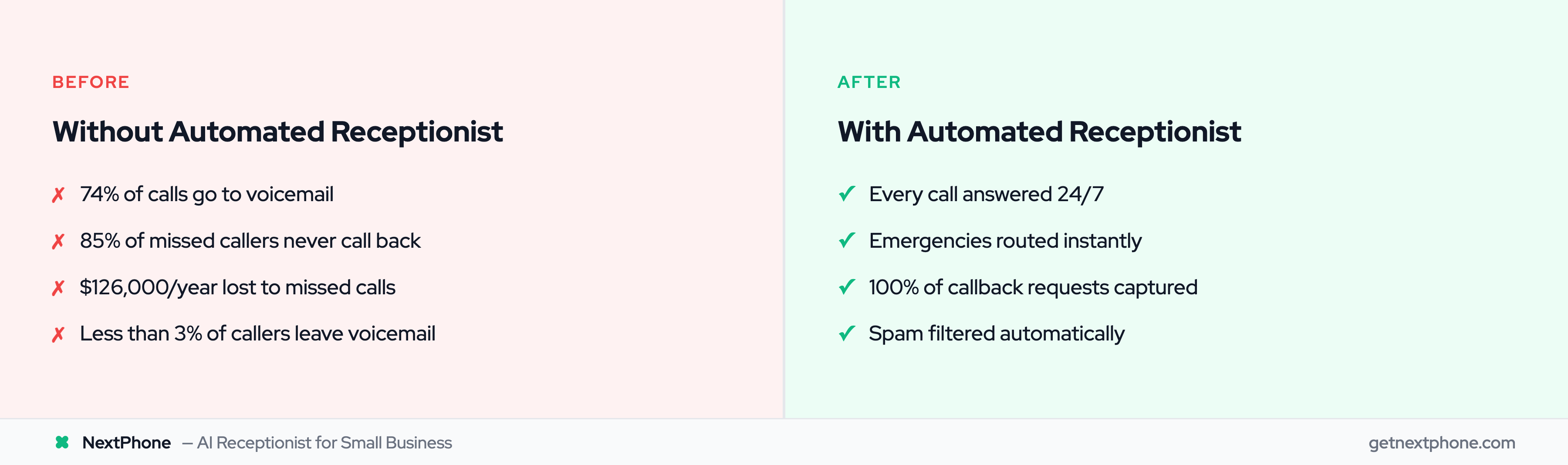
Industry research shows home services contractors miss 60-80% of incoming calls. According to research, the average small business loses $126,000 per year to unanswered calls. Worse yet, 85% of customers won't call back—they move on to your competitor.
66% of businesses have automated at least one process. Automated receptionists solve this problem. These AI-powered systems answer every call in seconds, handle routine questions, book appointments, and route urgent calls to you—all without hiring staff.
In this guide, you'll learn exactly what automated receptionists are, how they work, what they cost, and whether they're right for your business. More importantly, you'll see real data on what they save in time, money, and lost leads.
The Hidden Cost of Missed Calls
Most small business owners don't realize HOW MANY calls they're missing.
Every Missed Call Is a Lost Customer
Research shows that 47% of small businesses miss the initial call from potential customers. For home services contractors, the numbers are even worse—60-80% of calls go completely unanswered.
Think about that. If you get 40 calls this month, you're potentially missing 30 of them.
The real killer? 85% of customers whose calls go unanswered will not call back. They don't leave a voicemail waiting for you. They call the next business on their Google search. Your missed call just became your competitor's new customer.
The Math Behind the Revenue Loss
Let's run the numbers on what missed calls actually cost you.
Industry data shows the average contractor gets about 42 calls per month. If you're missing 74% of those calls like the research suggests, that's 31 missed opportunities every single month.
Here's where it gets expensive. Among the calls you're missing, several high-value types stand out:
- Quote and estimate requests — direct revenue opportunities, consistently among the most common reasons people call
- Scheduling and appointment requests — service revenue that books itself when someone picks up
- Emergencies requiring immediate response — the highest-margin work, and it goes to whoever answers first
- Callback requests — roughly one in four callers ask you to call them back
At an average project value of $3,500 and a typical 20% close rate on quotes, those 31 missed calls represent $10,956 per month in lost revenue. That's $131,472 per year walking out the door because your phone went to voicemail.
For roofers with higher average project values ($15,000), the numbers are even more brutal. Miss 10 quote requests per month, close 20% of them, and you've just lost $30,000 in monthly revenue—$360,000 per year.
Customer service data shows real calls like these going to voicemail:
- "Wants an estimate for a new roof. No urgency." ← Says "no urgency" but calling NOW!
- "Needs emergency AC repair, no cooling in 95 degree weather."
- "Wants to discuss a roof estimate and has questions; please call them back."
Each one is a potential customer who'll call your competitor next.
Chart showing home services contractors answer less than 30% of incoming customer calls
Why Voicemail Doesn't Work
You might think, "I'll just check my voicemail and call people back." The problem? Less than 3% of callers who get pushed to voicemail actually leave a message.
Customers don't want to leave voicemails. They want answers now. When you're on a job site and can't answer, they're already dialing the next contractor who WILL pick up.
The businesses winning jobs aren't necessarily the best at their craft. They're the ones who answer the phone first.
What Is an Automated Receptionist?
Let's clear up the confusion around terminology, because there are several terms floating around that mean slightly different things.
The Core Definition
An automated receptionist is an AI virtual receptionist system that answers incoming calls, understands what customers are asking for, provides information, routes calls to the right person, and books appointments -- all without human staff involved.
The key word is "automated"—it works 24/7, including nights, weekends, holidays, and when you're on another call. 30+ customer service automation statistics show this technology is rapidly transforming the industry. No lunch breaks, no sick days, no vacation time.
Industry research shows the virtual receptionist market reached $3.85 billion in 2024 and is projected to hit $9 billion by 2033. This isn't experimental technology anymore. 4.6 million businesses globally are using these solutions.
Automated vs Virtual vs AI Receptionist: What's the Difference?
Here's where it gets confusing. You'll see these terms used interchangeably, but they have important distinctions:
Automated receptionist = The umbrella term for any non-human call handling system. Could be AI-powered or menu-driven.
Virtual receptionist = Can be AI OR remote human teams working from home. The term is ambiguous—you need to ask if it's AI or humans.
AI receptionist = Specifically uses artificial intelligence and natural language processing to understand conversational language. Business process automation statistics for 2025 show significant productivity gains across all industries.
Auto attendant = Older technology. The "press 1 for sales, press 2 for service" phone tree. Less intelligent, more frustrating for customers.
Comparison table explaining differences between automated, virtual, AI receptionist and auto attendant systems
The modern automated receptionist uses conversational AI. Instead of forcing customers through a menu ("press 1 for..."), it understands natural language. Someone calls and asks, "Do you guys service the Westside?" The AI answers conversationally: "Yes, we service all of Los Angeles County."
What Is an Automated Reception System? (And What Is an Auto Receptionist?)
If you've searched for "automated reception" or "auto receptionist," you're looking for the same solution—just under different names. Here's how to sort them out:
Auto receptionist = Shorthand for automated receptionist, most common in phone system settings. VoIP dashboards and business phone platforms often label the incoming-call routing module the "auto receptionist." Same technology, different label.
Automated reception system = The full front-desk setup viewed as a whole: AI that answers, routes, books appointments, and logs every call. The word "system" signals that it's not just one feature—it's a complete automated call handling layer replacing a traditional front desk.
Automated reception = What the business operation looks like end-to-end. When a small business says they run "fully automated reception," they mean calls are answered, qualified, routed, and logged without a human touching the queue.
All three point to the same practical outcome. Whether the vendor calls it an "auto receptionist," an "automated reception system," or an "AI receptionist," the evaluation criteria are the same: Does it answer 24/7? Can it book appointments? Does it handle emergencies? What does it route to you—and when? See our guide to front desk automation for a broader look at how this fits into small business operations.
How It's Different from Auto Attendant
If you've ever called a business and heard "Press 1 for sales, press 2 for service, press 3 for billing..." you've experienced an auto attendant. This older technology is what most people picture when they hear "auto receptionist"—and it's the main reason the term has a bad reputation. These systems have been around for decades.
They're frustrating. Customers spend five minutes navigating menus, only to be routed to the wrong department or back to the main menu. (If you have an existing auto attendant and want to understand what an upgrade to AI looks like, see our comparison.)
Modern automated receptionists are different. They use natural language processing (NLP)—the same technology behind Siri and Alexa—to understand conversational speech. No button pressing. No endless menus. Just natural conversation.
Customer calls: "I need to schedule a tune-up for my AC before summer hits."
AI understands: "This is an appointment request for HVAC maintenance, non-urgent."
AI responds: "I can help schedule that. I have availability next Tuesday at 10 AM or Thursday at 2 PM. Which works better for you?"
The Three Main Types
As the market has evolved, three distinct approaches have emerged:
1. Fully Automated (AI-Only)
Pure AI with no human involvement. Answers every call using artificial intelligence.
2. Live Virtual Receptionist (Human Teams)
Real people (usually working remotely) who answer your calls. No AI—just humans with scripts.
3. AI with Smart Forwarding
AI resolves 90-95% of calls autonomously. Smart forwarding routes the 5-10% requiring your expertise to your phone.
We'll dive deep into comparing these in Section 6, but the trend is clear: 71% of organizations now regularly use generative AI for business functions, up 9% in just six months. AI-first models are becoming the standard.
Front Desk Automation for Small Businesses
Most small businesses don't have a dedicated front desk. They have a phone that rings, a calendar that needs filling, and an owner who's supposed to handle both while running the actual job.
Front desk automation solves that. Instead of a physical front desk with staff, an automated system handles every incoming call, books appointments, routes emergencies, and logs every interaction — without a human at the desk.
Here's what fully automated front desk operations look like for a small service business:
- Picks up every call — in under 5 seconds, 24/7, whether you're on a job site, in a meeting, or unreachable
- Books appointments — checks your calendar in real time, offers slots, and confirms directly into Google Calendar or Calendly without your input
- Takes messages — captures caller name, number, reason for call, and urgency level on every interaction
- Routes emergencies — hears "burst pipe" or "no heat" and transfers the call to your phone with full caller context so you can respond immediately
- Filters spam — robocalls and solicitors get screened out before they interrupt your workflow
- Logs to your systems — every call creates a record in HubSpot or your field service software; other tools connect via Zapier
The distinction from a basic automated receptionist: front desk automation is about workflow completion, not just call answering. The caller doesn't just get greeted — they get helped, their details get captured, and the outcome flows into the right system automatically.
For a deeper look at how this works end-to-end, see our guide to front desk automation.
How Automated Receptionists Work
Let's demystify the technology. You don't need to be technical to understand this—think of it like understanding how your car works. You don't need to be a mechanic to drive.
The Technology Behind It: Natural Language Processing (NLP)
Natural language processing is what allows AI to understand conversational language, not just keywords.
Older systems listened for specific phrases. If you said "appointment," it triggered one path. If you said "emergency," it triggered another. But if you said something slightly different—"I need to book a time to come in"—the system didn't recognize it.
Modern NLP understands intent. Whether someone says "I need an appointment," "Can I schedule a time?" or "When can you come out?"—the AI recognizes they all mean the same thing: appointment request.
According to Gartner, this technology is advancing rapidly. They predict that by 2029, agentic AI will autonomously resolve 80% of common customer service issues without human intervention.
We're not there yet, but modern systems already achieve 85-95% accuracy for routine inquiries.
The Call Flow: What Happens When Someone Calls
Here's exactly what happens when a call comes in:
- Call arrives → AI answers in 2-3 rings (6-8 seconds)
- Greeting plays → Custom greeting specific to your business
- AI listens → Natural language processing analyzes what customer is saying
- Intent detected → System determines what customer needs
- Action taken → AI either answers directly, books appointment, routes to human, or takes message
The whole process takes seconds. From the customer's perspective, they called, someone answered quickly, and they got help.
For example, here's a real call scenario:
Customer: "Hi, I need someone to look at my roof. It started leaking during the rain last night."
AI detects: Urgency keywords ("leaking"), service type (roofing, timeframe (recent issue)
AI responds: "I can help you with that. This sounds urgent—we have availability for emergency service this afternoon at 2 PM, or we can do a full inspection tomorrow morning at 9 AM. Which would you prefer?"
AI books: Customer chooses time slot, AI adds to calendar, sends confirmation
Total time: Under 60 seconds from call start to appointment booked.
Flowchart showing how automated receptionist routes incoming calls based on customer intent
Intent Detection and Smart Routing
This is where automated receptionists get really valuable. The AI does not just answer calls -- it understands urgency and uses intelligent call routing accordingly.
A significant share of calls contain urgency language: words like "urgent," "emergency," "ASAP," "today," "immediately," or "right now."
When the AI detects these keywords, it doesn't just take a message. It routes the call immediately to your cell phone. You get a call with the customer's name and the reason: "Emergency call from Sarah about burst pipe."
Real examples from customer calls:
- "Urgent: Porta potty delivery at 6 PM. Caller is waiting and needs to speak with you right away." → Routed immediately
- "Needs emergency AC repair, no cooling in 95 degree weather." → Routed immediately
- "Wants an estimate for a new roof. No urgency." → AI takes info, schedules callback
The system makes smart decisions about what needs immediate human attention versus what can be handled automatically.
Industry data shows AI handles 60-80% of inquiries without needing human intervention. The other 20-40% get routed to the right person at the right time.
Integration with Your Business Systems
An automated receptionist isn't an island. It connects to the tools you already use:
Calendar Integration
Syncs with Google Calendar, Outlook, Microsoft 365, or scheduling software. When someone books an appointment, it appears in your calendar immediately. When your calendar shows you're busy, the AI offers alternative times.
CRM Integration
Every call gets logged in your CRM (HubSpot, Salesforce, etc.) with caller information, reason for call, and outcome. You have a complete record without manual data entry.
Phone System Integration
Works with VoIP systems, existing landlines (with forwarding), or provides its own phone number.
SMS/Email Integration
Can send text confirmations, email receipts, and follow-up messages automatically.
The goal: Your automated receptionist works seamlessly with your existing workflow. You don't change how you work -- you just stop missing calls.
How NextPhone's Automated Receptionist Works
NextPhone combines all the capabilities above into a single $199/month flat-rate service built specifically for service businesses:
- Instant pickup -- answers in 1 ring (under 5 seconds), 3x faster than call centers
- Smart forwarding -- AI resolves 90-95% of calls autonomously, forwards the 5-10% requiring your expertise to your phone with full context
- Emergency detection -- automatically identifies urgency keywords ("pipe burst," "no heat," "flooding") and routes to your cell immediately
- 9 languages -- Spanish, French, Mandarin, Portuguese included at no extra cost
- 100+ integrations -- logs directly to your CRM, calendar, and job management tools
- Unlimited simultaneous calls -- handles surges without capacity limits
The difference from generic AI: NextPhone is trained on YOUR business. It learns from your website, knows your services and pricing, and uses your industry terminology -- not generic scripts.
Try NextPhone free for 7 days
Key Features of Automated Receptionists
What can these systems actually do? Here are the core capabilities that matter for small businesses:
Infographic showing key features of automated receptionist systems
24/7 Call Answering
The most obvious benefit: Your phone gets answered every single time it rings. 2 AM? Answered. Sunday afternoon? Answered. While you're on another call? Answered.
You're not paying for staff to work nights and weekends. The AI doesn't need overtime or holiday pay. It's just always there.
For businesses that get calls outside normal hours, this is massive. No more Monday mornings reviewing 15 voicemails from the weekend (and knowing 90% of those people already called your competitor).
Appointment Scheduling and Calendar Integration
A large share of customer calls are about scheduling—either booking appointments or requesting callbacks.
Modern automated receptionists can:
- Check your calendar availability in real-time
- Offer specific time slots that work
- Book appointments directly
- Send confirmation via email or SMS
- Handle rescheduling requests
- Block buffer time between appointments
Real example from customer calls: "Wants to schedule service for a leaky toilet, asking about your availability for tomorrow."
The AI checks the calendar, sees a 2 PM slot open, books it, and sends confirmation. Customer hangs up satisfied. You see a new appointment on your calendar with customer details and service needed.
No back-and-forth phone tag. No missed scheduling opportunities.
Intelligent Call Routing and Screening
Not all calls are equal. Emergencies need immediate attention. Quote requests can wait for a callback. Spam needs to be filtered.
Automated receptionists route based on what they detect:
Emergency keywords → Route to your cell phone immediately
- Emergencies are consistently among the top call types across our corpus — high-value, time-sensitive, and the first to go to competitors when you don't pick up
- Words like "emergency," "urgent," "burst," "no heat," "no cooling" trigger immediate routing
- Example: "Emergency pipe burst, needs plumber immediately" → You get the call right now
Routine questions → AI answers from knowledge base
- "What are your hours?" → AI answers directly
- "Do you service my area?" → AI checks service area, answers
- "How much for a new water heater?" → AI provides pricing info you've configured
Quote requests → Capture information, schedule callback
- AI asks qualifying questions (service needed, timeline, contact info)
- Logs in CRM for follow-up
- You call back when you have time to give a detailed estimate
Spam/robocalls → Filter automatically
- 7% of all incoming calls are spam or robocalls
- AI identifies patterns, blocks or filters these
- Saves you from dozens of interruptions per month
Message Taking and Callback Management
Here is something that should concern you: a large share of customer calls explicitly request callbacks. Many callers are saying "have them call me back."
Industry research shows many callback requests never get returned when tracked manually. A large share of people asking for callbacks do not hear back.
Automated receptionists solve this:
- Capture callback requests with full details (name, number, reason, urgency)
- Log in your CRM or task management system
- Send you reminders
- Track whether callback was completed
Real customer quotes captured by call systems:
- "Requested you call back at 888-568-0296."
- "Wants you to call them back when you have a chance."
- "Requested Barry call back regarding an insurance claim for property damage."
None of these fall through the cracks when your system tracks them automatically.
Spam and Robocall Filtering
A meaningful share of inbound calls are spam or robocalls — for electricians and other trades with high-traffic numbers, the rate is even higher.
That's dozens of interruptions per month from:
- Extended warranty robocalls
- Credit card scams
- Duct cleaning spam
- SEO/marketing spam calls
Every spam call that gets through costs you time and focus. You're in the middle of a job, you stop to check your phone, it's spam, you've lost your flow.
Automated receptionists identify spam patterns and filter them automatically. Legit calls get through. Robocalls don't. Simple.
Multi-Call Handling (Answering Multiple Calls Simultaneously)
Here's a physical limitation of human receptionists: They can only talk to one person at a time.
It's 10 AM on a Tuesday. The phone rings. Your receptionist answers. While they're on that call, three more calls come in. Those three go to voicemail. Two of those callers hang up and call your competitor.
AI doesn't have this limitation. It can answer unlimited simultaneous calls.
Busy season hits. Five calls come in at the same time. AI answers all five. Each caller gets immediate attention. Nobody waits on hold. Nobody goes to voicemail.
This scalability is massive during peak periods. Your call volume might triple in summer (HVAC) or winter (plumbing emergencies), but your cost stays exactly the same.
Benefits of Automated Receptionists for Small Businesses
Let's talk about why this actually matters for your bottom line.
Never Miss Another Lead or Emergency Call
The core value proposition: You stop losing business to missed calls.
Right now, industry data suggests you're missing 60-80% of incoming calls. The average small business loses $126,000 per year because of this. And 85% of those missed callers won't call back—they move on to the next business.
An automated receptionist captures calls you currently miss:
- After hours - Evenings, weekends, holidays
- During busy periods - When you're on another call
- On the job site - When you can't answer while working
- During lunch - When staff aren't at desk
- Peak season - When call volume exceeds capacity
Every captured call is a potential customer who would've gone to your competitor.
For emergencies specifically — a consistent top-ten call type across our 1,446,980+ call corpus — the impact is even bigger. These are often high-margin, urgent jobs. Customer calls five businesses. First one to answer gets the $1,200 emergency service call.
Massive Cost Savings Compared to Hiring Staff
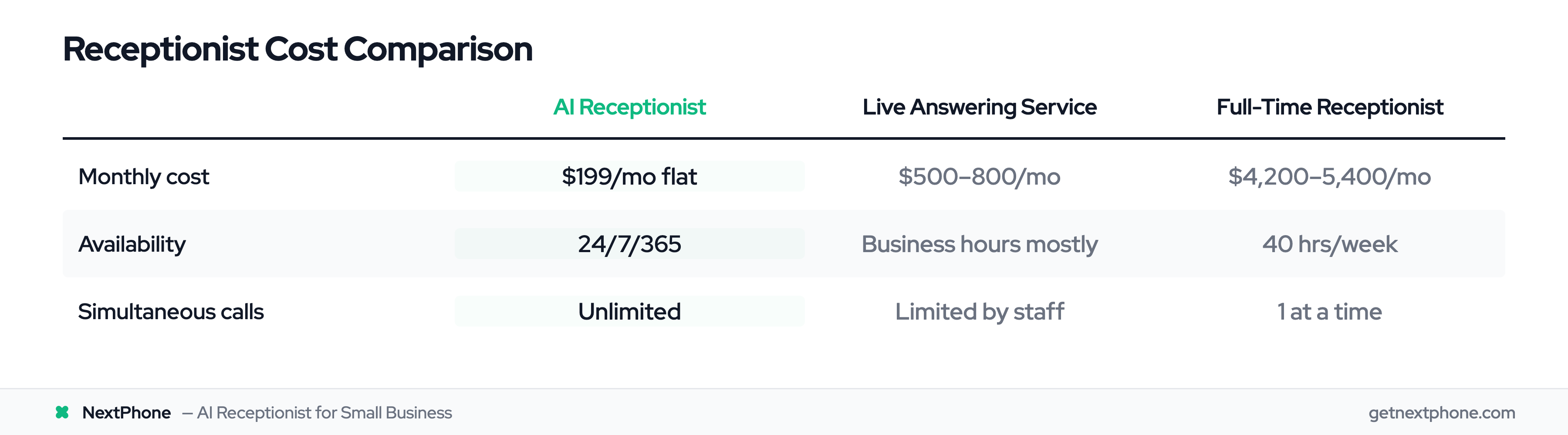
Let's run the numbers on what different solutions actually cost:
Full-time in-house receptionist:
- Base salary: $35,000-45,000/year ($21.23/hour according to BLS with benefits)
- Benefits (health insurance, taxes, etc.): $15,000-20,000/year
Total cost: $50,000-65,000/year = $4,200-5,400/month
Traditional live answering service:
- Ruby Receptionists: $319/mo base + $5.19/call = $500-800/mo for average call volume
- AnswerConnect: $325/mo base + per-minute charges = $575-900/mo
- Only available during business hours (most services)
Automated receptionist (AI-powered):
- Flat-rate services like NextPhone: $199/month unlimited calls
- No setup fees, no overage charges, true 24/7 coverage
The savings are undeniable. Even compared to live answering services, you're saving $300-600/month. Compared to a full-time receptionist, you're saving $4,000-5,200 every single month.
Research shows businesses can reduce overhead costs by 40-60% using virtual receptionist services instead of in-house staff.
Cost comparison chart showing automated receptionist saves $3,551 per month versus full-time receptionist
Instant Response Time (No More Waiting on Hold)
Customer expectations have changed. Nobody wants to wait on hold anymore.
AI answers in 2-3 rings. Typically 6-8 seconds from call start to "Hello, thanks for calling..."
Compare that to:
- Traditional answering services: 30-90 seconds average
- Voicemail: Never (85% won't call back)
- Calling back later: Hours or days delay
Speed matters. Industry research shows 80% of customers report positive experiences with AI receptionists, and one major factor is response time.
When someone calls about an emergency at 9 PM and gets an answer in 6 seconds instead of voicemail, that's a customer who stays with you instead of calling your competitor.
Scalability During Busy Seasons
Here's a problem with human staff: Costs scale linearly with call volume.
Your HVAC business is slow in spring. You get 30 calls/month. Then summer hits. Suddenly you're getting 150 calls/month. You either:
- Keep your current receptionist and miss 80% of calls during peak
- Hire temporary staff at $3,000+/month for three months
- Pay per-minute charges that quintuple your answering service bill
With flat-rate automated receptionists, your cost stays the same whether you get 30 calls or 300 calls.
One HVAC contractor told us: "Summer is insane. We get 15-20 calls per day. Before AI receptionist, we'd miss half. Now we capture every lead."
The system scales effortlessly. No hiring, no training, no increased cost.
Free Up Your Time for Higher-Value Work
Across the businesses we serve, a consistent slice of calls are routine repetitive questions: "What are your hours?" "Do you service my area?" "How much do you charge?" "Are you available this week?"
That might not sound like much, but if you get 40 calls/month, you're fielding several of these basic questions every week. Each call interrupts your work for 5-10 minutes.
AI handles these instantly. Customer calls, asks about hours, gets answer in 10 seconds, hangs up satisfied.
You never got interrupted. Customer got their answer faster. Everyone wins.
More significantly, spam and robocalls make up a notable share of inbound calls. That's several wasted interruptions per month you don't have to deal with anymore.
Combined, you're eliminating 5-6 interruptions per month that provide zero value. That's hours back in your schedule for actual work.
Professional Image for Small Businesses
There's a perception problem when customers call and always hit voicemail. They assume you're either:
- Too busy to care about new business
- Disorganized
- Not professional
- Going out of business
Professional call answering changes that perception. Someone always answers. Your business sounds larger and more established than it is.
For a solo contractor or small team, this levels the playing field against bigger competitors. Your customer service appears just as responsive as the large company with a full staff.
One plumber mentioned: "Customers comment on how professional our phone answering is. They don't know it's AI. They just know someone answered their call and helped them immediately."
ROI: The Bottom Line Math
Let's make this concrete with real calculations.
-
Example: HVAC Contractor
-
Current calls: 42/month
-
Currently answered: 26% (industry average)
-
Currently missed: 74% = 31 calls/month going to voicemail
-
Those 31 missed calls include several quote requests (quote and estimate requests rank among the most common inbound call types)
-
At $3,500 average HVAC project × 20% close rate = 1.4 jobs lost per month
-
Lost revenue: $4,900/month = $58,800/year
-
NextPhone cost: $199/mo = $2,388/year
-
Capture just 3 additional jobs/year = ROI of 4.4x
-
Example: Roofing Contractor
-
Current calls: 87/month (roofers get high call volume)
-
Assume a 76.6% miss rate = 67 calls/month to voicemail
-
Missed calls include approximately 9 quote requests (assuming a 10.6% quote request rate for roofing)
-
At $15,000 average roof × 20% close rate = 1.8 roofs lost per month
-
Lost revenue: $27,000/month = $324,000/year
-
NextPhone cost: $199/mo = $2,388/year
-
Capture just ONE additional roof/year = ROI of 6.3x
The math is simple: If you capture even a tiny fraction of the business you're currently missing, automated receptionist pays for itself many times over.
Automated vs Live vs AI with Smart Forwarding: Which Is Best?
There's no one-size-fits-all answer. The right choice depends on your call volume, complexity, and budget.
Let's break down each approach honestly, including the trade-offs.
Comparison table showing features, costs, and benefits of automated, live, and AI with smart forwarding receptionist solutions
Fully Automated (AI-Only) Receptionist
How it works: Pure AI handles every call. No humans involved.
Pros:
- Lowest cost - Typically $50-300/month
- True 24/7 availability - Never sleeps, no holidays, no sick days
- Unlimited simultaneous calls - Can handle any call volume
- Instant response time - Answers in 6-8 seconds
- Consistent quality - Same professional experience every time
- Scales perfectly - Cost doesn't increase with call volume
Cons:
- Limited to routine inquiries - Struggles with complex or unusual situations
- No human judgment - Can't read between the lines or use empathy
- Customer preference gap - Gartner research shows 64% of customers prefer companies DON'T use AI
- Accuracy limitations - 85-95% accuracy is good, but not perfect
Best for:
- High-volume routine calls
- Straightforward businesses (hours, pricing, scheduling are 90% of calls)
- Very small businesses with tight budgets
- Businesses where speed matters more than personal touch
Real scenario: Retail shop, dental office, salon—most calls are "What are your hours?" and "Can I book an appointment?" AI handles this perfectly.
Live Virtual Receptionist (Human Teams)
How it works: Real people (working remotely) answer your calls with scripts and guidelines you provide.
Pros:
- Human touch and empathy - Can read tone, build rapport, handle emotional situations
- Handles complexity - Can think through unusual situations
- Better for relationship-building - Some customers strongly prefer humans
- Can make judgment calls - Knows when to bend rules or escalate
Cons:
- Expensive - $300-2,000+/month depending on call volume
- Limited hours - Many services only cover business hours, not truly 24/7
- Can only handle one call at a time - During busy periods, calls still go to voicemail
- Costs scale with volume - Per-minute or per-call pricing adds up fast
- Quality varies - Depends on training and which agent answers
Best for:
- Complex businesses (legal, medical, financial services)
- High-value transactions where personal touch matters
- Businesses where every call is different/nuanced
- When building long-term client relationships is priority
Real scenario: Law firm, wealth management, boutique consulting—calls require understanding context, client history, and sensitive handling.
Industry data shows more than 70% of consumers prefer speaking with a person when they need help. If your business fits this category, live might be worth the premium cost.
AI with Smart Forwarding
How it works: AI answers all calls and resolves 90-95% autonomously. The 5-10% requiring your expertise get forwarded to your phone with full context.
Pros:
- Full coverage, full control - AI handles volume, you handle judgment calls
- Lowest cost - $199/month flat, no per-call fees for forwarding
- True 24/7 coverage - AI always available, forwards to you when it matters
- No strangers - Complex calls go to YOU, not paid agents reading scripts
- Scales perfectly - AI handles unlimited calls, you only get the important ones
Cons:
- You answer forwarded calls - 2-5 calls/day during peak (but these are calls you'd want to handle anyway)
Best for:
- Most small businesses
- Service businesses (contractors, agencies, consultants)
- Businesses with mix of routine and complex calls
- Anyone who wants to stop paying strangers to answer their phones
Real scenario: Home services contractor—90% of calls are "What are your hours?" "Can you come Tuesday?" "Do you service my area?" AI handles instantly. 10% are complex situations requiring your expertise. Smart forwarding routes those to your phone with all context captured.
The Trade-Offs: Cost vs Quality vs Complexity
Here's the honest assessment:
If budget is your primary concern: Go fully automated. $100-200/mo gets you 24/7 coverage.
If customer experience is non-negotiable: AI with smart forwarding. AI answers instantly, forwards complex calls to you personally. $199/mo.
If you get mostly routine calls: AI handles 90-95% without forwarding anything.
If every call is unique and complex: AI with smart forwarding—you handle the calls that matter, AI handles the rest.
If you're not sure: Start with AI. Smart forwarding catches anything that needs you.
Why AI with Smart Forwarding Wins
Here's the reality: Research shows 80% of customers report positive experiences with AI receptionists.
Gartner found 64% of customers prefer companies don't use AI—in theory. But when they experience fast, accurate AI that actually solves their problem, they're satisfied.
Smart forwarding handles the perception gap. If the AI encounters a situation requiring your expertise, it forwards to your phone: "Let me connect you with someone who can help with your specific situation."
For routine questions: AI handles it in 30 seconds, customer hangs up satisfied.
For complex situations: You pick up with full context. Your expertise, your judgment—not a stranger's.
You get AI efficiency for 90-95% of calls with your personal judgment for the rest. Total cost: $199/month. No paid agents. No per-call fees.
See NextPhone pricing
How Much Does an Automated Receptionist Cost?
Let's talk real numbers. No "contact us for pricing" nonsense.
Pricing Models Explained
There are four common pricing models, and they have very different cost implications:
-
1. Flat Monthly Rate
-
Example: $199/month unlimited calls
-
How it works: You pay the same amount every month regardless of call volume
-
Best for: Most small businesses, especially those with unpredictable call volume
-
Pros: Predictable cost, no surprise bills, scales with your business
-
Cons: Might overpay if you get very few calls
-
2. Per-Minute Pricing
-
Example: $65/month base + $2.25/minute
-
How it works: Base fee plus charges for every minute spent on calls
-
Best for: Businesses with very low, predictable call volume
-
Pros: Lower base cost if you barely use it
-
Cons: Costs balloon during busy season; hard to budget; feels punitive (you're charged for customer calling you)
-
3. Per-Call Pricing
-
Example: $300 for 30 calls, $2,025 for 300 calls
-
How it works: Tiered pricing based on number of calls handled
-
Best for: Businesses with steady, moderate call volume
-
Pros: More predictable than per-minute
-
Cons: Still scales with volume; overage fees can be expensive
-
4. Tiered Pricing (Base + Overage)
-
Example: $100/month base + overage charges above limit
-
How it works: Flat fee up to a call limit, then per-call or per-minute after
-
Best for: Businesses that want predictable baseline with flexibility
-
Pros: Cost control with safety valve
-
Cons: Need to monitor usage to avoid overages
Typical Cost Ranges by Type
Here's what you'll actually pay in the market:
Fully Automated (AI-Only):
- Best value: $199-300/month (full features, good integrations)
- Example: NextPhone at $199/mo flat rate unlimited
Live Virtual Receptionist:
- Small business tier: $300-800/month (30-100 calls)
- Mid-volume tier: $800-1,500/month (100-200 calls)
- High-volume tier: $1,500-3,000/month (200+ calls)
- Example: Smith.ai at $300 for 30 calls, Ruby at $319/mo base + $5.19/call
AI with Smart Forwarding:
- $199/month flat rate (NextPhone — unlimited calls, smart forwarding included)
- No per-call fees, no overages, no hidden costs
Compare to traditional:
- Full-time in-house receptionist: $4,200-5,400/month (salary + benefits)
- Traditional answering service: $500-2,000/month (per-minute pricing for 40-150 calls)
Hidden Fees to Watch Out For
Here's where the advertised price often doesn't match your actual bill:
-
Setup/Onboarding Fees
-
$50-500 one-time charge to configure your account
-
Some providers waive this, others hide it until you sign up
-
Ask: "Is there any setup fee?"
-
Integration Costs
-
Connecting to your CRM, calendar, or phone system might cost extra
-
Can be $50-200 per integration
-
Ask: "What integrations are included? Which cost extra?"
-
Overage Charges
-
If you exceed your plan's call limit, per-call fees kick in
-
These can be expensive: $5-10 per call over your limit
-
Ask: "What happens if I go over my plan? What's the overage rate?"
-
Per-User or Per-Location Fees
-
Multi-location businesses might pay per location
-
Can double or triple your costs
-
Ask: "Does this price cover all my locations?"
-
Holiday/Weekend Premium Rates
-
Some live services charge more for nights/weekends
-
Defeats the purpose of 24/7 coverage
-
Ask: "Is this rate the same 24/7, or are there premium hours?"
Research shows that advertised prices rarely tell the full story—setup fees, integration costs, and overage charges can add 30-60% to your final bill.
Always ask for the "all-in" monthly cost for your specific situation before signing.
ROI Calculations: Is It Worth It?
Let's run the actual numbers to see if automated receptionist pays for itself.
Calculation 1: Small General Contractor
Current situation:
- Gets 30 calls/month
- Answers 26% (industry average)
- Misses 74% = 22 calls/month
Those 22 missed calls include (using industry data):
- 1-2 quote requests
- 2 scheduling requests
- 5 callback requests
Value of missed opportunities:
- Quote requests: 1.5 × $3,500 avg project × 20% close rate = $1,050/month
- Scheduling: 2 × $400 avg service call × 30% book rate = $240/month
Total lost: $1,290/month = $15,480/year
NextPhone cost: $199/mo = $2,388/year
- ROI: Capture 15% of missed opportunities = break even. Capture 30% = 2x ROI.
Calculation 2: Busy HVAC Contractor
Current situation:
- Gets 42 calls/month (industry average for contractors)
- Answers 26%
- Misses 74% = 31 calls/month
Those 31 missed calls include:
- Several quote requests
- Several scheduling requests
- 8 callback requests
Value of missed opportunities:
- Quote requests: 2 × $3,500 × 20% close = $1,400/month
- Scheduling: 2 × $400 × 30% book = $240/month
- Callbacks: 8 × $400 × 15% convert = $480/month
Total lost: $2,120/month = $25,440/year
NextPhone cost: $199/mo = $2,388/year
- ROI: Capture just 9% of missed opportunities = break even. Capture 20% = 2.1x ROI.
Calculation 3: High-Volume Roofer
Current situation:
- Gets 87 calls/month (roofing gets high volume)
- Assume a 76.6% miss rate (roofers have worse answer rates)
- = 67 calls/month missed
Those 67 missed calls include:
- Several quote requests (roofing consistently ranks highest for quote-request call volume)
- 5 scheduling requests
- 20 callback requests
Value of missed opportunities:
- Quote requests: ~7 × $15,000 avg roof × 20% close = $21,000/month
- Scheduling: 5 × $1,200 avg service × 25% = $1,500/month
Total lost: $22,500/month = $270,000/year
NextPhone cost: $199/mo = $2,388/year
- ROI: Capture ONE additional roof per year = 6.3x ROI. Capture one roof per quarter = 25x ROI.
ROI calculation showing cost of missed calls versus automated receptionist investment
The bottom line: For businesses getting 30+ calls/month with average project values above $1,000, automated receptionist pays for itself many times over.
The question isn't "Can I afford $199/month?"
The question is "Can I afford to keep losing $15,000-270,000/year to missed calls?"
See NextPhone pricing
What Industries Benefit Most?
Automated receptionists work across many industries, but some get dramatically better results. Here are the top fits with links to our dedicated industry guides:
Home Services and Contractors -- The prime use case. HVAC, plumbing, electrical, roofing, painting, landscaping, pest control. You cannot answer your phone while working on a job site. Call volume spikes seasonally. Project values are high ($3,500-$15,000+). Missing a single call means losing thousands.
Healthcare -- Medical offices, dental practices, veterinary clinics, urgent care, physical therapy. 80% of calls are appointment scheduling -- perfect for AI. Regulatory compliance required for protected health information.
Legal and Professional Services -- Law firms, consultants, CPAs. High value per client ($10,000-$50,000+ in billable work), after-hours intake critical, lead qualification on first call.
Real Estate -- Agents, brokers, property managers. Time-sensitive leads, showing scheduling automation, always on the go.
Is It Right for YOUR Business? (Decision Framework)
Not every business needs an automated receptionist. Here's how to know if you're a good fit:
You're a GREAT fit if:
- ✅ You get 20+ calls per week
- ✅ You can't answer phone while doing your main work (you're mobile, hands-on, or client-facing)
- ✅ You get calls during evenings/weekends when you're not available
- ✅ You have time-sensitive or emergency calls that can't wait
- ✅ Many calls are routine questions (hours, pricing, scheduling, "do you service my area?")
- ✅ Missing calls is costing you business (competitors are getting customers who can't reach you)
You might NOT need it if:
- ❌ You get fewer than 10 calls per week (cost might not justify)
- ❌ You're always at a desk and can answer immediately (though after-hours coverage still helps)
- ❌ Every single call requires deep expertise and can't be handled with simple Q&A
- ❌ Your customers strongly prefer email communication over phone
- ❌ You already have a full-time receptionist who handles calls perfectly
Still not sure?
Ask yourself: "How many calls did I miss last month?" If the answer is "I don't know," you're probably missing more than you think.
Check your phone bill or VoIP system. How many calls came in? How many did you actually answer? The gap is your opportunity.
Are you an AI receptionist fit? Find out if NextPhone works for contractors like you
How to Choose the Right Automated Receptionist
The key factors: call volume (determines pricing model), call complexity (determines whether AI-only or AI + smart forwarding), integration needs (calendar, CRM), and budget. For a detailed buying guide, see our choosing an answering service guide and AI receptionist setup guide.
The most common mistake is choosing based on lowest advertised price. A "$45/month" plan with per-call overages can cost $380/month at real volumes. Always calculate your total expected cost at your actual call volume before committing. Never sign an annual contract without a 2-week trial with real calls first.
How NextPhone Provides 24/7 Automated Receptionist Service
We've covered the industry broadly. Now let's talk about how NextPhone specifically solves the missed call problem for home services contractors.
The NextPhone Approach: Pure AI with Smart Forwarding
NextPhone's AI resolves 90-95% of calls autonomously. For the 5-10% requiring your expertise, smart forwarding routes to your phone.
90-95% of your calls are resolved by AI:
- "What are your hours?"
- "Do you service my area?"
- "Can I schedule an estimate?"
- "How much for a new water heater?"
AI handles these instantly. Customer gets answer in 30 seconds, hangs up satisfied, you never got interrupted.
5-10% forward to your phone:
- "My situation is complicated—I have water damage from a leak, insurance questions, and need multiple services."
- "I'm not happy with the service I got last month."
- "Can you explain the estimate you gave me? I have questions about the line items."
Smart forwarding routes these to your phone with full context. You provide the judgment—not a paid stranger.
You get AI efficiency for nearly all calls with your personal expertise for the ones that matter.
Built for Home Services Contractors
NextPhone isn't a generic solution adapted for contractors. It's built specifically for the way you work:
Understands contractor terminology
Knows the difference between "tune-up," "maintenance," "repair," and "replacement." Understands "emergency," "same-day service," "estimate."
Emergency detection
When someone says "urgent," "emergency," "ASAP," "no heat," "no cooling," "burst pipe"—AI recognizes this and routes to your cell phone immediately.
Job site scenarios
Designed for the reality that you're on a roof, in a crawl space, or with a client when calls come in.
Calendar booking for estimates/service
Customer calls: "I need someone to look at my AC."
AI checks your calendar: "I have availability tomorrow at 2 PM or Thursday at 10 AM. Which works better?"
Customer chooses.
Appointment appears in your Google Calendar with customer name, phone, address, and reason.
You show up to the appointment. You never had to stop work to answer the phone or play phone tag.
Transparent Pricing: $199/Month, Unlimited Calls
No games. No hidden fees. No "contact us for pricing."
-
$199/month. Unlimited calls. That's it.
-
No setup fees
-
No per-minute charges
-
No per-call overages
-
No integration fees (Google Calendar, Outlook included)
-
No premium rates for nights/weekends
Your call volume goes from 30/month to 150/month during summer? Your bill stays $199.
Compare to alternatives:
- Full-time receptionist: $3,750/month (salary + benefits per BLS)
- Live answering service: $500-800/month for moderate call volume
- NextPhone: $199/month regardless of volume
Savings: $3,551/month vs full-time receptionist. $301-601/month vs traditional answering service.
What you get for $199/month:
- AI answers every call in under 5 seconds
- Handles routine questions instantly (hours, pricing, service area, etc.)
- Books appointments directly into Google Calendar or Outlook
- Detects emergencies and routes to your cell phone immediately
- Filters spam/robocalls automatically (saves you from 7% of calls)
- Takes detailed messages for callbacks
- Tracks callback requests so none fall through cracks
- Smart forwarding to your phone for complex situations
- Captures the 74% of calls that currently go unanswered
One HVAC contractor told us: "I can't answer my phone when I'm on a roof. NextPhone handles it and my schedule stays full. It's like having a receptionist for $200/month."
Real scenario with NextPhone:
11 PM call: "Emergency—no heat and it's 20 degrees outside."
NextPhone AI detects "emergency" and "no heat"
Routes immediately to your on-call tech's cell phone
Tech answers: "This is [Your Company], I understand you have a heating emergency. What's going on?"
Tech gets full details, addresses call, books emergency service appointment
Customer gets help. You get a $1,200 emergency service call. All automated.
Frequently Asked Questions
How much does an automated receptionist cost per month?
AI-powered automated receptionists cost $50-300/month for small businesses, with full-featured services like NextPhone at $199/month flat-rate for unlimited calls. Live virtual receptionist services run $300-2,000+/month depending on call volume. For context, a full-time in-house receptionist costs $3,500-5,400/month including salary and benefits. The key cost variable is your pricing model: flat-rate plans stay predictable regardless of volume, while per-minute services can double your bill during busy months. See our full cost comparison for provider-by-provider breakdowns.
Can an automated receptionist handle emergency calls?
Yes. Modern AI receptionists use keyword detection to identify urgency. When callers say "emergency," "burst pipe," "no heat," "flooding," or similar phrases, the system routes the call immediately to your cell phone with full caller context. Urgency-flagged calls and emergencies are among the most common call types in our 1,446,980+ call corpus — and the most time-sensitive. NextPhone's emergency call routing works automatically without manual configuration — it detects urgency keywords and forwards instantly.
How long does it take to set up an automated receptionist?
Most AI-powered services go live within 1-2 days. You provide your business information (hours, services, pricing, service area), connect your calendar, set up your greeting, and configure call routing rules. Realistic total setup time is 1-3 hours. Live virtual receptionist services take longer -- typically 1-2 weeks -- because human operators need script training. NextPhone offers same-day setup with AI that learns from your website automatically. For a step-by-step walkthrough, see our AI receptionist setup guide.
How does an automated receptionist compare to a live answering service?
Automated receptionists cost 60-80% less than live services ($199/month vs $500-2,000+/month), answer instantly (no hold times), handle unlimited simultaneous calls, and provide consistent 24/7 coverage with no holiday surcharges. Live services excel at complex conversations requiring human judgment and empathy. The best approach for most businesses is AI with smart forwarding: AI resolves 90-95% of routine calls automatically, and forwards the 5-10% requiring your expertise directly to your phone. See our detailed AI vs human receptionist comparison.
What is an automated receptionist?
An automated receptionist is an AI-powered system that answers incoming phone calls, understands customer requests, provides information, routes calls, and books appointments—all without human staff.
It works 24/7, handles routine questions instantly (hours, pricing, service area), and ensures you never miss a call. Think of it as a virtual employee that answers your phone, but costs $199/mo instead of $3,750/mo for a human receptionist.
Modern automated receptionists use natural language processing (the same technology behind Siri and Alexa) to understand conversational speech, not just keyword matching.
How accurate are automated receptionists?
Modern AI receptionists achieve 85-95% accuracy for routine inquiries like hours, pricing, and appointment scheduling.
Accuracy depends heavily on training the AI with your specific business information: what services you offer, how you price them, your availability, your service area, and common customer questions.
The best systems route complex or unusual questions to your phone via smart forwarding rather than guessing and potentially giving wrong information. This ensures quality while keeping costs at $199/month—AI resolves routine inquiries, you handle what requires your judgment.
Will customers be frustrated talking to an AI instead of a human?
The data shows an interesting disconnect. Gartner research found that 64% of customers prefer companies DON'T use AI in customer service. But Uberall's 2024 study found 80% of customers report positive experiences when they actually interact with well-designed AI systems.
Translation: Customers fear AI in theory (imagining frustrating phone trees and bad chatbots), but when they experience modern conversational AI that actually helps them, they're satisfied.
The key is smart forwarding: AI handles routine calls where speed matters ("What are your hours?" "Can I book Tuesday at 2 PM?"), and forwards complex calls to your phone where your empathy and judgment matter. Customers don't feel stuck because they know they can reach you if needed.
How much does an automated receptionist cost?
Pricing varies significantly by type:
Fully automated (AI-only): $50-300/month for small businesses. Example: NextPhone at $199/mo with unlimited calls.
Live virtual receptionist: $300-2,000+/month depending on call volume. Example: Smith.ai at $300 for 30 calls, Ruby at $319/mo base + $5.19/call.
AI with smart forwarding: $199/month (NextPhone). AI resolves 90-95%, forwards complex calls to your phone.
Watch for hidden fees: Setup charges, per-minute overages, integration costs can add 30-60% to advertised prices. Always ask for "all-in" monthly cost before committing.
Compare to alternatives: Full-time in-house receptionist costs $3,500-5,400/month (salary + benefits), traditional answering service costs $500-800/month for moderate call volume.
See NextPhone pricing
Can automated receptionists handle emergency calls?
Yes, using keyword detection. When callers use words like "emergency," "urgent," "ASAP," "no heat," "no cooling," "burst pipe," or "leaking," the AI recognizes urgency and routes the call immediately to your cell phone.
Urgency-flagged calls and emergencies can't wait for callbacks—customers need help immediately, and they'll call your competitor if you don't answer.
Example: Customer calls at 2 AM about burst pipe → AI detects "emergency" keyword → Routes to on-call plumber's cell phone with caller details → Plumber answers and helps immediately.
This ensures emergencies get immediate attention while routine calls ("What are your hours?") are handled automatically without waking you up at 2 AM.
Will an automated receptionist replace my staff?
No—automated receptionists augment staff, they don't replace them.
AI handles routine inquiries (60-80% of calls): hours questions, pricing questions, appointment scheduling, simple service requests, spam filtering.
Humans handle complex situations (20-40% of calls): unusual requests, customer complaints, nuanced decisions, relationship building.
Think of it as freeing your staff from repetitive, low-value tasks so they can focus on high-value work—not replacing their jobs entirely. Your receptionist stops answering "What are your hours?" 10 times a day and focuses on complex customer needs.
For small businesses without dedicated receptionist, automated receptionist means you're not personally answering every single call while trying to do your actual work.
How long does it take to set up an automated receptionist?
Setup time varies by provider. Some claim "5 minutes" which is oversimplified. Realistic timeline: 1-3 hours for complete setup.
What you need to configure:
- Business information (hours, services, pricing, service area)
- Calendar integration (connect Google Calendar or Outlook)
- Custom greeting (how you want AI to answer)
- FAQ knowledge base (common questions customers ask)
- Call routing rules (when to route to your cell vs take message)
- Test calls (verify it's working correctly)
Good news: This is one-time setup, not ongoing work. And most providers offer setup assistance—you don't need technical expertise.
Some providers offer "white glove" setup where they do it for you. Ask about this if you're not comfortable with technology.
What's better: automated receptionist or live answering service?
Depends on your needs. Here's the honest comparison:
Automated wins on:
- Cost: $100-300/mo vs $500-2,000/mo for live
- Availability: True 24/7 vs business hours only (for most live services)
- Scalability: Handles unlimited simultaneous calls vs one at a time for live
- Consistency: Same quality every time vs depends on which agent answers
- Speed: Answers in 6-8 seconds vs 30-90 seconds for live
Live wins on:
- Complex call handling: Humans can think through unusual situations
- Personal touch: Some customers prefer human interaction
- Empathy: Better for emotional situations or complaints
Best solution for most small businesses: AI with smart forwarding. AI resolves 90-95% of calls, forwards the 5-10% requiring your expertise to your phone. You get AI cost savings with your personal judgment for calls that need it.
Compare automated vs live vs AI with smart forwarding
Stop Losing Customers to Missed Calls
Automated receptionists solve the problem that costs small businesses $126,000+ per year: missed calls.
Three main options exist—fully automated (AI-only), live virtual receptionist (human teams), and AI with smart forwarding. For most small businesses, AI with smart forwarding offers the best balance of cost ($199/mo) and control. You get the speed and scalability of AI for 90-95% of calls, with smart forwarding to your phone for the rest.
The businesses winning in 2026 aren't the ones with the biggest marketing budgets. They're the ones answering every call. While your competitors send customers straight to voicemail, you can capture every lead automatically—nights, weekends, busy season, whenever.
The question isn't "Can I afford an automated receptionist?"
The question is "Can I afford to keep missing 74% of my calls?"
