
Your phone rings. You're in the middle of helping a customer. It goes to voicemail. Another rings. You're on a ladder, in a meeting, or driving between jobs. Voicemail again. By the time you check those messages, one caller has already booked with your competitor.
This scenario plays out millions of times daily across small businesses. Studies show that 62% of calls to small businesses go unanswered, and the financial impact is staggering - anywhere from $26,000 to $126,000 in lost revenue each year for the average SMB.
Here's the thing: most of those calls aren't complex. They're not emergencies requiring your expertise or delicate situations needing a human touch. They're simple questions. Scheduling requests. People asking about your hours or pricing.
These are exactly the kinds of calls that receptionist automation handles brilliantly.
But automation isn't magic, and it's not meant to replace human connection entirely. This guide breaks down exactly what you can automate, what still needs that human element, and how to implement automation in a way that actually works for your business.
What Is Receptionist Automation?
Receptionist automation uses technology - typically AI-powered systems - to handle traditional front-desk tasks like answering calls, scheduling appointments, and responding to common questions. Think of it as extending your team's capabilities rather than replacing them.
The technology has come a long way from the robotic "press 1 for sales" systems of the past. Modern AI receptionists can understand natural language, hold actual conversations, and handle surprisingly complex interactions. An AI virtual receptionist can book appointments directly into your calendar, answer questions about your services, and route calls to the right person when needed.
The market for these solutions has exploded in recent years. The virtual receptionist industry is now valued at $3.85 billion and growing at nearly 46% annually. 66% of businesses have automated at least one process, and the business process automation market is projected to grow from $13.7B to $41.8B by 2033. That growth isn't happening because businesses love shiny new tech - it's happening because the ROI is real.
The True Cost of Not Automating
Before we get into what you can automate, let's talk about why this matters. Because the cost of ignoring your phone problem is probably higher than you think.
Missed Calls Are Missed Revenue
The numbers here are brutal. When someone calls your business and you don't answer:
- 85% of them will never call back. They move on. They find someone who did answer.
- 62% will go straight to a competitor. Not eventually - immediately.
- Each missed call costs an average of $12.15 in direct lost revenue. For some businesses, especially in home services or professional services, that number is much higher.
Add it up over a year and you're looking at $26,000 to $126,000 walking out the door. A survey by Vida found that 42% of small business owners estimate they lose at least $500 every month just from missed calls. That's over $6,000 a year - and most are dramatically underestimating.
The Hidden Time Drain
Beyond missed calls, there's the time cost. Every call your team takes for a simple question - "What are your hours?" "Do you serve my area?" "How much does X cost?" - is time they're not spending on higher-value work.
Then there's the scheduling dance. The back-and-forth of finding a time that works. The reminders. The rescheduling when something comes up. Managing voicemails. Coordinating callbacks. 68% of agents spend 10-29% of their time on manual after-call work. It all adds up to hours each week that could be spent on work that actually grows your business.
What Receptionist Tasks Can Be Automated
Now for the good news. A huge chunk of what traditionally ate up receptionist time can now be handled automatically - and handled well.
Phone Answering and Call Routing
This is the foundation. An AI receptionist answers every call, instantly, 24/7. No hold times. No voicemail. No missed opportunities because you were busy with another customer.
Smart call routing means callers get directed to the right person or department based on what they need. After-hours calls get handled instead of hitting a closed message. Overflow calls during busy periods get answered instead of going to voicemail. Your phone becomes a tool that works for you around the clock.
Appointment Scheduling
Scheduling is one of the biggest wins for automation. Callers can book appointments directly into your calendar without any human involvement.
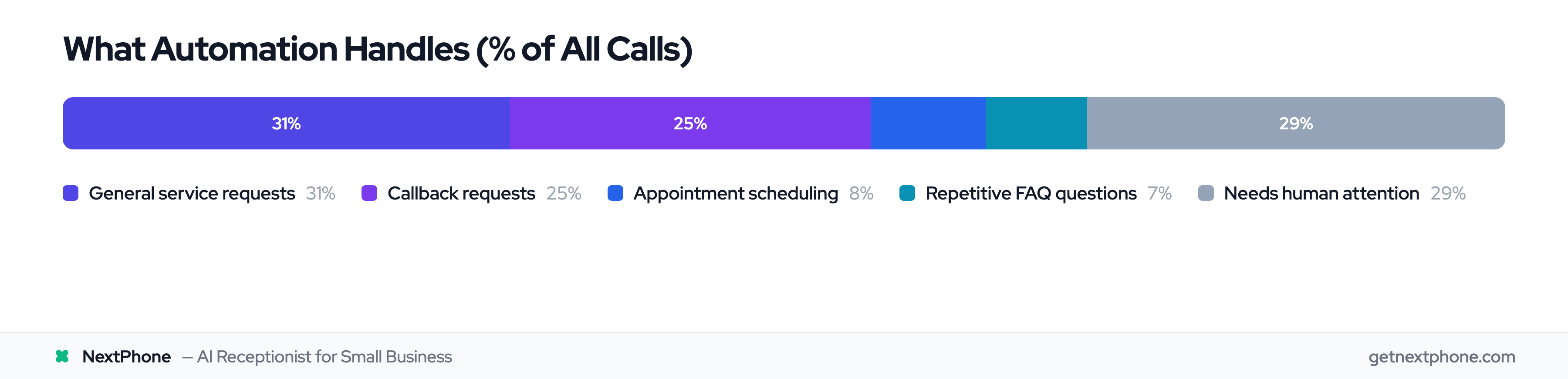
Analysis of small business call data shows that 7.7% of all incoming calls are scheduling requests that can be handled automatically. The AI checks your availability, offers time slots, confirms the booking, adds it to your calendar, and even sends reminders. Rescheduling and cancellations work the same way.
No more phone tag. No more double-bookings. No more lost appointments because someone couldn't reach you. Automated reminders reduce no-shows by 30-40%, and up to 90% in some cases—at a fraction of the cost of manual reminders.
Answering Repetitive Questions
What are your hours? Where are you located? How much do you charge? Do you offer this service? What's your service area?
These questions come up constantly. They're easy to answer, but they take time - and they interrupt whatever else your team is doing.
Data shows that 6.5% of calls are repetitive questions about pricing, hours, availability, and service area - exactly the kind of thing AI handles perfectly. Customer service automation statistics show this type of routine handling drives significant efficiency gains. You set up the answers once, and the system handles them forever. Accurately. Consistently. Instantly.
General Service Requests
Beyond simple questions, AI can handle a significant portion of general service requests - gathering information, logging requests, providing status updates, and routing inquiries to the right place.
Our data shows 31.1% of calls fall into this category of general service requests that can be handled by automation. That's nearly a third of all calls that don't need a human at all.
Callback Management and Lead Capture
Not every call needs to be resolved immediately. Sometimes people just need a callback when someone's available. Sometimes they're inquiring about your services and need follow-up.
AI excels at capturing this information reliably. Contact details get logged correctly. CRM records get updated. Follow-up tasks get created. Nothing falls through the cracks. Businesses using automation report a 62% reduction in manual marketing tasks.
About 25.4% of calls are callback requests that need tracking. Automation ensures every one of those potential customers gets followed up with.
The Bottom Line on Automation Potential
Add up those numbers: 7.7% scheduling, 6.5% repetitive questions, 31.1% general service requests. That's over 45% of calls that can be fully or partially automated.
For a business receiving 50 calls a day, that's 22-23 calls handled without any staff involvement. Multiply that by the average handling time, and you're looking at hours of recovered productivity every single day. Some businesses report 190% productivity gains from workflow automation.
What Still Needs a Human Touch
Automation is powerful, but it's not magic. Some situations genuinely require a human, and knowing where to draw that line is crucial for keeping customers happy.
Emotional and Complex Situations
When someone calls upset, frustrated, or in distress, they need empathy. Real empathy. An AI can be polite and helpful, but it can't truly understand frustration or offer genuine comfort.
Complaints that need de-escalation, customers who are having a bad day, sensitive matters that require reading between the lines - these calls need a human who can pick up on emotional cues and respond appropriately. A good automation system recognizes these situations and routes them to a person quickly.
High-Value Sales Conversations
For complex sales - especially high-ticket services or customized solutions - nothing replaces human conversation. Negotiations, custom pricing discussions, relationship-dependent decisions: these require the kind of nuanced communication AI can't fully replicate.
AI can qualify leads, gather initial information, and schedule sales calls. But the actual selling, especially for significant purchases, benefits from human expertise and relationship-building.
Emergency and Crisis Situations
Safety concerns, urgent medical or legal matters, situations requiring immediate judgment - these can't wait for normal protocols. They need a human who can assess the situation, make decisions, and take action.
Good automation systems have emergency protocols built in. They recognize urgency indicators and escalate immediately to a live person. The key is making sure those handoffs happen seamlessly.
Building Deep Client Relationships
For long-term relationship building - the kind that creates loyal customers who refer others - human connection matters. The personal touches, remembering details about someone's situation, picking up on unspoken needs: this is where human receptionists shine.
The best approach is hybrid. Let automation handle the routine so your team has time to invest in relationships that actually move the needle.
How to Implement Receptionist Automation (Step-by-Step)
Ready to get started? Here's a practical roadmap for implementing automation without disrupting your business.
Step 1: Audit Your Current Call Volume
Before choosing a solution, understand what you're dealing with. Track your calls for 2-4 weeks:
- How many calls do you receive daily?
- What types of calls are most common?
- When are your peak times?
- Which calls take the most time to handle?
- How many calls go to voicemail?
This data shapes every decision that follows.
Step 2: Identify Your Automation Candidates
Match your call types against what automation handles well. Start with the highest-volume, lowest-complexity calls. Scheduling requests, business hours questions, basic pricing inquiries - these are your quick wins.
Calculate the potential time savings. If 30% of your calls are simple questions that take 2 minutes each, and you get 40 calls a day, that's 24 minutes daily you could reclaim. Run the numbers for your situation.
Step 3: Choose the Right Solution
Look for these key features:
- Natural conversation ability - Does it sound robotic or natural?
- Integration options - Will it connect with your calendar, CRM, and phone system?
- Customization - Can you tailor it to your specific business and services?
- Escalation protocols - How does it handle calls that need a human?
- Reporting - Can you see how it's performing?
Pricing models vary widely. Some charge per call, others per minute, others a flat monthly rate. Understand what you're paying for and how costs scale as volume increases.
Step 4: Set Up Your Knowledge Base
This is where the magic happens - or doesn't. Your AI is only as good as the information you give it.
Document your most common questions and their answers. Write naturally, the way you'd actually talk to a customer. Organize by category (scheduling, pricing, services, location, etc.) so the system can find answers quickly.
Plan for updates. Prices change. Services evolve. Your knowledge base needs to stay current.
Step 5: Configure Call Routing
Decide how calls should flow:
- Should the AI answer first, or ring to a human with AI backup?
- What happens after hours?
- How are calls routed to different team members or departments?
- When should the AI transfer to a person?
Most businesses let AI answer everything, with smart forwarding for the few calls needing their expertise. AI resolves 90-95% autonomously. The alternative isn't "human answers" — it's voicemail. AI wins that comparison every time.
Step 6: Establish Human Handoff Rules
Define exactly when calls should go to a human. Emotional callers. Complex requests. VIP customers. Specific topics that need human judgment.
Equally critical: make sure context transfers with the call. Nothing frustrates a customer more than repeating everything they just told the AI. Good systems pass along the conversation so the human knows what's already happened.
Step 7: Test and Launch
Before going live, test extensively. Make calls yourself. Have friends call. Try edge cases. See how the AI handles unusual requests.
Consider a soft launch - route a portion of calls through the system while monitoring closely. Gather feedback from callers and staff. Fix issues before full rollout.
Step 8: Monitor and Optimize
This isn't set-it-and-forget-it technology. Monitor performance weekly at first:
- How many calls is automation handling?
- What's the resolution rate?
- How often do calls escalate to humans?
- What questions is the AI getting wrong?
Use this data to continuously improve. Update your knowledge base. Refine your routing rules. Expand automation to new call types as you get comfortable.
Calculating Your ROI
Let's talk numbers. Here's how receptionist automation typically pays for itself:
Cost comparison:
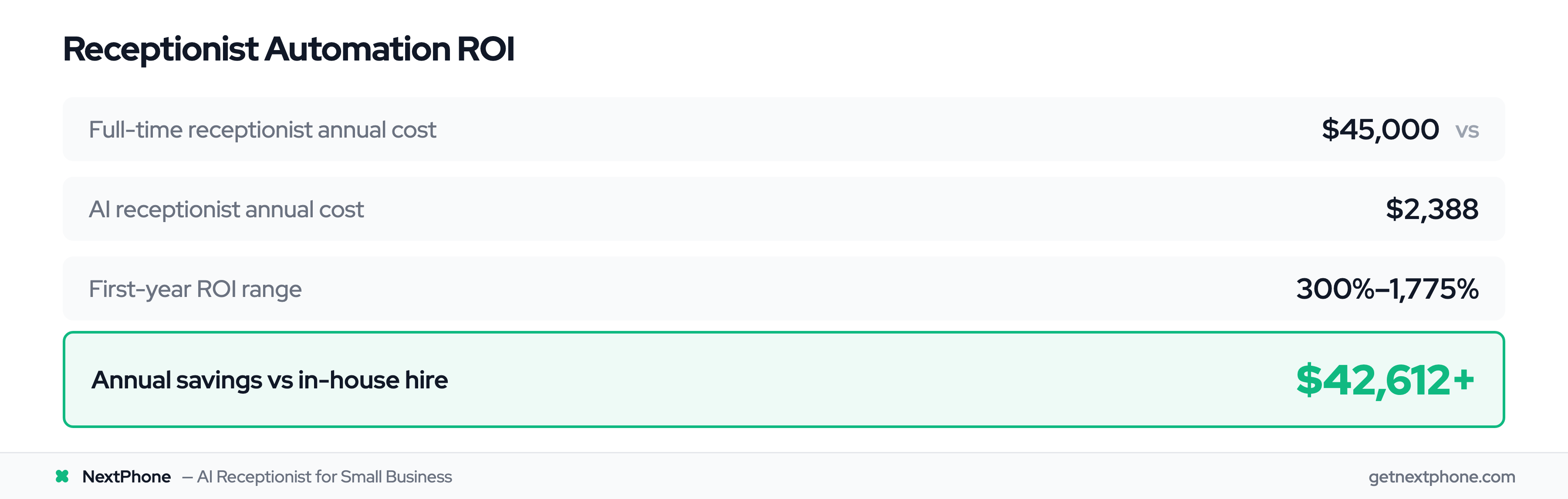
- Full-time receptionist: $35,000-$45,000 annually, plus benefits, training, and management overhead
- AI receptionist solutions: $50-$300/month for most small businesses ($600-$3,600 annually)
Savings potential:
- Direct cost reduction: 27% to 90% compared to human staffing. Business process automation statistics for 2025 confirm these savings across industries.
- Revenue recovery: Fewer missed calls means more captured business
- Time value: Staff freed from routine tasks can focus on revenue-generating work
Industry benchmarks:
- First-year ROI typically ranges from 300% to 1,775%
- Most companies recover their investment within 3 months
- One documented case showed a law firm saving $45,000 annually against $2,400 in AI costs - a 1,775% ROI
The math usually isn't close. For most businesses, automation pays for itself quickly and keeps delivering returns month after month.
How NextPhone Makes Receptionist Automation Simple
If you're looking for a solution that handles the automation opportunities we've discussed without complexity or hidden costs, NextPhone is worth considering.
NextPhone's AI-powered phone system is designed specifically for small businesses that need professional call handling without the enterprise price tag. It handles exactly the kinds of calls that automation does best:
- 24/7 call answering - Every call gets answered, instantly, any time of day
- Appointment scheduling - Callers book directly into your calendar
- FAQ responses - Common questions answered accurately and immediately
- Callback management - Every inquiry captured and tracked
- Lead capture - Contact details logged and organized
What makes NextPhone different is its simplicity and pricing. At $199/month with unlimited calls, you're not watching a meter tick or worrying about overage charges. The cost is predictable whether you get 100 calls or 1,000.
The system works alongside your existing staff - handling routine calls and after-hours coverage while your team focuses on complex situations and relationship-building. Or it can serve as your primary phone solution if you're running lean.
Setup doesn't require technical expertise. You provide information about your business, configure your preferences, and the system handles the rest. Most businesses are up and running within days.
Common Mistakes to Avoid
A few pitfalls to watch out for as you implement automation:
Trying to Automate Everything
Not every call should be handled by AI. If you try to force automation on situations that need human judgment, you'll frustrate customers and damage relationships. Know your limits. Embrace the hybrid approach.
Poor Knowledge Base Setup
Your AI is only as good as its training. If you rush the knowledge base setup or don't keep it updated, you'll get wrong answers and confused callers. Invest time upfront and commit to ongoing maintenance.
Ignoring the Handoff Experience
The moment a call transfers from AI to human is critical. If the human doesn't know what's already happened, the caller has to repeat everything. That's annoying at best, infuriating at worst. Make sure context flows with the call.
Set It and Forget It Mentality
Automation needs attention. Monitor performance. Review calls. Update responses. What works today might not work as your business evolves. Plan for ongoing optimization from the start.
Frequently Asked Questions
Will my customers hate talking to an automated system?
Modern AI receptionists sound natural - far from the robotic systems of the past. Studies show 80% of customers report positive experiences, especially when their issue gets resolved quickly. Most people care more about getting an answer than who (or what) provides it. The key is making sure the AI is genuinely helpful, not just a barrier to reaching a human.
How long does it take to set up receptionist automation?
Basic setup typically takes a few days to two weeks, depending on the complexity of your business and how much customization you need. Full optimization - refining responses, perfecting routing, expanding capabilities - usually happens over 30-60 days as you learn what works. The good news is you'll see benefits from day one.
Can AI receptionists handle my specific industry?
Yes, for most industries. Healthcare practices, law firms, home services, professional services, retail - AI adapts to each. 88% of healthcare leaders already use automated appointment reminders. The key is proper setup of your knowledge base with industry-specific information. Some solutions offer templates for common industries, which speeds up configuration.
What happens when the AI can't handle a call?
Good systems recognize their limits. When a call needs a human - whether due to complexity, emotional content, or specific request - the AI executes a warm handoff. The caller gets transferred to a person, and importantly, the context of the conversation goes with them. The caller doesn't have to start over.
How much can I expect to save with receptionist automation?
Most businesses see 300% to 1,775% ROI in the first year. Compared to a full-time receptionist costing $35,000-$45,000 annually, AI solutions running $50-$300/month represent massive savings. Add in recovered revenue from fewer missed calls and the productivity gains from staff freed up for other work, and the financial case is compelling.
Should I replace my receptionist or use automation as backup?
Neither has to be all-or-nothing. Many businesses use automation as backup - catching overflow calls, handling after-hours, covering lunch breaks and vacations. This is especially relevant for industries like property management, where 75%+ of US property managers handle maintenance and repair calls alongside other responsibilities. Others scale down human receptionist hours while AI handles routine work. The right balance depends on your call volume, complexity, and how much you value having humans as the first point of contact. Most find a hybrid approach optimal.
Is receptionist automation secure for my business data?
Reputable providers use enterprise-grade security, including encryption for data in transit and at rest. Before choosing a provider, ask about their security practices, data handling policies, and compliance certifications. Any legitimate provider should be transparent about these details.
Moving Forward
Receptionist automation isn't about replacing human connection - it's about making sure that connection happens where it matters most. Let technology handle the routine so your team can focus on the complex, the sensitive, and the relationship-building that actually grows your business.
The potential is significant. Over 45% of your calls are probably candidates for automation. The ROI is typically 300% or better. And the technology has matured to the point where customers often can't tell the difference.
Start by auditing your calls. Understand what you're dealing with. Then pick a solution that fits your needs and budget, configure it properly, and commit to ongoing optimization.
Your phone is either working for you or against you. With the right automation, it can finally start pulling its weight.