Quick answer: A conversational AI phone system answers your business line using natural language — no "press 1" menus — and handles routine intake (hours, scheduling, urgency, callbacks) in 5 seconds or less. The rest are hang-ups, spam, or callers who never wait past 14 seconds. Pick a platform that widens that band against your specific call mix.
This is what conversational AI sounds like end-to-end — greeting, intake, capture. Use this as the bar to measure every other vendor demo against.
Your phone rings at 2 PM. A potential customer needs an emergency plumbing repair—water pouring through their ceiling. But you're under a sink at another job site, hands covered in pipe joint compound. The call goes to voicemail. They call the next plumber. You just lost a $2,400 emergency job.
Industry research shows this happens more than you think: small businesses miss 74.1% of incoming customer calls. Those aren't just missed calls—they're missed appointments, lost quotes, and customers hiring your competitors because you didn't answer.
Conversational AI phone systems are changing this reality for small businesses. In this guide, you'll learn exactly how conversational AI understands and responds to customer calls, what makes it different from old-school "press 1" phone trees, which businesses benefit most, and what it actually costs (with real ROI calculations). More importantly, you'll see data from thousands of real customer interactions showing what you're leaving on the table.
What Is Conversational AI Phone Technology?
If you've ever called a business and heard "Press 1 for sales, press 2 for support," you know how frustrating traditional phone systems can be. Conversational AI is the opposite of that.
The Simple Definition
Conversational AI for phone systems is technology that answers calls and has actual conversations with customers using natural language—just like talking to a person. Instead of forcing callers through rigid menu trees, the AI understands what they're asking in their own words and responds intelligently.
Think about the difference: Traditional system says "Press 1 for hours." Conversational AI lets the customer ask "Are you open Saturday?" and responds "Yes, we're open 9 AM to 5 PM Saturday." This is the foundation of what makes an AI virtual receptionist so effective.
That's the fundamental shift. The customer talks naturally, and the AI understands.
Voice-First AI for Phone Calls
Here's what makes conversational AI different from chatbots: it's designed specifically for voice conversations, not repurposed text chat. The technology handles:
- Speech recognition that converts what customers say into text
- Natural language processing that understands meaning, not just keywords
- Voice synthesis that responds in natural-sounding speech
- Phone system integration that works with your existing business number
You're not installing new phone hardware or changing your number. The AI layers on top of what you already have. There are now 8.4 billion voice assistants globally—and business phone systems are finally catching up.
What Makes It "Conversational"
Three things make AI truly conversational instead of robotic:
1. Natural language understanding. The AI doesn't need exact phrases. Whether a customer says "When are you open?" or "What are your hours?" or "Are you available Saturday?" it understands they're asking the same thing.
2. Context awareness. The AI remembers what was said earlier in the conversation. If a customer asks "Are you open Thursday?" and then says "What about Friday instead?" the AI knows you're still discussing appointment availability.
3. Multi-turn conversations. Real conversations go back and forth. Conversational AI can handle 10+ exchanges, adapting based on what the customer says—not just following a pre-programmed script.
According to Anthropic's research on conversational AI, modern systems can maintain conversation context across lengthy exchanges, something impossible with traditional IVR. 85% of customer service leaders plan to pilot conversational GenAI in 2025.
Real-World Example
Here's how it works in practice:
Customer: "I need someone to look at my roof." AI: "I can help you schedule a roof inspection. Are you dealing with a leak or just want a general inspection?" Customer: "There's a leak in the bedroom." AI: "Got it, a leak repair is more urgent. I have availability tomorrow at 10 AM or 2 PM. Which works better?" Customer: "Tomorrow at 10 works." AI: "Perfect, you're booked for 10 AM tomorrow. I'll send you a confirmation text with the details and the inspector's contact info."
That's a natural conversation. No "press 1," no menu trees, no frustration.
This is what replaces voicemail for service businesses — the AI captures contact info, scope, and urgency before the caller has a chance to hang up. In our data, the 4.0% transferred + 0.9% booked + 0.9% new-lead outcomes all start from a turn that sounds like this one.
Why Small Businesses Need Conversational AI Phone Systems
The problem isn't just that you're busy. It's that every call you miss is a customer choosing your competitor.
The Hidden Cost of Missed Calls
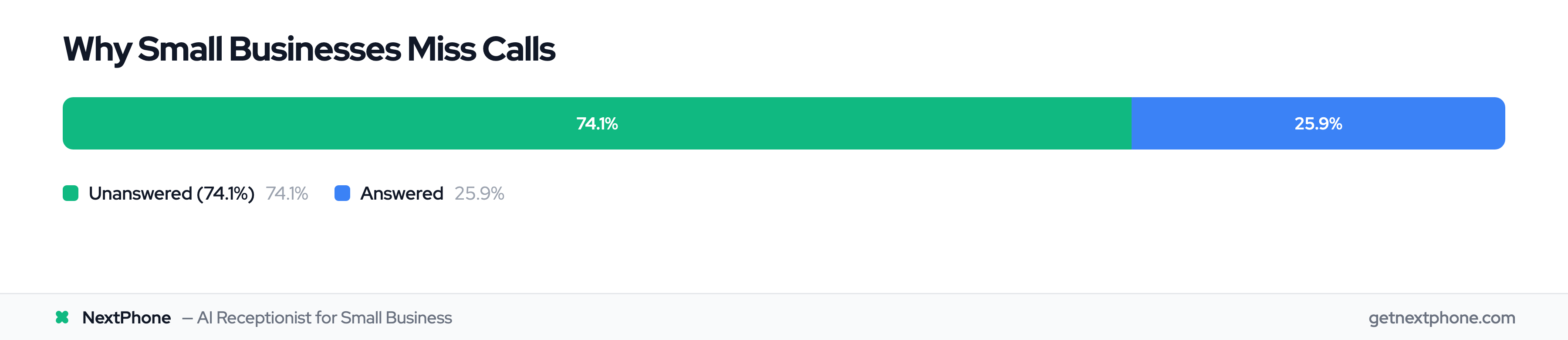
Let's look at the real numbers. Industry research on home services contractors shows 74.1% of calls go completely unanswered. Not transferred to voicemail and returned later—completely unanswered.
For a contractor getting 42 calls per month (the industry average), that's 31 missed calls every month. If just 20% of those callers would've hired you at an average $3,500 project value, you're losing $21,700 monthly. That's $260,000 per year.
But it's not just revenue. The damage runs deeper:
One roofing contractor in an industry study had 87 missed calls in a single month during busy season. He told researchers: "I didn't even know I was missing that many calls until I saw the data. I just thought business was slow."
Meanwhile, he was turning away $20,000+ in monthly revenue.
After-Hours and Emergency Calls You're Losing
Here's the brutal reality: Some of your most valuable calls happen when you're closed.
The 9 PM call from a homeowner whose AC just died in 95-degree heat? That's a $1,200 emergency job with premium pricing. The Saturday morning call about a burst pipe? That's $2,000+ you're not getting because you don't work weekends.
Analysis of real customer voicemails shows the urgency:
- "Needs emergency AC repair, no cooling in 95 degree weather."
- "Urgent: leak around chimney, ongoing rain, needs repair ASAP."
- "Water pouring through ceiling, need plumber immediately."
Every one of these callers is trying 5-10 businesses. The first one to answer gets the job.
Why Traditional Solutions Fall Short
Most small businesses try one of three approaches, and all have major gaps:
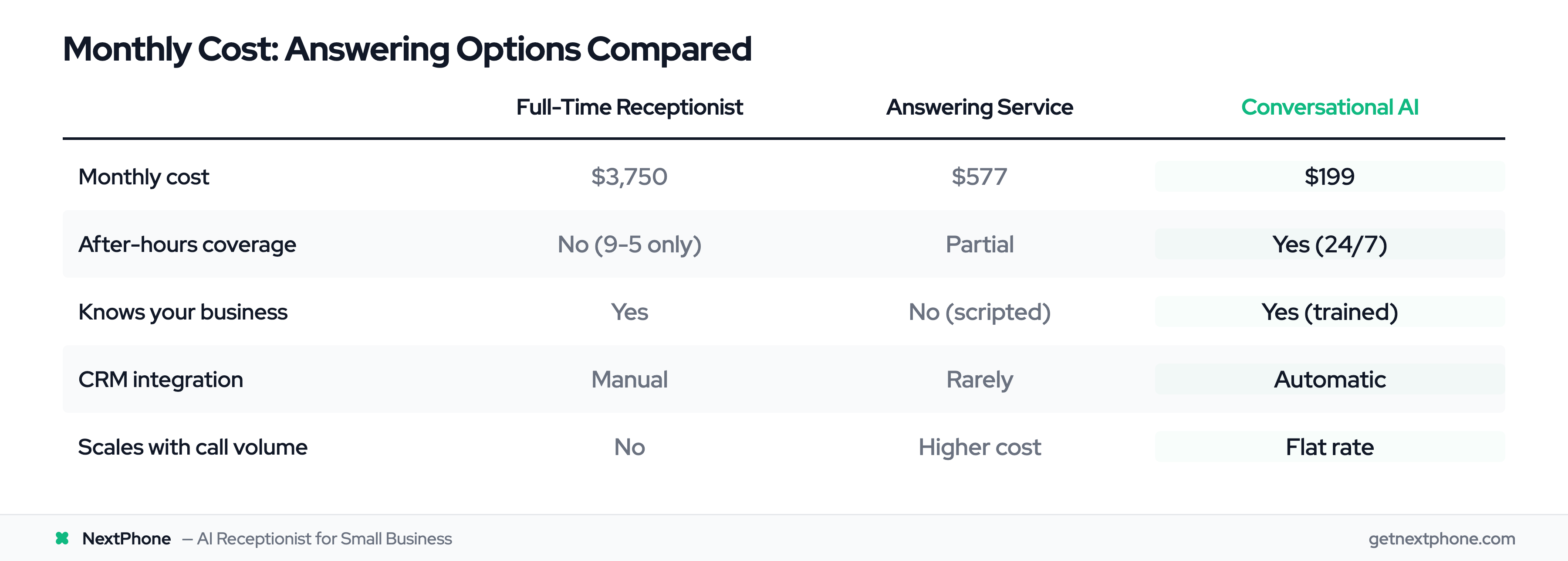
Hire a full-time receptionist. At $33,960 per year salary (Bureau of Labor Statistics), plus benefits and payroll taxes—call it $45,000 all-in—you're spending $3,750 monthly. They work 9 to 5. What about the large share of calls that arrive after hours? Those still go to voicemail.
Use a traditional answering service. Live answering services like Ruby Receptionists charge around $577/month for average call volume. During busy season when calls spike 3X-5X? That bill hits $1,500+. And they don't know your business—customers get generic "I'll take a message" service.
Just let it ring. This is what most small businesses do. It's free upfront, but a Harvard Business Review study found it costs an average of $75,000 annually in lost revenue.
None of these work for businesses with unpredictable call patterns, tight margins, or after-hours emergencies.
That's where conversational AI changes everything.
How Conversational AI Phone Technology Works
You don't need a computer science degree to understand this. Here's how the technology actually works, in plain language.
Natural Language Processing (NLP) in Plain English
When someone calls, the first step is converting their voice into text the computer can analyze. That's speech recognition.
But here's where it gets interesting: The AI doesn't just look for keywords. It uses natural language processing to understand what the customer means, not just what they said.
Example: A customer says "My heater's not working and it's freezing in here."
Old-school IVR would hear "heater" and "not working" and maybe route it to service. Conversational AI understands:
- This is about heating (not cooling)
- There's a problem (not a quote request)
- There's urgency ("freezing" indicates immediate need)
- Route as emergency, not routine call
According to MIT Technology Review research, modern conversational AI achieves 90-95% accuracy in understanding natural speech—compared to 60-70% for traditional IVR keyword matching.
Speech Recognition That Actually Works
Early phone AI was terrible at understanding accents, background noise, or people who talk fast. Modern conversational AI has solved most of those problems.
The technology now handles:
- Different accents and dialects across regions
- Background noise (construction sites, traffic, kids yelling)
- Speaking patterns (fast talkers, people who pause, those who ramble)
- Technical terminology specific to your industry
You train the AI on your business vocabulary—"HVAC," "roof pitch," "emergency service," "quote"—and it learns to recognize these terms even in noisy environments.
Intent Detection and Smart Routing
Here's where conversational AI shows its intelligence. After understanding what the customer said, the AI determines their intent—what they actually want.
Based on intent, the AI routes intelligently:
- Appointment request → Check calendar, book available slot
- General question → Answer from knowledge base
- Emergency → Transfer immediately to your phone
- Complex issue → Take detailed message with contact info
Real example from customer call data: "Urgent: Porta potty delivery at 6 PM. Caller is waiting and needs to speak with you right away."
The AI detected urgency keywords ("urgent," "waiting," "right away") and routed immediately instead of taking a message.
Context Awareness and Conversation Memory
What makes AI "conversational" instead of robotic is memory. The AI tracks what's been discussed and maintains context across the conversation.
Example: Customer: "Do you do roof repairs?" AI: "Yes, we handle all types of roof repairs. Are you dealing with a leak or damaged shingles?" Customer: "A leak in the bedroom." AI: "Got it. Leaks need quick attention. Can I schedule someone to come out and assess it?"
Notice the AI remembered "roof repair" when asking about scheduling. It didn't restart the conversation or ask "What service do you need?"
According to Anthropic's research, conversational AI can maintain context across 10+ conversation turns—handling complex back-and-forth exchanges that would confuse traditional phone systems.
Integration with Your Business Systems
The AI doesn't work in isolation. It connects to your existing tools:
- Calendar integration (Google Calendar, Outlook) to check availability and book appointments
- CRM integration (Salesforce, HubSpot) to log calls and update customer records
- Phone system integration (any VoIP provider) to forward calls or transfer to you
- Messaging integration (SMS, email) to send confirmations and follow-ups
When a customer books an appointment, the AI adds it to your calendar, sends them a confirmation text, and logs the interaction in your CRM—automatically.
What Makes AI "Conversational" vs Robotic IVR
This is the question everyone asks: "What's different from those awful 'press 1' phone systems?"
Traditional IVR: The "Press 1" Problem
Traditional Interactive Voice Response (IVR) systems work like this:
"Thank you for calling. Press 1 for sales. Press 2 for support. Press 3 for billing. Press 4 to hear these options again."
You press 2.
"You've reached support. Press 1 for technical support. Press 2 for product questions. Press 3 for—"
You hang up and call a competitor.
The problems with IVR:
- Rigid menu structure (customers forced into predetermined paths)
- Keyword matching only (say the wrong word, AI doesn't understand)
- No context awareness (treats each response as isolated)
- Robotic voice quality (sounds like a computer from 1995)
- Frustrating customer experience (5+ button presses to reach a human)
Studies show traditional IVR achieves only 60-70% accuracy because it relies on keyword matching. Say "I need help" instead of the programmed "support" keyword, and it fails.
What "Conversational" Actually Means
Conversational AI operates on three principles that make it feel like talking to a person:
1. Natural language understanding. You can phrase your question any way you want:
- "When are you open?"
- "What are your hours?"
- "Are you available this weekend?"
All three get the same answer because the AI understands meaning, not just keywords.
2. Context awareness. The AI remembers what you've said:
- Customer: "I need a roof inspection."
- AI: "I can schedule that. Are you seeing any visible damage?"
- Customer: "Yeah, some missing shingles."
- AI: "Got it, I'll mark this as a repair estimate instead of routine inspection."
The AI connected "missing shingles" back to the original "roof inspection" request.
3. Natural-sounding voice. Modern text-to-speech technology sounds nearly human. Customers often don't realize they're talking to AI unless explicitly told.
The Natural Voice Quality Factor
Here's what makes some AI sound natural and others sound robotic:
Natural AI voice:
- Varies tone and pacing (sounds conversational, not monotone)
- Uses contractions ("you're" not "you are")
- Includes natural pauses (breathes between sentences)
- Adapts volume and speed based on context
Robotic AI voice:
- Monotone delivery (every word same emphasis)
- Overly formal language ("It would be my pleasure to assist you")
- No natural rhythm (sounds like reading a script)
- Pronunciation errors (especially with names and technical terms)
The difference is dramatic. Twilio's study of 457 business leaders and 4,800 consumers found a 31-point satisfaction gap: 90% of businesses think customers are satisfied with their AI interactions, but only 59% of customers agree.
The fastest way to close that gap is to actually listen to the voice before you ship it. Two samples from the production voice library — pick the one that matches your brand:
A natural, organized, trustworthy tone — works well for legal, dental, real estate, and service businesses where the first impression has to feel composed.
Direct, unfussy, no marketing-voice gloss — fits trades, contractors, and field-service businesses where callers want a quick yes/no, not a script.
When AI Sounds Human vs Robotic
You know you're talking to good conversational AI when:
- You forget it's not a person
- Your question gets answered without repeating yourself
- The conversation flows naturally
- You can interrupt or change topics mid-conversation
You know it's old-school robotic IVR when:
- You're pressing buttons instead of talking
- You have to repeat yourself multiple times
- The voice sounds like Stephen Hawking's computer
- You're frantically pressing 0 to reach a human
One Reddit user described the difference perfectly: "I called my dentist's new AI system expecting the usual 'press 1' nightmare. Instead, I just said 'I need to reschedule my Thursday appointment,' and it... just did it. Took 30 seconds. I actually forgot I was talking to AI."
What Conversational AI Can Do on Phone Calls
Let's get specific. Here's what conversational AI actually handles for small businesses.
Answer Common Questions Instantly
A steady share of customer calls are nothing but repetitive questions:
- "What are your hours?"
- "Do you service my area?"
- "What's your pricing?"
- "Are you available this week?"
It might not sound like much, but for a business getting 50 calls a month, that's a handful of interruptions every week asking the same things. Each interruption costs 10-15 minutes of focus time.
Conversational AI answers these instantly from your knowledge base. Customer asks about hours, AI responds immediately. No wait time, no voicemail, no callback needed.
Real example from customer calls: "Inquired about your hours of operation."
The AI answered in 5 seconds. The business owner never got interrupted.
Schedule Appointments in Real-Time
Here's where conversational AI shows real power: booking appointments without human involvement.
Customer data shows booking or rescheduling an appointment is the single most common reason people call. For most small businesses, that's several appointments booked per week—or missed if you don't answer.
How it works:
- Customer calls: "I need an appointment for a roof inspection."
- AI checks your calendar integration (Google Calendar, Outlook, etc.)
- AI offers available slots: "I have Thursday at 10 AM or Friday at 2 PM."
- Customer chooses: "Thursday works."
- AI books it, sends confirmation text, adds to your calendar
You wake up to a booked appointment you never had to touch.
Real customer call: "Wants to schedule an appointment for heating electrical service and requested a callback."
With conversational AI, there's no callback needed. The appointment gets booked on the initial call.
Capture and Route Urgent Calls
This is critical for businesses that handle emergencies. Industry analysis shows:
- Emergencies are a recurring reason people call
- Urgent calls rank among the top reasons people call ("ASAP," "urgent," "emergency," "today," "immediately")
Conversational AI detects urgency keywords and context, then routes immediately to your phone instead of taking a message.
Real examples from customer voicemails:
- "Needs emergency AC repair, no cooling in 95 degree weather."
- "Urgent: leak around chimney with ongoing rain, needs repair ASAP."
- "Water heater leaking, needs replacement ASAP."
When the AI hears "emergency," "urgent," "ASAP," or describes critical situations (no heat, no cooling, water damage), it knows this can't wait. The call gets transferred to your mobile immediately with context: "Emergency call: AC failure, 95-degree heat."
You can answer knowing it's urgent, or let it go to your voicemail if you're with a client. Either way, the call gets prioritized correctly.
Track Callback Requests Automatically
That's one in four callers leaving a message asking you to call them back.
Conversational AI captures 100%:
- Caller's name (asks if not provided)
- Phone number (confirms it's correct)
- Reason for call
- Best time to call back
- Urgency level
This gets logged in your CRM or sent to you as a text with all details. Nothing falls through the cracks.
Real customer call: "Requested you call back at 888-568-0296."
Instead of a voice message you might miss, you get a text: "Callback request from John Smith, 888-568-0296, regarding roof estimate, available after 3 PM."
Filter Spam and Robocalls
Call analysis shows spam and robocalls are a steady share of incoming calls. For a busy small business, that's several wasted interruptions every month.
Conversational AI identifies spam based on:
- Known spam phone numbers (database of millions)
- Robotic speech patterns (AI talking to AI)
- Common spam scripts ("Your car warranty is expiring")
- Unusual call patterns (same number calling 10 times in a row)
These calls get blocked automatically. You never hear about them. Electricians in industry studies faced the highest spam rate at 15.5%—their numbers get sold to spam lists more than other trades. For them, spam filtering saves hours weekly.
Take Detailed Messages
When AI can't handle a call—complex technical question, emotional customer, unusual situation—it takes a comprehensive message:
- Who called (name, company if applicable)
- Contact information (phone, email)
- Reason for calling (in their words)
- Best time for callback
- Urgency level
Real example: "Wants to discuss a roof estimate and has questions; please call them back."
The message includes context so you can prepare before calling back.
What AI Can't Do (Yet)
To be realistic, conversational AI has limitations:
- Highly technical troubleshooting (requires expert knowledge and diagnosis)
- Emotional or sensitive situations (angry customer, complaint, bad news)
- Complex negotiations (pricing exceptions, contract terms, complicated projects)
- Situations requiring judgment calls (unusual requests, ethical dilemmas)
Best conversational AI systems know their limits. When confidence is low or the situation is complex, they route to a human rather than guessing wrong.
Real Benefits for Small Businesses
Let's translate features into actual business value.
Never Miss a Customer Call Again
Right now, if you're like most small businesses, you're answering about 26% of calls. The other 74.1% go to voicemail or get no answer at all.
Conversational AI flips that. You go from answering 1 in 4 calls to capturing 98%+. That's 3X more customer conversations, which means 3X more opportunities to book jobs, schedule appointments, and capture leads.
Every call that previously went to voicemail now gets answered in under 5 seconds.
24/7 Availability Without Hiring Staff
Your receptionist works 9 to 5, Monday through Friday. That's 40 hours a week.
Conversational AI works 168 hours a week. Nights. Weekends. Holidays. No vacation days. No sick days. No "I'm at lunch."
Industry analysis of home services calls shows significant volume outside business hours—especially emergencies. The 9 PM AC failure. The Saturday morning plumbing leak. The Sunday afternoon roof emergency after a storm.
These are premium-priced jobs with motivated customers. AI answers them all.
Capture More Leads and Revenue
Here's the math that matters:
For a roofing contractor getting 87 calls monthly (industry average):
- Currently answering: 26% = 23 calls
- With conversational AI: 98% = 85 calls
- Additional conversations: 62 more per month
Assume a 10.6% quote-request rate for roofing and that's 6.5 additional quote opportunities monthly. At $15,000 average roof with a 20% close rate, that's $19,500 in additional monthly revenue.
Annual impact: $234,000 in projects you previously lost.
Cost of AI: $2,388 annually.
ROI: 9,700%.
Even if you capture just ONE additional $15,000 project, the AI pays for itself for 6 years.
Reduce Time Wasted on Repetitive Questions
A predictable slice of calls asks the same questions:
- Hours of operation
- Service area coverage
- General pricing ranges
- Availability this week
For a contractor getting 40 calls monthly, that's 2-3 interruptions weekly asking questions that could be answered by anyone.
Each interruption costs 10-15 minutes: Stopping what you're doing, washing hands, taking off gloves, answering the call, getting back to work.
That's 30-45 minutes weekly of wasted time—2-3 hours monthly.
Conversational AI answers these questions instantly. You never get interrupted. You stay focused on the $150/hour skilled work you do, while AI handles the $15/hour receptionist tasks.
Professional First Impression Every Time
When you're covered in drywall dust, you sound rushed on the phone. When you're exhausted from a 12-hour day, your tone shows it. When you're annoyed because this is the fifth "what are your hours?" call today, customers hear it.
AI never has a bad day. Every caller gets the same professional, friendly, helpful greeting—whether it's the first call of the day or the 50th. Your brand stays consistent.
Industry research shows companies implementing conversational AI see:
- Significant reduction in service costs (less staff time handling routine calls)
- Faster response times (immediate answer vs callback delays)
- Higher customer satisfaction (immediate help vs waiting for callbacks)
Scale During Busy Seasons Without Hiring
HVAC contractors face 5X call volume spikes during summer heat waves and winter freezes. Landscapers get slammed in spring. Roofers are inundated after storms.
You can't hire and train someone for a 2-month busy season. But you also can't handle 5X the calls yourself.
Conversational AI scales infinitely. 10 calls a day or 100—the cost stays the same ($199/mo), and every call gets answered in under 5 seconds.
When call volume drops, you don't pay for staff sitting idle. The AI is there when you need it, invisible when you don't.