Your business phone rings. You're in a meeting, on a job site, or eating dinner with your family. The caller needs help now. They've got an emergency, they want a quote, or they're ready to book. But you can't answer.
They call your competitor instead.
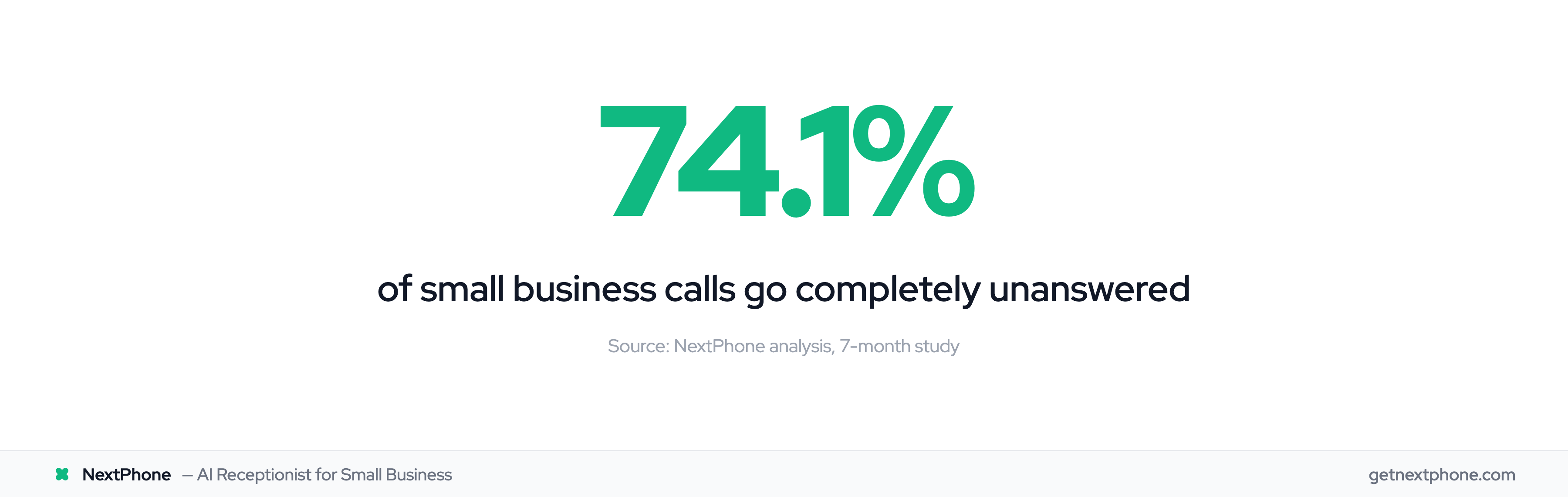
This happens more than you think. Across the businesses our AI receptionist works with, the pattern holds: 74.1% of small business calls go completely unanswered (Invoca data corroborates this). That's three out of every four potential customers calling someone else — translating to roughly $260,400 per year in lost revenue for a typical service business.
The good news? Getting a virtual phone number takes about 10 minutes and costs anywhere from $0 to $199/month depending on features. The harder question is making sure those calls actually get answered.
This guide shows you exactly how to get a virtual business phone number. You'll learn what virtual numbers are, compare the best providers, and understand what most guides don't tell you — what happens after the phone rings. For a broader look at all your options, see our business phone options comparison and business phone system guide.
What Is a Virtual Phone Number?
A virtual phone number is a phone number that isn't tied to a physical phone line or specific device. Instead of copper wires or a SIM card, virtual numbers route calls over the internet using VoIP (Voice over Internet Protocol) technology.
You can answer calls to your virtual number from your smartphone, laptop, tablet, or any internet-connected device. The caller just dials a normal-looking phone number. They have no idea whether you're answering from an office in Manhattan or a coffee shop in Montana.
How Virtual Phone Numbers Work
When someone calls your virtual number, the call travels over the internet to your chosen device. The technology handles the routing automatically. You download an app, log in, and start making and receiving calls.
No phone system installation. No waiting for the phone company. No extra hardware to buy.
The virtual number works just like a traditional phone number for callers. They dial, it rings, someone (hopefully) answers. The difference is entirely on your end—you get flexibility that landlines can't match.
Virtual Numbers vs Traditional Business Lines
| Feature | Virtual Number | Traditional Landline |
|---|---|---|
| Hardware needed | None | Phone system, wiring |
| Location flexibility | Anywhere with internet | Fixed location |
| Setup time | Minutes | Days to weeks |
| Monthly cost | $0-199 | $50-150 plus equipment |
| Scalability | Add lines instantly | Requires installation |
The shift away from landlines is massive. According to Phone.com research, 71.7% of US adults have abandoned landlines in favor of wireless and internet-based alternatives. For businesses, this trend is accelerating—VoIP systems save companies up to 75% on communication costs compared to traditional phone services.
Types of Virtual Phone Numbers for Business
Not all virtual numbers work the same way. The type you choose affects how customers perceive your business and how much you'll pay.
Local Numbers
Local numbers use area codes tied to specific geographic regions. A 212 number says "New York." A 310 says "Los Angeles." A 512 says "Austin."
The psychology matters. Customers answer calls from local numbers at significantly higher rates—60-70% compared to just 40-50% for toll-free numbers. People associate toll-free with telemarketers. Local feels trustworthy.
You can get a local number in any area code, regardless of where you actually are. A plumber in Phoenix can have a Tucson number to serve that market. A consultant in Chicago can have numbers in every city where they have clients.
Toll-Free Numbers (800, 888, 877)
Toll-free numbers project national presence. When customers see an 800 number, they think "established company." The caller doesn't pay for the call—you do, though most modern plans include unlimited toll-free minutes.
Toll-free works best for e-commerce businesses, national services, and dedicated customer support lines. If your customers are spread across the country and you want to look like a national brand, toll-free makes sense.
Vanity Numbers
Vanity numbers spell something memorable, like 1-800-FLOWERS or 1-888-NEW-ROOF. They're excellent for marketing and brand recognition but cost more and limit your area code options.
For most small businesses, a local number is the right choice. You get higher answer rates, lower costs, and the perception of being a community business.
What a Virtual Business Phone Number Gives You (That a Personal Number Doesn't)
When you search for a virtual business phone number, you're looking for more than a second line on your personal phone. You're looking for business infrastructure: clean caller ID registration, SMS compliance, team extensions, and the ability to route calls professionally even when you can't answer personally.
Here's what sets a business-grade virtual number apart:
| Factor | Personal Virtual Number | Virtual Business Phone Number |
|---|---|---|
| Caller ID | Often flagged as "Unknown" or spam | Registered with your business name |
| SMS compliance | A2P 10DLC not configured | Registered for business texting (required by US carriers) |
| Multiple users | Single user | Team extensions, shared inbox |
| Business hours routing | Manual workaround | Built-in scheduling |
| Call records and transcripts | Rare or add-on | Standard in business plans |
| Answering | Voicemail only | Forwarding, AI receptionist, or live agent |
The phone number itself looks identical to any caller. What differs is everything built around it.
Caller ID registration matters more than most guides admit. A local number registered as a legitimate business shows up that way — "Acme Plumbing" or your business name — instead of a raw area code that pattern-matches to spam. Customers answer recognized numbers at significantly higher rates than unknown ones.
The gap that matters most for business: a virtual business phone number rings, but it doesn't answer itself. The number solves "how do customers reach me?" It doesn't solve "what happens when I'm busy?" For businesses losing calls after hours or during peak hours, the number is step one — see our 24/7 virtual receptionist guide for what actually answering every call looks like.
Benefits of Getting a Virtual Phone Number
A virtual phone number solves several problems that small business owners deal with every day.
Separate Business and Personal Calls
Using your personal cell for business creates problems. Customers call at dinner. Work follows you everywhere. Your personal number gets listed on Google, shared with strangers, and potentially exposed in a data breach.
A virtual business number creates a clean boundary. Business calls come through the business line. Personal calls stay personal. You can set business hours so after-hours calls go straight to voicemail or an answering service.
One device, two numbers, clear separation.
Appear Local Anywhere
Want to expand into a new market without opening an office? Get a local number in that area code.
A contractor in Dallas can add a Fort Worth number to capture customers who prefer calling local businesses. A consultant can have numbers in every city where they have clients. Customers see a local area code and feel more comfortable calling.
This works especially well for service businesses expanding their territory. You can test a new market with a $15/month number before committing to a physical presence.
Work From Anywhere
The office is wherever you are. Answer business calls from home, the coffee shop, a job site, or the beach.
This flexibility has become essential. Research from Zoom shows that 64% of workplaces now operate on a hybrid model. Workers expect to take calls from anywhere, and virtual numbers make that possible without giving clients your personal cell.
Save Significantly on Phone Costs
Traditional business phone systems require hardware, installation, and ongoing maintenance. Virtual numbers need none of that.
According to G2 research, small businesses save an average of 68% by switching to usage-based virtual phone plans. No equipment costs, no installation fees, no long-term contracts. Most providers let you cancel anytime.
Get Professional Features Without Enterprise Prices
Virtual phone systems include features that used to require expensive PBX equipment.
- Auto-attendant menus ("Press 1 for Sales...")
- Call forwarding to any number
- Voicemail transcription
- Call recording
- SMS messaging
- Multiple extensions
A decade ago, these features cost thousands. Now they're included in $15-20/month plans.
How to Get a Virtual Phone Number (Step-by-Step)
Getting a virtual phone number takes less time than ordering lunch. Here's the process.
Step 1: Decide What You Need
Before picking a provider, answer these questions:
Do you need SMS capability? One-third of consumers prefer texting businesses over calling. If you want to send appointment reminders, quick updates, or respond to customer texts, make sure your provider supports it.
Local number or toll-free? Local numbers have higher answer rates and create community trust. Toll-free projects national presence. Most small businesses should start with local.
How many users need access? Solo operators need one line. Teams need multiple extensions or shared access. Pricing often scales by user.
What's your budget? Free options exist but come with significant limitations. Expect to spend $10-200/month depending on features.
Do you need someone to actually answer, or just a number? This is the question most guides skip. A virtual number rings. But if nobody picks up, callers still reach voicemail—or hang up and call your competitor.
Step 2: Choose a Provider
The market has dozens of options. Here's how the major players compare:
| Provider | Starting Price | SMS | Best For |
|---|---|---|---|
| Google Voice | $10/user/mo | Limited | Solopreneurs using Google Workspace |
| Grasshopper | $14/mo | Yes | Small teams wanting simplicity |
| RingCentral | $20/user/mo | Yes | Growing businesses needing scale |
| OpenPhone | $19/user/mo | Yes | Startups wanting modern features |
| NextPhone | $199/mo | Yes | Businesses wanting AI answering included |
Google Voice is cheap and integrates with Google tools, but lacks advanced features and business-grade reliability. See our Google Voice alternative comparison for what you're giving up.
Grasshopper pioneered virtual numbers for small business. Simple interface, reasonable pricing, but limited integrations.
RingCentral offers enterprise-level features. Great for growing companies, but the complexity and cost may be overkill for solopreneurs.
OpenPhone has a modern interface and solid SMS support. Good middle ground for startups.
NextPhone includes AI-powered call answering with the number—you get both the line and someone to answer it.
Step 3: Sign Up and Select Your Number
The signup process is straightforward:
- Create an account with your chosen provider
- Browse available numbers by area code
- Select your preferred number (local, toll-free, or vanity)
- Complete verification (usually just confirming your email)
Most providers show you available numbers and let you pick one that looks good. Some charge extra for "premium" numbers with memorable patterns.
Step 4: Configure Your Settings
Once you have your number, set it up properly:
Call forwarding: Choose where calls go. Your cell phone? A team member? Multiple numbers simultaneously?
Voicemail greeting: Record a professional message. Avoid generic defaults—they scream "small operation that doesn't care."
Business hours: Set when you're available. Calls outside those hours can go directly to voicemail or an after-hours service.
SMS auto-replies: Some providers let you send automatic text responses to callers.
Step 5: Port Your Existing Number (Optional)
Already have a business number you've been using? You can likely keep it.
Number porting transfers your existing number to your new virtual provider. The process typically takes 1-10 business days. US regulations require carriers to allow porting, so your current provider can't refuse (as long as your account is in good standing).
For detailed instructions on moving your number, see our phone number porting guide.
Step 6: Test Everything
Before advertising your new number:
- Call it from another phone to verify it rings correctly
- Test voicemail by calling and leaving a message
- Send a text to confirm SMS works
- Make an outbound call to check that your caller ID displays properly
- Test call forwarding by having someone call while you're on another line
Five minutes of testing prevents embarrassing moments with real customers.
Free Virtual Phone Number Options (What You Should Know)
Searching for a free virtual phone number app? They exist—with significant catches.
Free Options That Actually Work
Google Voice (Personal): Free for personal use. Requires an existing US phone number to verify your account. Limited features, no business-grade support.
TextNow: Provides free numbers with ad support. Works for basic calling and texting, but reliability issues and ads make it unsuitable for professional use.
Free trials: Most paid providers offer 7-14 day trials. Grasshopper, OpenPhone, and others let you test their full service before committing.
The Catch with "Free" Virtual Numbers
Free services make money somehow. Here's what you typically sacrifice:
- Limited features: No call forwarding, basic voicemail, no SMS
- Ads: Free services display or play advertisements
- Reliability issues: Dropped calls, delayed texts, downtime
- No porting: Can't transfer your number if you leave
- Shared numbers: Some services recycle numbers, causing confusion
- No support: Problems? You're on your own
For a side project or testing purposes, free works fine. For a real business where missed calls cost money, free is expensive.
When Free Makes Sense
- Testing whether a virtual number fits your workflow
- Very low call volume (under 10 calls per month)
- Personal projects that don't require professionalism
When You Should Pay
- Customer-facing business of any size
- More than 10 calls per month expected
- Need SMS/texting capability
- Require professional features like call forwarding
- Can't afford to miss calls due to reliability issues
A realistic budget for basic virtual phone service is $15-30/month. For comprehensive solutions with answering features, expect $100-200/month.