
10 Best RingCentral Alternatives for Small Business (2026)

Updated
42 min read
Comparisons
10 Best RingCentral Alternatives for Small Business (2026)

NextPhone AI Receptionist

Answer every call, book appointments, 24/7.

Quick answer: For most small businesses, the best RingCentral alternative isn't another VoIP platform — it's NextPhone AI (flat monthly plans from $199, unlimited inbound calls answered 24/7). Switching to Nextiva or Zoom Phone saves $60–120/month but doesn't fix the real problem: calls going to voicemail while you're busy. NextPhone answers every inbound call for you — 24/7, no per-user fees, no missed revenue — and it learns your business from every call, so it gets sharper over time instead of staying static. And for a 1–3 person business, it's no longer just the answering layer: you can call out and text from the NextPhone app on your business number, and have the app ring you first before the AI picks up. This guide covers both categories with verified pricing and honest trade-offs.

Switching from RingCentral? Try NextPhone free → — flat monthly plans, no per-user fees, every inbound call answered 24/7.

Last updated: August 2026. Pricing verified at time of writing. Confirm current pricing on each vendor's site.

The short list of RingCentral alternatives for small business in 2026: Microsoft Teams Phone ($15/user, best for M365 customers), Nextiva ($18.95/user, best support), Zoom Phone ($10/user, cheapest VoIP), Ooma Office ($19.95/user, no contracts), Grasshopper ($14–55/mo flat, solopreneurs), OpenPhone ($19/user, remote teams), Dialpad ($15/user, AI sales), Google Voice (free–$10), 8x8 ($15/user, international), and NextPhone AI ($199/mo flat, unlimited AI answering — and for 1–3 person teams, a full phone-line replacement: it answers, texts, and makes calls from your business number).

When you signed up for RingCentral, it seemed like the professional choice. A real business phone system with all the features. Then the bill came.

Five users at $25 each. Monthly. Plus the features you added. Plus the overage charges. Plus the "administrative fees" nobody mentioned during the sales call.

You're not alone. Thousands of small business owners are searching for a RingCentral alternative right now - looking for something simpler, cheaper, or just better suited to how they actually run their business.

This guide covers the 10 best RingCentral alternatives for 2026. RingCentral holds 20% of the global UCaaS market share, but that doesn't mean it's right for you. We'll compare traditional VoIP options, introduce a category most comparison articles completely ignore (AI answering), and help you figure out which solution actually matches your needs. For a broader overview of business phone options, start there if you're still deciding what type of system you need.

Below: the quick comparison, what RingCentral really costs in 2026, and the question most articles skip — do you actually need a full UCaaS platform at all?

Disclosure: NextPhone is our product. We built it as an AI-powered alternative to traditional phone systems for small businesses. We've included it alongside VoIP alternatives so you can compare on the same terms.


Best RingCentral Alternatives: Quick Comparison
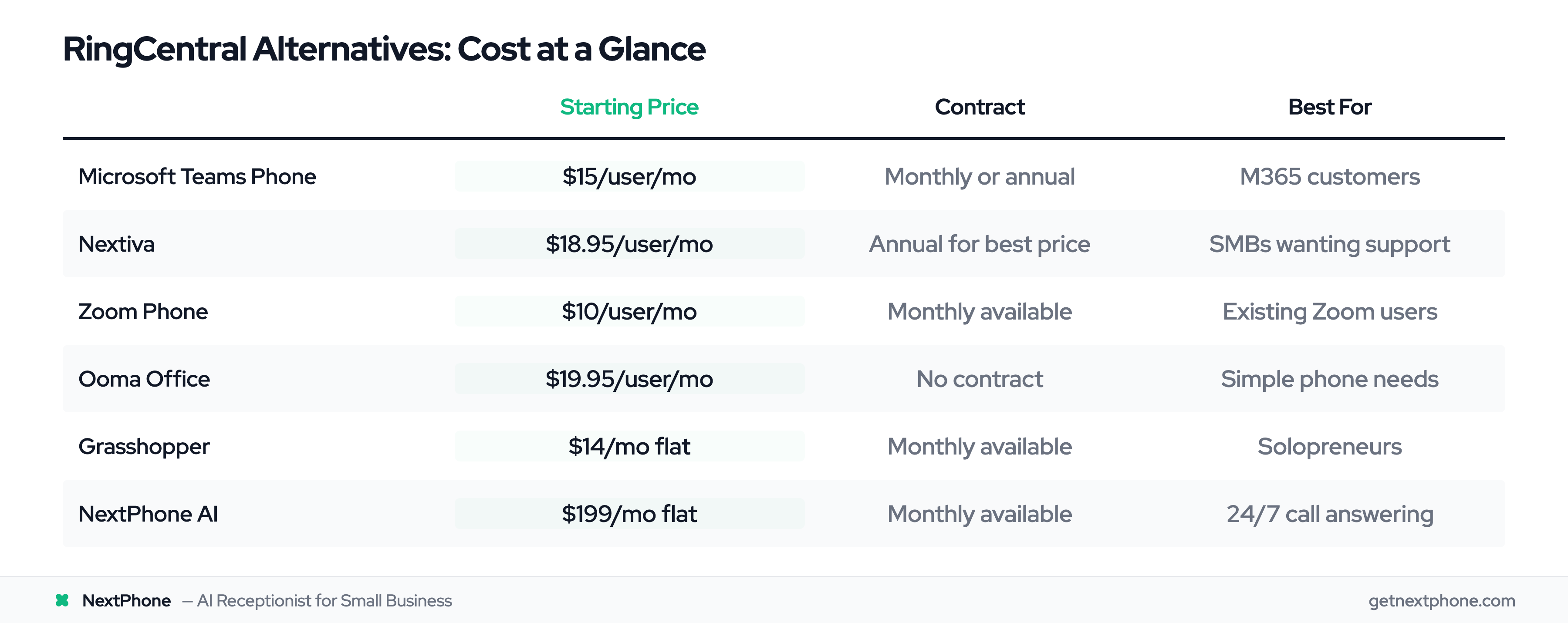
Comparison table of RingCentral alternatives with pricing and best-fit use cases

If you're scanning for options, here's the overview. For a deeper dive, see this 13 best RingCentral alternatives comparison:

AlternativeStarting PriceBest ForKey Advantage
Microsoft Teams Phone$15/user/moM365 customersNative Teams integration
Nextiva$18.95/user/moSMBs wanting better supportTop-rated customer service (G2: 9.0)
Zoom Phone$10/user/moTeams already using ZoomFamiliar interface, lowest cost
Ooma Office$19.95/user/moBudget-conscious basicsNo contracts, simple setup
Grasshopper$14-55/moSolopreneurs, small teamsNo per-user fees (some plans)
OpenPhone$19/user/moRemote teamsModern interface, shared inboxes
Dialpad$15/user/moAI-powered sales teamsBuilt-in AI transcription
Google VoiceFree-$10/user/moSolopreneurs on a budgetFree tier available
8x8$15/user/moInternational callingUnlimited calling to 48 countries
NextPhone AIfrom $199/mo24/7 call answeringAnswers, texts, and calls — no per-user fees

Each serves different needs. Traditional VoIP alternatives give you another phone system. AI answering solves a different problem entirely. Let's break down both categories.


RingCentral Competitors: Side-by-Side Comparison (2026)

The most-searched RingCentral comparison in 2026 isn't 1-vs-1 — it's RingCentral vs the four platforms small businesses actually shortlist next: Zoom Phone, Microsoft Teams Phone, 8x8, and Nextiva. Here's the head-to-head on the dimensions that decide the switch.

PlatformStarting priceContractBest fitWhere it beats RingCentral
RingCentral$20/user/moAnnual recommendedMid-market UCaaSBaseline — broad feature set, 300+ integrations
Zoom Phone$10/user/moMonthly availableTeams already on Zoom~50% cheaper, one-click call-to-video escalation
Microsoft Teams Phone$15/user/mo (add-on)Monthly or annualM365 shopsNo new app, pooled minutes, native Outlook/Teams integration
8x8$15/user/moAnnual for best priceInternational callingUnlimited calling to 14–48 countries included
Nextiva$18.95/user/moAnnual for best priceSMBs that want hand-holdingG2 support 9.0 vs RingCentral 7.9; slightly lower price for similar features

Quick verdict for small business in 2026: If you already pay for Microsoft 365, Teams Phone is the cheapest path because the seat license is largely paid for. If your team lives in Zoom, Zoom Phone is the cheapest standalone VoIP at $10/user. If you want a like-for-like RingCentral replacement with better support, pick Nextiva. If you make a lot of international calls, pick 8x8. None of these answer the phone for you when nobody's at the desk — that's where flat-rate AI answering (NextPhone, $199/mo unlimited) comes in alongside whichever VoIP you pick.

Alternatives to RingCentral, ranked by use case (2026)

A direct ranking so you don't have to re-read the table:

  1. Best for answering inbound calls (replaces a receptionist): NextPhone AI at $199/mo flat — unlimited calls answered 24/7, no per-user fees. For most small businesses, this is the switch that moves revenue, not just saves on the monthly phone bill.
  2. Best overall VoIP alternative to RingCentral: Nextiva ($18.95/user) — closest feature parity with materially better support (G2: 9.0 vs 7.9).
  3. Best cheap VoIP alternative to RingCentral: Zoom Phone at $10/user/mo.
  4. Best alternative for M365 customers: Microsoft Teams Phone at $15/user/mo add-on.
  5. Best alternative for solopreneurs: Grasshopper at $14/mo flat (no per-user fees).
  6. Best alternative for international calling: 8x8 at $15/user/mo.

That last one is the category most 2026 comparison guides skip: across our analysis of 1,446,980 inbound calls, the most common reasons people call — in ranked order — are booking or rescheduling an appointment, asking about a specific service, requesting a quote, checking status, hours and location, new-customer inquiries, and emergencies. Almost every one is billable work walking in the door. Swapping VoIP providers doesn't capture any of it if nobody picks up.


RingCentral Alternative for Small Business: Phone System vs. Call Answering

Most comparison guides answer this question with another VoIP platform. For small businesses, that's often the wrong answer. The right RingCentral alternative depends on which problem you're actually solving.

The phone-system problem: you need outbound calling, extensions, or team collaboration. Any VoIP on the ranked list above handles this — Nextiva and Zoom Phone are the practical picks for most teams.

The missed-call problem: calls go to voicemail when nobody's at the desk — during jobs, after hours, on weekends. No VoIP switch fixes this. RingCentral routes calls to phones your team needs to answer; it doesn't answer for you. An AI answering service does.

For most small businesses, the second problem costs more in lost revenue than the first saves on the monthly bill. One missed quote request or new client inquiry can be worth more than a full year of VoIP savings.

For a 1–3 person business, that's the whole switch: NextPhone covers inbound answering, outbound calls, and business texting on one flat monthly plan. For larger teams, the hybrid setup — simpler VoIP for extensions, AI answering for the main line — typically costs less than a full RingCentral plan and does more.


RingCentral Pricing in 2026 — What You'll Really Pay

RingCentral's advertised pricing starts at $20/user/month on annual plans, but the invoice that arrives rarely matches the brochure. Here's what a small team actually pays across the three standard tiers, with NextPhone's flat rate alongside for comparison:

PlanPer User (Annual)5-User Team/mo10-User Team/mo
RingCentral Core$20/mo$100$200
RingCentral Advanced$25/mo$125$250
RingCentral Ultra$35/mo$175$350
NextPhone AIFlat rate$199$199

Note: All RingCentral plans require a human to answer each inbound call — no AI receptionist or 24/7 answering is included at any tier. NextPhone's flat monthly plans from $199 cover unlimited inbound AI answering with no per-minute charges.

Those base numbers grow before you hit "pay invoice." SMS plans cap monthly messages and charge overages beyond the allotment. Toll-free minutes have their own cap with per-minute billing past it. Administrative fees (not government-mandated — just extra charges) add another line item. AI features that are included at higher tiers cost extra on Core and Advanced.

The realistic cost for a 5-person team on RingCentral Advanced: $125/mo base, plus overages and fees, lands closer to $150–185 in most months. And after all that, calls still go to voicemail whenever your team is busy, on a job, or after hours.

NextPhone's $199/month is a flat rate covering unlimited inbound calls answered 24/7 — no per-user math, no overage surprises, no per-minute meter. RingCentral is a phone system you make outbound calls through; NextPhone answers inbound calls so no caller ever reaches voicemail. Larger teams run both — though for a 1–3 person business, NextPhone now covers both sides: outbound calls and texting from the app on your business number, with the AI answering everything you don't pick up.


Why Small Businesses Leave RingCentral
RingCentral homepage

If you're still weighing whether the switch is justified, it helps to understand why RingCentral - despite being a solid enterprise platform - often isn't the right fit for small businesses.

Per-User Pricing Pain

RingCentral's pricing model works great for enterprises. For small businesses, it creates headaches.

The math is straightforward but frustrating:

  • 5 users at $25/month = $125/month
  • 10 users at $25/month = $250/month
  • 20 users at $25/month = $500/month

Every new hire increases your phone bill. That part-time employee who needs occasional access? Same per-user fee. The seasonal worker? Full price. Annual contracts lock you in, and monthly pricing runs 30-50% higher if you don't commit.

For businesses with tight margins, watching phone costs scale linearly with headcount gets old fast.

Feature Overload

RingCentral offers 300+ integrations. Video meetings for 200+ participants. Enterprise analytics. Team messaging that rivals Slack. Advanced call routing. AI transcription. Device management.

Impressive capabilities - if you use them.

Most small businesses need to make calls, receive calls, and maybe check voicemail. They're paying for a Ferrari when they need a pickup truck.

The admin interface reflects this enterprise focus. Setting up call flows, managing integrations, configuring advanced features - it requires training and time most small business owners don't have. When you just want your phone to ring and someone to answer, RingCentral can feel like overkill.

Hidden Costs Add Up

The advertised RingCentral packages run $20-$35/user/month on annual plans. But those prices come with asterisks:

  • SMS limits: Exceed your monthly quota and overage charges apply
  • Toll-free minutes: Capped on most plans, with per-minute overages
  • AI features: Premium add-ons at additional cost
  • Administrative fees: Not government-mandated, just extra charges
  • Setup fees: For custom configurations
  • International calling: Not included in domestic plans

That "affordable" plan gets expensive when the bill arrives.

The Real Question Nobody Asks

Here's what most "RingCentral alternatives" articles miss entirely:

Do you need a phone SYSTEM or just answered CALLS?

These are two different problems. A phone system lets you make and receive calls. Having calls answered means someone (or something) picks up when customers call.

RingCentral - and every VoIP alternative - solves the first problem. But modern businesses need CRM integration and analytics, plus someone to actually answer. If your real issue is calls going to voicemail because nobody's available to answer, switching VoIP providers won't help.

Keep this distinction in mind as we explore alternatives.


Traditional VoIP Alternatives to RingCentral

If you genuinely need a phone system - outbound calling, team messaging, video conferencing, complex call routing - these are your best options.

Microsoft Teams Phone - Best for Existing Microsoft 365 Customers

Pricing: $15 per user per month (Calling Plan add-on)

If your team already runs on Microsoft 365, Teams Phone is the path of least resistance. It adds full PSTN calling to the Teams app your team already uses for chat and meetings — no new software to install.

The Calling Plan uses pooled minutes across your organization rather than per-user allotments, which works well for teams where some people make many calls and others barely touch the phone. The softphone-first approach means no desk phones required, though you can add them if needed.

Practitioners in enterprise IT communities report 50-60% cost savings compared to RingCentral when the business already pays for M365 licenses. The integration with Outlook, SharePoint, and the rest of the Microsoft stack is seamless — call scheduling, contact sync, and voicemail transcription all work natively.

For more on how Teams Phone connects with other tools, see our Microsoft Teams integration guide.

Best for: Businesses already paying for Microsoft 365 who want calling without another vendor Limitation: Weak contact center capabilities and limited call reporting compared to dedicated UCaaS platforms

FeatureMicrosoft Teams PhoneRingCentral
Starting Price$15/user/mo (add-on)$20/user/mo
Contract RequiredMonthly or annualAnnual recommended
Best ForM365 customersEnterprise UCaaS
Key LimitationLimited reportingComplex, expensive

Nextiva - Best for Customer Support

Pricing: $18.95-32.95 per user per month

Nextiva consistently ranks as the top RingCentral alternative for good reason. The feature set is comparable, the pricing is slightly lower, and the customer support is significantly better.

G2 rates Nextiva's customer support at 9.0 out of 10, compared to RingCentral's 7.9. When you're a small business without an IT department, responsive support matters.

The interface feels more intuitive than RingCentral's enterprise-focused design. Setup takes hours instead of days. And the mobile app actually works reliably - a common complaint about RingCentral among users. For a detailed comparison, see our Nextiva alternative breakdown.

Best for: Small businesses who want RingCentral-level features with better support Limitation: Still uses per-user pricing, so costs scale with team size

FeatureNextivaRingCentral
Starting Price$18.95/user/mo$20/user/mo
Contract RequiredAnnual for best priceAnnual recommended
Best ForSMBs wanting strong supportEnterprise UCaaS
Key LimitationPer-user pricing scales upComplex admin, hidden fees

Zoom Phone - Best Budget Option

Pricing: $10-20 per user per month

If your team already lives in Zoom, their phone system makes sense. The interface is familiar, the integration is seamless, and the price undercuts everyone.

At $10 per user for the basic plan, Zoom Phone costs half what RingCentral charges. You get domestic calling, voicemail, SMS, and the ability to escalate any call to a video meeting with one click.

The transition from call to video - something that feels clunky on other platforms - happens naturally in Zoom. For teams doing sales calls or customer support, that fluid experience matters.

Best for: Teams already using Zoom for video meetings Limitation: Analytics and advanced features less robust than RingCentral

FeatureZoom PhoneRingCentral
Starting Price$10/user/mo$20/user/mo
Contract RequiredMonthly availableAnnual recommended
Best ForExisting Zoom usersEnterprise UCaaS
Key LimitationWeaker analyticsComplex, expensive

Ooma Office - Best for Simplicity

Pricing: $19.95-29.95 per user per month

Ooma doesn't try to compete with RingCentral's feature list. Instead, it focuses on doing the basics well.

No contracts. Setup in 15 minutes. Call, text, voicemail, basic routing. That's mostly it - and for many small businesses, that's exactly enough.

The pricing stays predictable. No surprise fees. No complexity tax. Just a phone system that works. Learn more in our Ooma integration overview.

Best for: Small businesses with basic phone needs who value simplicity Limitation: Fewer integrations and advanced features

FeatureOoma OfficeRingCentral
Starting Price$19.95/user/mo$20/user/mo
Contract RequiredNo contractAnnual recommended
Best ForSimple phone needsEnterprise UCaaS
Key LimitationFewer integrationsComplex, expensive

Grasshopper - Best for Solopreneurs

Pricing: $14/month (True Solo) to $55/month (Small Business)

Grasshopper takes a different approach: flat monthly pricing instead of per-user fees.

The True Solo plan gives one person a business phone number, voicemail, and basic features for $14/month. The Small Business plan covers unlimited users for $55/month. No per-seat math required.

It's designed for separating business from personal calls without the complexity of enterprise VoIP. Virtual phone system, not full UCaaS platform. See how Grasshopper compares with AI features in our Grasshopper AI receptionist comparison.

Best for: Solo businesses, freelancers, 1-3 person teams Limitation: Limited advanced features compared to full VoIP platforms

FeatureGrasshopperRingCentral
Starting Price$14/mo flat$20/user/mo
Contract RequiredMonthly availableAnnual recommended
Best ForSolopreneurs, tiny teamsEnterprise UCaaS
Key LimitationNo advanced VoIP featuresComplex, expensive

OpenPhone - Best for Remote Teams

Pricing: $19 per user per month

OpenPhone built their platform around how modern remote teams actually communicate: lots of texting, shared inboxes, and asynchronous collaboration.

The interface feels more like a messaging app than a phone system. Shared numbers let multiple team members handle the same conversations. The design is clean and modern - a stark contrast to the cluttered dashboards of enterprise VoIP.

For teams where texting matters as much as calling, OpenPhone offers a genuinely different experience. For integration details, see our OpenPhone integration guide.

Best for: Remote teams, text-heavy communication, small teams collaborating on customer conversations Limitation: No video conferencing, limited analytics

FeatureOpenPhoneRingCentral
Starting Price$19/user/mo$20/user/mo
Contract RequiredMonthly availableAnnual recommended
Best ForRemote, text-heavy teamsEnterprise UCaaS
Key LimitationNo video, limited analyticsComplex, expensive

Dialpad - Best for AI-Powered Sales Teams

Pricing: $15 per user per month

Dialpad leans hard into AI. Every call gets real-time transcription, automated post-call summaries, and sentiment analysis. For sales teams, the AI coaching features flag objection-handling moments and track talk-to-listen ratios across reps.

At $15/user/month for the base plan, it undercuts RingCentral while delivering AI features that RingCentral charges extra for. The interface is clean and modern, and the mobile app is solid.

Where Dialpad gets expensive is the upper tiers. AI Sales Center and AI Contact Center plans jump significantly in price. And if your team just needs basic calling without the AI layer, the extra intelligence adds complexity you may not want. See our Dialpad AI alternative comparison for more detail.

Best for: Sales-focused teams that want AI transcription, coaching, and call intelligence built in Limitation: Higher tiers get expensive fast; overkill for teams with basic phone needs

FeatureDialpadRingCentral
Starting Price$15/user/mo$20/user/mo
Contract RequiredMonthly availableAnnual recommended
Best ForAI-powered sales teamsEnterprise UCaaS
Key LimitationExpensive upper tiersAI features cost extra

Google Voice - Best Free Option for Solopreneurs

Pricing: Free (personal) / $10 per user per month (Business Starter)

Google Voice is the simplest entry point. The free personal tier gives you a US phone number, voicemail, and basic call forwarding — enough for a solopreneur who needs a separate business number without spending anything.

The Business Starter plan at $10/user/month adds Google Workspace integration, multi-user support, and SLA guarantees. If your business already runs on Gmail and Google Calendar, the integration is seamless.

The trade-offs are real: no toll-free numbers, limited to US users, no advanced call routing, and the feature set is bare-bones compared to any dedicated VoIP platform. For anything beyond basic inbound/outbound calling, you'll outgrow it quickly. Read our Google Voice alternative guide for a full comparison.

Best for: Solopreneurs and freelancers who want a free or near-free business number Limitation: No toll-free numbers, US-only, minimal features for growing teams

FeatureGoogle VoiceRingCentral
Starting PriceFree (personal)$20/user/mo
Contract RequiredNoAnnual recommended
Best ForSolopreneurs, freelancersEnterprise UCaaS
Key LimitationUS-only, no toll-freeComplex, expensive

8x8 - Best for International Calling

Pricing: $15 per user per month

8x8 positions itself as the international business communications platform — and delivers on it. The base plan includes unlimited calling to 14 countries, and higher tiers extend that to 48 countries. For businesses with international clients or distributed teams, this alone justifies the switch from RingCentral.

The platform covers the full UCaaS stack: voice, video, chat, and contact center. Pricing undercuts RingCentral at the lower tiers while matching features for most SMB needs. The admin console is straightforward, and porting numbers from RingCentral is well-documented.

Where 8x8 falls short: the interface feels dated compared to newer competitors like OpenPhone or Dialpad, and support response times can be inconsistent according to G2 reviews. Check our 8x8 integration guide for setup details.

Best for: Businesses with significant international calling needs Limitation: Interface less modern than newer competitors; inconsistent support

Feature8x8RingCentral
Starting Price$15/user/mo$20/user/mo
Contract RequiredAnnual for best priceAnnual recommended
Best ForInternational callingEnterprise UCaaS
Key LimitationDated interfaceInternational costs extra

Honorable Mentions

  • GoTo Connect ($27/user): Unlimited calling to 50+ countries included - ideal for international businesses
  • MightyCall ($20/user): Intuitive dashboard with call recording and analytics
  • Unitel Voice ($9.99/month): The budget champion for absolute basics
The Problem Traditional Alternatives Don't Solve

Here's the uncomfortable truth: switching from RingCentral to Nextiva won't help if nobody's there to answer.

Every VoIP platform we've discussed is a phone system. They route calls. They provide numbers. They offer voicemail. But they don't answer phones.

The Missed Call Reality

Industry research shows small businesses miss 60-80% of incoming calls. When nobody's available - lunch breaks, job sites, after hours, busy periods - calls go to voicemail. We break down the full cost of this problem in our guide on how to reduce missed calls.

And 67% of callers don't leave voicemails. They just call the next business on their list.

Think about your own customer calls:

  • Quote requests (requesting a quote is among the top 3 most common call types): Customer calls for an estimate. No answer. They call your competitor.
  • Emergencies (urgency and emergency calls rank among the top reasons people call): Burst pipe, broken AC, urgent situation. Can't wait for a callback. First contractor to answer wins.
  • New customers (first impression): No answer on the first call? Many never call back.

The Cost of Switching VoIP

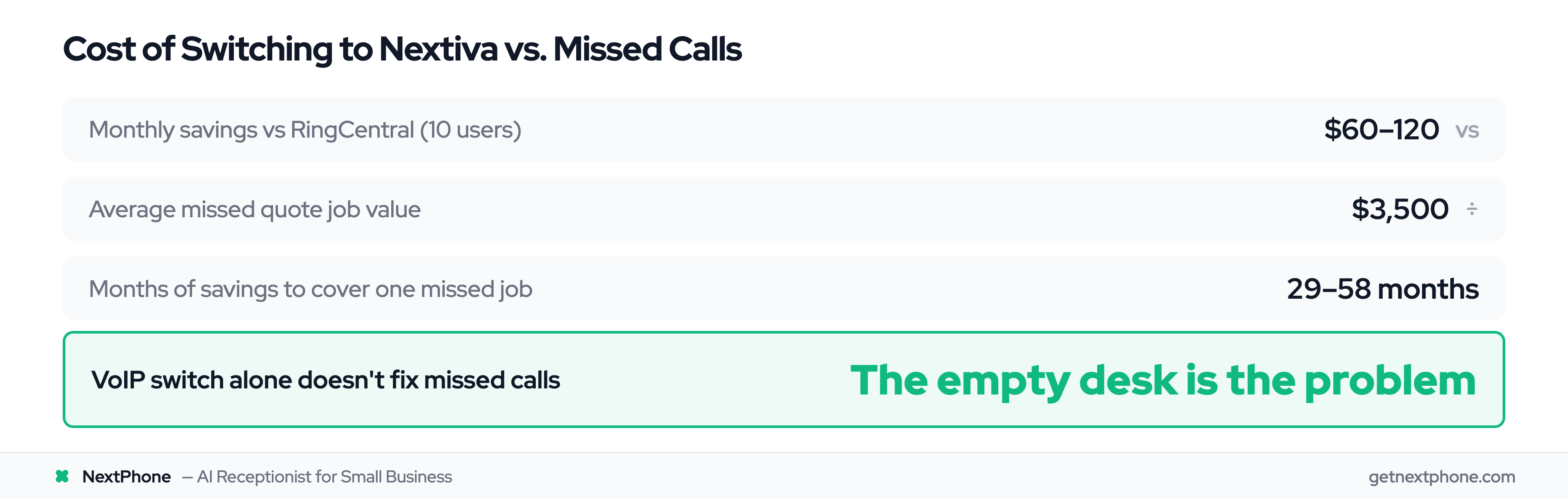
ROI calculation showing savings from switching VoIP don't offset revenue lost from missed calls

Let's say you switch from RingCentral to Nextiva:

  • RingCentral (10 users): $250-350/month
  • Nextiva (10 users): $189-330/month
  • Monthly savings: $60-120

That's real money. But if calls still go to voicemail, you're still losing revenue. One missed $3,500 quote request costs more than a year of those savings.

The VoIP platform isn't the problem. The empty desk is.


NextPhone AI Receptionist

Answer every call, book appointments, 24/7.

AI Answering: The Alternative Nobody Mentions

There's a category of solution most "RingCentral alternatives" articles completely ignore: AI-powered answering service solutions.

This isn't another VoIP platform. It's a fundamentally different approach to the "missed calls" problem.

What AI Answering Actually Does

AI answering services pick up the phone when you can't. Here's what that looks like in practice:

Every call answered: AI picks up in under 2 seconds. No voicemail, no missed opportunities. 24/7/365 - nights, weekends, holidays, 3 AM emergencies.

Routine questions handled: "What are your hours?" "Do you service my area?" "How much for a standard service call?" AI answers these instantly — hours, location, and service questions are among the most frequent call types in our 1,446,980+ call corpus.

Appointments scheduled: Customer wants to book? AI checks your calendar in real-time, confirms the slot, sends confirmation. Booking and rescheduling appointments is the single largest call category we see — that's billable work the AI captures for you automatically.

Emergencies routed: "My pipe burst!" AI detects urgency keywords and transfers to your number within seconds. Every emergency call reaches you immediately instead of going to voicemail.

Hear it: AI screening a caller and routing to the right line
0:00
0:00

This is the routing layer RingCentral charges to configure (and then to maintain as your team grows). The AI screens first, then forwards to whoever owns that call type — owner cell, on-call tech, billing line — without a separate IVR build.

Messages captured perfectly: Customer leaves details? AI captures everything verbatim.

Spam filtered: A meaningful share of inbound calls are spam and robocalls. AI identifies and blocks them automatically. You never hear about the extended car warranty offers.

What the AI Actually Sounds Like

Before you trust an AI on your inbound line, you need to hear it answer the phone. A flat-rate plan is only worth it if the voice on the other end doesn't sound like a 2008 IVR. NextPhone ships a 28-voice production library — small-business owners typically pick one calm-professional voice for the main line and an alternate for after-hours. Two of the most-picked:

Hear it: Emma — warm-professional female voice
0:00
0:00

The default we recommend for service businesses with a customer-facing front line. Warm, organized, unhurried. Pair her with your standard intake script (or have NextPhone draft one).

Hear it: Chris — direct-confident male voice
0:00
0:00

Better for contractors, dispatch lines, and B2B sales — anywhere you want the caller to feel like a competent person picked up, not a chatbot. Same flat-rate plan, different voice.

How It Differs from VoIP

Let's be clear about what we're comparing:

VoIP (RingCentral, Nextiva, etc.)AI Answering (NextPhone)
Phone systemAnswering solution
Routes calls to youAnswers calls for you
You need someone to pick upAI picks up 24/7
Per-user pricingFlat monthly rate
Works when you're availableWorks when you're not
Outbound calls from desk or appOutbound calls from the NextPhone app
Texting capped, with overage feesTwo-way texting included
Rings every desk until voicemailApp rings you first, AI picks up if you don't

For teams that need extensions and internal collaboration, these are complementary categories — a phone system for the team, AI answering on top. For a 1–3 person business, the line between them has mostly disappeared. Which raises the question people keep asking us:

Can NextPhone Replace RingCentral Outright?

"So... are you a VoIP?" Sort of — a new-age one. NextPhone started as the answering layer, but the phone-system basics are now built in. On one $199 flat line you get:

  • Your existing number, ported in — customers dial the same number they always have
  • Every inbound call answered in under 2 seconds, 24/7 — no voicemail, ever
  • The app rings you first when you want to pick up yourself — if you don't answer within a few seconds, the AI takes the call instead of a voicemail box
  • Outbound calls from the mobile app — your business number shows on the caller ID, not your personal cell
  • Two-way texting on the same number — send and receive, included in the flat rate
  • A transcript, summary, and recording of every call — no premium add-on tier

For a solo operator or a 1–3 person team, that's the whole job RingCentral was doing — minus the per-user math, plus every call actually answered. Cancel the seat licenses, port the number, done.

For larger teams, not yet: NextPhone doesn't do per-user extensions, department ring groups, or desk phones. If you need those, run the hybrid setup covered below — a simple VoIP for the team, NextPhone answering the main line.

Why NextPhone Beats RingCentral on Cost + AI Features

Here's the comparison most guides skip — RingCentral charges $20–45/user/month but still doesn't answer your calls. NextPhone does, for $199/month flat:

RingCentralNextPhone AI
Monthly cost (5 users)$125–175/month$199/month flat
Pricing modelPer-user (scales with headcount)Flat rate (unlimited calls)
Answers inbound calls 24/7
After-hours coverage
Appointment booking✅ (books into your calendar)
AI call summary + transcriptPremium add-on✅ Included
Outbound calls✅ Desk + app✅ From the mobile app
Two-way business texting✅ Capped, overage fees✅ Included
Rings you first, AI as backup❌ (voicemail as backup)
Setup timeMulti-day, IT requiredSame-day
Improves over timeStatic config✅ Learns your business from every call

At five users, the monthly cost is nearly the same — but RingCentral only routes calls to desks that may or may not be staffed. NextPhone answers every one of them, 24/7.

Cost Comparison vs Human Receptionist

SolutionMonthly CostCalls Answered
RingCentral (5 users)$125-175Only when someone's available
Nextiva (5 users)$95-165Only when someone's available
Full-time receptionist$3,500+40 hours/week
AI answering (NextPhone)$199 flat24/7/365, unlimited calls

For $199/month, AI answering provides coverage that would cost $40,000+/year with a human receptionist. And unlike a human, AI doesn't take lunch breaks, sick days, or vacations. For a full breakdown, see our AI receptionist pricing guide.

Who This Works For

AI answering makes sense when:

  • Service businesses: Contractors, law firms, real estate agents
  • Solo operators: Can't answer while working on jobs
  • Teams missing after-hours calls: Revenue walking away at 6 PM
  • Anyone losing business to voicemail: Every unanswered call is a potential customer going elsewhere

RingCentral for Law Firms: Why Attorneys Switch

Law firms are among the most common RingCentral customers — and among the first to discover the platform doesn't fix their real problem.

A 5-attorney firm on RingCentral Advanced pays $125/month for a system that routes calls to desks. Attorneys are in depositions, client meetings, and court for hours at a stretch. A new-client call that hits voicemail at 2 PM on a Tuesday doesn't wait for a 4 PM callback. According to the Clio 2024 Legal Trends Report, only 40% of law firms answered the phone when secret-shopped. And 42% of legal consumers hire the first firm that responds (Gary Falkowitz, intake consultant to 200+ firms).

After-hours intake is the sharper gap: only 25% of law firms answer after hours, while 35%+ of prospective clients call during evenings and weekends. A RingCentral phone system rings an empty desk at 7 PM.

What NextPhone adds to (or replaces) RingCentral for law firms:

  • 24/7 intake — new client calls answered every night, weekend, and holiday, with case details collected before any transfer or message
  • Urgency routing — arrests, imminent hearings, and emergencies route to the on-call attorney immediately, not to voicemail
  • Clio booking — the AI checks your Clio calendar and books the initial consultation during the call, or texts a booking link if no slot is available
  • Triage before transfer — case type, incident date, and jurisdiction are collected before any transfer, so no attorney takes a new-client call cold

For solo practitioners and small firms, NextPhone replaces RingCentral entirely: same number, AI answers 24/7, outbound calls and texting from the app. For larger firms with per-user extensions and department lines, it runs alongside the VoIP system — covering the inbound line where missed calls cost the most. See the full intake routing breakdown: answering service for law firms.


Who Still Needs Traditional VoIP

For a solo operator or a 1–3 person team, NextPhone can be the whole phone setup — answered calls, outbound calls, and texting on one number. Larger teams still need traditional VoIP if:

  • Multiple staff each need their own extension or direct line
  • Calls ring across departments (hunt groups, ring groups)
  • Desk phones or SIP hardware are part of the workflow
  • Team messaging and video meetings should live in the same suite
  • Enterprise compliance mandates specific platforms

The point isn't that VoIP is bad. It's that many businesses pay for VoIP when their actual problem is unanswered calls.


The Hybrid Approach: Best of Both Worlds

If you're a 1–3 person business, you may not need this section — NextPhone alone covers calls in, calls out, and texting. But for teams that need extensions and internal collaboration, you don't have to choose:

Simple phone system for the team + AI answering for inbound coverage.

Example Setup

  • Basic VoIP (Grasshopper or Ooma): $20-50/month
  • AI answering (NextPhone): $199/month Total: $220-250/month

Compare that to:

  • RingCentral (5 users): $125-225/month, but calls still go to voicemail after hours
  • Plus full-time receptionist: Add $3,500/month if you want calls answered

The hybrid approach costs less than many enterprise VoIP plans while delivering what most small businesses actually need: the ability to make calls AND have incoming calls answered.

What You Get

  • Outbound calling capability when you need it
  • 24/7 inbound answering - every call
  • Appointment scheduling handled automatically
  • Emergency routing to your phone immediately
  • Spam filtering (spam and robocalls blocked automatically)
  • Perfect message capture for callbacks
  • No per-user fees eating into margins

Real-World Scenario

Plumbing contractor, 3-person team:

Current setup (RingCentral): $75-105/month, but calls go to voicemail during jobs, after 5 PM, and on weekends.

Hybrid setup: $70/month (Grasshopper) + $199/month (NextPhone) = $269/month

Result: All calls answered 24/7. Emergencies routed to on-call plumber's cell within seconds. Appointments scheduled automatically. Quote requests captured with perfect details.

ROI check:

  • One captured emergency job ($1,200 average) pays for 4+ months
  • One quote request that converts ($3,500 average) pays for 13+ months

The math works.


How to Choose the Right RingCentral Alternative

Not everyone needs the same solution. Here's how to figure out what fits. For a side-by-side comparison of all categories, see our virtual receptionist comparison and answering service comparison.

Choose Traditional VoIP Alternative If:

  • Internal team communication (messaging, video) is critical
  • Multiple staff each need their own extension or direct line
  • Complex call routing between departments is required
  • You have dedicated staff to answer incoming calls
  • Enterprise compliance requirements mandate specific platforms

Recommendations:

  • Best overall: Nextiva (great support, competitive features)
  • Budget pick: Zoom Phone ($10/user)
  • Simplest: Ooma Office (no contracts, quick setup)
  • Solopreneurs: Grasshopper (no per-user fees)

Choose AI Answering If:

  • Inbound calls currently go to voicemail
  • After-hours coverage is critical for your business
  • You're a service business with scheduling needs
  • No dedicated receptionist available
  • You're a 1–3 person business that wants one flat bill for calls answered, calls out, and texting
  • The cost of missed calls exceeds solution cost (usually true)

Recommendation: NextPhone AI for 24/7 coverage at flat rate

Choose Hybrid If:

  • You need both outbound calling AND 24/7 inbound coverage
  • Small team can't afford a full-time receptionist
  • Current VoIP works fine but calls go unanswered
  • You want the best of both worlds without enterprise pricing

Recommendation: Simple VoIP (Grasshopper or Ooma) + AI answering

Ask Yourself These Questions

  1. What percentage of your calls currently go unanswered?
  2. Do you need to make outbound calls, or is inbound your main concern?
  3. How many team members actually need phone system access?
  4. What's your current cost per user per month?
  5. What's the value of a typical missed call in your business?

If most calls go unanswered and missed calls cost real revenue, AI answering solves that problem better than any VoIP switch.


Switching from RingCentral: What to Know

If you do decide to switch, here's what to expect.

Number Porting

Good news: you can keep your phone number. Almost every VoIP provider and AI answering service supports number porting.

The process typically takes 1-2 weeks. You'll fill out some paperwork, RingCentral releases the number, and your new provider takes over. Customers won't notice any change. Our phone number porting guide walks through the full process step by step.

Contract Considerations

Before switching, check your RingCentral contract:

  • Remaining term length
  • Early termination fees (if any)
  • Whether annual prepayment is refundable
  • Auto-renewal clauses

Factor any exit costs into your switch timing. Sometimes waiting a month or two saves significant fees.

Transition Timeline

  • VoIP to VoIP: 2-4 weeks (mostly number porting)
  • Adding AI answering: Same day with new number, 1-2 weeks if porting
  • Hybrid setup: Can run parallel during transition for seamless handoff

What You'll Lose (Honestly)

Switching means giving up:

  • RingCentral-specific integrations (may need alternatives)
  • Meeting history and call recordings (export first)
  • Existing call flows (need to rebuild on new platform)
  • Familiarity (learning curve with any new system)

None of these are dealbreakers, but plan for them.

Softphone vs. Physical Phones

Before switching, decide whether your team needs desk phones or can work entirely from softphones (apps on computers and mobile devices). Most modern alternatives default to softphone-first, which cuts hardware costs to zero. If your team relies on physical handsets, confirm compatibility with your new provider before committing — not every alternative supports every SIP phone model.

Call Recording Compliance

If you record calls — for training, quality assurance, or legal protection — check your state's consent laws before migrating. Some states require all-party consent, meaning every person on the call must agree to recording. Your new provider's recording setup may differ from RingCentral's. Our guide on call recording laws by state covers the compliance details.

Run a 2-Week Proof of Concept

Don't rip and replace on day one. Most providers offer free trials or month-to-month plans. Run your new system alongside RingCentral for two weeks. Forward a subset of calls to the new provider. Test call quality, reliability, mobile app performance, and support responsiveness under real conditions. If it works, migrate fully. If it doesn't, you haven't disrupted your business.


How We Evaluated These Alternatives

We reviewed each alternative across five criteria that matter most to small businesses:

  1. Pricing transparency. We looked at actual costs — not just advertised starting prices. That means factoring in per-user fees, add-ons, overages, and contract requirements.
  2. Setup ease. How quickly can a non-technical business owner get up and running? We prioritized solutions that don't require IT support or multi-day onboarding.
  3. Support quality. When something breaks, how fast do you get help? We cross-referenced G2 and TrustRadius ratings for customer support responsiveness.
  4. Feature fit for SMBs. Enterprise features look impressive on spec sheets but add complexity small teams don't need. We evaluated whether core features match how small businesses actually operate.
  5. Real user reviews. We sourced feedback from G2, TrustRadius, and practitioner communities to surface common praise and complaints — not just vendor marketing.

For a deeper dive into VoIP fundamentals for small business, we have a separate guide covering the basics.


Frequently Asked Questions

What is the best free alternative to RingCentral?

There's no true "free" business phone alternative with comparable features. Google Voice offers free personal use but limited business functionality. For low-cost options, consider Zoom Phone at $10/user/month or Unitel Voice at $9.99/month. If your main concern is having calls answered rather than a full phone system, AI answering at $199/month flat rate often delivers better ROI than free tools with major limitations.

Is there a free version of RingCentral?

No. RingCentral offers a time-limited free trial but no free plan — the cheapest tier is $20/user/month billed annually. If free is the requirement, Google Voice's personal tier is the closest real option, with Unitel Voice ($9.99/month) and Zoom Phone ($10/user/month) as the cheapest paid routes.

Who is RingCentral's biggest competitor?

By scale, Microsoft Teams Phone and Zoom Phone — both bolt onto suites businesses already pay for, which makes them the default switch. For a like-for-like UCaaS platform, Nextiva is the alternative small businesses shortlist most, with 8x8 and Dialpad close behind. NextPhone competes on a different axis entirely: instead of routing calls to your team, it answers them.

Is Nextiva or RingCentral better for small business?

Nextiva offers better customer support (rated 9.0 vs 7.9 on G2) and slightly lower pricing for similar features. However, both use per-user pricing models that scale with team size. For small businesses, the bigger question is whether you need a full UCaaS platform at all. Many find simpler solutions or AI answering better suited to their actual needs.

Can I keep my phone number when switching from RingCentral?

Yes. Number porting is standard across VoIP providers and AI answering services. The process takes 1-2 weeks, and most providers handle the paperwork for you. Your customers won't notice any change - same number, different system answering.

What's cheaper than RingCentral for a small team?

For traditional VoIP: Zoom Phone ($10/user), Ooma ($19.95/user), or Grasshopper ($14-55/month flat rate). For call answering specifically: AI answering at $199/month covers unlimited calls regardless of team size - no per-user fees.

How does AI answering differ from VoIP phone systems?

VoIP is a phone system - it routes calls to phones that someone needs to answer. AI answering actually answers calls 24/7, handles routine questions, schedules appointments, routes emergencies, and captures messages. Larger teams need both: VoIP for extensions and internal collaboration, AI for ensuring inbound calls get answered. For a 1–3 person business, NextPhone covers both — it answers inbound calls and handles outbound calls and texting from the app.

Is RingCentral worth it for a one-person business?

Usually not. Solo businesses rarely need enterprise UCaaS features like video meetings for 200 people, team messaging, and advanced analytics. Better options include Grasshopper ($14/month for basic virtual phone), Google Voice (free/cheap basics), or AI answering if your main challenge is calls going unanswered while you're working.

Which is better, RingCentral or Grasshopper?

Different weight classes. Grasshopper is a virtual phone number with flat pricing ($14–55/month) — right for solos who want business and personal calls separated. RingCentral is a full UCaaS platform — right for teams that need extensions, video, and integrations. Neither answers your calls; if that's the real problem, pair either with AI answering — or for a 1–3 person business, let NextPhone replace both.

Can my boss see my RingCentral calls?

Yes. RingCentral admins can see call logs — numbers, times, durations — and can listen to recordings if the company has call recording enabled. Whether those calls can legally be recorded depends on state consent laws; some states require every participant's consent. Our guide to call recording laws by state covers what notification is required where.

Is NextPhone a VoIP or an answering service?

A bit of both — closer to a new-age VoIP. It answers every inbound call with AI, 24/7, and the phone-system basics are built in: your ported number, outbound calls from the mobile app with your business caller ID, two-way texting, and an app-rings-first mode where you pick up when you're free and the AI catches everything else. What it doesn't do: per-user extensions, ring groups, and desk phones — teams that need those keep a simple VoIP alongside it.

Is RingCentral good for law firms?

RingCentral works as a phone system for law firms that need per-user extensions, department lines, and team messaging — but it doesn't answer the phone. The Clio 2024 Legal Trends Report found only 40% of firms answered when secret-shopped, and 42% of legal consumers hire the first firm that responds. For practices where 24/7 intake matters (personal injury, criminal defense, family law), adding AI answering alongside RingCentral — or replacing it entirely for solo and small practices — is the switch that changes outcomes, not a VoIP upgrade.

What are the best alternatives to RingCentral in 2026?

The strongest alternatives to RingCentral in 2026 are Nextiva ($18.95/user/mo, best support), Zoom Phone ($10/user/mo, cheapest VoIP), Microsoft Teams Phone ($15/user/mo add-on for M365 customers), 8x8 ($15/user/mo, best for international calling), Ooma Office ($19.95/user/mo, no contracts), Grasshopper ($14–55/mo flat for solos), OpenPhone ($19/user/mo for remote teams), and NextPhone AI ($199/mo flat for 24/7 AI call answering). Most small businesses end up pairing a cheaper VoIP with AI answering rather than buying a full RingCentral-style UCaaS plan.

How does RingCentral compare to competitors like Zoom Phone, Microsoft Teams Phone, 8x8, and Nextiva in 2026?

Zoom Phone undercuts RingCentral on price ($10 vs $20/user). Microsoft Teams Phone is the cheapest add-on if you already pay for M365 ($15/user). 8x8 wins on international calling (unlimited to 14–48 countries). Nextiva matches RingCentral feature-for-feature with materially better support (G2: 9.0 vs 7.9) at slightly lower cost. RingCentral still wins on raw integration count (300+) and contact-center maturity, but most small businesses don't use those features.

What is the best RingCentral competitor for small business in 2026?

For most small businesses in 2026, Nextiva is the best like-for-like RingCentral competitor (similar features, better support, slightly cheaper). If your team already uses Microsoft 365, Teams Phone is cheaper. If your problem isn't the phone system but unanswered inbound calls, NextPhone AI at $199/mo flat replaces a receptionist for less than the cost of three RingCentral seats — and answers in under 2 seconds, 24/7.


The Bottom Line

RingCentral is a powerful platform - built for enterprises with enterprise needs.

For small businesses, it's often overkill: expensive per-user pricing, features you'll never use, complexity that eats into your day.

The best RingCentral alternative depends on what you actually need:

Need a phone system? Nextiva, Zoom Phone, or Ooma offer similar features at lower cost with less complexity.

Need calls answered? AI answering solves the problem VoIP can't - 24/7 coverage at flat rate pricing, no per-user fees, no missed calls.

Running a 1–3 person business? You may not need two products at all - NextPhone answers, calls, and texts on one flat-rate number.

Need both? The hybrid approach - simple VoIP plus AI answering - often costs less than enterprise VoIP alone while delivering better outcomes.

Before you switch to another VoIP provider, ask yourself: Is the phone system really the problem? Or is it the calls going to voicemail while you're busy running your business?

Ready to stop paying for features you don't use - and start capturing every call? See how NextPhone's AI receptionist handles your calls 24/7 on flat monthly plans from $199. No per-user fees. No missed calls. No voicemail black holes.

Try NextPhone AI answering service

AI answering service that answers, qualifies, and books — 24/7.

Related Articles

Yanis Mellata

About NextPhone

NextPhone helps small businesses implement AI-powered phone answering so they never miss another customer call. NextPhone captures leads, qualifies prospects, books meetings, and syncs with your CRM — automatically.

Try NextPhone

Get Started Free