The Phone System Debate You're Having Wrong
You just upgraded your business phone system. New VoIP setup, crystal-clear call quality, professional auto-attendant greeting. Feels great.
Then you check your call log after a week on the job site. Fourteen missed calls. Three voicemails. Eleven potential customers who called, got no answer, and moved on.
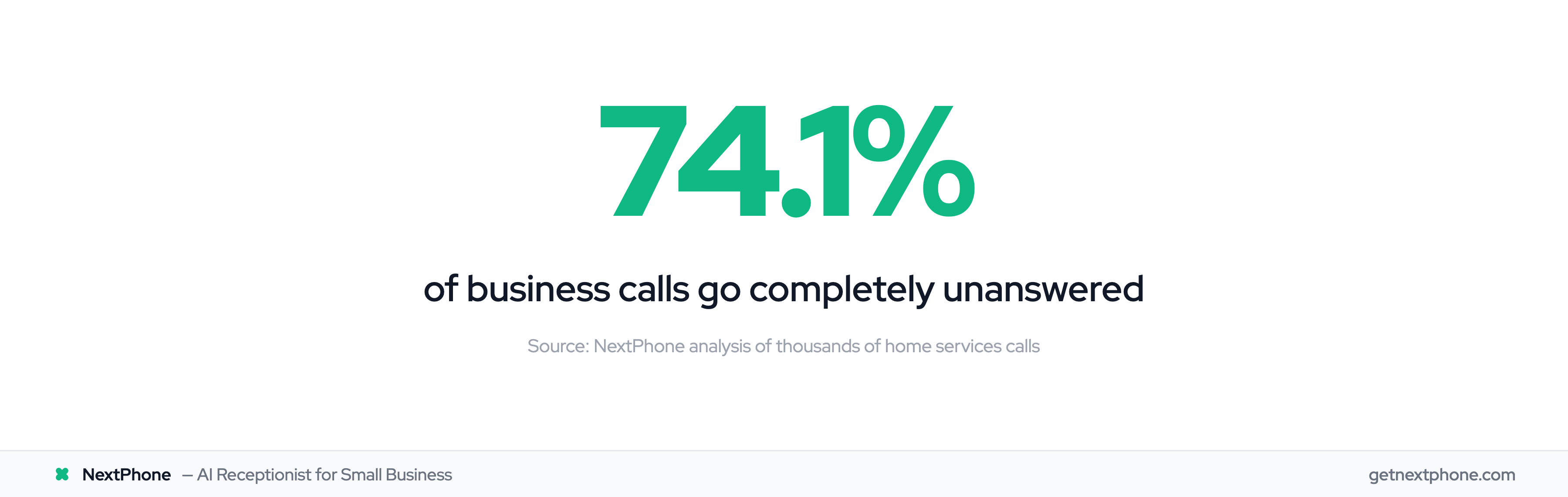
Here's the thing most "business phone comparison" guides won't tell you: the business phone system you choose is far less important than whether someone picks it up. In Invoca's analysis of thousands of calls from home services businesses, 74.1% went completely unanswered. That stat holds whether the business uses a landline, VoIP, or a virtual number.
But you still need to choose a phone system. So let's do this properly. I'll give you an honest comparison of all three options, what they actually cost, and then we'll talk about the factor that really determines whether your phone makes or loses you money. If you haven't set up a business line yet, start with our guide on how to get a business phone number.
This guide is based on hands-on experience with each system type. Pricing verified as of early 2026.
Quick Recommendation by Business Type
| Business Type | Best Phone System | Why |
|---|---|---|
| Solo operator, budget-conscious | Virtual number ($10-25/mo) | Separate business line, no hardware |
| Small team (2-10 people) | VoIP ($15-40/user/mo) | Call routing, shared lines, CRM integration |
| Growing business (10+) | VoIP/UCaaS ($30-50/user/mo) | Full collaboration suite, analytics |
| Any business missing calls | VoIP + AI receptionist | Answers 24/7 regardless of phone system |
Understanding Your Three Business Phone Options
Before you can pick the right system, you need to understand what you're actually choosing between. These three categories cover virtually every business phone option on the market.
Traditional Landlines (POTS/PBX)
Traditional landlines use copper wiring connected to the public switched telephone network (PSTN). They've been the standard for over a century. For businesses with multiple employees, a Private Branch Exchange (PBX) system routes calls internally.
The hardware lives on-site. The lines are physical. And the technology, while proven, is being actively phased out by most carriers. AT&T, Verizon, and others have already started sunsetting copper infrastructure in many markets.
VoIP (Voice over Internet Protocol)
VoIP converts your voice into digital packets and sends them over the internet. Cloud-hosted VoIP means no on-site hardware beyond your phones or headsets. Everything runs through your provider's servers.
The global VoIP market hit $151.21 billion in 2024, growing at 12.1% annually. That growth tells you where the industry is heading. Most new business phone installations today are VoIP.
Virtual Phone Systems
Virtual phone systems give you a business number that forwards to your existing devices. No hardware, no desk phones, no PBX. Calls to your business number ring on your cell phone, laptop, or whatever device you designate.
Think of it as a professional layer on top of your personal phone. You get a separate business number, basic call routing, and voicemail without carrying a second device. For more on this option, see our guide on getting a virtual phone number for business.
Cost Comparison: The Real Numbers
Let's cut through the vague pricing language and look at what each option actually costs for a small business.
Monthly Costs Side-by-Side
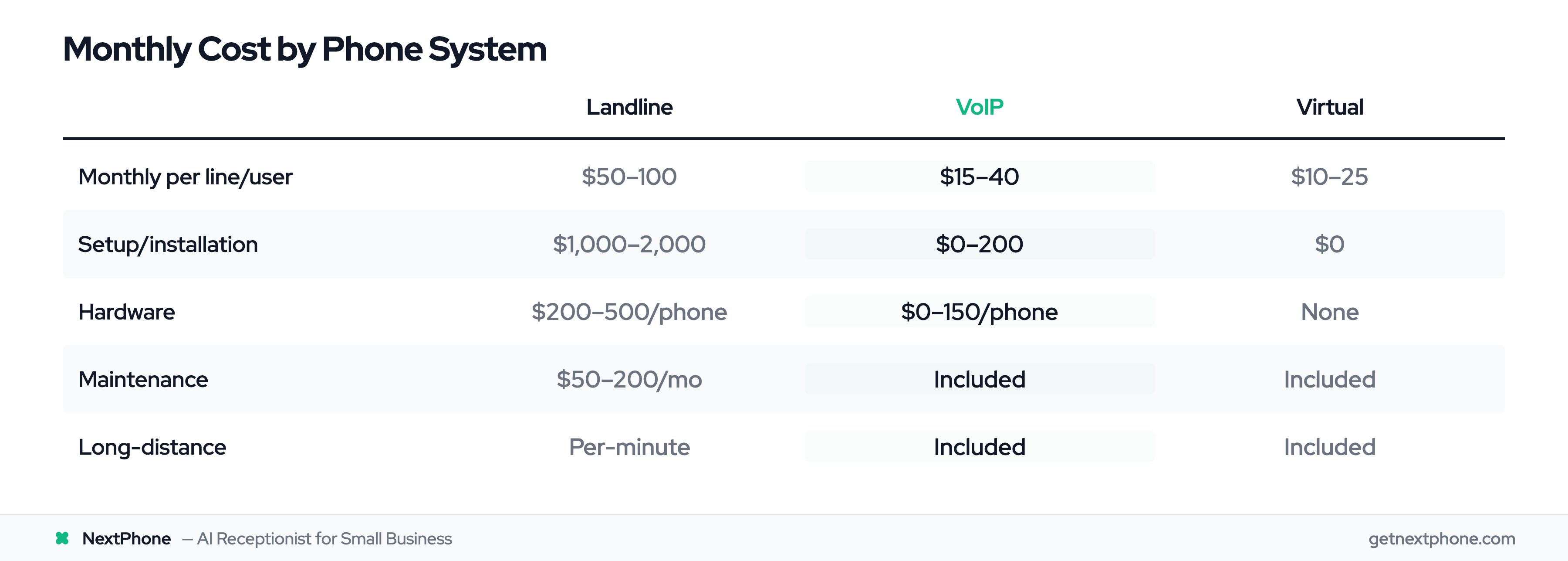
| Cost Factor | Landline | VoIP | Virtual |
|---|---|---|---|
| Monthly per line/user | $50-100 | $15-40 | $10-25 |
| Setup/installation | $1,000-2,000/user | $0-200 total | $0 |
| Hardware | $200-500/phone | $0-150/phone | None |
| Maintenance | $50-200/month | Included | Included |
| Long-distance | Per-minute charges | Usually included | Usually included |
What the Pricing Tables Don't Show
Most comparison guides stop at the monthly bill. They're missing the biggest cost: what happens when nobody answers. Invoca's analysis of thousands of calls from home services businesses found that 74.1% go completely unanswered. Each missed call is a potential customer calling your competitor instead. For more on the true cost of missed calls, see our reduce missed calls guide.
A full-time receptionist costs $35,000 per year according to the Bureau of Labor Statistics. That's nearly $3,000 a month just in salary, before benefits, training, or vacation coverage.
The Bottom Line on Cost
VoIP saves most businesses 40-60% compared to landlines on their phone bill. Virtual systems save even more. But the real financial question isn't "which system costs less?" It's "which approach captures the most revenue?"
Features and Reliability Compared
Call Quality and Reliability
Landlines win on raw reliability. Copper doesn't need internet or power (for basic service). In a power outage, your landline still works. For businesses in areas with spotty internet, this matters.
VoIP quality depends on your internet connection. With a stable connection (25+ Mbps), modern VoIP is indistinguishable from a landline. Leading providers guarantee 99.999% uptime. But if your internet goes down, so do your phones.
Virtual systems piggyback on your cell carrier's network. Quality matches whatever your cell service provides in your area.
Feature Comparison
| Feature | Landline | VoIP | Virtual |
|---|---|---|---|
| Voicemail | Basic | Visual + transcription | Basic to advanced |
| Call forwarding | Limited | Advanced rules | Core feature |
| Auto-attendant | Expensive add-on | Usually included | Basic version |
| Call recording | Requires hardware | Cloud-based, included | Limited |
| SMS/texting | No | Yes | Some providers |
| CRM integration | No | Yes | Limited |
| Video conferencing | No | Usually included | No |
| Mobile app | No | Yes | Yes |
| Number porting | Yes | Yes | Yes |
| Multiple lines | Expensive to add | Easy to add | Easy to add |
Scalability and Flexibility
VoIP scales effortlessly. Adding a new employee means adding a user to your account, not running new copper to their desk. Remote workers connect from anywhere with internet.
Landlines require physical installation for each new line. Moving offices means reinstalling everything.
Virtual numbers add lines instantly but lack the advanced collaboration features (video, team messaging) that VoIP bundles in.
Pros and Cons Summary
Landline
- Pros: Rock-solid reliability, no internet dependency, works during power outages
- Cons: Expensive to install and maintain, no modern features, being phased out by carriers, can't scale easily
VoIP
- Pros: 40-60% cheaper than landlines, rich feature set (CRM integration, call recording, video), scales instantly, works anywhere with internet
- Cons: Depends on internet quality, goes down if internet goes down, can have minor latency issues
- Notable providers: RingCentral (from $20/user/mo), Nextiva (from $25/user/mo), Ooma (from $20/user/mo)
Virtual Phone System
- Pros: Cheapest option, no hardware needed, instant setup, works on existing devices
- Cons: Limited features, no team collaboration tools, basic call routing only
- Notable providers: Google Voice (free personal/$10/mo business), Grasshopper (from $14/mo)
For a deeper dive into VoIP options, see our VoIP small business guide.