
Your phone rings. A homeowner needs their AC fixed today - it's 95 degrees and climbing. But you're under a house running electrical wire. The call goes to voicemail. They call the next contractor on their list.
That scenario plays out thousands of times every day. And switching to VoIP won't fix it by itself.
This guide covers everything you need to know about VoIP for small business: what it is, what it costs, how to set it up, and the critical piece most guides skip - how to actually make sure those calls get answered.
What Is VoIP and Why Small Businesses Are Switching
VoIP stands for Voice over Internet Protocol. Instead of sending your voice through copper phone lines, VoIP converts it into digital data and routes it through the internet.
Think of it this way: traditional phone calls travel on dedicated highways built decades ago. VoIP calls travel on the same internet infrastructure that handles your email, streaming, and everything else online.
The result? Lower costs, more features, and flexibility that landlines can't match.
How VoIP Calls Work (Technical Made Simple)
When you make a VoIP call, your voice gets converted into small digital packets. These packets travel across the internet to the person you're calling, where they get reassembled back into audio.
This happens in real-time, which is why modern VoIP calls sound just as clear as landline calls - sometimes better.
You can make VoIP calls from:
-
Traditional-looking desk phones (IP phones)
-
Your computer using a softphone app
-
Your smartphone using a VoIP app
-
Even a regular phone connected to a VoIP adapter
And yes - Google Voice is a VoIP service. It uses internet protocols to route calls, which is why it needs Wi-Fi or mobile data to work. More on that in the FAQ section.
VoIP vs Landline: The Business Case
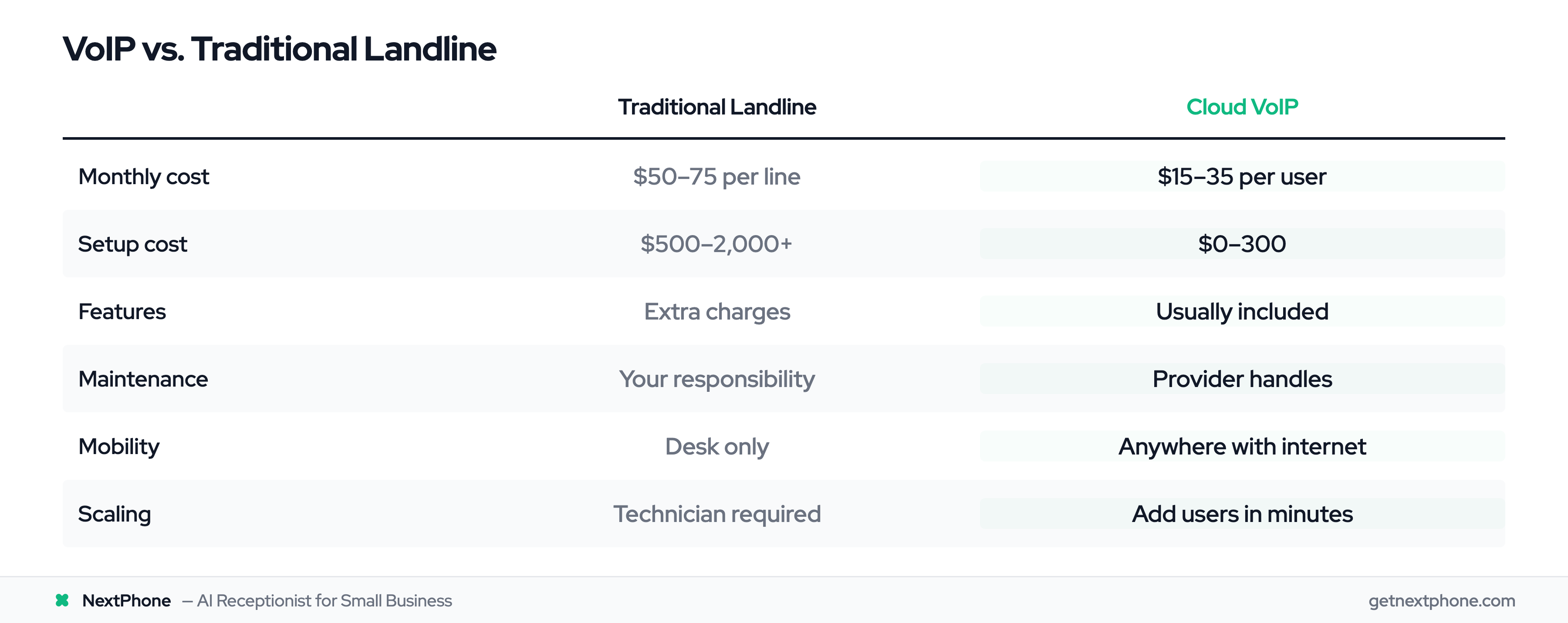
The numbers make the decision straightforward for most small businesses:
| Factor | Traditional Landline | Cloud VoIP |
|---|---|---|
| Monthly cost | $50-75 per line | $15-35 per user |
| Setup cost | $500-2,000+ | $0-300 |
| Features | Extra charges | Usually included |
| Maintenance | Your responsibility | Provider handles |
| Mobility | Desk only | Anywhere with internet |
| Scaling | Technician visit required | Add users in minutes |
Landline infrastructure is aging, and carriers are investing less in maintenance. Meanwhile, VoIP providers are adding AI-powered features, better mobile apps, and tighter integrations with business tools.
For most small businesses, the question isn't whether to switch to VoIP - it's when.
The Real Cost of VoIP for Small Business
Let's break down what you'll actually pay, including the costs that don't show up in provider ads.
Monthly Service Costs
VoIP pricing typically falls into three tiers:
Entry Level ($10-20/user/month)
Basic calling, voicemail, and mobile apps. Works for businesses that just need phones and not much else.
Mid-Tier ($20-35/user/month)
Where most small businesses land. Includes auto-attendant menus, call recording, voicemail transcription, video conferencing, and team messaging. Providers like Zoom Phone, Nextiva, and RingCentral compete heavily here.
Premium ($35-50/user/month)
Advanced features like call center capabilities, AI-powered analytics, CRM integrations, and priority support. Usually overkill for businesses under 20 employees.
One-Time Setup Costs
Cloud VoIP keeps initial costs low:
-
Softphone apps: Free (use your existing computer and phone)
-
IP desk phones: $80-300 each (optional - nice to have, not required)
-
Headsets: $30-150 (if you're taking calls on a computer)
-
Conference room equipment: $200-2,000 (if you need it)
Many small businesses start with just softphone apps and add desk phones later if their team prefers them.
Hidden Costs to Watch
Before signing any contract, ask about:
-
Overage charges: Some plans limit minutes or charge per-minute after a threshold
-
International calling: Often not included in base plans
-
Number porting fees: Moving your existing number should be free, but some providers charge $10-25
-
Add-on features: Call recording, additional storage, or advanced analytics might cost extra
-
Hardware rental: Some providers push phone rentals that cost more than buying outright
According to Bureau of Labor Statistics data, the median hourly wage for a receptionist is $17.90. At $199/month, an AI receptionist costs less than hiring someone for 12 hours of work - and it covers you 24/7/365.
Choosing the Right VoIP Solution: Cloud vs On-Premise
There are two main approaches to VoIP. For small businesses, one is almost always the right choice.
Cloud-Based VoIP (Recommended for Small Business)
With cloud VoIP, your provider hosts everything. You don't own or maintain any servers - you just use the service.
Why cloud works for small businesses:
-
No hardware headaches: Provider maintains all the infrastructure
-
Automatic updates: New features appear without you doing anything
-
Scale instantly: Add or remove users from a web dashboard
-
Work from anywhere: Same system whether you're in the office, at home, or on a job site
-
Disaster recovery: If your office floods, your phone system keeps running
The overwhelming majority of small businesses choose cloud-based VoIP, and for good reason.
On-Premise VoIP (When It Makes Sense)
On-premise means you buy and maintain your own VoIP server. It's more control, but more responsibility.
Consider on-premise only if:
-
You have 100+ employees and high call volume
-
Specific compliance requirements demand local data storage
-
You have IT staff to maintain the system
-
You prefer one-time costs over monthly subscriptions
For a 1-20 person business? Cloud VoIP wins every time.
How to Set Up VoIP: Step-by-Step Guide
Setting up cloud VoIP is simpler than most people expect. Here's what actually happens.
Step 1: Assess Your Internet Connection
VoIP needs reliable bandwidth, but not as much as you might think.
Minimum requirements:
-
100 Kbps per concurrent call
-
Recommended: 1 Mbps or more per call for consistent quality
Quick math: A standard 50 Mbps business connection can easily handle 20+ simultaneous VoIP calls with room to spare.
Before committing to any provider, run a VoIP-specific speed test. Most providers offer these free. They check not just speed but also jitter and packet loss - factors that affect call quality.
If your internet is unreliable, consider upgrading to business-class service or getting a backup cellular connection for failover.
Step 2: Choose Your VoIP Provider
The market is crowded with options. Focus on these factors:
Pricing transparency: Does the advertised price include the features you need, or are there add-on charges?
Reliability: Look for 99.99%+ uptime guarantees. Read reviews about outages.
Support quality: When something breaks at 7 PM, can you reach someone?
Contract terms: Month-to-month costs more but offers flexibility. Annual contracts lock you in but usually save 15-20%.
Integration options: Does it connect with your CRM, calendar, or other business tools?
Take advantage of free trials. Most providers offer 14-30 days. Actually use the service during the trial - make calls, test the mobile app, see how support responds to questions.
Step 3: Select Your Phone Numbers
You have options here:
Port your existing number: Takes 1-3 weeks depending on your current carrier. Your provider handles the paperwork. By law, carriers cannot hold your number hostage. For a full walkthrough, see our guide on how to get a business phone number.
Get new local numbers: Instant activation. Choose any available area code.
Add toll-free numbers: 800, 888, 877, etc. Looks professional but comes with a tradeoff - local numbers have 60-70% answer rates while toll-free numbers see 40-50% because they're associated with telemarketers.
For most small businesses, porting your existing local number while getting a backup number makes sense.
Step 4: Set Up Your Devices
You don't need special equipment to start using VoIP.
Option A: Softphone Apps (Lowest Cost)
Download your provider's app on your computer and phone. Make and receive calls just like any other app. Cost: Free.
Option B: IP Desk Phones (Traditional Experience)
If you or your team prefer physical phones, IP phones from brands like Yealink, Polycom, or Grandstream work well. Most providers ship pre-configured phones that work when you plug them in. Cost: $80-300 per phone.
Option C: Analog Phone Adapters (Use Existing Phones)
If you have traditional desk phones you like, ATA adapters let you connect them to your VoIP service. Cost: $30-50 per adapter.
Step 5: Configure Call Routing
This is where most small businesses leave money on the table.
Basic setup includes:
-
Your main greeting (auto-attendant)
-
Business hours call routing
-
After-hours handling
-
Voicemail setup
The critical question: What happens to calls after hours?
If the answer is "voicemail," you're likely losing leads. Our data shows most home services calls happen outside standard 9-5 hours - and those callers have high intent.
Which brings us to the problem VoIP doesn't solve.
The Problem VoIP Doesn't Solve (And What Does)
VoIP gives you modern phone infrastructure. It's cheaper than landlines, more flexible, packed with features.
But VoIP doesn't answer your calls. You do.
And that's where things fall apart for most small businesses.
VoIP Gives You Flexibility - But Flexibility Can Backfire
Picture this: You've got a great VoIP setup. Calls forward to your cell phone. You can take calls anywhere.
Except you're on a ladder installing a ceiling fan. Or you're in a customer meeting. Or you're elbow-deep in a clogged drain.
The call goes to voicemail. The customer - who needed help today, not tomorrow - calls the next name on their list.
VoIP makes it easier to receive calls wherever you are. It doesn't make it easier to actually answer them.
The Shocking Truth About Missed Calls

Here's what the data on calls to home services businesses shows:
-
Industry research shows 74.1% of calls go completely unanswered - that's nearly three out of four potential customers
-
Approximately one in four callers explicitly asks for a callback - callbacks that, without a system, rarely happen
-
Urgent calls rank among the top reasons people call, using language like "emergency," "urgent," or "ASAP"
-
Emergencies are a recurring reason people call - pipe burst, no AC in 95-degree heat, power out
According to industry research, 85% of callers who reach voicemail won't call back. They don't leave a message - they call your competitor.
The Revenue Math That Hurts
Let's run the numbers for a typical home services contractor:
-
42 calls per month (industry average)
-
31 missed calls (74.1% go unanswered)
-
6 would have converted (20% conversion rate)
-
$3,500 average job value
Monthly lost revenue: $21,700
Annual lost revenue: $260,400
That's not a typo. A quarter million dollars per year, walking out the door because calls go unanswered.
VoIP is half the solution. The other half is making sure someone - or something - actually picks up.