AI receptionist or human receptionist - which should you choose?
The question assumes you have to pick one. You don't.
Most small businesses miss 74% of their calls. Across the 1,446,980+ business calls we've answered for contractors and others, neither AI alone nor human alone solved this completely. The businesses capturing the most revenue aren't choosing sides - they're strategically combining both.
This guide compares AI and human receptionists honestly. We'll show what each does better, reveal the hidden costs of both, and explain why hybrid wins. No sales pitch - just data and practical recommendations. Twilio's research shows a 31-point satisfaction gap: 90% of businesses think customers are satisfied, but only 59% actually are—highlighting the need for the right balance between AI and human interaction.
Quick Comparison: AI vs Human Receptionist at a Glance
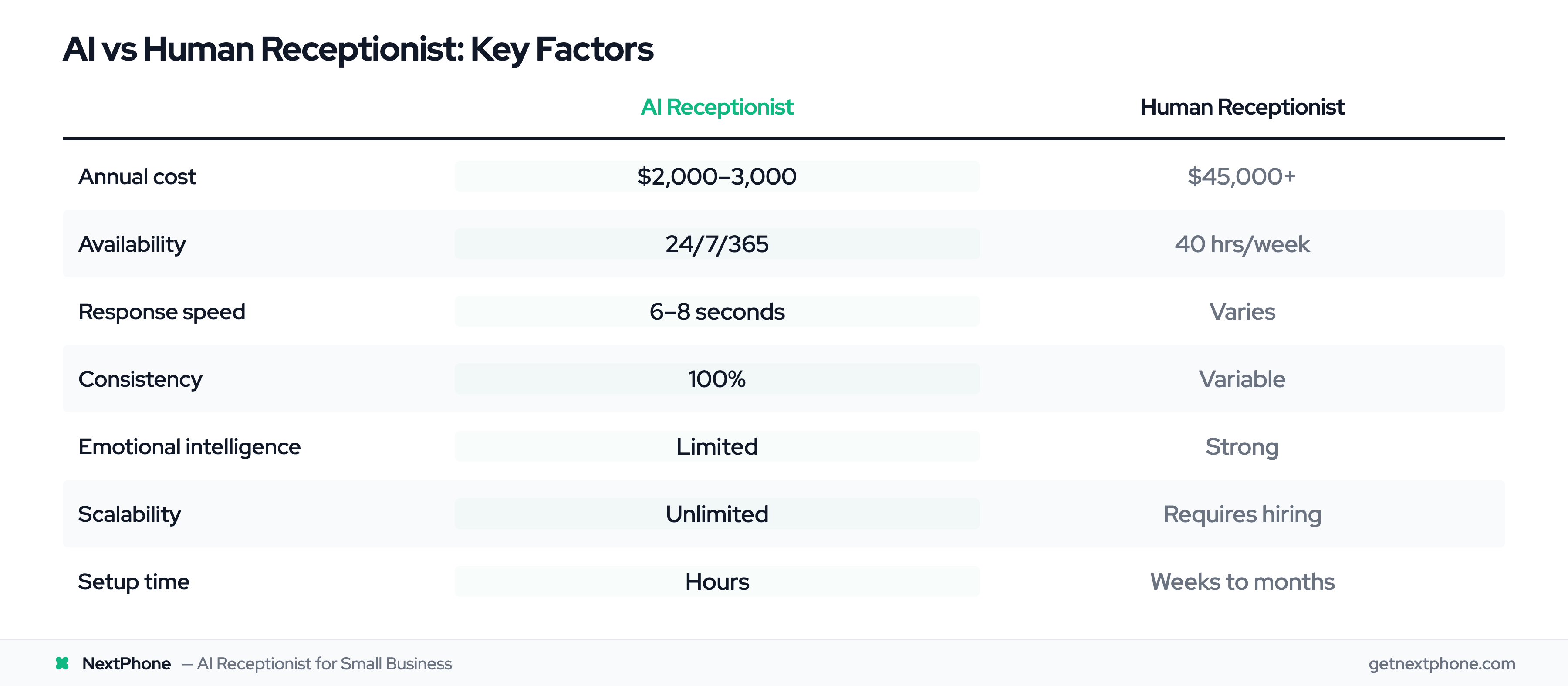
Before diving deep, here's the summary:
| Factor | AI Receptionist | Human Receptionist |
|---|---|---|
| Annual Cost | $2,000-3,000 | $45,000+ |
| Availability | 24/7/365 | 40 hours/week |
| Response Speed | 6-8 seconds | Varies |
| Consistency | 100% consistent | Variable |
| Complex Situations | Routes to human | Handles directly |
| Emotional Intelligence | Limited | Strong |
| Scalability | Unlimited | Requires hiring |
| Setup Time | Hours | Weeks to months |
Neither option wins across the board. Each excels in different situations, which is exactly why the either/or framing is wrong.
Cost Comparison: The Full Picture
Human Receptionist: True Total Cost
The Bureau of Labor Statistics puts the average receptionist salary at $35,000 per year. But that's not your actual cost.
Add benefits, payroll taxes, and overhead (roughly 30%), and you're at $45,500 annually.
But wait - there's more:
- Training: 2-4 weeks of paid learning curve
- Turnover: Average receptionist tenure is 2-3 years; each replacement costs $5,000+ to recruit and train
- Coverage gaps: Sick days, vacation, lunch breaks need backup
- Overtime: After-hours coverage requires premium pay or additional staff, often prompting businesses to consider an answering service alternative
Real-world total for reliable human coverage: $50,000-60,000/year once you account for backup coverage and turnover.
AI Receptionist: What You're Really Paying
AI receptionist pricing ranges from $95/month (limited calls) to $300+/month (enterprise features).
NextPhone charges $199/month with unlimited calls - that's $2,388/year.
Additional costs to consider:
- Setup time: 1-2 hours (usually free)
- Integration: Typically included
- Training the AI: 2-3 hours of your time
True total cost: $2,400-3,000/year including your time investment.
The Math Is Clear - But Incomplete
Annual savings: $43,000+ switching from human to AI.
But here's what pure cost comparison misses: capability differences. If AI can't handle your complex calls, those savings become lost revenue. If human can't provide 24/7 coverage, you're still missing calls.
The real question isn't "which costs less?" It's "where should I invest each dollar for maximum return?"
Availability & Response Speed
Coverage Hours Reality
Human receptionist: 40 hours per week (assuming full-time). That's 24% of the total hours in a week.
- Lunch breaks: 1 hour daily = 5 hours/week uncovered
- Sick days: Average 5 per year
- Vacation: 2-3 weeks per year
- Before 9 AM and after 5 PM: Voicemail
AI receptionist: 168 hours per week. 100% of available hours.
- No breaks, no sick days, no holidays
- Answers at 3 AM on Christmas
- Never asks for time off
- Consistent coverage regardless of weather, illness, or personal issues
Response Speed Comparison
When a call comes in:
AI receptionist: Answers in 6-8 seconds. Every time. No variation.
Human receptionist: Depends on current activity, other calls, distractions. Generally fast during working hours, but voicemail outside them.
After-Hours: Where the Money Is
Urgent calls rank among the top reasons people call. Many come outside business hours.
One HVAC contractor missed 23 after-hours emergency calls. At $1,200 per emergency job, that's $27,600 in lost revenue - just from calls that came when the office was closed.
For businesses with emergency services or customers who call evenings/weekends, 24/7 availability isn't a nice-to-have. It's essential.
Accuracy & Consistency
Information Accuracy
AI receptionist: 85-95% accuracy on routine inquiries. Information comes from a knowledge base you control. When you update hours or pricing, AI's information updates instantly across all calls.
Human receptionist: Accuracy varies based on training quality, memory, and tenure. New hires make more mistakes. Even experienced staff occasionally give outdated information or make errors under pressure.
Message Capture Quality
AI receptionist: Verbatim transcription. Customer says "My name is Michael Thompson, that's T-H-O-M-P-S-O-N, call me at 555-234-8876 anytime except Thursday mornings." You get exactly that.
Human receptionist: "Some guy named Mike Thomson or Thompson, I think. Left a number but I'm not sure I got it right. Said to call back, I forget when works for him."
This isn't hypothetical. In our analysis, businesses regularly lost leads due to incomplete message capture. AI eliminates this problem entirely.
Day-to-Day Consistency
AI receptionist: Monday at 9 AM and Friday at 4:55 PM are identical. No tired Mondays, no checked-out Fridays, no bad days affecting service quality.
Human receptionist: Human variability. Great employees still have off days. Personal issues, fatigue, and mood affect performance.
Human advantage: Humans can recognize when something "feels off" and ask clarifying questions naturally. AI follows patterns; humans detect exceptions.
Customer Experience Reality
The 64% Elephant in the Room
According to Gartner's 2024 survey, 64% of customers would prefer companies didn't use AI for customer service. Research confirms this human preference—93% of US consumers prefer human agents over AI, with 78% saying humans resolve problems faster and 84% saying more accurately.
That statistic scares many business owners. But context matters.
That 64% experienced bad AI: endless loops, inability to reach humans, frustrating scripts that go nowhere. They're not rejecting AI - they're rejecting terrible implementation.
When AI Actually Improves Experience
Consider the alternative to AI: voicemail or endless ringing.
Scenario A (No AI): Customer calls at 6 PM. Rings 5 times. Voicemail. Customer hangs up, calls competitor.
Scenario B (AI): Customer calls at 6 PM. AI answers in 6 seconds. "Thanks for calling. How can I help?" Answers their question about hours, books appointment, customer satisfied.
For simple questions, instant AI beats callbacks by hours or days.
Salesforce research shows 82% of customers expect faster service than ever. AI delivers speed. The 64% who "don't want AI" often prefer AI over waiting—62% of customers prefer chatbots over waiting for human agents.
The key insight: 77% are more willing to use AI if they know how to reach a human when needed.
When Human Touch Is Essential
Some calls genuinely need humans:
- Upset customers: "I'm furious about the job your guys did last week." This needs empathy, not scripts.
- Complex problems: "My circuit breaker trips sometimes but not always, and there's an intermittent burning smell." This needs expertise and clarifying questions.
- High-stakes sales: "$80,000 commercial renovation? Let's discuss your vision." This needs relationship building.
The solution isn't choosing one - it's routing appropriately.
What AI Handles Better (Honest Assessment)
Let's be clear about where AI genuinely outperforms humans:
Repetitive Questions
"What are your hours?" "Do you service my area?" "How much for a standard service call?"
A steady slice of every week's calls is these exact repetitive questions. AI answers them perfectly every time, freeing humans for work that actually needs expertise.
Appointment Scheduling
Customer wants Thursday 2-4 PM. AI checks calendar in real-time, books 2:30, sends confirmation. Done in 60 seconds.
Human receptionist: "Let me check... can I call you back?" Phone tag ensues. Appointment maybe booked in 2 days.
Booking or rescheduling an appointment is the single most common reason people call. AI handles these with zero friction.
After-Hours Coverage
You're asleep. Customer's pipe bursts at 2 AM.
With AI: Call answered, emergency detected, routed to your on-call phone within seconds.
Without AI: Voicemail. Customer calls three competitors. First one who answers gets the $1,500 job.
Spam Filtering
Spam and robocalls are filtered out before they ever ring you. That's hundreds of interruptions per year you never hear about.
AI recognizes patterns, blocks spam automatically. You never hear about it. Human receptionists answer every call, wasting time on "extended car warranty" pitches.
Perfect Message Capture
AI captures every detail verbatim. No forgotten names, no missed phone numbers, no "I think he said..." approximations.
For a business losing leads to incomplete information, this alone justifies AI cost.
When Smart Forwarding Kicks In (The 5-10%)
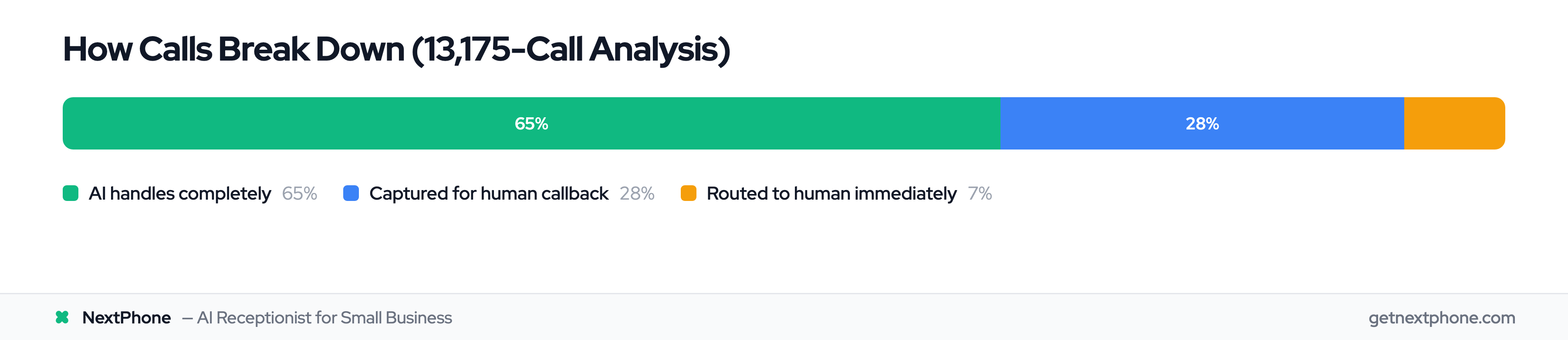
AI resolves 90-95% of calls. Here's when smart forwarding routes to your phone:
Complex Problem Descriptions
"My AC runs for 10 minutes then shuts off, but only on hot days, and there's water under the unit sometimes but not always."
AI captures the full description. Smart forwarding routes to you with all context. You ask the right diagnostic questions and schedule the appropriate technician. No stranger is making this judgment call—you are.
Upset Callers
Customer calls frustrated about a previous job. They need reassurance.
Smart forwarding detects negative sentiment and routes to your phone. YOU de-escalate and save the relationship. Your voice, your empathy—not a paid agent reading a script.
High-Value Opportunities
$75,000 whole-house renovation? Smart forwarding routes immediately with all captured details.
AI handled the initial contact and captured their interest. You close the deal. Requesting a quote or estimate is among the top reasons people call—these forward to you automatically.
Judgment Calls
"Can you squeeze me in today? I know it's last-minute..."
Smart forwarding routes these to your phone. You know your schedule, your customers, and when to make exceptions. That's YOUR judgment, not a stranger's.
Unusual Situations
First-time situations with no template. AI takes a detailed message or forwards to you immediately.
The real comparison: without AI, these calls go to voicemail. With AI + smart forwarding, every caller reaches someone—and the 5-10% that need you reach YOU.