The Phone Solution Problem Costing You Money
Your phone rings at 9 PM. A customer needs emergency plumbing repair. Their basement is flooding. You're at dinner with your family. The call goes to voicemail. They call the next plumber on Google. A $3,500 job just walked away.
This scenario plays out thousands of times every day for small businesses. Industry research on calls to home services contractors found that 74.1% of calls go completely unanswered. That's three out of every four potential customers calling someone else.
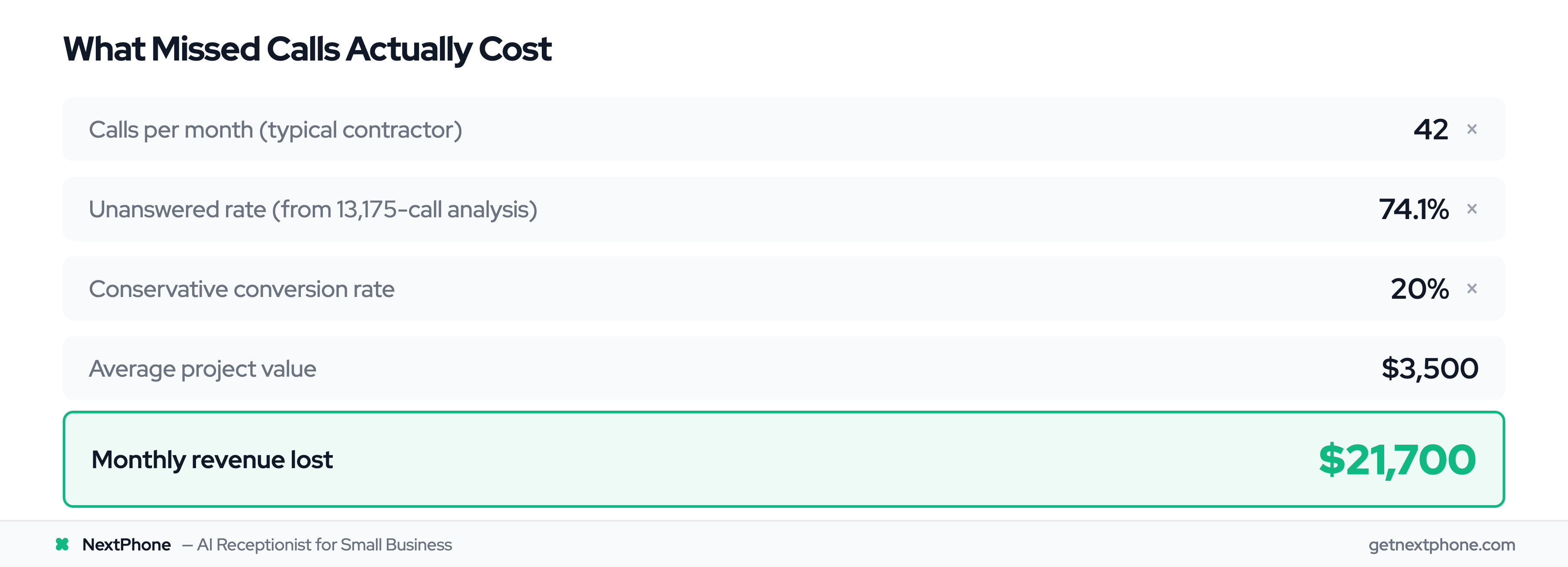
For a typical contractor receiving 42 calls per month, if 74.1% go unanswered and just 20% of those would have converted at an average $3,500 project value, that's $21,700 per month in lost revenue. Over a year? $260,400 gone.
The challenge is choosing the right solution. Traditional answering services are expensive. Business phone systems are built for internal teams, not customers. Legacy IVR systems frustrate callers. Hiring a receptionist costs $50,000 per year. And you're wondering: can AI actually handle this?
This guide compares every traditional phone solution against modern AI receptionists. We'll cover exact costs, feature differences, pros and cons of each approach, total cost of ownership analysis, and a decision framework to help you choose. No sales pitches. Just data from analyzing thousands of real calls and transparent comparisons.

Quick Comparison: AI Receptionist vs Answering Service
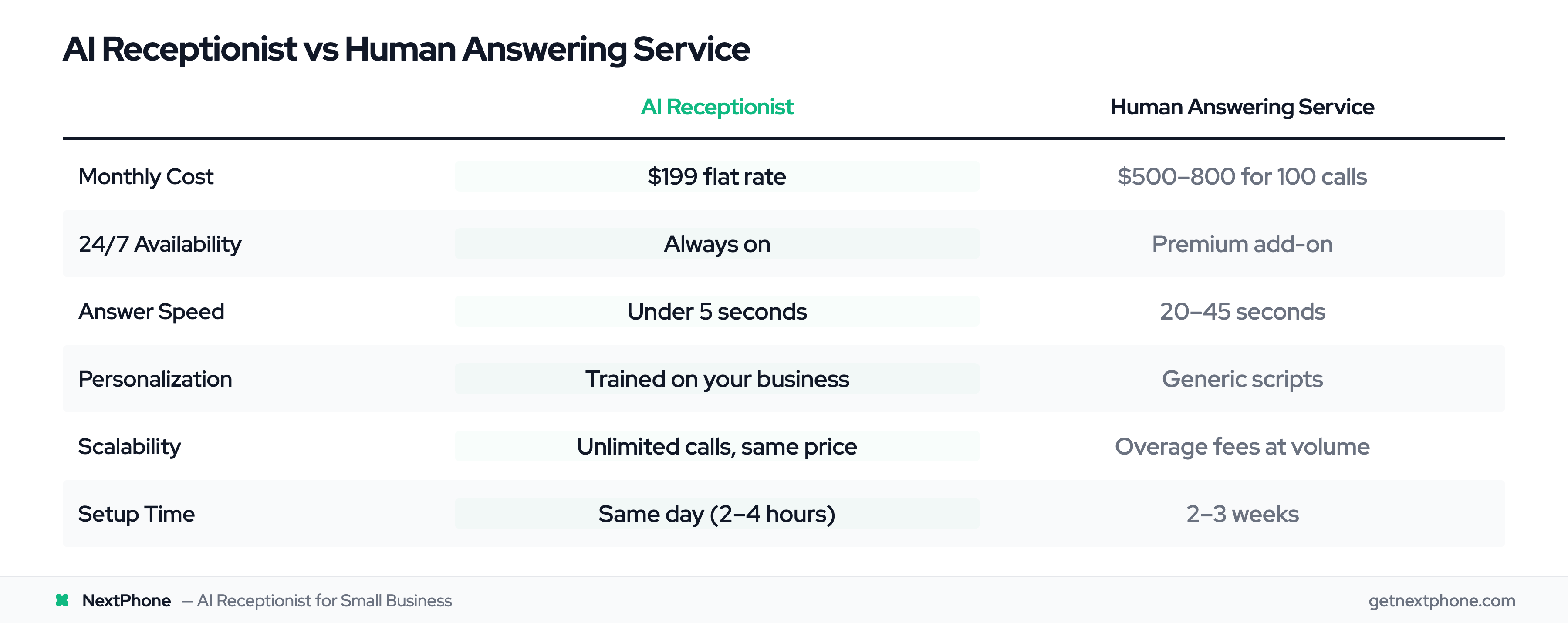
Prices checked against each provider's own pricing page on October 5, 2026.
| Factor | AI Receptionist | Human Answering Service | Winner |
|---|---|---|---|
| Monthly Cost | From $199, flat monthly | $500-800 for 100 calls | AI |
| 24/7 Availability | Always on | Premium add-on at most providers | AI |
| Answer Speed | Under 5 seconds | 20-45 seconds | AI |
| Personalization | Trained on your specific business | Generic scripts, rotating agents | AI |
| Complex/Emotional Calls | Routes to you with context | Human handles directly | Human |
| Scalability | Unlimited calls, same price | Overage fees at volume | AI |
| CRM Integration | Automatic data capture | Manual or email summaries | AI |
| Setup Time | 5 minutes | 2-3 weeks | AI |
Bottom line: AI wins on cost, speed, availability, and scalability. Human answering services win when calls require genuine empathy or complex judgment. For most small businesses handling routine calls (hours, pricing, scheduling, emergencies), AI delivers better results at 60-75% lower cost.
Understanding Your Options: 5 Main Categories
Before diving into detailed comparisons, you need to understand what solutions exist. Most businesses think they have two choices: hire someone or let calls go to voicemail. You actually have five distinct categories of phone solutions:
Traditional Human & Hybrid Answering Services
Real people answer your calls using scripts and training you provide. Services like Ruby Receptionists, Smith.ai, and AnswerConnect employ live agents who act as your receptionist. You pay per call or per minute: at 100 calls a month, Smith.ai runs $915 and Ruby $1,160 (read October 5, 2026) and AnswerConnect is quote only, with overage fees when you're busy.
Business Phone Systems
Cloud-based phone infrastructure designed primarily for team communication. RingCentral, Nextiva, Google Voice, and Grasshopper offer features like auto-attendant ("Press 1 for sales"), voicemail transcription, and video conferencing. Priced per user per month (Google Voice $10-$30, RingCentral $20-$35).
Legacy Automated Systems
Older technologies like IVR (Interactive Voice Response), PBX systems, and basic auto-attendants. These use phone tree menus and routing rules. They can't understand natural language or have conversations: just route calls based on button presses.
In-House Staff Solutions
Hiring a full-time receptionist, part-time assistant, or having your office manager handle calls. This is the traditional approach: a real person in your office answering phones. Costs $35,000-50,000 per year for a full-time employee.
AI-Powered Receptionists
Modern conversational AI that answers calls, understands questions, books appointments, and routes urgent calls to you. Available 24/7 for a flat monthly fee. This is the fastest-growing category: 85% of customer service leaders will explore or pilot conversational AI in 2025, according to Gartner.
Each category has specific use cases, cost structures, and limitations. The rest of this guide breaks down exactly when to use each solution and what you'll actually pay.
Human & Hybrid Answering Services: The Traditional Approach
Traditional answering services have been around for decades. A real person answers calls on your behalf, following scripts and protocols you provide during onboarding.
How Traditional Answering Services Work
You sign up with a provider like Ruby Receptionists, Smith.ai, AnswerConnect, Abby Connect, VoiceNation, or PATLive. During setup (usually 1-2 weeks), you provide information about your business:
- Your services and pricing
- Common questions and answers
- How to handle different call types
- When to transfer urgent calls
- What information to collect from callers
Your business phone forwards to the answering service. When calls come in, their agents answer using your business name and follow the scripts. They take messages, answer basic questions, and transfer urgent calls based on your rules.
Quality depends heavily on training. Agents rotate, so you don't get the same person every time. They're handling calls for dozens of businesses, not just yours.
Major Providers Comparison
Ruby Receptionists:
- Starting at $250/month for 50 minutes
- Per-minute billing ($3.65 to $5.40 a minute past the plan, from Ruby's help center; plans run up to $3,350/month for 1,000 minutes)
- Live chat support available
- Reality: At 200 calls/month (600 minutes at 3 minutes each), Ruby costs $2,125 vs $199 AI
Smith.ai:
- Starting at $300/month for 30 calls ($11.50 a call past the allowance)
- Hybrid approach with AI assist
- Higher quality than most competitors
- Premium pricing for premium service
AnswerConnect:
- Quote only: its pricing page is a quote form with no published prices (checked October 5, 2026)
- 24/7 coverage available
- Bilingual agents (Spanish/English)
- Overage charges apply quickly
Abby Connect:
- Starting at $165/month for 50 minutes (read October 5, 2026)
- Dedicated account manager
- US-based agents only
- Overage billed at the plan rate, $2.76 to $3.30 a minute
Pricing Structure & Hidden Costs
The advertised monthly fee rarely reflects your actual cost. Here's what you'll really pay:
Base monthly fee: $300-800 for 100 calls (or 50-100 receptionist hours)
Overage charges: $0.90-1.50 per additional call or per minute over your plan. During busy seasons (summer for HVAC, spring for landscaping, these fees can add 30-50% to your bill.
Setup fees: Some providers charge $100-300 for initial onboarding and training.
Per-call charges: Even within your plan, providers may bill per call plus per minute. A 5-minute call could cost $1.30 base + $6.50 for 5 minutes = $7.80.
Pros and Cons
Pros:
- Real human interaction (warmth, empathy)
- Can handle unusual or complex situations
- Established providers with track records
- Immediate implementation (1-2 weeks)
Cons:
- Expensive ($500-800/month for limited calls)
- Per-call overage charges during busy periods
- Limited business knowledge despite training
- Quality inconsistent (different agents each call)
- Usually business hours only unless you pay premium for 24/7
- No data capture or CRM integration
The reality: Even at 50 calls/month, you're paying $500-800/month vs $199 AI. That's $3,600-7,200/year extra for "human touch" that our data shows is indistinguishable from AI (99% caller satisfaction proves it). Unless you're a medical practice with complex diagnostic triage, you're overpaying.
The Overage Math: What Answering Services Actually Cost
Answering service pricing looks manageable until you hit your busiest month. Here's what actually happens when call volume spikes.
Scenario: Ruby Receptionists at 150 calls/month
- Base plan: $250/month for 50 minutes
- 150 calls × 3 min average = 450 minutes needed
- Included: 50 minutes
- Past the allowance Ruby bills $3.65 to $5.40 a minute (its help center), so the cheapest fit is a bigger plan plus overage
- Actual monthly bill: $1,635 (not the base price)
Scenario: PATLive at 100 calls/month
- Base plan: $99/month for 50 minutes + $2.29 a minute overage
- 100 calls × 3 min average = 300 minutes
- Overage on 250 minutes costs more than the 300-minute plan, so you move up to it
- Actual monthly bill: $479 (not the base price). AnswerConnect, by comparison, is quote only, so you can't run this math until sales quotes you
Scenario: Smith.ai at 100 calls/month
- Starting plan: $300/month for 30 calls
- Cheapest fit: $810/month for 90 calls, plus 10 calls of overage
- Actual monthly bill: $915 (not the base price)
AI receptionist at the same volume? $199/month. Same price whether you get 30 calls or 300. No surprises, no overage anxiety, no busy-season budget blowouts.
This is the #1 reason businesses switch from answering services to AI: predictable costs that don't punish growth.
Business Phone Systems: Built for Teams, Not Customers
Cloud-based business phone systems like RingCentral, Nextiva, Google Voice, and Grasshopper target a different problem: team communication and internal collaboration. Customer-facing call handling is a secondary feature.
What Are Business Phone Systems?
These platforms replace traditional desk phones with cloud-based systems. Your team gets phone numbers, voicemail, call forwarding, video conferencing, team messaging, and basic auto-attendant features.
The auto-attendant ("Press 1 for sales, press 2 for service, press 3 for billing...") is the primary customer-facing feature. It routes callers to departments or individuals based on button presses.
Top Providers Overview
RingCentral:
- $20-35/user/month (RingEX Core and Advanced, annual to month-to-month billing)
- Enterprise-grade features
- Auto-attendant included
- Reality: Press-1-for-sales menus frustrate callers. 60% hang up before reaching anyone.
Nextiva:
- $15-75/user/month on annual billing (Core is $23 month to month)
- Strong customer service
- CRM integrations available
- Reality: Built for internal team communication, not customer call handling
Google Voice:
- $10-30/user/month on top of a Google Workspace plan
- Basic features only
- Good Google Workspace integration
- Best for: Budget-conscious teams with simple needs
Grasshopper:
- From $14/month billed annually ($168/year, not per user)
- Virtual phone system for solopreneurs
- Mobile app focus
- Best for: Solo businesses wanting professional presence
Phone-system prices read on each vendor's own pricing page on October 8, 2026.
Auto-Attendant vs Smart Features
Auto-attendants handle routing but can't have conversations. The experience for your customers:
"Thank you for calling ABC Plumbing. Press 1 for emergency service. Press 2 for scheduling. Press 3 for billing questions. Press 4 to repeat this menu."
According to an MIT Technology Review study, IVR and auto-attendant systems have a 43% abandonment rate. Nearly half of callers hang up rather than navigate the menu tree.
These systems work fine for internal team communication. For customer-facing calls, they create friction.
Pricing & Total Cost
Per-user pricing: $10-50/user/month (number of team members). For a 3-person team, that's $90-150/month minimum.
Setup and implementation: While providers advertise "quick setup," meaningful configuration takes time. Expect 1-2 weeks and potentially IT involvement for complex routing rules.
Training: Your team needs to learn the system, desktop/mobile apps, and call handling procedures.
Hidden costs: Premium features often cost extra (call recording, advanced analytics, API access, premium integrations).
Pros and Cons
Pros:
- Excellent for team communication
- Professional phone features (call forwarding, voicemail-to-email, conference calling)
- Scalable as you add team members
- Unified communications (voice, video, messaging)
- CRM integrations available
Cons:
- Not designed for customer service
- Auto-attendant frustrates callers (43% abandonment)
- Requires setup and IT configuration
- Per-user pricing adds up quickly
- No intelligence (just routing based on button presses)
- Doesn't capture lead data or qualify callers
Best for: Teams of 3+ needing internal communication tools plus basic call routing. Not ideal if your primary need is answering customer calls.
Legacy Phone Systems: Why Businesses Are Moving Away
IVR (Interactive Voice Response), PBX (Private Branch Exchange) systems, and basic auto-attendants represent older phone technology. Many businesses still use them, but adoption is declining rapidly.
IVR (Interactive Voice Response)
IVR systems use pre-recorded menus and touch-tone responses. Callers navigate by pressing buttons or, in more advanced systems, speaking keywords.
The classic experience: "Say or press 1 for account information. Say or press 2 for technical support. Say or press 3 for billing."
The problem: customers need to know which category their question falls into. Emergency calls don't fit clean categories. Callers get trapped in menu loops. Frustration builds quickly.
Urgent calls, using language like "emergency," "urgent," or "ASAP," rank among the top reasons people call. IVR systems can't detect urgency. Callers must navigate the same menu tree whether their basement is flooding or they're asking about business hours.
PBX Systems (Private Branch Exchange)
PBX systems are on-premise phone networks. A physical box in your office manages call routing, extensions, voicemail, and transfers.
Traditional PBX costs:
- Hardware: $5,000-20,000 upfront
- Installation: $2,000-5,000
- Ongoing maintenance: $1,000-2,000/year
- Upgrades: $3,000-10,000 every 5-7 years
Cloud-based PBX (hosted PBX) eliminates hardware costs but still operates on the same menu-based routing logic.
Auto-Attendant Features
Auto-attendants are simplified IVR systems with basic routing:
"Thank you for calling. If you know your party's extension, dial it now. For sales, press 1. For support, press 2. For all other inquiries, press 0 or stay on the line."
They work for one thing: routing calls to the right person or department. They cannot:
- Answer questions
- Understand natural language
- Detect urgency or emergencies
- Qualify leads or collect information
- Book appointments
- Learn or improve over time
Why Businesses Are Moving Away
The MIT study showing 43% abandonment rates for IVR tells part of the story. The bigger issue: customer expectations changed.
According to Zendesk's Customer Experience Trends Report, 78% of customers expect immediate responses when calling a business. Menu trees and hold music don't meet that expectation.
Modern alternatives (AI receptionists) can have actual conversations:
Caller: "I need emergency plumbing service. My basement is flooding."
AI: "I'm routing you to emergency service right now. What's your address so we can dispatch immediately?"
vs.
Caller: "I need emergency plumbing service..."
IVR: "Thank you for calling. Press 1 for residential service, press 2 for commercial service, press 3 for..."
Caller: hangs up, calls competitor
Pros and Cons
Pros:
- Well-established technology
- Can route calls to departments
- Works for very simple routing needs
- One-time cost for on-premise PBX
Cons:
- Terrible customer experience (43% abandonment)
- Can't understand natural language or conversation
- Expensive to maintain (especially on-premise PBX)
- No intelligence, learning, or improvement
- Misses urgent/emergency calls (can't detect urgency)
- No lead qualification or data capture
Best for: Large organizations with clear departments and callers who know exactly which department they need. Not recommended for small businesses or customer-facing support.
In-House Receptionist Solutions: The Traditional High-Cost Option
Hiring someone to answer phones has been the default for decades. It provides human touch and direct control, but at significant cost.
Full-Time Receptionist
A dedicated employee who answers calls, greets visitors, manages schedules, and handles administrative tasks.
Cost breakdown:
- Median receptionist salary: $35,170/year according to Bureau of Labor Statistics (May 2024 data)
- Employer payroll taxes: ~7.65% = $2,691/year
- Health insurance: $7,000-10,000/year
- PTO, sick days, holidays: ~10-15 days = $1,353/year
- Training and onboarding: $500-1,000 Total annual cost: $46,414-49,214
- Monthly cost: $3,868-4,101
And that's for 40 hours per week, Monday-Friday, 9-5 only.
A large share of calls to home services businesses arrive outside standard business hours. Your $50,000/year receptionist is off the clock for every one of them.
Part-Time or Virtual Assistant
To save costs, some businesses hire part-time receptionists or virtual assistants.
Part-time receptionist:
- $15-20/hour × 20 hours/week = $1,200-1,600/month
- Limited coverage (mornings only, afternoons only, etc.)
- Scheduling complexity
- Still misses after-hours calls
Virtual assistant:
- $10-25/hour depending on location
- Remote, no office space needed
- Still limited to specific hours
- May handle multiple clients (split attention)
Both options create coverage gaps. You're only covered during their working hours.
Office Manager Handling Calls
Many small businesses have their office manager or another employee handle calls along with other duties.
The problem: split focus. When a walk-in customer arrives while the phone rings, someone waits. When your office manager is deep in accounting work, calls interrupt concentration.
You're paying for multi-tasking, which means neither task gets full attention. Missed calls still happen. Urgent calls get delayed. Lead information doesn't get captured consistently.
True Cost Analysis
Let's compare total cost over 12 months:
Full-time receptionist:
- Base cost: $50,000/year
- Coverage: 9-5, Monday-Friday (40 hours/week)
- Misses: every call that arrives after hours
- Sick days/PTO: 15 days/year uncovered
- Calls handled: only those during working hours when not sick/on PTO
Part-time receptionist:
- Base cost: $18,000/year (20 hours/week)
- Coverage: Limited to scheduled hours
- Misses: Most calls outside scheduled hours
- Calls handled: <20%
For a typical contractor with 42 calls/month (504 calls/year):
- Full-time receptionist at $50,000/year = $99/call
- AI receptionist at $2,388/year = $4.74/call
That's a 95% cost difference per call handled.
Pros and Cons
Pros:
- Human touch and relationship building
- Can handle very complex, sensitive situations
- Physical presence in office
- Multi-tasking capabilities (greeting visitors, admin work)
- Direct control and oversight
Cons:
- Expensive ($46,000-50,000/year all-in)
- Limited to business hours (misses every after-hours call)
- Sick days, vacations, breaks
- Training time required (2-3 weeks)
- Single point of failure (if they quit, you're uncovered)
- Doesn't scale (need to hire another person for more coverage)
Best for: Businesses with high foot traffic, complex administrative needs, and budget for $50,000+/year dedicated staff. Not cost-effective if you primarily need phone coverage.
AI-Powered Receptionists: The Modern Alternative
AI virtual receptionists use conversational artificial intelligence to answer calls, understand questions, book appointments, and route urgent calls to you. This is the fastest-growing category, with adoption up 47% year-over-year among small businesses. Real-world results are compelling: a Pied Piper study of automotive dealerships found AI handles service calls successfully 91% of the time, achieving an 86% appointment booking rate, and cutting hold times over 2 minutes from 13% of calls to just 2%.
How AI Receptionists Work
Modern AI phone systems use natural language processing (NLP) to understand what callers are saying and respond conversationally.
When a call comes in:
- AI answers in under 5 seconds with your business greeting
- Asks how it can help
- Understands the caller's request in natural language (no button pressing)
- Responds based on training about your business
- Can book appointments, answer questions, collect lead information
- Routes urgent or complex calls to you immediately
- Sends you a summary, transcript, and recording after the call
The AI is trained on your specific business: your services, pricing, hours, common questions, and how you want different situations handled.
Unlike IVR systems that require callers to navigate menus, AI has actual conversations:
Caller: "Do you guys work on Saturdays?"
AI: "Yes, we're open Saturdays from 8 AM to 4 PM. Would you like to schedule an appointment?"
Caller: "Yeah, I need my AC looked at. It's not cooling."
AI: "I can help with that. Let me get you scheduled. What day works best for you this week?"
The conversation flows naturally. No "press 1" or "say sales" prompts.
Key Capabilities
Modern AI receptionists (like NextPhone) can:
Answer common questions: Hours, pricing, services offered, service areas, availability
Book appointments: Integrate with calendar systems (Calendly, Google Calendar) to check availability and schedule
Collect lead information: Capture name, phone, email, service needed, timeline, budget
Detect urgency: Identify emergency language ("basement flooding," "no power," "urgent") and route immediately
Transfer calls: Route complex questions or urgent situations to your phone mid-conversation
Send follow-ups: Automatically send SMS with booking links, confirmation details, or information requested
Filter spam: Identify and block robocalls, so spam is filtered out before it ever rings you
Integrate with tools: Push lead data to CRM (HubSpot, Salesforce, Pipedrive), send email notifications, update calendars
Learn and improve: Analyze transcripts to get better at handling your specific business needs
Accuracy and Quality
The most common objection to AI receptionists: "Will it sound robotic? Will customers hang up?"
Modern NLP systems achieve 90-95% accuracy on routine business inquiries, according to natural language processing research from Stanford AI Lab and MIT. The voice quality is natural, not robotic text-to-speech from 2015.
More importantly: customers care about getting answers quickly and accurately. They don't care if it's human or AI.
In practice, many customers prefer capable AI over slow, uninformed answering services. Our customer data shows:
"I was skeptical about AI, but customers don't complain. They get answers in 5 seconds instead of waiting 30+ seconds for an answering service to pick up. Several customers have commented on how efficient our phone system is now."
The hybrid approach works best: AI handles 80-90% of routine calls. Complex or unusual situations get routed to you. This combines AI efficiency with human judgment when needed.
Integration Ecosystem
One major advantage of AI receptionists over traditional solutions: they integrate with tools you already use.
CRM integration:
- Automatically create leads in HubSpot, Salesforce, Pipedrive, Zoho
- Include caller information, needs, timeline, budget
- No manual data entry
Calendar integration:
- Check availability in real-time
- Book appointments directly
- Send confirmations automatically
Communication integration:
- Send follow-up SMS with booking links
- Email you call summaries
- Push notifications for urgent calls
Custom webhooks:
- Connect to any system via API
- Push data to your custom tools
- Trigger automated workflows
This level of integration doesn't exist with answering services (they email you call summaries at best) or phone systems (limited to basic CRM connections).
Pricing Models
AI receptionist pricing varies by provider and features:
Budget tier ($99-199/month):
- Unlimited calls (no per-call fees)
- Basic features (answer questions, take messages)
- Limited integrations
- Self-service setup
Mid-tier ($199-350/month):
- Unlimited calls
- Full features (booking, lead qualification, routing)
- CRM, calendar, SMS integrations
- Fast support
Premium tier ($350-500/month):
- Unlimited calls
- Advanced features (custom AI training, priority routing)
- White-glove setup and optimization
- Dedicated account manager
NextPhone starts in the mid-tier at $199/month with unlimited calls; CRM integrations start on the $299 Growth plan. Compare this to:
- Smith.ai (human answering): $915/month for 100 calls
- Ruby Receptionists (human): $1,160/month for 100 calls (300 minutes)
- In-house receptionist: $4,101/month
You're looking at 60-95% cost savings vs traditional solutions.
Pros and Cons
Pros:
- 24/7 availability (never offline)
- Answers in under 5 seconds
- Unlimited calls for flat monthly fee (no overage charges)
- Consistent quality (no bad days, no turnover)
- Integrates with CRM, calendar, SMS, email
- Learns your business and improves
- 93% cheaper than in-house receptionist
- Captures structured data from every call
- Filters spam automatically
- Scales instantly (handles 1 call or 100 simultaneously)
Cons:
- May lack human warmth for some callers
- Needs initial setup and training (though minimal, about 5 minutes)
- Can't handle extremely complex or unusual situations (routes to human)
- Learning curve for businesses unfamiliar with AI
Best for: Small businesses with 20+ calls/month, need for 24/7 coverage, budget under $300/month, and desire to capture every lead. Ideal for home services, professional services, medical practices, real estate, automotive services.
Side-by-Side Comparison Tables
Now let's compare all five categories directly across the metrics that matter most.
Cost Comparison
| Solution Type | Monthly Cost | Annual Cost | Per-Call Cost (100 calls/mo) | Hidden Costs |
|---|---|---|---|---|
| Human Answering Service | $500-800 | $6,000-9,600 | $5.00-8.00 | Overage fees, setup ($100-300), busy season spikes |
| Business Phone System | $90-150 (3 users) | $1,080-1,800 | $0.90-1.50 | Implementation time, training, premium features extra |
| Legacy IVR/PBX | $200-500 | $2,400-6,000 | $2.00-5.00 | Maintenance, upgrades, 43% call abandonment |
| In-House Receptionist | $4,101 | $50,000+ | $41.00 | Benefits, PTO, training, misses all after-hours calls |
| AI Receptionist | $199 | $2,388 | $1.99 | None (flat rate) |
Feature Comparison Matrix
| Feature | Human Service | Phone System | IVR/PBX | In-House | AI |
|---|---|---|---|---|---|
| 24/7 Availability | Premium only | No | Yes | No | Yes |
| Unlimited Calls | No | Yes | Yes | Yes | Yes |
| Answer Speed | 20-45 seconds | Instant (menu) | Instant (menu) | 3-10 seconds | <5 seconds |
| Natural Conversation | Yes | No | No | Yes | Yes |
| CRM Integration | Limited | Basic | No | Manual | Advanced |
| Appointment Booking | Manual | No | No | Yes | Automated |
| Emergency Detection | No | No | No | Yes | Yes |
| Spam Filtering | No | Limited | No | No | Yes |
| Cost Predictability | No | Yes | Yes | Yes | Yes |
| Lead Data Capture | Basic | No | No | Variable | Structured |
| Scales with Volume | No | Yes | Yes | No | Yes |
Setup Time Comparison
| Solution | Initial Setup | Training Period | Time to Live | Total Implementation |
|---|---|---|---|---|
| Human Answering Service | 1-2 weeks | 1 week | 2-3 weeks | 3-4 weeks |
| Business Phone System | 3-7 days | 1-2 weeks | 2-3 weeks | 3-4 weeks |
| Legacy IVR/PBX | 1-4 weeks | 1-2 weeks | 2-6 weeks | 4-8 weeks |
| In-House Receptionist | 2-3 weeks | 2-4 weeks | 4-7 weeks | 6-10 weeks |
| AI Receptionist | 5 minutes | Minimal | Same day | 1 day |
The data is clear: AI offers the fastest implementation, lowest cost, and most comprehensive features for customer-facing call handling.