Introduction
Picture this: You're on a ladder replacing a roof section when your phone buzzes in your pocket. A potential customer needs an estimate for a $15,000 roofing project. But you can't answer safely. The call goes to voicemail. By the time you climb down and call back three hours later, they've already booked with a competitor who picked up on the first ring.
This scenario plays out thousands of times daily across the home services industry. Research shows 62% of calls to contractors go unanswered, and here's the brutal part: 85% of those customers never call back. They simply move on to the next name on their Google search results.
For a typical contractor receiving 42 calls per month with an average project value of $3,500, that's $18,200 in lost revenue every single month. Voicemail doesn't help—fewer than 3% of callers actually leave messages. But hiring a full-time receptionist costs $2,900 per month, and they're only available during business hours.
Automated answering services are changing this reality. Business process automation statistics show companies are rapidly adopting these solutions across industries. These systems answer every call 24/7, route emergencies to your phone immediately, schedule appointments into your calendar, and capture callback requests—all starting at $99 per month. But do they actually work for contractors? Will customers hate talking to a "robot"?
This comprehensive guide covers everything you need to know: what automated answering services are, how the technology works, what they can realistically handle on a contractor's phone line, transparent ROI calculations, and when smart forwarding kicks in. By the end, you'll know exactly whether automated answering makes sense for your business.
The Missed Call Crisis for Contractors
Before diving into solutions, let's establish the scope of the problem. Most contractors don't realize how many opportunities they're missing because their phone went unanswered.
How Many Calls Are Contractors Missing?
Industry research reveals a troubling pattern: 62% of calls to small businesses go unanswered. For contractors, the numbers are even worse. Roofing companies miss 76.6% of incoming calls—more than three out of every four potential customers. General contractors miss 62%. Even plumbers, who typically have better answer rates, still miss half their calls.
The pattern shows up in real call data from home services businesses. We're not talking about businesses that are closed—these calls come in during normal business hours. The problem? Contractors are on job sites, under sinks, on roofs, or with other customers. The phone rings, and there's simply no one available to answer.
During peak seasons, the situation gets worse. After a major storm, roofing companies can receive 50-100 calls in a single day. Even businesses with office staff get overwhelmed. Every call that goes to voicemail is a potential customer deciding whether to wait for your callback or move on.
Why Don't Customers Call Back?
Here's where the problem becomes a crisis: 85% of unanswered callers won't call back. They don't sit around waiting for you to check voicemail. They call the next contractor on their list.
Think about your own behavior as a consumer. When you need a plumber for a burst pipe or an electrician for a sparking outlet, do you leave a voicemail and wait patiently? Or do you keep calling until someone actually picks up?
The data on voicemail is even more damning. Fewer than 3% of callers leave voicemail messages. The traditional "just let it go to voicemail and I'll call them back" strategy captures almost none of your missed opportunities.
Salesforce research shows 88% of customers say the experience a company provides is as important as its products—and that experience starts with answering the phone. Studies show that businesses who respond within five minutes are 10 times more likely to win the job compared to those who respond five hours later. First-responder advantage is real, and when you miss the call entirely, you're not even in the race.
The Real Cost of One Missed Call
Let's do the math on what each missed call actually costs your business.
For a general contractor with an average project value of $3,500 and a typical close rate of 20%, each missed opportunity costs $700 in potential revenue. That's the expected value: $3,500 × 20% = $700.
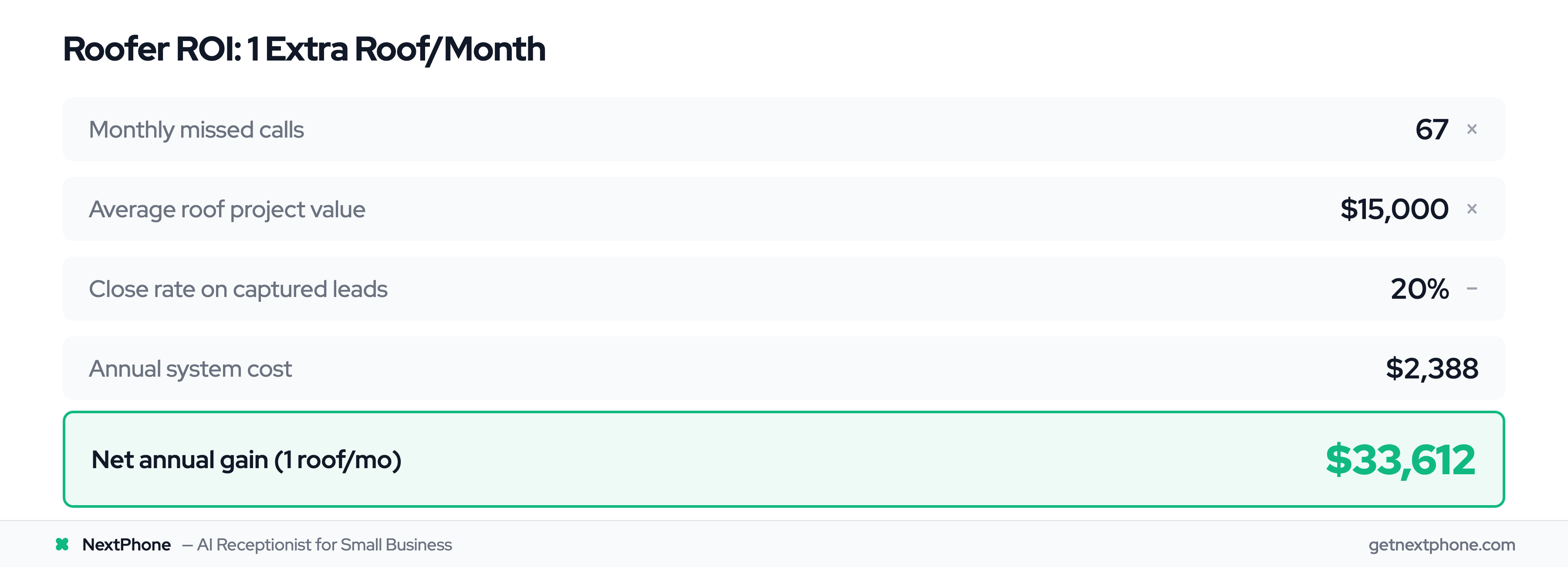
For a roofer with $15,000 average projects and the same 20% close rate, each missed call costs $3,000 in expected revenue.
For an electrician averaging $800 per service call with a 25% close rate, the cost per missed opportunity is $200.
Now multiply by your monthly missed calls. A contractor getting 42 calls per month who misses 62% loses 26 opportunities. At $700 per missed opportunity, that's $18,200 per month—or $218,400 per year.
For the roofer missing 76.6% of 87 monthly calls? They're losing 67 opportunities per month. Even if only about one incoming call in ten is a quote request, that's nine quote opportunities a month walking out the door. At $3,000 expected value each, that's $27,000 per month—$324,000 annually.
These aren't hypothetical numbers. They represent real revenue walking out the door every single month because your phone went to voicemail.
"No Urgency" Doesn't Mean "No Rush"
Here's a real call transcript from a roofing contractor's missed calls: "Wants an estimate for a new roof. No urgency."
The note says "no urgency." But here's what it actually means: The customer is calling right now. They're comparing contractors right now. And they're ready to book with whoever responds first.
"No urgency" is a trap. It doesn't mean the customer will wait three hours for your callback. While you're finishing your current job and thinking "I'll call them back this evening," they've already received estimates from two competitors who answered their phone.
Every call represents a customer who is ready to buy now. They're calling at this moment because they have time now, they're thinking about the project now, and they're motivated to move forward now. The contractor who answers first gets the appointment. The contractor who calls back three hours later gets, "Thanks, but we already found someone."
This is why automated answering services matter. They capture the "no urgency" calls that are actually urgent because the customer is calling NOW.
What is an Automated Answering Service?
Now that we've established the problem, let's define the solution. Automated answering services come in several forms, and understanding the differences matters.
Automated Answering Service Definition
An automated answering service is software that answers your business phone calls automatically, understands what the caller needs, routes them to the appropriate destination, takes messages, and can even schedule appointments—functioning as an AI virtual receptionist without human intervention.
Unlike voicemail, which passively records messages after you miss calls, automated answering actively engages with callers immediately. The system answers on the first ring, every time, 24 hours a day, seven days a week, 365 days a year. It never takes a break, never calls in sick, and never goes on vacation.
The technology handles multiple calls simultaneously. Where a human receptionist can only talk to one person at a time, automated systems can answer 10, 50, or 100 calls at once. This matters during peak times—after a storm, during seasonal rushes, or when your advertising campaign hits.
Modern systems range from simple menu-based options ("Press 1 for service, Press 2 for billing") to sophisticated AI that holds natural conversations with callers and understands intent without requiring button presses.
Auto Attendant vs. IVR vs. AI Answering (What's the Difference?)
The terminology can be confusing, so let's clarify what these terms actually mean.
Auto Attendant is the simplest form—a basic menu system that plays a greeting and routes calls based on button presses. Think "Press 1 for sales, Press 2 for service, Press 3 for billing." It's automated, but it requires callers to navigate menus. Best for businesses with clear departmental structure and tech-savvy customers willing to press buttons.
IVR (Interactive Voice Response) is more advanced. It can collect information from callers—account numbers, appointment preferences, callback numbers—through touchtone input or simple voice recognition. Banks use IVR for account balance inquiries. Service businesses use it for appointment scheduling. It's interactive but still structured around predetermined paths.
AI Answering Service represents the current generation. These systems use conversational AI and natural language processing to understand what callers say without requiring button presses or rigid scripts. A customer can say "I need emergency plumbing service" or "My toilet is overflowing" or "It's flooding in my bathroom," and the AI understands these all mean the same thing—route to emergency plumbing immediately.
Most modern automated answering services combine all three approaches. They use conversational AI as the front end for natural interaction, IVR capabilities for structured data collection like appointment times, and auto attendant functionality for final routing to the right person or department.
NextPhone uses the AI conversational approach because contractor customers prefer talking naturally rather than navigating phone menus when they have an emergency or need service.
How It Differs from Voicemail and Live Receptionist
Let's compare automated answering to the alternatives contractors typically use.
Automated vs. Voicemail: Voicemail is passive—it only activates after you miss the call. It records a message and hopes the caller leaves one (remember, fewer than 3% do). Automated answering is proactive—it answers the call immediately, engages with the caller, routes emergencies to you right away, and can solve many requests (like booking appointments) without any voicemail required.
Automated vs. Live Receptionist: A live receptionist is a human employee (in-house or virtual) who answers your calls. The advantage? Human touch, empathy, and ability to handle complex situations. The disadvantages? Cost ($2,900/month for full-time employee), limited availability (typically 40 hours per week, not 24/7), and capacity (can only handle one call at a time). Automated answering costs $99-$299/month, works 24/7, and handles unlimited simultaneous calls.
Automated vs. Virtual Receptionist: Virtual receptionists are real humans working remotely for services like Ruby Receptionists or AnswerConnect. They answer your calls professionally from an off-site location. This is similar to a live receptionist but more flexible. However, you're still paying $500-$800/month for 100 calls, and they have the same one-call-at-a-time limitation. When call volume spikes, costs spike too.
Here's a comparison table:
| Feature | Voicemail | Auto Attendant | Live Receptionist | AI Answering |
|---|---|---|---|---|
| Availability | 24/7 (passive) | 24/7 (active) | 40-50 hrs/week | 24/7 (active) |
| Cost | $0-10/mo | $15-150/mo | $2,900/mo | $99-299/mo |
| Interaction | One-way recording | Menu navigation | Natural conversation | Natural conversation |
| Routing | None | Button-based | Intelligent | AI-powered intelligent |
| Capacity | Unlimited (passive) | Unlimited | 1 call at a time | Unlimited |
Who Uses Automated Answering? (Validation)
If you're wondering whether automated answering is a proven technology or some untested experiment, the data provides validation: 85.8% of Fortune 500 companies use auto attendants. 66% of businesses have automated at least one process, and the trend is accelerating.
These are large enterprises with resources to hire receptionist teams, yet they still deploy automated systems. Why? Because automation provides consistency, 24/7 coverage, and unlimited capacity that human teams can't match economically.
The market is growing rapidly. The automated voice answering system market was valued at $1.2 billion in 2024 and is projected to reach $3.5 billion by 2033—a compound annual growth rate of 12.5%. The business process automation market is projected to grow from $13.7B to $41.8B by 2033, reflecting broader adoption of automation across industries. The virtual answering solutions market specifically is projected to hit $531.1 million in 2025.
Adoption is accelerating particularly in the small business segment. Home services contractors, HVAC companies, plumbing businesses, and electrical contractors are implementing automated answering at increasing rates as the technology improves and becomes more affordable.
You're not an early adopter or beta tester. You're joining a proven technology that Fortune 500 companies have trusted for decades, now available at small business prices.
How Automated Answering Services Work
Understanding the mechanics helps you evaluate whether this technology fits your business. The good news: it's much simpler than you might think.
The Basic Call Flow (What Happens When Someone Calls)
Here's exactly what happens when a customer calls your business number with an automated answering service:
Step 1: Customer dials your regular business phone number.
Step 2: The system answers immediately—typically within 1-2 rings, often in under five seconds.
Step 3: AI greets the caller with your customized message. Example: "Thanks for calling ABC Plumbing. How can I help you today?"
Step 4: Customer states their need in plain language. They might say "I need emergency service," or "I want to schedule an estimate," or "What are your hours?"
Step 5: AI understands the intent using natural language processing (more on this below) and determines the appropriate action.
Step 6: The call gets routed to the right destination:
- Emergency? → Routes to your on-call phone immediately
- Appointment request? → AI books directly into your calendar
- General question? → AI provides the information from your business details
- Complex situation? → Forwards to your phone or takes detailed message
The entire process from answer to resolution takes 15-45 seconds for straightforward requests. The caller never experiences hold music, transfers to multiple departments, or frustrating "press 1, press 2, press 3" menus for simple questions.
Natural Language Processing: How AI Understands Callers
You don't need to understand the technical details, but knowing the basics helps explain why modern AI answering works so much better than the robotic systems from 10 years ago.
Natural Language Processing (NLP) is the technology that allows AI to understand human speech the way another human would. Modern AI achieves 85-95% accuracy for conversational understanding in business contexts.
Here's what this means practically: The AI is trained on thousands of contractor-customer conversations. It learns that "My AC is broken," "AC not working," "No cold air coming out," and "Air conditioning isn't cooling" all mean the same thing—the customer needs AC repair service.
The caller doesn't have to use exact phrasing or specific keywords. They can describe their problem naturally, the way they'd explain it to a friend, and the AI understands. It doesn't require rigid scripts like older systems that only responded to exact phrases.
The AI also understands context. If a customer says "I'm interested in your services," followed by "Can you come today?" the system knows "today" refers to scheduling service, not general information about today's date.
Intent Detection and Smart Routing
Once the AI understands what the caller said, it needs to determine intent—what does this person actually need?
Intent categories the AI recognizes:
Emergency service: The caller uses words like "emergency," "urgent," "ASAP," "right now," "immediately," or describes crisis situations like "flooding," "no heat," "sparking," or "burst pipe." Urgent calls rank among the top reasons people call, and they need priority routing. The AI detects these keywords and routes to your emergency line or on-call technician within seconds.
Appointment scheduling: The caller says "I want to schedule," "book an appointment," "when can you come," or "I need an estimate." The AI can access your calendar, check availability, and book appointments directly. Booking or rescheduling an appointment is the single most common reason people call.
General questions: The caller asks about hours, service areas, pricing, services offered, or other basic information. The AI provides answers from your business profile. These make up a large chunk of everyday call volume—information requests that don't need human involvement.
Callback requests: The caller says "please call me back," "have someone contact me," or leaves a phone number. Approximately one in four callers asks for a callback. The AI captures the phone number, best time to call, and reason for callback, then sends you immediate notification.
Spam/robocalls: The AI identifies robocall voice patterns, spam number databases, and suspicious call characteristics. It filters these automatically, so spam never rings you at all. Electricians tend to get hit hardest.
Real example of intent detection in action: A customer calls and says, "Needs emergency AC repair, no cooling in 95 degree weather." The AI detects:
- Service type: AC repair
- Urgency level: Emergency (keywords "emergency" + extreme weather condition)
- Action required: Route to on-call HVAC technician immediately
The call reaches your phone within eight seconds with a summary: "Emergency AC repair call, 95-degree heat, no cooling."
Integration with Your Existing Systems
One of the most common questions contractors ask: "Do I need to change my phone number or buy new equipment?"
No. Nearly all automated answering services work with your existing phone number through call forwarding.
Setup process: You enable call forwarding from your current business number to the automated system's number. This takes 5-10 minutes and is completely reversible. Your customers keep calling your regular number—they never know anything changed. The automation answers, and if you ever want to disable it, calls simply return to ringing your phone normally.
Integration with other tools: Modern automated systems connect to your existing business software:
- Calendars: Google Calendar, Microsoft Outlook, Calendly, and most scheduling platforms
- CRM systems: Salesforce, HubSpot, or whatever customer management tool you use
- Phone systems: Any VoIP provider or traditional phone carrier
- Communication tools: Sends notifications via SMS, email, or messaging platforms like Slack
The AI can book appointments directly into your Google Calendar. When a customer schedules a Thursday 2 PM estimate, it appears on your calendar immediately with the customer's name, phone number, service needed, and address. You wake up to a filled schedule, not a voicemail box requiring callbacks.
Setup typically takes a few hours for basic configuration—not weeks or months. Most providers offer setup assistance or done-for-you onboarding to get you live quickly.
What Automated Answering Systems Can Actually Handle (Based on Real Call Data)
This is where we move from theory to reality. What customers actually say when they call a contractor tells you which calls an automated system can handle intelligently and which ones it can't.
Breaking Down What Contractors Get Called About
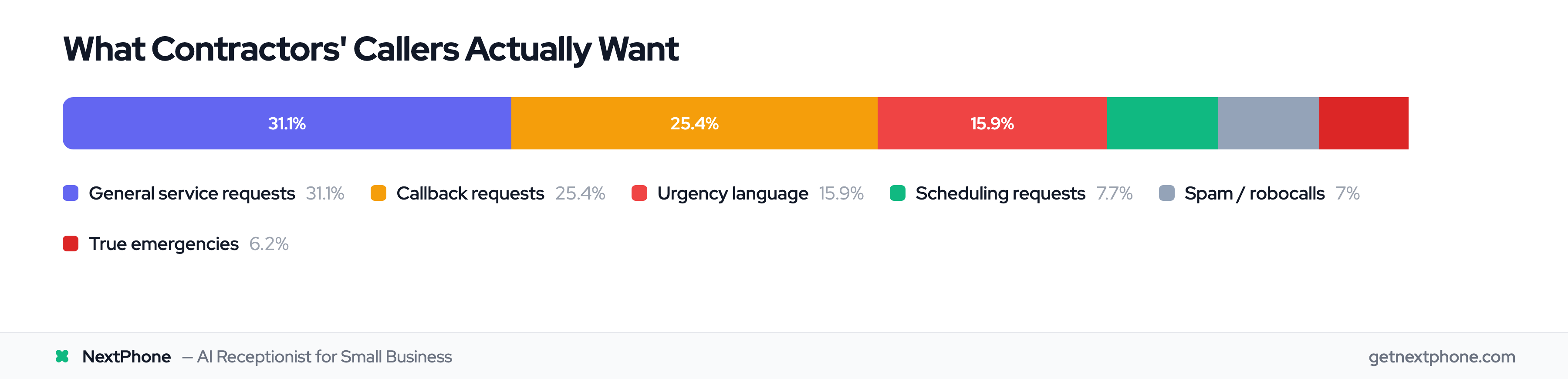
Real call data from home services businesses shows what customers actually want when they call:
-
General service requests – Customers calling about routine service needs, basic inquiries about what you do, or requesting information. These are straightforward calls AI handles completely, and they account for a big share of the phone ringing.
-
Callback requests – Approximately one in four callers says "please call me back" or leaves a callback number. This is the biggest opportunity most contractors miss without a system.
-
Scheduling or appointment requests – Booking or rescheduling an appointment is the single most common reason people call: customers who want an estimate, service, or a reserved time slot. AI can handle these from start to finish.
-
Quote or estimate requests – Among the top reasons people call. Callers gathering pricing information or requesting formal estimates. AI can collect initial information and route to you, or provide general pricing if you've configured it. For businesses that take purchases over the phone, a dedicated order taking service processes the full transaction during the call.
-
True emergencies – A recurring reason people call. Crisis situations requiring immediate response: burst pipes, no heat in winter, electrical hazards, AC failure in extreme heat. These can't wait for callbacks.
-
Spam or robocalls – Complete waste of your time. Spam is filtered out before it ever rings you, so you never see them.
-
Urgency language – Urgent calls rank among the top reasons people call. Broader than emergencies, these calls use words like "urgent," "ASAP," "today," or "as soon as possible." Not all are crises, but all need priority handling.
Combined, well-configured AI can intelligently handle 60-80% of calls without any human intervention. The remaining 20-40% involve complexity that benefits from human judgment—pricing negotiations, upset customers, nuanced questions—and these route to you or your backup team.
Callback Requests: The One in Four You're Losing
This deserves special attention because it's one of the biggest missed opportunities.
One in four customers who call explicitly requests a callback. They say "have someone call me back at this number" or "I'm available after 3 PM today" or "my number is 888-568-0296."
Without an automated system tracking these requests, they routinely fall through the cracks. The sticky note gets lost. The voicemail gets buried. The message wasn't clear about the callback number. The result: people who specifically asked you to call them back never hear from you.
Each lost callback isn't just a missed call—it's a damaged customer relationship. This person reached out, explicitly asked you to call them, and you didn't. They assume you don't care about their business, and they're right to think that.
What AI does differently with callback requests:
First, it captures the information perfectly every time:
- Phone number (verified by asking caller to confirm)
- Best time to call back
- Reason for callback (roof estimate, AC repair quote, general service inquiry)
- Urgency level (can it wait or is it time-sensitive?)
Second, it sends you immediate notification. You receive an SMS or email: "New callback request from John Smith at 555-123-4567 - needs roof estimate, prefers 2-4 PM callbacks, mentioned neighbor's recommendation."
You have all the context needed to return the call professionally. No more "Hi, I'm returning your call but I'm not sure what you needed" awkwardness.
Real example from the data: "Requested you call back at 888-568-0296." Without automation, this becomes a voicemail you might hear hours later, if at all. With automation, you get an instant text notification with that exact number, ready to call back.
Emergency Call Routing for Contractors
Here's where automated answering becomes genuinely valuable—not just convenient, but business-critical.
Remember that emergencies are a recurring reason people call? For a contractor receiving 42 calls monthly, that's a handful of emergency calls every month. These are your highest-value jobs. Emergency plumbing, electrical, HVAC, and roofing work often commands 1.5-2× normal rates due to after-hours premiums and urgency.
These calls can't wait in voicemail for three hours while you finish your current job. The customer with the burst pipe at 2 PM who calls three contractors isn't leaving three voicemails—they're calling until someone answers. The first contractor who picks up gets a $1,200 emergency plumbing job. The two who sent callers to voicemail get nothing.
How AI handles emergencies:
The system detects emergency keywords and phrases:
- Explicit: "emergency," "urgent," "ASAP," "right now," "immediately"
- Situational: "flooding," "no heat," "no cooling," "sparking," "burning smell," "burst pipe," "roof leak"
- Urgency context: "95-degree heat," "freezing temperatures," "water everywhere"
When detected, the AI routes the call to your designated emergency contact (usually your cell phone or on-call technician) within seconds—not minutes or hours.
Real example: "Urgent: Porta potty delivery at 6 PM. Caller is waiting and needs to speak with you right away."
The AI recognizes "urgent" and "right away" and doesn't send this to voicemail. It routes to your phone immediately. You answer, secure the job, and handle the time-sensitive delivery. Without automation, this call goes to voicemail, the caller books with the next company, and you lose both the emergency premium and a potential long-term commercial client.
Another example: "Needs emergency AC repair, no cooling in 95 degree weather."
Emergency + extreme temperature = crisis situation. This homeowner is desperate for help NOW, not tomorrow. This call gets priority routing with context provided: emergency AC, heat emergency, immediate need. You can decide whether to take it or route to another tech, but you have the option because the call reached you instead of dying in voicemail.
Spam Filtering: Getting Your Time Back
Let's talk about the hidden time drain: spam and robocalls.
A steady share of incoming calls to contractors are spam or robocalls—complete wastes of time. Electricians get hit the hardest among the trades. Why? Electrician business numbers tend to end up on spam lists more frequently.
Each spam call costs you time and attention. You stop what you're doing, answer the phone, and hear a recorded message about extended car warranties or fake Google listings. It's frustrating and unproductive.
Time savings calculation:
For a contractor receiving 42 calls per month:
- Spam calls per month: a few calls
- Time per spam call: 5-10 minutes (interruption + returning to task)
- Monthly time saved: 15-30 minutes
For an electrician receiving 87 calls per month, where spam runs highest:
- Spam calls per month: roughly a dozen
- Monthly time saved: 65-130 minutes (1-2+ hours)
AI filters spam automatically through multiple methods:
- Robocall detection: Identifies computerized voice patterns
- Spam number databases: Cross-references known spam numbers
- Suspicious pattern recognition: Identifies characteristics of spam calls
You can review filtered calls if you want to verify nothing legitimate was blocked, but typically you'll never think about them again. They're eliminated before they interrupt your day.
What Automated Systems Struggle With
To be completely honest, AI doesn't handle everything perfectly. Understanding limitations is important for setting realistic expectations.
Situations where AI struggles:
Complex negotiations: A customer says, "I got three quotes ranging from $5,000 to $8,000 for this project. Can you beat $5,000?" This requires judgment about your costs, availability, competition, and whether it's worth taking the job at that price. AI can't negotiate pricing effectively.
Upset customers needing empathy: Someone calls angry about a previous service issue, a billing dispute, or a miscommunication. They need human empathy, not a system following a script. AI can detect negative sentiment and route to a human, but it shouldn't attempt to handle the situation itself.
Highly nuanced questions requiring expertise: "I need plumbing work done, but only if you can also handle the electrical, and it needs to be scheduled for next Tuesday or Wednesday, whichever works better with your team's schedule, and I need you to coordinate with my general contractor who's working on the remodel." This multi-part request with contingencies needs human problem-solving.
Reading emotional cues: An experienced receptionist can hear hesitation in a caller's voice and ask probing questions: "You sound uncertain—what concerns do you have about the project?" AI misses subtle emotional cues that humans pick up naturally.
The solution: Hybrid approach
The best automated answering services don't try to handle everything. They attempt to help with simple requests, and when they detect complexity, they immediately route to a human.
Good AI says: "That sounds complex—let me connect you to our service manager who can discuss the details with you." The call reaches you within seconds with context about what the customer needs.
This approach—AI resolves 90-95% of calls, forwards the rest to you—combines 24/7 availability with your judgment when it matters.
Benefits of Automated Answering Services for Contractors
Now that you understand what automated systems can and can't do, let's examine the specific benefits for home services businesses.
Never Miss a Call (or a Customer) Again
The primary benefit is obvious but worth stating clearly: you answer every single call, every single time.
You answer when you're on a job site, under a house, on a ladder, at lunch, in a meeting, on another call, at 3 AM, on Sunday, or on vacation. The 62% miss rate that costs you $18,000-$27,000 monthly drops to 0%.
For a contractor receiving 42 calls per month who currently misses 62% (26 calls), automated answering captures all 26 additional opportunities. Even if your close rate is just 20%, that's five additional jobs per month you weren't getting before.
The customer with the emergency at 11 PM on Saturday doesn't call three contractors anymore—they call you, the AI answers, detects the emergency, and routes to your on-call phone. You get the job because you answered. Simple.
Remember that 85% of unanswered callers won't call back? With automated answering, they don't need to. You answered on the first ring.
Capture Every Callback Request Perfectly
We covered this earlier, but it's worth emphasizing as a standalone benefit: approximately one in four of your callers asks for a callback, and without a system, a lot of those requests fall through the cracks.
With automation, you capture 100% of callback requests with complete information:
- Verified phone number (AI asks caller to confirm)
- Best time to call (morning, afternoon, specific time)
- Reason for callback (estimate, service question, emergency scheduling)
- Urgency level (can wait or needs same-day return)
You receive instant SMS or email notification: "New callback request from Sarah Johnson at 555-987-6543 - needs HVAC estimate for new furnace installation, available weekday afternoons, no rush."
You have all context needed to return the call professionally. No more deciphering unclear voicemails or calling back with "Hi, you called but I'm not sure what you needed."
Each callback request represents a warm lead—someone interested enough in your services to reach out and ask you to contact them. These are high-value opportunities. Not losing them to voicemail chaos represents significant revenue capture.
Respond to Emergencies Instantly
Emergency jobs are your highest-value work. A burst pipe at midnight, an electrical hazard, no heat during a winter freeze, or AC failure during a heat wave—these command premium pricing because they can't wait.
Traditional approach: Customer calls at 9 PM. Gets voicemail. Calls next contractor. Calls next contractor. Third contractor answers, gets the job. You check voicemail at 10:30 PM, call back, customer says "Sorry, already found someone."
Automated approach: Customer calls at 9 PM. AI answers in five seconds. Detects emergency keywords ("burst pipe," "water everywhere"). Routes to your on-call phone immediately with context: "Emergency plumbing call, burst pipe, water damage in progress." You answer, secure the $1,200 emergency job.
Emergencies are a recurring reason people call—a handful per month for a typical contractor. Miss them and you've lost thousands in high-margin work. Capture them and you've paid for your automated system many times over.
Emergency routing is particularly valuable for trades where after-hours crises are common: plumbing (burst pipes, water heaters), HVAC (heating/cooling failures), electrical (power outages, hazards), and roofing (storm damage, leaks).
Scale Without Hiring
Here's the math on hiring a receptionist:
Full-time receptionist costs:
- Salary: $35,000/year = $2,917/month
- Benefits (25-30%): +$875/month
- Training, turnover, management: +time and cost Total: $3,650-$4,000/month
What you get:
- Coverage: 40 hours per week (23% of total hours)
- Capacity: 1 call at a time
- Sick days, vacation, breaks: productivity variance
Automated answering costs:
- $99-$299/month for most small business systems
- NextPhone: $199/month flat rate
What you get:
- Coverage: 168 hours per week (100% of hours)
- Capacity: Unlimited simultaneous calls
- No sick days, no vacation, no turnover
The savings are $3,350-$3,800 per month—that's $40,200-$45,600 annually. You could buy a new truck with one year's savings.
But it's not just about cost. Capacity matters. A receptionist handles one call at a time. During a busy period—after a storm, during summer AC season, after a major advertising campaign—multiple callers get busy signals or voicemail.
Automated systems handle unlimited simultaneous calls. Storm hits your area, 15 customers call about roof damage at 8 AM, all 15 get answered at once. AI triages emergencies (active leaks) for immediate routing, schedules inspections for the rest. No busy signals, no voicemail overload.
You scale your call handling instantly during peak periods without hiring seasonal staff.
Professional Consistency Every Time
Every caller gets the same professional greeting, the same quality of service, the same accurate information.
There's no variation based on whether your receptionist is having a bad day, feeling rushed, or dealing with personal stress. There's no difference in quality between the first call Monday morning and the last call Friday afternoon.
The AI never forgets to ask for a callback number. It never accidentally gives wrong information about hours or service areas. It never puts someone on hold and forgets about them.
Research from eGain found that 61% of customers feel companies don't value their time when they experience poor phone service—long holds, transfers to wrong departments, having to repeat information. Consistent, immediate service prevents this frustration.
Whether it's 9 AM Monday or 3 AM Saturday, the caller gets answered in five seconds and helped professionally. This consistency builds your brand reputation. Customers notice when you're reliable.
Challenges and Limitations: When You Need Human Backup
Automated answering isn't perfect for every situation. Being honest about limitations helps set realistic expectations and explains why smart forwarding matters.
What Customers Really Think About Automated Systems
Let's address the elephant in the room: Some customers prefer talking to humans.
Studies show mixed reactions to automation. An eGain survey found that 61% of customers think companies don't value their time when they encounter poor automated systems—emphasis on "poor." Badly designed phone trees with eight menu levels, systems that can't understand accents, or automation that traps you with no path to a human create frustration.
Another study from Smith.ai found that 35% of respondents say automated systems never solve their problems.
But here's the context: 62% of contractor calls go unanswered currently. No human is worse than good automation.
Well-designed systems that use conversational AI (not robotic button menus) and route complex issues to humans get much better reception. The key isn't avoiding automation—it's implementing it thoughtfully.
Also consider that 63% of customers have stopped doing business with a company due to inability to connect with support. Sending every call to voicemail because you're on a job site? That's inability to connect. Automated answering that actually answers and routes appropriately is better than voicemail 100% of the time.
The customer who called at 10 PM isn't comparing your AI to your receptionist (you don't have one answering at 10 PM). They're comparing your AI to your voicemail greeting. AI wins that comparison every time.
When Automation Falls Short
Being clear about where AI struggles helps you prepare appropriate backup.
Complex price negotiations: "I have three quotes ranging from $8,000 to $12,000 for this roofing project. If you can beat $8,000, I'll sign today." This requires business judgment about your costs, margin requirements, how much you want the work, and competitive positioning. AI can't evaluate these factors and negotiate intelligently.
Upset customers needing de-escalation: Someone calls angry about a service issue, a billing dispute, or a missed appointment. They need empathy, active listening, and human problem-solving. AI can detect negative sentiment in voice tone and route to a human, but it shouldn't attempt to handle the situation itself.
Highly technical questions requiring deep expertise: "I have a two-zone HVAC system with a clicking sound coming from the compressor, but only when outdoor temperature is above 85 degrees and only on the second floor zone. What could cause this?" This needs diagnostic expertise AI doesn't have.
Multi-part requests with contingencies: "I need plumbing work, but only if you can also coordinate with my electrician who's working Tuesday, and I need it done before my building inspection on Thursday, which might get rescheduled to Friday." Complex scheduling with dependencies needs human coordination.
Reading subtle emotional cues: An experienced human receptionist can hear hesitation and probe: "You sound uncertain about moving forward—what concerns do you have?" AI misses these nuanced emotional signals.
The result when AI attempts to handle situations beyond its capability: customer frustration. They feel trapped in a system that can't help them and doesn't understand their complex need.
The Hybrid Approach: Best of Both Worlds
The solution isn't choosing between "full automation" or "all human." It's combining them strategically.
Hybrid model operation:
AI answers every call 24/7 and handles routine inquiries:
- Business hours, service areas, basic pricing
- Appointment scheduling from available calendar slots
- Callback request capture with full details
- Answering common questions (pricing, services offered, payment methods)
- Spam filtering
This represents 60-80% of calls—the repetitive, straightforward requests that don't need human judgment.
For complex situations, AI detects it needs human help and routes seamlessly:
- Customer expresses frustration (negative sentiment detection)
- Question involves pricing negotiation or custom work
- Multi-part requests requiring coordination
- Customer specifically requests to speak with owner or manager
- Anything the AI determines is beyond its confidence threshold
The customer experiences immediate answer (AI) followed by immediate routing to human when needed. No voicemail limbo.
NextPhone's approach:
NextPhone is pure AI with smart forwarding:
- AI answers every call in under five seconds
- Resolves 90-95% completely on its own (routine questions, scheduling, callbacks, spam filtering)
- Forwards the 5-10% that are complex or urgent directly to your phone with full context
- Customer always gets immediate answer OR immediate connection to you
You get 24/7 coverage without robotic frustration. The AI handles the volume, and you step in only when your expertise is genuinely needed.
Automated vs. Live vs. Hybrid (Comparison)
Here's how the three approaches compare:
Pure Automated (AI/IVR only, no human backup):
- Reality: AI at $199/month delivers 24/7, unlimited capacity, 99% caller satisfaction. The "frustrates customers on complex questions" myth? AI routes complex questions to YOUR phone in under 5 seconds. The caller reaches YOU (the actual expert), not a script-reading receptionist. "No human empathy" for "What time do you open?" - callers want answers, not empathy. AI delivers in 1 ring.
- For any call volume: AI wins. (Except medical practices requiring complex diagnostic triage)
Pure Live (Full-time receptionist or virtual receptionist service):
- Reality: $600-1,200/month at 100+ calls. That's $6,000-12,000/year overpayment vs AI for identical experience (99% caller satisfaction). The "human touch" caller waits 15-30 seconds vs 1-ring AI answer. "Handles any complexity"? They transfer complex calls to you anyway—AI just does it faster. "Emotional intelligence"? AI detects urgency and routes to YOU instantly. You provide the empathy, not a stranger.
- For any call volume: AI costs less, answers faster, delivers same satisfaction. Only medical practices requiring complex diagnostic triage need humans.
AI with Smart Forwarding (NextPhone):
- Pros: 24/7 coverage, resolves 90-95% of calls autonomously, forwards complex/urgent to your phone, scales for any volume, flat $199/month
- Cons: You need to be available for the rare forwarded call (or it takes a message)
- Best for: Contractors and service businesses with variable call volume, mix of routine and complex calls, after-hours emergencies
For most home services contractors, AI with smart forwarding delivers optimal results: 24/7 availability captures after-hours emergencies and weekend calls, AI resolves 90-95% on its own, and smart forwarding ensures you handle the rare complex situation personally.