The Callback That Never Happens
Your phone rings. A homeowner needs their AC fixed before the weekend - temperatures are climbing and they want someone reliable. Your answering service picks up, takes their name and number, and promises you'll call back.
You get the message three hours later. You call back. No answer. You try again the next morning. Still nothing.
They booked someone else within an hour of their original call.
This scenario plays out constantly. Industry research shows 74.1% of calls to home services businesses go completely unanswered. Of the calls that do get through, approximately one in four explicitly asks for a callback.
Here's what makes that brutal: 85% of callers who don't reach someone won't call back. They don't leave a message. They call your competitor.
The fix isn't just answering more calls. It's booking appointments when callers are ready — not taking messages and hoping the callback happens in time.
This guide compares scheduling-enabled answering services (live and AI), breaks down pricing from $99-$800/month, and shows you the conversion math that makes immediate booking worth the investment. If you want the short version: AI scheduling at $199/month with real-time calendar sync and unlimited calls is the best value for most small businesses.
Why Scheduling Matters More Than Just Answering
The Message-Taking Problem
Basic answering services do exactly what the name suggests: they answer and take messages. Someone picks up, writes down the caller's information, and sends you a note to call back later.
That "later" is where revenue dies.
When a message sits in your inbox for two hours, three hours, or until the next morning, the caller's urgency fades. They've had time to call other businesses. They've had time to second-guess whether they even need the service. They've had time to get distracted by something else entirely.
What Callers Actually Want
Our call data tells a clear story about what customers actually want when they call:
- Approximately one in four asks for a callback - They want to talk to someone and schedule
- Urgent calls rank among the top reasons people call - Words like "emergency," "urgent," or "ASAP"
- Quote requests are among the top reasons too - Ready to move forward
- Booking or rescheduling is the single most common reason - They have a calendar open
These aren't casual inquiries. These are people ready to book. And when they reach an answering service that can only take a message, you're asking them to wait while their motivation cools.
The Revenue You're Losing
Here's the math that should keep you up at night:
A typical home services contractor gets about 42 calls per month. With a 74.1% miss rate, that's 31 calls going to voicemail or an answering service that can only take messages.
If just 20% of those would have converted at an average project value of $3,500, you're looking at $21,700 in missed revenue every month. That's $260,400 per year walking out the door.
The emergency calls hurt even more. Emergencies are a recurring reason people call - pipe bursts, power outages, AC failures in extreme heat. These jobs average $4,200 and go to whoever answers first. Miss one emergency call per week and you're losing $16,800 per month.
The Real ROI of Booking vs Message-Taking
Message-Taking Conversion Reality
When your answering service takes a message, here's what typically happens:
- Message gets sent to you (instantly, or batched hourly)
- You see it when you're free (could be hours later)
- You call back (if you remember, if you have time)
- Caller may or may not answer (often they don't)
- If they answer, you finally have a conversation
Research from Liine's analysis of 278,000 healthcare leads found that only 39.9% of marketing-sourced leads ever book an appointment when they have to wait for callbacks. That's less than half.
The callback loop creates friction at every step. And friction kills conversion.
Immediate Booking Advantage
Now consider what happens when your answering service can actually book appointments:
- Caller explains what they need
- Service checks your real-time calendar
- Caller picks a time that works
- Appointment is confirmed on the spot
- Caller gets SMS/email confirmation
No waiting. No phone tag. No hoping you'll remember to call back.
Professional answering services that can book directly report 30-45% higher conversion rates than those limited to message-taking. The difference is capturing intent when it's highest — right when the caller picks up the phone. For more on this dynamic, see our guide on converting calls to bookings.
The Math That Matters
Let's say you receive 10 callers per day who want to schedule service:
-
With message-taking: With message-taking:
-
10 messages taken
-
You call back 8 (2 slip through the cracks)
-
4 answer your callback (50% connect rate)
-
3 book an appointment (75% of conversations)
-
Result: 3 bookings per day
-
With immediate scheduling: With immediate scheduling:
-
10 callers want to schedule
-
7 book immediately (70% conversion - some prefer to think about it)
-
Result: 7 bookings per day
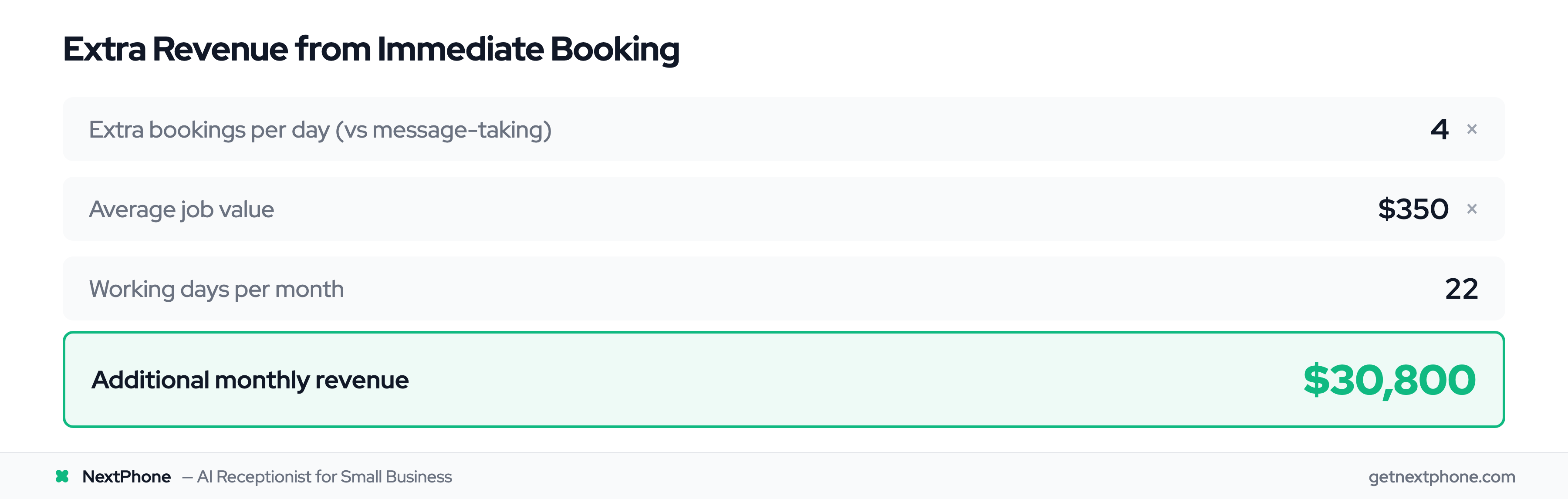
At an average job value of $350, that's an extra 4 bookings per day - $1,400 in additional daily revenue, or about $30,800 per month.
| Factor | Message-Taking | Immediate Booking |
|---|---|---|
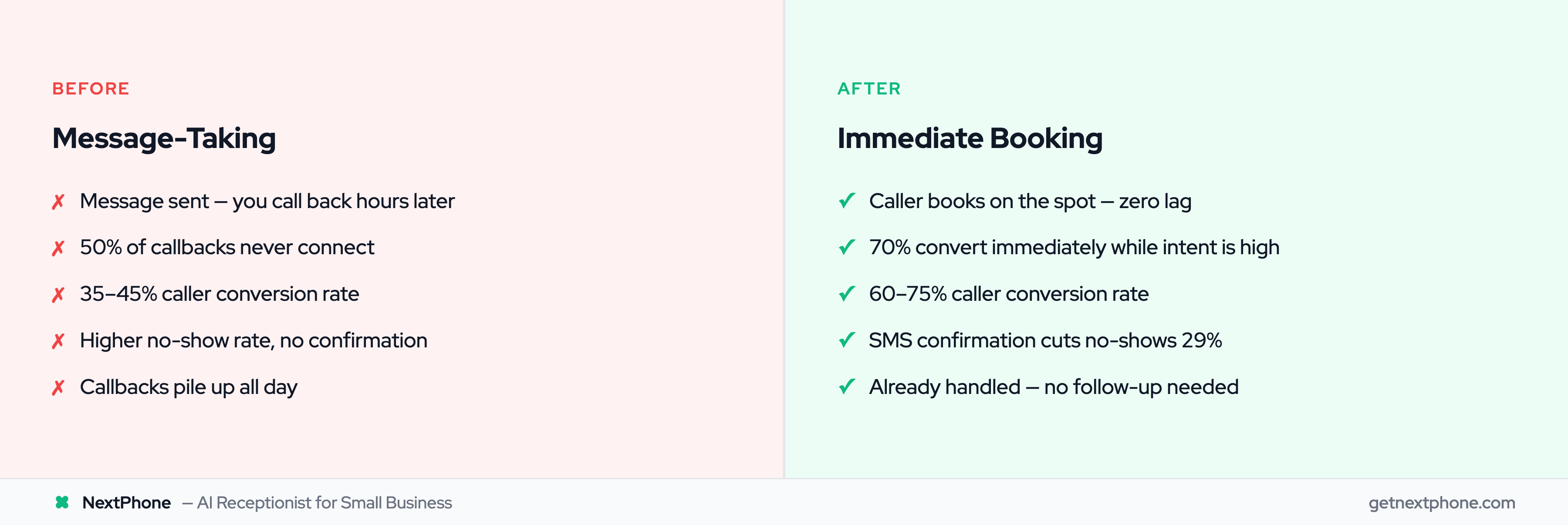
| Caller conversion rate | 35-45% | 60-75% |
| Time from call to booking | Hours to days | Immediate |
| No-show rate | Higher (no confirmation) | 29% lower with reminders |
| Customer experience | Waiting, uncertainty | Confirmed, confident |
| Your workload | Callbacks all day | Already handled |
How Answering Service Appointment Scheduling Works
The Caller Experience
From the caller's perspective, booking through a scheduling-enabled answering service feels seamless:
- They call your business number - You're out on a job or it's after hours
- Service answers professionally - "Thanks for calling Smith Plumbing, how can I help?"
- They explain their need - "I need someone to look at a leaky faucet"
- Real-time availability check - "I can get someone out Tuesday at 2pm or Wednesday at 10am"
- They choose a time - "Tuesday at 2pm works"
- Instant confirmation - "Perfect, you're booked. You'll get a text confirmation in a moment"
The whole interaction takes 2-3 minutes. They hang up with a confirmed appointment and peace of mind.
Behind the Scenes: Calendar Sync
The magic happens through calendar integration. Modern answering services connect directly to your scheduling system - whether that's Google Calendar, Outlook, Calendly, Acuity, or industry-specific software.
Two-way sync means:
- When the service books an appointment, it appears on your calendar instantly
- If you manually add something to your calendar, the service sees it and won't double-book
- Cancellations and reschedules update everywhere automatically
For teams with multiple technicians, the service can check availability across all calendars and assign based on location, skill set, or whoever's available first.
Confirmation and Follow-Up
Once booked, the caller gets immediate confirmation via SMS or email. This does two important things:
-
Reduces no-shows - Healthcare research shows no-show rates drop by 90% with timely reminders. Confirmation + reminder = commitment.
-
Builds trust - The caller knows the appointment is real, not just a promise someone will call them back.
Many services also send automatic reminders 24 hours before the appointment, reducing no-shows even further.
Calendar Integration: What to Expect
Popular Calendar Platforms
Quality scheduling answering services integrate with the tools you already use:
- Google Calendar - The most common, with 500+ million users worldwide
- Microsoft Outlook - Standard for many businesses
- Calendly - Popular for appointment-based businesses
- Acuity Scheduling - Common in professional services
- Industry-specific systems - HVAC software, legal practice management, medical EMRs
If you're already using scheduling software, your answering service should plug into it - not require you to adopt something new.
Two-Way Sync vs One-Way
Not all integrations are equal:
-
One-way sync - The answering service can see your calendar but can't write to it. They check availability, then send you a request to manually add the appointment. Better than message-taking, but still creates lag.
-
Two-way sync - The service reads AND writes to your calendar in real-time. Appointments appear automatically. Changes sync both directions. This is what you want.
Always ask: "Does your calendar integration allow you to book directly, or do you just send me requests?"
Multi-Calendar Support
If you have a team, you need a service that can check multiple calendars simultaneously. Otherwise, they're just checking your calendar while your three technicians have completely different availability.
Good services can:
- Check all team calendars at once
- Route appointments based on location or specialization
- Balance workloads across the team
- Respect individual working hours and time off
Live vs AI Appointment Scheduling
Live Agent Scheduling: Pros and Cons
Live answering services use human receptionists to handle calls and schedule appointments.
Pros:
- Human judgment for complex situations
- Can handle emotional or upset callers effectively
- Reads between the lines on caller needs
- Adapts to unusual requests
Cons:
- Higher cost ($400-800/mo for scheduling capability)
- Limited hours unless you pay for 24/7 coverage
- Quality varies by agent
- Can't scale instantly during call spikes
Live scheduling works best when your calls regularly involve complex coordination, sensitive situations, or customers who expect a human touch.
AI Scheduling: Pros and Cons
AI-powered answering services use conversational AI to handle calls and book appointments.
Pros:
- 24/7 availability without overtime costs
- Answers in under 5 seconds - no hold time
- Consistent quality on every call
- Scales to handle any volume
- Lower cost ($99-299/mo, often unlimited calls)
Cons:
- May struggle with highly complex requests
- Some callers prefer humans
- Requires quality handoff protocol for edge cases
Modern AI handles routine appointment scheduling with 90-95% accuracy. For the 5-10% of calls that need human judgment, good AI services route to a real person rather than fumbling through.
The Hybrid Approach
The smartest businesses use both:
- AI handles first contact - Answers instantly, handles routine bookings
- Complex calls route to humans - Angry customers, multi-party scheduling, sensitive situations
- You get notified for high-value calls - Emergency routing direct to your phone
This gives you AI efficiency (cost, speed, 24/7) with smart forwarding for the calls that need it.
Which Is Right for You?
| Scenario | Best Option |
|---|---|
| High call volume, routine scheduling | AI scheduling |
| Complex appointments (multi-party, varying durations) | Live agents |
| After-hours coverage needed | AI (24/7 built in) |
| Budget under $300/mo | AI scheduling |
| Callers frequently upset or emotional | Live agents or hybrid |
| Want consistent quality every call | AI scheduling |
For most routine scheduling, AI delivers comparable or better results than live agents at a fraction of the cost.