
Your phone rings while you're on a ladder installing electrical wiring. You can't answer. The caller needs an emergency repair—$1,200 job. They call the next electrician on Google. Job lost in 30 seconds.
Research shows 62% of calls to home services businesses go unanswered—and 42% of SMBs lose $500 or more per month to missed calls. For contractors, that's not just annoying—it's financially devastating.
At average contractor call volumes, missing 70% of calls means losing $16,800-$252,000 annually in quote requests, appointments, and emergency jobs you never knew about.
The best AI receptionist apps now resolve 90-95% of calls without human intervention, answer in under 5 seconds, and maintain 99% positive caller sentiment — measured across 1,446,980 real business calls. They route emergencies to your phone, book appointments directly into your calendar, and cost less than one employee lunch per day.
In this guide, we compare 9 AI receptionists for small businesses in 2026—honest pros, cons, and pricing for each.
Quick Answer: The Best AI Receptionist App in 2026
Short answer: The best AI receptionist app in 2026 is NextPhone — a flat-rate $199/month AI receptionist solution that picks up in under 5 seconds, resolves 90–95% of calls without human escalation, and maintains 99% positive caller sentiment across 1,446,980+ real business calls answered. It runs 24/7, supports 9 languages, includes spam filtering and emergency routing, and is the only AI receptionist software in this comparison that doesn't meter you per call or per minute.
Best for home services & contractors: NextPhone (flat-rate, emergency keyword routing). Best AI + human hybrid: Smith.ai ($300/mo for 30 calls). Best budget AI: Dialzara (from $29/mo) or Upfirst (from $24.95/mo) — limited features. Best for scheduling-heavy practices: My AI Front Desk (from $79/mo).
A production after-hours call answered by NextPhone — greeting, urgency capture, contact details, callback flagged. This is the call a voicemail box would have lost.
What Is an AI Receptionist App?
An AI receptionist app is software that uses artificial intelligence to answer your business phone calls automatically. Instead of hiring a full-time receptionist or letting calls go to voicemail, an AI virtual receptionist handles inquiries 24/7 using natural language processing. The virtual receptionist market has reached $6.26 billion, driven by businesses seeking 24/7 coverage without the cost of human staff.
How AI Receptionist Apps Work
The technology sounds complex, but the process is straightforward. When a call comes in, the AI follows three steps:
First, it converts the caller's voice to text (speech-to-text). Then, it analyzes what the caller wants using natural language processing—the same technology that powers Siri and Alexa. Finally, it either responds with an answer (text-to-speech) or routes the call to the right person.
You train the AI by feeding it information about your business: hours of operation, services offered, pricing, frequently asked questions. The more detail you provide during setup, the better it performs.
What AI Receptionists Can Do
Modern AI receptionist apps handle most routine business calls:
- Answer questions about hours, pricing, and services
- Book appointments directly into your calendar
- Route urgent calls to your phone immediately
- Take detailed messages with caller contact info
- Filter spam and robocalls automatically
- Send confirmation texts after bookings
- Handle multiple calls simultaneously (no busy signals)
Modern AI achieves 85-95% accuracy for routine inquiries when trained on business-specific information. For complex or unusual questions, the best systems route calls to you rather than guessing. The technology is advancing rapidly—85% of customer service leaders plan to pilot conversational generative AI in 2025.
AI vs. Traditional Receptionist
The cost difference is stark. The Bureau of Labor Statistics reports the median receptionist salary is $33,960 per year ($2,830/month). Add benefits—health insurance, payroll taxes, paid time off—and you're looking at $3,750-$4,000 monthly for a full-time receptionist.
That receptionist works 40 hours per week. An AI receptionist costs $199-$500 per month for full-featured solutions and works 168 hours per week (24/7/365). No breaks, no sick days, no vacations.
The math makes sense for small businesses. A traditional receptionist costs $45,000 annually (salary plus benefits). An AI receptionist costs $2,388 annually ($199/month). That's a $42,612 savings—and the AI never sleeps.
Why Small Businesses Need AI Receptionist Apps
Missing calls doesn't feel catastrophic in the moment. You're busy. You'll call them back. But the data tells a different story.
The Hidden Cost of Missed Calls
Industry research shows 60-80% of small business calls go unanswered. That's not an exaggeration—three out of every four potential customers can't reach you.
What happens when someone calls and gets voicemail? Research shows 60-80% call a competitor instead of leaving a message. They don't wait. They move on to the next Google result.
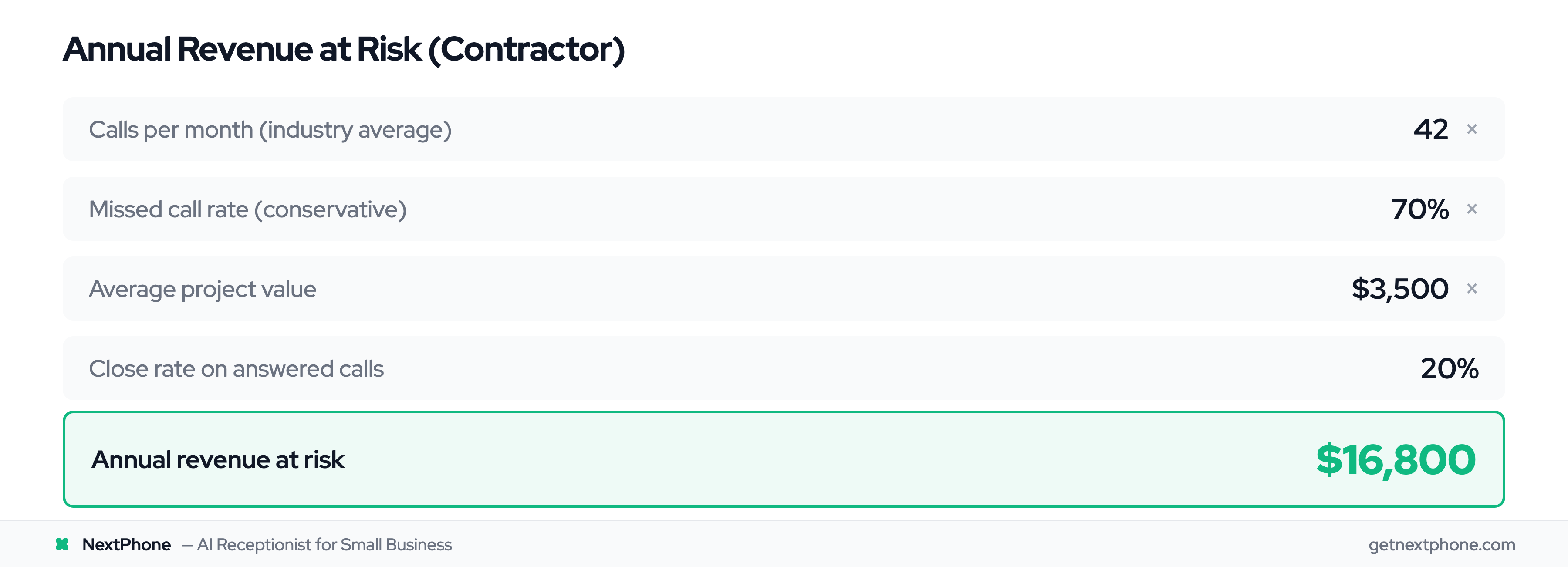
Let's do the math for a general contractor:
42 calls/month (industry average)
× 70% missed (conservative estimate from industry data)
= 29 missed calls monthly

Of those 29 missed calls:
- Quote/estimate requests are among the top reasons people call
- That's 2 quotes lost per month

At $3,500 average project value
× 20% close rate
= $1,400/month in lost revenue
= $16,800 lost annually
For roofers, the numbers are even worse. Roofing contractors in industry studies average 87 calls monthly but miss 76.6%. Assume roughly one in ten of those missed calls is a quote request for a project averaging $15,000, and that's $252,000 in annual lost revenue.
An AI receptionist costs $2,388 per year. If it captures just one additional $3,500 job you would've missed, you're profitable for 17 months.
After-Hours Opportunities You're Missing
Research on customer call patterns found that urgent calls with language like "ASAP," "urgent," "emergency," or "today" rank among the top reasons people call. True emergencies requiring immediate response are a recurring reason too.
These aren't calls that can wait for a callback tomorrow morning. Real example from industry research data:
"Needs emergency AC repair, no cooling in 95 degree weather."
When someone's AC dies in a heat wave, they're calling 5-10 HVAC contractors. The first one to answer gets a $1,200+ emergency job. The rest get nothing.
After-hours calls represent massive revenue opportunities. Customers don't only have emergencies during business hours. But if you're not answering at 9 PM on a Tuesday, you're sending them straight to your competitor who has an AI receptionist.
Time Wasted on Repetitive Questions and Spam
A steady share of every week's calls ask the same repetitive questions: "What are your hours?" "What's your service area?" "How much do you charge?"
Each interruption costs 15-20 minutes of focus time. You stop what you're doing, answer the phone, explain your hours for the hundredth time, and lose your momentum.
Then there's spam. A meaningful share of incoming calls are spam or robocalls—dozens of wasted interruptions a year for a contractor getting 500 calls yearly. For electricians, it's worse: their numbers get on spam lists more frequently than other trades.
AI filters spam automatically. It blocks robocalls before your phone even rings.
And here's the kicker: approximately one in four callers asks for a callback. "Have him call me back about the roof estimate." Without a tracking system, a large share of those callback requests never get returned. That's hundreds of lost customers who felt ignored.
AI apps track every callback request with contact info, urgency level, and what they called about. You see it in your dashboard and actually follow up.
9 Best AI Receptionists for Small Business (2026)
We compared each service on pricing transparency, feature depth, integration ecosystem, voice quality, and setup time. Each product was evaluated at the same call volume scenarios to normalize pricing comparisons.
Disclosure: NextPhone is our product. We've included it because it competes directly in this category, but we applied the same evaluation criteria to every service. Where NextPhone falls short—single pricing tier, contractor focus, no human fallback—we say so.
1. NextPhone - Best Overall for Small Business
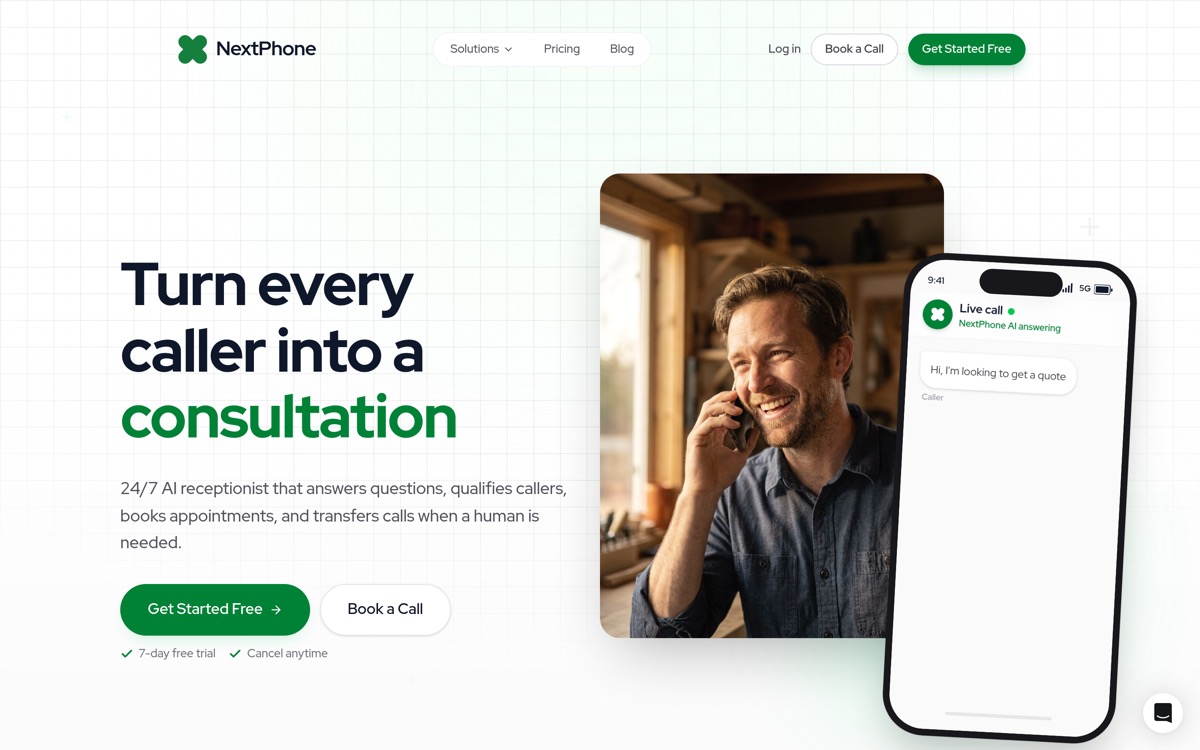
For all contractors: Roofing, HVAC, electrical, plumbing, and general contractors. Unless you're a medical practice requiring complex diagnostic triage, this is the answer.
NextPhone was built specifically for contractors and field service businesses that struggle with high missed call rates. The flat-rate unlimited pricing eliminates surprise bills during busy season.
- 24/7 AI call answering (responds in under 5 seconds)
- Emergency call detection with keyword routing ("urgent," "emergency," "ASAP")
- Automatic spam filtering (blocks wasted calls before they ring)
- Callback request tracking (captures the roughly one in four calls requesting follow-up)
- Appointment booking with Google Calendar and Outlook integration
- Call transcripts and analytics dashboard
- Unlimited parallel calls (no busy signals ever)
- Industry-specific training (understands contractor terminology)
- CRM integration (Salesforce, HubSpot, ServiceTitan, Jobber)
Pricing:
- Single tier: $199/month flat rate
- Unlimited incoming calls (no per-minute or per-call charges)
- No setup fees
- 7-day free trial
Pros:
- Flat-rate pricing means no surprise bills during peak season
- Contractor-specific features (emergency routing, spam filtering for trades)
- Fast answer time (under 5 seconds keeps customers on the line)
- Unlimited calls included (scales with your business)
- Completely transparent pricing ($199/mo, period)
Cons:
- Single pricing tier (no cheaper option for very low volume)
- Focused on contractors (may lack features for other industries)
Why contractors choose NextPhone:
Research analyzing home services calls found that emergencies requiring immediate response are a recurring reason people call. NextPhone's AI detects urgency keywords—"emergency," "pipe burst," "no heat," "urgent"—and routes these calls directly to your phone instead of trying to handle them with AI.
Real example from industry data:
"Emergency pipe burst, needs plumber immediately."
When that call comes in at 9 PM, NextPhone's AI detects "emergency" and "immediately," connects the caller to your phone, and you answer a $1,200 after-hours job in 15 seconds.
The spam filtering is calibrated for contractors. Electricians get hit hardest—their numbers get on lists more than other trades. NextPhone automatically filters these time-wasters before they ever ring you.
And here's the big one: flat-rate unlimited pricing. Most competitors charge per-minute or per-call, which creates sticker shock when you hit busy season. Roofing contractor in May after hailstorms? You might get 200 calls. With per-call pricing at $5/call, that's a $1,000 surprise bill. NextPhone stays $199 whether you get 20 calls or 200.
The result? 99% caller satisfaction. Most callers can't tell they're talking to AI—they just know someone finally answered the phone.
Setup takes a few minutes. No technical skills required.
Try NextPhone free for 7 days
AI answering service that answers, qualifies, and books — 24/7.
2. Smith.ai - Best for AI + Human Hybrid
Best for: Law firms, professional services, and businesses where some calls genuinely require human judgment.
Smith.ai combines AI efficiency with live human receptionists as backup. Over 5,000 businesses use the service, with particularly strong adoption among law firms for client intake.
Pricing: Starting at $255/month for 30 calls. Free trial: 14-day money-back guarantee Standout feature: Human receptionists handle calls AI can't—complex intake gets real empathy.
Pros:
- AI handles routine calls, humans handle complex situations
- Extensive CRM integrations (Clio, Salesforce, HubSpot)
- Strong lead qualification and intake workflows
- 4.8+ stars on G2, Capterra, and Clutch
Cons:
- Per-call pricing gets expensive at volume ($8.50+/call overage)
- Starting at $255/month for just 30 calls
- Complex pricing tiers make budgeting harder
- At 100 calls/month, expect $850+ vs flat-rate alternatives
Smith.ai works best for law firms and professional services where sensitive intake calls genuinely require a human voice. The AI-human handoff is smooth. The downside is cost: volume growth punishes you with per-call overages. Choose Smith.ai when call quality matters more than cost predictability.
3. Ruby - Best for Human Receptionists
Best for: Businesses where callers actively expect or prefer a human, and budget isn't the primary concern.
Ruby provides US-based live receptionists, not AI. It's on this list because many "best AI receptionist" searches come from people comparing AI against human alternatives.
Pricing: Starting at $319/month for 50 receptionist minutes Free trial: 21-day money-back guarantee Standout feature: Real human receptionists based in the US, trained on your business.
Pros:
- Genuine human interaction (no AI involved)
- US-based team, professional and consistent
- Strong reputation and established track record
- Excellent for businesses where callers expect a person
Cons:
- Most expensive option on this list ($319+ for just 50 minutes)
- Per-minute overage charges add up fast ($5.19+/min)
- After-hours coverage requires add-on
- No AI automation for routine calls
Ruby is the right choice if your callers actively dislike AI or your calls require empathy a machine can't deliver. For everyone else, the price premium is hard to justify—especially since AI handles routine calls (hours, pricing, scheduling) identically to a human at a fraction of the cost.
4. Dialzara - Best Budget AI Option
Best for: Businesses testing AI reception for the first time without a major commitment.
Dialzara offers pure AI call answering at entry-level pricing, making it accessible for solopreneurs and very small businesses with low call volume.
Pricing: Starting at $29/month (limited calls), up to $199/month for higher tiers Free trial: Available Standout feature: Low entry price lets you test AI reception without financial risk.
Pros:
- Affordable entry point ($29/month to start)
- Pure AI with decent voice quality
- Easy setup process
- Good for testing whether AI reception works for your business
Cons:
- Limited call volume at base tier
- Fewer integrations than established platforms
- Less mature product with smaller feature set
- No emergency routing at lower tiers
Dialzara works for businesses with low call volume (under 30 calls/month) who want to experiment with AI reception before committing to a full-featured platform. If you're getting 50+ calls/month and need emergency routing or deep CRM integration, you'll outgrow the base tier quickly.
5. Upfirst - Best for Solopreneurs
Best for: Solo professionals and very small businesses wanting simple, affordable AI call answering.
Upfirst targets the simplicity end of the market—minimal setup, affordable pricing, basic AI coverage.
Pricing: Starting at $24.95/month Free trial: Available Standout feature: Simplest setup on this list—designed for non-technical users.
Pros:
- Most affordable starting price on this list
- Clean, simple interface
- Quick setup with minimal configuration
- Good for basic call handling
Cons:
- Smaller feature set than full-featured platforms
- Newer product with less proven track record at scale
- Limited integrations
- May not scale for growing businesses
Upfirst is a good starting point if you're a solopreneur getting 10-20 calls/month and want basic AI coverage. Understand the tradeoff: you get affordability at the cost of features like emergency routing, advanced CRM sync, and multi-language support.
6. My AI Front Desk - Best for Scheduling-Heavy Businesses
Best for: Dental offices, salons, therapy practices, and any business where 80%+ of calls are appointment-related.
My AI Front Desk focuses specifically on scheduling workflows—booking, rescheduling, cancellations, and calendar management.
Pricing: From $79/month Free trial: 7-day trial Standout feature: Built specifically around appointment booking and calendar management.
Pros:
- Strong scheduling and calendar integration
- Designed for appointment-heavy workflows
- Handles booking, rescheduling, and cancellations naturally
- Affordable for the feature set
Cons:
- Narrower feature set outside of scheduling
- Less CRM depth than broader platforms
- Limited emergency routing capabilities
- Not ideal for businesses with complex non-scheduling calls
If the vast majority of your calls are about appointments, My AI Front Desk handles that use case well. For businesses where calls also include emergencies, complex quotes, or non-scheduling inquiries, a more general-purpose AI receptionist is a better fit.
7. Rosie - Best for After-Hours Coverage
Best for: Businesses that answer most calls themselves but need backup for after-hours and busy periods.
Rosie focuses on the missed-call problem: catching calls that go to voicemail when you're unavailable, rather than replacing your phone system entirely. (If text acknowledgment on missed calls is all you need right now, the missed call text back guide covers the simpler options before stepping up to a full AI receptionist.)
Pricing: Pay-per-minute starting at $0.25/minute Free trial: Available Standout feature: Purpose-built for after-hours and overflow call handling.
Pros:
- Designed specifically for missed call recovery
- Pay only for what you use
- Good voicemail-to-text transcription
- Works as a supplement to your existing setup
Cons:
- Per-minute pricing gets expensive at higher volume
- Limited as a full-time receptionist replacement
- Fewer integrations than all-in-one platforms
- No emergency routing
Rosie works as a supplement—handling calls when you can't answer rather than replacing your phone system. Good for businesses that answer most calls themselves but lose revenue on after-hours and busy-period calls. At volume, per-minute costs exceed flat-rate alternatives.
8. TTYL - Best iOS Companion App
Best for: iPhone users who want a lightweight AI receptionist managed entirely from their phone.
TTYL is an iOS-only AI receptionist with a 4.9-star App Store rating and 10,000+ businesses using it. It's built as a mobile-first call handler—answer calls, block spam, get summaries.
Key Features:
- Native iOS app (App Store exclusive)
- AI-powered call answering with natural-sounding voices
- Spam call detection and blocking
- Detailed call summaries, transcripts, and recordings
- Customizable greetings and response protocols
- Appointment scheduling
- 24/7 availability
Pricing:
- Not publicly listed (download app to see plans)
Pros:
- Excellent iOS app experience (4.9/5 rating)
- Strong spam filtering
- Natural voice quality
- Simple setup from your phone
Cons:
- iOS only—no Android support
- No public pricing transparency
- Fewer integrations than NextPhone (100+)
- No emergency keyword detection
- No smart forwarding for urgent calls
- Limited to phone-based management (no web dashboard)
How it compares to NextPhone:
TTYL is a solid iOS app for basic call answering and spam filtering. NextPhone offers the full package: flat-rate unlimited at $199/month, emergency detection, smart forwarding, 9 languages, unlimited simultaneous calls, 100+ CRM integrations, and both mobile and web access. If you need more than basic call screening, NextPhone covers it.
AI Receptionist Comparison Table
Pricing Comparison
| Product | Starting Price | Pricing Model | AI / Human | Best For |
|---|---|---|---|---|
| NextPhone | $199/mo | Flat-rate unlimited | AI | Contractors & SMBs |
| Smith.ai | $255/mo | Per-call (30 included) | AI + Human | Law firms, professional services |
| Ruby | $319/mo | Per-minute (50 min) | Human | Callers who prefer humans |
| Dialzara | $29/mo | Tiered | AI | Budget testing |
| Upfirst | $24.95/mo | Tiered | AI | Solopreneurs |
| My AI Front Desk | $79/mo | Flat-rate | AI | Scheduling-heavy businesses |
| Rosie | $0.25/min | Per-minute | AI | After-hours overflow |
| TTYL | In-app pricing | Subscription | AI | iOS users |
| RingCentral | Platform add-on | Varies | AI | Existing RingCentral users |
Feature Comparison
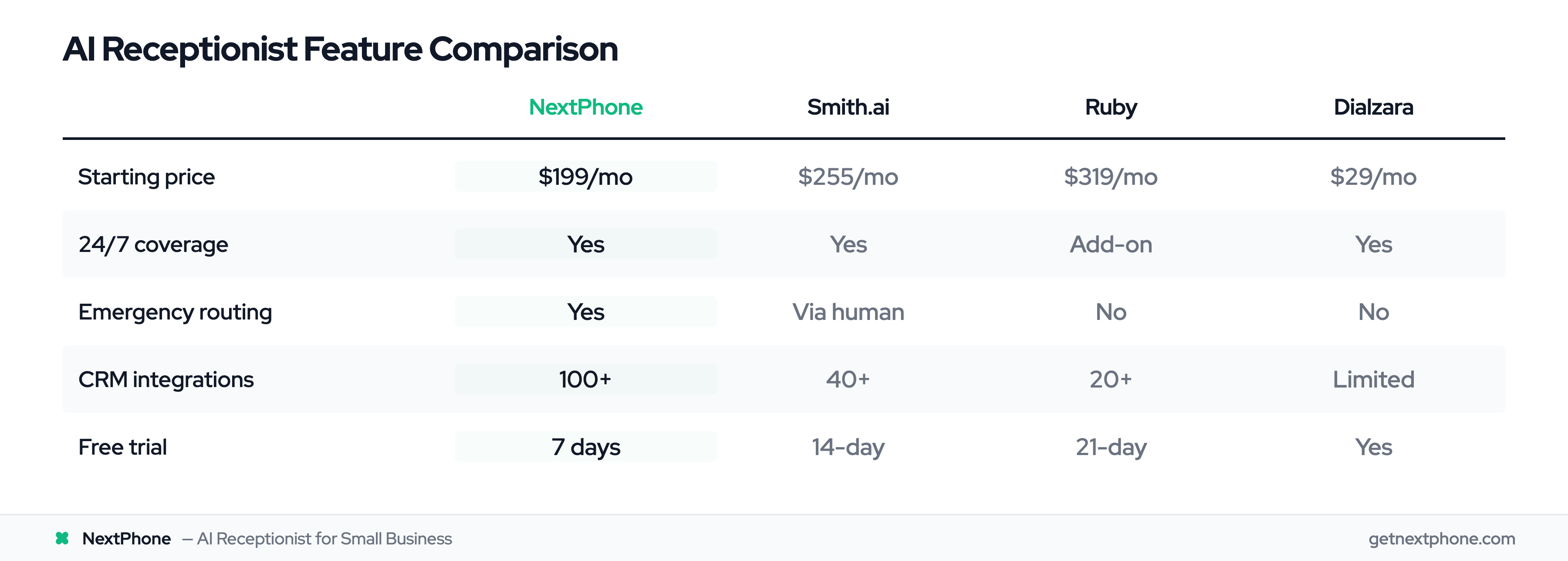
| Product | 24/7 | Emergency Routing | CRM Integrations | Free Trial |
|---|---|---|---|---|
| NextPhone | ✅ | ✅ | 100+ | 7 days |
| Smith.ai | ✅ | Via human | 40+ | 14-day guarantee |
| Ruby | Add-on | ❌ | 20+ | 21-day guarantee |
| Dialzara | ✅ | ❌ | Limited | Yes |
| Upfirst | ✅ | ❌ | Limited | Yes |
| My AI Front Desk | ✅ | ❌ | Limited | 7 days |
| Rosie | ✅ | ❌ | Limited | Yes |
| TTYL | ✅ | ❌ | Limited | Yes |
| RingCentral | ✅ | ❌ | Native | With plan |
Best AI Receptionist App by Vertical and Use Case
Different businesses have different call patterns. Here's our pick by industry and scenario, based on the call data we see across 1,446,980+ inbound calls handled by our AI receptionist.
Best AI Receptionist for Small Business
For most small businesses, NextPhone is the best AI receptionist for small business in 2026. The flat-rate $199/month covers unlimited inbound calls — no per-minute meter, no overage anxiety. You get emergency routing, spam filtering, calendar booking, and 100+ Zapier-bridged integrations included.
Which AI virtual receptionist is best for small businesses depends on call volume: under 20 calls/month, Upfirst or Dialzara can work as a cheap entry point; at 30+ calls/month, the per-call metered services (Smith.ai, Ruby) get expensive fast and NextPhone's flat rate wins on both price and feature depth.
Best AI Receptionist for Contractors and Home Services
For contractors — plumbing, HVAC, electrical, roofing, general — NextPhone is purpose-built for the missed-call problem and the seasonal volume spikes. The AI detects urgency keywords ("pipe burst," "no heat," "roof leak," "no AC") and routes those calls to your cell instead of trying to handle them. Most home services alternatives either meter you per call (painful in storm season) or skip emergency routing entirely.
If you're shopping AI receptionist for home services alternatives, the realistic options are: NextPhone (flat-rate, contractor-tuned), Smith.ai (AI+human, expensive at volume), Rosie (after-hours overflow only), and My AI Front Desk (scheduling-only). For full coverage at predictable cost, NextPhone is the answer.
Best AI Receptionist for Roofing Companies
Roofing contractors have the worst missed-call math in home services — Invoca's data shows up to 76.6% of calls go unanswered, and roofing leads are high-ticket ($15,000+ per project). After a hailstorm, call volume can 10x in a week. NextPhone's unlimited flat-rate is the only sensible option at that volume; per-call services bill you $1,000+ in surprise overage. Emergency keyword detection ("storm damage," "leak," "tarp") routes the highest-intent calls straight to you.
Best AI Receptionist for Construction Companies
For construction companies and general contractors, the right AI receptionist needs to: (1) handle subcontractor coordination calls, (2) route emergency jobsite calls, (3) capture estimate requests with project type and budget. NextPhone handles all three with custom intake questions, plus integrates with QuickBooks and ServiceTitan via Zapier.
Best AI Receptionist for Trucking Companies
Trucking companies need an AI receptionist that handles dispatch overflow, after-hours load requests, and driver call-ins around the clock. NextPhone runs 24/7/365 and can route urgent dispatch calls to your on-call number while capturing structured load data (origin, destination, weight, pickup time) for everything else.
Best AI Receptionist for Managed Services Providers (MSPs)
For MSPs, the AI receptionist needs to triage urgent client tickets, route VIP accounts to your on-call engineer, and capture detailed problem descriptions for standard issues. NextPhone's custom intake fields let you collect client name, system affected, error message, and urgency — then push the record into ConnectWise or Autotask via Zapier. Smith.ai's hybrid AI+human model also works here if your clients expect a live person.
Best AI Receptionist for Dental Practices (Voicify Competitors)
For dental practices comparing Voicify alternatives, the realistic competitors are: NextPhone, Smith.ai, My AI Front Desk, and Ruby. NextPhone handles appointment booking, new-patient intake, and insurance verification questions through configurable intake fields. My AI Front Desk is the most narrowly-focused on scheduling. Smith.ai adds human backup for sensitive intake. NextPhone is the flat-rate, full-feature pick.
Most Reliable AI Receptionist Available 24/7
The most reliable AI receptionist available 24/7 is the one that picks up consistently, handles overflow without dropping calls, and degrades gracefully when it doesn't know an answer. NextPhone hits under 5 seconds to pickup, handles unlimited simultaneous calls (no busy signals), and resolves 90–95% of calls without human escalation — the remaining 5–10% get smart-forwarded to your phone with full context. The real comparison isn't AI vs human — it's AI vs voicemail.
Best 24/7 Coverage AI Receptionist
Every AI receptionist on this list runs 24/7 in theory; the meaningful question is what they cost when you actually use them at 2 AM. Per-minute services (Ruby at $5.19/min overage, Rosie at $0.25/min) penalize after-hours volume. Flat-rate AI (NextPhone $199/mo, My AI Front Desk $79/mo for scheduling-only) doesn't. For best 24/7 coverage at predictable cost, NextPhone is the pick.
Cheapest AI Receptionist
The cheapest AI receptionist apps in 2026 are Upfirst ($24.95/mo) and Dialzara (from $29/mo) — both have limited features, low call caps, and minimal integrations. They work for solopreneurs getting 10–20 calls/month. For everyone else, the math flips: the price difference vanishes the moment a $3,500 job slips through the cracks because the cheap service didn't have emergency routing or callback tracking. NextPhone at $199/mo with unlimited calls is cheaper than Ruby ($319), AnswerConnect ($325), and Smith.ai's human tier ($300 for just 30 calls).
Free AI Receptionist for Small Business
There is no genuinely free AI receptionist for small business worth recommending — the "free" options are either time-limited trials, demo accounts capped at a handful of calls, or stripped-down free tiers that can't actually answer your business phone. What is widely available is free trials: NextPhone offers a 7-day free trial with the full feature set ($199/mo after), Smith.ai offers a 14-day money-back guarantee, Ruby a 21-day guarantee, and Dialzara/Upfirst free trials. Use the trial period to validate fit before committing.
Best Niches for AI Receptionist (2025–2026)
The best niches for AI receptionist in 2025–2026, based on the verticals where missed-call cost is highest and answering patterns are highly repeatable: (1) home services (plumbing, HVAC, electrical, roofing — emergency-heavy and seasonal), (2) legal practices (high-stakes intake, conflict checks, after-hours consultations), (3) dental and medical offices (appointment-heavy, predictable workflows), (4) MSPs (24/7 triage, structured ticket capture), (5) trucking and logistics (dispatch overflow, driver call-ins), and (6) real estate (showing requests, property inquiries that need instant response). All of these share the same DNA: high missed-call cost, repeatable call patterns, and an after-hours tail.
AI Receptionist Use Cases by Industry
| Industry | Top use cases | Why AI works |
|---|---|---|
| Home services | Emergency triage, after-hours quoting, scheduling | Time-sensitive, voicemail kills the lead |
| Legal | New-client intake, conflict screen, consult booking | Standardized scripts, sensitive but repeatable |
| Dental / medical | Appointment booking, rescheduling, insurance Qs | 80%+ of calls are scheduling — perfect AI fit |
| MSP / IT | Ticket capture, on-call routing, status checks | Structured data collection, 24/7 demand |
| Trucking | Dispatch overflow, load requests, driver call-ins | Round-the-clock, structured intake |
| Real estate | Showing requests, listing inquiries, lead capture | Speed-to-lead wins deals |
| Salons / spas | Booking, rescheduling, cancellations, gift cards | Scheduling-dominated call mix |