
You're paying $400 a month for your "virtual office." There's a prestigious business address you never actually use. Mail forwarding you check once a month, maybe. And 50 receptionist minutes that run out by week two, leaving you with per-minute overage charges that quietly double your bill.
Sound familiar? You're not alone.
The virtual office industry hit $24.7 billion in 2025 and keeps growing (driven by trends documented in the Owl Labs 2025 State of Hybrid Work Report) because businesses assume they need the full package. A professional address, mail handling, AND live receptionist all bundled together. But here's what nobody tells you: many businesses are overpaying for services they don't actually need.
This guide helps you figure out whether you need the complete virtual office bundle or just the phone answering piece. We'll break down what's actually included, what it really costs (including the hidden fees), and when you might be better off unbundling to save $150-600 per month.
What's in a "Virtual Office with Live Receptionist" Package?
Before deciding what you need, you need to understand what you're buying. A "virtual office with live receptionist" typically bundles three distinct services.
The Business Address Component
The address piece gives you a legitimate commercial address to use for your business. You can list it on your website, business cards, marketing materials, and official documents. Most virtual office addresses can also be used for company registration, though some banks and licensing bodies have restrictions on mail-center addresses versus traditional commercial space.
The business address component matters if you work from home and don't want to publish your home address, if you need a commercial address for banking or licensing, or if you're establishing presence in a new market where you don't have physical space.
Mail Handling Services
Mail handling means someone receives your business mail, stores it securely, and either holds it for pickup, scans it to send you digitally, or forwards it to another address. Some packages include package receiving for deliveries.
How valuable is this? If you receive regular business mail, quite valuable. If you get maybe one or two pieces of business mail per month, you're paying for a service you barely use.
The Live Receptionist Piece
This is the phone answering component. A receptionist answers calls in your company name, takes messages, transfers calls to you when appropriate, and handles basic caller inquiries. Some services offer appointment scheduling and more sophisticated call handling. For a deeper look at this specific component, see our guide to AI virtual receptionist technology.
The receptionist piece is typically where the real costs pile up. Most providers either limit your minutes/calls or charge per-minute rates that can quickly exceed your base subscription.
What Packages Actually Include at Each Price Level
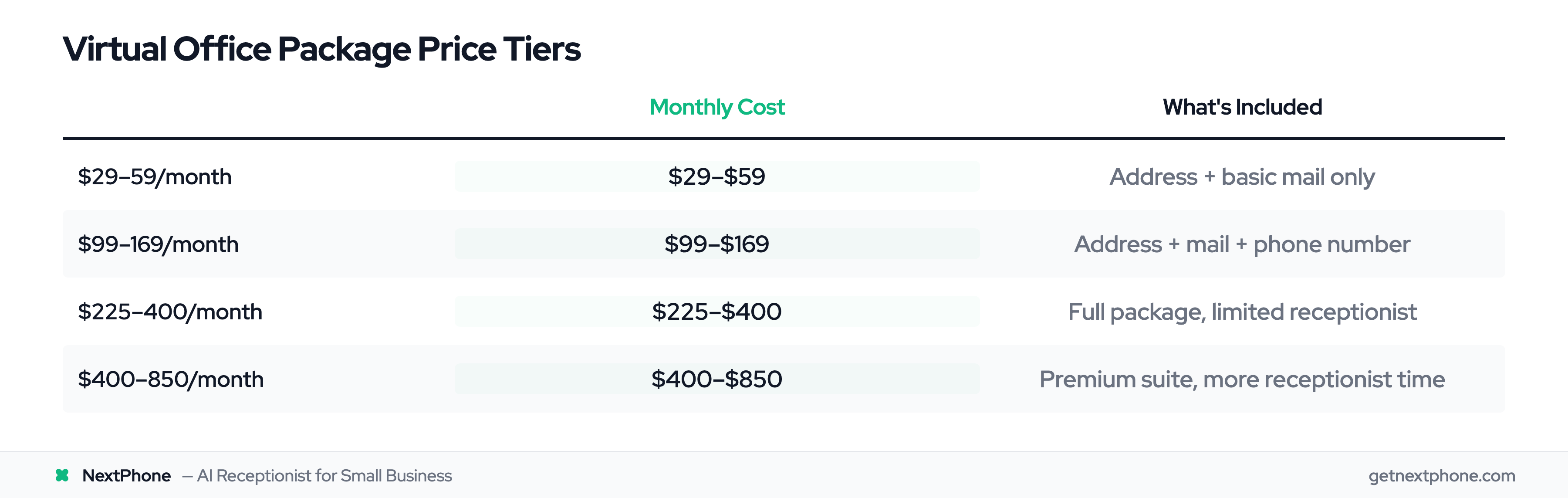
Prices checked against each provider's own pricing page on November 2, 2026 (25 of 27 providers; the other 2 earlier).
| Price Tier | What You Get | Example Providers |
|---|---|---|
| $15-60/month | Address + basic mail only | iPostal1, Alliance Virtual |
| $99-129/month | Address + mail + phone answering, or receptionist minutes alone | Opus Virtual, Davinci |
| $225-400/month | Full package with limited receptionist | Ruby, Smith.ai |
| $400-850/month (quoted, varies by location) | Premium suite with more receptionist time | Intelligent Office, Regus |
The jump from "address only" to "full package with receptionist" is where most businesses see their costs multiply.
What Does a Virtual Office with Receptionist Actually Cost?
The advertised price is rarely the final price. Understanding the real cost means looking at pricing models, hidden fees, and what happens when you exceed your plan limits.
The Three Pricing Models
Per-minute pricing charges you based on how long each call takes. Rates typically range from $1.50 to $6.00 per minute. A 3-minute call at $2.00 per minute costs $6.00. Handle 50 calls per month averaging 3 minutes each, and you're looking at $300 in receptionist charges alone.
Monthly subscriptions give you a bundle of minutes or calls for a flat monthly fee. The catch: go over your allocation, and overage rates kick in at 1.5-2x your base rate.
Per-call pricing charges a flat rate per call regardless of duration. Rates range from $0.99 to $11.00 per call depending on the provider and service level.
What Providers Actually Charge
| Provider | Base Price | What You Get | Overage Rate |
|---|---|---|---|
| Davinci Virtual | $129/month | 50 receptionist minutes | Not published (you move up a plan) |
| Ruby | $250/month (50 minutes) | 50 receptionist minutes | $3.65 to $5.40 a minute (help center) |
| Smith.ai | $300/month (30 calls) | 30 calls | $11.50 a call |
| Opus Virtual | $99/month | Unlimited basic answering | N/A |
| Intelligent Office | Quote only | Full office suite | Varies |
Davinci, Opus Virtual, Intelligent Office, iPostal1 and Alliance Virtual read on their own sites October 8, 2026; virtual office prices vary by location. Ruby's overage rates are from its help center.
Hidden Costs That Add Up
Setup and onboarding fees range from $50-200 for account creation, call script customization, and system integration. Smith.ai and Ruby charge no setup fee, and Opus Virtual and some others waive it too.
Overage charges are where bills explode. If you have a 50-minute plan and use 100 minutes, you're not paying double your base rate. You're paying for the bigger plan or overage on top. Davinci, for example, publishes no overage rate and moves you up instead: from $129 for 50 minutes to $239 for 100, so your "affordable" plan nearly doubles.
Contract commitments lock you in for 6-12 months, making it harder to switch when you realize you're overpaying. Read the fine print before signing.
Add-on services like appointment scheduling, CRM integration, bilingual support, and after-hours coverage often cost extra. Smith.ai charges additional fees for bilingual support. Many providers charge premium rates for 24/7 coverage.
The Total Cost Reality
A business expecting $200/month often ends up closer to $350-450 once overages and add-ons are factored in. The SBA's employee cost calculator shows hiring in-house is even worse: 1.25-1.4x base salary once benefits and taxes are included. That prestigious business address you're paying for but never using? It's part of that bundle cost whether you need it or not. For a detailed breakdown of virtual receptionist cost vs hiring staff, the savings get even more dramatic.
The Decision Framework: Full Package vs. Phone Answering Only
Here's the question nobody asks: Do you actually need everything in that bundle?
When You Need the Full Virtual Office Package
The complete package makes sense if you check several of these boxes:
- You need a business address for company registration or licensing
- Banks or lenders require a verified commercial address for financing
- You receive regular business mail (more than 2-3 pieces monthly)
- You want occasional access to meeting rooms or coworking space
- You're establishing presence in a new city or market where you have no physical location
If three or more of these apply, a bundled virtual office may be your best value. You're actually using what you're paying for.
When Phone Answering is Enough
Many businesses only have one real problem: they can't answer calls while working. They already have a business address (home office, existing commercial space, or an address-only service from about $15 a month). They don't receive significant business mail. They just need someone to answer the phone professionally when they're on a job site, in meetings, or handling other work.
NextPhone call data puts the missed-call rate for home services businesses at 74.1%. Nearly three out of four calls go completely unanswered. Not because these businesses didn't care about their customers. Because contractors can't answer phones while they're on a roof, under a house, or elbow-deep in electrical work.
If your main problem is missed calls rather than missing a business address, you're overpaying for services you don't use.
The Unbundling Strategy
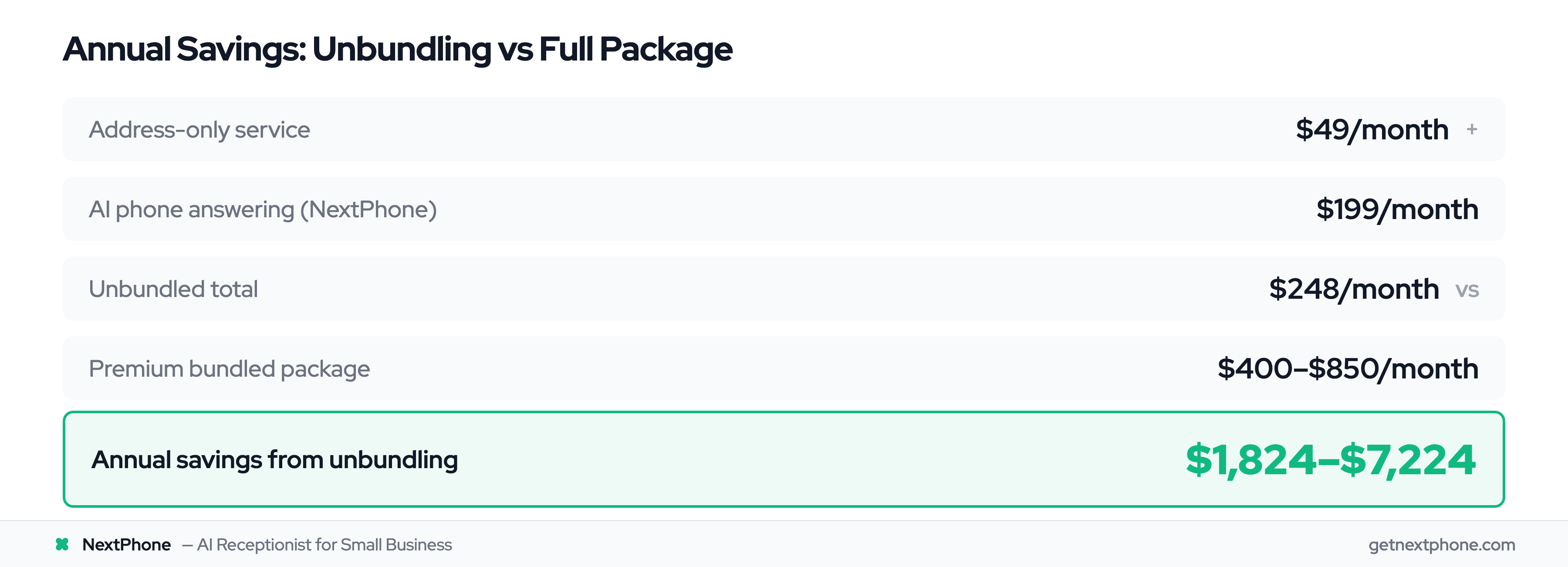
Instead of buying a $400-850/month premium virtual office package, consider unbundling:
Address only: $15-60/month from providers like iPostal1 or Alliance Virtual
Phone answering only: $199/month from AI services like NextPhone (unlimited calls)
Total unbundled cost: $214-259/month
Bundled package cost: $300-850/month
Annual savings from unbundling: up to about $7,600, depending on the package you replace
That's real money back in your business, and you get exactly what you need without paying for services collecting dust.
Quick Self-Assessment
Answer these four questions:
-
Do you need a business address you don't already have? If yes, address services add value.
-
Do you receive more than 2-3 pieces of business mail per month? If yes, mail handling helps.
-
Is your main problem missing calls while you're working? If yes, phone answering is your priority.
-
Do clients ever visit your business location? If yes, meeting room access may matter.
If you answered "no" to questions 1 and 2 but "yes" to question 3, standalone phone answering is your answer. If you answered "yes" to 1 and 2, the bundle makes more sense.
Comparing Major Virtual Office Providers
For businesses who do need the full package, here's how the major providers stack up.
Best for Budget-Conscious: Opus Virtual
Price: $99/month
What you get: Business address, mail handling, unlimited live call answering
Pros:
- Affordable
- Unlimited answering removes overage anxiety
- Nationwide locations
Cons:
- Basic features
- Less sophisticated routing than premium options
- Limited hours
Best for: Solopreneurs and small businesses who need the basics without premium pricing
Best for Premium Service: Ruby
Price: Starting at $250/month for 50 minutes of receptionist time
What you get: U.S.-based live receptionists, professional call handling, limited calls/minutes
Pros:
- Warm, professional service
- Captures 1.6 million leads per year for clients
- Strong reputation
Cons:
- Per-minute charges add up
- Can get expensive with higher call volumes
Best for: Law firms, consultants, and professional services wanting premium client experience
Smith.ai
Price: Starting at $300/month for 30 calls
What you get: Detailed analytics, AI-assisted human receptionists, data visualizations
Pros:
- Rich reporting and insights
- Predictive analysis
- Tech-forward approach
Cons:
- 30-call limit on base plan
- $11.50 per additional call on the base plan
Best for: Tech companies, digital marketers, and businesses who love data
Best for Physical Presence: Intelligent Office
Price: Quote only; Intelligent Office publishes no prices and varies by location
What you get: Physical office locations, meeting rooms, full receptionist suite, coworking access
Pros:
- Real office space when needed
- Multiple locations
- Comprehensive services
Cons:
- Expensive
- Location-dependent
- May be overkill for fully remote businesses
Best for: Businesses that occasionally need physical meeting space or office access
Provider Comparison at a Glance
| Provider | Monthly Cost | Calls/Minutes | 24/7? | Per-Minute? |
|---|---|---|---|---|
| Opus Virtual | $99 | Unlimited basic | No | No |
| Ruby | From $250/month (50 minutes) | 50 minutes | Yes | Yes |
| Smith.ai | From $300/month (30 calls) | 30 calls | Yes | Per-call |
| Davinci | $129+ | 50 minutes | No | Yes |
The pattern is clear: affordable options have limits (hours or features), and unlimited options come with premium price tags or per-minute anxiety. You can compare user experiences across providers on virtual receptionist reviews. Which leads to the question: is there another option?