For teams where one captured lead outweighs the monthly cost, an AI receptionist replaces the voicemail step entirely — across 1,446,980 real inbound calls we analyzed, voicemail only captured 20.8% of them. This guide compares the four best voicemail apps for business (TTYL, NextPhone, Google Voice, T-Mobile VVM) and shows where the AI receptionist crossover happens.
What 1,446,980 real B2B calls revealed about voicemail
Most "best voicemail app" guides borrow stats from a 2018 blog post. We pulled ours directly from NextPhone's production database — 1,446,980 inbound calls across our customer base, with a 10-day window of 15,830 calls used for the duration and outcome breakdowns.
Hear it: NextPhone picking up a real inbound call
0:00
0:00
NextPhone's AI receptionist picking up an inbound call in under 3 seconds — full intake, captured contact, no tone.
Implication for the comparison below: a B2B voicemail app's job isn't just to store messages — it's to surface the 20.8% that get captured into something your team can act on (a CRM record, a Slack ping, a calendar slot). The apps that do that win. The ones that just hand you an audio file lose.
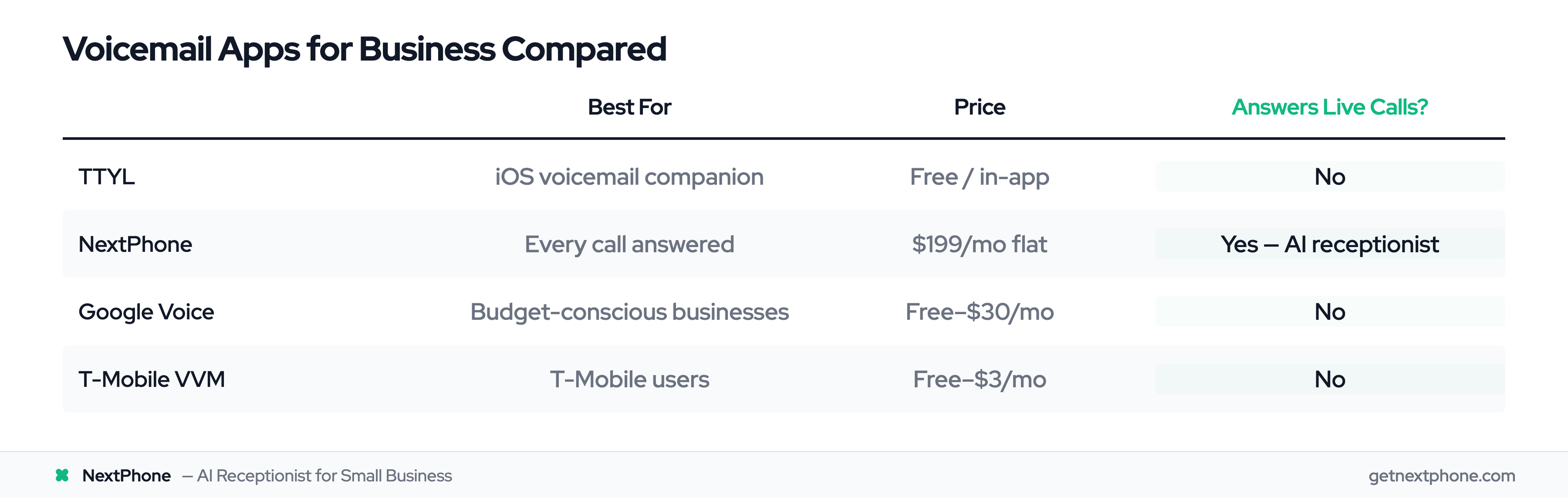
Best Voicemail Apps for B2B: Quick Comparison
Here's the overview before we dig into details:
App
Best For
Price
Key Feature
CRM Sync
TTYL
iOS voicemail companion
Free / in-app
AI transcription & smart notifications
Manual share
NextPhone
B2B teams where missed calls cost real money
$199/mo flat
AI receptionist — answers, books, routes, no voicemail step
Native (webhook + integrations)
Google Voice
Google Workspace shops
Free–$30/mo
Transcripts in Gmail + Workspace SSO
Workspace only
T-Mobile VVM
T-Mobile-only solos
Free–$3/mo
Carrier integration
None
Now let's break down what each one actually delivers for a B2B context.
What Makes a Great Business Voicemail App?
The best business voicemail app for your team depends on two factors that consumer voicemail app reviews almost never weigh: where the captured message lands, and what you can do with it.
For a solo owner checking messages during lunch, any app with AI transcription will do. For a team handling 50+ calls per week, the gap between options is enormous:
Transcription accuracy — does it recognize industry-specific terms ("HVAC tune-up," "Chapter 7 bankruptcy," "commercial roofing quote")?
CRM delivery — does the message land as a call record in HubSpot or Salesforce, or just as an audio file in your email?
After-hours continuity — does a missed call become a voicemail, or does a live AI handle it instead?
Compliance — are transcripts stored in a way that survives an audit or client dispute?
The four apps below each solve a different subset of that list. If you need all four, the answer is probably not a voicemail app at all.
What Is Visual Voicemail (and Why B2B Needs More)?
Visual voicemail lets you see your voicemails as a list on your phone screen — with transcriptions, caller info, and playback controls — instead of dialing in to listen one by one. That's the consumer version.
For B2B, the bar is higher. You want transcripts that survive compliance audits, a record that lands in your CRM next to the contact, spam filtering that doesn't false-positive on prospects, and an after-hours story. The four apps below cover that bar at different price points — and at the top of that ladder, the "voicemail" frame stops applying entirely.
TTYL: Best iOS Voicemail Companion App for B2B
TTYL is a smart voicemail app for iPhone that uses AI to transcribe and organize your voicemails. Built for business users who need more than basic carrier voicemail but don't want a full phone system.
Hear it: warm-professional female (Emma) — the voice tier TTYL+NextPhone use for client-facing intake
0:00
0:00
If you want a sense of what a B2B greeting actually sounds like in production, this is the default warm-professional voice. Pair with any of our scripts.
Key Features
TTYL uses AI-powered transcription to convert voicemails to text instantly. Smart notifications prioritize important messages so you don't waste time on spam. The clean interface makes it easy to scan, search, and manage all your voicemails in one place.
The app works with your existing phone number — no porting or setup hassle. Just download from the App Store and connect.
Pricing
Free tier available
Premium features via in-app purchase
Pros and Cons
What works well:
AI-powered transcription with high accuracy
Clean, modern iOS interface
Works with your existing number
Smart notification filtering
Where it falls short:
iOS only (no Android version)
Companion app, not a standalone phone system
Newer product, still building features
No native CRM sync — transcripts are share-sheet only
Best for: iPhone-only B2B solos who want smart voicemail management with AI transcription — especially small business owners who need to scan messages between meetings without a full PBX.
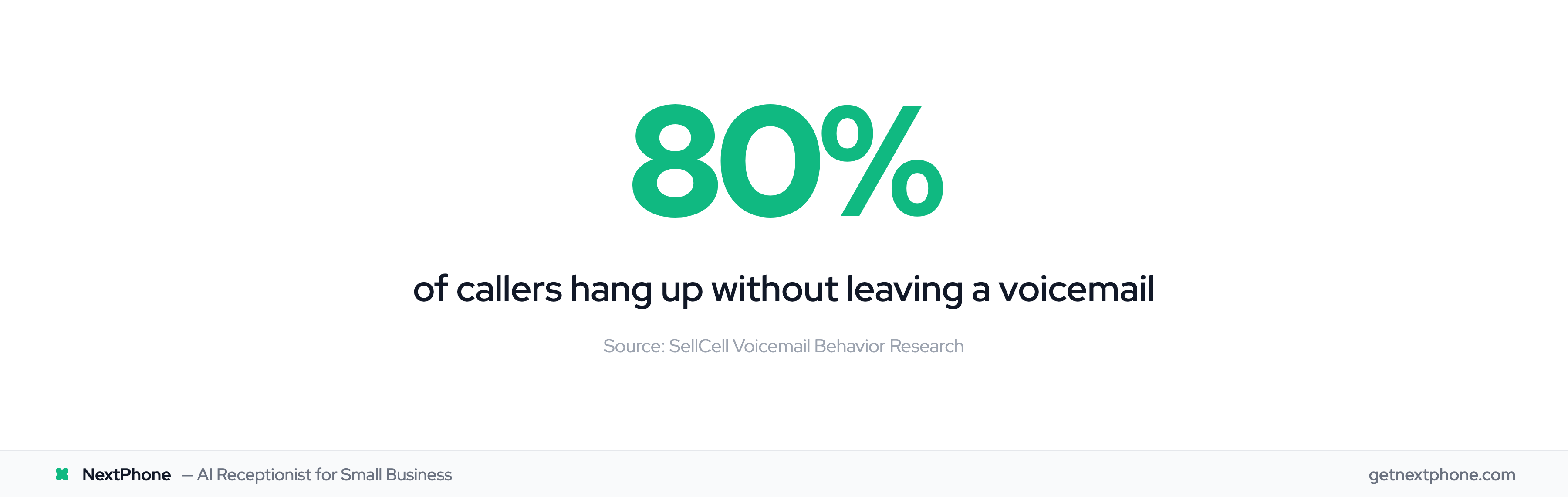
NextPhone isn't a voicemail app — it's an AI receptionist that answers your phone so callers never hit voicemail in the first place. For B2B teams where missed calls mean lost deals, it solves the problem voicemail apps can't: the 80% of callers who hang up without leaving a message, and the share of callers who hang up without ever leaving a message.
Hear it: NextPhone qualifying an inbound B2B lead end-to-end
0:00
0:00
What replaces voicemail for service businesses — the AI captures contact info, urgency, and scope before the caller gets a chance to hang up. This is the entire reason a B2B team would skip a voicemail app.
Key Features
NextPhone answers calls in under 2 seconds, 24/7. The AI collects caller information, books appointments directly into your calendar, answers FAQs about your business, and routes emergencies to your personal phone. Everything syncs to your CRM automatically — the same record a voicemail app would store as audio, NextPhone stores as a structured contact + transcript + next-action.
It handles the calls that would otherwise become missed voicemails — or worse, lost customers. For a closer look at how this compares to upgrading from Google Voice, see our Google Voice to AI receptionist upgrade guide.
A voicemail app stores the message. An AI receptionist actually handles the call — books, qualifies, escalates.
Pricing
$199/month flat rate — unlimited calls, no per-minute fees
7-day free trial
A note on the per-minute thing: many AI answering vendors quote a sub-$1 per-minute rate, then round every call up to the next 30 or 60 seconds. Flat-rate billing avoids the entire game.
Pros and Cons
What works well:
Answers 100% of calls (vs ~20% voicemail capture rate)
Books appointments and answers questions automatically
Flat rate pricing — no per-minute rounding surprises
Native CRM + webhook integration
Where it falls short:
$199/mo is significantly more than voicemail apps
AI, not human — complex emotional calls may need escalation
Overkill if you get fewer than 10 calls per week
Best for: Service businesses, contractors, and professional practices where missed calls cost real money. One captured job typically covers months of the subscription.
Try NextPhone free for 7 days
AI answering service that answers, qualifies, and books — 24/7.
Google Voice: Best Free Voicemail App for Google Workspace Teams
Google Voice remains the go-to choice for B2B teams wanting solid voicemail without the monthly bill. If you're already using Gmail and Google Workspace, this is where you start.
Key Features
Google Voice transcribes voicemails using the same AI that powers Google Search. The accuracy is solid for most business conversations. Transcripts appear in your email and the app, so you can read messages instead of listening to them.
You get unlimited voicemail storage, which matters if you need to keep records. Call forwarding lets you route calls to multiple phones. And the interface feels familiar if you've used any Google product.
Pricing
The free personal tier works for solopreneurs who just need basic voicemail on a second number. Business plans run:
Starter: $10/user/month
Standard: $20/user/month
Premier: $30/user/month
Pros and Cons
What works well:
Free tier is genuinely useful
Excellent transcription accuracy
Seamless Google Workspace integration
Unlimited storage
Where it falls short:
No native CRM integration outside Workspace
Limited to US and Canada
Business features require paid plans
No spam blocking beyond basic filtering — in our data 9.0% of inbound calls were spam, and Google Voice surfaces most of them as messages
Best for: Google Workspace teams and solopreneurs who want reliable, free voicemail management.
How to Set Up Free Visual Voicemail with Google Voice
Create a Google Voice account at voice.google.com and choose a phone number.
Set up call forwarding from your carrier to your Google Voice number so missed calls route there automatically.
Voicemails arrive as text — transcriptions show up in the Google Voice app and in your Gmail inbox.
T-Mobile Visual Voicemail: Best Carrier-Specific Option
If your B2B operation is small enough to run off one T-Mobile line and you want the simplest possible setup, the carrier's visual voicemail app comes pre-installed on most Android phones.
Hear it: direct-confident male (Chris) — the no-frills B2B voice tier
0:00
0:00
The other end of the brand spectrum from Emma. Use this voice for the short, direct B2B greetings most contractors and trades prefer.
Key Features
T-Mobile Visual Voicemail does the basics well. You see your voicemails as a list instead of calling in to check them. You can download messages, forward them to email, or save them to an SD card.
Premium upgrade ($2.99/month) adds voicemail-to-text transcription in multiple languages.
Common Issues and Fixes
T-Mobile VVM has known bugs. The "Can't retrieve messages at this time" error is common. Fix it by force-closing the app and reopening. Some users report the app keeps turning on LTE even on WiFi, which drains battery.
For accounts older than a few years, you may need to call T-Mobile and ask a rep to reset your voicemail box before visual voicemail works properly.
Pros and Cons
What works well:
Free basic version
Pre-installed, no extra app needed
Carrier support available
Premium transcription is cheap
Where it falls short:
T-Mobile customers only
Known reliability issues
Limited features compared to third-party apps
No business-specific capabilities — no CRM hook, no team inbox, no escalation logic
Best for: T-Mobile-only B2B solos who want simple, carrier-integrated visual voicemail without installing extra apps.
Note: AT&T and Verizon offer similar carrier voicemail apps with comparable features and limitations.
When to Pick a Voicemail App vs an AI Receptionist
Three questions answer this for almost every B2B team:
What is one captured lead worth? If the answer is more than $199 (most service businesses, B2B sales, professional services), an AI receptionist's break-even is a single saved call per month. The voicemail apps above can't promise that.
What share of your calls arrive after hours? A meaningful share arrives after-hours. If yours is similar and your voicemail app's only after-hours play is "we'll get back to you," you're losing the night shift.
Where does the record need to live? If the answer is "in our CRM, attached to the contact, with the next action set" — only NextPhone in this list does that natively. The voicemail apps hand you audio or text and expect you to file it.
If the answers point at voicemail (low call volume, lead value < monthly cost, you're already triaging messages manually), pick TTYL or Google Voice. If they point at an AI receptionist, the math usually closes itself.
Frequently Asked Questions
What is the best free voicemail app for business?
For iPhone users, TTYL is the best iOS voicemail companion with AI transcription and a free tier. For the most full-featured free option, Google Voice offers reliable transcription, unlimited storage, and Google Workspace integration. Both work with your existing number.
How do I set up visual voicemail on Android?
Most Android phones have visual voicemail built-in through your carrier app. For T-Mobile, look for "T-Mobile Visual Voicemail" in your app drawer. It's usually pre-installed. For third-party apps like Google Voice, download from Google Play Store and follow the setup prompts to forward your voicemail.
Why isn't my T-Mobile voicemail app working?
Start by force-closing the app and reopening it. Check Google Play for updates. If problems persist, contact T-Mobile to reset your voicemail box. Accounts older than a few years sometimes need a rep to manually authorize visual voicemail before it works.
What percentage of B2B callers actually leave voicemails?
In our 15,830-call inbound sample, 20.8% of calls ended in a captured message through an AI receptionist. Plain voicemail systems run lower — industry benchmarks for "left a message" rates sit around 15–20%. The other 80% hang up. According to InsideSales research, waiting 30 minutes to call them back drops your contact rate by 10x.
Are AI answering services better than voicemail apps for B2B?
For B2B teams where phone leads drive revenue, yes. AI answering like NextPhone captures meaningfully more callers because it actually talks to them instead of asking for a message. It books appointments, answers questions, and syncs with your tools. Trade-off is price: $199/month flat for AI answering vs free–$30/month for voicemail apps. For service businesses, one captured job often covers months of AI answering.
What about per-minute pricing on AI receptionists?
Watch the rounding. Many vendors quote a sub-$1 per-minute rate, then round every call up to the next 30 or 60 seconds. Rounding to 6s adds 6.7%. Always ask vendors what their rounding increment is — and prefer flat-rate billing when the call profile is short and bursty (which most B2B is).
What do I do if I lost visual voicemail after switching carriers?
Carrier visual voicemail apps are locked to their network — switch carriers and the old app stops working. Third-party apps like TTYL and Google Voice work across all carriers, so your voicemail setup survives the switch. If you've already lost access, download one of these apps and set up call forwarding from your new carrier.
Final Verdict: Best Voicemail App for B2B in 2026
Best iOS voicemail app: TTYL. AI-powered transcription, clean interface, works with your existing number. The best way to manage voicemails on iPhone.
Best free option: Google Voice. Reliable transcription, unlimited storage, and seamless Google Workspace integration. The default choice for budget-conscious B2B solos already in the Google ecosystem.
Best for T-Mobile users: T-Mobile Visual Voicemail. Free, integrated, good enough for basic needs.
Best when missed calls cost money: NextPhone. One captured job typically pays for itself.
Voicemail apps are getting better every year. Transcription is more accurate, interfaces are cleaner, and smart filtering saves real time. But across 1,446,980 real inbound calls, they still only convert about 1 in 5 of the callers you miss — and 0 in 5 of the ones who hang up in the first 14 seconds. For B2B teams where every phone lead matters, the question isn't which voicemail app has the best features. It's whether managing voicemails or actually answering calls is the better use of your money.