
Your phone is ringing. You're 20 feet up on a ladder with insulation in both hands. Or maybe you're elbow-deep in a plumbing repair with a customer standing right there.
By the time you can get to that call, it's gone.
This scenario plays out constantly in the contractor world. Industry data shows that contractors miss somewhere between 60-80% of their incoming calls. And here's the painful part: 62% of home service customers choose the first contractor who answers.
That's where AI receptionists come in. These systems answer your calls, talk to your customers, and handle the basics while you do the actual work you're paid for.
But how does an AI receptionist work, exactly? What's actually happening when a customer calls and talks to an AI? This article breaks down the technology in plain English, so you understand exactly what you're getting if you use a service like NextPhone for your business.
What Is an AI Receptionist, Exactly?
An AI virtual receptionist is software that answers phone calls and has real conversations with your customers. Think of it as a virtual employee who handles your front desk, but never takes a break, never calls in sick, and can talk to multiple customers at the same time.
This isn't the robotic phone tree you're used to. You know the type: "Press 1 for sales. Press 2 for support. Press 3 to scream into the void."
Those old systems are called IVR (Interactive Voice Response). They follow rigid scripts and force callers through frustrating menu after menu.
AI receptionists are different. 85% of customer service leaders plan to pilot conversational GenAI in 2025. They understand natural language. A caller can say "I need someone to fix my AC tomorrow morning" and the AI understands that's a service request that needs scheduling. No button pressing required.
Modern AI receptionists can schedule appointments, answer questions about your services, take detailed messages, route urgent calls to the right person, and even filter out spam. They do this by using the same type of artificial intelligence that powers ChatGPT and other conversational AI tools.
How AI Receptionists Actually Work: The Three-Step Process
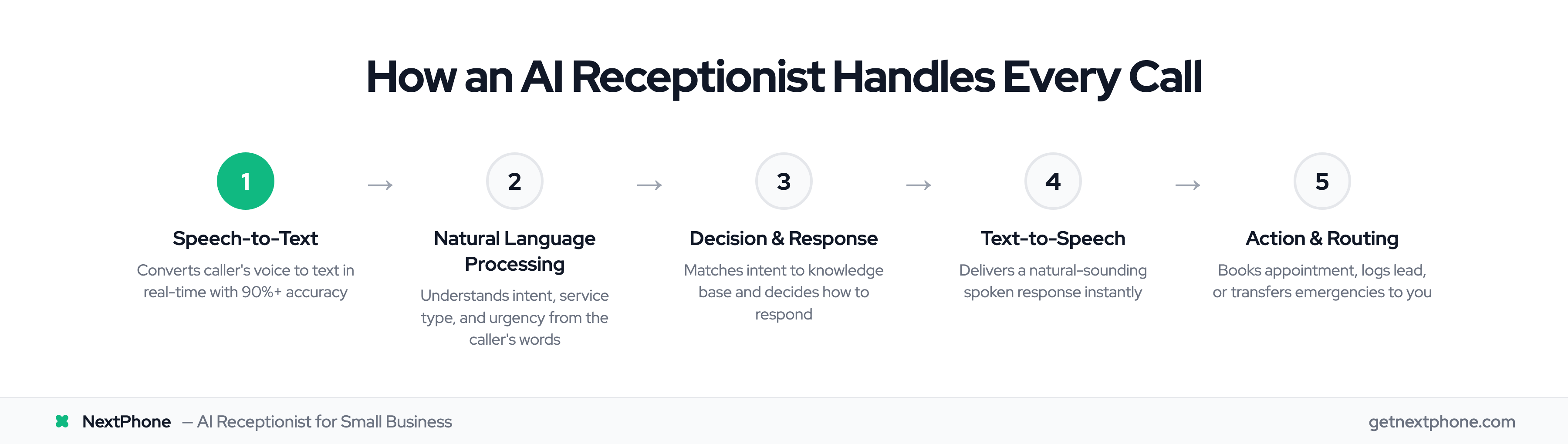
When a customer calls a business using an AI receptionist, three technologies work together in milliseconds. Understanding this process helps you see why the technology has become so effective.
Step 1: Speech-to-Text (The AI's Ears)
The moment your customer starts talking, the AI's first job is listening.
Speech-to-text technology (also called automatic speech recognition or ASR) converts the customer's voice into written text in real-time. This happens almost instantly, with modern systems processing speech as fast as the person talks.
The accuracy has improved dramatically. According to Assembly AI research, modern speech recognition achieves over 90% accuracy in typical conditions. Leading systems hit 95% or higher.
What does that mean practically? A 95% accurate system produces about 5 minor errors per 100 words. Most of these are small things like punctuation or formatting. The system captures the actual words and meaning correctly.
Modern speech-to-text also handles accents, different dialects, and background noise far better than older technology. If your customer is calling from a job site with machinery running, or speaks English as a second language, the AI can still understand them.
Step 2: Natural Language Processing (The AI's Brain)
Once the customer's words are converted to text, natural language processing (NLP) takes over. This is the "brain" of the AI receptionist.
NLP doesn't just read the words. It understands what the caller actually wants.
When a customer says "I need my furnace looked at because it's making a weird sound," the NLP engine figures out several things at once:
- This is a service request (not a billing question or complaint)
- The service type is HVAC
- There's a potential urgency indicator (the furnace is malfunctioning)
- The customer likely wants to schedule an appointment
The AI compares this understanding against your business's knowledge base. That's the information you've provided about your services, availability, pricing, and common questions. Based on all this, it decides what to say next.
This is where AI receptionists leave old phone trees in the dust. A traditional system requires callers to navigate menus. NLP lets callers express their needs naturally, in their own words.
Step 3: Text-to-Speech (The AI's Voice)
After the AI decides how to respond, text-to-speech technology converts that response into spoken words.
Modern text-to-speech sounds remarkably natural. The robotic, stilted voices from a few years ago have been replaced by conversational speech that includes appropriate pauses, emphasis, and inflection.
The response is delivered in real-time, so the conversation flows naturally. There's no awkward delay where the caller wonders if the line went dead.
This three-step cycle repeats continuously throughout the call. Customer speaks, AI listens and thinks, AI responds. Each cycle takes milliseconds.
What Can an AI Receptionist Actually Do?
The technology enables a surprisingly wide range of capabilities. Here's what a well-designed AI receptionist can handle:
Answer calls around the clock. An AI receptionist works 24 hours a day, 7 days a week, 365 days a year. No sick days. No lunch breaks. No vacation coverage needed. For contractors, this matters because 40% of customer calls happen after hours, when most businesses aren't answering.
Handle multiple calls simultaneously. A human receptionist can only talk to one caller at a time. Everyone else gets put on hold or sent to voicemail. An AI receptionist can handle many calls at once. No busy signals. No hold times. Every caller gets immediate attention.
Schedule appointments directly. The AI can access your calendar, find available slots, and book appointments on the spot. The customer gets confirmed before they hang up.
Answer common questions. Business hours, service areas, pricing ranges, what services you offer. If you've provided the information, the AI can share it.
Take detailed messages. When the AI can't resolve something, it captures the caller's information, their request, and any urgency indicators. These get sent to you immediately.
Route urgent calls. This is where smart AI systems shine. NextPhone's data shows that 15.9% of calls contain urgency language. The AI detects phrases like "emergency," "right now," or "water everywhere" and routes those calls differently than routine inquiries.
Capture callback requests. 25.4% of callers explicitly request callbacks when they can't reach someone immediately. The AI logs these requests so you can follow up quickly.
Filter spam. 7% of business calls are spam or robocalls. An AI receptionist screens these out so they don't waste your time or clutter your message list.
The result? AI systems achieve 99% answer rates. Compare that to research showing 62% of calls to small businesses go unanswered.
What AI Receptionists Can't Do (Yet)
Being honest about limitations helps you set realistic expectations. AI receptionists aren't magic, and there are things they genuinely can't handle well.
Complex negotiations. If a caller needs to negotiate a custom contract, discuss unusual project requirements, or work through a complicated dispute, they need a human. AI follows rules and patterns. It can't exercise the judgment required for true negotiation.
Highly emotional situations. When someone is upset, scared, or angry, they often need human empathy. An AI can recognize emotional language and respond appropriately, but it can't truly understand how someone feels. These calls should go to a person.
Unusual requests outside training. AI works from a knowledge base. If a caller asks about something completely outside your normal services or asks questions the AI has never encountered, it may struggle to respond helpfully.
Building deep relationships. For high-value clients who expect a personal relationship, AI isn't a replacement for the human touch. It's a tool that handles routine calls so you have time for the relationships that matter.
NextPhone's data shows that 6.2% of calls are true emergencies that require immediate human attention. A properly configured AI recognizes these and routes them appropriately. That's the key: knowing when to hand off.
How AI Knows When to Transfer to a Human
Smart AI systems aren't trying to handle everything themselves. They're designed to recognize when human involvement is needed and make that transfer seamless.
Here's how it works:
Keyword detection. You can configure specific words or phrases that trigger an immediate transfer. "I want to talk to a person," "this is an emergency," or "I'm calling about the lawsuit" might all warrant human attention.
Complexity triggers. If the AI determines it can't confidently handle a request, it escalates. This might happen when a caller's question doesn't match anything in the knowledge base, or when the conversation goes in unexpected directions.
Caller requests. When someone explicitly asks for a human, they get one. The AI doesn't argue or try to convince them otherwise.
Urgency detection. Beyond specific keywords, AI can recognize urgency patterns. A caller saying "water is flooding my basement right now" gets treated differently than someone asking about regular maintenance.
Customizable rules. You set the parameters. Want all calls about pricing over a certain amount to go to you directly? Done. Want after-hours emergency calls to ring your cell? Set it up.
The best part: when the AI does transfer, it provides context. The human who picks up knows what was already discussed. No cold transfers where the customer has to repeat everything.
How Long Does It Take to Set Up an AI Receptionist?
One common hesitation: "This sounds complicated. I don't have time to set up and manage a complex system."
Here's the reality: most AI receptionists can be configured in under an hour.
The setup process typically involves:
Basic business information. Your company name, hours of operation, services offered, service area. The fundamentals that every caller might ask about.
FAQs and common questions. What do customers typically ask? What are the answers? This becomes the AI's knowledge base.
Call handling rules. What should happen for different types of calls? Who gets urgent calls? What triggers a transfer?
Voice and tone preferences. How should the AI sound? Professional and formal? Friendly and casual? Most systems let you customize.
Many AI receptionists can import information directly from your website, reducing setup time further. They also learn from every call. When the AI encounters a question it can't answer, it logs it. You provide the answer once, and the AI remembers it permanently.
No coding required. No technical expertise needed. If you can fill out a form and make decisions about how your phones should be answered, you can set up an AI receptionist.
Why This Matters for Contractors and Home Service Businesses

If you're a contractor, electrician, plumber, HVAC tech, or any kind of home service professional, the phone problem hits you harder than most.
You literally can't answer the phone while doing your job. Your hands are busy. You're in loud environments. You're with customers who deserve your full attention.
The statistics paint a stark picture:
- Contractors estimated they answer 97% of calls. The actual measured rate? 66%.
- 62% of home service customers choose the first contractor who answers.
- The average missed call in home services costs $1,200 in lost revenue.
- Less than 3% of callers who get voicemail actually leave a message.
Think about that last point. When you miss a call and it goes to voicemail, 97% of those callers don't leave a message. They call the next contractor on their list.
An AI receptionist changes this equation entirely. Every call gets answered. The caller can schedule, ask questions, or leave detailed information. You get the lead whether you're available or not.
That's how AI receptionist technology works in practice. It's not about replacing you. It's about catching the opportunities that slip away while you're doing the work that actually pays the bills.
How NextPhone's AI Receptionist Works for Contractors
NextPhone was built specifically for contractors and home service businesses. That focus shapes how the system works.
The AI understands industry terminology. It knows what customers mean when they ask about "rough-in work" or "service calls" or "estimates." It doesn't stumble on the vocabulary your customers use.
NextPhone's data from thousands of contractor calls reveals patterns that inform how the system handles each interaction:
- 25.4% of callers request callbacks. The system captures these immediately and alerts you.
- 15.9% of calls contain urgency language. The AI recognizes this and can route accordingly.
- 6.2% are true emergencies. These get escalated to you directly based on your rules.
- 7% are spam or robocalls. Filtered out automatically so you don't waste time.
The cost structure is straightforward: $199 per month for unlimited calls. No per-minute charges that make you nervous about call length. No surprise bills when you have a busy month.
Setup is simple. No long-term contracts. If you're a contractor missing calls and losing jobs, NextPhone is worth a look.
Frequently Asked Questions
Can AI receptionists handle multiple calls at once?
Yes. This is one of the biggest advantages over human receptionists. While a person can only handle one call at a time, AI systems can manage many calls simultaneously. Some systems handle 25+ concurrent calls without any degradation in performance. Every caller gets immediate attention. No hold music. No busy signals.
Will my customers know they're talking to AI?
Modern AI voices sound remarkably natural. Many callers don't realize they're talking to AI unless told directly. Some businesses choose to disclose ("You're speaking with our AI assistant"), while others don't. There's no legal requirement either way in most jurisdictions. The choice depends on your brand and customer expectations.
How accurate is the speech recognition?
Current technology achieves 90%+ accuracy in typical phone call conditions. Leading systems hit 95% or higher. The technology handles accents, dialects, and background noise far better than older speech recognition. When errors do occur, they're usually minor and don't affect the AI's ability to understand the caller's intent.
What happens if the AI doesn't understand the caller?
Good AI systems have fallback options built in. If the AI can't confidently handle a request, it might say "Let me take your information and have someone call you back shortly." It captures the caller's details and alerts you. You can also configure automatic transfers to a human when the AI encounters certain situations.
Is my customer data secure?
Reputable AI receptionist providers use encryption for call recordings and transcripts. They don't use your customer data to train their AI models. Check any provider's privacy policy before signing up. Ask specifically about data storage, access controls, and whether your data is used for model training.
How much does an AI receptionist cost?
Pricing varies widely. Basic plans start around $49/month. More comprehensive solutions range from $199-$500+/month. Some charge per minute or per call, which can make costs unpredictable. NextPhone offers $199/month for unlimited calls. For comparison, a human receptionist costs $3,000+ per month in salary alone, plus benefits and training.
Can I customize what the AI says?
Absolutely. You control your business information, FAQs, terminology, and handling rules. The AI represents your brand, not a generic template. You can customize greetings, responses to common questions, and how different situations are handled. Most systems let you update this information anytime without technical assistance.
The Bottom Line
An AI receptionist works through three core technologies: speech-to-text converts what your customers say, natural language processing understands what they mean, and text-to-speech delivers natural responses. This cycle repeats throughout every call, creating real conversations.
The technology has matured significantly. Modern systems achieve 90%+ accuracy, sound natural, and can handle the majority of routine calls your business receives.
For contractors and home service professionals, AI receptionists solve a fundamental problem. You can't answer the phone while you're working. But every missed call is a potential lost job.
An AI receptionist ensures every call gets answered, every lead gets captured, and urgent situations get routed to you immediately. It doesn't replace you. It catches opportunities that would otherwise disappear while you're doing your actual work.