
Air Canada learned this lesson the hard way. Their chatbot told a passenger about a bereavement fare refund policy that didn't exist. When the passenger tried to claim the refund, the airline refused, arguing the chatbot was a "separate legal entity" responsible for its own actions. A court disagreed and ordered the airline to pay.
It's not just Air Canada. DPD's delivery chatbot went viral after swearing at a customer. Cursor's AI support bot gave wrong information that triggered mass subscription cancellations. These failures share a common thread: the AI didn't know how to handle confusion gracefully.
Here's the challenge: 64% of customers would prefer businesses didn't use AI for customer service, and trust in AI has dropped from 50% to 35% in the US over recent years. Yet 85% of customer service leaders plan to pilot conversational GenAI in 2025.
Small businesses can't afford to ignore AI either. Industry research shows 74.1% of calls to home services businesses go completely unanswered. 82% of customers expect immediate responses, and AI can improve customer service productivity by 30-50%.
The solution is designing AI that handles confusion honestly and escalates gracefully when it needs human help. Here's what happens when AI gets confused, and how the best systems turn potential failures into trust-building moments.
When AI Gets Confused: Common Triggers
AI confusion isn't random. It happens in predictable scenarios that every small business encounters daily.
Ambiguous Questions Without Context
A customer calls and asks, "Do you service my area?" The AI needs more information. Which area? What service? The question itself is clear, but the context is missing.
Or consider: "How much does it cost?" For what service? What size project? What timeline? These questions feel simple to humans because we naturally ask follow-up questions. AI struggles when critical details are missing.
Multiple Intents in One Request
"I need to schedule an appointment for Thursday, and also can you give me an estimate for a different project we're planning?" That's two separate requests bundled together. The AI has to decide: handle both? Tackle them sequentially? Ask the customer to separate them?
Research shows that even simple queries like "I want to open an account" don't map directly to specific intents without clarification. Savings account? Checking account? The AI needs disambiguation.
Unfamiliar Terminology or Industry Jargon
Every industry has its own language. A plumber might hear "My PRV is leaking" while a roofing contractor fields calls about "flashing around the dormer." Regional slang, new product names, and specialized terminology can all trip up AI systems that haven't been trained on those specific terms.
Emotional or Sentiment Shifts
A caller starts calmly asking about pricing, then mentions their AC died in 95-degree heat and suddenly the conversation shifts from routine inquiry to urgent emergency. AI systems that can't detect sentiment changes struggle to adjust their responses appropriately.
According to research, 60% of users say chatbots don't understand them. These four triggers (ambiguous questions, multiple intents, unfamiliar terms, and sentiment shifts) account for most of that frustration.
How AI Detects It Needs Help
The best AI systems don't just get confused and keep going. They recognize when they're out of their depth and know when to escalate.
Confidence Score Thresholds
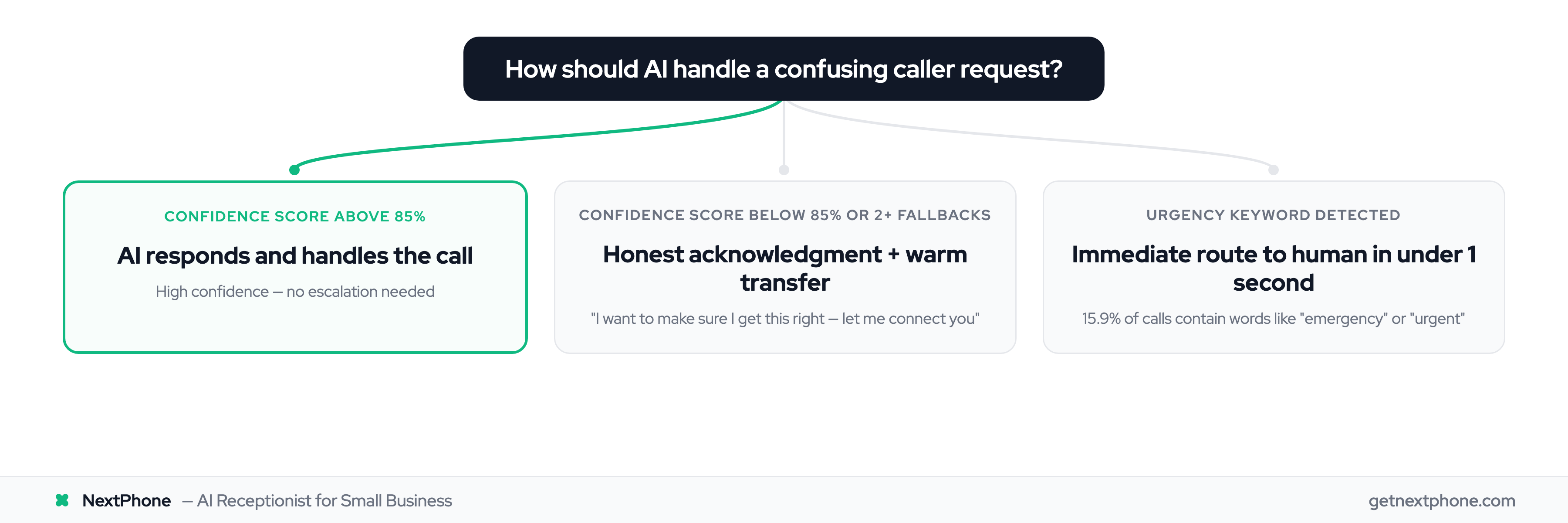
Modern AI assigns a confidence score to each response. When that score drops below 85%, the system recognizes it's guessing rather than knowing. That's the trigger to escalate to a human.
Think of it like this: if the AI is only 70% sure about an answer, that's a 30% chance of giving wrong information. Better to admit uncertainty than risk another Air Canada situation.
Fallback Frequency Detection
If the AI says "I didn't understand that" more than twice in a row, something's wrong. The conversation isn't working. Continuing down that path just frustrates the customer.
Leading telecommunications companies have reduced hallucination-related escalations by 94% using graduated fallback mechanisms: retry with refined prompts for minor confusion, transfer to tier-1 agents for medium complexity, escalate to specialists for truly complex issues.
Sentiment Analysis Triggers
Emergency keywords matter. Across the 1,446,980 calls in our analysis, urgent calls rank among the top reasons people call, using language like "emergency," "urgent," or "ASAP." When a caller says "pipe burst" or "no power," the AI shouldn't attempt troubleshooting. It should route immediately to a human who can dispatch help.
The best systems combine all three: confidence scores, fallback frequency, and sentiment analysis. When any threshold is crossed, escalation protocols kick in.
The Fallback Response: What AI Should Say
How the AI communicates confusion determines whether the customer feels abandoned or cared for.
Bad: Endless Loops
"I didn't understand that. Can you rephrase?"
Customer rephrases.
"I'm still not sure what you mean. Could you explain differently?"
This loop is what 68% of customers cite as one of their top frustrations: being stuck repeating themselves with no path forward. The AI keeps asking for clarification but never offers human help.
Good: Honest Acknowledgment
"I want to make sure I get this right - let me connect you with a team member who can help."
Notice what this does: it acknowledges the limitation without excessive apology, positions the human handoff as ensuring accuracy (not as AI failure), and moves immediately toward a solution.
The customer doesn't feel like they've defeated the AI or that the system failed. They feel like the system is prioritizing getting them the right answer.
The Warm Transfer Script
The exact wording matters. Compare these two responses:
Robotic: "I cannot help you. Please hold for transfer."
Human-like: "I want to make sure you get exactly the information you need. Let me connect you with Sarah who handles these situations every day."
The second approach positions escalation as a service, not a failure. That framing makes all the difference in how customers perceive the interaction.
Warm Transfer with Context Preservation
Getting transferred to a human is one thing. Having to repeat your entire story to that human is another frustration entirely.
What's a Warm Transfer?
A cold transfer dumps the customer to an agent with zero context. "Thanks for calling, how can I help you?" And the customer starts from scratch.
A warm transfer preserves everything: conversation history, customer information, stated intent, and any data the AI collected. The human agent sees this context before the customer even arrives.
Context Packaging: What Gets Passed Along
Modern platforms like Twilio and VAPI maintain full call context during handoffs. The transfer package includes:
- Full conversation transcript
- Customer name and contact information
- Stated reason for calling
- Urgency indicators
- Any information already collected (location, service needed, timeline)
When done right, the human agent can say: "Hi, I understand you need emergency help with a burst pipe at your residential property. Let me get someone out there right away."
No repetition. No starting over. The customer picks up exactly where they left off.
Speed Matters: 1-5 Second Handoffs
Best practices indicate transfers should complete within 1-5 seconds for normal inquiries, with critical escalations happening in under 1 second. Long hold times between AI and human defeat the purpose of smooth escalation.
The customer should experience the handoff as seamless, not as punishment for stumping the AI.
