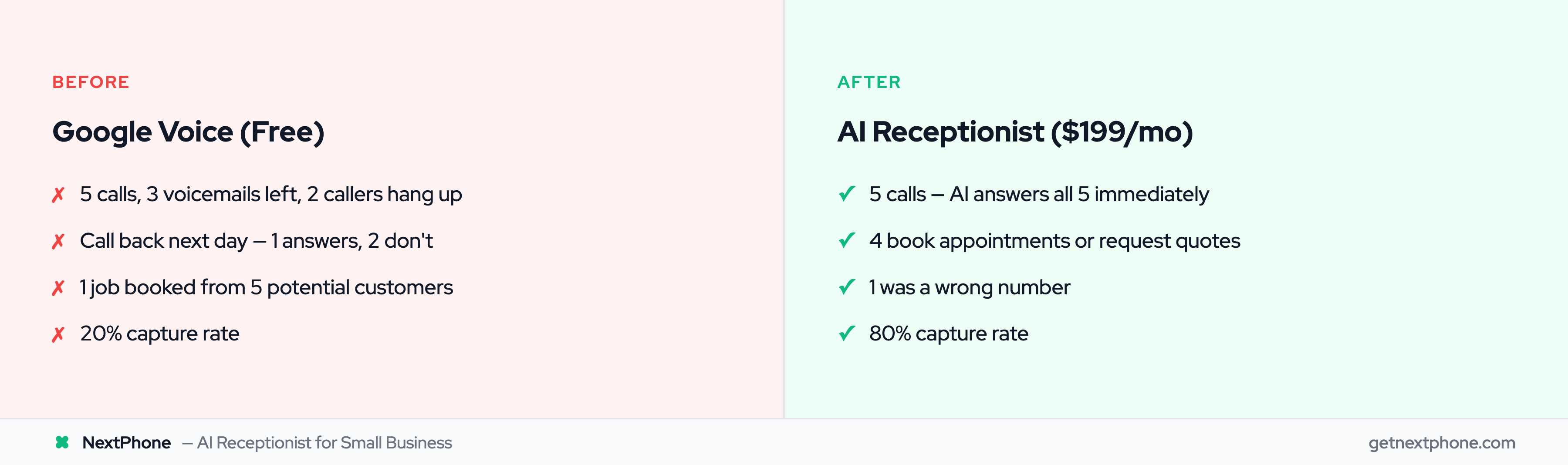
You started with Google Voice because it was free.
Separate your personal and business calls. Get a local number. Look more professional than giving out your cell. Made sense when you were just starting.
Now you're getting real calls. Potential customers. Referrals. But you're on a job site with hands covered in paint. The phone rings. Voicemail. They call the next contractor.
Google Voice served you well at the beginning. But its limitations are now costing you business, and if you're weighing your options, our Google Voice alternative comparison covers the full landscape.
This guide shows how to upgrade from Google Voice to professional AI answering without losing the number your customers already have.
Why Google Voice Stops Working
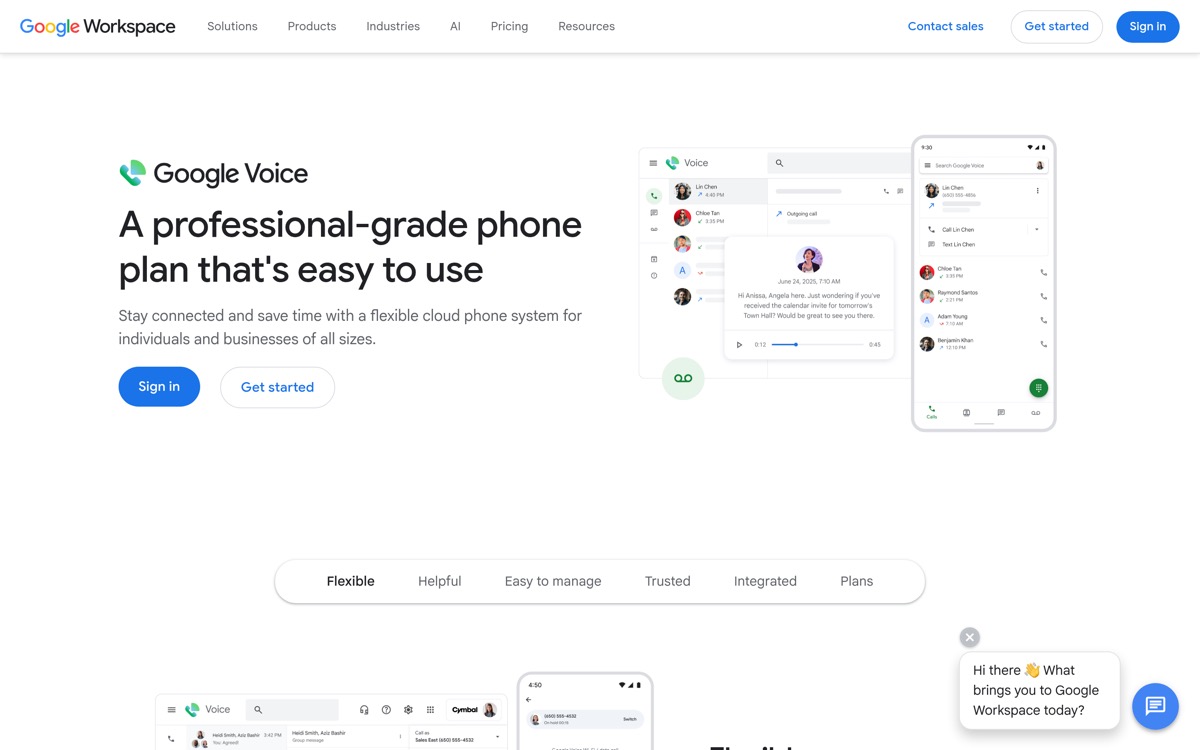
Google Voice is a phone number and voicemail system. That's it.
When you were doing 3 jobs a month, that was enough. Now that you're doing 10, 15, or 20, the gaps become obvious:
No Live Answering
When you miss a call, Google Voice takes a voicemail. That's the extent of its capability. Across the 1,446,980 inbound calls in our analysis, the pattern is unambiguous: small businesses routinely miss 60–80% of incoming customer calls (Invoca data corroborates). Those callers left voicemails... or more likely, called someone else.
Home services is the worst of it. Industry research puts the unanswered rate at 74.1%, which for a contractor taking 42 calls a month works out to 31 calls nobody picks up. Better transcription leaves that number unchanged. It gives you a more readable record of what you lost.
Your Voicemail Becomes a Backlog
Checking messages stops being a system and becomes a chore you are permanently behind on.
Roughly one in four callers in our corpus makes an explicit callback request: "please call me back," "give me a call when you get this." Without something that tracks those and closes them out, most never happen. The caller moves on and you never find out you had the lead.
Basic Voicemail Only
Google Voice transcribes voicemails (sometimes accurately, sometimes hilariously wrong). But it can't screen calls, ask qualifying questions, or route based on urgency.
A caller saying "My pipe burst and my basement is flooding" gets the same treatment as "Can you send me a brochure?" Both become voicemails you'll check when you check them.
No Professional Greeting
"Hi, you've reached [your name]. Leave a message." That's the ceiling.
Compare that to: "Thanks for calling ABC Plumbing. I can help you schedule service, get a quote, or answer questions about our services. What can I help you with today?"
The first sounds like a person who might call back. The second sounds like a business.
No Appointment Scheduling
A caller wants to book service. With Google Voice, they leave a message. You call back hours later. They might not answer. You leave a message. Phone tag begins.
With professional answering, the caller books an appointment during the call. Done. No back-and-forth.
No Emergency Routing
Someone's AC died in a heat wave. They call you. Google Voice: "Leave a message at the beep." You check voicemail 3 hours later. They've already hired someone else.
A professional system detects "emergency," "urgent," or "flooding" and routes that call to your phone immediately, interrupting you if necessary, because this is worth interrupting for.
These are also the calls worth the most. An emergency ticket runs around $4,200 against $3,500 for routine work. Miss one a week because you were under a sink and that is $16,800 a month, about $201,600 a year.
No CRM Integration
Every lead that comes through Google Voice requires manual data entry. Customer name, phone, what they need: you're typing it into your system later (if you remember).
Professional systems log this automatically as the call happens.
Forwarding from Google Voice to an AI Receptionist
Most people assume the upgrade path is simple: flip on call forwarding in Google Voice, point it at an AI receptionist, done. It mostly is, but Google Voice has quirks that trip people up, and knowing them upfront saves you a frustrating afternoon.
Here's the honest picture of what Google Voice forwarding can and can't do, and the cleanest way to route every call to an AI.
Where Google Voice Forwarding Falls Short for a Business
Google Voice was built to forward to your phones: your cell, your home line, your Google account. It was never designed to be the front door of a business with real call routing. A few specific limits matter:
- Forwarding to linked numbers only (by default). Google Voice rings the "linked devices" on your account. To forward to a different number (like an AI receptionist line), you have to add and verify that number, and Google Voice doesn't always treat external numbers the same way it treats your own.
- No business hours or per-call-type routing. Google Voice can't say "send quote calls here, emergencies there, after-hours to the AI." It rings everything the same way. There's no intelligent call routing layer. It's all-or-nothing.
- The voicemail black hole. If a forward doesn't connect, the call falls back to Google Voice voicemail. So even with forwarding "on," a missed handoff still dumps your caller into a message box, the exact outcome you're trying to escape.
- Spam screening that adds friction. Google Voice's call screening can ask callers to state their name before connecting. Legitimate customers sometimes hang up on that extra step, reading it as a robot or a screener. Real spam call filtering happens before the phone rings, rather than by making customers audition.
- No structured data capture. Even when a call connects, Google Voice hands you a phone call with no logged lead, intent, or next action. The capture happens (or doesn't) in your head.
None of this means Google Voice forwarding is useless. It means the reliable way to do this is to stop relying on Google Voice to make routing decisions and let it do one simple thing: hand the call to a number that actually answers.
The Fix: Get a NextPhone Number and Route the AI to It
The cleanest setup is the most boring one, and that's why it works:
- Get a dedicated NextPhone number. You sign up and get a real phone number that the AI receptionist answers in under 2 seconds, 24/7. This becomes your reliable "answer point."
- Forward your Google Voice number to it. In Google Voice, add the NextPhone number as a forwarding destination so unanswered calls roll to the AI instead of voicemail.
- Let the AI own the routing. This is the part Google Voice can't do. The AI greets the caller, handles routine questions, books appointments, captures lead details, and (when it matters) routes the call to you. Emergencies hit your cell. Routine stuff gets handled without bothering you.
How a Google Voice number reaches an AI receptionist: Google Voice does the simple handoff, NextPhone does the real routing.
The key mental shift: Google Voice stays your published number, NextPhone becomes your answering layer. Your callers never see the second number. They dial what's on your truck and your cards; the AI picks up when you can't.
What the AI Actually Sounds Like
Before you forward real customers to it, you should hear what they'll hear. This is a sample call: an AI receptionist handling an after-hours inquiry end to end:
A sample after-hours call. The AI greets, captures the reason for the call and contact details, and flags it for follow-up. This is the exact call a Google Voice voicemail box loses.
This is the difference between "leave a message at the beep" and a caller who actually gets helped at 9 PM.
What Professional Answering Looks Like
Professional answering does more than take messages. It handles calls:
Custom greetings that name your business and set expectations.
Intelligent routing that understands "I have an emergency" is different from "I'm curious about pricing."
Live conversation that asks questions, provides information, and resolves inquiries.
Appointment scheduling that books callers directly onto your calendar.
24/7 availability that answers at midnight the same way it answers at noon.
CRM integration that logs every lead without manual entry.
Callback tracking that ensures every callback request gets followed up.
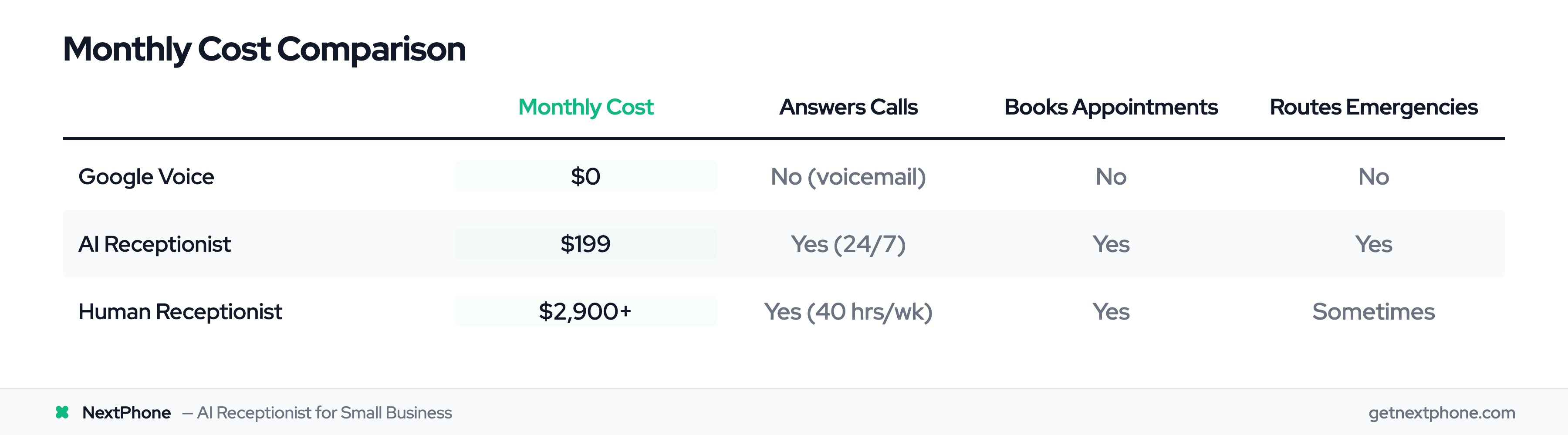
This used to require a $35,000/year receptionist or expensive answering services. AI has changed that math.
AI Receptionist: The Google Voice Upgrade Path
An AI receptionist gives you professional answering without the professional price.
Here's what changes when you upgrade:
From Voicemail to Conversation
Instead of leaving a message, callers speak with an AI that understands natural language. "I need to schedule a quote for a kitchen remodel" gets a response: "I can help with that. What day works best for you? Are you available this week or next?"
From Basic to Intelligent Routing
The AI detects urgency. "My toilet is overflowing" triggers immediate routing to your phone. "What time do you open tomorrow?" gets answered on the spot without bothering you.
From Missed to Captured
The AI answers in under 2 seconds, every call, every time. No missed rings. No "let me call them back later." The lead is captured while they're actively looking.
From Manual to Automatic
Call details (name, phone, reason for calling) log automatically. You wake up to a list of leads, ready to act on.
When the AI has a real conversation with a caller, the most common outcomes, ranked, are a message captured for the business, the call transferred to a human, a new lead recorded, a booking link sent, the question answered outright, and an appointment booked. Spam and robocalls are filtered out before any of that.
Keep Your Google Voice Number
Here's what most people don't realize: you don't have to abandon your Google Voice number to upgrade.
How It Works
Google Voice supports call forwarding. When you can't answer, Google Voice forwards to another number: your AI receptionist line.
The setup:
- In Google Voice settings, navigate to Calls → Forwarding
- Add your NextPhone number as a forwarding destination
- Configure when forwarding happens (always, when busy, when unanswered)
- Save changes
Callers dial your Google Voice number: the one on your truck, your cards, your website. When you don't answer, the AI picks up.
Your Number Stays the Same
Customers keep calling the same number. Your marketing stays the same. Your reputation stays the same. Only the answering improves.
Port Later If You Want
Once you're confident in the upgrade, you can port your Google Voice number to your new service so the AI answers it directly, with no forwarding hop. But there's no rush. The forwarding approach lets you test before fully committing.