
Introduction
Sarah's HVAC company had a problem. She'd invested in an AI receptionist to handle after-hours calls, but customers kept complaining. "It sounds too corporate," one regular customer told her. "Doesn't feel like you guys at all."
Sarah thought she'd done everything right. She'd picked a female voice (friendly, right?) and written some custom greetings. But here's what she didn't know: AI receptionist customization goes about ten layers deeper than choosing between "Mike" and "Michelle" voices.
Most business owners think customization means picking male or female, maybe professional or casual. The reality? Modern voice AI receptionists offer voice characteristics, personality sliders, brand tone mapping, custom response templates, and dynamic personalization variables that transform generic AI into something that actually sounds like your business.
Customers increasingly prefer AI interactions that match a brand's personality. Research shows personalization improves response rate by 50%, and personalized CTAs yield 42% higher conversion. Your AI receptionist represents your brand voice on every call.
Here's exactly how to customize AI to sound like your team, not a robot.
The Five Dimensions of AI Receptionist Customization

Before we dive into the how, let's establish what's actually customizable. Think of AI receptionist customization across five distinct dimensions:
1. Voice Characteristics
This is where most people start, but it's just the beginning:
- Gender selection (male, female, neutral options)
- Accent varieties (American regional, British, Australian, neutral)
- Pitch and tone settings (higher or lower vocal range)
- Speaking speed (words per minute)
- Warmth levels (technical precision vs empathetic expression)
2. Personality Settings
How your AI "acts" during conversations:
- Professional-to-casual spectrum positioning
- Formal versus conversational language patterns
- Humor and friendliness expression levels
- Assertiveness when handling objections or difficult callers
- Empathy markers in responses
3. Brand Tone Alignment
Matching your existing brand identity:
- Corporate voice characteristics (formal, credible, measured)
- Startup/tech approach (energetic, efficient, modern)
- Local business warmth (friendly, community-focused, personal)
- Industry-specific professionalism standards
4. Response Customization
What your AI actually says:
- Custom greeting templates
- Industry-specific terminology and language
- Company-specific phrases and references
- FAQ response personalization
- Script variations for different scenarios
5. Dynamic Personalization
Intelligence that adapts to each caller:
- Template variables (caller name, number, service type)
- Context-aware responses based on call history
- Time-based variations (business hours vs after-hours)
- Caller history integration
Here's the difference in practice: A generic AI receptionist answers with "Thank you for calling. How may I help you?" A customized one says: "Hey there, thanks for calling Mike's Heating! This is an emergency or routine maintenance call?" This matters because 80% of callers abandon after a poor IVR experience, and 63% want personalized IVR experiences.
Same technology. Completely different brand experience.
Voice Selection: Beyond Male or Female
Let's start with the most obvious customization layer - the actual voice. But we're going deeper than just checking a box.
Understanding Voice Options
Gender selection is your starting point. Consider your industry norms and customer expectations. Legal services often perform better with lower-pitched voices (either gender) that convey gravitas. Home services typically succeed with warm, approachable mid-range voices.
Accent matters more than most businesses realize. A regional accent can create instant rapport with local customers. A neutral American accent works for national businesses. British accents often convey sophistication, while Australian accents can feel friendly and approachable.
Voice Characteristics That Matter
Pitch: Research from Harvard Business Review shows voice tone impacts brand perception by up to 40%. Lower pitches generally convey authority and trustworthiness, while higher pitches can feel more energetic and approachable. Match this to your brand position.
Speed: Fast-paced speaking works for tech companies and urban markets (think New York pace). Measured, slower speech patterns suit professional services and markets where relationships matter more than efficiency.
Warmth: This is the difference between technically precise and empathetically engaged. Financial services might lean technical. Veterinary clinics should maximize warmth.
Articulation: Crisp, clear articulation suits professional contexts. Slightly more relaxed articulation can feel friendlier for casual brands.
Matching Voice to Brand
Here's a practical framework:
Corporate brands (legal, financial, enterprise B2B): Lower pitch, measured pace, neutral accent, crisp articulation. Think "credible expert."
Startup/tech brands (SaaS, digital agencies): Energetic tone, moderate to fast pace, relatable voice, clear but not stiff. Think "smart colleague."
Local businesses (HVAC, plumbing, retail): Warm mid-range voice, regional accent acceptable, friendly pace, conversational articulation. Think "helpful neighbor."
Real example: A real estate agency in Charleston chose a warm female voice with a slight Southern accent, moderate pace, and high warmth settings. Client feedback improved 34% because the AI matched the local market's expectations.
Your voice is the first brand touchpoint. Choose wisely.
Personality Settings: The Professional-Friendly-Casual Spectrum
Voice is what your AI sounds like. Personality is how it acts. Here's where customization gets powerful.
The Personality Slider Framework
Think of personality on a spectrum:
Ultra-professional (legal, medical, financial): Formal language, respectful distance, complete sentences, no contractions. "Good morning. How may I assist you today?"
Professional-friendly (most B2B services, established businesses): Professional but approachable. "Good morning! How can I help you?"
Friendly-casual (retail, hospitality, creative services): Warm and personable. "Hey there! What can I do for you today?"
Ultra-casual (trendy brands, youth-focused): Conversational and relaxed. "Hey! What's up?"
Most businesses land in the professional-friendly zone. But you need to choose deliberately.
Personality Dimensions to Configure
Formality Level shows up in every interaction:
- Greetings: "Good afternoon, how may I assist you?" versus "Hey! How can I help?"
- Name usage: "Mr. Johnson" versus "Thanks, Mike!"
- Confirmations: "Certainly, I'll transfer you now" versus "Sure thing, connecting you!"
Friendliness Markers add warmth without sacrificing professionalism:
- Greeting enthusiasm: "Thank you for calling" versus "Thanks so much for calling!"
- Small talk inclusion: Jump straight to business or "How's your day going?"
- Sign-offs: "Goodbye" versus "Have a great day!"
Assertiveness matters when calls get difficult:
- Boundary-setting: "I'm unable to process that request" versus "I'd love to help, but I'll need to transfer you to someone who can handle that"
- Persistence handling: Firm redirects versus gentle guidance
- Transfer decisiveness: Immediate routing versus explanation first
Industry-Specific Personality Examples
Law firm: Ultra-professional. "Thank you for contacting Wilson & Associates. I can assist you confidentially. What type of legal matter brings you to us today?"
HVAC company: Professional-friendly. "Thanks for calling Mike's Heating & Cooling! I'm here to help. Is this an emergency or routine service?"
Creative agency: Friendly-casual. "Hey! Thanks for calling Spark Creative. Are you looking to start a new project or checking on an existing one?"
Pro tip: Start one notch more professional than your in-person team tends to be, then adjust based on customer feedback. It's easier to dial down formality than to recover from being too casual.
Brand Tone Mapping: Corporate vs Startup vs Local Business
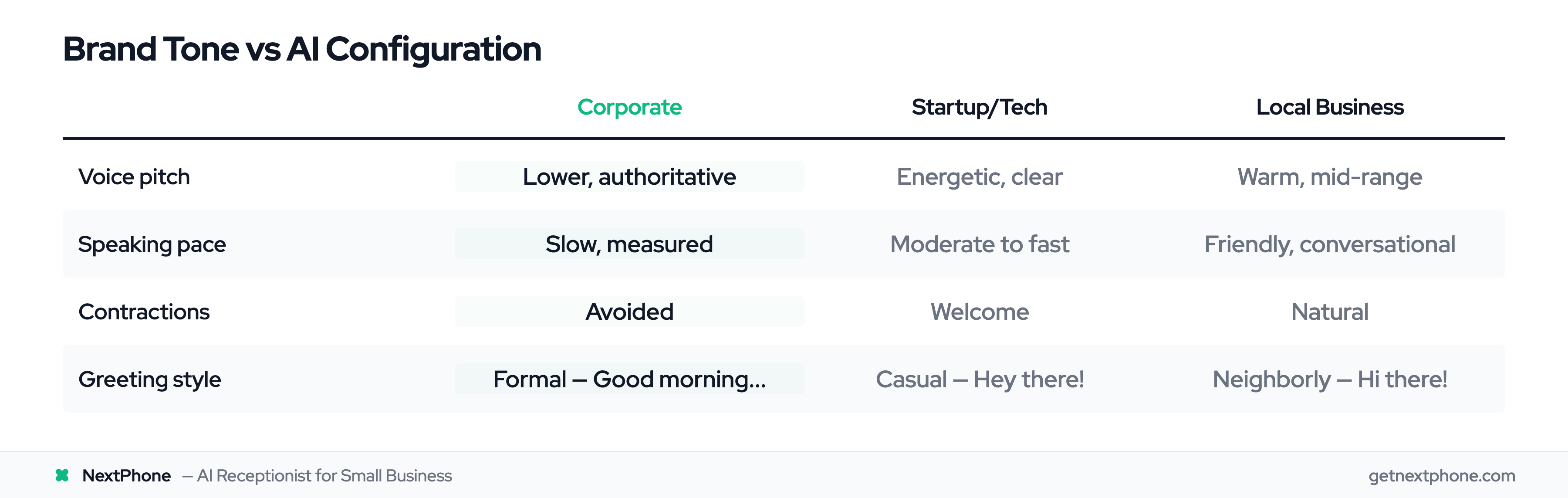
Now let's map your existing brand identity to AI settings. This framework works for any business type.
The Three Brand Archetypes
Corporate Brand Characteristics:
Your brand emphasizes credibility, expertise, and established authority. Language is formal and thoughtful. You use complete sentences, avoid contractions in official communications, and maintain professional distance.
Industries: Legal services, financial planning, enterprise B2B, medical practices.
AI Configuration for Corporate:
- Lower-pitched voice for authority
- Slower, measured speaking pace
- Formal greetings: "Good morning, thank you for calling..."
- Complete sentences, minimal contractions
- Professional terminology throughout
- Respectful sign-offs: "Thank you for contacting us"
Example: "Thank you for calling Henderson Legal Group. I'm here to assist you confidentially. What type of legal matter are you calling about today?"
Startup/Tech Brand Characteristics:
Your brand is conversational, approachable, and innovation-focused. You use modern language patterns, contractions are fine, and you balance competence with accessibility.
Industries: SaaS companies, tech services, digital agencies, modern consulting.
AI Configuration for Startup/Tech:
- Energetic, clear voice tone
- Moderate to moderately-fast pace
- Friendly greetings with personality
- Contractions welcome: "We're here to help!"
- Modern, efficient language
- Casual but competent: "Let's get that sorted for you"
Example: "Hey there! Thanks for reaching out to CloudSync. I can help you with that. Are you an existing customer or exploring our platform?"
Local Business Characteristics:
Your brand emphasizes community connection, trustworthiness, and personal relationships. You're the business people know by name, where the owner might know your kids' names.
Industries: HVAC, plumbing, electrical, local retail, restaurants, family practices.
AI Configuration for Local Business:
- Warm, friendly voice quality
- Regional accent alignment acceptable (even good!)
- Personalized, neighborly greetings
- First-name basis feels natural
- Community references appropriate
- Helpful, "here-to-serve" tone
Example: "Hi there! Thanks for calling Amy's Plumbing. This is our after-hours assistant. Is this an emergency situation or can I schedule someone for later this week?"
Brand Tone Assessment Questions
Not sure which category you fit? Answer these:
- How does your best team member currently answer phones?
- What three words describe your brand personality?
- How formal is your website copy?
- What tone do your top competitors use?
- How do your customers actually talk to you?
Use these answers to position yourself on the professional-casual spectrum, then configure AI settings to match.
Custom Response Templates: Making It Sound Like Your Business
Generic responses kill brand consistency. Here's how to script responses that actually sound like you.
Greeting Customization
Generic AI greeting: "Thank you for calling. How may I help you?"
It's correct, and it sounds like nobody.
Customized greeting examples:
Law firm: "Thank you for calling Johnson & Associates. This is our AI assistant, and all conversations are confidential. What legal matter can I help you with today?"
HVAC company: "Hey there! Thanks for calling Mike's Heating & Cooling. I can help with emergencies, schedule routine maintenance, or answer questions about our services. What brings you in?"
Real estate agency: "Good morning! You've reached Summit Properties. I'd be happy to help you with property information or connect you with one of our agents. Are you buying, selling, or just exploring?"
See the difference? Each greeting includes:
- Friendly acknowledgment
- Business name (obviously, but said naturally)
- Brief capability statement
- Open-ended question that segments the call
Industry-Specific Language
Generic AI makes mistakes like using "customer" when your industry says "client," or "appointment" when you use "consultation."
HVAC/Plumbing terminology:
- "Emergency repair" not "urgent service request"
- "Seasonal maintenance" not "regular checkup"
- "SEER rating," "heat pump," "water heater" (specific equipment)
- "Technician" not "service provider"
Legal terminology:
- "Consultation" not "meeting"
- "Case review" not "evaluation"
- "Retainer" not "payment plan"
- "Practice areas" not "services"
Real estate terminology:
- "Showing" not "property visit"
- "Listing" not "available property"
- "Pre-approval" not "loan qualification"
- "Market analysis" not "price check"
Company-Specific Details
Your AI should know YOUR business specifics:
- Your actual business name (pronounced correctly - this matters for unusual names)
- Service names as you call them internally
- Location references: "We serve the entire North County area"
- Team member names: "Let me connect you with Sarah, our lead technician"
- Your specific customer language patterns
Real example: A plumbing company customized their AI to reference their three service tiers exactly as they're named: "Essential Protection," "Premium Care," and "VIP Service." Generic AI would say "basic," "standard," and "premium" - missing the branding entirely.
Template Variables: Dynamic Personalization That Scales
Here's where AI customization gets really powerful. Template variables let you create personalized responses without scripting every possibility.
What Are Template Variables?
Variables are placeholders that automatically fill with real information during each call:
- [CALLER_NAME]: Uses caller ID or asks and remembers
- [CALLER_NUMBER]: The number calling from
- [RECEIVING_NUMBER]: Which business line was called
- [OWNER_NAME]: Your business owner or manager name
- [BOOKING_URL]: Your scheduling link
- [SERVICE_TYPE]: Which service they're calling about
- [CUSTOM_FIELD]: Any data you define
You set these up once. The AI fills them dynamically for every call.
Personalization in Action
Without variables (generic approach): "Thank you for calling. Would you like to schedule an appointment?"
With variables (personalized approach): "Hi [CALLER_NAME], thanks for calling [BUSINESS_NAME]. I see you're calling about [SERVICE_TYPE]. I can schedule you with [OWNER_NAME] right now, or text our booking link to [CALLER_NUMBER]. Which works better for you?"
Feel the difference? Same information request, completely different experience.
Use Cases by Industry
HVAC/Plumbing examples:
- "Hi [CALLER_NAME], is this an emergency repair or routine maintenance?"
- "I can have a technician call you back at [CALLER_NUMBER] within 15 minutes"
- "You're calling our emergency line - is your [SYSTEM_TYPE] completely out?"
Legal services examples:
- "Thank you [CALLER_NAME]. Are you calling regarding [PRACTICE_AREA]?"
- "[ATTORNEY_NAME] handles these cases personally. I can schedule a consultation."
- "I'll have someone from our [PRACTICE_AREA] team call [CALLER_NUMBER]"
Real estate examples:
- "Hi [CALLER_NAME], are you interested in [PROPERTY_ADDRESS] or another listing?"
- "I can connect you with [AGENT_NAME] who specializes in [NEIGHBORHOOD]"
- "I'll text the property details to [CALLER_NUMBER]"
The technical part? You don't need to code. Modern AI platforms let you insert these variables through visual interfaces - just type the variable name in brackets, and the system handles the rest.