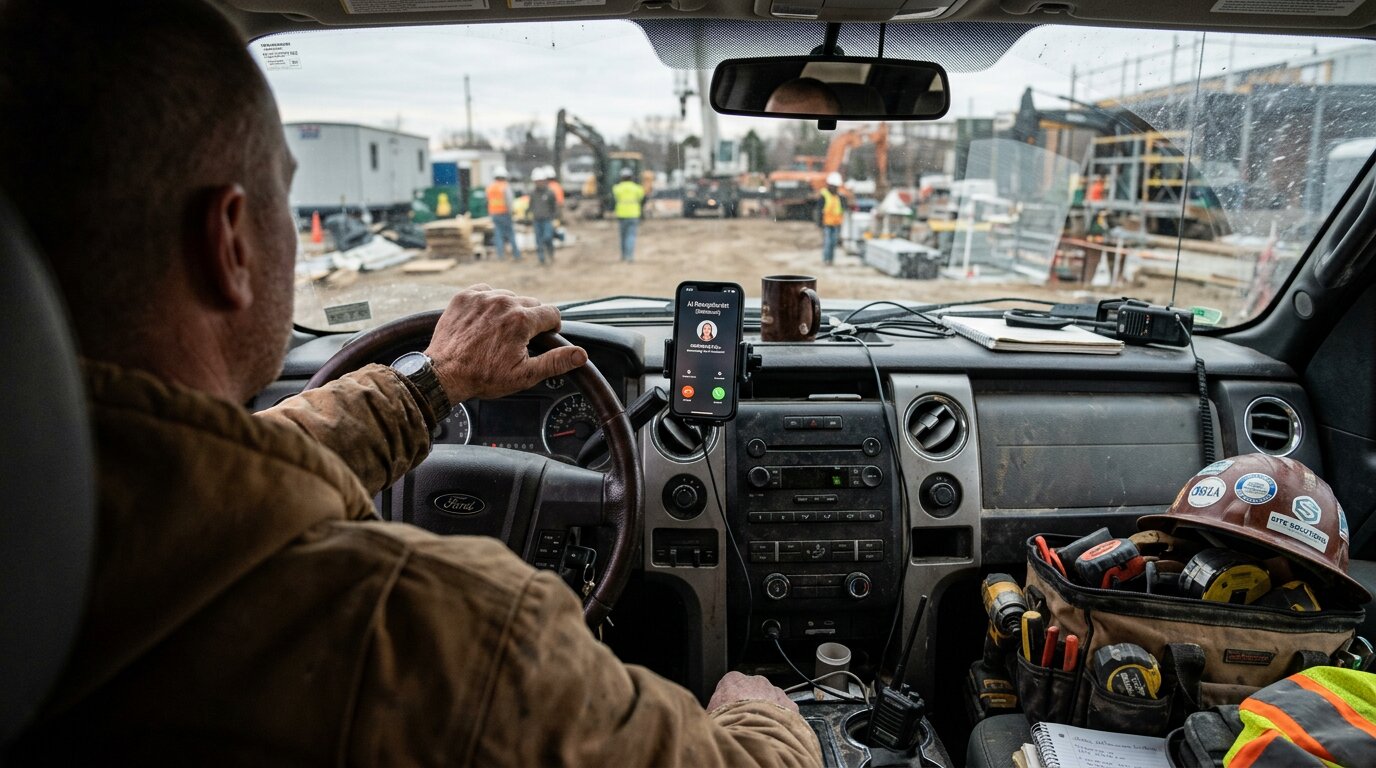
Your phone rings at 2 PM. An urgent customer needs emergency plumbing repair: a burst pipe flooding their basement. You're under a house fixing another job. The call goes to voicemail. They call the next plumber. You just lost a $4,200 emergency job.
This happens more than you think. Industry research shows 74.1% of calls to home services contractors go completely unanswered. That's three out of every four potential customers calling someone else.
For a typical contractor receiving 42 calls per month, that's 31 missed calls. If just 20% would have converted at an average $3,500 project value, you're losing $21,700 per month. That's $260,400 per year in revenue going to your competitors.
According to industry research, over 70% of companies plan to upgrade to an AI phone system within the next two years. If you have AT&T Business Phone, you have two clear paths to add AI receptionist capabilities. This guide shows you both options with transparent pricing, setup steps, and real data to help you choose.
What AT&T Business Phone Services Are Available?
Before you can integrate AI, you need to understand which AT&T service you have. AT&T ranks #1 in small business wireless customer satisfaction according to J.D. Power, serving 2.5 million businesses and 100 million US families. AT&T offers two distinct business phone products, and people often confuse them. The integration path you choose depends on which one you're using.
AT&T Phone for Business (Traditional VoIP)
This is AT&T's basic VoIP service for small businesses. It converts your existing phone lines to digital service over your AT&T Business Internet or Fiber connection.
Pricing starts at $15 per month for the first line (regular price $30/mo). The service includes over 30 calling features like Caller ID, Call Waiting, Call Forwarding, Three-Way Calling, and Voicemail-to-Text. You get unlimited calling in the U.S., Mexico, and Canada.
The advantage here is simplicity. You keep your existing analog phones, no new equipment required. It's NFPA 72 compliant for critical systems and includes 24-hour battery backup.
If you have AT&T Business Internet or Fiber and added phone service through them, you likely have Phone for Business.
AT&T Office@Hand (Cloud Communication Platform)
Office@Hand is AT&T's comprehensive cloud communications platform, built on RingCentral's infrastructure. This is a full unified communications system with video conferencing, team messaging, and advanced call management.
Plans include over 40 advanced features and native mobile apps. The platform supports CRM integrations, analytics, and (most relevant here) AI receptionist capabilities.
Office@Hand is a more expensive, feature-rich solution designed for businesses that need a complete communication ecosystem. If your phone app says "Office@Hand" or you access your phone system through a RingCentral-branded portal, this is what you have.
Which Service Do You Have?
Check your AT&T Business account online or look at your billing statement. The product name will be listed clearly. If you're still unsure, call AT&T Business Support at 800-321-2000 (Monday–Friday, 8 AM–7 PM ET).
Why does this matter? Because AT&T's native AI receptionist only works with Office@Hand. But third-party AI solutions work with both services through call forwarding.
AT&T Office@Hand Native AI Receptionist
If you already have Office@Hand, AT&T offers a native AI receptionist add-on. This is the most integrated option, built directly into your existing platform.
What Is Office@Hand AI Receptionist?
The Office@Hand AI Receptionist uses conversational AI to answer calls 24/7, route inquiries, and handle common questions. It's powered by RingCentral's AI technology and integrates seamlessly with your Office@Hand account.
The system handles custom greetings, answers frequently asked questions based on your business information, transfers calls by name or context, and can send text messages to callers. You train it using your website, FAQs, and uploaded documents.
Setup is straightforward. You choose a professional AI persona, add your business information, and configure common questions. The AI syncs automatically with your existing Office@Hand phone settings.
Key Features
Here's what Office@Hand AI Receptionist can do:
- 24/7 availability - Answers every call, even after hours and weekends
- Intelligent routing - Transfers calls to the right person based on caller intent
- CRM integration - Automatically logs call details and updates contact records
- Call transcription - Converts voicemails and calls to searchable text
- Real-time coaching - Provides suggested responses during live calls
- Knowledge base training - Learns from your website, documents, and FAQs
The system is designed to handle routine inquiries while escalating complex questions to human staff.
Pricing Structure
Office@Hand AI Receptionist starts at $39 per month for 100 minutes of AI call handling. But there's a catch: you need an Office@Hand base plan to use it.
The base Office@Hand plan costs approximately $70 per month per user. So your total minimum cost is around $109 per month for AI receptionist capabilities.
The 100-minute limit is another consideration. If you receive 42 calls per month (the industry average for contractors) and each call averages 3-4 minutes, you'll hit the limit quickly. Overage pricing applies for additional minutes.
Limitations to Consider
Office@Hand AI is integrated and convenient, but it has constraints. The 100-minute starter limit isn't enough for high call volume businesses. You're locked into the Office@Hand ecosystem. Switching platforms means losing your AI setup.
Customization options are limited compared to standalone AI receptionist platforms. You get preset personas and configurations rather than fully custom AI behavior. And the total cost adds up when you factor in the required base plan.
How to Integrate Third-Party AI Receptionists with AT&T
Whether you have AT&T Phone for Business or Office@Hand, you can integrate third-party AI receptionist services using call forwarding. This approach gives you more flexibility and often better pricing for unlimited call handling.
Why Consider Third-Party AI Solutions?
Third-party AI receptionists work with your existing AT&T phone service without requiring platform changes. You're not locked into AT&T's ecosystem, which means you can switch or upgrade your phone service without losing your AI setup.
Most third-party solutions offer unlimited call minutes rather than per-minute limits. You get more customization options: the AI can be trained specifically for your business with custom workflows, integrations, and behavior.
Pricing is often more transparent with flat monthly fees. And you can use the same AI receptionist even if you change phone carriers later.
How Call Forwarding Integration Works
The setup is simpler than you might think. You forward your AT&T Business Phone number to your AI receptionist's dedicated phone number. When customers call your business, AT&T automatically routes the call to your AI receptionist service.
The AI answers, engages with the caller, collects information, and can transfer calls back to you for complex questions or emergencies. From the caller's perspective, they dialed your business number and got immediate assistance.
No APIs, no complex integrations, no IT team required. Just basic call forwarding that's been around for decades.
Step-by-Step Setup Process
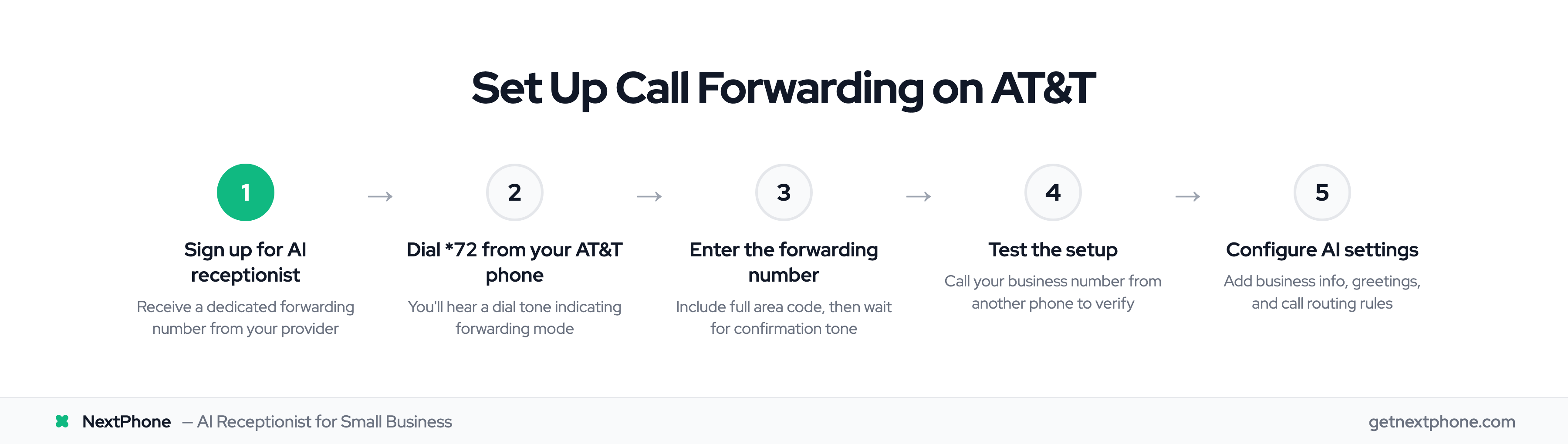
Here's how to set up third-party AI receptionist integration with AT&T Business Phone:
Step 1: Choose your AI receptionist service and sign up for an account. You'll receive a dedicated phone number for call forwarding.
Step 2: From your AT&T business phone, dial *72 (or 72# on some systems). You should hear a dial tone.
Step 3: Enter your AI receptionist's forwarding number exactly as provided. Include the area code even if it's local.
Step 4: Wait for confirmation. You'll hear a confirmation tone or message indicating call forwarding is active.
Step 5: Test the setup by calling your business number from another phone. You should reach your AI receptionist.
Step 6: Configure your AI receptionist settings through your provider's dashboard. Add business information, set up greetings, configure call routing rules, and train the AI on your FAQs.
To deactivate call forwarding later, dial *73. To verify if forwarding is active, dial *74.
Compatible Third-Party Solutions
Any AI receptionist service that provides a dedicated phone number for forwarding will work with AT&T Business Phone. Look for services that offer:
- Dedicated forwarding numbers
- 24/7 availability
- Custom training on your business
- Emergency call detection and routing
- CRM integrations
- SMS and email notifications
- Transparent pricing
NextPhone, for example, provides instant AT&T activation codes and dedicated forwarding numbers that work with both AT&T Phone for Business and Office@Hand.
AT&T AI Receptionist Costs: Native vs Third-Party
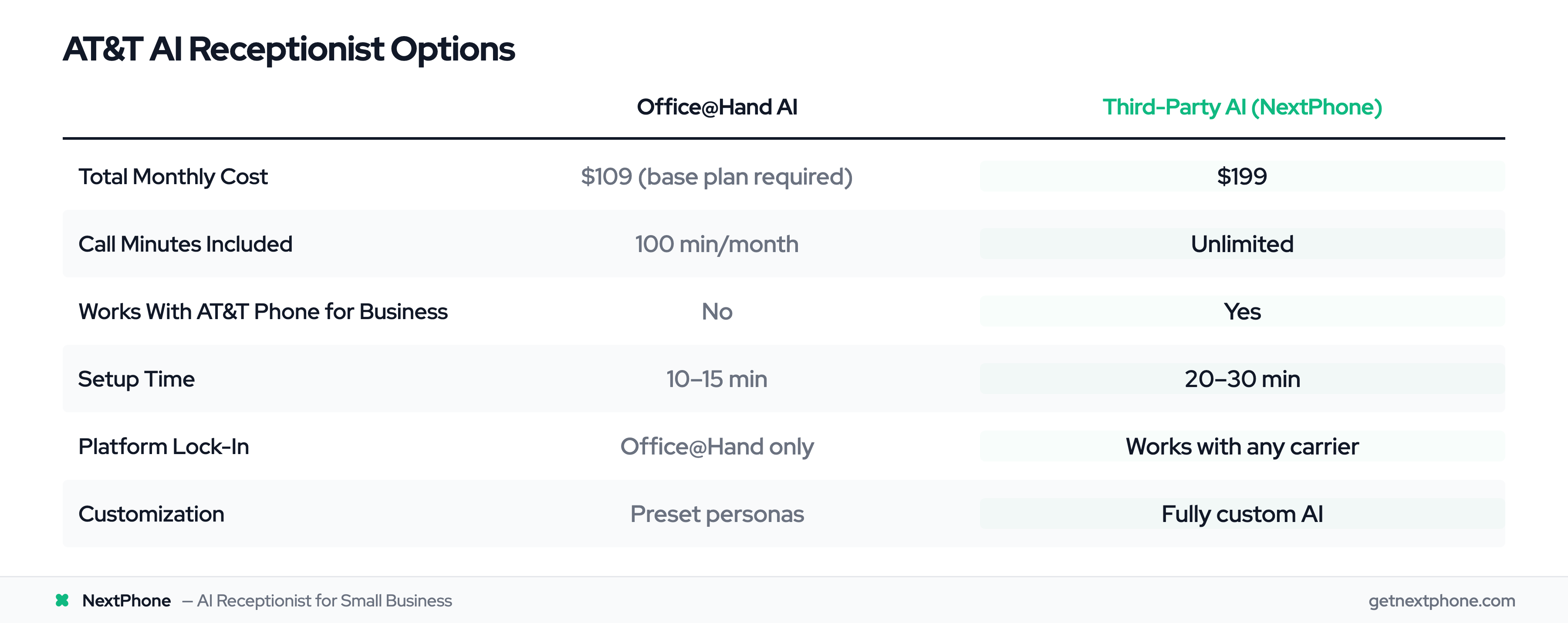
Let's break down the real costs with complete transparency. Understanding the total investment helps you make the right decision for your business.
Office@Hand AI Total Cost
Office@Hand AI Receptionist: $39/mo for 100 minutes of AI call handling
Office@Hand base plan (required): ~$70/mo per user
Total minimum cost: $109/mo
But here's what that includes:
- 100 minutes of AI call handling per month
- Full Office@Hand platform access
- Video conferencing and team messaging
- CRM integrations
- Call analytics
If you exceed 100 minutes, overage charges apply. For a contractor receiving 42 calls per month at 3-4 minutes each, you're looking at 126-168 minutes of AI call time. You'll exceed the limit most months.
Third-Party AI Cost Structure
Third-party AI receptionist services typically charge flat monthly fees for unlimited calls. NextPhone, for example, costs $199 per month with no per-minute limits.
Total cost: $199/mo for unlimited calls
What you get:
- Unlimited AI call handling (no minute caps)
- 24/7 availability
- Custom AI training on your business
- Emergency detection and intelligent routing
- CRM integrations via webhooks
- SMS and email notifications
- Works with your existing AT&T phone service (no platform change required)
The higher upfront cost delivers better value for businesses with high call volume. You're not paying for a full UCaaS platform you might not need, just the AI receptionist capability.
Real Revenue Impact Data
Here's why this investment matters. The data on calls to home services contractors reveals a brutal reality about missed calls.
Industry research shows 74.1% of calls go completely unanswered. For a typical contractor receiving 42 calls per month, that's 31 missed calls going straight to voicemail.
Approximately one in four callers explicitly asks for a callback. That's 11 callback requests per month. Without a systematic tracking system, research shows most of those callbacks never happen. You lose 9 leads per month just from forgotten callbacks.
Urgent calls rank among the top reasons people call: words like "emergency," "urgent," or "ASAP." These are high-value calls. Emergency jobs average $4,200, significantly higher than routine work. Missing just one emergency call per week costs you $16,800 per month.
ROI Calculation Example
Let's calculate the return on investment with conservative numbers.
You receive 42 calls per month (industry average for small contractors). Without AI, 74.1% go unanswered. That's 31 missed calls. If just 20% of those missed calls would have converted at an average $3,500 project value, you're losing $21,700 per month in revenue.
That's $260,400 per year going to competitors who answered the phone.
Now, let's say you invest in an AI receptionist. At $199 per month for unlimited calls, you spend $2,388 per year.
If the AI helps you capture just ONE additional $3,500 job per month, you generate $42,000 in annual revenue from calls you would have missed.
ROI: $42,000 revenue / $2,388 cost = 17.6x return on investment
And that's the conservative scenario assuming you only capture one extra job per month. Most contractors see significantly better results.