Google Voice for business seems perfect: a free (or cheap) business phone number, separate from your personal line. Professional enough for a growing business. Simple to set up.
So why are you still missing leads?
A solo attorney can't pick up when an after-hours intake call comes in, and the case goes to the next firm on the list. A massage therapist's appointment confirmations get flagged as spam. A personal trainer's voicemail fills up while they're in back-to-back sessions. A plumber on a job can't answer when a $3,500 emergency call comes in. Google Voice gives you a phone number, but phone numbers don't answer calls. You do. When you're unavailable, calls go to voicemail. And in business, voicemail often means the caller hangs up and calls your competitor.
Industry research shows small businesses miss 60-80% of incoming calls. Google Voice doesn't fix that. It just gives you a separate voicemail box to ignore.
This guide shows you when Google Voice actually works, when you've outgrown it, and what alternatives actually solve the missed call problem - not just give you fancier features for a phone that still goes unanswered.
The Google Voice Gap Nobody Talks About
What Google Voice Actually Does
Google Voice is a virtual phone number with call forwarding and voicemail. That's it.
When someone calls your Google Voice number, it rings your linked phone(s). If you answer, great. If you don't, it goes to voicemail. The caller can leave a message, and Google will transcribe it (usually inaccurately).
For what it is, Google Voice works fine. The problem is what it isn't.
What Google Voice Can't Do
Google Voice can't answer calls when you're busy.
It can't greet callers professionally when you're with another customer. It can't capture lead information when you're driving. It can't route emergencies to your phone at 2 AM while letting routine calls wait until morning.
You are still the bottleneck. Google Voice just makes the bottleneck look slightly more professional with a separate phone number.
And the calls hitting that voicemail aren't junk. Across the inbound calls our own AI receptionist answers, the most common reasons people call — in ranked order — are:
- Booking, confirming, or rescheduling an appointment
- Asking about a specific service or repair
- Requesting a quote or estimate
- Checking the status of existing work
- Hours, location, and directions
- New-customer inquiries
- Emergencies
Every one of those is a real customer with intent. Google Voice's voicemail catches the message (sometimes) but books nothing, qualifies nothing, and routes no emergencies. A real alternative answers and acts.
A production after-hours call — the AI greets with the business name, captures the reason and contact details, and flags it for callback. Compare that to 'leave a message after the tone.'
The Real Cost of "Free"

Google Voice is free (or $10-30/user for the Workspace version). The real cost is often $17/month when you factor in Workspace requirements. But let's do some math.
Across the 1,446,980+ inbound calls our AI receptionist has answered, emergencies, same-day service requests, and urgent inquiries make up a significant share — callers with real intent who won't leave a voicemail and wait for a callback. They call the next business on Google.
When those calls go to voicemail, the customer calls your competitor. The first business to respond wins.
At industry averages of 40 calls per month, missing 60-80% means 24-32 missed calls. If just 20% of those would have become $1,000+ jobs, that's $4,800-6,400 in lost revenue monthly.
"Free" Google Voice might be costing you more than you realize.
When Google Voice Actually Works
Before you rush to upgrade, let's be honest: Google Voice works fine for certain situations.
Side hustles and hobby businesses: If missing a call means missing a $50 Etsy sale and not a $5,000 contract, voicemail is acceptable.
Very early stage: You're testing a business idea, not ready to invest in infrastructure, and can personally answer most calls.
Flexible schedule: You work from home, control your calendar, and can actually answer calls when they come in.
Backup number only: You have another answering solution and just need a secondary business number.
Personal/professional separation: You simply want clients calling a different number than your personal phone, and you can handle the calls yourself.
If any of these describe you, Google Voice might be exactly what you need. No reason to upgrade yet.
But when call volume increases, when you're missing leads, when after-hours calls matter - that's when it's time to upgrade from Google Voice before the limitation costs you real money.
5 Signs You've Outgrown Google Voice
1. You're Missing Calls You Can't Afford to Miss
The occasional missed call is normal. But when you start noticing patterns - voicemails from customers who ended up hiring someone else, emergency calls that came in after hours, quote requests you didn't return in time - that's a sign.
Industry research shows the first business to respond wins 35-50% of leads. Every voicemail is a head start for your competition.
2. Clients Comment on Voicemail or Lack of Professionalism
"I got your voicemail" shouldn't be how customer relationships start. When clients mention difficulty reaching you, or when you sense they expected more than an answering machine, perception matters.
Professional answering - whether human or AI - signals that you're a real business, not just someone with a Google account.
3. You Need Features Google Voice Doesn't Have
Google Voice free tier lacks:
- Professional auto-attendant with menu options
- Intelligent call routing rules
- CRM integrations
- Call recording (for training or documentation)
- Team extensions and departments
- Appointment booking capability
- Toll-free numbers
Even Google Voice for Workspace (paid version) limits these features to higher tiers or doesn't offer them at all.
4. After-Hours Calls Are Going to Competitors
Emergencies are among the most time-sensitive calls any business receives. Pipe bursts at 10 PM. AC fails on a 95-degree Saturday. Roof leaks during a storm.
These calls can't wait for a voicemail callback tomorrow morning. The customer needs help now, and they're calling every business in their phone until someone answers.
If you're in any industry with urgent or emergency work, after-hours voicemail is directly sending revenue to competitors.
5. You've Stopped Checking Voicemails Promptly
Be honest: when's the last time you listened to all your voicemails the same day they came in?
Voicemail purgatory is real. Messages pile up. Callbacks get delayed. By the time you respond, the customer has already hired someone else or forgotten why they called.
If voicemail has become a backlog rather than a system, you've outgrown Google Voice.
6. Your Business Texts Are Getting Flagged or Blocked
Google Voice numbers are VoIP-based, and carriers increasingly flag VoIP texts as spam. Appointment confirmations never arrive. Follow-up texts land in spam folders. The A2P (application-to-person) messaging crackdown means Google Voice numbers get blocked at the carrier level — especially for repeated business messages like reminders or booking confirmations. If customers say they never got your text, this is likely why.
What to Look for in a Google Voice Alternative
Before evaluating specific solutions, understand what you actually need.
Must-Have Features
Professional greeting: Customizable message with your business name, not "leave a message after the beep."
Call forwarding with rules: Ring different phones based on time, caller ID, or other conditions.
Voicemail transcription: Actually accurate transcription, not Google's often-garbled version.
Mobile app: Manage calls from anywhere, not just when you're at your desk.
Number porting: Ability to bring your existing Google Voice number so customers don't need a new contact. The FCC has guidelines for keeping your phone number when changing providers.
Nice-to-Have Features
Call recording: For training, quality assurance, or documentation.
Team features: Extensions, departments, ring groups for growing businesses.
CRM integration: Caller info and history at your fingertips.
Analytics and reporting: Understand call patterns and volume.
Toll-free number option: For a more established business appearance.
The Feature Most People Miss: Actual Call Answering
Here's what most "Google Voice alternative" articles don't tell you:
Every VoIP service still requires YOU to answer the phone.
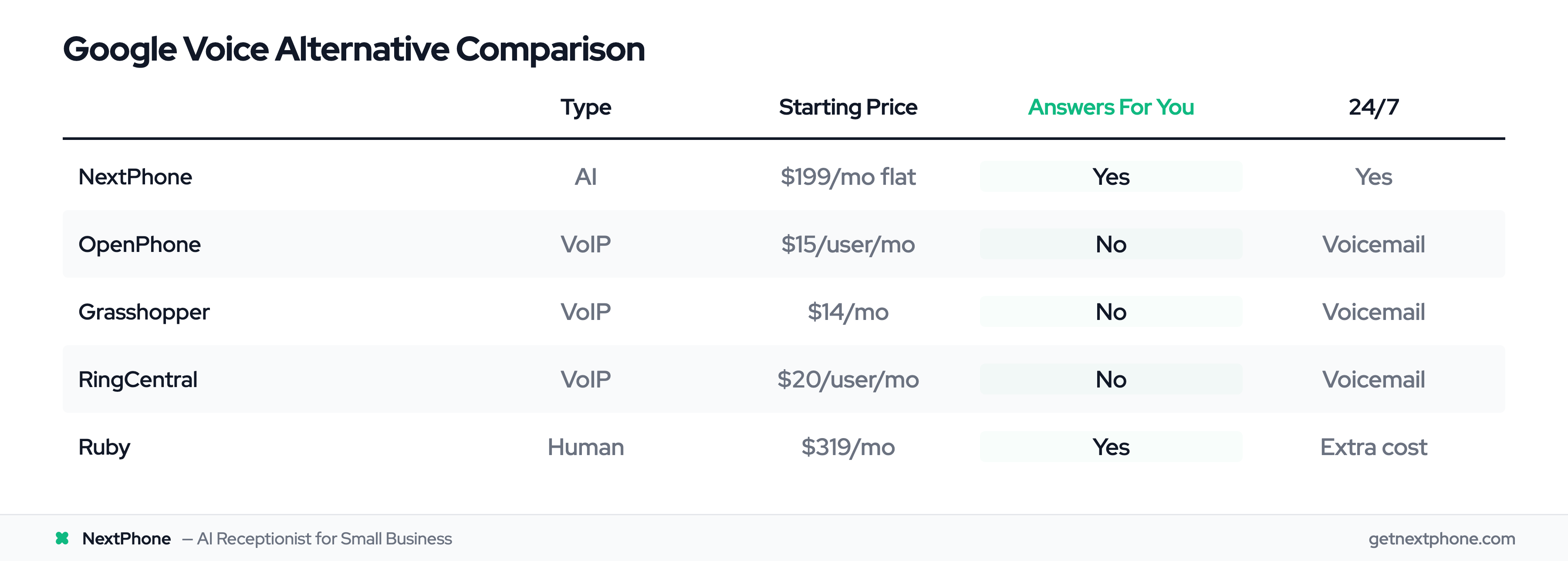
RingCentral has great features - but calls still go to voicemail when you don't pick up. Grasshopper looks professional - but you're still the bottleneck. OpenPhone is affordable - but you still miss calls on job sites.
If your problem is that you can't answer calls, a better phone system doesn't solve it. You need something that answers FOR you.
Types of Google Voice Alternatives
Not all alternatives solve the same problem. Here's how they break down by category:
Traditional VoIP Services
What they are: Cloud-based phone systems with advanced features.
Examples: RingCentral, Grasshopper (400,000+ customers served since 2003), OpenPhone, Dialpad
What they solve: Google Voice's limited features, lack of professionalism, missing integrations.
What they don't solve: You still have to answer the phone. Calls still go to voicemail when you're unavailable.
Best for: Businesses that can actually answer calls but need better features and more professional appearance. Most alternatives offer 99.9%+ uptime.
Pricing: $15-80/user/month depending on features.
Virtual Receptionist Services (Human)
What they are: Real humans who answer your phone on your behalf.
Examples: Ruby Receptionists, AnswerConnect, Specialty Answering Service
What they solve: Calls actually get answered by a person. Professional, warm, human interaction.
What they don't solve: Expensive ($300-800+/month). Limited hours without premium pricing. Receptionists may not know your business deeply.
Best for: High-value professional services (law firms, accounting and financial practices) where warm human interaction justifies the cost.
Pricing: $250-800+/month for meaningful coverage.
AI Answering Services
What they are: AI-powered answering service systems that answer calls conversationally, 24/7.
Examples: NextPhone, Smith.ai (AI option), and other AI answering services
What they solve: Calls get answered professionally, any time. Information captured accurately. Appointments booked automatically. Emergencies routed to you. Spam filtered.
What they don't solve: Very complex conversations still need human follow-up. Not right for extremely high-touch industries where AI might feel impersonal.
Best for: Small and medium businesses that miss calls, need 24/7 coverage, and want professional answering without receptionist costs.
Pricing: $199-400/month for unlimited calls.
Going deeper on AI specifically? We have a dedicated Google Voice AI alternative guide focused entirely on AI-powered options.
Which Category Fits Your Problem?
Ask yourself:
Can you actually answer most calls yourself? VoIP services add features but you're still the answering system. If you just need better tools, VoIP works.
Is your service high-value enough to justify $500+/month for call answering? Human receptionists are ideal but expensive. If a single lead covers months of cost, it might make sense.
Do you need 24/7 coverage at small business prices? AI answering provides receptionist-level service at VoIP prices - roughly $199/month for unlimited calls, around the clock.
Not sure which fits? See our full breakdown on how to choose the right answering service for your business.
Why AI Answering Is Different From Just "Upgrading" Google Voice
Comparing Apples to Oranges
Most "Google Voice alternative" comparisons miss the point. They compare features of different phone systems. But Google Voice's problem isn't features - it's that nobody answers.
Comparing Google Voice to RingCentral is like comparing mailboxes. One has more compartments. Neither delivers your mail.
AI answering is the mail carrier. It actually answers the phone.
What AI Answering Actually Does
When a call comes in with AI answering:
-
Immediate answer: No rings, no voicemail. AI picks up in seconds with your business greeting.
-
Conversational handling: Caller explains what they need. AI understands and responds naturally.
-
Information capture: Name, number, reason for calling - all captured accurately, not half-heard and scribbled down.
-
Intelligent routing:
- Emergency keywords ("flooding," "no heat," "ASAP") → route directly to your cell
- Appointment requests → book directly in your calendar
- Quote requests → capture details, mark as priority callback
- Spam/robocalls → filter automatically
-
24/7 availability: 3 AM Christmas morning or 2 PM on Tuesday. Same professional experience.
The Math That Changes Everything
Let's revisit the numbers:
- Average small business: 40 calls/month
- Industry miss rate: 60-80% = 24-32 missed calls
- Conservative assumption: 20% of missed calls would have become jobs
- Average job value: $1,000-3,500
Monthly missed opportunity: $4,800-22,400
AI answering cost: $199/month
ROI: One captured job pays for an entire year of service.
This isn't about getting "better features" than Google Voice. It's about actually capturing revenue you're currently losing to voicemail.
What AI Handles Best
Based on customer service data, here's where AI excels:
General service requests (the most common call type): "I need my AC serviced" — AI captures details, confirms availability, schedules.
Scheduling and appointments: AI checks your calendar in real-time, books the slot, sends confirmation.
Quote requests: AI captures project details — scope, timeline, address, budget — for your callback.
Emergencies and urgent calls: AI detects urgency ("burst pipe," "no cooling in 95 degrees") and routes directly to you within seconds.
Spam filtering: AI recognizes robocalls and telemarketers, blocks them automatically. You never waste time on "extended car warranties."
For the many callers who request callbacks, AI captures every detail accurately - name, number, best time to call, reason for call. No more lost notes or garbled voicemails.