Introduction
Ready to Stop Missing Customer Calls?
Try NextPhone's AI receptionist free for 7 days. See how other small businesses are capturing more leads 24/7.
Get Started"Urgent: Emergency pipe burst, needs plumber immediately."
The call came in at 10 PM on a Saturday. If you don't answer, they're calling the next plumber on Google. The job is worth $1,200. But your phone went to voicemail.
This scenario plays out thousands of times every day across small businesses. Industry research shows home services contractors miss 60-80% of incoming customer calls. Even worse, 15.9% of those calls contain urgency language—customers calling five competitors simultaneously. First to answer wins the job.
Every missed call is a customer hiring your competitor.
This guide explains what AI answering services are, how they work, what they cost, and whether they're right for your small business. Unlike other guides that hide pricing or over-promise capabilities, we'll give you an honest assessment including what AI can't do yet. We'll show you real data from industry research analyzing thousands of customer service calls, with transparent ROI calculations you can use.
Let's start by understanding the real cost of missing calls.
The Real Cost of Missed Calls for Small Businesses
Every unanswered call is a potential customer choosing your competitor. For small businesses, especially those in home services, the math is brutal.
How Many Calls Are Businesses Actually Missing?
Industry research reveals that contractors miss 60-80% of incoming customer calls. Think about that. Three out of every four potential customers can't reach you.
Why do calls go unanswered? You're on a job site. You're with a customer. You're driving between appointments. It's after hours. It's the weekend. Your hands are literally covered in paint, drywall mud, or grease.
The phone rings. You can't answer. The customer moves on.
What Happens When Customers Can't Reach You?
When customers can't reach a business, they don't wait around. Forrester research shows that after more than one bad experience, around 80% of consumers would do business with a competitor instead.
Translation: Miss a call twice, and you've likely lost that customer permanently.
Customer service data reveals even more concerning patterns:
- 25.4% of customers explicitly request callbacks—that's one in four callers leaving their number and hoping you'll return the call
- 15.9% of calls contain urgency language like "ASAP," "urgent," "today," or "emergency"—these aren't casual inquiries, they're ready-to-buy customers
- 6.2% are true emergencies requiring immediate response
Here's a real example from a customer service call: "Wants an estimate for a new roof. No urgency."
Sounds casual, right? Wrong. They're calling you NOW. And they're calling your competitors too. The first business to answer and provide helpful information wins the job.
The High-Value Calls You're Losing
Not all missed calls cost the same. The emergency calls you're missing? Those average $1,200 per job compared to $400 for regular service calls. That's 3x the revenue, and they often happen after hours when your competitors can't answer either.
The callback requests you're not tracking? Industry research shows 42% of callback requests go unreturned without proper systems. Each one represents a potential customer relationship worth $5,000-$10,000 in lifetime value.
The quote requests marked "no urgency"? Industry data from roofing contractors shows 10.6% of all calls are quote requests. For a $15,000 average roof replacement, every missed estimate call is a potential five-figure loss.
One contractor in an industry study had 76 missed calls in a single month during peak season. He didn't even know he was missing that many calls until he saw the data. He thought business was just slow.
It wasn't slow. His phone was ringing off the hook. He just couldn't answer it.
What Is an AI Answering Service?
An AI answering service uses conversational artificial intelligence—specifically speech recognition and natural language processing—to answer phone calls, understand what callers need, and respond or take action 24/7/365.
AI Answering Service Defined
Think of it like having Siri or Alexa answer your business phone, except it's specifically trained for customer service calls. When someone calls your business, the AI picks up in seconds, has a conversation with the caller, understands their intent, and either answers their question, books an appointment, takes a detailed message, or routes the call to you.
This isn't a phone tree. You know those "press 1 for sales, press 2 for support" systems everyone hates? That's IVR (Interactive Voice Response), and it's not AI. That's just menu navigation.
AI answering services actually understand what people say and respond naturally. A customer can ask "Are you open on weekends?" and the AI recognizes this as a business hours question and answers "Yes, we're open Saturdays 8am-2pm." If the customer follows up with "Can I schedule an appointment for Saturday at 10?" the AI checks your calendar and books it.
It's a conversation, not a menu.
How It's Different from IVR or Voicemail
Voicemail just records a message. You still have to call people back, and industry data shows 42% of those callbacks never happen because the messages pile up or get lost.
IVR systems can route calls but can't have conversations. They frustrate customers. Forrester research found that 62% of customers would prefer to "hand out parking tickets" than navigate automated phone trees.
AI answering services combine the 24/7 availability of voicemail with the conversational ability of a human receptionist. They don't just take messages—they solve problems, answer questions, and capture opportunities in real-time.
How It's Different from Traditional Answering Services
Traditional answering services use human operators, typically outsourced to call centers. They're available 24/7, which is good. But they have limitations:
- They handle one call at a time (busy signals during peak periods)
- They're reading from scripts about your business (limited knowledge)
- They cost $250-$500+ per month with per-minute overages
- Response times average 30-90 seconds (they're juggling multiple clients)
AI answering services can handle unlimited simultaneous calls, know everything about your specific business, cost less, and answer in under 10 seconds.
According to Gartner's December 2024 survey, 85% of customer service leaders will explore or pilot customer-facing conversational GenAI in 2025. This technology is becoming mainstream fast.
How AI Answering Services Work
Understanding how the technology works helps you evaluate whether it's right for your business. Don't worry—we'll keep this non-technical.
Step 1: Automatic Speech Recognition (ASR)
When a call comes in, the AI answers and immediately starts converting the caller's voice to text in real-time. This is the same technology that powers Siri when you say "set a timer for 10 minutes."
Modern ASR systems handle accents, background noise, and conversational speech patterns. When someone says "I need someone to come look at my leaky faucet," the AI converts that speech to text instantly.
Step 2: Natural Language Processing (NLP)
Here's where it gets smart. The AI doesn't just transcribe words—it understands meaning and context.
If someone says "I need someone today," "This is urgent," or "My AC just died and it's 95 degrees"—the AI recognizes all of these as urgent requests requiring immediate action, even though they're phrased completely differently.
This isn't keyword matching. The AI understands that "Are you open?" and "What are your hours?" and "Can I come by today?" are all asking the same basic question. It recognizes intent, not just words.
Step 3: Intent Recognition and Response
Based on what it understands, the AI determines what the caller needs:
- Information request (hours, pricing, service area)
- Scheduling request (book an appointment)
- Emergency (urgent service needed)
- Quote request (estimate for a project)
- Callback request (leave name and number)
- Spam (robocall or solicitation)
Customer service data shows 15.9% of calls contain urgency language that AI must detect and prioritize. The system is trained to recognize phrases like "emergency," "urgent," "ASAP," "broken," "not working," and hundreds of variations.
Step 4: Action and Integration
Once the AI knows what the caller needs, it takes action:
Answer directly: "We're open Monday through Friday 8am to 6pm, and Saturdays 9am to 2pm."
Schedule appointment: Checks your Google Calendar, finds available slots, books the appointment, sends confirmation via email and SMS.
Take detailed message: Captures name, phone number, service needed, urgency level, transcribes the entire conversation, and sends it to you via email, SMS, or CRM integration.
Route to human: For complex questions or emergencies, transfers the call to your phone with context: "Hi, I have Mrs. Johnson on the line with an emergency AC repair request. Here's what she told me..."
Capture lead info: Logs every caller's information in your CRM automatically—no manual data entry.
Here's a real example from customer service data:
Customer calls: "Hi, my AC stopped working and it's 95 degrees. I need someone today."
ASR: Converts to text NLP: Understands AC repair + urgency (95 degrees, "need today") Intent: Emergency service request Action: Captures info, marks as urgent, sends immediate notification to owner, offers to transfer to on-call technician
The entire process happens in seconds.
Continuous Learning and Improvement
AI platforms are trained on millions of phone calls. Smith.ai reports training their system on over 20 million calls. This massive dataset helps AI understand thousands of ways people phrase the same requests.
More importantly, your AI learns YOUR business specifically. In the first month, accuracy is typically around 80% as the system learns your services, terminology, and how you want calls handled. By month two, accuracy reaches 95%+ for routine inquiries.
Gartner predicts that by 2029, agentic AI will autonomously resolve 80% of common customer service issues without human intervention. The technology keeps getting better.
What Types of Calls Can AI Handle?
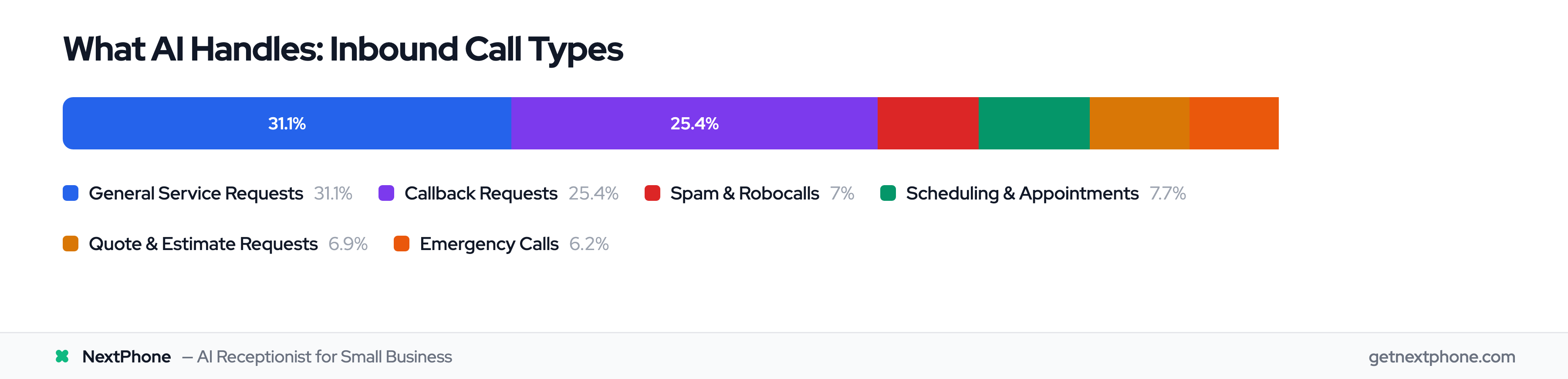
Let's look at what AI answering services actually handle, based on industry research analyzing thousands of customer service calls.
General Service Requests (31.1%)
Nearly one-third of calls are straightforward service requests: "I need a plumber to fix a leak," "Can you clean my gutters?" or "Do you install ceiling fans?"
AI captures the details—what service they need, their location, timeline, and contact information. It determines if it's urgent and logs everything for you to follow up. You get organized lead information instead of scattered voicemails.
Callback Requests (25.4% - One in Four Customers!)
This is huge. One in four callers explicitly asks for a callback.
"Please call me back when you get a chance." "Have him call me at this number." "I'll wait to hear from you."
Here's the problem: Without tracking, industry research shows 42% of callback requests go unreturned. Messages get lost. Voicemails pile up. You forget to call people back.
With AI, 100% of callback requests are captured with the caller's phone number, best time to call, and reason for calling—all logged in your system automatically.
Real customer service examples:
- "Requested callback at 888-568-0296"
- "Wants you to call regarding insurance claim for property damage"
- "Requested Barry call back when he has a chance"
Every single one logged. No more lost opportunities.
Industry-specific note: Painters have the highest callback rate at 48.1%—nearly half of all calls! For painters, callback tracking isn't optional. It's critical.
Scheduling and Appointments (7.7%)
"Can I schedule service for tomorrow?" "What times do you have available this week?" "I need to book a pest control appointment."
AI checks your calendar integration, sees your availability, books the appointment, and sends confirmation. The customer gets instant scheduling instead of waiting for you to call them back with available times.
Real example from customer service data: "Wants to schedule service for a leaky toilet, asking about availability for tomorrow."
Quote and Estimate Requests (6.9%)
Even when customers say "no urgency," these are time-sensitive. They're calling multiple businesses to get quotes.
The AI captures all the project details needed for an accurate estimate—what work they need done, property details, timeline, budget considerations. You get organized quote requests instead of vague voicemails saying "call me about a job."
Industry data shows roofers get the highest rate of quote requests at 10.6%. For a $15,000 average roof replacement, every captured quote request is a potential five-figure opportunity.
Real example: "Wants an estimate for a new roof. No urgency." (But they're calling competitors right now.)
Repetitive FAQs AI Answers Instantly (6.5%)
"What are your hours?" "Do you service my zip code?" "How much do you charge for X?" "Are you licensed and insured?"
These calls don't need to reach you. The AI answers instantly from your business information. The customer gets their answer in 10 seconds instead of waiting for a callback or navigating your website.
This frees up your time for calls that actually need your expertise.
Emergency Calls (6.2%)
Emergency jobs average $1,200 compared to $400 for regular service calls—3x the revenue. Many emergencies happen after business hours, when your competitors' phones go to voicemail.
AI detects urgency through keywords and context:
- "Emergency pipe burst, needs plumber immediately"
- "Needs emergency AC repair, no cooling in 95 degree weather"
- "Urgent: Porta potty delivery at 6 PM. Caller is waiting and needs to speak with you right away"
The AI marks these as high-priority and routes them to your phone immediately, or if you're unavailable, takes detailed information and sends urgent alerts.
You capture the after-hours emergencies your competitors miss.
Spam and Robocalls AI Filters (7.0%)
Seven percent of calls are spam—robocalls, solicitations, wrong numbers. The AI screens these automatically. You never hear from "Rachel from Card Services" or solar panel scammers again.
Industry-specific note: Electricians face the highest spam rate at 15.5% because they're on every vendor list. That's nearly 1 in 6 calls wasting their time. AI filters all of it.
The data is clear: AI can handle the vast majority of what your phone rings with, freeing you to focus on the calls that truly need human expertise.
Benefits of AI Answering Services
Let's talk about what this technology actually does for your business.
Never Miss a Call—24/7/365 Coverage
Your AI receptionist doesn't sleep. It doesn't take weekends off. It doesn't call in sick.
This matters because 6.2% of calls are emergencies, and many happen after 5pm or on weekends. Emergency jobs average $1,200 versus $400 for regular service calls. While your competitors' phones ring to voicemail at 8pm Saturday, yours is answered professionally.
You capture the weekend and after-hours opportunities everyone else misses.
Instant Response Time (No More Wait Times)
AI answers in 6-8 seconds. Compare that to the 42-minute average customer service wait time reported by OnePoll in 2022, or even the 30-90 seconds it takes traditional answering services to pick up (they're juggling multiple clients).
Speed matters when 15.9% of calls are urgent. The customer calling five contractors doesn't wait—they hire whoever answers first and provides helpful information.
Handle Unlimited Calls Simultaneously
A human receptionist handles one call at a time. Others go to voicemail or get a busy signal.
Traditional answering services have limited operators. During peak times, you get busy signals or long wait times.
AI handles 5 calls or 500 calls simultaneously. Never a busy signal. Never a wait. Perfect for seasonal businesses with call spikes—like HVAC contractors during summer AC emergencies or roofers after storms.
Significant Cost Savings
McKinsey research shows AI technologies can reduce customer service expenses by up to 30%.
Here's the math: Full-time receptionist: $16-20/hour × 2,080 hours = $33,000-$42,000 salary, plus payroll taxes (7.65%), benefits, PTO, training = $40,000-$50,000 annually Traditional answering service: $250-$500/month with per-minute overages = $3,000-$6,000+ annually AI answering service: $199/month = $2,388 annually
You save $37,000-$48,000 per year compared to hiring a receptionist. That money goes straight to your bottom line.
Perfect Consistency (No Human Variability)
Your AI never has a bad day. It never forgets to mention your current promotion. It never puts someone on hold and forgets about them. It's always professional, always on-brand, always accurate.
No sick days. No vacation coverage. No turnover. No training new employees every time someone quits.
Same quality at 2am as 2pm.
Capture and Organize Every Lead
100% of callers get logged—name, phone number, service needed, urgency level, conversation transcription. All integrated automatically into your CRM.
Remember that 25.4% who request callbacks? Every single one captured and tracked. No more lost sticky notes or forgotten voicemails.
You can see your entire call history, identify trends, follow up on every opportunity.
Data and Insights You Can Act On
Your AI tracks everything:
- Call volume patterns (busiest times, days, seasons)
- Common questions (update your website FAQ based on real caller questions)
- Caller sentiment and urgency patterns
- Which marketing sources drive calls
- ROI on your call answering investment
Forrester research found that 76% of AI users reported higher revenue growth over the past 12 months. Businesses that capture more leads and track their data grow faster.
What AI Answering Services Can't Do Yet (Honest Limitations)
Let's be honest about where AI falls short. Transparency matters.
The Customer Sentiment Challenge
Here's data most providers won't tell you: According to a Gartner survey in July 2024, 64% of customers would prefer companies didn't use AI in customer service. Additionally, 60% worry AI will make it harder to reach a live person.
These aren't hypothetical concerns. Real customers are skeptical of AI.
That's why being upfront about using AI—and offering easy escalation to humans—builds more trust than trying to hide it.
Situations Where AI Struggles
AI isn't perfect. Here's where it falls short:
Complex, unique scenarios requiring judgment: "I need a custom solution combining services you don't usually bundle together, and I have specific requirements about materials and timeline."
AI can take notes, but a human needs to quote this job.
High-emotion situations: Angry customers, complaints, distressed callers. AI can detect frustration in tone and escalate to a human, but it can't provide empathy like another person can.
Subtle nuances and reading between the lines: A human can hear hesitation and ask "Are you comparing quotes? I can explain our pricing structure." AI isn't there yet.
Building deep relationships: AI handles transactions well. But long-term customer relationships—knowing Mrs. Johnson always calls on Wednesdays about her rental properties—benefit from human touch.
Industry-specific jargon edge cases: While AI learns your terminology, very specialized or uncommon technical terms may confuse it initially. It gets better with training, but month one has a learning curve.
Why the Hybrid Approach Works Best
The solution isn't AI-only or human-only. It's both.
Best practice: AI handles 80-90% of routine calls (FAQs, scheduling, message taking, lead capture, spam filtering). Humans handle 10-20% (complex quotes, complaints, unique situations, VIP customers).
When AI encounters something it can't handle well, it smoothly transfers: "That's a great question. Let me connect you with John who can answer that specifically for you."
The customer gets efficiency when appropriate (instant answers to simple questions) and human expertise when needed (complex situations requiring judgment).
This hybrid approach addresses the Gartner finding that 64% prefer humans for service. You're not replacing humans—you're freeing humans to focus on the interactions where they add the most value.
Industry research shows that by 2029, AI will autonomously resolve 80% of common issues. But that still leaves 20% needing human expertise. The businesses winning are those combining AI efficiency with human judgment, not betting on one or the other.
AI Answering Service vs. Traditional Answering Service vs. Human Receptionist
Let's compare your options honestly.
AI Answering Service vs. Traditional Answering Service
Cost:
- AI: $199/month flat rate (unlimited calls)
- Traditional: $250-$500/month + per-minute overages
Traditional services often charge $0.25/minute. If you get 42 calls per month averaging 8 minutes each, that's $84 in overages on top of the base fee.
Availability: Both offer 24/7 coverage.
Capacity:
- AI: Unlimited simultaneous calls (never a busy signal)
- Traditional: 1-3 operators (busy signals during peak periods)
Response Time:
- AI: 6-8 seconds
- Traditional: 30-90 seconds (operators juggle multiple clients)
Consistency:
- AI: Always knows your business details
- Traditional: Operators read from scripts, may not know specifics
Integration:
- AI: Direct CRM and calendar integration
- Traditional: Takes messages you manually enter
When traditional is better: If you absolutely need a human voice for every call and can't use a hybrid approach, traditional services provide that. But they're more expensive and less scalable.
AI Answering Service vs. Human Receptionist
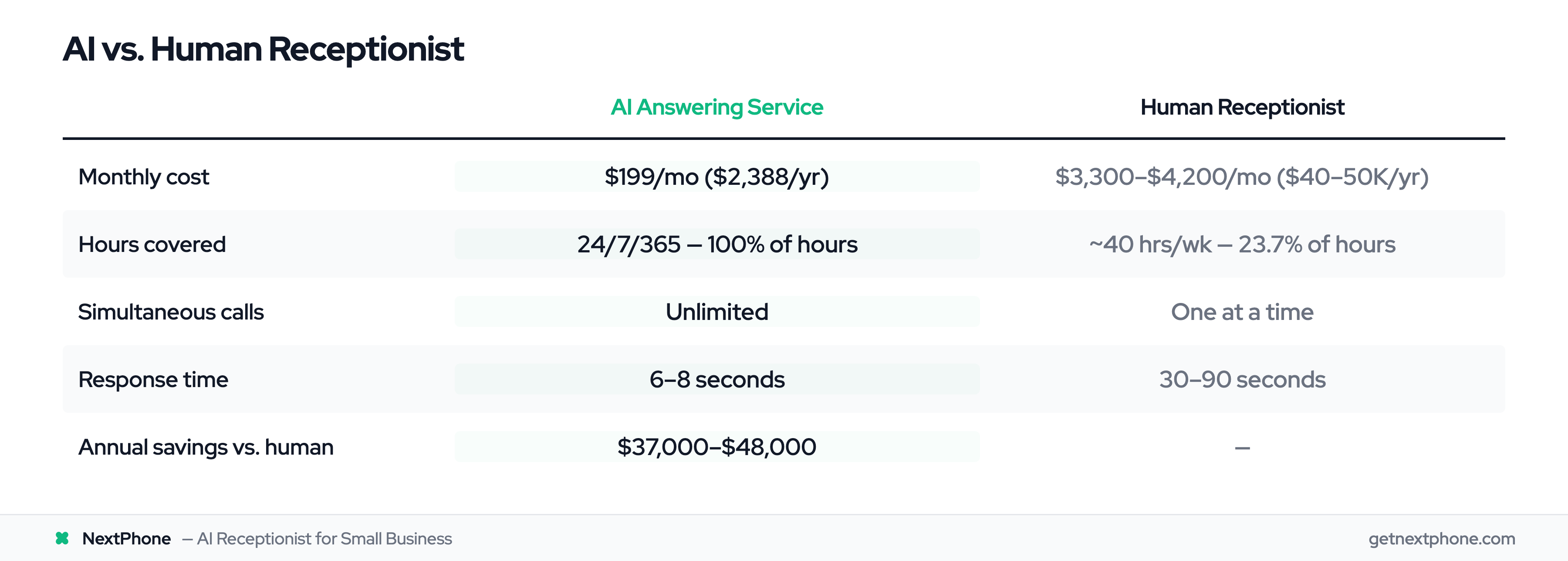
Cost:
- AI: $199/month = $2,388/year
- Human: $40,000-$50,000/year (salary + taxes + benefits)
Bureau of Labor Statistics data shows the average receptionist salary is $33,000-$42,000. Add 7.65% payroll taxes, health insurance (~$500/month = $6,000/year), PTO, sick days, and training costs—you're at $40,000-$50,000 all-in.
Savings: $37,000-$48,000 annually.
Availability:
- AI: 24/7/365 (8,760 hours per year)
- Human: 40 hours/week, 2,080 hours per year (minus PTO and sick days)
A human receptionist covers 23.7% of hours in a year. AI covers 100%.
Capacity:
- AI: Unlimited simultaneous calls
- Human: One call at a time (others go to voicemail)
Consistency:
- AI: Perfect consistency, never forgets details
- Human: Variable (bad days, sick days, learning curve, turnover)
When human is better:
- Complex B2B sales requiring relationship building
- High-touch industries where every call is a consultative conversation
- Businesses with in-person reception needs (greeting visitors, handling packages, managing office)
Hybrid Option: Many businesses use part-time reception staff during peak hours + AI for after-hours and overflow. This gives you human touch during business hours and 24/7 coverage at a fraction of the full-time receptionist cost.
Decision Framework
Choose AI if: High call volume, many after-hours calls, budget under $500/month, need 24/7 coverage, mostly routine inquiries.
Choose Traditional if: Need human voice for every call, low call volume, can't use AI for brand reasons.
Choose Human Receptionist if: Need in-person reception, every call is complex/consultative, budget allows $40K+/year.
Choose Hybrid (AI + Human) if: Want efficiency + personal touch, high call volume with some complex needs.
For most small businesses, hybrid is the answer.
How Much Does an AI Answering Service Cost? (Pricing and ROI)
Let's talk numbers. Real numbers, not "contact sales for pricing" nonsense.
AI Answering Service Pricing Models
The market ranges from $30-$300/month for small business solutions. Here's what you'll find:
Per-minute models: $0.20-$0.30/minute. Sounds affordable until you do the math. 42 calls × 8 minutes average × $0.25 = $84/month in call charges. Add a base fee, and you're at $150-$200. The problem? Unpredictable. One busy month could cost you $400.
Flat-rate subscription models: $99-$300/month for unlimited (or high-limit) calls. Predictable, usually better for SMBs. You know exactly what you're paying.
Enterprise solutions: $1,000-$10,000/month. Overkill for small businesses. These are for call centers handling thousands of calls daily.
What affects price: Call volume limits, features (scheduling, CRM integration, multiple locations), support level, contract length.
Hidden fees to watch for: Setup fees ($200-$500 at some providers), per-user fees, integration costs, overage charges beyond your plan limits.
NextPhone Transparent Pricing
We believe in showing pricing upfront. Here it is:
$199/month flat rate
What you get:
- Unlimited calls (no per-minute fees)
- 24/7 answering
- Appointment scheduling with calendar integration
- CRM integration (Salesforce, HubSpot, and others)
- Call recording and transcription
- Analytics dashboard
- Spam filtering
- No setup fees
- No contracts (month-to-month)
- 14-day free trial
Why transparent pricing matters: Our competitors hide pricing to force sales calls. We think you deserve to know what it costs upfront so you can make an informed decision.
Real ROI Calculations (Will It Pay for Itself?)
Let's run the numbers with real business examples.
Example 1: General Contractor
Scenario: 42 calls/month, 70% missed (industry average), $3,500 average project
Math:
- 42 calls/month × 70% missed = 29.4 missed calls/month
- Industry research shows 6.9% of calls are quote/estimate requests
- 29.4 missed × 6.9% quotes = 2.03 missed quote opportunities/month
- Close rate: 20% (industry standard)
- 2.03 quotes × 20% = 0.41 jobs/month lost = ~5 jobs/year
Lost revenue: 5 jobs × $3,500 = $17,500/year
NextPhone cost: $199/mo × 12 = $2,388/year
ROI: Capture just ONE additional job → $3,500 revenue - $2,388 cost = $1,112 profit (1.5x ROI in one job, 17x ROI if you capture all month's worth)
Capture average (5 jobs): $17,500 - $2,388 = $15,112 profit (7x ROI)
Example 2: Roofing Contractor (High-Value Projects)
Scenario: 50 calls/month, 76.6% missed (roofers have highest miss rate), $15,000 average roof
Math:
- 50 calls × 76.6% missed = 38.3 missed calls/month
- 10.6% of roofer calls are quote requests (industry research)
- 38.3 × 10.6% = 4.06 missed quotes/month = 48.7 quotes/year
- Close rate: 15% (lower for big projects)
- 48.7 quotes × 15% = 7.3 jobs/year lost
Lost revenue: 7.3 jobs × $15,000 = $109,500/year
NextPhone cost: $2,388/year
ROI: Even capturing just ONE roof → $15,000 - $2,388 = $12,612 profit (6x ROI)
Capturing average (7.3 jobs): $109,500 - $2,388 = $107,112 profit (45x ROI)
Example 3: After-Hours Emergency Service
Scenario: 40 calls/month, 6.2% emergencies (many after-hours)
Math:
- 40 calls × 6.2% emergencies = 2.5 emergency calls/month
- Assume 1 emergency/month happens after hours (currently lost to competitor)
- Emergency jobs average $1,200 (vs. $400 regular service)
Lost revenue: 12 emergencies/year × $1,200 = $14,400/year
NextPhone cost: $2,388/year
ROI: Capture after-hours emergencies → $14,400 - $2,388 = $12,012 profit (6x ROI)
Example 4: Callback Follow-Through
Scenario: 40 calls/month, 25.4% request callbacks
Math:
- 40 calls × 25.4% = 10.2 callback requests/month
- Industry research: 42% of callbacks go unreturned without tracking
- 10.2 × 42% = 4.3 callbacks lost/month = 51.6/year
- Customer lifetime value (contractors): $5,000-$10,000
- If you save just 5 callbacks/year from falling through cracks...
Value: 5 customers × $5,000 LTV = $25,000 lifetime value captured
NextPhone cost: $2,388/year
ROI: 10x return on just 5 saved customer relationships
The One-Job Rule (Simplest ROI Framework)
Here's the bottom line: If AI helps you capture ONE additional job per year that you'd otherwise miss, it pays for itself.
Most contractors: Average job $1,000-$15,000 NextPhone: $2,388/year Math: 1 job > $2,388 = profitable
Given that industry research shows 60-80% missed calls, capturing one extra job is conservative. Everything beyond that first job is pure profit.
Industries and Use Cases: Who Benefits Most from AI Answering Services?
AI answering services work for many industries, but some see dramatically better results than others.
Home Services Contractors (The Sweet Spot)
If you're on job sites all day and can't answer your phone, AI answering services are built for you.
Why it's perfect:
- You're physically unable to answer calls (hands dirty, on a ladder, operating equipment)
- High missed call rate (60-80% industry average)
- Time-sensitive calls (emergencies, "I need someone today")
- After-hours and weekend calls matter (emergencies don't wait for Monday)
- Every missed call is revenue lost
Specific trades:
Plumbers: Emergencies happen after-hours. 50% of calls are specific service requests. AI captures the details (what's broken, how urgent, location) and routes emergencies to your on-call phone.
Electricians: Highest spam rate at 15.5%—nearly 1 in 6 calls wastes your time. AI filters all spam automatically. Plus 24.8% callback requests all get logged and tracked.
HVAC: Seasonal spikes (summer AC emergencies, winter heat failures). Emergency calls average $1,200. AI handles the rush when 10 customers call simultaneously during the first 95-degree day.
Roofers: Highest quote request rate at 10.6%. Average roof is $15,000. AI captures every estimate request with project details so you can follow up with accurate quotes.
General Contractors: Highest callback rate at 24.9%, plus diverse service requests (32.3%). AI organizes all lead information so nothing falls through cracks.
Painters: Highest callback rate of any trade at 48.1%—nearly half of all calls request callbacks! Without tracking, painters lose half their leads. AI captures 100%.
Pest Control: Highest scheduling rate at 34.7%. Recurring service model means AI can book initial service, then schedule follow-ups automatically. Also high spam rate (19.9%) that AI filters.
Healthcare and Medical Practices
Appointment scheduling is the killer use case. AI books cleanings, checkups, follow-ups while your front desk helps patients in the office.
After-hours answering for urgent situations. Patient calls at 7pm with a question? AI can answer common questions or route emergencies appropriately.
HIPAA compliance matters here—make sure your AI provider offers HIPAA-compliant solutions if handling protected health information.
Professional Services (Legal, Accounting, Real Estate)
Legal: Intake calls, consultation scheduling, basic practice area questions. AI qualifies leads before they reach attorneys.
Accounting: Tax season call spikes. AI books appointments, answers common questions (office hours, what documents to bring), sends appointment reminders.
Real Estate: Property inquiries, showing scheduling. Motivated buyers call at 9pm after seeing a listing—AI answers questions and books a showing for the next day while competitors' calls go to voicemail.
Consulting: Lead capture, meeting scheduling, qualification questions. AI gathers background information before the consultant spends time on discovery calls.
Retail and E-commerce
Store hours, location, product availability. "Do you have X in stock?" "What time do you close?" "Where are you located?"
AI answers instantly from your business information. For multi-location businesses, AI knows details for all locations.
Order status inquiries (with system integration), returns and exchanges information (policies, process).
Who Should NOT Use AI Answering (Honest Assessment)
Very low call volume: If you get 5-10 calls per month, AI isn't cost-effective. Just use voicemail and return calls promptly.
Highly consultative B2B sales: Long sales cycles where every call is a complex conversation requiring deep expertise. You still need human touch for these relationships. (Though AI can handle after-hours as backup.)
Extremely specialized industries with jargon AI struggles to learn: Very niche medical specialties, highly technical B2B where every caller uses industry-specific terminology the AI would need months to master.
Customer demographics that strongly prefer human interaction: Some luxury services, high-end B2C where brand positioning demands white-glove human service.
But even these can use hybrid: AI for after-hours, humans during business hours.
How to Choose the Right AI Answering Service (Selection Guide)
Not all AI answering services are created equal. Here's what to look for.
Key Features to Look For
Natural-sounding voice: Does it sound human or robotic? Request a demo before committing. Some providers' AI sounds like 1990s text-to-speech. Others are nearly indistinguishable from humans.
Customization for your business: Can you train it on YOUR services, pricing, FAQs, business hours, service area? Generic AI that can't learn your specifics won't work well.
Appointment scheduling: Direct calendar integration (Google Calendar, Outlook, Apple Calendar). AI should be able to check availability and book appointments without you touching anything.
Smart call routing: Can it detect urgency and route accordingly? If someone says "emergency," the AI should flag it and get them to you immediately.
Escalation to humans: Smooth handoff when AI can't handle something. "Let me connect you with John who can help with that specifically."
Call recording and transcription: Review calls to ensure quality, train your team, improve your business.
Analytics dashboard: Call volume, call types, trends, busiest times. Data you can use to make business decisions.
Spam filtering: Automatically screen robocalls and solicitations.
Multi-language support: If you serve non-English speakers, ensure the AI supports those languages.
Integration Capabilities
CRM integration: Salesforce, HubSpot, Pipedrive—automatically log every lead without manual data entry.
Calendar integration: Google Calendar, Outlook, Apple Calendar for automatic appointment booking.
Phone system compatibility: Works with existing VoIP or landline via call forwarding or direct integration.
SMS/Email notifications: Real-time alerts for urgent calls or voicemails.
Zapier/API access: Connect to other tools you use (project management software, invoicing systems, etc.).
Industry-specific software: For contractors (ServiceTitan, Jobber, Housecall Pro), for healthcare (Epic, Athenahealth), etc.
Pricing Structure (Red Flags to Avoid)
Transparent vs. hidden pricing:
✅ Good: Clear pricing on website, no "contact sales" ❌ Red flag: Must talk to sales for pricing = likely expensive enterprise solution
Flat-rate vs. per-minute:
✅ Good: Flat monthly rate with unlimited (or high) call limits ❌ Red flag: Per-minute pricing that can balloon (monitor closely if choosing this)
Setup fees and contracts:
✅ Good: No setup fees, month-to-month or annual discounts (optional) ❌ Red flag: $500+ setup fees, locked into 12-24 month contracts
Overage charges:
✅ Good: Clear overage policy or unlimited ❌ Red flag: Vague "overages billed at $X" without clear limits
Questions to Ask Vendors
Before you commit, ask:
- "Can I hear a demo with calls from my industry?"
- "What's your average voice recognition accuracy rate?"
- "How do you handle calls the AI can't answer?"
- "What integrations do you support?" (Specifically the tools you use)
- "What's the total monthly cost including all fees?"
- "Is there a setup fee or contract commitment?"
- "How long does implementation take?"
- "Can I customize responses and call flows?"
- "Do you provide call analytics?"
- "What happens if there's an internet outage?"
- "Is your service HIPAA/SOC 2 compliant?" (if you need this)
- "Can I try it free before committing?"
How NextPhone Measures Up
- Natural voice: Modern conversational AI that sounds human
- Full customization: Trained specifically on your business, services, pricing, FAQs
- Calendar integration: Google Calendar, Outlook, Apple Calendar
- Intelligent routing: Urgency detection and smart escalation to you when needed
- Transparent pricing: $199/mo flat rate, no hidden fees
- No contracts: Month-to-month, cancel anytime
- 14-day free trial: Try it risk-free
- Full analytics dashboard: Call volume, types, trends, recordings
- Integrations: Works with major CRMs, calendars, and phone systems
Implementation: What to Actually Expect
Unlike competitors who promise "5-minute setup," let's be realistic about implementation.
Timeline: From Setup to Optimized
- Week 1: Initial Setup (1-2 hours of your time)
- Connect phone number (call forwarding or VoIP integration)
- Enter basic business info: Hours, services, service area, pricing ranges
- Upload FAQs and common questions
- Set up calendar integration
- Configure escalation rules (when to route calls to you vs. take message)
- Week 2-3: AI Training (30 minutes - 1 hour of your time)
- AI learns from your input
- Review sample call scenarios
- Provide industry-specific terminology
- Adjust responses to match your brand voice
- Test calls to ensure quality
- Week 4: Go Live (Ongoing monitoring)
- Turn on call forwarding to AI
- Monitor first calls closely
- Make adjustments based on real calls
- Review call recordings
- Fine-tune responses
Month 1: ~80% accuracy (AI is learning your business) Month 2+: ~95% accuracy (AI has learned patterns) Ongoing: Quarterly reviews to optimize, add new services, update seasonal FAQs
What You'll Need to Provide
Business basics: Name, hours, service area, contact info, website Services list: What you offer, basic pricing ranges (if you share pricing) Common FAQs: Hours, service area, emergency policy, how scheduling works, payment methods Brand guidelines: How to greet callers, brand voice (professional, friendly, casual), what NOT to say Calendar access: For appointment booking Escalation preferences: When to route to you vs. take detailed message
Training the AI on Your Business
This isn't difficult, but it takes thought. You need to think through "What do customers ask most?" and "How should AI respond?"
Most platforms provide templates to start with. You customize from there.
It's an iterative process. You'll review actual calls, see what worked and what didn't, and adjust. Like training a new employee—takes some time upfront but worthwhile long-term.
The Ramp-Up Period (Honest Talk)
First few calls may have hiccups. That's normal. The AI learns from corrections (if you provide feedback).
Month 1: You'll review calls more frequently, make adjustments, refine responses.
Month 2+: Set it and mostly forget it. Review weekly or monthly instead of daily.
This is worthwhile investment. Think of it like hiring an employee who never quits and gets better every month.
Tip: If you're nervous, start with after-hours only. Test the AI with lower-stakes calls (evenings and weekends) before routing all calls through it. This lets you build confidence before going full-time.
Tips for Successful Implementation
1. Start simple: Don't try to configure 100 scenarios on day one. Cover the basics, add complexity as you go.
2. Review calls weekly (Month 1): Identify patterns, see what customers actually ask, adjust responses.
3. Use call recordings: Learn what customers need, how they phrase requests, what confuses the AI.
4. Update regularly: New services, seasonal changes (holiday hours), pricing updates, staff changes.
5. Be patient: AI improves with data. Give it time to learn.
6. Keep human backup: Hybrid approach means escalation is always available. Customers can reach you if needed.
- Communicate with customers:**
- Be transparent: "You've reached ABC Plumbing. Our AI assistant can help schedule appointments or I can take a message for John."
Most businesses see AI answering accuracy improve from 80% in Month 1 to 95%+ by Month 2-3 as the system learns. Setup typically takes 1-2 hours of business owner time spread over 2-3 weeks.
Frequently Asked Questions
How accurate is AI answering service?
Modern AI achieves 85-95% accuracy for understanding conversational speech and determining caller intent. Accuracy depends on training—AI trained specifically on your business and industry performs better. In the first month, expect around 80% accuracy as the AI learns your services and common questions. After 2-3 months, accuracy reaches 95%+ for routine inquiries. The best systems route complex or unclear questions to humans rather than guessing.
Do customers know they're talking to AI?
This depends on your preference. Some businesses disclose upfront: "You've reached Smith Plumbing. Our AI assistant can help schedule appointments or connect you with John." Others let the AI answer naturally—modern voices sound very human. Customer reception varies, but most customers care about getting help quickly, not whether it's AI or human—as long as their problem is solved. We recommend transparency for trust-building, but it's not required. If a customer asks "Am I talking to a robot?" the AI can confirm and offer to connect them with a human.
Can AI answering service handle multiple calls at once?
Yes—this is a major advantage over human receptionists and traditional answering services. AI can handle unlimited simultaneous calls. Whether 5 people call or 500 people call, there's no busy signal, no wait time. This is perfect for businesses with seasonal spikes or peak-hour call volume. Example: An HVAC contractor during the first 95-degree day of summer when 10 people call at once about broken AC units—AI answers all 10 instantly while a human could only take one.
What happens if AI doesn't know the answer?
Good AI systems have escalation protocols. When the AI doesn't know something, it has several options:
1. Route to human: "Great question. Let me connect you with Sarah who can answer that specifically."
2. Take detailed message: "I don't have that information, but I'll take your name and number and have John call you back within 2 hours."
3. Offer to email information: "I'll have someone email you details about that service."
AI should never guess or provide incorrect information. This is why the hybrid approach works best—AI handles 80-90% of calls confidently, escalates the rest to humans who have the expertise.
Can AI answering service integrate with my existing phone system?
Yes. Most AI answering services integrate with existing phone systems through two methods:
1. Call forwarding: Forward your existing number to the AI service. This works with any phone—landline, cell phone, VoIP. Takes 5-10 minutes to set up.
2. VoIP integration: Direct integration if you use a VoIP system like RingCentral, Nextiva, Grasshopper, etc.
You don't need to change your phone number. AI also integrates with CRM systems (Salesforce, HubSpot), calendars (Google Calendar, Outlook), and can send you notifications via SMS or email. NextPhone works with all major phone systems and business tools.
How much does AI answering service cost for small businesses?
Small business AI answering services typically range from $99-$300/month. Pricing models include:
Flat-rate subscription: $199-$299/mo for unlimited calls (most predictable) Per-minute pricing: $0.20-$0.30/minute (can add up, watch for overages) Tiered plans: Based on call volume (e.g., 0-100 calls, 100-500 calls)
- Compare to alternatives: Traditional answering service costs $250-$500/mo. Full-time receptionist costs $40,000/year ($3,333/mo). NextPhone costs $199/month flat rate with unlimited calls and no contracts.
- ROI check: Capturing just one additional job per year that you'd otherwise miss typically covers the annual cost.
Is AI answering service better than voicemail?
Significantly better for capturing leads and providing customer service. Voicemail has major limitations:
- 42% of voicemails go unreturned (industry research)
- Customers don't want to leave messages—they call the next business
- No immediate answers to simple questions (hours, service area, pricing)
- Can't book appointments in real-time
- Miss time-sensitive opportunities (15.9% of calls contain urgency language)
- AI advantages: Answers immediately (no wait for callback), answers FAQs instantly, books appointments on the spot, captures 100% of lead information, detects urgency and routes accordingly.
- Result: AI captures opportunities that voicemail loses. For businesses serious about growth, voicemail isn't a strategy—it's leaving money on the table.
Conclusion
AI answering services aren't just for enterprises anymore. Small businesses are using this technology to answer calls they'd otherwise miss, capture leads 24/7, and compete with bigger competitors—all without hiring full-time staff or paying thousands monthly for traditional answering services.
The data is clear. Industry research shows contractors miss 60-80% of calls—with 25.4% requesting callbacks, 6.2% being emergencies, and 15.9% containing urgency language. Every missed call is a customer hiring your competitor.
AI handles 80-90% of routine calls (scheduling, FAQs, lead capture) while escalating complex situations to humans. This hybrid approach addresses customer concerns (64% prefer human service according to Gartner) while capturing the efficiency gains AI provides.
Cost comparison says it all: $199/mo for AI vs. $40,000/year for a receptionist. Capturing just one additional job per year justifies the investment. Everything beyond that is profit.
The question isn't whether you can afford AI answering service. It's whether you can afford to keep missing 60-80% of your calls.
- Ready to stop missing calls? Try NextPhone free for 14 days and see how many opportunities you've been losing. No credit card required. Start capturing every customer call today →
About the Content Team
The NextPhone content team specializes in helping small businesses and home services contractors leverage AI technology to improve customer service and capture more revenue. Our insights are based on industry research analyzing thousands of real customer service calls, providing honest, data-driven guidance on AI answering solutions.
Related Articles
AI Phone Answering: How It Works and Why Businesses Are Switching
Learn how AI-powered phone answering technology works under the hood, what it costs, and why small businesses are adopting it faster than enterprises. Read more →
AI Receptionist Pricing: Complete 2025 Cost Guide
Complete breakdown of AI receptionist costs, from DIY platforms to full-service solutions, with ROI calculations and pricing comparisons across providers. Read more →
Best AI Receptionist for Small Business: 2025 Comparison
We reviewed the top 5 AI receptionist platforms for small businesses. Here's what we found—features, pricing, pros, cons, and who each solution works best for. Read more →
How Contractors Are Using AI to Capture More Leads
Specific tactics home services contractors use to leverage AI answering services for competitive advantage. Real examples from plumbers, electricians, HVAC, and more. Read more →
The Real Cost of Missed Calls for Small Businesses
Calculate exactly how much revenue you're losing to unanswered customer calls. Includes ROI calculator and industry benchmarks by business type. Read more →
Draft Metadata
- Title:**
- AI Answering Services 101: Complete Guide for Small Businesses Reading Time: ~15 minutes Author: NextPhone Content Team
Images Needed (11 total):
- Hero image: Small business owner/contractor looking satisfied with phone/dashboard
- Section 1: Bar chart - "What Happens to Your Missed Calls" (25.4% callbacks, 15.9% urgent, 6.9% quotes, 6.2% emergencies)
- Section 2: Comparison table - AI vs. IVR vs. Voicemail vs. Traditional Service
- Section 3: Flowchart - "How AI Processes a Call" (ASR → NLP → Intent → Action)
- Section 4: Pie chart - Call Type Breakdown (31.1% service, 25.4% callbacks, 7.7% scheduling, etc.)
- Section 5: Icon infographic - "7 Key Benefits of AI Answering Services"
- Section 6: Venn diagram - "The
- Hybrid Approach: AI + Human" (80-90% AI / 10-20% Human)
- Section 7: Comparison table - AI vs. Traditional vs. Human Receptionist
- Section 8: ROI infographic - "The One-Job Rule" ($3,500 job = 17x ROI)
- Section 10: Checklist graphic - "AI Answering Service Selection Checklist"
- Section 11: Timeline graphic - Implementation phases (Week 1 to Month 2+)
Schema Markup Needed:
- BlogPosting schema
- FAQ schema (7 questions)
- Organization schema
Internal Links (10):
- "see how NextPhone's AI technology works" → How NextPhone Works page
- "AI receptionist for painters" → Painters landing page
- "AI answering service for electricians" → Electricians landing page
- "NextPhone's transparent pricing" → Pricing page
- "how NextPhone routes complex calls to you" → Call routing page
- "calculate your exact missed call cost" → ROI Calculator
- "starting at $199/month" → Pricing page
- "AI receptionist specifically built for contractors" → Contractors landing page
- "NextPhone integrates with all major CRM and calendar tools" → Integrations page
- "NextPhone's step-by-step setup guide" → Getting Started guide
External Citations (7):
- Forrester - 80% switch after bad experience
- Gartner - 85% exploring GenAI in 2025
- Gartner - AI will resolve 80% by 2029
- McKinsey - 30% cost reduction
- Forrester - 76% revenue growth
- Gartner - 64% prefer human service
- Bureau of Labor Statistics - Receptionist salary data
CTAs (3):
- After Section 2: "See how AI handles real customer calls →" (Soft CTA)
- After Section 8: "Calculate how much you're losing to missed calls →" (Mid CTA)
- Conclusion: "Try NextPhone free for 14 days..." (Hard CTA)