A customer calls at 7 PM. Your AI receptionist answers professionally, collects their information, and books an appointment for Thursday at 2 PM. The call ends.
What happens next?
If the answer is "nothing until Thursday," you're losing money. No confirmation means the customer second-guesses whether the appointment is real. No reminder means they forget or double-book. No follow-up means a 30-40% chance they simply don't show up.
But if your system automatically sends a confirmation text within 60 seconds, a reminder the day before, and a "we're on our way" message the morning of, that appointment keeps. The customer feels taken care of. Your schedule stays full.
The difference is SMS follow-up automation. Here's how to implement timing strategies, message sequences, and templates that turn phone calls into confirmed customers.
Why SMS Follow-Up Matters

Text messages have a 98% open rate compared to 20% for email. Some studies show 45% SMS response rates vs 6% for email. The average person reads a text within 3 minutes of receiving it.
32% of consumers open texts within 60 seconds. When you need customers to see information immediately, SMS wins.
Customer expectations have changed. In 2026, people expect text confirmations for everything from restaurant reservations to dentist appointments. Call someone to book service without sending a confirmation text, and they wonder if the appointment is real. They might call a competitor just to be safe.
SMS reminders reduce no-shows by 30-40%. One analysis of service businesses found appointment show-up rates jumped from 60% to 85% when implementing a simple two-message reminder sequence.
Research shows 97% of studies confirm reminders improve attendance, with a weighted mean reduction of 34% in no-shows. That's 25 percentage points of captured revenue that would otherwise evaporate.
Across the 1,446,980 business calls in our analysis, approximately one in four callers specifically requests a callback. These are warm leads raising their hands saying "I want your service, just call me back." Without SMS follow-up confirming when you'll call, many forget they even reached out. A simple "We'll call you tomorrow at 9 AM" text captures these opportunities.
Multi-channel communication multiplies results. Customers who receive confirmation via phone call, SMS, and email are 3X more likely to convert than those who only get one touchpoint. Marketing automation can drive 451% more leads, with 9x more conversions from 5-minute follow-ups. SMS serves as the immediate reinforcement layer between initial call and detailed email.
Modern customers expect it, data proves it works, and automation makes it effortless.
Optimal Timing for Post-Call SMS
When you send matters as much as what you send.
Immediate (0-60 Seconds After Call)
Best for: Appointment confirmations, emergency acknowledgments, booking links, next steps
Why it works: The customer just hung up and is still focused on your service. Sending a confirmation within 60 seconds catches them before they switch mental contexts. They see your text, think "good, that's handled," and move on with confidence.
Example: Customer books HVAC tune-up at 2 PM Thursday. Within 30 seconds, they receive: "Your AC tune-up with Smith HVAC is confirmed for Thursday 1/9 at 2 PM. See you then!"
Short Delay (5-30 Minutes After Call)
Best for: Callback commitments, estimate follow-ups with links, resource sharing
Why it works: Gives the customer time to finish immediate post-call tasks (like checking their calendar one more time or discussing with a spouse) before sending additional information. Not so long they forget, not so fast it feels pushy.
Example: Customer requests quote for bathroom remodel. 10 minutes after call ends: "Thanks for contacting Johnson Plumbing! Here's your estimate: [link]. We'll call you tomorrow at 10 AM to discuss. - Mike"
Scheduled Follow-Up (Hours to Days Later)
Best for: Day-before appointment reminders (24 hours prior), day-of reminders (2-4 hours before), post-service satisfaction surveys (24 hours after), payment reminders
Why it works: Catches customers before they forget or double-book. The 24-hour reminder gives them time to reschedule if needed. The day-of reminder ensures the appointment is top-of-mind.
Example sequence:
- Immediate: "Appointment confirmed for Thursday 1/9 at 2 PM"
- 24 hours before: "Reminder: Your AC tune-up is tomorrow at 2 PM. Reply CONFIRM or call to reschedule."
- 2 hours before: "Mike is heading to your appointment at 2 PM today. Running on schedule!"
Timing Best Practices
Time zones matter. Multi-location businesses need SMS systems that automatically adjust send times to recipient time zones. A 9 AM reminder in New York should not arrive at 6 AM in California.
Respect quiet hours. Federal TCPA regulations prohibit texts before 8 AM or after 9 PM in the recipient's local time zone (some states have stricter rules). Emergency confirmations may be exceptions, but routine reminders should stay inside business hours.
Don't spam. One confirmation plus one or two reminders is plenty for most appointments. Sending five texts for a single service call annoys customers and increases opt-outs.
SMS Sequence Strategies
Different situations call for different message cadences.
Single Touch Approach
When to use: Emergency acknowledgments, simple confirmations, information delivery
Structure:
- One SMS immediately after call
Example (Emergency): Customer's basement is flooding. After emergency call is routed to on-call plumber: "EMERGENCY CONFIRMED: Smith Plumbing received your flooding call. Our plumber Mike will arrive within 45 minutes at 123 Oak St."
That's it. No reminders needed. Tech is on the way.
Multi-Touch Appointment Sequence
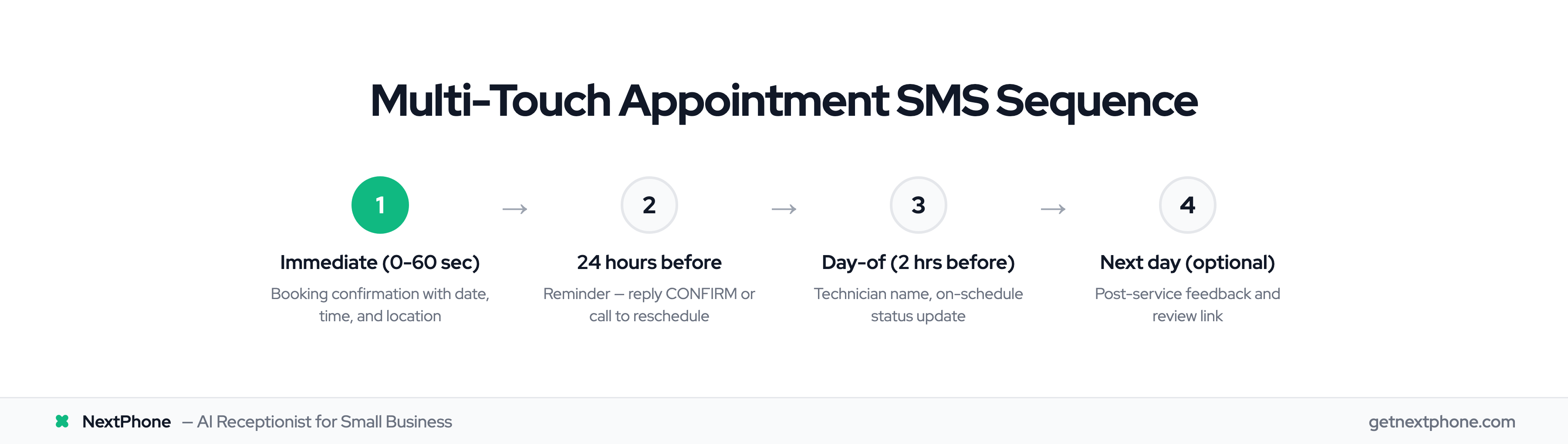
When to use: Scheduled appointments, routine service calls, consultations
Structure:
- Immediate confirmation (within 60 seconds of booking)
- Reminder 24 hours before
- Reminder 2-4 hours before (day-of)
- Optional: Post-service follow-up 24 hours after
Example (Routine Appointment):
Touch 1 (immediate): "Hi Sarah! Your furnace tune-up with Smith HVAC is confirmed for Thursday 1/9 at 2 PM. We'll see you at 456 Maple Ave. Questions? Call us at 555-0100."
Touch 2 (24 hours before): "Reminder: Your furnace tune-up is tomorrow at 2 PM. Reply CONFIRM or call 555-0100 to reschedule."
Touch 3 (day-of, 2 hours before): "Sarah, Mike is heading to your furnace appointment today at 2 PM. Running on schedule. See you soon!"
Touch 4 (next day, optional): "Thanks for choosing Smith HVAC! How was your experience with Mike? Reply with feedback or review us here: [link]"
This sequence confirms, reminds twice to prevent no-shows, and captures feedback for future marketing.
Abandoned Call Follow-Up
When to use: Missed calls, hang-ups, voicemails (Note: Gong's research on voicemails shows limited effectiveness compared to text follow-up)
Structure:
- Immediate "sorry we missed you" SMS with callback options
Example: Caller rings your business number but hangs up before AI answers (or during business hours when line is busy).
Immediate auto-SMS: "Sorry we missed your call! This is Smith HVAC. Reply with your name and what you need, or book online: [link]. We'll call you back within 2 hours."
Our data shows approximately one in four callers asks for a callback. Many of these hang up if they don't reach someone immediately. An automated follow-up SMS captures these warm leads before they call your competitor.
Context-Based Sequence Customization
Not all appointments are equal. Customize sequences based on context:
Emergency vs Routine:
- Emergency: Single acknowledgment SMS only (customer doesn't need reminders for crisis situations)
- Routine: Full multi-touch sequence
New Customer vs Returning Customer:
- New: Longer messages with more context ("First time with us? Here's what to expect...")
- Returning: Shorter messages ("See you Thursday at 2 PM!")
High-Value vs Standard Appointments:
- High-value ($5K+ projects): Personal touches, owner name in signature, extra contact options
- Standard: Efficient templates, technician name only
Use call transcription data to inform sequences. If customer mentioned they're going on vacation next week, reference it: "Looking forward to completing your AC tune-up before your trip next week!"
Message Templates by Scenario
Effective SMS templates balance brevity, clarity, and personalization.
Template Structure Best Practices
Keep it under 160 characters when possible. Single-SMS messages (160 characters or less) feel concise and urgent. Longer messages split into multiple texts, which can look cluttered.
Include clear action items. "Reply CONFIRM" or "Call us at [number]" tells customers exactly what to do.
Always identify your business. Messages from unknown numbers get ignored. Start with your business name.
Provide opt-out option. TCPA compliance requires opt-out language. Simple "Reply STOP to opt out" at the end works.
Use template variables for personalization. [customer_name] feels personal at scale.
Appointment Confirmation Template
Hi [customer_name]! Your [service_type] appointment with [business_name] is confirmed for [date] at [time]. We'll see you at [address]. Questions? Call [phone]. Reply STOP to opt out.
Example populated: "Hi Sarah! Your furnace tune-up appointment with Smith HVAC is confirmed for Thursday 1/9 at 2 PM. We'll see you at 456 Maple Ave. Questions? Call 555-0100. Reply STOP to opt out."
Callback Commitment Template
Thanks for contacting [business_name]! We'll call you back [callback_time] regarding your [service_request]. - owner_name
Example: "Thanks for contacting Smith HVAC! We'll call you back tomorrow at 10 AM regarding your AC repair estimate. - Mike"
This captures the roughly one in four who request callbacks and gives them confidence you'll actually call.
Emergency Acknowledgment Template
EMERGENCY CONFIRMED: [business_name] received your [emergency_type] call. Our tech [tech_name] will arrive within [eta] minutes at [address].
Example: "EMERGENCY CONFIRMED: Smith HVAC received your no heat call. Our tech Mike will arrive within 45 minutes at 123 Oak St."
Starting with "EMERGENCY CONFIRMED" in all caps signals urgency and reassures the stressed customer that help is on the way.
Day-Before Reminder Template
Reminder: Your [service_type] appointment with [business_name] is tomorrow at [time]. Reply CONFIRM or call [phone] to reschedule.
Example: "Reminder: Your furnace tune-up appointment with Smith HVAC is tomorrow at 2 PM. Reply CONFIRM or call 555-0100 to reschedule."
The two-way option (reply or call) accommodates different customer preferences.
Day-Of Reminder Template
[customer_name], [tech_name] is heading to your appointment today at [time]. Running on schedule. See you soon!
Example: "Sarah, Mike is heading to your appointment today at 2 PM. Running on schedule. See you soon!"
Personalizing with the technician's name builds connection and reduces no-shows (customers feel bad standing up "Mike" specifically, not just "the company").
Resource/Link Sharing Template
Hi [customer_name]! Here's the [resource_type] we discussed: booking_url. Questions? Text back or call [phone].
Example: "Hi Sarah! Here's the maintenance guide we discussed: https://smithhvac.com/furnace-guide. Questions? Text back or call 555-0100."
Post-Service Follow-Up Template
Thanks for choosing [business_name]! How was your experience with [tech_name]? Reply with feedback or review us here: [review_url]
Example: "Thanks for choosing Smith HVAC! How was your experience with Mike? Reply with feedback or review us here: https://g.page/r/smithhvac"
Asking about the specific technician (not just "your service") personalizes the request and increases response rates.
Payment Reminder Template
[customer_name], your [service_type] invoice of $[amount] is ready. Pay online: [payment_url] or call [phone]. Thanks!
Example: "Sarah, your furnace tune-up invoice of $150 is ready. Pay online: https://smithhvac.com/pay/12345 or call 555-0100. Thanks!"
NextPhone SMS Automation
Manual SMS follow-up doesn't scale. You forget to send messages, mistype customer names, or send at the wrong time. Automation solves this.
How It Works
NextPhone's voice AI receptionist analyzes each call's context and outcome, then automatically triggers the appropriate SMS template via Twilio API integration. No buttons to click, no messages to remember. The system handles everything.
Workflow:
- Customer calls
- AI answers, handles call, collects information
- Call ends (appointment booked, callback requested, emergency routed, etc.)
- AI determines call outcome
- Appropriate SMS template auto-triggers within seconds
- Template variables populate from call data
- SMS delivered via Twilio to customer's phone
- Delivery confirmation logged to dashboard
Template Variables Available
NextPhone provides dynamic variables that auto-populate with call-specific data:
- caller_number - Customer's phone number
- [receiving_number] - Your business phone number
- [message] - Summary of call or transcription excerpt
- owner_name - Business owner or representative name
- booking_url - Link to your scheduling page, payment portal, or resource
- Custom variables - Any data AI collects during call (customer name, service type, address, appointment time, etc.)
You set up templates once. Variables auto-populate for every call forever.
Automation Triggers
The system maps call outcomes to SMS templates:
Appointment scheduled: Send confirmation immediately Callback requested: Send commitment within 5 minutes Emergency handled: Send acknowledgment with tech ETA Estimate requested: Send follow-up with quote link Call unanswered: Send "sorry we missed you" message
Real Use Case Examples
HVAC Company (Emergency Call at 2 AM): Customer's heat stops working on a freezing January night. They call emergency line. AI routes to on-call technician. Within 30 seconds of call completion, customer receives: "EMERGENCY CONFIRMED: Smith HVAC received your no heat call. Our tech Mike will arrive within 60 minutes at 123 Oak St."
Customer gets immediate peace of mind without waiting for a human to manually send a text at 2 AM.
Dental Practice (Appointment Booking): Patient calls to book cleaning. AI schedules Thursday at 10 AM. Immediate SMS: "Your dental cleaning with Smile Dental is confirmed for Thursday 1/9 at 10 AM. See you then!" Day before: reminder SMS. Day of: confirmation SMS. Patient shows up (no-show rate drops 40%). Hospitals using AI to predict no-shows have seen significant cost reductions through proactive SMS outreach.
Plumbing Company (Estimate Request): Homeowner calls about bathroom remodel. AI qualifies lead, collects details. 10 minutes after call: "Thanks for contacting Johnson Plumbing! Here's your estimate: [link]. We'll call you tomorrow at 10 AM to discuss. - Mike"
Estimate link is in customer's phone before they call your competitor for a comparison quote.
Legal Firm (Consultation Scheduled): Potential client books free consultation. Immediate confirmation, 24-hour reminder, day-of reminder. Show-up rate for free consultations improves from 60% to 90%.
Benefits Over Manual SMS
Instant delivery: No delay waiting for staff to remember to send. Customer receives SMS within seconds.
100% consistency: Never forget to send a confirmation. System fires every time.
Personalization at scale: Variables auto-populate. Every message feels custom-written.
Works 24/7: After-hours appointments still get immediate confirmations even though your office is closed.
Reduces staff workload: Receptionist time saved: ~2 hours per day not manually texting customers.
Setup Process
Step 1: Configure templates in NextPhone dashboard (15 minutes) Write your template messages, insert variables where needed
Step 2: Map triggers to templates (10 minutes) "When appointment booked, send Confirmation Template 1" "When emergency handled, send Emergency Template 2"
Step 3: Test with sample calls (5 minutes) Make test calls, verify correct SMS sends with proper data
Step 4: Go live Automation runs forever with zero additional work
NextPhone's SMS system costs $199/month for unlimited calls and unlimited SMS, compared to pay-per-message services that charge $0.01-0.03 per SMS (50 SMS/day = $15-45/month just for texts, before the phone service). The ROI is significant: businesses see an average of $71 return for every $1 spent on SMS marketing.