You're on a roof installing shingles. Your phone rings. A homeowner needs emergency roof repair — yesterday's storm ripped off half their shingles and rain is coming tonight. They're calling three contractors. Whoever answers first gets the $4,500 job.
Your phone is in your truck. The call goes to voicemail. They call the next contractor.
Across the 1,446,980+ inbound calls our AI receptionist has answered, the pattern is unambiguous: small businesses routinely miss 60–80% of incoming customer calls (Invoca data corroborates). For a contractor averaging 42 calls per month at a 74.1% miss rate, that's 31 missed opportunities — and if just 20% would have converted at a $3,500 average project, roughly $21,700 in lost revenue every month.
Call forwarding setup solves this. This guide covers the part most articles skip — forwarding any number from any carrier into an AI receptionist that answers first — plus conditional forwarding, sequential vs simultaneous routing, time-based rules, failover, and how AI screening makes traditional forwarding smarter.
Forward Any Number, From Any Carrier, Into One AI Receptionist
Here's the setup that actually fixes the missed-call problem, and it's simpler than most people expect.
When you sign up for NextPhone, you get a dedicated phone number. You can forward calls to that number from any carrier or provider you already use — Verizon, AT&T, T-Mobile, Google Fi, a VoIP line like RingCentral or OpenPhone, a traditional landline, even another business number you've had for years. You don't switch carriers. You don't port anything (unless you want to). You just point your existing line at your NextPhone number.
And you can do this for as many numbers as you want. Got a main business line, a separate after-hours number, a Google Voice number on your marketing flyers, and an old landline still printed on a truck wrap? Forward all four to the same NextPhone number. Every call your business receives — no matter which line it came in on — gets answered by the same AI receptionist, trained on your business, with the same hours, the same intake questions, the same routing rules.
How the routing actually works
This is the key distinction. Traditional call forwarding sends the caller straight to another phone — your cell, your office, voicemail. NextPhone inserts an intelligent layer in the middle:
- A customer calls your business number (or any number you've forwarded in).
- The call routes to your NextPhone number, where the AI answers in under 5 seconds.
- The AI handles the call — answers questions, books appointments, captures the lead, qualifies intent.
- When a call needs a human, the AI transfers to your cell — or to whoever should take that call type.
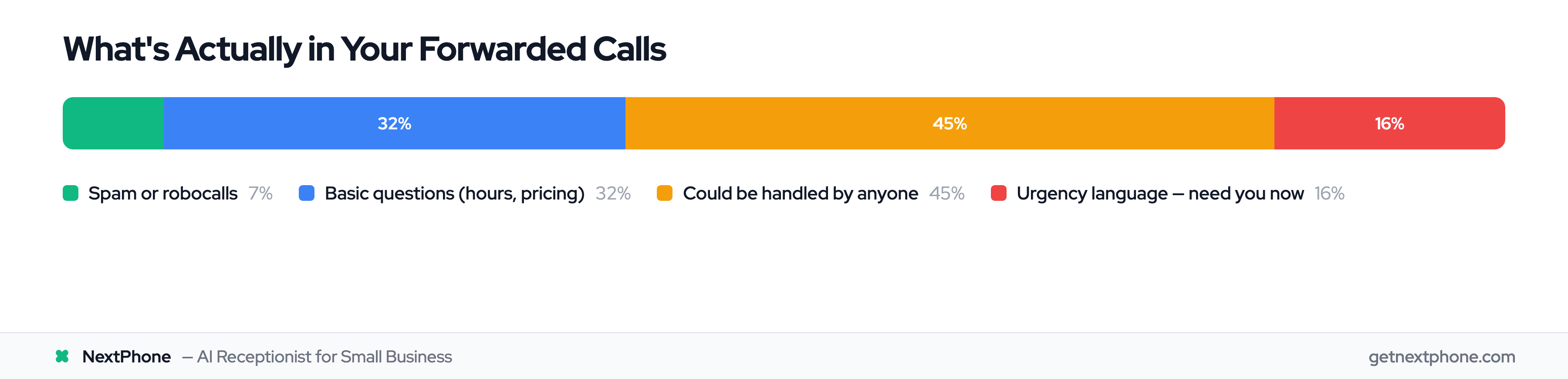
So your business number doesn't ring your pocket 42 times a month for "What are your hours?" and robocalls. It rings the AI. The AI only forwards to you the calls that actually need you, with context.
This is the layer that sits between your forwarded number and your cell. The AI greets the caller, handles or qualifies the request, then transfers to whoever owns that call type — owner cell, on-call tech, billing line — without a separate IVR build.
You decide where it goes from there
"Routes however you want" isn't marketing fluff — it's configurable per call type. A few examples of how owners set it up:
- Emergencies → your cell, immediately. "My basement is flooding" gets transferred to you within seconds, with the AI announcing the context.
- New leads → captured and texted to you, so you can call back on your schedule instead of dropping a wrench to answer.
- Routine questions → handled by the AI outright, no transfer, no interruption.
- Billing or existing-customer calls → routed to your office line or a teammate.
- After-hours → AI takes a detailed message and promises a callback, while still patching true emergencies through.
The forwarding is provider-agnostic on the way in, and the routing is fully flexible on the way out. That combination is what lets a one-person crew sound like a staffed office.
Carrier-Agnostic Call Forwarding: How to Set It Up
You don't need a special phone, a VoIP migration, or your carrier's app. Conditional call forwarding works through short dial codes (called MMI or feature codes) that are standardized across virtually every US carrier — GSM carriers like AT&T and T-Mobile, and most of the MVNOs that run on their networks.
There are two ways to forward, and most businesses want the second one.
Option 1: Forward everything (unconditional)
This sends every call straight to your NextPhone number, no exceptions.
- Turn on: dial
*72followed by your NextPhone number, then press call. Wait for the confirmation tone. - Turn off: dial
*73and press call.
Use this when you're fully out — vacation, a conference, a day you won't touch the phone. The downside: it's all or nothing. Your phone never rings, even when you'd have happily answered.
Option 2: Forward only the calls you'd otherwise miss (conditional)
This is the setup most owners want. Your phone rings normally. Only when you don't answer, are already on a call, or are unreachable does the call forward to your NextPhone number — where the AI picks up. You never miss a call, but you're not handing every call to the AI either.
These conditional codes work on essentially any GSM carrier (AT&T, T-Mobile, and the MVNOs on those networks). Replace <number> with your NextPhone number:
| Condition | Activate | Deactivate |
|---|---|---|
| No answer (phone rings first, then forwards) | **61*<number>*11*<seconds># | ##61# |
| All conditional (busy, no answer, or unreachable) | **004*<number># | ##004# |
Dial the code like a phone number and press call. You'll see a confirmation message on screen. For most businesses the simplest setup is **004*<number># — it forwards on busy, no answer, and unreachable in one step. If you'd rather your phone ring a few times before the AI picks up, use the **61* no-answer code with a ring delay instead.
In the no-answer code, the value before the final # is how long your phone rings first, set in 5-second steps — and each 5 seconds is about one ring (5 = 1 ring, 30 = 6 rings). Three to four rings (15–20 seconds) is the sweet spot: long enough to grab it yourself, but callers still reach the AI before they give up. For example, **61*<number>*11*20# forwards after about four rings.
On iPhone, turn off Live Voicemail first. On AT&T, T-Mobile, or Verizon, open Settings → Phone → Live Voicemail and switch it off before you set up forwarding. If it stays on, iOS answers and transcribes the call itself, so your forwarding code never fires and callers never reach the AI. (Android phones aren't affected.)
A note on Verizon, CDMA, and VoIP lines
The **61* style codes are GSM. Verizon and some other carriers use the *71 / *72 family for conditional and unconditional forwarding instead, and VoIP providers (RingCentral, OpenPhone, Ooma, Google Voice) configure forwarding in their app or web portal rather than with dial codes. The principle is identical everywhere: point the line at your NextPhone number, choose conditional if you want your phone to ring first. If you're not sure which codes your line uses, open Set up call forwarding in the NextPhone app and pick your carrier — it shows the exact activate and deactivate codes for your provider, so you're not guessing.
Test it before you trust it
Forwarding silently breaks more often than people think — a carrier setting resets, a code gets fat-fingered. After you set it up, call your business number from a different phone and confirm it reaches the AI. Then test the conditional path: let it ring without answering and make sure it forwards. Re-check after any carrier change.
Types of Call Forwarding: Conditional vs Unconditional
There are two main categories of call forwarding: unconditional and conditional. 75.5% of consumers switch providers due to poor customer service, and 77% of SMB owners already use call forwarding — it's table stakes for modern businesses. Understanding the difference helps you set up the right system.
Unconditional Call Forwarding (Forward All Calls)
Unconditional call forwarding sends every single call to another number. No exceptions. When it's active, your business line immediately forwards to your designated number without ringing first.
Use this when you're out of the office all day — on vacation, at a conference, or working remotely. It's simple but offers no control. Every call goes to the same place, whether it's your accountant calling about taxes or a robocall about your car's extended warranty.
Most businesses need more flexibility.
Conditional Call Forwarding (Forward Based on Criteria)
Conditional call forwarding only delivers calls that meet predetermined criteria. Instead of forwarding everything, it routes calls based on your status or specific conditions.
The three main conditional triggers:
- Busy: Your line is engaged with another call — forward incoming calls to a backup number or to the AI
- No Answer: You don't pick up within a set number of rings (usually 3-5) — forward to mobile, a team member, or the AI
- Unreachable: Your phone is off or outside service area — forward to an alternative number
Conditional forwarding gives you control. During business hours at your desk, calls ring normally. In a client meeting with your line marked "busy," calls forward to your office manager. Working in a basement with no cell signal, calls automatically route to your partner's phone — or to your AI receptionist.
When to Use Each Type
Here's the practical difference: An electrician working in a crawl space can't answer their phone. With conditional forwarding set to "no answer after 4 rings," the call automatically forwards to their AI receptionist, which captures the job and texts the details. They maintain professional service without interrupting their work.
Among the inbound calls our AI receptionist answers, emergencies and urgent issues are a real and recurring category — and those calls need priority routing. Conditional forwarding lets you set up rules that treat them differently: forwarding immediately to your mobile for emergencies while letting routine calls go to the AI or to voicemail after hours.
Sequential vs Simultaneous Routing: Which Works Better?
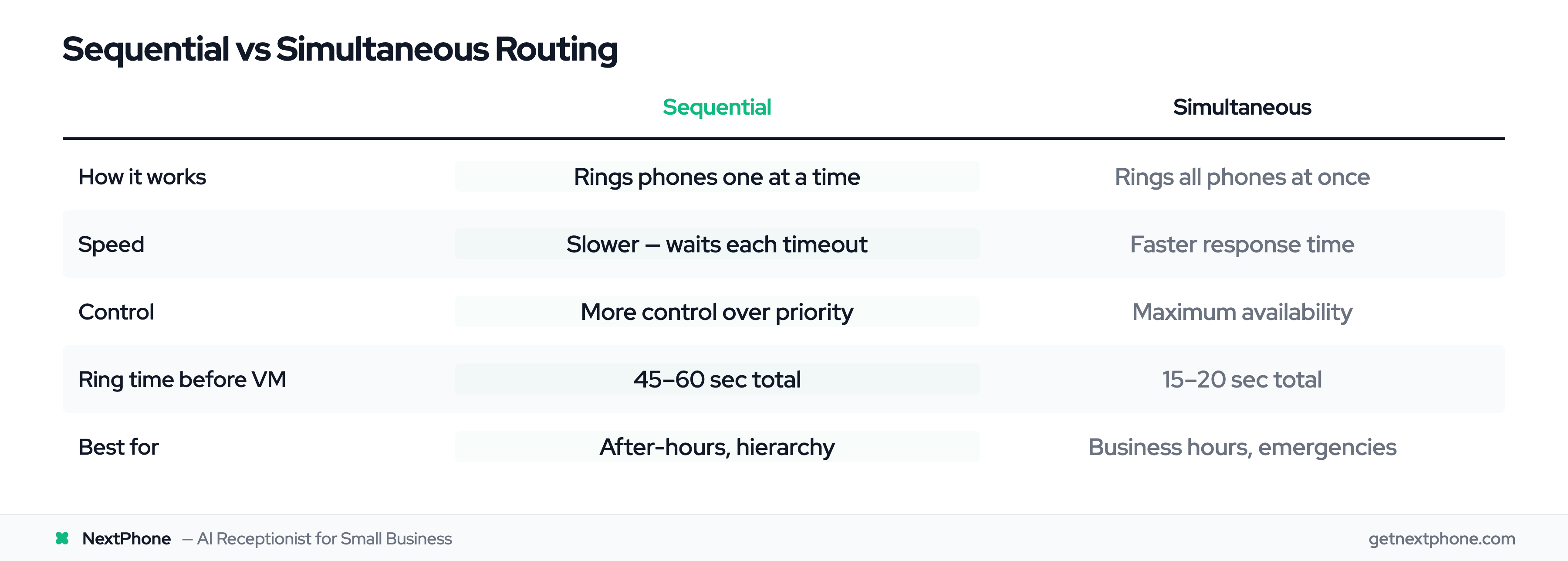
Once you've decided to forward calls, you need to choose how they're routed to multiple destinations. Two strategies exist: sequential and simultaneous.
Sequential Call Forwarding (Ring in Order)
Sequential ringing forwards calls to numbers one at a time in a preset order. Your business line rings first. If unanswered after 15-30 seconds, it forwards to your mobile. Still no answer? It rings your office phone. Finally, it goes to voicemail.
This creates a hierarchy. You control exactly who gets the call first, second, and third.
Sequential works well for solo businesses or when you have a preferred contact order. A plumber might set: mobile phone (15 sec) — office line (15 sec) — voicemail. This ensures they get first shot at answering, but calls don't get lost if they're under a house fixing pipes.
The downside? Speed. Each number rings for the configured time before moving to the next. Total time before voicemail can be 45-60 seconds. Some customers hang up before the chain completes.
Simultaneous Ringing (Ring All at Once)
Simultaneous ringing does exactly what it sounds like — all designated phones ring at once. Your desk phone, mobile, and partner's phone all ring together. Whoever answers first gets the call. The other phones stop ringing.
Simultaneous ringing minimizes unanswered calls and reduces response time. Instead of waiting for three sequential 20-second ring cycles, all phones ring immediately. First available person picks up.
This works best for teams, urgent calls, and maximizing availability. A service business with three technicians can have all their phones ring. Whoever's available answers — whether they're at the shop, in the truck, or on another job site.
Choosing the Right Strategy for Your Business
Most businesses don't choose one or the other — they use both strategically.
A typical hybrid setup:
- During business hours (9-5): Simultaneous ring to whole team — maximize coverage
- After hours (5pm-9am): Sequential to on-call person — manager — AI receptionist — respect hierarchy
- Weekends: Sequential to emergency-only mobile — AI receptionist
Here's a comparison to help you decide:
| Feature | Sequential | Simultaneous |
|---|---|---|
| How it works | Rings phones one at a time in order | Rings all phones at once |
| Speed | Slower (waits for each timeout) | Faster response time |
| Control | More control over call priority | Maximum availability |
| Best for | Solo businesses, preferred routing | Teams, urgent calls, sales |
| Typical ring time | 15-30 sec per number | All ring until answered |
| When to use | After-hours, hierarchy needed | Business hours, emergencies |
An HVAC company averaging 42 calls per month found that switching from sequential to simultaneous during business hours cut their missed-call rate dramatically. The difference? Calls reached someone in 10 seconds instead of 40.
Time-Based Call Routing: Business Hours vs After-Hours
The best call forwarding setup changes automatically based on time. You don't want the same routing at 10 AM on Tuesday as you do at 10 PM on Saturday.
How Time-Based Routing Works
Time-based routing automatically changes your forwarding rules based on a schedule. You set it once, and it handles the rest.
During business hours, calls might ring your desk phone or the entire team simultaneously. After 5 PM, they forward to an on-call mobile. Weekends route to the AI, which captures the message and patches through emergencies.
Modern VoIP and cloud phone systems make this easy. Traditional carriers offer limited time-based features — you might need to manually activate/deactivate forwarding with codes like *72 and *73. Newer systems (and an AI receptionist with built-in business hours) let you configure detailed schedules once and forget them.
Setting Up Business Hours Rules
A practical business hours setup for a contractor:
Monday-Friday, 8 AM - 6 PM:
- Simultaneous ring: Office phone + Mobile
- Ring time: 20 seconds
- If unanswered: Forward to AI receptionist
Monday-Friday, 6 PM - 8 AM:
- Forward directly to AI receptionist
- AI captures the lead, books if possible, transfers true emergencies to on-call mobile
Saturday:
- Forward to mobile
- Ring time: 15 seconds
- If unanswered: AI receptionist
Sunday:
- All calls to AI receptionist
- Emergencies transferred to on-call technician; everything else captured for Monday
After-Hours and Holiday Routing
A large share of inbound calls come in outside business hours, and those callers often have the highest intent — they're actively dealing with a problem right now. Emergencies — a pipe burst, no power, AC out in 95-degree heat — can happen at 2 AM on a Sunday. You need a way to handle them without being woken up by every spam call.
The solution: conditional forwarding into an AI receptionist with emergency detection. The AI identifies urgency and routes accordingly. A call saying "My basement is flooding!" gets transferred to your cell immediately. A call asking "What are your hours?" gets answered on the spot — no callback needed, no interruption to you.
A production after-hours call — the AI greets, captures the issue and contact details, and flags it for callback. This is the call a voicemail box loses at 9 PM.
Time-based routing also prepares you for peak and slow periods. An HVAC company might route more calls to the AI during summer when field techs are slammed with AC emergencies. In winter, calls can ring the office longer since scheduling is slower.