
Your phone rings at 9 PM. A homeowner's AC just died in 95-degree heat—they need emergency repair tonight. But you're at your kid's baseball game. The call goes to voicemail. They call the next contractor. You just lost a $3,500 job.
This happens more than you think. Industry research shows home services contractors miss 60-80% of incoming calls. Every missed call is a potential customer hiring your competitor instead.
AI call centers are changing this reality. In this guide, you'll learn exactly what AI call centers are, how the technology works, what they cost, and whether they make sense for your business. More importantly, you'll see real data on what you're losing—and what you could capture.
The Small Business Call Crisis
If you own a small business, you know the problem: your phone won't stop ringing, but you can't always answer it. Industry benchmarks from ContactBabel show abandonment rates are a critical metric—and for small businesses without dedicated phone coverage, those rates can be devastating. You're on a job site. With a customer. Under a sink. On a roof. And every ring could be a $500 service call or a $15,000 project.
The Real Cost of Missed Calls
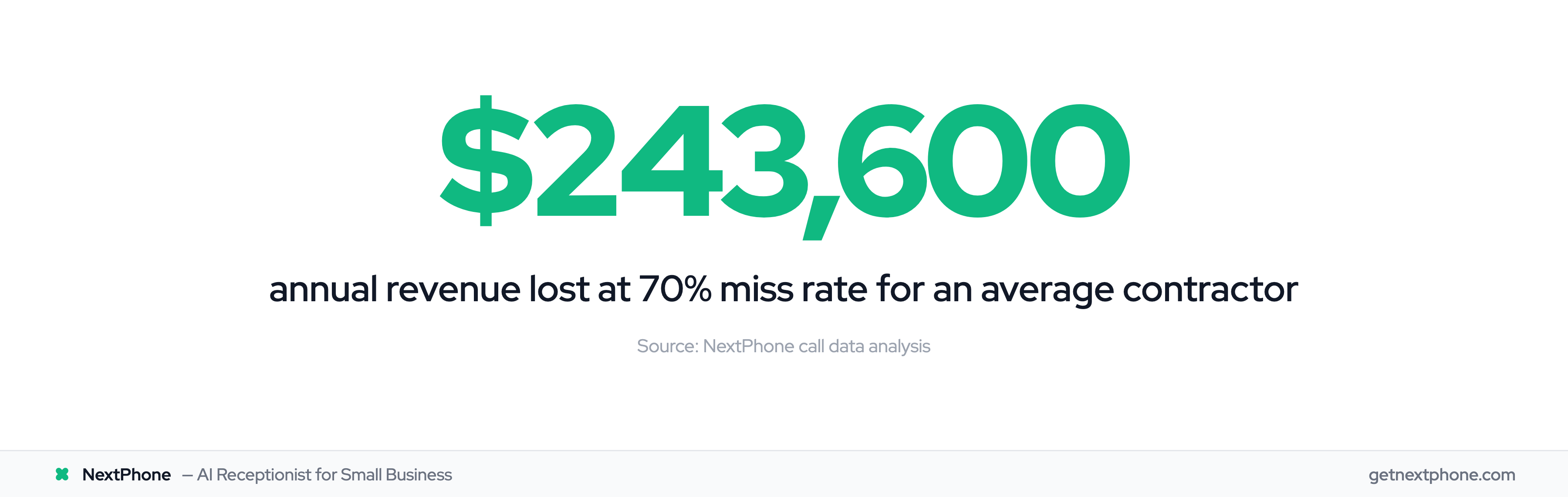
Let's talk numbers. Industry data shows contractors miss 60-80% of incoming customer calls. Not because you're ignoring customers—because you're actually working.
But here's the brutal math: If you're getting 42 calls per month (average for small contractors), and you're missing 70% of them, that's 29 missed calls monthly. At an average project value of $3,500 and a conservative 20% close rate, you're losing $20,300 per month. That's $243,600 per year walking out the door.
Call abandonment rates directly correlate with lost revenue—every caller who gives up is a potential customer gone. One plumber in our research had no idea he was missing that many calls. He told us: "I just thought business was slow." It wasn't slow. The phone was ringing constantly—he just couldn't hear it over the sound of the pipe wrench.
Why After-Hours Calls Matter Most
Here's what makes this worse: the highest-value calls often come after hours. Analysis of call patterns shows 15.9% of customer calls contain urgency language—words like "emergency," "ASAP," "urgent," or "today." Another 6.2% are true emergencies requiring immediate response.
These emergency calls average $1,200+ in revenue. They're the jobs where price isn't the main concern—speed is. The customer with the burst pipe at 10 PM isn't shopping around. They're calling contractors until someone answers. First to answer wins.
"Emergency pipe burst, needs plumber immediately."
That's a real voicemail transcription from our research. By the time the plumber checked his voicemail the next morning, the customer had already hired someone else. $2,500 job gone.
The Hiring Problem (Can't Afford Full-Time Staff)
So why not just hire a receptionist? Simple: you can't afford it, and it doesn't solve the problem anyway.
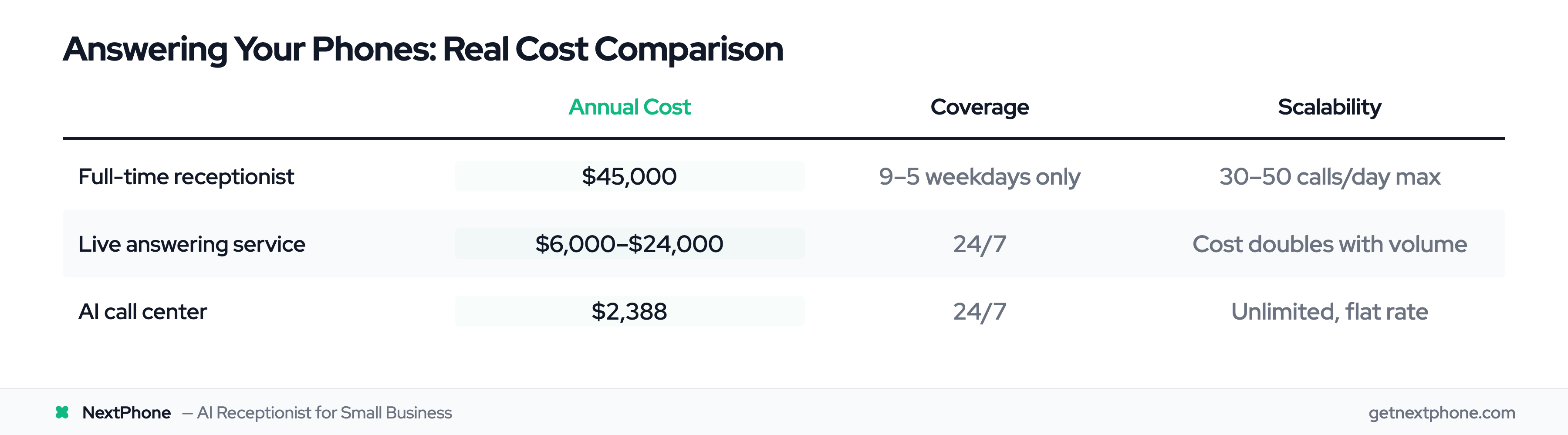
A full-time receptionist costs $35,000 in salary, plus about $10,000 in benefits, payroll taxes, and overhead. That's $45,000 per year—and they only work 9-5 on weekdays. What about the 73% of after-hours calls our data tracked? Those still go to voicemail.
Traditional live answering services seem like a solution until you see the bill. They charge $500-800 per month for basic service (usually 100 calls), with per-minute charges after that. During busy season when you're getting 150 calls? That bill hits $2,000+.
You need 24/7 coverage without the 24/7 cost. That's where AI call centers come in.
What Is an AI Call Center?
Let's cut through the jargon and explain this simply.
The Simple Definition
An AI virtual receptionist call center is software that answers your phone calls using conversational artificial intelligence instead of humans. When someone calls your business, AI picks up, understands what they're asking (using natural language processing), and responds in real-time with human-like conversation.
It can answer questions ("What are your hours?"), take messages ("I need a callback"), book appointments ("Can I schedule for Thursday at 2 PM?"), and route urgent calls to you immediately ("I have an emergency pipe burst!").
The key difference from a traditional call center: there are no human agents sitting at desks answering phones. The AI does it—24 hours a day, 7 days a week, 365 days a year. No breaks, no sick days, no overtime.
According to Gartner, 85% of customer service leaders will explore or pilot conversational AI solutions in 2025. Gartner also reports that 91% of customer service leaders face executive pressure to implement AI, with 80% expecting to reduce agent headcount within 18 months. This isn't experimental anymore—it's mainstream.
AI Call Center vs. Traditional Call Center
Traditional call centers employ human agents to answer calls. You've called them: "Your call is important to us. Please hold for the next available representative." Then you wait. And wait.
Traditional centers work well for large enterprises that can afford to employ 50, 100, or 500 agents. For a small business getting 30-150 calls per month? The economics don't work. You'd need at least 2-4 agents to cover business hours properly. That's $100,000-180,000 per year in labor costs alone.
AI call centers flip this model. Instead of humans who cost $35,000+ each annually, you have software that costs $99-299 per month total. Instead of waiting for "the next available representative," calls are answered in 2-5 seconds every time. Instead of limited hours (unless you pay overtime), you get 24/7 coverage at the same flat rate.
How It Differs from Basic IVR or Voicemail
You've encountered IVR systems: "Press 1 for sales. Press 2 for support. Press 3 for—" You get it. Those systems work on rigid menus and touchtone inputs. They're not conversational.
AI call centers are different. They use conversational AI, which means you talk to them like a person:
Caller: "Are you open Saturday?" AI: "Yes, we're open Saturday 9 AM to 5 PM. Would you like to schedule an appointment?" Caller: "How much for a water heater replacement?" AI: "Water heater replacements typically range from $1,200 to $2,500 depending on the unit. I can connect you with a technician who can give you an exact quote. What's the best number to reach you?"
Natural conversation, not button pushing. That's the difference.
And compared to voicemail? Well, voicemail doesn't answer questions, book appointments, or route emergencies. It just records messages that you'll (hopefully) check later. By which point the caller has already moved on to your competitor.
How AI Call Centers Work
You don't need to be technical to understand this, but knowing how it works helps you trust it. Here's what happens when someone calls an AI call center.
Natural Language Processing (The Brain)
Natural language processing (NLP) is the technology that allows AI to understand conversational language—not just keywords, but actual meaning and context.
When a caller says "I need someone to look at my AC, it's not cooling," the AI doesn't just match keywords like "AC" and "cooling." It understands this is a service request, specifically for air conditioning, and that "not cooling" indicates a problem requiring diagnosis.
Modern NLP achieves 85-95% accuracy for routine inquiries. 70% of customer inquiries can now be handled by AI without human intervention. The technology has come a long way from the days of "I'm sorry, I didn't understand that. Please rephrase."
Speech Recognition (The Ears)
Before the AI can understand what's being said, it needs to hear it. Speech recognition converts spoken words into text that the AI can process.
This happens in real-time. You're not experiencing delays while the system "thinks"—the conversation flows naturally. The AI hears your words, converts them to text, processes the meaning, formulates a response, and speaks back to you in under a second.
Intent Detection and Smart Routing
Here's where it gets smart. The AI doesn't just understand the words—it detects intent. What does the caller actually want?
Are they asking a simple question the AI can answer? ("What are your hours?") Do they want to book an appointment? ("Can I schedule a service call?") Is this an emergency requiring human attention? ("Emergency pipe burst!") Is this spam? ("This is Rachel from Card Services...")
Based on the detected intent, the AI routes the call appropriately:
- Simple questions → AI answers directly from your business knowledge base
- Appointment requests → AI books into your integrated calendar
- Emergency/urgent calls → AI routes immediately to your phone or on-call number
- Complex questions → AI takes detailed message or connects to you
- Spam calls → AI filters automatically (saves you the interruption)
Analysis of call patterns shows 15.9% of calls contain urgency language. AI detects words like "emergency," "urgent," "ASAP," "immediately," and "right now," then routes these priority calls to you within seconds—not hours later when you check voicemail.
Integration with Your Business Systems
AI call centers don't operate in isolation. They connect to your existing tools:
- Calendar integration (Google Calendar, Outlook, Apple Calendar) → Books appointments directly
- CRM integration (Salesforce, HubSpot, Pipedrive) → Logs calls and creates leads
- Phone system (any VoIP provider) → Handles call forwarding and routing
- Messaging (SMS, email) → Sends you notifications about calls and messages
When a customer calls to schedule an appointment, the AI doesn't just take a message asking you to call back and schedule it. It checks your calendar for availability, offers times, books the appointment when the customer confirms, and sends both of you a confirmation. Done. No back-and-forth required.
Smart Forwarding: AI Handles 90-95%, You Handle the Rest
AI resolves the vast majority of calls autonomously—scheduling, answering questions, capturing leads, providing quotes. For the 5-10% that need your judgment, smart forwarding routes the call to your phone with full context.
Without AI, those calls go to voicemail. 85% of callers never call back. The real comparison isn't AI vs human—it's AI vs missed revenue.
McKinsey's analysis shows 50-60% of customer interactions are transactional—perfect for AI. The rest benefit from your involvement. Let the AI handle "What are your hours?" so you can focus on "I have a complex insurance claim question about water damage."
When the AI isn't confident about how to handle something, it doesn't guess and risk giving wrong information. Smart forwarding connects the caller to your phone with full context of what they already asked, so you're not starting from scratch.
See how NextPhone's AI routes calls based on urgency and complexity →
Key Benefits of AI Call Centers for Small Businesses
Theory is fine. But what does this actually do for your business? Let's get specific.
Never Miss Another Call (Especially After-Hours)
Your biggest competitor advantage isn't better marketing or lower prices. It's answering the phone when others don't.
Think about when customers call with urgent needs: evenings, weekends, holidays. Your competitor sends them to voicemail. You answer—even if "you" is an AI. Which business gets the job?
After-hours calls aren't just convenient—they're often the highest-value opportunities. The homeowner whose AC dies at 9 PM in July isn't price-shopping. They need help now. First business to answer gets a premium emergency call ($1,200+ average).
AI gives you 24/7 availability without paying anyone to work nights, weekends, and holidays. The cost is the same whether you get 10 calls or 100 calls, whether they come at 2 PM or 2 AM.
Massive Cost Savings vs. Hiring Staff
Let's compare your options for answering calls:
-
Option 1: Full-time receptionist
-
Salary: $35,000/year
-
Benefits, payroll taxes, overhead: +$10,000
-
Total: $45,000/year
-
Coverage: 9-5 weekdays only (misses 73% of after-hours calls)
-
Scalability: Can handle ~30-50 calls/day max
-
Option 2: Traditional live answering service
-
Base cost: $500-800/month for 100 calls
-
Per-minute overage: $2-3/minute
-
Busy season (150+ calls): $2,000+/month
-
Total: $6,000-$24,000/year depending on volume
-
Coverage: 24/7 (good)
-
Scalability: Costs scale linearly with call volume (bad)
-
Option 3: AI call center
-
Flat rate: $199-299/month
-
Total: $2,388-3,588/year
-
Coverage: 24/7
-
Scalability: Same cost for 10 or 1,000 calls
The math is clear. AI call centers cost 95-98% less than traditional options.
According to McKinsey, companies implementing AI call centers achieve a 50% reduction in cost per call while simultaneously increasing customer satisfaction scores. Gartner projects $80 billion in contact center labor cost savings by 2026 through conversational AI.
Those are enterprise numbers, but the principle scales down to your small business: answer more calls, spend less money.
Instant Scalability (Handle 10 or 1,000 Calls)
Here's a problem traditional solutions can't solve: seasonal spikes in call volume.
HVAC contractors know this pain. In January and July, your phone rings off the hook. You're getting 5X your normal call volume. With a live receptionist, they're overwhelmed—calls go to voicemail anyway. With an answering service, your bill quintuples.
With AI? Same $199/month whether you get 30 calls or 300 calls.
One HVAC contractor we spoke with went from 30 calls per month in April to 150 calls per month in July during a heat wave. Traditional answering service would have billed $2,000+ for that month. AI: $199, same as April. He captured every lead without blowing his budget.
85% of call center managers are implementing conversation intelligence, with customer satisfaction jumping 64% when using real-time AI assistance. McKinsey's research indicates that AI-powered call centers can handle 20-30% more calls while requiring 40-50% fewer agents compared to traditional setups. For small businesses, that translates to handling growth without proportional cost increases.
Consistent, Professional Experience Every Time
Humans have bad days. They get tired, frustrated, sick. They might be short with the 47th caller asking the same question they've answered 46 times that day.
AI doesn't have bad days. Every caller gets the same professional, friendly, helpful experience whether they're the first call of the day or the 200th. The AI doesn't get impatient with repetitive questions. It doesn't forget to mention your current promotion. It doesn't mishear or misspell contact information.
Consistency builds your brand. When every customer interaction is professional and helpful, your reputation improves. Contact center statistics for 2025 show consistency is a top driver of customer satisfaction.
Automatic Spam Filtering and Call Tracking
In our analysis of call data, 7% of all incoming calls were spam or robocalls. That's 72 hours per year of interruptions that provide zero value.
"This is Rachel from Card Services..." "Your car warranty is about to expire..." "Hello? Can you hear me?"
AI identifies and filters spam automatically. You never get interrupted. Your callback list stays clean.
Speaking of callbacks: 25.4% of customer calls in our research explicitly requested a callback. "Have them call me back at 555-1234" is one of the most common caller requests.
Without a tracking system, industry research shows 42% of callback requests never get returned. That's not because you're ignoring customers—it's because the request got lost in the shuffle. Voicemail from Tuesday gets buried under Wednesday's voicemail. The customer never hears back. They hire someone else.
AI tracks every callback request in a system you can review. Name, number, time they called, what they need. Nothing falls through the cracks.
Focus Time for You (Stop Interruptions)
You know the scenario: You're focused on a complex job. Really in the zone. Phone rings. It's someone asking "What are your hours?" Takes 2 minutes to answer. Takes 20 minutes to get back in the zone.
Our analysis shows 6.5% of customer calls are asking repetitive questions: business hours, service area, pricing, availability. These are important questions—the caller deserves an answer—but they don't require your expertise.
AI handles these without interrupting you. You stay focused on the $5,000 job in front of you. The caller gets an instant answer instead of going to voicemail. Win-win.
You can review call summaries at the end of the day: "AI handled 12 calls (hours questions, scheduling, service area), booked 3 appointments, routed 2 emergencies to your phone, took messages from 2 callers requesting quotes."
You were productive all day, and you didn't miss anything important.
AI Call Center Costs and ROI
Let's talk money. What does this actually cost, and what's the return on investment?
Traditional Call Center Costs (The Baseline)
To understand if AI call centers are worth it, you need to know what you're comparing them to.
A traditional in-house call center with just 4 agents costs approximately $264,212 per year, according to call center cost analysis. That includes salaries, benefits, payroll taxes, training, management, technology infrastructure, and facilities.
For a small business, even a single full-time receptionist runs $35,000-45,000 annually when you account for benefits and overhead. And that gives you 9-5 coverage. Miss 100% of after-hours calls.
Traditional live answering services charge per call or per minute:
- Base monthly fee: $300-500
- Per-call charges: $2-5 per call
- Or per-minute: $1.50-3.00 per minute
For a small business averaging 42 calls per month at 3 minutes each:
- Monthly: $500 base + (42 × $2.50/call) = $605/month
- Annual: $7,260
But during busy season when calls double or triple? Your bill doubles or triples too. You either pay it or lose the calls.
Oh, and one more cost people forget: turnover. Traditional call centers face 30-45% annual turnover rates. Every departing agent costs $10,000-20,000 in lost training investment and replacement recruiting. Even your single in-house receptionist might leave after 18 months, and you start the training process over.
AI Call Center Pricing Models
AI call center pricing varies based on your business size and needs:
Enterprise/per-user models: $15-50 per user per month
- Makes sense if you have 20+ agents
- Costs add up quickly for small businesses (5 users × $30 = $150/month minimum)
Per-minute models: $0.09-0.15 per minute
- Sounds cheap until you do the math
- 42 calls/month × 3 minutes = 126 minutes = $11-19/month
- But unpredictable—busy month costs more
Subscription flat-rate models: $99-299/month unlimited
- Best for small businesses
- Fixed cost regardless of call volume
- No surprises, no overage charges
Custom enterprise solutions: $500,000+ one-time
- For massive call centers with specialized needs
- Not relevant for small businesses
The sweet spot for small businesses is flat-rate subscription plans. You know exactly what you're paying every month, whether you get 10 calls or 1,000 calls.
Real ROI Calculations for Small Businesses
Let's do the actual math on what AI call centers return.
Example 1: General Contractor
Current situation:
- 42 calls per month (industry average)
- Missing 70% due to being on job sites (29 missed calls)
- Average project value: $3,500
- Industry close rate: 20%
Lost revenue calculation:
- 29 missed calls × $3,500 project value × 20% close rate = $20,300/month
- Annual lost revenue: $243,600
AI call center investment:
- Cost: $199/month = $2,388/year
Conservative ROI (capture just 5 additional jobs/year):
- 5 jobs × $3,500 × 20% close = $3,500 in new revenue
- ROI: $3,500 gained - $2,388 cost = $1,112 profit
- Return: 47%
Realistic ROI (capture 20% of currently missed calls):
- 29 missed/month × 20% captured = 6 calls/month = 72/year
- 72 × 20% close = 14 jobs
- 14 jobs × $3,500 = $49,000 in new revenue
- ROI: $49,000 - $2,388 = $46,612 profit
- Return: 1,952%
Even if you only capture ONE additional $3,500 job, you're profitable for 17 months.
Example 2: HVAC Contractor (Seasonal Business)
Current situation:
- Off-season: 30 calls/month
- Peak season (June-August): 150 calls/month
- Can't afford seasonal receptionist
- Using traditional answering service
Traditional answering service cost:
- Off-season: $373/month (30 calls)
- Peak season: $2,000/month (150 calls)
- Annual: (9 × $373) + (3 × $2,000) = $9,357
AI call center cost:
- Flat rate: $199/month year-round
- Annual: $2,388
Savings: $6,969/year
Plus, during those peak months, you're not stressed about the answering service bill eating your margins. Every call costs the same: $0 at the margin.
Hidden Costs to Consider (Both Sides)
Traditional call center hidden costs:
- Training time (2-4 weeks per new hire at reduced productivity)
- Turnover replacement ($10,000-20,000 per departure)
- Payroll taxes (7.65% FICA, unemployment insurance)
- Sick days and vacation coverage
- Overtime during busy periods
- Technology (phone system, CRM, training tools)
AI call center hidden costs:
- Initial setup time (2-4 hours to configure)
- Integration fees (usually included, but verify)
- Learning curve (first week while AI learns your business)
- Monitoring time (10-20 minutes/week reviewing calls)
The difference: traditional costs are ongoing and unpredictable. AI costs are one-time or minimal.
Most AI call center platforms include setup, training, and integrations in the base price. You're not paying $2,000-20,000 in professional services fees like enterprise systems require.
See NextPhone's transparent pricing starting at $199/month →
AI Call Center vs. Traditional Call Center
The answer is obvious: at 100+ calls/month, AI costs $199 flat vs traditional call centers at $5,000-15,000/month. That's $58,800-178,800/year in overpayment for identical caller experience.
Cost and Scalability Comparison
Traditional call center:
- Fixed labor costs: $35,000-45,000 per receptionist
- Variable capacity: Each person handles 30-50 calls/day max
- Scaling up: Hire more people (+$35K-45K each)
- Scaling down: Layoffs (costly, demoralizing)
- Busy season: Pay overtime (1.5X-2X normal rate)
AI call center:
- Fixed cost: $99-299/month regardless of volume
- Infinite capacity: Handles 1 call or 1,000 simultaneously
- Scaling up: Automatic, no additional cost
- Scaling down: Automatic, no layoffs needed
- Busy season: Same price as slow season
McKinsey's research shows companies can operate with 40-50% fewer agents while handling 20-30% more calls by implementing AI. The traditional model of "hire more people to handle more calls" is over.
When AI Wins (Routine, High-Volume, 24/7)
AI call centers excel at:
- Routine inquiries
- "What are your hours?"
- "Do you service my area?"
- "How much does X cost?"
- "Can I schedule an appointment?"
These questions have straightforward answers. AI answers instantly, accurately, 24/7. No wait time, no "let me transfer you," no going to voicemail because it's 8 PM.
High call volume A human can handle maybe 40-50 calls per day maximum. AI can handle 1,000+ calls simultaneously without slowing down or making mistakes.
After-hours coverage Want a human answering your phones at 10 PM on Sunday? That's expensive (if you can even find someone willing). AI works every night, every weekend, every holiday at the same cost.
Consistency Call 100 times, get the same professional experience 100 times. AI doesn't have bad days or forget your current promotion.
When Humans Win (Complex, Emotional, Nuanced)
Traditional call centers with human agents are still better for:
Complex problem-solving Customer has a multi-part question involving insurance, previous service history, custom pricing, and scheduling constraints. Humans navigate complexity better.
Emotional situations Customer is upset about a problem, needs empathy and reassurance. Humans can genuinely understand and respond to emotions in ways AI can't yet match.
Nuanced judgment calls "I know you normally charge $200 for this, but given the situation, can you do anything?" Humans can make judgment calls about exceptions and special circumstances.
Building relationships Long-term B2B relationships benefit from human connection. Calling and hearing a familiar voice matters.
The question isn't "which is better overall"—it's "which is better for which situation."
The Hybrid Approach (Best of Both)
Here's what smart businesses do: use AI as the first line of defense, humans as specialized backup.
How it works:
- AI answers every call in under 5 seconds (24/7)
- AI handles routine inquiries without human involvement (60-80% of calls)
- AI detects urgency and routes emergencies immediately to your phone
- AI recognizes complex situations and routes to you with full context
- You focus on high-value interactions that need human judgment
For small businesses, "human" is often the owner. You're not hiring a call center staff—you're just getting AI backup so you can focus on work instead of being interrupted by routine questions.
One HVAC contractor described it perfectly: "I can't answer my phone when I'm on a roof. NextPhone handles the routine stuff, and if it's truly urgent or complex, it patches them through to me. I stay productive, but I never miss important calls."
That's the hybrid model in action.
Industries and Use Cases for AI Call Centers
Who benefits most from AI call centers? Any business with calls they can't always answer—but some industries are perfect fits.
Home Services and Contractors (Prime Use Case)
Plumbers, electricians, HVAC techs, roofers, painters, landscapers—you're the ideal candidates for AI call centers. Here's why:
You can't answer when you're working Your hands are full. You're under a sink, on a roof, in a crawl space, wiring a panel. You can't grab your phone without stopping work.
Industry research shows home services contractors miss 60-80% of calls. Not because you don't care—because you're literally working with your hands.
You have after-hours emergencies Pipes burst at midnight. AC dies in July heat waves. Roof starts leaking during a storm. These emergency calls are your highest-margin work ($1,200-3,500 average), and they can't wait until morning.
Our analysis found 15.9% of calls contain urgency language, and 6.2% are true emergencies. AI detects these ("emergency," "urgent," "ASAP") and routes immediately to your phone. The customer gets a human for their emergency within seconds.
Real example from our call data: "Emergency pipe burst, needs plumber immediately."
That call came in at 10:17 PM. The plumber with AI answered immediately, had the emergency routed to his phone, and captured a $2,500 job. His competitor's call went to voicemail.
Seasonal call spikes HVAC contractors know this: summer and winter, your phone rings 5X more than spring and fall. You can't hire seasonal receptionists for 3 months. AI scales instantly at the same cost.
High-value projects With average projects ranging from $500 to $15,000+, every missed call is expensive. Roofing contractors average $15,000 per project. Analysis shows 10.6% of roofing calls are quote requests. Missing even one quote call costs $1,500+ in potential revenue.
Spam and robocalls Electricians face the highest spam rate in our data—15.5% of calls. AI filters these automatically so you're not interrupted by "Rachel from Card Services" six times a day.
See how AI receptionist works for contractors and home services →
Healthcare and Medical Practices
Medical offices, dental practices, and healthcare providers are adopting AI call centers for:
Appointment scheduling 34.7% of calls in our analysis of service businesses are scheduling requests. For medical practices, that number is higher. AI books appointments directly into your practice management system.
Patient calls Monday morning to schedule a physical. AI checks your calendar, offers available slots, books when patient confirms, sends confirmation to both. No staff time required.
After-hours nurse line routing Non-emergency medical questions after hours. AI can route to on-call nurse line or triage based on keywords.
Prescription refill requests Routine, repetitive. Perfect for AI to capture and route to pharmacy.
Regulatory compliance Choose AI platforms that are compliant and secure.
Legal Services and Law Firms
Law firms benefit from AI call centers for:
New client intake Potential clients often call after hours (after accidents, arrests, family situations). These are high-value leads—$2,000 to $10,000+ per client. Missing these calls means losing cases to the firm that answered.
Case status inquiries "What's happening with my case?" AI can provide status updates from your case management system or route to the appropriate attorney.
Consultation scheduling AI books initial consultations into attorney calendars automatically.
After-hours urgent calls Client arrested on Friday night. Client in car accident. AI routes genuinely urgent situations to on-call attorney, takes messages for less urgent matters.
Real Estate and Property Management
Real estate agents and property managers use AI for:
Property inquiries "Is 123 Main Street still available?" AI can answer from your MLS integration or route to showing scheduler.
Showing scheduling AI books property showings based on agent availability.
Tenant maintenance requests After-hours maintenance calls. AI captures details, routes emergencies (burst pipe, no heat in winter), logs non-urgent requests for next business day.
24/7 availability = competitive advantage Home buyers browse listings at night. Being the agent who answers at 9 PM when they have questions gives you first contact.
Any Business with After-Hours Call Volume
The common thread across all these industries: calls happen outside business hours, you can't always answer, and missing calls means losing revenue.
If you're getting calls after 5 PM, on weekends, or during seasons when you're swamped, AI call centers make sense.
How to Implement an AI Call Center
You don't need to be technical. Most AI call center platforms are designed for small business owners to set up themselves.
Choose the Right Provider for Your Business Size
For small businesses (under 50 employees): Look for flat-rate subscription platforms ($99-299/month unlimited). Avoid per-user pricing that scales up costs unnecessarily.
Key features to look for:
- Flat monthly pricing (no per-minute surprises)
- Easy setup (hours, not months)
- Calendar integration (Google, Outlook, Apple)
- Phone forwarding (works with any number)
- Emergency routing (detect urgency, route to your phone)
- No long-term contracts (flexibility to cancel if needed)
- Free trial (test before committing)
For mid-size businesses (50-200 employees): Per-user models ($15-50/user/month) might make sense if you have existing call center staff you're augmenting with AI.
For enterprises (200+ employees): Custom solutions with dedicated implementation support. Not covering those here—this guide is for small businesses.
Setup and Training (Faster Than You Think)
Most small business AI call center setups take 2-4 hours, not weeks or months.
Basic setup steps:
- Forward your phone number to the AI platform (or port your number if you prefer)
- Enter business information: Hours of operation, services offered, service area, pricing (if you share that over phone)
- Connect your calendar (Google Calendar, Outlook, etc.) for appointment booking
- Configure routing rules: Set your phone number for emergency routing, on-call schedules if applicable
- Upload knowledge base (optional but recommended): FAQ document, common questions, service descriptions
Time investment: 2-4 hours for initial setup. Most of that is gathering the information (hours, services, etc.), not technical work.
According to Gartner, 85% of customer service leaders are exploring or piloting conversational AI in 2025 specifically because implementation has become so much easier than it was even 2-3 years ago. Genesys reports ~$2.4B ARR with 30%+ year-over-year growth driven by AI demand.
Integration with Existing Systems
Most AI call center platforms integrate with common business tools:
Calendar systems:
- Google Calendar (most common for small businesses)
- Outlook/Microsoft 365
- Apple Calendar
- Calendly, Acuity Scheduling
CRM platforms:
- Salesforce
- HubSpot
- Pipedrive
- Zoho CRM
Phone systems:
- Any VoIP provider (RingCentral, Vonage, 8x8, Nextiva, Grasshopper)
- Traditional landlines (via forwarding)
Messaging:
- SMS notifications
- Email summaries
- Slack notifications (for teams)
Integration typically works via API connections or native integrations. Setup is usually point-and-click, not coding.
Testing and Refinement
Before you go live with customers, test the system yourself.
Test script:
- Call your number and ask "What are your hours?" → AI should answer correctly
- Call and say "I'd like to schedule an appointment for Thursday afternoon" → AI should check calendar and book
- Call and say "I have an emergency pipe burst" → AI should route to your phone immediately
- Call and ask a complex question → AI should either answer or route to you with context
If any test fails, adjust your knowledge base or routing rules and test again.
Refinement process: After your first week live, review call recordings and transcripts. You'll find:
- 80% of calls handled perfectly
- 15% routed to you appropriately (complex situations)
- 5% where AI response could be improved
Update your knowledge base with better wording for those 5%. By week two, accuracy improves to 90%. By month one, you're at 95%+.
The AI learns over time. The more calls it handles for your specific business, the better it gets at understanding your industry terminology, common questions, and routing patterns.
Monitoring Performance
Most platforms provide a dashboard showing:
- Calls answered by AI
- Calls routed to human
- Appointments booked
- Messages taken
- Spam filtered
- Average response time
- Call recordings/transcripts
You don't need to monitor this daily. Check weekly: "How many calls did we handle? Any patterns I should know about?"
Time investment: 10-20 minutes per week. That's significantly less than the hours you'd spend answering all those calls yourself.
See NextPhone's simple setup process—live in under an hour →
How NextPhone Brings AI Call Center to Small Business
Most AI call center solutions target enterprises with hundreds of agents and budgets to match. NextPhone is built specifically for small businesses—contractors, home services, local businesses with under 50 employees.
Small business pricing: $199/month flat rate with unlimited calls. No per-minute charges. No call volume limits. No surprises on your bill. Whether you get 10 calls or 1,000 calls in a month, you pay $199.
Compare that to:
- Full-time receptionist: $45,000/year
- Traditional answering service: $500-2,000/month depending on volume
- Enterprise AI platforms: $15-50 per user per month (quickly gets expensive)
How NextPhone works:
When a call comes in, NextPhone's AI answers in under 5 seconds. It handles routine questions instantly—business hours, service area, pricing, services offered. No hold music. No "press 1 for..." No voicemail.
For appointment requests, NextPhone checks your Google Calendar or Outlook, finds available times, and books the appointment directly. Customer gets confirmation via text. You get a notification. Done.
For emergencies—remember, 15.9% of calls contain urgency language like "emergency" or "urgent"—NextPhone detects these keywords and routes the call to your phone immediately. The caller hears "That sounds urgent, let me connect you with someone right away." You pick up, handle the emergency, capture the $1,200+ job.
For complex questions the AI isn't confident about, it doesn't guess. It takes a detailed message with the caller's contact information and what they need, then sends you a text and email summary. You call back when convenient with full context.
And for spam? NextPhone filters it automatically. The 7% of calls that are robocalls and spam never reach you. Hours of interruptions saved.
One HVAC contractor using NextPhone told us: "I can't answer my phone when I'm on a roof installing an AC unit. NextPhone handles it, and my schedule stays full. It's like having a receptionist for $200 a month."
No setup fee. No long-term contract. 7-day free trial.
See how NextPhone works for contractors and small businesses →
Frequently Asked Questions
How accurate is AI call center technology?
Modern conversational AI achieves 85-95% accuracy for routine inquiries like hours, pricing, scheduling, and service area questions. The key is training the AI on your specific business—what services you offer, how you price things, your availability, your service area.
When AI encounters a complex or unusual question it doesn't have high confidence in (below 85% certainty), the best systems route the call to a human rather than risking a wrong answer. NextPhone takes this approach—if it's not sure, it routes to you with context so you can handle it properly.
Accuracy improves over time as the AI handles more calls specific to your business. First week might be 80%, second week 90%, by month one you're at 95%+.
See how NextPhone's AI handles calls →
Will AI replace my staff or put people out of work?
AI augments humans, it doesn't replace them. For small businesses (under 50 employees), you likely don't have full-time call center staff anyway—you're the one answering calls between jobs, appointments, or meetings. AI gives you 24/7 coverage you couldn't afford to hire for.
For larger businesses with existing call center staff, AI handles the routine 60-80% of calls (hours, pricing, scheduling), allowing human agents to focus on complex situations that require empathy, judgment, and expertise. Think of AI as the first line of defense, humans as the specialized backup for situations that need that human touch.
The data shows this: McKinsey reports companies using AI call centers operate with 40-50% fewer agents while handling 20-30% more calls. Customer service automation statistics confirm these efficiency gains are becoming standard. But those remaining agents are doing higher-value work—complex problem-solving, customer relationship building, handling upset customers—not answering "What are your hours?" for the 50th time that day.
Can AI handle emergency calls and route them properly?
Yes. Modern AI uses natural language processing to detect urgency indicators—words and phrases like "emergency," "urgent," "ASAP," "immediately," "right now," and "as soon as possible."
Analysis of call patterns shows 15.9% of customer calls contain this urgency language, and 6.2% are true emergencies requiring immediate response. AI detects these and routes the call to your phone (or designated on-call number) within seconds.
The caller doesn't get voicemail. They don't wait for a callback. They hear "That sounds urgent, let me connect you right away," and within 5 seconds they're talking to you.
Real example from our data: "Emergency pipe burst, needs plumber immediately."
That call came at 10:17 PM. AI answered, detected "emergency," and routed to the plumber's cell phone immediately. He captured a $2,500 emergency job that his competitors' voicemail systems missed.
See how AI receptionist handles emergencies →
How much does an AI call center really cost for a small business?
For small businesses, AI call centers typically range from $99-$299/month for flat-rate unlimited plans. This compares very favorably to alternatives:
- Full-time receptionist: $35,000-45,000/year ($2,900-3,750/month) for 9-5 coverage only
- Traditional answering service: $500-2,000/month depending on call volume
- Enterprise AI platforms: $15-50 per user per month (gets expensive with multiple users)
NextPhone costs $199/month with unlimited calls and no per-minute fees. Whether you get 10 calls or 1,000 calls in a month, you pay the same flat rate.
ROI is straightforward: If you capture just ONE additional $3,500 job that you would've otherwise missed, you're profitable for 17 months. If you capture one extra job per month, that's $42,000 in new annual revenue vs. $2,388 in annual AI cost—a 1,659% return on investment.
See transparent pricing →
What happens if the AI doesn't understand a caller or gives wrong information?
Quality AI systems have guardrails built in. When the AI isn't confident about an answer (below 85% certainty threshold), it doesn't guess and risk giving wrong information. Instead, it routes the call to a human.
The AI might say: "That's a great question. Let me connect you with someone who can help with that specific situation." Then it patches the caller through to you or takes a detailed message.
Additionally, you can review call recordings and transcripts to see how the AI handled calls. If you notice it gave an incorrect answer or could have handled something better, you update the knowledge base. The AI learns from your feedback and improves over time.
This is why accuracy starts at 80-85% in week one and improves to 95%+ by month one. The AI is learning your specific business, your terminology, your customers' common questions, and your preferences for how to handle different situations.
Can AI call centers integrate with my existing calendar and phone system?
Yes. Most AI call center platforms integrate with common business tools via API or native integrations:
Calendar systems:
- Google Calendar (most common for small businesses)
- Microsoft Outlook / Office 365
- Apple Calendar
- Scheduling tools like Calendly and Acuity Scheduling
CRM platforms:
- Salesforce
- HubSpot
- Pipedrive
- Zoho CRM
Phone systems:
- Any VoIP provider (RingCentral, Vonage, 8x8, Nextiva, Grasshopper, etc.)
- Traditional landlines via call forwarding
Communication:
- SMS notifications
- Email summaries
- Slack notifications (for teams)
Setup typically takes a few hours, not months. Most integrations are point-and-click configuration—you don't need technical expertise or developers.
NextPhone integrates with Google Calendar, Outlook, and all major VoIP providers out of the box. Setup takes about an hour.
What industries benefit most from AI call centers?
Any business with high call volume benefits, but especially:
Home services (plumbing, HVAC, electrical, roofing, landscaping, painting
- Can't answer when on job sites
- High after-hours emergency volume
- Seasonal call spikes
- High-value projects ($500-15,000+)
- Industry research shows 60-80% of calls currently missed
Healthcare (medical offices, dental practices, clinics)
- High volume of appointment scheduling calls
- After-hours patient inquiries
- Prescription refill requests
- Need compliant solutions
Legal services (law firms, solo practitioners)
-
High-value client leads ($2,000-10,000+ per client)
-
After-hours urgent calls (arrests, accidents)
-
Consultation scheduling
-
Case status inquiries
-
24/7 property inquiries
-
Showing scheduling
-
Tenant maintenance requests
-
Competitive advantage (answer when others don't)
The common thread: Industries where calls are time-sensitive (emergencies, appointments), happen after hours, come in while you're busy with other customers, and represent significant revenue. If missing a call means losing a $500-15,000 opportunity, AI call centers make sense.
See how AI receptionist works for contractors →
Stop Missing Calls, Start Capturing Every Lead
AI call centers aren't just for enterprises anymore. Small businesses are using them to answer calls they'd otherwise miss, capture leads 24/7, and compete with bigger competitors—all without hiring full-time staff or paying $45,000/year for receptionists.
The technology works. Five9 reports 213% potential ROI according to Forrester analysis, with 32% year-over-year enterprise AI revenue growth. Conversational AI handles routine inquiries with 85-95% accuracy. It detects emergencies and routes them to you immediately. It scales instantly from 10 to 1,000 calls at the same flat cost. And it costs 95-98% less than traditional solutions.
The businesses winning in 2026 aren't the ones with the biggest marketing budgets. They're the ones answering every call—especially the after-hours ones when competitors are closed. The ones losing are still sending customers to voicemail while they're on job sites, with patients, or asleep.
Your competitors are already missing 60-80% of their calls. If you answer yours, you win.
Ready to stop missing calls? Start your free 7-day trial of NextPhone and see how AI answers every call 24/7—no hiring required, no long-term contract, just $199/month to never miss another lead →
About NextPhone
NextPhone is dedicated to helping small businesses capture every customer call using AI-powered phone answering technology. We focus specifically on contractors, home services, and local businesses that can't afford traditional call center solutions but can't afford to keep missing calls either. Our team has analyzed thousands of customer service interactions to understand what makes businesses lose or capture leads, and we're sharing that knowledge to help small businesses thrive.