The Other Half of Your Phone Problem
You've got the inbound side figured out. Calls come in, someone answers - or at least they're supposed to. But what about the calls YOU need to make?
The appointment reminder you forgot to send. The callback you promised but never got to. The follow-up on last week's estimate. The confirmation for tomorrow's 8 AM service call.
Most small business owners spend their energy worrying about missed incoming calls - and they should, since industry research shows 74.1% of calls to home services businesses go unanswered. But there's an equally expensive problem hiding in plain sight: the outbound calls that never get made.
Every forgotten reminder is a potential no-show. Every missed callback is a lead going cold. Every skipped follow-up is revenue left on the table. An outbound answering service handles all of it automatically, so you can focus on the work itself.
What Is an Outbound Answering Service?
Most people think of answering services as purely reactive - someone calls you, they pick up. But an outbound answering service flips the script. It makes calls ON YOUR BEHALF to customers and leads at the right time, with the right message.
Inbound vs Outbound: Two Sides of the Same Coin
Think of it this way:
- Inbound: Handles calls coming TO your business (new inquiries, scheduling, emergencies)
- Outbound: Makes calls FROM your business (reminders, confirmations, follow-ups, surveys)
Both serve the same goal - making sure no customer interaction falls through the cracks. The difference is who initiates contact.
Across the calls we answer, booking or rescheduling an appointment is the single most common reason people call, and approximately one in four callers asks for a callback. That's a huge volume of outbound follow-up work that someone needs to do. Without a system, it rarely happens.
Types of Outbound Calls
A quality outbound answering service handles several categories:
- Appointment reminders: "Hi, this is a reminder about your HVAC maintenance appointment tomorrow at 10 AM"
- Confirmations: "Can you confirm you'll be available for the plumbing inspection on Thursday?"
- Callback follow-ups: Returning calls from customers who left messages or requested callbacks
- Estimate follow-ups: "We sent your roofing estimate last Tuesday - any questions?"
- Post-service check-ins: "Just following up on yesterday's repair. Is everything working as expected?"
- Re-engagement calls: Reaching out to past customers for seasonal maintenance or repeat service
- Review requests: "If you were happy with the service, would you mind leaving us a quick review?"
Who Uses Outbound Calling Services
Any business where appointments matter benefits from outbound calling. That includes:
- Home services: HVAC, plumbing, electrical, landscaping - where job scheduling drives revenue
- Healthcare: Medical, dental, chiropractic - where no-shows are an industry-wide problem
- Legal: Client follow-ups, consultation confirmations
- Beauty and wellness: Salons, spas, personal training - high-frequency booking businesses
- Automotive: Service appointments, maintenance reminders
The common thread: if your revenue depends on people showing up when they said they would, you need proactive outbound communication.
Appointment Reminders: Solving the No-Show Problem
No-shows don't feel like a crisis. One missed appointment here. A late cancellation there. But add them up over a month, and you'll find they're quietly draining thousands from your bottom line.
What No-Shows Actually Cost Your Business
Research published in peer-reviewed journals shows the average no-show rate across service businesses sits around 23%. Some specialties see rates as high as 30-39%.
Let's do the math for a home services contractor with 10 appointments per week:
- 10 appointments x 23% no-show rate = 2.3 missed per week
- Average appointment value: $3,500
- Weekly lost revenue: $8,050
- Monthly lost revenue: $32,200
Even if your numbers are smaller - say 5 appointments per week at $500 each - a 23% no-show rate still costs you $2,300 per month. That's $27,600 per year from people who agreed to the appointment and simply didn't show.
Why Customers Miss Appointments
Before you blame your customers, understand why it happens:
- 33% simply forget the scheduled time or date (the biggest single cause)
- 31.5% cite lack of communication from the provider (no reminders, no confirmation)
- Scheduling too far out - patients booked 30+ days in advance are twice as likely to no-show
- Life gets in the way - but a reminder gives them a chance to reschedule rather than ghost
The pattern is clear: most no-shows aren't intentional. They're the result of busy people losing track without a nudge.
How Reminder Calls Fix the Problem

The data on appointment reminders is compelling. According to research published in JAMA, practices implementing systematic reminder systems reduced no-shows from 23% to just 8% within six months. That's a 65% reduction.
For our 10-appointment-per-week contractor:
- Before reminders: 2.3 no-shows/week ($8,050 lost)
- After reminders: 0.8 no-shows/week ($2,800 lost)
- Weekly savings: $5,250
- Monthly savings: $21,000
That's $21,000 per month recovered by simply reminding people about appointments they already booked.
Timing Your Reminders for Maximum Impact
Not all reminder timing is equal. Best practices based on industry research:
- First reminder: 48 hours before the appointment (gives time to reschedule if needed)
- Second reminder: Morning of the appointment (last-minute confirmation)
- Method: Phone call for older demographics, text message for younger, both for highest effectiveness
The phone call matters more than you'd think. While 67% of patients prefer text reminders, many demographics - particularly customers 50+ who make up a large portion of home services buyers - respond better to actual voice calls. A multi-channel approach works best.
Follow-Up Calls: Converting Callbacks Into Revenue
Appointment reminders protect existing revenue. Follow-up calls generate new revenue. Both matter, but follow-ups are where most small businesses completely drop the ball.
The Callback Gap
Here's a stat from our analysis that should wake up every business owner: approximately one in four inbound callers asks for a callback. They say things like "Can you have someone call me back?" or "Please return my call when you're free."
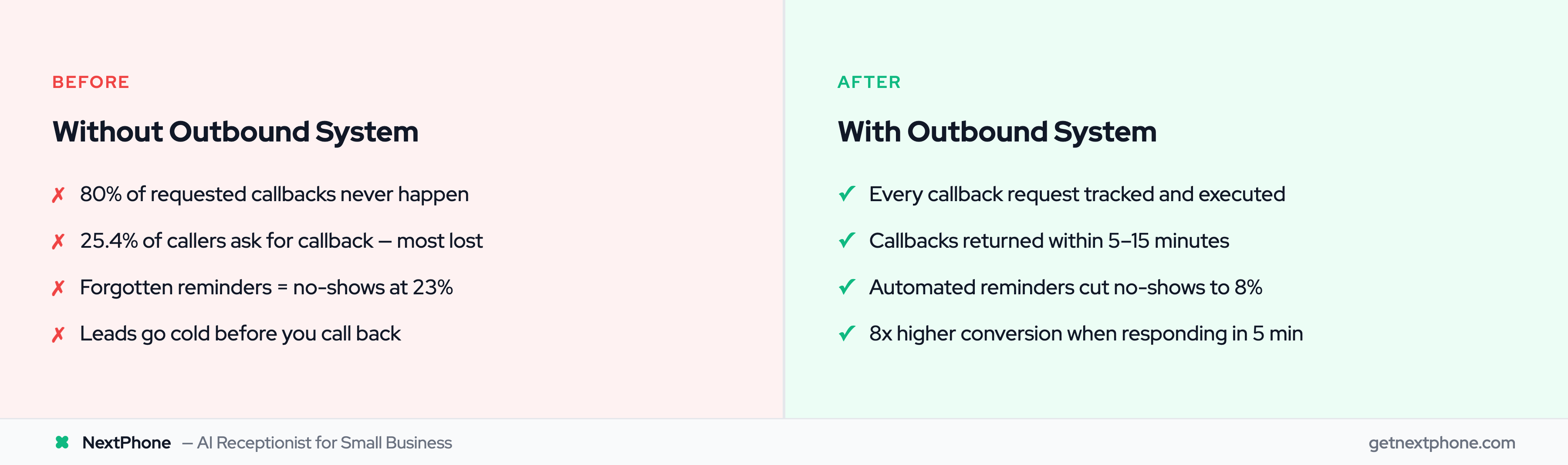
What actually happens? Without a callback tracking system, approximately 80% of those requested callbacks never happen. The business owner gets off the job, sees a list of missed calls, gets busy with something else, and the callbacks pile up.
That's 9 lost leads per month for a business receiving 42 calls. At 30% conversion and $3,500 average project value, that's $9,450 per month in revenue that was basically asking to be collected - and never was.
Speed-to-Lead for Follow-Ups
The timing of your follow-up matters enormously. The InsideSales Lead Response Management Study found:
- Calling back within 5 minutes: 8x higher conversion rate
- Waiting 30 minutes: Contact rate drops 10x
- Waiting 1 hour: 7x worse qualification rate
- Waiting 24 hours: 60x worse than responding in the first hour
When someone calls your business, expresses interest, and asks for a callback, the clock starts immediately. Every minute you wait, the lead cools. By the time most contractors get around to calling back - often the next day - the customer has already booked someone else.
Industry research confirms: 85% of callers who don't reach someone won't call back on their own. If YOU don't follow up, the revenue is gone.
Types of Follow-Up Calls That Drive Revenue
An outbound answering service can handle several follow-up categories:
- Callback returns: Responding to voicemails and callback requests within minutes, not hours
- Estimate follow-ups: Checking in 2-3 days after sending a quote ("Did you have any questions about the estimate?")
- Lead nurturing: Following up with prospects who expressed interest but didn't book
- Post-service satisfaction: "How did the installation go? Anything we can help with?"
- Review generation: Happy customers who just got a follow-up call are primed to leave positive reviews
Each of these calls takes 2-5 minutes manually. Across 10-15 follow-ups per week, that's 1-2 hours of calling that most business owners simply never get to.
When to Follow Up (Timing Rules)
Based on the speed-to-lead research and practical experience:
- Callback requests: Within 5-15 minutes (before they call a competitor)
- Estimate follow-ups: 48-72 hours after sending (enough time to review, not so long they forget)
- Post-service check-ins: 24-48 hours after completion (fresh in their mind)
- Re-engagement: 3-6 months after last service (seasonal maintenance timing)
- Review requests: 1-3 days after positive check-in call
How Outbound Calling Services Work
The mechanics of outbound calling have evolved significantly. You're no longer limited to hiring someone to sit at a desk with a phone list. Here's how modern outbound services operate.
Traditional Human Outbound Services
Companies like PATLive and Answering Service Care offer human-powered outbound calling. You provide a list of contacts and a script, and their staff makes calls during business hours.
What you get:
- Real human voices making your calls
- Ability to handle objections and conversation
- Personalized interactions
What you pay:
- $500-1,000/month for campaign-based calling
- Per-call or per-minute fees on top of base pricing
- Additional costs for after-hours or weekend calling
- Script development and training fees
The main limitation: capacity. Human callers can make 40-60 calls per day. If you need 200 reminders sent on a Monday morning, you're either paying for multiple agents or spreading calls across several days.
AI-Powered Outbound Calling
This is where AI answering services really differentiate. Modern AI can make outbound calls that sound natural, handle real-time responses, and scale without limits.
An AI outbound system:
- Makes reminder calls at exactly the right time (automated scheduling)
- Handles responses naturally ("press 1 to confirm, press 2 to reschedule")
- Sends follow-up texts after the call with booking links
- Logs all interactions in your CRM
- Scales to hundreds of calls simultaneously if needed
- Works 24/7 - can make evening reminder calls for next-morning appointments
The cost difference is significant. AI adoption among small businesses has surged 41% in the past year, and outbound automation is one of the fastest-growing use cases.
The Hybrid Inbound + Outbound Model
Here's what makes this genuinely powerful for small businesses: a service that handles BOTH directions.
The typical workflow:
- Inbound call arrives - AI answers, collects info, schedules appointment
- 48 hours before appointment - AI automatically sends reminder (call + text)
- Morning of appointment - Second confirmation sent
- After service - Follow-up call to check satisfaction
- 3 days later - Review request sent to happy customers
- If customer called but didn't book - AI follows up within the hour
One system handles the entire customer communication lifecycle. No separate tools. No manual reminder lists. No forgotten callbacks.
This is fundamentally different from after-hours answering alone, because it's proactive rather than reactive. You're not just catching incoming calls - you're actively driving your business forward.
Integration With Your Scheduling Tools
For outbound calling to work automatically, it needs to know when appointments are scheduled. Modern services integrate with:
- Calendar systems: Google Calendar, Calendly, Acuity
- CRM platforms: HubSpot, Salesforce, Pipedrive
- Industry software: ServiceTitan, Jobber, HouseCall Pro
- Custom webhooks: Connect to any system with an API
The integration means: when you book an appointment (or your AI books one during an inbound call), the reminder sequence triggers automatically. No manual input. No forgetting.
The ROI of an Outbound Answering Service
Let's stack up the numbers, because this is where outbound calling justifies itself many times over.
Revenue Saved (No-Show Reduction)
For a business with 10 appointments per week at $3,500 average:
- No-shows without reminders (23%): 2.3/week = $8,050 lost
- No-shows with reminders (8%): 0.8/week = $2,800 lost
Monthly savings from no-show reduction: $21,000
Revenue Generated (Follow-Up Conversion)
For a business receiving 42 calls/month with roughly one in four requesting callbacks:
- Callback requests: ~11 per month
- Without follow-up: 80% lost = 9 leads gone
- With systematic follow-up: 80% reached = 9 leads contacted
- At 30% conversion, $3,500 average: 2-3 additional jobs
Monthly revenue from follow-up: $7,000-10,500
Time Saved (Staff Hours Recaptured)
Manual reminder and follow-up calling typically takes:
- 2+ hours per day for a busy small business
- 22 working days per month
- At $25/hour equivalent labor cost
Monthly time savings: $1,100+
Total ROI
| Value Source | Monthly Impact |
|---|
| No-show reduction | $21,000 saved |
| Follow-up revenue | $7,000-10,500 generated |
| Time savings | $1,100 recaptured |
Total monthly value: $29,100-32,600
Cost of AI outbound service: $199/month
Even if your numbers are a quarter of these examples, you're looking at $7,000+ in monthly value for a $199 investment. The math is hard to argue with.
How NextPhone Handles Outbound Calling
NextPhone combines inbound answering with outbound follow-up in a single platform, purpose-built for small businesses that can't afford separate systems for each function.
Here's what the outbound side handles:
SMS follow-up after every inbound call. When the AI answers a call and collects customer information, it automatically sends a text with your booking link, business details, or confirmation. No manual step required.
Appointment reminders and confirmations. Connected to your calendar, NextPhone sends automated reminders at the intervals you set - typically 48 hours and morning-of. Customers can confirm, cancel, or request to reschedule directly.
Callback tracking and execution. When inbound callers request callbacks (about one in four do, according to our data), the system logs it, prioritizes it, and either follows up automatically or alerts you for time-sensitive situations.
CRM integration for complete records. Every outbound interaction gets logged alongside inbound call data, so you have a complete picture of each customer relationship. Works with HubSpot, Salesforce, and custom webhook integrations.
All of this - inbound answering plus outbound follow-up - runs at $199/month with unlimited usage. No per-call fees, no overage charges, no separate contracts for inbound and outbound.
Frequently Asked Questions
What's the difference between an inbound and outbound answering service?
An inbound service answers calls that come TO your business - handling inquiries, scheduling, and emergencies. An outbound service makes calls FROM your business - appointment reminders, follow-ups, confirmations, and proactive outreach. The best modern services combine both into a single platform so all customer communication flows through one system.
How many reminder calls reduce no-shows the most?
Research shows two reminders work best: one 48 hours before the appointment (giving time to reschedule if needed) and one the morning of. A single reminder reduces no-shows by roughly 30-40%, while the two-touch approach achieves the full 65% reduction from 23% to 8%.
Will automated outbound calls annoy my customers?
When done correctly, no. Customers generally appreciate appointment reminders - 40% say they'd miss fewer appointments if they received additional reminders. The key is relevance and timing. A reminder about their scheduled service call is helpful. Cold-calling them about a new promotion at 8 PM is not. Outbound calling services for existing appointments and follow-ups have high customer approval rates.
Can an outbound service reschedule appointments during the call?
AI-powered outbound services can handle basic rescheduling during the reminder call. When a customer responds to a reminder saying they can't make the original time, the AI can check availability and offer alternatives. For more complex scheduling, it can transfer to a human or send a self-scheduling link via text.
Is automated outbound calling legal (TCPA)?
Yes, with conditions. The Telephone Consumer Protection Act (TCPA) allows automated calls for appointment reminders and service-related communication to customers who have an existing business relationship with you. This covers reminders, confirmations, and follow-ups for services they've already booked. What it does NOT cover: unsolicited sales calls to people who haven't contacted you. Stick to existing customers and active leads, and you're on solid legal ground.
How quickly should follow-up calls happen after initial contact?
As fast as possible. Research shows conversion rates are 8x higher when you respond within five minutes versus thirty minutes. For callback requests, aim for under 15 minutes. For estimate follow-ups, 48-72 hours is the sweet spot. For post-service check-ins, 24-48 hours works best while the experience is fresh in the customer's mind.
Close the Loop on Every Customer Interaction
Answering incoming calls is only half the job. The other half - the reminders, the follow-ups, the confirmations, the callbacks - is where most small businesses lose thousands every month without even realizing it.
Twenty-three percent of your booked appointments won't show up without reminders. A quarter of your inbound callers are asking for follow-up that never comes. Every estimate you send without following up is money sitting on the table.
An outbound answering service closes those gaps automatically. And when it's combined with inbound answering in a single AI-powered system, you get complete coverage of every customer touchpoint - incoming and outgoing - for less than what most businesses spend on their monthly phone bill.
