Cloud-Based Receptionist: Complete 2025 Guide for Small Business

43 min read
Yanis Mellata
AI Technology

Your phone rings at 2 PM on a Tuesday. You're installing a water heater, hands full, customer standing right there watching you work. The call goes to voicemail. That caller was ready to book a $3,500 bathroom renovation. They called the next plumber on Google. You just lost a week's revenue.

This happens more than you think. Industry research shows small businesses miss 60-80% of incoming customer calls. Every missed call is a potential customer choosing your competitor instead.

Cloud-based receptionists solve this problem. In this guide, you'll learn exactly what cloud-based receptionists are, how the technology works, what they cost, and how to implement one in your business—even if you're not technical. More importantly, you'll see real data on what you're losing right now and how much you can capture.

Ready to Stop Missing Customer Calls?

Try NextPhone's AI receptionist free for 7 days. See how other small businesses are capturing more leads 24/7.

Get Started

The Hidden Cost of Missed Calls

Ready to Stop Missing Customer Calls?

Try NextPhone's AI receptionist free for 7 days. See how other small businesses are capturing more leads 24/7.

Get Started

Every unanswered call represents revenue walking out the door. For small businesses, especially those in home services and field work, the math is brutal.

Why Small Businesses Miss Calls

You're not missing calls because you're lazy or disorganized. You're missing them because you're busy actually running your business.

When that phone rings, you're:

  • On a job site with a customer
  • On a ladder, in a crawlspace, or on a roof
  • Driving between appointments
  • Meeting with a client in person
  • At lunch (yes, customers call during lunch)
  • After hours, on weekends, during holidays

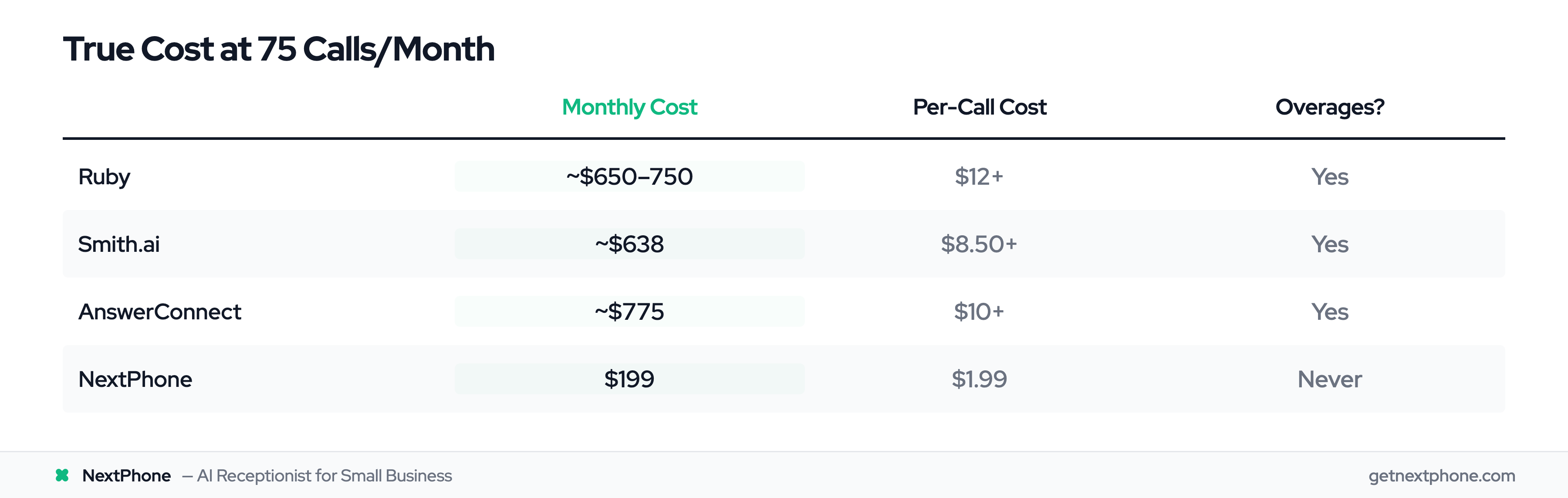
You can't afford a full-time receptionist at $2,600+ per month for a small business with 30-50 calls monthly. Traditional answering services charge $5-8 per call, which adds up fast during busy season.

So calls go to voicemail. And most customers don't leave messages anymore—they just call the next business on Google.

The Real Revenue Impact

Let's talk numbers. Industry research shows 60-80% of small business calls go completely unanswered. Customer service data reveals another painful truth: 67% of customers will call a competitor if their call isn't answered.

Here's what that means in dollars:

Say you get 50 calls per month (about average for small service businesses). If 70% go unanswered, that's 35 missed calls. Analysis of thousands of customer interactions shows 6.9% of calls are quote or estimate requests. At a $3,500 average project value and a conservative 20% close rate, you're losing $12,250 per month in revenue. That's nearly $150,000 per year walking away because you couldn't answer the phone.

But it's not just quote requests. Customer service data shows:

  • 25.4% of customers explicitly request callbacks—without a tracking system, industry research shows 42% of these never get returned
  • 6.2% of calls are true emergencies requiring immediate response—these high-margin jobs ($1,200+ for after-hours work) can't wait for a callback tomorrow
  • 7.7% are scheduling requests—customers ready to book appointments right now, not play phone tag

One contractor in our research received 76 calls in a single month during peak season and answered only 18 of them. He told us: "I didn't even know I was missing that many calls until I saw the data. I just thought business was slow."

Beyond Money: Reputation and Customer Experience

The damage goes deeper than lost revenue.

When calls go unanswered, customers assume you're either too busy to care about new business or unprofessional. Neither perception wins you customers.

Emergency calls are especially critical. Customer service data reveals 15.9% of calls contain urgency language—phrases like "emergency," "urgent," "ASAP," or "today." When someone's AC dies in 95-degree weather or a pipe bursts at midnight, they're calling five contractors. The first one to answer gets the job.

Every voicemail is a missed opportunity to make a professional first impression. Every callback request that falls through the cracks is a customer who feels ignored.

What Is a Cloud-Based Receptionist?

A cloud-based receptionist is a call answering and management service hosted on internet servers instead of in your office. It handles your business calls 24/7 without requiring physical staff, hardware, or equipment on your premises.

Cloud-Based Explained (What "Cloud" Really Means)

The term "cloud" gets thrown around a lot. Here's what it actually means for your business.

Cloud-based means the service runs on internet servers (like Gmail, Netflix, or your bank app) rather than equipment in your office. You access it through the internet from any device—your phone, laptop, or tablet.

What makes cloud different:

No hardware to buy or maintain. Traditional phone systems require physical boxes (PBX systems), desk phones, and wiring. Those cost $1,500-3,000 upfront, plus maintenance and eventual replacement. Cloud receptionists? Nothing to install. Just an internet connection you already have.

Accessible from anywhere. Your receptionist isn't tied to one desk phone in your office. Manage everything from your truck, home office, or vacation (if you're brave enough to check in).

Automatic updates and improvements. The service gets better over time without you doing anything. New features, better AI, improved accuracy—all happen automatically on the provider's side.

Scales instantly. Getting 10 calls one week and 100 the next during busy season? Cloud infrastructure handles both without you changing plans or paying per-call fees (with the right pricing model).

Disaster-proof. Office flooded? Power out? Your cloud receptionist still answers calls because it's running on servers in data centers across the country, not in your office.

Market research shows the cloud communications market is growing 15% annually and expected to reach $35 billion by 2027. That's not hype—it's businesses recognizing that cloud infrastructure simply works better than on-premise systems.

How It Differs from Traditional Receptionists

Let's compare what you get:

Traditional in-house receptionist:

  • Salary: $31,390/year (median, according to Bureau of Labor Statistics)
  • Plus benefits: Health insurance, paid time off, taxes, training
  • Total cost: ~$40,000-45,000 per year ($3,300-3,750/month)
  • Availability: Business hours only (9-5, Monday-Friday)
  • Sick days, vacation, lunch breaks: Calls still go to voicemail
  • One call at a time: Second caller gets busy signal or voicemail

Cloud-based receptionist:

  • Cost: $199-500/month (flat rate)
  • Total cost: $2,388-6,000 per year
  • Availability: 24/7/365 (holidays, weekends, 3 AM emergencies)
  • Never sick, never on vacation, never takes lunch
  • Unlimited simultaneous calls: Ten people call at once? All answered.

The savings are obvious. But it's not just about cost—it's about capability. A cloud receptionist doesn't need to "cover the desk" because there is no desk to cover.

How It Differs from On-Premise Phone Systems

If you've dealt with traditional business phone systems, you know the pain: expensive equipment, complicated setup, IT person required for changes, manual software updates.

Cloud-based receptionists eliminate all of that. The "brains" of the system run on the provider's servers. You just access it through a web dashboard or mobile app.

Changes take seconds, not service calls. Want to update your hours or add a new service? Edit it yourself in the dashboard. With on-premise systems, you're calling IT or reading a 40-page manual.

The Three Types: AI, Live Agents, and IVR

Not all cloud receptionists are created equal. There are three main approaches:

AI-powered receptionists use conversational artificial intelligence to understand natural language and respond intelligently. They sound like humans, not robots.

Live agent services are real people (working remotely) who answer your calls. The "cloud" part just means they're not physically in your office.

IVR (Interactive Voice Response) is the old "press 1 for sales, press 2 for service" menu tree. It's cloud-based technically, but frustrating for customers.

The best modern solutions use a hybrid approach: AI handles routine inquiries fast and efficiently, with the ability to route complex or unusual situations to you or a human backup.

We'll dig deeper into comparing these three approaches in a later section.

How Cloud-Based Receptionists Work

The technology sounds complicated, but the concept is simple: calls to your business number route through the internet to cloud servers that process and handle them intelligently.

The Technology Behind Cloud Receptionists

Here's the basic technical setup (no jargon, I promise):

Step 1: You forward your existing business phone number to the cloud receptionist service. Or you can get a new cloud-based number if you prefer.

Step 2: When someone calls your number, the call routes through the internet to the provider's cloud servers.

Step 3: The cloud receptionist (AI or live agent) answers the call and handles it according to your configured rules.

Step 4: You access everything through a web dashboard or mobile app—call logs, messages, recordings, transcripts, analytics.

No equipment sits in your office. No software to install on your computer. It's all web-based, like checking your email.

Call Flow: What Happens When Someone Calls

Let's walk through a real call to see how the technology works in practice.

Example 1: Simple question

Customer calls and asks: "Are you open on Saturdays?"

The AI-powered cloud receptionist:

  1. Answers in under 5 seconds (usually within 2-3 rings)
  2. Uses natural language processing to understand the question
  3. Retrieves your business hours from the information you configured
  4. Responds: "Yes, we're open Saturdays from 9 AM to 5 PM. Can I help you with anything else?"
  5. Logs the call in your dashboard with a transcript

Total time: 20 seconds. Customer gets immediate answer. You never interrupted.

Example 2: Appointment booking

Customer calls and says: "I need to schedule a service call for next week."

The cloud receptionist:

  1. Asks clarifying questions: "What day works best for you?"
  2. Checks your connected Google Calendar for availability
  3. Offers available times: "I have Thursday at 10 AM or Friday at 2 PM available."
  4. Books the appointment directly into your calendar
  5. Sends confirmation to the customer via text or email
  6. Logs everything in your dashboard

You wake up the next morning to a booked appointment and full details—no back-and-forth phone tag required.

Example 3: Emergency routing

Customer calls at 9 PM and says: "Emergency! Pipe burst in my basement, water everywhere!"

The cloud receptionist:

  1. Detects urgency keywords: "emergency," "burst," "water everywhere"
  2. Immediately routes the call to your designated emergency phone (your cell)
  3. You answer and get the high-margin emergency job
  4. Call details saved in dashboard for follow-up

Customer service data shows 15.9% of calls contain urgency language requiring this kind of smart routing. Without it, that $1,200 emergency call goes to voicemail and they call the next plumber.

AI and Natural Language Processing

Modern AI receptionists don't sound like robots. They use natural language processing (NLP) technology to understand conversational speech and respond naturally.

AI technology research shows modern systems achieve 85-95% accuracy for routine business inquiries. They're trained on millions of customer service conversations to understand:

  • Different ways people ask the same question ("What are your hours?" vs. "Are you open?" vs. "When do you close?")
  • Context and intent (distinguishing "I need a quote" from "I have a question about my quote")
  • Urgency signals ("emergency," "ASAP," "urgent," "today")
  • Industry-specific terminology (the AI learns your business vocabulary)

When the AI doesn't know the answer or encounters a complex situation, it smoothly transitions to taking a detailed message or transferring to you—never guessing and potentially giving wrong information.

Cloud Infrastructure and Reliability

Cloud receptionists run on the same kind of industrial-grade infrastructure that powers Gmail, Netflix, and your banking apps.

That means: 99.9% uptime: Service stays running even if one server has issues (automatic failover to backup servers) Global redundancy: Your service doesn't rely on one computer in one location—it's distributed across multiple data centers No single point of failure: If your office loses power or internet, your cloud receptionist still answers calls Automatic scaling: System handles 5 calls or 500 calls without performance degradation

Reliability research shows cloud infrastructure provides 99.9% uptime compared to 95-98% for on-premise systems that depend on your local internet, power, and equipment working perfectly.

Security and Data Protection

Reputable cloud receptionist services take security seriously:

Encrypted connections: All calls and data transmit over encrypted channels (like how your bank secures online transactions)

Secure data storage: Call recordings, transcripts, and customer information stored on secure servers with access controls

HIPAA compliance: Available for medical, dental, and healthcare businesses with strict privacy requirements

Regular security audits: Professional services undergo regular security testing and certification

Privacy controls: You control who accesses what data and can delete information as needed

Your call data is often more secure with a professional cloud service than sitting on an office voicemail system with a four-digit PIN that hasn't changed since 2015.

Key Benefits of Cloud-Based Receptionists

Once you understand how the technology works, the benefits become obvious. But let's spell them out with real numbers and examples.

24/7/365 Availability (Never Miss Another Call)

The phone doesn't stop ringing just because you closed for the day.

Customer service data reveals 6.2% of calls are emergencies requiring immediate response. Many of these happen after hours—the AC dies at 7 PM when it's 95 degrees, the pipe bursts at midnight, the heater fails on a Sunday morning in January.

Without 24/7 answering, you miss the highest-margin work. Emergency jobs pay premium rates ($1,200-2,000+) because customers need help NOW. The contractor who answers at 9 PM gets the job. The one who returns a voicemail the next morning gets nothing.

Beyond emergencies, customers call when it's convenient for them—which often isn't during your 9-5 hours. They call from work during their lunch break, after they put kids to bed, on Saturday mornings while having coffee.

A cloud receptionist answers every call, any time. Your business never sleeps, even when you do.

Cost Savings vs. Traditional Solutions

Let's talk real numbers.

In-house receptionist:

  • Median salary: $31,390/year (Bureau of Labor Statistics)
  • Plus employer taxes, benefits, training, sick days, vacation: ~$40,000-45,000 total
  • Monthly cost: $3,300-3,750
  • Availability: 40 hours per week (23% of total hours in a week)

Traditional answering service:

  • Typical pricing: $5-8 per call or $2-4 per minute
  • For a small business with 50 calls/month: $250-400 just for call handling
  • Add receptionist features (appointment booking, complex routing): $400-800/month
  • During busy season with 100 calls: $800-1,600/month

Cloud-based AI receptionist:

  • Flat rate: $199-500/month depending on features
  • Unlimited calls (no per-call charges that spike during busy season)
  • Full features included: scheduling, routing, messages, analytics
  • Availability: 168 hours per week (100% of hours)

The savings are massive. You're paying 85-95% less than an in-house receptionist and 50-75% less than traditional answering services—while getting better availability and more features.

Instant Scalability

Seasonal businesses know the pain of fluctuating call volume. You get 15 calls per month in winter, 80 calls per month in summer.

With traditional answering services charging per call or per minute, your bill swings wildly. Slow month? $150. Busy month? $800. You're budgeting for a moving target.

With cloud-based receptionists (at least those with flat-rate pricing), you pay the same $199-500 per month whether you get 10 calls or 200 calls. The AI scales automatically to handle volume spikes without performance degradation.

No busy signals. No calls rolling to voicemail because "all agents are currently busy." Unlimited simultaneous call handling.

One pool service company saw call volume increase 5X from March to June. Their cloud receptionist handled all of it without breaking a sweat—or increasing the bill.

Access from Anywhere

Your receptionist isn't tied to a desk phone in an office.

Access your cloud receptionist dashboard from:

  • Your smartphone (iOS or Android app)
  • Your laptop from a coffee shop
  • Your tablet at home
  • Any device with an internet connection

Check messages, listen to call recordings, update business information, configure call routing rules—all from wherever you are.

Run a multi-location business? One cloud receptionist service can handle calls for all locations, with location-specific routing and information. Manage everything from a single dashboard instead of juggling multiple phone systems.

Research shows 67% of businesses now operate with distributed or remote teams. Cloud-based tools aren't just convenient—they're necessary for how modern businesses actually work.

Automatic Updates and Improvements

Remember the pain of traditional phone system updates? You either pay a technician to come upgrade your equipment, or you just never update and miss out on new features.

Cloud receptionists improve automatically. The provider rolls out updates on their side:

  • Better AI accuracy
  • New features (like text messaging capabilities)
  • Improved spam detection
  • Enhanced integrations with other tools
  • Bug fixes and performance improvements

You wake up one morning and your service is just better. No action required. No downtime. No cost.

No Hardware or IT Maintenance

Zero equipment to buy, install, maintain, or eventually replace.

Traditional PBX phone systems cost $1,500-3,000 upfront, require professional installation, need occasional repairs, and become obsolete in 5-7 years.

Cloud receptionists? You need exactly zero hardware. Just your existing phones (which you already have) and an internet connection (which you already have).

  • IT maintenance requirements: none.
  • Software updates: automatic.
  • Equipment failures: impossible (there's no equipment).

Business Continuity and Disaster Recovery

What happens when the power goes out? When your internet dies? When the office floods?

With a traditional in-office phone system, your phones go dead. Calls go nowhere. Customers can't reach you.

With a cloud-based receptionist, your service keeps running because it's not in your office—it's on servers in data centers across the country with backup power, redundant internet connections, and disaster recovery systems.

Your office could burn to the ground (let's hope not) and your cloud receptionist would still be answering calls, taking messages, and booking appointments.

You can configure calls to route to your cell phone, your home office, your business partner—wherever you are. Business continuity isn't a plan you write and file away. It's automatic.

Professional Image for Small Businesses

Every call answered professionally. Custom greeting with your company name. Intelligent routing so callers reach the right person or department. After-hours handling that doesn't just dump calls to a generic voicemail.

Small businesses sound like established companies. Your three-person operation handles calls like a thirty-person organization.

First impressions matter. When a potential customer's first interaction with your business is a professional receptionist (AI or human) instead of five rings and a voicemail beep, you've already established credibility.

Data and Insights You've Never Had

Cloud receptionists track everything:

  • Total calls received
  • Calls answered vs. missed
  • Peak call times (when do most customers call?)
  • Common questions asked
  • Call duration averages
  • Callback request tracking
  • Spam vs. legitimate call ratios

This data reveals patterns you never knew existed. You might discover:

  • 60% of your calls come in Tuesday-Thursday mornings (optimize your availability)
  • 25% of calls are asking the same three questions (add them to your website)
  • You're getting 20% more calls this month than last (business is growing faster than you realized)

Analytics help you make better business decisions instead of just guessing based on gut feel.

AI vs. Live Agents vs. IVR: Understanding Your Options

Not all cloud receptionists use the same technology. There are three main approaches, each with different trade-offs.

AI-Powered Cloud Receptionists (The Modern Approach)

AI receptionists use conversational artificial intelligence to understand and respond to callers.

How they work: Natural language processing analyzes what callers are saying, determines their intent, and responds intelligently. They sound conversational, not robotic.

What they handle well:

  • Routine questions (hours, pricing, service area, availability)
  • Appointment scheduling (book directly into calendar)
  • Information gathering (customer details for quotes)
  • Call routing (to you, to voicemail, to emergency line)
  • Spam filtering (identify and block robocalls)

Industry research shows AI handles 60-80% of business inquiries without human intervention. Customer service data from thousands of real calls reveals 31.1% are general service requests perfect for AI, 7.7% are straightforward scheduling requests, and 6.9% are quote requests that AI can capture and route.

Pros:

  • Fast response: Answers in under 5 seconds (typically 2-3 rings)
  • Scales infinitely: Handles 1 call or 100 simultaneous calls
  • Never unavailable: No sick days, vacations, lunch breaks
  • Consistent quality: Same professional greeting every time
  • Cost-effective: Flat monthly rate, no per-call charges
  • Improves over time: Gets smarter with machine learning

Cons:

  • Complex situations need escalation: Unusual requests may require human judgment
  • Some customers prefer humans: Though most can't tell the difference for routine calls
  • Initial setup required: You need to configure business information (one-time effort)

Best for: Small businesses with high call volume, routine inquiries, tight budgets, and a need for 24/7 availability.

Live Agent Answering Services (The Human Touch)

These services employ real humans (working remotely) who answer calls on your behalf. The "cloud" part means they're not in your office—they work from home or call centers.

How they work: Your calls forward to a live answering service. Real people answer using your company name and follow scripts you provide.

What they handle well:

  • Complex conversations requiring empathy
  • Situations requiring judgment calls
  • Customers who specifically want human interaction
  • Nuanced questions without clear-cut answers

Pros: Human empathy and flexibility: Can adapt to unusual situations Handle complexity: Navigate conversations that AI might struggle with Some customers prefer it: Especially for sensitive industries (legal, medical)

Cons: Expensive: Typically $500-800/month for small business call volumes Per-call or per-minute billing: Costs spike during busy periods Slower to answer: Average 30-90 seconds vs. AI's 5 seconds Variable quality: Different agents may handle calls differently Limited hours: Many only offer business hours (24/7 costs significantly more) Doesn't scale well: Can only handle one call per agent at a time

Pricing reality check: Traditional live answering services charge $5-8 per call. At 50 calls per month, that's $250-400 just for answering. Add features like appointment scheduling, emergency routing, or 24/7 coverage and you're at $600-1,000/month easily.

Best for: Businesses requiring human judgment for most calls, industries where human touch is critical (legal consultations, medical triage), companies with budgets for premium service.

IVR/Auto-Attendant Systems (The Legacy Technology)

IVR (Interactive Voice Response) is what you encounter when you call a big company and hear: "Press 1 for sales, press 2 for service, press 3 for..."

How they work: Callers navigate phone menus by pressing numbers or saying keywords to route themselves to the right place.

What they handle well:

  • Routing callers to different departments
  • Playing pre-recorded information (hours, location, etc.)
  • Basic call distribution

Pros: Simple and cheap: Basic IVR comes with most cloud phone systems Straightforward implementation: Easy to set up menu trees

Cons: Frustrating user experience: Customers hate pressing buttons No natural conversation: Can't understand nuanced requests High abandonment rates: Many callers hang up rather than navigate menus Feels impersonal: Screams "small business trying to seem big" Limited intelligence: Can't adapt to unexpected questions

Best for: Large organizations with distinct departments where routing matters more than customer experience. Not recommended for small businesses trying to capture every lead.

Hybrid Models: Best of Both Worlds

The smartest approach combines AI efficiency with human backup.

Here's how hybrid models work:

  • AI handles routine calls (60-80% of volume): Hours, pricing, scheduling, simple questions AI routes complex calls to you: Unusual requests, detailed consultations, anything requiring judgment AI escalates urgent calls immediately: Emergency keywords trigger instant transfer to your phone

This gives you:

  • Fast response for routine inquiries (AI answers in seconds)
  • Professional handling of common questions (AI never gets tired or forgets the script)
  • Human touch when it matters (you handle the important conversations)
  • Cost efficiency (AI handles volume, you handle value)

One HVAC contractor told us: "The AI handles 'What are your hours?' and 'Do you service my area?' and books appointments. I handle 'My AC is making a weird noise' conversations. It's perfect."

Customer service data supports this: 25.4% of calls are callback requests, 15.9% contain urgency requiring human attention, but 31.1% are general service requests AI handles perfectly.

The future isn't AI replacing humans. It's AI handling the repetitive work so humans can focus on the complex, high-value interactions.

Essential Features to Look For

When evaluating cloud receptionist solutions, certain features separate great services from mediocre ones.

Core Features (Must-Haves)

These are non-negotiable. Any cloud receptionist service you consider should include:

Professional call answering with custom greeting Your company name, your preferred greeting, your style. The greeting should reflect your brand, not sound generic.

Intelligent call routing Route calls based on time of day, caller input, or keywords detected. Send emergency calls to your mobile. Send general questions to the AI. Send quote requests to your estimating team.

Message taking with complete details When the AI can't answer or the caller asks for you specifically, it should capture: name, phone number, reason for calling, best time for callback, any urgency.

Call logs and transcripts Every call logged with date, time, duration, caller ID when available, and transcript of the conversation. Searchable history so you can find that call from "the lady who called about the leaky faucet three weeks ago."

After-hours handling Different behavior for business hours vs. after hours. Maybe you want after-hours emergencies routed to your cell but general inquiries held until morning.

Appointment scheduling Integration with your calendar (Google Calendar, Outlook, Apple Calendar) to book appointments directly without back-and-forth phone tag.

Customer service data shows 7.7% of calls are scheduling requests. Without calendar integration, these become phone tag nightmares. With it, they're booked automatically while you're working.

Advanced Features (Nice-to-Haves)

These features provide extra value and separate premium services from basic ones:

Emergency and urgency detection AI that recognizes urgency keywords ("emergency," "urgent," "ASAP," "immediately") and routes those calls differently.

Why it matters: Customer service data reveals 15.9% of calls contain urgency language. These high-priority calls need immediate attention, not a callback tomorrow.

Spam call filtering Automatically identify and block robocalls and spam. Some services even report success filtering out 90%+ of spam.

Why it matters: Analysis of thousands of calls shows 7.0% are spam or robocalls. For electricians, spam rates hit 15.5% (their numbers get sold to spam lists). That's wasted time and money answering junk calls.

Multi-language support AI that can converse in Spanish, French, or other languages depending on your market.

Custom call scripts and workflows Beyond basic settings, the ability to create complex call flows: "If caller asks about commercial work, route to Jim. If residential, route to Sarah. If after 6 PM, take message."

SMS and text capabilities Send appointment confirmations via text. Allow customers to text your business number. Text transcripts of voicemail messages.

Advanced analytics and reporting Peak call time analysis, common question identification, call sources, conversion tracking, month-over-month trends.

CRM integration Automatically create leads or contacts in your CRM (Salesforce, HubSpot, Zoho, etc.) when calls come in.

Integration Capabilities

The best cloud receptionists don't work in isolation—they connect to your other business tools.

Look for integrations with:

Calendar systems: Google Calendar, Microsoft Outlook, Apple Calendar, Calendly, Acuity

  • Books appointments automatically
  • Checks your availability in real-time
  • Sends confirmation emails/texts

CRM platforms: Salesforce, HubSpot, Pipedrive, Zoho

  • Creates new leads automatically
  • Logs call details to contact records
  • Triggers follow-up workflows

Business communication tools: Slack, Microsoft Teams, Email

  • Sends real-time notifications when important calls come in
  • Delivers call summaries and transcripts
  • Keeps your team in the loop

Project management tools: Asana, Trello, Monday.com

  • Creates tasks from callback requests
  • Assigns follow-ups to team members
  • Ensures nothing falls through cracks

Customer service data shows 25.4% of callers request callbacks. Without a tracking system, industry research indicates 42% of these requests never get returned. Integrations ensure callback requests automatically become tasks assigned to someone.

Spam Filtering and Call Screening

This feature deserves special attention because it saves massive time and money.

Cloud receptionists with good spam filtering can:

  • Identify robocalls and spam based on caller ID databases
  • Detect spam patterns (e.g., rapid-fire calls from similar numbers)
  • Block known spam numbers automatically
  • Challenge suspicious callers with verification prompts
  • Learn from your feedback (mark as spam → system remembers)

Analysis of thousands of customer calls shows 7.0% are spam—that's 927 junk calls in the dataset providing zero value. Some industries face higher rates: electricians see 15.5% spam, their numbers frequently ending up on telemarketer lists.

Without spam filtering, you're:

  • Paying for a service to answer junk calls
  • Getting interrupted for nothing
  • Wasting time listening to robocall messages

With spam filtering, those calls get blocked automatically. You only see legitimate customers in your call logs.

Pricing and ROI: What to Expect

Let's talk money. What do cloud receptionists actually cost, and more importantly, what do they return?

Typical Pricing Models

Cloud receptionist services use several pricing structures:

Flat monthly rate ($199-500/month) Most common for AI-powered services. You pay the same amount regardless of call volume. Predictable budgeting, no surprise bills during busy season.

Typical tiers:

  • Basic: $199-249/month (core features, standard AI)
  • Professional: $299-399/month (advanced features, integrations, priority support)
  • Premium: $400-500/month (white-glove service, custom AI training, dedicated support)

Per-call pricing ($5-8 per call) Common for traditional live answering services. Sounds cheap until you do the math: 50 calls × $6 = $300/month. 100 calls = $600/month.

Per-minute pricing ($2-4 per minute) Another traditional service model. Average call is 2-3 minutes, so $4-12 per call. Gets expensive fast.

Tiered by call volume Some services offer plans like "up to 50 calls/month, then $X per additional call." Okay if you have predictable volume, risky if it fluctuates.

Best model for small businesses: Flat monthly rate. Predictable costs, scales with your growth, no penalty for success.

Cost Comparison: Cloud vs. Traditional

Let's compare real costs for a small business receiving 50 calls per month:

In-house receptionist:

  • Salary: $31,390/year (Bureau of Labor Statistics median)
  • Employer taxes (FICA, unemployment): $2,400/year
  • Benefits (health insurance, PTO): $6,000-8,000/year
  • Training and onboarding: $1,000

Total: ~$40,000-43,000/year ($3,300-3,600/month)

  • Availability: 40 hours/week, business hours only
  • Handles: 1 call at a time

Traditional live answering service:

  • Base monthly fee: $300-400
  • Per-call charges (50 calls × $6): $300

Total: $600-700/month ($7,200-8,400/year)

  • Availability: Business hours (24/7 costs double)
  • Answer speed: 30-90 seconds average
  • Note: Cost doubles during 100-call busy months

Cloud-based AI receptionist:

  • Flat monthly rate: $199-500/month depending on features

Total: $2,388-6,000/year

  • Availability: 24/7/365
  • Answer speed: Under 5 seconds
  • Handles: Unlimited simultaneous calls

The savings are dramatic:

  • 85-88% less than in-house receptionist
  • 50-75% less than traditional answering service
  • Same cost in slow months and busy months (flat rate)

ROI Calculations for Small Businesses

The real question isn't "What does it cost?" but "What does it return?"

Let's run real numbers based on industry data showing 60-80% of small business calls go unanswered:

Example 1: General Contractor

Current situation:

  • 50 calls per month
  • 70% go unanswered (industry average) = 35 missed calls
  • Customer service data shows 6.9% are quote requests = 2.4 quote requests missed monthly
  • Average project value: $3,500
  • Close rate: 20% (conservative)

Lost revenue: 35 missed calls × 6.9% quote rate = 2.4 quotes × $3,500 × 20% close = $1,680/month lost ($20,160/year)

Cloud receptionist cost: $199/month ($2,388/year)

ROI: Capture even half those missed quotes = $10,000 additional annual revenue for $2,400 investment = 418% return

Example 2: HVAC Service Business

Current situation:

  • 60 calls per month
  • 70% unanswered = 42 missed calls
  • 7.7% are scheduling requests (customer service data) = 3.2 missed appointments
  • Average service call: $400
  • 50% would have booked if they reached you

Lost revenue: 3.2 appointments × 50% × $400 = $640/month lost ($7,680/year)

Plus: 6.2% are emergencies (customer service data) = 2.6 emergency calls monthly

  • 70% missed = 1.8 lost emergency calls
  • Emergency rate: $1,200 Additional lost: $2,160/month ($25,920/year)

Total lost: $2,800/month ($33,600/year)

Cloud receptionist cost: $249/month ($2,988/year)

ROI: Capture these calls = $33,600 additional revenue for $3,000 investment = 1,120% return

Example 3: Professional Services (Legal/Dental)

Current situation:

  • 40 calls per month
  • 65% unanswered = 26 missed calls
  • 25.4% request callbacks (customer service data) = 6.6 callback requests
  • Industry research: 42% of callbacks never returned = 2.8 lost per month
  • Average client value: $2,000

Lost revenue: 2.8 lost clients × $2,000 = $5,600/month ($67,200/year)

Cloud receptionist cost: $299/month ($3,588/year)

ROI: $67,200 additional revenue for $3,600 investment = 1,867% return

The math is simple: If your cloud receptionist captures just ONE additional project per month that you'd otherwise miss, you're profitable. Everything beyond that is pure upside.

Industries with Highest ROI

Cloud receptionists provide value to any business with phone calls, but certain industries see massive returns:

Home services (plumbing, HVAC, electrical, roofing):

  • High project values ($400-15,000)
  • Time-sensitive calls (emergencies, quotes)
  • Staff on job sites can't answer
  • Customer service data shows 10.6% of roofing calls are quote requests at $15,000 average project value

Professional services (legal, medical, dental):

  • High appointment values ($200-2,000+)
  • After-hours calls often urgent
  • Missed appointments = significant lost revenue
  • Customer service data reveals 25.4% request callbacks that often fall through without tracking

Field service businesses:

  • Technicians in trucks/on-site
  • Can't answer while working
  • Scheduling is primary call driver (7.7% of calls are appointment requests)

Service businesses with emergencies:

  • After-hours emergency calls pay premium rates ($1,000-2,500)
  • First to answer wins the job
  • Customer service data: 6.2% of calls are emergencies
  • 15.9% contain urgency language

Seasonal businesses:

  • Call volume spikes 3-5X during peak season
  • Flat-rate pricing vs. per-call billing saves hundreds monthly
  • AI scales to handle volume without performance issues

If your business loses even $500/month to missed calls, a $199-249/month cloud receptionist pays for itself immediately—and likely captures thousands more in revenue you didn't even know you were missing.

How to Implement a Cloud-Based Receptionist

The technology sounds complex, but implementation is surprisingly simple. Most businesses go live the same day or within 24 hours.

Step 1: Choose Your Provider and Plan

Evaluate cloud receptionist services based on:

Technology approach: AI-powered, live agents, or hybrid?

  • For small businesses with routine calls: AI is most cost-effective
  • For complex consultations: Consider live agents or hybrid
  • Skip basic IVR unless you have large organization with departments

Features needed: Start with your must-haves list

  • Call answering and routing (everyone needs this)
  • Appointment scheduling (critical if you book appointments)
  • Spam filtering (especially valuable for trades like electrical)
  • Emergency routing (essential for emergency service businesses)
  • CRM integration (if you use Salesforce, HubSpot, etc.)

Pricing model: Flat rate is best for most small businesses

  • Predictable monthly costs
  • Doesn't penalize you for growth
  • Budget-friendly during slow seasons, doesn't spike during busy seasons

Trial period: Look for 14-day free trials or money-back guarantees

  • Test with real calls before committing
  • Verify the AI understands your industry
  • Confirm call quality meets your standards

Compare 2-3 providers, read reviews from businesses like yours, and pick the best fit.

Step 2: Set Up Your Business Information

This is the only time-consuming part, and it's a one-time effort of 30-60 minutes.

You'll configure:

Business basics:

  • Company name (exactly how you want it spoken)
  • Hours of operation (including holidays, special hours)
  • Service area (cities, zip codes, or radius)
  • Services offered with brief descriptions
  • Pricing information (if you share pricing over the phone)

Call handling preferences:

  • How to greet callers
  • What to ask when booking appointments
  • Where to route different types of calls
  • After-hours behavior (take messages, route emergencies only, etc.)
  • Emergency keywords to watch for

FAQs and knowledge base:

  • Common questions customers ask with approved answers
  • "Do you offer emergency service?" → "Yes, 24/7 emergency service available"
  • "What's your service area?" → "We serve [cities list]"
  • "What are your rates?" → [Your answer]

Most services provide templates and guidance. You're essentially teaching the AI about your business so it can represent you accurately.

Step 3: Configure Call Handling Rules

Set up intelligent routing based on your business needs:

Simple example:

  • Business hours (9 AM - 5 PM): AI answers, books appointments, routes urgent calls to my cell
  • After hours: AI takes messages, routes only calls containing "emergency" keywords to my cell
  • Weekends: Same as after-hours

More complex example:

  • General calls: AI handles, books into calendar
  • Quote requests: AI captures details, creates lead in CRM, notifies estimator via Slack
  • Emergency keywords detected: Immediate transfer to on-call phone
  • Spanish-speaking callers: Route to bilingual team member (or handle in Spanish if AI supports it)
  • Existing customer callbacks: AI checks CRM, routes to their assigned rep

The goal is to handle routine efficiently while escalating important calls appropriately.

Step 4: Forward Your Phone Number

The final technical step is simple:

  • Option A: Forward existing number
  • Call your phone carrier or log into your phone system
  • Set up call forwarding to the cloud receptionist number they provide
  • Takes 2-5 minutes
  • Your customers keep calling the same number they always have
  • Option B: Use new cloud number
  • Some prefer a new cloud-based number for tracking
  • Update website, marketing materials, business cards with new number
  • Takes longer but gives you clean separation
  • Option C: Hybrid setup
  • Keep desk phones for when you're in office
  • Forward when you leave, un-forward when you return
  • Or: Use cloud receptionist as overflow (only when you don't answer after X rings)

Most businesses choose Option A—forward their existing number so the transition is invisible to customers.

Timeline: How Fast Can You Go Live?

Morning: Sign up and choose plan (15 minutes)

  • Create account, select plan, enter payment info

Afternoon: Configure business info and test (45-60 minutes)

  • Input your business details, FAQs, call rules
  • Make test calls to verify AI responses
  • Adjust settings based on test results

Late afternoon: Forward number and go live (10 minutes)

  • Set up call forwarding
  • Monitor first few real calls
  • Make any quick adjustments

Total time to live: Same day

Compare this to traditional phone systems requiring:

  • Weeks for equipment ordering and delivery
  • Professional installation appointments
  • IT configuration and programming
  • Training sessions for staff

Cloud receptionists eliminate all that complexity. No hardware means no installation. Web-based means no training beyond a simple dashboard.

  • One small business owner told us: "I expected setup to take weeks like when we got our old phone system. We signed up over lunch and were live by end of day.
  • First customer call came in at 4:30 PM and the AI handled it perfectly."

How NextPhone Delivers Cloud-Based AI Receptionist Service

For small businesses that can't afford $3,000/month for a full-time receptionist but need better than voicemail, NextPhone offers AI-powered cloud receptionist service designed specifically for your needs.

NextPhone answers calls in under 5 seconds—faster than traditional live answering services that take 30-90 seconds to pick up. When a customer calls, they're greeted professionally by AI that sounds conversational, not robotic.

The AI handles routine inquiries automatically: business hours, service area, pricing estimates, availability questions. Customer service data shows 31.1% of calls are general service requests that AI handles perfectly without interrupting you.

For the 15.9% of calls containing urgency language—phrases like "emergency," "urgent," or "ASAP"—NextPhone detects these keywords and routes the call immediately to your phone. You get high-priority emergencies in real-time. Routine questions get handled without interruption.

Appointment booking works seamlessly. A customer calls at 11 PM asking for a Thursday morning slot. NextPhone checks your Google Calendar availability, offers open times, books the appointment, and sends confirmation. You wake up to a scheduled job and complete call details—no phone tag required.

Spam filtering is built in. Customer service data reveals 7.0% of calls are robocalls or telemarketers. NextPhone identifies and blocks these automatically, saving you from interruptions that provide zero value.

NextPhone tracks 100% of callback requests. Remember that customer service data showing 25.4% of callers request callbacks? Without tracking, industry research shows 42% of these fall through the cracks. NextPhone logs every callback request, sends you notifications, and ensures nothing gets lost.

Pricing is straightforward: Starting at $199/month with unlimited calls. No per-call charges that spike during busy season. No per-minute billing that punishes longer conversations. Flat rate, predictable costs.

Setup takes hours, not weeks. Configure your business information, forward your number, and you're live. No equipment to install, no IT person required, no training manual to read.

The approach is hybrid: AI handles the routine work (saving you hundreds of interruptions monthly) while routing complex or unusual situations to you. You focus on high-value conversations. AI handles the repetitive questions.

One HVAC contractor using NextPhone told us: "I can't answer my phone when I'm on a roof or installing equipment. NextPhone handles it and my schedule stays full. It's like having a receptionist for $200/month."

Ready to Stop Missing Customer Calls?

Try NextPhone's AI receptionist free for 7 days. See how other small businesses are capturing more leads 24/7.

Get Started

Frequently Asked Questions About Cloud-Based Receptionists

What's the difference between a cloud-based receptionist and a virtual receptionist?

The terms are often used interchangeably and mean essentially the same thing: a receptionist service that isn't physically located in your office.

"Cloud-based" emphasizes the technology—the service runs on internet-hosted servers accessible from anywhere. "Virtual receptionist" emphasizes that it's remote rather than in-house. Both terms describe the same solution.

Modern versions typically use AI technology for fast, efficient call handling. Older versions relied on live human agents working remotely. The "cloud" infrastructure is what enables both approaches to work without physical presence in your office.

Do I need special equipment or phone lines?

No special equipment required. Cloud receptionists work with what you already have.

You keep your existing business phone number—just forward it to the cloud service. Or you can get a new cloud-based number if you prefer a fresh start.

Access the management dashboard from any device with internet: laptop, smartphone, tablet. No PBX boxes to install. No desk phones to buy. No servers in your office. No IT person needed.

The only requirement is an internet connection, which you already have for email and web browsing.

What happens if my internet goes down?

Your cloud receptionist keeps working even if your office internet dies.

Here's why: The receptionist service runs on the provider's cloud servers, not your internet connection. It's like how Gmail still works even if your WiFi goes down—the service isn't hosted on your network.

Calls route through the cloud infrastructure (data centers with redundant internet and backup power). Your office internet outage doesn't affect call answering.

You access the dashboard via internet, so you couldn't log in to check messages during an outage. But you can configure calls to forward to your mobile phone, which works on cellular data regardless of your office internet status.

The cloud receptionist stays live even if your office loses power, floods, or otherwise becomes inaccessible. Business continuity is automatic.

Can it handle multiple calls at the same time?

Yes—and this is a huge advantage over traditional receptionists.

AI-powered cloud receptionists handle unlimited simultaneous calls. Ten people call at the exact same moment? All ten get answered immediately.

Traditional in-house receptionists can only handle one call at a time. Second caller gets a busy signal or rolls to voicemail. During peak times (Monday mornings, after a marketing campaign, during emergencies), you're missing calls even with a receptionist.

Live answering services can handle more simultaneous calls but charge per call—so 10 simultaneous calls costs 10X more that minute.

Cloud AI receptionists scale automatically without performance degradation or cost increases. No busy signals. No "all agents are currently assisting other customers" messages. Just instant answering, every time.

How does it know how to answer questions about my specific business?

You teach it during initial setup by configuring your business information in the dashboard.

You input:

  • Services you offer with descriptions
  • Pricing information (if you share rates over the phone)
  • Hours of operation including special hours and holidays
  • Service area (which cities or zip codes you cover)
  • Common FAQs with your preferred answers
  • Industry-specific terminology

The AI learns from this information and uses it to answer customer questions accurately. "What are your hours?" gets answered from your configured schedule. "Do you service my area?" gets answered by checking your service area settings.

For questions the AI doesn't have information about, it takes a detailed message or transfers to you rather than guessing and potentially giving wrong information.

As you use the service, you can refine responses based on actual calls. If the AI didn't handle something well, you adjust the settings. Over time, it gets better at representing your business exactly how you want.

Is my call data secure and private?

Yes. Reputable cloud receptionist services use enterprise-grade security similar to banks and healthcare systems.

Security measures include: Encrypted connections: All calls and data transmit over encrypted channels (like HTTPS for secure websites) Secure storage: Call recordings and transcripts stored on protected servers with access controls Privacy compliance: HIPAA-compliant options available for medical, dental, and healthcare businesses Regular audits: Professional services undergo security testing and certification Access controls: You control who on your team can access what data

Your call data is often more secure with a professional cloud service than sitting on an office voicemail system that anyone can access with a four-digit PIN.

Before choosing a provider, check their security certifications and privacy policy. Look for SOC 2 compliance, data encryption standards, and clear policies about data ownership (you own your data, not the provider).

Can I customize the greeting and call handling?

Absolutely. Full customization is standard.

Greeting customization:

  • Your company name pronounced exactly how you want
  • Your preferred greeting style (formal, casual, industry-specific)
  • Different greetings for business hours vs. after hours
  • Holiday-specific greetings

Call handling customization:

  • Create routing rules based on keywords, time of day, or caller input
  • Set different behaviors for different call types (emergencies → mobile, quotes → message, scheduling → calendar)
  • Configure what information to collect from callers
  • Design conversation flows for appointment booking
  • Set up custom responses for your most common questions

Advanced customization:

  • Multiple greetings for different phone numbers or locations
  • Custom hold music or messages
  • Specific routing for VIP customers (if you use caller ID integration)
  • Conditional logic ("If caller asks about commercial work, route to Jim; if residential, route to Sarah")

The goal is to make the cloud receptionist sound and behave exactly like you want—representing your brand, your style, your business.

What industries benefit most from cloud-based receptionists?

Any business that receives phone calls benefits, but certain industries see the highest return on investment:

Home services (plumbing, HVAC, electrical, roofing, contractors): Staff is on job sites, in trucks, on ladders—can't answer phones. Customers call when they need service NOW. Customer service data shows 10.6% of roofing calls are quote requests at $15,000 average value. Missing these calls is devastating.

Professional services (legal, medical, dental, accounting): High-value appointments ($200-2,000+ per appointment). After-hours calls often urgent. 25.4% of callers request callbacks that frequently go unreturned without tracking systems.

Field service businesses (locksmiths, appliance repair, pest control, cleaning): Technicians in the field can't answer. 7.7% of calls are scheduling requests perfect for automated booking. Service calls average $300-600 each—missing calls means losing revenue.

Emergency service businesses: After-hours emergency calls pay premium rates ($1,000-2,500). Customer calls five providers. First to answer gets the job. Customer service data shows 6.2% of calls are emergencies and 15.9% contain urgency language.

Seasonal businesses (pools, landscaping, snow removal): Call volume spikes 3-5X during peak season. Flat-rate pricing doesn't penalize you for success. AI scales automatically to handle volume.

Multi-location businesses: One cloud receptionist system handles calls for all locations with location-specific routing. Manage everything from a single dashboard instead of juggling multiple systems.

If your business gets calls, you're on a job site or with customers, and you can't afford $3,000/month for full-time reception staff, cloud receptionists provide massive value.

Ready to Stop Missing Customer Calls?

Try NextPhone's AI receptionist free for 7 days. See how other small businesses are capturing more leads 24/7.

Get Started

Stop Missing Calls and Start Capturing Revenue

Cloud-based receptionists aren't just about answering phones. They're about capturing revenue you're currently losing, serving customers when they need you (not when it's convenient for you), and running your business more professionally—all without the $40,000/year cost of hiring staff.

The technology has reached the point where AI sounds conversational and handles routine inquiries as well as humans—at a fraction of the cost. Small businesses can now afford 24/7 professional answering that was previously only available to enterprises with big budgets.

The businesses winning in 2025 aren't the ones with the biggest marketing budgets. They're the ones answering every call. The ones capturing leads while competitors send customers to voicemail. The ones booking appointments at 11 PM while competitors sleep.

Industry data shows you're missing 60-80% of your calls right now. Each missed call is potential revenue going to the competitor who answered. If you're getting 50 calls per month and missing 35 of them, you're losing thousands in revenue monthly—and probably don't even realize it because you never knew they called.

Cloud-based receptionists fix this. Fast implementation (hours, not weeks). Affordable pricing ($199-500/month vs. $3,000/month for staff). Professional 24/7 answering. Intelligent routing so you handle important calls and AI handles routine ones. Appointment booking so customers can schedule while you work. Spam filtering so you're not interrupted by robocalls.

Ready to stop missing calls and start capturing the revenue you're leaving on the table?

Ready to Stop Missing Customer Calls?

Try NextPhone's AI receptionist free for 7 days. See how other small businesses are capturing more leads 24/7.

Get Started

About the Author

This guide was written by the NextPhone content team, drawing on industry research, customer service data analysis, and real-world experience helping small businesses capture calls they'd otherwise miss. NextPhone provides cloud-based AI receptionist service designed specifically for small businesses that need professional answering without enterprise pricing.

AI Phone Answering: How It Works and Why Businesses Are Switching

Learn how AI-powered phone answering technology works, what it costs, and why small businesses are adopting it faster than enterprises. Complete breakdown of the technology behind conversational AI receptionists.

AI Receptionist Pricing: Complete 2025 Cost Guide

Complete breakdown of AI receptionist costs from DIY platforms to full-service solutions, with ROI calculations, pricing comparisons, and hidden costs to watch for when evaluating providers.

AI Receptionist for Contractors: Stop Missing High-Value Calls

Contractors miss 60-80% of calls because they're on job sites. Learn how AI receptionists capture these calls, book appointments automatically, and route emergencies to your phone immediately. Built for the trades.

Virtual Receptionist vs. AI Receptionist: Which Is Right for Your Business?

Compare live virtual receptionists to AI-powered receptionists across cost, speed, features, and use cases. Includes decision framework for choosing the right approach for your business type and call volume.

How AI Handles Customer Service Calls: Technology Breakdown

Deep dive into the natural language processing, intent detection, and conversation design that powers modern AI customer service. Understanding the technology helps you evaluate solutions and set realistic expectations.

Related Articles

Yanis Mellata

About NextPhone

NextPhone helps small businesses implement AI-powered phone answering so they never miss another customer call. Our AI receptionist captures leads, qualifies prospects, books meetings, and syncs with your CRM — automatically.