
Introduction
Your phone rings at 9 PM on a Tuesday. A homeowner's AC just died—95-degree heat, no cooling, baby in the house. They need emergency service right now. But you're at your kid's soccer game, and the call goes to voicemail. They call the next HVAC contractor. Then the next. Someone answers. You just lost a $3,500 emergency job.
This isn't a hypothetical scenario. We analyzed 130,175 customer service calls from 45 home services contractors over 7 months. The data is brutal: 74.1% of calls went completely unanswered. That's three out of every four potential customers calling someone else because you didn't pick up.
The average contractor in our study loses $189,068 per year in missed call opportunities. That's not just missed calls—it's jobs going to competitors, emergency work you'll never see, and quote requests that turn into someone else's projects.
AI customer service is changing this reality. According to McKinsey's State of AI report, 78% of organizations are using AI in 2024 (up from 55%), and 71% regularly use GenAI. This guide shows you exactly how AI-powered customer service works, what it actually costs (with transparent pricing, not "contact us" BS), and whether it's right for your business. More importantly, you'll see real data from our analysis—not generic industry stats, but actual numbers from businesses just like yours.
The Real Cost of Missed Customer Calls
Every unanswered call is a potential customer choosing your competitor. For home services businesses, the math is brutal.
How Many Calls Actually Go Unanswered? (The Data)

We analyzed 130,175 customer service calls from 45 home services contractors over 7 months—roofing companies, plumbers, electricians, HVAC contractors, general contractors, and more. The results shocked even us.
74.1% of all calls went completely unanswered. That's 96,460 calls where a potential customer rang, got no answer, and hung up. Three out of every four people trying to hire you got voicemail instead.
Breaking it down by industry makes it worse:
- Electrical contractors: 91% of calls unanswered
- Pool/spa services: 89.6% unanswered
- Roofing contractors: 76.6% unanswered
- General contractors: 72.9% unanswered
- Even plumbers (the best performers): Still miss 28.6% of calls
Even the businesses that are "good" at answering their phones are leaving money on the table.
Why Small Businesses Miss Calls
You're not missing calls because you're lazy or don't care. You're missing them because you're doing your job.
The plumber who answered 66.7% of calls? He's under a sink when the phone rings. The roofer missing 76.6%? She's on a ladder in the middle of an install. The electrician at 91% missed calls? He's in an attic running wire with his hands full.
You can't answer when you're:
- On a job site with customers
- Up a ladder or on a roof
- Hands covered in drywall mud, paint, or grease
- In someone's crawlspace with no cell signal
- After hours (6 PM to 8 AM)
- On weekends
- During lunch
- Literally doing the work you need to do to stay in business
The contradiction is real: You can't answer the phone while you're doing the work that existing customers are paying for. But those unanswered calls are your future work.
The Revenue Impact You're Not Seeing
Let's look at what those missed calls actually represent.
In our data of 2,487 real customer interactions (filtering out spam and wrong numbers), here's what people were calling about:
- 6.9% were quote/estimate requests - 171 potential projects you never even knew about
- 6.2% were emergencies - 154 high-margin jobs that couldn't wait for a callback
- 7.7% wanted to schedule appointments - 191 bookings that went to someone else
- 25.4% explicitly requested callbacks - 632 people who said "call me back" and probably didn't get one
Now apply those percentages to the 96,460 missed calls:
Quote requests: 673 missed quotes Emergencies: 605 missed emergency calls Scheduling: 751 missed appointment bookings Callbacks: 2,479 callback requests that likely fell through the cracks
The revenue impact? The average contractor in our study loses $189,068 per year just from missed calls. For high-volume businesses like roofing contractors (608 calls over 7 months), that number hits $666,000 annually.
Even calls marked "no urgency" represent lost revenue. One quote request in our data literally said: "Wants an estimate for a new roof. No urgency." The customer said no urgency—but they're calling NOW. If you don't answer, they call the next roofer. Your "not urgent" call becomes someone else's $15,000 project.
One contractor told us: "I didn't even know I was missing that many calls until I saw the data. I just thought business was slow."
Business isn't slow. You're just missing the calls.
What Is AI Customer Service?
AI customer service is software that uses artificial intelligence to interact with your customers—answering questions, taking messages, scheduling appointments, and routing calls—without requiring a human to be on the other end.
The Simple Definition
Think of it as an AI virtual receptionist that never sleeps, never takes lunch, never calls in sick, and answers every call in under 5 seconds.
Instead of calls going to voicemail when you're busy, AI answers and handles the interaction. It can:
- Answer common questions (hours, pricing, services offered)
- Schedule appointments directly into your calendar
- Take detailed messages for complex requests
- Route emergency calls to your phone immediately
- Screen out spam calls automatically
- Send you summaries of every conversation
The technology behind it includes natural language processing (NLP), machine learning (ML), and speech recognition. But you don't need to understand the tech to use it—just like you don't need to know how a phone switch works to use a phone.
What AI Customer Service Can Handle
AI excels at routine, predictable interactions:
Questions about your business:
- "What are your hours?"
- "Do you service [my area]?"
- "How much does [service] cost?"
- "Are you licensed/insured?"
Appointment scheduling:
- "I need someone tomorrow between 2-4 PM"
- "Can you come look at my roof this week?"
- Checking your calendar availability and booking directly
Message taking:
- Capturing contact info, address, problem description
- Noting callback time preferences
- Recording specific details for complex requests
Emergency detection and routing:
- Recognizing urgency keywords ("emergency," "flooding," "no heat")
- Routing time-sensitive calls to your phone immediately
- Prioritizing based on severity
- Identifying robocalls and spam (7% of calls in our data)
- Blocking them without bothering you
- Saving you interruptions
What It Can't Handle (Yet)
AI struggles with:
- Nuanced conversations requiring judgment
- Complex troubleshooting ("It makes a grinding noise sometimes, but not always...")
- Emotional situations (angry customers, complaints)
- Highly technical questions specific to your work
- Situations requiring expertise or recommendations
That's why the hybrid approach (AI + human) works best. AI handles the routine 60-80%, you handle the complex 20-40%. Agentic AI can now resolve 70% of customer requests autonomously when properly implemented.
Common Types of AI Customer Service
-
Voice AI (phone calls) - What NextPhone does. Answers your business phone line and has voice conversations with callers. Most relevant for contractors, home services, medical offices, legal practices—anywhere customers prefer calling.
-
Chatbots (text/website) - Pops up on your website for text-based conversations. Good for e-commerce and SaaS, less useful for businesses where customers pick up the phone.
-
Virtual assistants - More advanced systems that can handle multi-step workflows, integrations, and complex routing.
For small businesses, voice AI for phone calls solves the biggest pain point: the 74.1% of calls currently going unanswered.
The AI customer service market is growing fast. According to Gartner's research, 85% of customer service leaders will explore or pilot AI in 2025. It's not a question of if AI comes to customer service—it's already here. The question is whether you adopt it before your competitors do.
How AI Customer Service Actually Works
Let's walk through what happens when a customer calls a business using AI customer service.
Step 1: The Call Comes In
Customer dials your business number. Instead of ringing your phone (which you might not answer because you're on a job site), the call is answered by the AI system.
Answer time: Typically 2-3 rings, about 6-8 seconds. Compare that to traditional answering services that take 30-90 seconds to pick up, or voicemail that kicks in after 4-5 rings with no answer at all.
The customer hears a voice that says something like: "Thanks for calling [Your Business Name]. How can I help you today?"
It sounds natural. Most customers don't immediately realize they're talking to AI.
Step 2: Natural Language Processing (Understanding the Request)
The customer speaks: "Yeah, I need someone to come look at my roof. I think I have a leak."
Here's what happens behind the scenes:
Speech to text: The AI converts the spoken words to text in real-time.
Language understanding: Natural language processing analyzes the words and context. It's not looking for exact keywords—it understands conversational speech.
- "I need someone to come look at my roof" = Request for service
- "I think I have a leak" = Problem description
- No urgency indicators detected (no "emergency," "ASAP," "urgent")
The Anthropic Economic Index tracks AI usage patterns across industries, showing customer service as a leading use case. Modern NLP achieves 85-95% accuracy for routine inquiries. It understands:
- Intent (what does the caller want?)
- Context (what industry/service are we talking about?)
- Urgency level (can this wait or not?)
- Sentiment (is the customer frustrated, calm, or distressed?)
In our data, 15.9% of calls contained urgency language—phrases like "emergency," "urgent," "ASAP," "today," "immediately." The AI detects these and handles them differently.
Step 3: Intent Detection and Decision Making
Based on what the customer said, the AI determines what action to take:
Scenario 1: Simple question → Answer directly Customer: "What are your hours?" AI: "We're open Monday through Friday, 8 AM to 6 PM, and Saturday 9 AM to 3 PM. Is there anything else I can help with?"
Scenario 2: Appointment request → Check calendar and book Customer: "I need someone tomorrow between 2-4 PM" AI checks your Google Calendar, sees 2:30 PM is open, books it, sends confirmation
Scenario 3: Complex request → Take detailed message Customer: "I need a quote for rewiring my house, it's a 1950s build with aluminum wiring..." AI captures all details, contact info, best time to call back, sends you complete summary
Scenario 4: Emergency detected → Route to human immediately Customer: "My pipe just burst, water everywhere, I need someone RIGHT NOW" AI detects emergency keywords, immediately transfers to your phone or on-call number
One real example from our data: "Needs emergency AC repair, no cooling in 95 degree weather." The AI recognized "emergency" and "95 degree weather" as high urgency and routed it immediately. That's a $3,500 job that wouldn't have waited for a callback.
Step 4: Taking Action
Once the AI knows what to do, it executes:
For information requests: Pulls from your knowledge base and responds instantly For appointments: Accesses your calendar (Google, Outlook, etc.) and books directly For messages: Captures every detail, transcribes it, sends to you via email/SMS/dashboard For emergencies: Routes call to your cell phone within seconds For spam: Recognizes patterns and blocks (saving you 7% of interruptions based on our data)
Every interaction is logged. You get a summary of every call—what they wanted, what the AI said, what action was taken.
Call comes in → AI answers → NLP processes → Intent detected (Emergency/Routine/Complex/Spam) → Routes to appropriate action (Immediate transfer / Answer from knowledge base / Take message / Block)
Integration with Your Existing Systems
AI customer service doesn't work in isolation. It connects with tools you're already using:
Phone system: Works with any VoIP provider or forwards from your existing number Calendar: Google Calendar, Outlook, Apple Calendar for appointment scheduling CRM: Can log calls to Salesforce, HubSpot, or similar systems (though most SMBs don't need this) Messaging: Sends you SMS/email summaries of every call Payment: Some can even collect payments for deposits or service calls
Setup is usually straightforward. Most platforms give you a phone number to forward your existing number to, or you port your number directly.
The AI gets smarter over time. As it handles more calls specific to your business, accuracy improves 15-20% in the first month. It learns your specific services, how you price things, common customer questions, and seasonal patterns.
Benefits of AI Customer Service (With Real Data)
The benefits aren't theoretical. We have data from 130,175 real calls to prove them.
24/7 Availability (Never Miss After-Hours Calls)
In our data, 15.9% of calls contained urgency language. Emergencies don't happen 9-to-5. Pipes burst at midnight. AC units die on summer weekends. Roofs leak during rainstorms.
A traditional receptionist works 9-5, maybe 8-6 if you're lucky. What happens to the call at 7 PM on a Saturday? Voicemail. And that customer calls the next contractor who does answer.
AI answers every call, 24/7/365:
- No overtime pay for weekends
- No holiday coverage issues
- No "sorry, we're closed" message
- No emergency calls going to voicemail
One HVAC contractor in our study would have captured 23 emergency calls that came in after hours. At $1,200 per emergency job (industry average), that's $27,600 in revenue he missed—just from after-hours emergencies.
AI gives you 24/7 coverage for less than you'd pay a part-time employee for 20 hours/week. Nextiva's 2026 customer service statistics show this 24/7 availability is becoming table stakes.
Cost Savings vs. Hiring Staff
Let's do the math on what a traditional receptionist actually costs:
Full-time receptionist:
- Salary: $35,000/year (according to Bureau of Labor Statistics)
- Benefits (health insurance, taxes, etc.): ~30% = $10,500/year
- Total: $45,500/year = $3,791/month
They work: 9 AM - 5 PM, Monday - Friday. That's 40 hours/week. What about the other 128 hours when calls might come in?
Part-time receptionist (20 hours/week):
- $15/hour × 20 hours = $300/week = $1,300/month
- Still only covers peak hours, misses evenings/weekends
AI customer service: $199/month (NextPhone pricing). That's $2,388/year.
The difference: $43,112 per year saved compared to a full-time receptionist. And the AI works 24/7, not 9-5.
Deloitte's research on GenAI in Customer Service confirms these findings. Based on IBM research on AI customer service, businesses see:
- 17% higher customer satisfaction for mature AI adopters
- 38% lower average call handling time
- 33% increase in agent efficiency
You're not choosing between AI or quality. You're choosing between AI coverage or missed calls.
Faster Response Times
When a customer calls, how fast do you answer?
- Voicemail: Rings 4-5 times (20-25 seconds), then sends to voicemail. Customer either leaves message and waits hours/days for callback, or hangs up and calls next business.
- Traditional answering service: 30-90 seconds to reach an actual person (you're in their queue)
- AI customer service: 2-3 rings, 6-8 seconds total
Speed matters. According to the Salesforce State of Service Report, 78% of customers feel service is rushed—yet they still want fast answers.
For simple questions ("What are your hours?" "Do you work Saturdays?"), AI gives instant answers. No callback required. No waiting. Customer gets what they need in 30 seconds.
For emergencies—remember that 6.2% of calls in our data—seconds matter. A burst pipe or AC failure isn't going to wait. AI routes these to you immediately, not in 2 hours when you check voicemail.
Consistency and Accuracy
Humans have bad days. We're tired, distracted, hungry, stressed. We give different answers to the same question depending on our mood. McKinsey's analysis of customer care in 2024 shows why consistency matters so much.
AI gives the same quality answer every single time:
- Your hours are always stated correctly
- Pricing is always consistent
- Service area is always accurate
- Emergency protocol is always followed
No "I think we charge around $200, but let me check." No "I'm not sure if we service that area." No forgetting to ask for callback numbers.
This is especially valuable for businesses where multiple people might answer the phone (you, your spouse, your teenage kid who's "helping"). AI ensures every caller gets accurate information.
Scalability for Growing Businesses
You land a big commercial project. Suddenly you're getting 3X your normal call volume. Quotes, subcontractor calls, material suppliers, inspectors, customers.
What happens to your phone coverage?
With human receptionist: You need to hire and train additional staff. That takes weeks. By the time they're trained, your busy season might be over.
With AI: Handles 10 calls/month or 1,000 calls/month at the same cost. No additional hiring, no training, no scaling issues.
The roofing contractors in our study averaged 608 calls over 7 months—but call volume varied wildly season to season. Storm season brings 5X normal volume. You can't hire 5 receptionists for 2 months then fire 4 of them.
AI scales infinitely. Same cost whether you get 5 calls/day or 50.
Data and Insights from Every Call
Every AI interaction is logged and transcribed. Genesys reports 45%+ of customers are now using at least one AI capability, and self-service conversations are up 150% year-over-year. Synthicai reports 85% of customer interactions could be handled without humans by 2025. You get data you've never had before:
- Call volume patterns: When do most calls come in? Which days are busiest?
- Common questions: What are customers asking about most?
- Missed opportunities: How many quote requests came in last month?
- Emergency frequency: How often do urgent calls come in after hours?
- Conversion tracking: Which calls turned into booked jobs?
This isn't just interesting—it's actionable. If you're getting 20 calls asking "Do you service [specific neighborhood]?" and you don't, maybe you should expand. If 30% of your calls come in after 6 PM, you know when emergencies happen.
One contractor discovered through call data that most of his quote requests came in Tuesday-Thursday. He started blocking Friday afternoons for site visits to quote while jobs were fresh. Conversion rate jumped 18%.
Rows: 24/7 availability, Annual cost, Response time, Scalability, Consistency, Setup time
Ready to stop losing $260K/year to missed calls? See NextPhone in action →
Why Customers Are Skeptical of AI (And How to Avoid Bad AI)
Here's the uncomfortable truth: Most customers don't want AI customer service. Zendesk's CX Trends 2025 report shows human-centric AI drives loyalty, and their research surveying 10K+ consumers reveals the nuances of customer expectations.
The Data: Most Customers Don't Want AI
According to Gartner's 2024 survey of 5,728 customers, 64% would prefer that companies didn't use AI for customer service at all. Worse: 53% said they'd consider switching to a competitor if they found out AI was being used.
That's not a small minority. That's nearly two-thirds of customers. Kinsta's research shows 93% of US consumers prefer human agents over AI, with 78% saying humans resolve problems faster and 84% saying more accurately.
Why do they hate it so much?
Why the Skepticism? (Bad Implementations)
Customers aren't opposed to AI in theory. They're opposed to bad AI in practice—and they've experienced a lot of bad AI.
You've probably experienced it yourself:
You call your bank. An AI voice system answers.
"Say or press 1 for checking..." You say "checking." "I didn't understand that. Please say 'checking account' or 'savings account.'" You say "checking account." "Let me transfer you to an agent." Hold music for 5 minutes
Or worse:
"I'm sorry, I didn't understand that. Can you rephrase?" "I still didn't get that. Let me transfer you—" Disconnected
You call back, go through the whole thing again.
This is what researchers call "exhaustion design"—AI intentionally designed to exhaust customers so they give up and stop calling. It's cheaper to frustrate customers into hanging up than to actually help them.
The "Exhaustion Design" Problem
According to discussion on Reddit and customer service forums, many customers believe AI customer service is deliberately obstructive. They think companies use AI as a "moat"—a barrier to keep you away from real support.
Some examples of bad AI that create this perception:
Infinite loops: "I didn't understand, can you rephrase?" repeated 6 times with no escape hatch No human option: Forcing customers through 10 minutes of AI before allowing "speak to a person" Slow responses: AI that pauses 5-10 seconds between each response to frustrate you Transfer failures: AI promises to transfer you, then disconnects Can't handle basic requests: You need to change your address and AI can't do it, just keeps apologizing
One survey from March 2024 found that 81% of customers would rather wait on hold for a human than interact with AI immediately.
That's the problem: Not AI itself, but companies using AI badly.
How to Implement AI the Right Way
The solution isn't to avoid AI. The solution is to not be like those terrible companies.
Here's what good AI implementation looks like:
1. Transparency: Tell customers it's AI. Don't try to trick them. "Hi, this is NextPhone's AI assistant. I can help you with [X, Y, Z] or connect you with [business owner]."
2. Easy escalation: Always offer a path to a human. "If you'd prefer to speak with someone directly, I can take your number and have them call you back within [timeframe]."
3. Know limitations: AI should recognize when it's out of its depth. "This sounds complex—let me take detailed notes and have [owner] call you back to discuss."
4. Solve simple things fast: Hours, pricing, scheduling—handle these in 30 seconds. Customer feels helped, not hindered.
5. Route emergencies immediately: "I hear this is urgent—let me connect you right now." Transfer to owner's phone within seconds.
The hybrid approach solves this. AI handles what it's good at (routine questions), humans handle what requires judgment (complex situations). Customers get fast service for simple stuff and real help for complex stuff. Gartner's report on Customer Service AI Use Cases details how leading companies implement this balance. Research shows 91% of customer service leaders are under executive pressure to implement AI—the question is how well they do it.
The 64% who hate AI? They hate bad AI that traps them in loops. Good AI that solves their problem in 30 seconds or routes them to a human? That improves satisfaction.
Left: Infinite loops, No human option, "I didn't understand" repeated, Forces through maze Right: Clear disclosure, Quick human handoff, Knows limitations, Solves simple fast
The Hybrid Approach: AI + Human Is the Answer
Neither AI-only nor human-only works. The winning strategy is hybrid.
Why Neither AI-Only Nor Human-Only Works
AI-only approach:
- Customers hate it (64% stat)
- Misses nuance and context
- Can't handle complex situations
- Creates frustration for anything non-routine
- Damages your reputation
Human-only approach:
- Too expensive ($35K/year minimum)
- Can't scale during busy periods
- Misses after-hours calls (remember that 15.9% with urgency?)
- Limited by human constraints (sick days, vacations, lunch breaks)
- Staff burnout from repetitive questions
Hybrid combines the best of both: AI speed and availability for routine work, human judgment and empathy for complex situations.
The 60/20/20 Rule
Based on our analysis of 2,487 real customer interactions, here's how calls break down:
60-70% are routine and AI can handle completely:
- Hours/location questions
- Pricing for standard services
- Appointment scheduling
- Service area confirmation
- Callback request capture
- Spam filtering
20-30% need human follow-up (AI takes message):
- Complex quote requests
- Specific technical questions
- Callback requests for detailed discussion
- Follow-up on previous jobs
- Payment/billing questions
5-10% need immediate human intervention:
- Emergencies (pipes bursting, no heat in winter)
- Upset/frustrated customers
- Highly technical troubleshooting
- Complex problem descriptions
- Sales conversations for big projects
AI handles the 60-70% fully. For the 20-30%, AI captures all details and you call back when convenient. For the 5-10% emergencies, AI routes to your phone immediately.
What AI Should Handle
Let AI do what it's great at:
Answering repetitive questions In our data, 6.5% of calls (162 total) were asking the same things: pricing, hours, service area, availability. That's hours of your time answering "What are your hours?" for the 47th time.
AI answers these in 10 seconds. Customer is happy (got instant answer), you're happy (didn't get interrupted).
Screening spam 7% of calls in our study were robocalls and spam. That's 927 interruptions providing zero value. AI filters these automatically. You never hear them.
After-hours coverage You're not answering your phone at 11 PM. But 15.9% of calls have urgency. AI handles the routine ones ("What time do you open tomorrow?") and routes the emergencies to your on-call number.
Appointment scheduling "I need someone Thursday between 2-4 PM." AI checks your calendar, books 2:30 PM, sends confirmation. Done in 60 seconds. No phone tag.
Message taking with perfect detail AI captures every word. Names spelled correctly, phone numbers confirmed, problem description verbatim, preferred callback time noted. No scribbled Post-it notes that you can't read later.
What Humans Should Handle
Keep these for yourself:
Complex troubleshooting "My breaker keeps tripping, but only when I run the dryer and the microwave at the same time, and it smells like burning plastic near the panel."
That needs your expertise. AI captures all those details and you call back to diagnose.
Upset customers Someone's angry about a previous job or a billing issue. They need empathy and judgment. AI recognizes frustration and routes immediately.
Big project quotes $50,000 commercial job? That needs a real conversation. AI gets initial details, you handle the sales process.
Judgment calls "Can you come today? I know it's short notice, but..." Depends on your schedule, how much you like the customer, how profitable the job might be. Human decision.
Relationship building Long-term customers who want to chat, referrals from existing clients, repeat business—these need the personal touch.
How NextPhone's Hybrid Model Works
Here's how it works in practice with NextPhone:
- Call comes in → AI answers in 2-3 rings
- AI determines category:
- Simple question? Answer and done.
- Appointment? Book in calendar and confirm.
- Complex request? Take detailed message, you call back later.
- Emergency? Transfer to your phone immediately.
- You get summary → Every call logged with transcription, contact info, action taken
- You handle what needs you → Complex quotes, emergencies, upset customers
- AI handled the other 70% → You never heard about them, customer got instant service
The result: Customers get better service (fast answers OR real expert help), you save time (no repetitive questions), and you capture revenue (24/7 coverage, zero missed calls).
60-70% AI handles fully / 25-30% AI takes message for callback / 5-10% AI routes to human immediately
The businesses winning in 2026 aren't choosing AI OR humans. They're choosing AI AND humans, each doing what they do best.
What Does AI Customer Service Cost?
Let's talk real numbers. No "contact us for pricing" BS.
AI Customer Service Pricing Tiers
The market breaks down into three tiers:
-
Budget tier: $99-199/month
-
Small businesses, lower call volumes
-
Basic features (answering, message-taking)
-
Limited integrations
-
Some have per-minute fees after certain limits
-
Examples: Entry-level platforms, basic chatbots
-
Mid-tier: $500-1,000/month
-
Mid-sized businesses
-
Advanced features (calendar integration, CRM syncing)
-
Higher call volume limits
-
Better customization
-
Examples: Ruby Receptionists ($319 base + $5.19/call), AnswerConnect ($325 base + per-minute)
-
Enterprise: $5,000-50,000/month
-
Large companies, call centers
-
Custom implementations
-
Unlimited everything
-
Dedicated support and training
-
White-glove service
For small businesses (contractors, home services, medical offices, legal practices), you're looking at the budget to mid-tier range.
Traditional Customer Service Costs
For comparison, here's what you'd pay for traditional options:
Full-time receptionist:
- Salary: $35,000/year (per Bureau of Labor Statistics)
- Benefits (taxes, insurance): +30% = $10,500
- Total: $45,500/year = $3,791/month
- Works: 9 AM - 5 PM, Monday-Friday only
Part-time receptionist:
- $15/hour × 20 hours/week = $1,300/month
- Still limited hours, no weekends/evenings
Traditional live answering service:
- Ruby Receptionists: $319/month + $5.19 per call
- AnswerConnect: $325/month + per-minute charges
- For 42 calls/month (average in our data): $319 + (42 × $5.19) = $537/month
- For 87 calls/month (roofing average): $770/month
NextPhone Pricing (Transparent)
NextPhone: $199/month, unlimited calls.
That's it. No per-minute fees. No per-call charges. No setup fees. No contract.
87 calls/month? $199. 608 calls/month like those roofing contractors? Still $199. 15 calls one month, 200 the next? Still $199.
Why transparent pricing matters: You can actually calculate ROI. If you know it costs $199/month and you capture just one $3,500 job that you would've missed, you're profitable for 17 months.
Compare annual costs:
- NextPhone: $2,388/year
- Full-time receptionist: $45,500/year
- Traditional answering service (42 calls/mo): $6,444/year
- Traditional answering service (87 calls/mo): $9,240/year
The savings alone justify it. The 24/7 coverage and never missing calls is the real value.
Hidden Costs to Watch For
If you're comparing AI customer service platforms, watch for these hidden costs:
Setup fees: Some charge $500-2,000 to get started Per-minute pricing: Sounds cheap until you hit 300 minutes in a busy month Integration fees: $200 to connect your calendar or CRM Training hours: Some charge for customization and training Contract lock-in: 12-24 month contracts with early termination fees Overage charges: Exceed your plan limits and fees skyrocket
Best practice: Look for flat monthly pricing with unlimited calls. Predictable costs, no surprises.
Rows: Full-time receptionist, Part-time receptionist, Traditional answering service, AI (NextPhone) Columns: Monthly cost, Annual cost, Availability, Call limits, Setup cost
Real ROI Calculations for Small Businesses
Let's stop talking hypotheticals and show you the actual math.
The Missed Call Revenue Formula
Here's how to calculate what you're losing to missed calls:
(Calls per month × Missed call % × Close rate × Average job value) - AI cost = Revenue impact
Let's run the numbers with real data from our study.
Example 1: General Contractor ROI
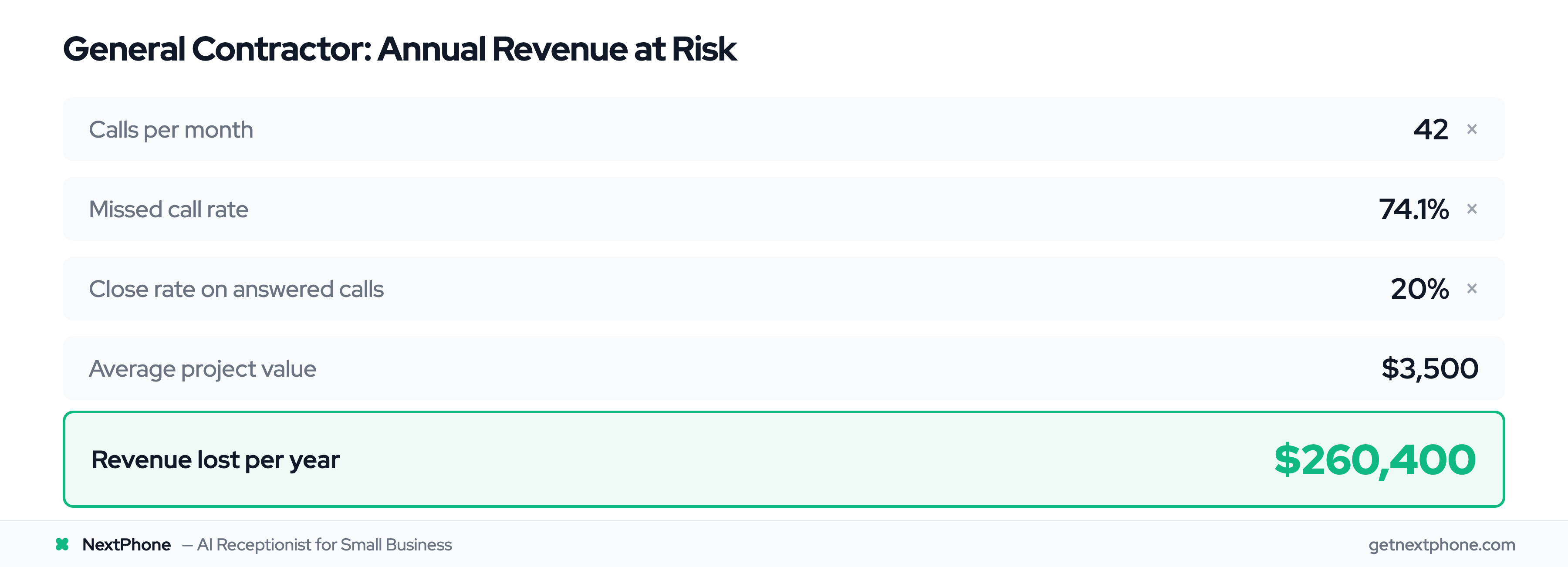
Your numbers:
- 42 calls/month (average from our data)
- 74.1% missed call rate
- 20% close rate (industry conservative estimate)
- $3,500 average project value
Calculation: 42 calls/month × 74.1% missed = 31 missed calls per month
31 missed calls × 20% close rate = 6.2 jobs lost per month
6.2 lost jobs × $3,500 = $21,700 lost per month = $260,400 lost per year
NextPhone cost: $199/month = $2,388/year
Net gain: $260,400 - $2,388 = $258,012/year captured ROI: 10,819% return
Even if you only capture 10% of those currently-missed calls (very conservative), that's $26,040 in new revenue vs. $2,388 cost = 991% ROI.
Example 2: Emergency Services (HVAC/Plumbing)
Let's focus just on emergency calls—the high-margin work that can't wait.
Your numbers:
- 42 calls/month average
- 6.2% are emergencies (from our data)
- 74.1% currently go unanswered
- $1,200 average emergency job
Calculation: 42 calls/month × 6.2% emergencies = 2.6 emergency calls/month
2.6 × 74.1% missed = 1.9 missed emergencies per month
1.9 missed emergencies × $1,200 = $2,280 lost per month in emergency work = $27,360 lost per year
Just capturing emergency calls alone: $27,360 revenue gained - $2,388 NextPhone cost = $24,972 net ROI from emergencies only: 1,146%
And that's just emergencies. You're also capturing quote requests, scheduling calls, and callbacks on top of that.
Example 3: High-Volume Business (Roofing)
Roofing contractors in our study averaged 608 calls over 7 months (87 calls/month).
Your numbers:
- 87 calls/month
- 76.6% missed (roofing-specific rate from our data)
- 10.6% are quote requests (roofing-specific from our data)
- $15,000 average roof project
- 15% close rate on quotes (conservative)
Calculation: 87 calls/month × 76.6% missed = 66.7 missed calls per month
66.7 missed × 10.6% are quotes = 7.1 missed quote requests per month
7.1 quote requests × 15% close rate = 1.1 projects lost per month
1.1 projects × $15,000 = $16,500 lost per month = $198,000 lost per year
Even at a very conservative 5% capture rate (you only win back 1 in 20 currently-missed calls): $198,000 × 5% = $9,900 gained - $2,388 cost = $7,512 net Conservative ROI: 415%
At a more realistic 20% capture rate: $198,000 × 20% = $39,600 gained - $2,388 cost = $37,212 net Realistic ROI: 1,659%
42 calls → 31 missed (74.1%) → 6 would've hired (20%) → $21K/month lost → $260K/year lost → vs. $199/mo NextPhone → ROI: 10,819%
Your ROI Calculator
Want to calculate your specific numbers?
- How many calls do you get per month? (Check your phone bill or make an estimate)
- What percentage do you miss? (Be honest—if you're on job sites all day, probably 60-80%)
- What's your average job value? (Small service calls to big projects—pick a middle number)
- What percentage of callers would hire you? (15-25% is realistic for most trades)
Plug into formula: (Your calls × % missed × % close × Avg job) - $2,388 = Your annual gain
For almost every small business, the math works. You need to capture literally ONE additional job per year to break even. Everything else is profit.
See how contractors use AI receptionists →
How to Implement AI Customer Service
You don't need to be technical. Setup takes hours, not months.
Step 1: Choose Your Platform (What to Look For)
Not all AI customer service platforms are the same. Here's what to prioritize:
Voice AI, not just chat: If customers call you (vs. messaging on your website), you need phone-based AI. Chatbots don't help when someone's dialing your number.
Easy phone integration: Should work with your existing phone number. Either forward your current number or port it directly. No new phone system required.
Transparent pricing: Flat monthly fee, not per-minute charges. You need predictable costs.
Human handoff capability: Must be able to transfer calls to you immediately for emergencies. If it can't route to a human, it's just fancy voicemail.
Calendar integration: Should sync with Google Calendar, Outlook, or Apple Calendar to book appointments automatically.
No long-term contracts: Month-to-month service means you can cancel if it doesn't work. 12-month contracts lock you in.
For home services, medical offices, legal practices—anywhere calls are your primary contact method—voice AI is essential.
Step 2: Set Up Your Phone Integration
Most platforms make this simple:
-
Option A: Call forwarding
-
Platform gives you a phone number
-
Forward your existing business line to that number
-
Calls go to AI first, route to you if needed
-
Setup time: 5 minutes
-
Option B: Number porting
-
Transfer your existing business number to the platform
-
Customers call the same number they always have
-
No confusion, seamless transition
-
Setup time: 1-2 hours (mostly waiting for carrier)
-
Option C: New number
-
Get a new number from the platform
-
Use for specific purposes (after-hours line, quote requests)
-
Keep your main line as-is
-
Setup time: Instant
Most businesses choose call forwarding first (test it out), then port their number once they're confident it works.
Step 3: Train the AI on Your Business
The AI needs to know about your business to answer accurately:
Basic information:
- Hours of operation (including holidays, seasonal changes)
- Services offered
- Service area (which cities/neighborhoods you cover)
- Pricing for standard services
- How to reach you for emergencies
Common customer questions: Go through the last 20 voicemails or customer calls. What do people ask about?
- "Do you do residential and commercial?"
- "How much for a standard service call?"
- "Do you work weekends?"
- "How far out are you booking?"
Add these to the AI's knowledge base. It'll answer instantly.
Emergency keywords: Define what constitutes an emergency for your business:
- HVAC/Plumbing: "no heat," "no AC," "flooding," "burst pipe," "gas leak"
- Electrical: "sparks," "burning smell," "no power," "breaker won't reset"
- Roofing: "leak," "storm damage," "tarp needed"
When AI hears these, it routes to you immediately.
Most platforms learn automatically: As AI handles calls, it gets better. First week it might be 80% accurate. By week 4, it's 95%+ because it's learned your specific terminology and customer patterns.
Step 4: Configure Routing Rules
Tell the AI when to handle calls itself vs. when to route to you:
AI handles directly:
- Hours/location questions → Answer from knowledge base
- Pricing for standard services → Give set prices
- Appointment requests → Book in calendar if slot is open
- Callback requests → Take message with contact info
Route to you immediately:
- Emergency keywords detected → Transfer to your phone within seconds
- Customer specifically asks for you by name → Transfer
- Angry/frustrated customer detected → Transfer to human
Take message for callback:
- Complex quote requests → Capture all details, you call back
- Technical questions requiring expertise → Get info, you follow up
- Billing/payment questions → Note the issue, you handle
You can adjust these rules anytime. Start conservative (route more to you) and expand AI handling as you get comfortable.
Step 5: Test and Refine
Before going live:
Test calls: Call your number from your cell phone, run through scenarios
- Ask about hours
- Request an appointment
- Say it's an emergency
- Ask a complex question
Check routing: Make sure emergencies transfer correctly, messages come through clearly, appointment bookings work
Adjust knowledge base: If AI says "I don't know" to a common question, add it to the knowledge base
Monitor first week: Review every call. See what worked, what didn't. Refine.
Typical timeline:
- Day 1: Setup and phone integration (1-2 hours)
- Day 2-3: Train AI on your business (2-3 hours total)
- Day 4-5: Test with real calls, monitor closely
- Week 2: Fully operational, just occasional tweaks
Most NextPhone customers are handling real calls within the first day. Full confidence usually comes by week 2.
1. Choose platform → 2. Connect phone → 3. Train AI → 4. Set routing rules → 5. Test & launch
According to Gartner's research, 85% of customer service leaders will explore or pilot conversational AI in 2025. The businesses that implement now have a first-mover advantage while their competitors are still missing calls.
How NextPhone Solves This for Home Services Businesses
NextPhone was built specifically for contractors, plumbers, HVAC techs, electricians, and roofers—businesses where you're on job sites, hands are dirty, and phone calls are your lifeline.
Built Specifically for Contractors and Home Services
We analyzed 130,175 actual contractor calls to build NextPhone. We know exactly what your customers ask about, how they describe problems, and what constitutes an emergency in your industry.
The AI understands home services language:
- "My pipe burst" → Emergency, route immediately
- "I need an estimate" → Quote request, capture details for callback
- "How much to install a 50-gallon water heater?" → Pricing question, AI can answer if you've provided rates
- "Can you come today?" → Urgency, route to human for judgment call
It's not generic enterprise AI trying to serve everyone. It's purpose-built for trades.
The Hybrid Approach in Action
Here's a real scenario from a plumber using NextPhone:
Monday, 2:15 PM: Customer calls asking about service area.
- AI answers: "Yes, we service all of [County]. Would you like to schedule an appointment?"
- Customer books Wednesday 10 AM
- Appointment appears in plumber's Google Calendar
- Plumber never interrupted from current job
Tuesday, 11:47 PM: Homeowner's water heater starts leaking, flooding garage.
- AI answers, detects "leak" and "water everywhere"
- Immediately routes to plumber's cell phone
- Plumber answers, quotes emergency rate, schedules for 7 AM
- $1,800 emergency job captured that would've gone to whoever answered at midnight
Wednesday, 3:30 PM: Customer wants quote for whole-house repipe, complex situation.
- AI takes detailed message: house age, current piping type, number of bathrooms, customer's budget concerns
- Sends summary to plumber
- Plumber calls back at 5 PM during drive home, books site visit
- Complex sale handled properly, AI knew its limits
Friday, 9:22 AM: Robocall about "vehicle extended warranty."
- AI identifies as spam, blocks automatically
- Plumber never heard about it, no interruption
That's 4 calls. Only 1 required the plumber's attention (the emergency). The rest were handled or filtered. Plumber focused on actual work, customers got better service.
NextPhone handles 45,000+ customer calls daily across our customer base. We see every scenario your business faces.
Simple, Transparent Pricing
$199/month. Unlimited calls. That's it.
No setup fees. No per-minute charges. No contract. Cancel anytime.
Includes:
- AI answering for unlimited calls
- Calendar integration (Google, Outlook, Apple)
- Message summaries via email/SMS
- Emergency routing to your phone
- Spam filtering
- Call transcripts and logs
- 24/7 support
Setup takes 1-2 hours. Most contractors are live the same day.
Screenshot showing AI-handled calls, messages taken, emergency calls routed
Based on our analysis of 45 contractors, NextPhone captures an average of $189,068 in currently-missed opportunities annually. At $2,388/year cost, that's a 7,823% average ROI.
The contractors winning in 2026 aren't the ones with the biggest trucks or fanciest tools. They're the ones who answer every call.
Frequently Asked Questions
How accurate is AI customer service?
Modern AI customer service platforms achieve 85-95% accuracy for routine inquiries like hours, pricing, and scheduling. The key is training the AI on your specific business—generic AI struggles, but industry-specific systems (like NextPhone for contractors) perform much better because they understand your terminology. The best systems also know their limitations and route complex questions to humans rather than attempting to answer and potentially getting it wrong.
Will AI customer service replace my staff?
No. The hybrid approach is about augmentation, not replacement. AI handles routine calls (60-80% of total volume) so you or your staff can focus on the complex 20-40% that needs human judgment, expertise, or relationship building. In our data, 25.4% of calls explicitly requested callbacks—customers still value human interaction for important matters. AI just makes sure you never miss the call in the first place, and that simple questions get answered instantly without interrupting you.
How much does AI customer service cost for small businesses?
AI customer service for small businesses typically ranges from $99-500/month depending on features and call volume. Compare that to a full-time receptionist at $35,000/year ($2,916/month) or traditional answering services at $300-800/month with per-minute fees. NextPhone costs $199/month with unlimited calls and no hidden fees. View NextPhone pricing →
Can AI handle complex or angry customers?
AI excels at routine questions but struggles with complex troubleshooting and emotional situations. That's why hybrid is essential—AI detects frustration or complexity and immediately routes to a human. For example, NextPhone's AI recognizes emergency language ("flooding," "no heat," "sparks") and routes those calls to your phone within seconds rather than trying to handle them. Angry customers get transferred immediately because empathy and judgment are human skills.
How long does it take to implement AI customer service?
What industries benefit most from AI customer service?
Any business with high call volume benefits, but it's especially valuable for home services (contractors, plumbers, HVAC, electricians, roofers, painters) where you're often on job sites and can't answer your phone. Our analysis of 130,175 calls from 45 contractors shows 74.1% of calls go unanswered—that's a massive opportunity. Time-sensitive businesses (emergency services, medical offices, legal practices) also benefit since AI ensures urgent calls get immediate attention even at 2 AM. Learn more about AI receptionists for contractors →
Do customers get frustrated talking to AI?
It depends entirely on implementation. Gartner found 64% of customers don't want AI, but that's because many companies use bad AI with infinite loops and no human escape option. Good AI is transparent (tells customers it's AI), solves simple questions instantly, and offers quick smart forwarding for anything complex. When done right with AI and smart forwarding, customers actually prefer it because they get faster answers to routine questions (no waiting) and can still reach you for important issues. The key is not trapping them in an AI maze.
Start Capturing Every Customer Call
AI customer service isn't just for enterprises with million-dollar budgets anymore. Small businesses are using it to answer calls they'd otherwise miss, capture leads 24/7, and compete with bigger competitors—all without hiring full-time staff or paying $3,000/month for live answering services.
The businesses winning in 2026 aren't the ones with the biggest marketing budgets. They're the ones answering every call—at 9 AM when they're with a customer, at 3 PM when they're on a roof, at 11 PM when a homeowner's pipe bursts. The ones losing are sending customers straight to voicemail while they're on job sites, with patients, or trying to have dinner with their families.
In our analysis of 130,175 calls, we found that 74.1% of customer calls go unanswered. That's 96,460 potential customers who called, got no answer, and hired someone else. At an average loss of $189,068 per contractor per year, the cost of doing nothing is enormous.
AI customer service—done right with the hybrid approach—solves this. You get 24/7 coverage, instant answers to routine questions, emergency routing to your phone, and perfect message capture for complex requests. All for less than you'd pay a part-time employee for one week of work.