
Introduction
It's 1 AM. A homeowner has a burst pipe flooding their basement. They're calling 5 plumbers—first to answer gets a $1,200 emergency job. Your phone rings... and goes to voicemail. By morning, your competitor already finished the job.
This scenario plays out thousands of times daily. Industry research shows home services contractors miss 60-80% of incoming calls. That's not just lost convenience—it's lost revenue. With 6.2% of calls being emergencies and 25.4% requesting callbacks, every missed call could be your next customer... calling your competition instead.
This guide shows exactly what virtual receptionist services are, how they work, what they cost, and whether they'll make or lose you money. No sales pitch—just real data from thousands of contractor calls, transparent pricing, and honest ROI calculations so you can make the right decision for your business.
What Is a Virtual Receptionist Service?
A virtual receptionist service is professional call answering for your business, handled remotely by live agents, AI virtual receptionist technology, or both. Unlike traditional answering services that simply take messages, virtual receptionists actively manage your calls—scheduling appointments, routing emergencies, answering common questions, and qualifying leads.
Think of it as having a receptionist, but without the desk in your office.
How It Differs from Traditional Answering Services
Traditional answering services are passive. Someone picks up, takes a message, and hangs up. You get a notification, then you call back (maybe).
Virtual receptionists are active. They follow your business rules to actually handle the call:
- Schedule appointments directly into your calendar
- Route emergency calls to your mobile immediately
- Answer frequently asked questions from your knowledge base
- Qualify leads by asking budget, timeline, and service needs
- Filter spam calls automatically (7% of calls are robocalls)
The difference matters. When 7.7% of customer calls are scheduling requests, you want those booked immediately—not sitting as messages you'll get to tomorrow.
Three Types: Human, AI, and Hybrid
Human virtual receptionists are live agents working remotely, answering your calls from call centers. They're highly personalized, empathetic, and flexible. Cost: $300-$2,000 per month depending on call volume.
AI virtual receptionists use conversational AI to understand and respond to callers. They answer instantly, never sleep, and handle unlimited volume. Cost: $50-$300 per month for most small businesses.
Hybrid virtual receptionists combine both. AI handles routine calls (60-70% of volume), while humans back up complex situations. This is becoming the industry standard because you get AI's efficiency with human judgment when it matters. Cost: $199-$500 per month.
According to industry research, 4.6 million businesses globally use virtual receptionist services, and 80% of customers report positive experiences with AI receptionists.
Real-World Example: A Day in the Life
Here's how it works for an HVAC contractor:
9 AM: Customer calls asking about service hours. AI answers: "We're open Monday through Friday, 8 AM to 6 PM, and Saturday 9 AM to 3 PM. Can I schedule a service call for you?"
2 PM: Homeowner calls: "My AC just died, it's 95 degrees, I need help today!" AI detects urgency keywords, immediately texts the on-call technician, and transfers the call.
11 PM: Someone calls asking about furnace tune-up pricing for next month. AI provides pricing, checks the calendar, and books an appointment for the following Tuesday at 10 AM. Customer gets a confirmation text. Contractor wakes up to a booked job.
The virtual receptionist market is growing rapidly—valued at $3.85 billion in 2024 and expected to reach $9 billion by 2033. Small businesses are realizing what enterprise companies have known for years: you can't afford to miss calls.
The Problem: What Missing Calls Costs Your Business
Every unanswered call is a potential customer choosing your competitor. For home services businesses, the math is brutal.
Industry Data: How Many Calls Contractors Actually Miss
Let's start with the hard truth. Industry research shows contractors miss 60-80% of incoming calls, with the average miss rate at 74.1%.
You read that right. Three out of every four calls go completely unanswered.
Why? You're on a job site. You're on a ladder. You're hands-deep in a repair. You're with another customer. You're at lunch. You're asleep. The call rings four times and goes to voicemail.
For the average contractor receiving 42 calls per month, that's 31 missed calls. That's 31 potential customers you never spoke to.
The True Cost of Missed Opportunities
Let's break down what those 31 missed calls actually represent:
6.9% are quote requests. Industry research on home services calls shows nearly 7% of callers are actively requesting estimates. That's 2.1 quote requests per month going straight to voicemail for the average contractor.
At a $3,500 average project value and a conservative 20% close rate, you're losing $1,470 per month from missed quote requests alone.
25.4% explicitly request callbacks. Industry data reveals one in four customers leaves a message asking you to call them back. How many of those callbacks actually happen? If you're honest, maybe half. The rest fall through the cracks, lost in a pile of sticky notes or forgotten voicemail notifications.
6.2% are true emergencies. These are "pipe burst," "no heat," "electrical sparking" calls that can't wait. Emergency jobs average $1,200 because of urgency premiums and after-hours rates. When someone has a basement flooding at 9 PM, they're calling contractors until someone answers. If you're not that someone, you just lost a $1,200 job to whoever picked up first.
15.9% contain urgency language. Phrases like "ASAP," "urgent," "today," or "emergency" appear in nearly one out of six calls. These aren't "call me back next week" leads. They're customers who need help now and will hire whoever responds fastest.
According to research on lead conversion timing, following up within the first minute of contact increases lead conversion rates by almost 400%. Every minute a potential customer waits reduces conversion probability by 4%.
Here's the reality: customers call 3-5 contractors. The first one to answer gets the job 40% more often than the others.
Why "I'll Call Them Back" Doesn't Work
You might be thinking, "I check my voicemail and return calls." Great. But by the time you do:
The emergency is handled. Someone with flooding doesn't wait 4 hours for a callback. They call the next plumber, who answers, and book them.
The quote request moved on. Homeowners researching roof repairs called five roofers. Three answered immediately and scheduled estimates. You called back 2 hours later. Guess who's getting those estimate appointments?
The callback request forgot about you. "Hi, this is Joe returning your call from this morning" only works if they're still interested. If they already booked someone else, your callback is pointless.
A 27% increase in lead conversion happens when callers speak with a live person versus going to voicemail. The difference isn't small. It's the difference between a thriving business and wondering why you're not getting enough jobs.
The After-Hours Revenue Gap
Here's what most contractors don't realize: the most valuable calls often happen when you're not working.
Industry data shows 6.2% of calls are emergencies. Many of these happen outside business hours—pipes burst at midnight, AC dies on Sunday afternoon, power goes out during a storm.
For a contractor getting 42 calls monthly, that's 2.6 emergency calls. If 90% happen after hours (and you're not answering), you're missing 2.3 emergency jobs per month at an average $1,200 value.
That's $2,760 per month in high-margin emergency revenue walking out the door because your business hours are 9-5 but customers have emergencies 24/7.
Real example from industry research: "Needs emergency AC repair, no cooling in 95 degree weather." This call came in at 8 PM on a Saturday. The first HVAC company to answer got a $3,500 emergency call-out. Everyone else got nothing.
How Virtual Receptionist Services Work
You're probably wondering: if I'm not answering the phone, how does a virtual receptionist actually handle my business calls? Let me walk you through the mechanics.
The Call Flow: What Happens When Someone Calls
Here's the step-by-step process:
Step 1: A customer calls your business number. Instead of ringing your personal phone (which you might not be able to answer), it forwards to your virtual receptionist service.
Step 2: The virtual receptionist answers within 2-3 rings—typically under 10 seconds. For AI systems, the answer is instant.
Step 3: The caller hears your customized greeting. Example: "Thank you for calling ABC Plumbing, this is Sarah. How can I help you today?"
Step 4: The receptionist follows your script to handle the call based on what the customer needs.
It's that simple from the customer's perspective. They called your number, someone professional answered, and their question gets resolved.
Call Screening and Smart Routing
Not all calls are equal. Virtual receptionists use intelligent routing to handle calls differently based on urgency and type.
Spam filtering: Industry research shows 7% of contractor calls are spam or robocalls. AI systems detect these automatically (caller ID patterns, known spam numbers, robotic voices) and block them. You never hear these calls.
Urgency detection: When a caller says "emergency," "urgent," "flooding," or "ASAP," the system flags it. According to industry data, 15.9% of calls contain urgency language. These calls get routed differently—often immediately transferred to your mobile phone with a text alert.
Service type routing: Some businesses have multiple service lines. A general contractor might route plumbing calls to their plumber and electrical calls to their electrician. The receptionist asks a qualifying question—"What type of service do you need?"—and routes accordingly.
Business hours vs. after-hours: Different protocols apply. During business hours, routine calls might be transferred to your office. After hours, only emergencies get transferred while routine calls are scheduled for callback the next business day.
According to industry data, over 80% of contact centers have integrated at least one virtual assistant to handle this type of intelligent routing.
Appointment Scheduling and Calendar Integration
Here's where virtual receptionists really shine: they don't just take appointment requests, they book them.
7.7% of calls are scheduling or appointment requests according to industry research. For a contractor getting 42 calls monthly, that's 3-4 appointment requests.
The virtual receptionist integrates with Google Calendar, Outlook, or industry-specific tools like ServiceTitan, Housecall Pro, or Jobber. When someone calls asking for an appointment:
Receptionist: "I can check availability for you. Are you available Tuesday between 2-4 PM?"
Caller: "Yes, 2 PM works."
Receptionist: "Perfect, I've scheduled you for Tuesday, March 12th at 2 PM. You'll receive a confirmation text and email with the details."
The appointment is in your calendar, the customer has confirmation, and you didn't touch your phone. This is particularly valuable during busy season when you're back-to-back with jobs and can't stop to manually schedule calls.
Message Taking and Callback Management
For calls that can't be scheduled or routed immediately, virtual receptionists take detailed messages.
But here's the key difference from regular voicemail: context and organization.
Industry data shows 25.4% of callers explicitly request callbacks. That's one in four calls. Without a system, these get lost. With a virtual receptionist, every callback request goes into your dashboard with:
- Caller name and contact info
- Reason for calling
- Best time to reach them
- Urgency level
- Any specific details (project type, timeline, budget if mentioned)
Real example from industry research: "Requested you call back regarding an insurance claim for property damage." That's not just "Joe called." That's actionable context that helps you prioritize which callbacks happen first.
CRM Integration and Lead Capture
Modern virtual receptionist services don't just answer calls—they capture leads in your CRM automatically.
When a quote request comes in, the receptionist asks qualifying questions:
- What service do you need?
- What's your timeline?
- What's your budget range?
- How did you hear about us?
This information automatically creates a lead record in Salesforce, HubSpot, ServiceTitan, or whatever CRM you use. By the time you follow up, you already know:
- It's a $15,000 roof replacement
- They want it done within 2 weeks
- They found you on Google
- They're getting 3 estimates
You're not calling blind. You're calling with enough context to close the deal.
One more benefit: you can track where leads come from. If 40% of your calls mention "found you on Google," you know your SEO is working. If 25% say "saw your truck," you know vehicle wraps are paying off.
Benefits of Virtual Receptionist Services for Contractors
Now that you understand how virtual receptionists work, let's talk about what they actually do for your business.
Never Miss a Revenue Opportunity Again
This is the big one. Remember those numbers from earlier?
- 6.9% of calls are quote requests
- 25.4% request callbacks
- 6.2% are emergencies
When you miss these calls, you lose revenue. When a virtual receptionist captures them, you gain revenue.
Industry research shows that following up within the first minute increases conversion by 400%. When your virtual receptionist answers in 3 rings instead of letting calls go to voicemail, you're dramatically increasing your odds of winning the job.
Real scenario: A homeowner needs a roof estimate after storm damage. They call 5 roofers at 4 PM on a Wednesday. Three roofers have virtual receptionists who answer immediately and schedule estimates for Thursday and Friday. Two roofers miss the call (on job sites) and call back 3 hours later. The homeowner already has 3 estimates scheduled. Guess who gets cut from consideration?
The first three get the opportunity. The last two don't even get on the property.
24/7 Professional Coverage (Including Emergencies)
Your business might operate 9-5, but customer emergencies don't.
Industry data shows 6.2% of calls are true emergencies. For contractors, many of these happen outside normal business hours:
- Pipe bursts at 11 PM
- AC dies during a heatwave on Sunday
- Power outage during a storm at 2 AM
- Water heater leaks Saturday morning
Emergency jobs command premium pricing. The average after-hours emergency job is worth $1,200 compared to $750 for routine daytime service. That's a 60% premium because the customer needs help NOW.
With a virtual receptionist providing true 24/7 coverage, you capture these high-margin calls. The AI or live agent answers, assesses the emergency, and routes it to your on-call phone immediately with context.
You wake up to: "Emergency call transferred at 1:30 AM - basement flooding from burst pipe - customer at 123 Main St - transferred to your mobile."
You take the call, handle the emergency, and earn $1,200. Without 24/7 coverage, that customer calls the next contractor and you never know the call happened.
Improve Customer Experience and First Impressions
Put yourself in your customer's shoes for a moment.
Scenario A: They call your business. The phone rings 4 times. Voicemail picks up with a generic message. They leave their name and number. Maybe you call back in 2 hours. Maybe tomorrow. Maybe never.
Scenario B: They call your business. Someone answers in 2 rings: "Thank you for calling ABC Plumbing, how can I help you today?" Their question gets answered or their appointment gets scheduled. They hang up feeling taken care of.
Which business seems more professional? Which one are they more likely to hire?
First impressions matter. According to ROI research for service businesses, companies using virtual receptionists see a 30% improvement in administrative efficiency and average resolution time drops from 11 minutes to 2 minutes.
Customers notice the difference between a polished, responsive business and a chaotic one-person show where calls go unanswered for hours.
Focus on Your Work, Not Your Phone
Here's a question: How many times have you been interrupted mid-job by your phone ringing?
You're installing a panel, wiring is everywhere, your hands are full, and your phone rings. Do you:
- Stop working (losing productivity and focus)
- Ignore it (potentially missing a customer)
- Answer it unsafely (risking injury)
All three options are bad.
Virtual receptionists eliminate this dilemma. Your phone doesn't ring 15 times per day. The virtual receptionist handles calls. You get a summary of important ones and can call back when you're between jobs or at a safe stopping point.
Industry research shows 31.1% of calls are general service requests that don't require your immediate attention. AI can answer these questions from your knowledge base:
- "What are your service hours?"
- "Do you offer emergency service?"
- "What areas do you cover?"
- "How much does a service call cost?"
You don't need to stop work for these. The receptionist handles them, and you stay focused on the job you're being paid to do.
According to AI automation productivity gains research citing McKinsey, AI automation can increase productivity by up to 40% by removing these constant interruptions.
Scalability Without Hiring Overhead
Your call volume isn't constant. If you're an HVAC contractor, summer is insane and winter is busy. Spring and fall are slower.
If you're a roofer, you get slammed after every major storm and during peak season. The rest of the year is moderate.
Hiring a full-time receptionist means paying for 40 hours per week regardless of call volume. During slow periods, they're underutilized. During peak periods, they're overwhelmed.
Virtual receptionists scale automatically. Whether you get 20 calls this month or 200, the cost stays flat (especially with AI-powered services). No hiring, no training, no managing schedules, no benefits, no severance if business slows down.
You get the coverage you need, when you need it, without the overhead of a full-time employee.
Automatic Spam Filtering and Call Screening
If you're an electrician, you know this pain: 15.5% of your calls are spam. That's the highest spam rate among all trades according to industry research.
Why? Electricians' numbers end up on spam lists more than other contractors. You get bombarded with:
- "Your Google listing needs updating"
- "This is Rachel from Card Services"
- "Your business loan has been approved"
- Robocalls about extended warranties
Industry data shows 7% of all contractor calls are spam or robocalls. For electricians, it's more than double that.
Virtual receptionists filter these automatically. They recognize spam patterns, known spam numbers, and robotic voices. These calls get blocked before ever reaching you.
For an electrician getting 60 calls per month with a 15.5% spam rate, that's 9 spam calls that get auto-blocked. That's 9 interruptions eliminated. That's hours of your time saved monthly.
Types of Virtual Receptionist Services: Human, AI, and Hybrid
Not all virtual receptionist services work the same way. There are three main models, each with different strengths, costs, and ideal use cases.
Traditional Human Virtual Receptionists
These are live agents—real people working remotely—who answer your calls from call centers.
How it works: Your calls forward to a call center where trained agents answer using your business name and script. They handle inquiries, take messages, schedule appointments, and transfer urgent calls.
Pros:
- High personalization and empathy
- Handle nuanced conversations well
- Can think on their feet for unusual situations
- Build rapport with repeat callers
Cons:
- More expensive ($300-$2,000 per month)
- Limited to business hours unless you pay premium for 24/7
- Can still miss calls during peak volume (they're human, finite capacity)
- Quality varies by agent training
Best for: Businesses that need high-touch customer service and can afford the premium cost. Legal practices, medical offices, and service businesses where every caller expects a personal conversation.
AI-Powered Virtual Receptionists
These use conversational AI to understand and respond to callers—essentially a very smart voicemail that talks back.
How it works: Natural language processing allows the AI to understand what callers are asking and respond from your knowledge base. It can book appointments, answer FAQs, route emergencies, and take detailed messages.
Pros:
- True 24/7/365 availability (never sleeps, never takes breaks)
- Instant answer (sub-second response time)
- Handles unlimited volume simultaneously
- Much more affordable ($50-$300 per month)
- Never has a bad day or forgets training
Cons:
- Can struggle with complex, nuanced situations
- May feel robotic if poorly designed
- Requires good training/setup to work well
- Not ideal for highly technical conversations requiring expertise
Best for: High call volume businesses with routine inquiries, after-hours coverage needs, and budget constraints. Home services contractors, retail businesses, and companies where most calls are scheduling or basic questions.
According to Gartner's prediction, by 2029 agentic AI will autonomously resolve 80% of common customer service issues without human intervention. The technology is advancing rapidly.
The AI receptionist market is projected to reach $154.8 billion by 2034 at a 31% compound annual growth rate. And 92% of companies plan to increase AI investment over the next three years.
Hybrid Models: The Best of Both Worlds
This is where the industry is headed: AI handles the routine 60-70% of calls, and humans back up the complex 30-40%.
How it works: AI answers every call and handles straightforward requests:
- "What are your hours?" → AI answers from knowledge base
- "I need to schedule an appointment" → AI books it in your calendar
- "How much does a service call cost?" → AI provides pricing
- Spam call → AI blocks it
For complex situations, the AI seamlessly transfers to a human:
- Angry customer who's frustrated
- Technical question requiring expertise
- Unusual request outside the script
- Caller who asks to speak to a person
Pros:
- Cost efficiency of AI (handles most calls)
- Quality of human judgment when it matters
- Scalability of AI with human safety net
- Best customer experience—fast response + escalation option
Cons:
- Requires good AI training and smooth handoff protocols
- Can be confusing if transition from AI to human is clunky
- More complex setup than pure AI or pure human
Best for: Almost everyone. This is becoming the industry standard because you get 70-80% cost savings from AI handling routine calls, plus the assurance that complex situations get human attention.
According to research citing McKinsey, the industry standard is 70% of routine calls handled by AI systems while complex interactions are managed by trained staff. This hybrid model optimizes both cost and quality.
Which Model Is Right for Your Business?
Here's the reality (not a "decision framework"):
Choose AI. Period. (Except complex medical triage)
"Budget isn't a constraint" - Being able to afford $500-2,000/month doesn't mean you should. AI at $199 delivers 99% caller satisfaction. You're overpaying $3,600-21,600/year for identical experience.
"Every caller expects high-touch" - They expect answers. AI answers in 1 ring vs 15-30 seconds for humans. Across 1,446,980 calls, 99% caller satisfaction with AI.
"Highly specialized (medical, legal)" - Only complex medical triage requires humans. Legal intake? AI screens and routes complex to YOUR phone in under 5 seconds.
"Low volume (under 50 calls)" - At 50 calls, human services cost $350-500 vs AI at $199. Low volume doesn't justify overpayment.
"Hybrid for best of both" - Hybrid = paying for AI ($199) AND humans ($300-400). Total: $500-600/month. The ACTUAL best of both: AI at $199 handles routine and routes complex to YOUR phone. Not to a paid service—to you.
For most home services contractors, hybrid is the sweet spot. Capture every call with AI, escalate the 15-20% that need human judgment, and pay a fraction of traditional receptionist costs.
Virtual Receptionist Pricing: What You'll Actually Pay
Let's talk money. What does a virtual receptionist service actually cost, and what are you getting for that price?
Pricing Models Explained (Per-Minute, Monthly, Hybrid)
Virtual receptionist services use three main pricing structures, and understanding them is critical because the wrong one can blow your budget.
Per-minute billing charges you for every minute the receptionist is on the phone. Rates typically range from $1.50 to $6.00 per minute.
Sounds cheap until you do the math. Average call length is 3-5 minutes. At $3.50/minute and 4 minutes per call, that's $14 per call. If you get 42 calls per month, you're paying $588.
Worse, many per-minute plans round up to 2-minute or 5-minute increments. A 30-second call gets billed as 2 minutes. That adds up fast.
Monthly flat rate charges a fixed fee for a set number of calls or unlimited calls. Examples:
- $199/month for unlimited calls
- $350/month for up to 100 calls
- $500/month for 150-300 calls
This is more predictable. You know your cost upfront and it doesn't fluctuate month to month. Better for budgeting.
Hybrid pricing combines a base fee plus per-call charges. Example: $100 base fee + $3 per call.
This can work for very low call volume (under 20 calls/month), but be careful. If call volume increases, your bill increases proportionally.
Real Pricing Examples from Major Providers
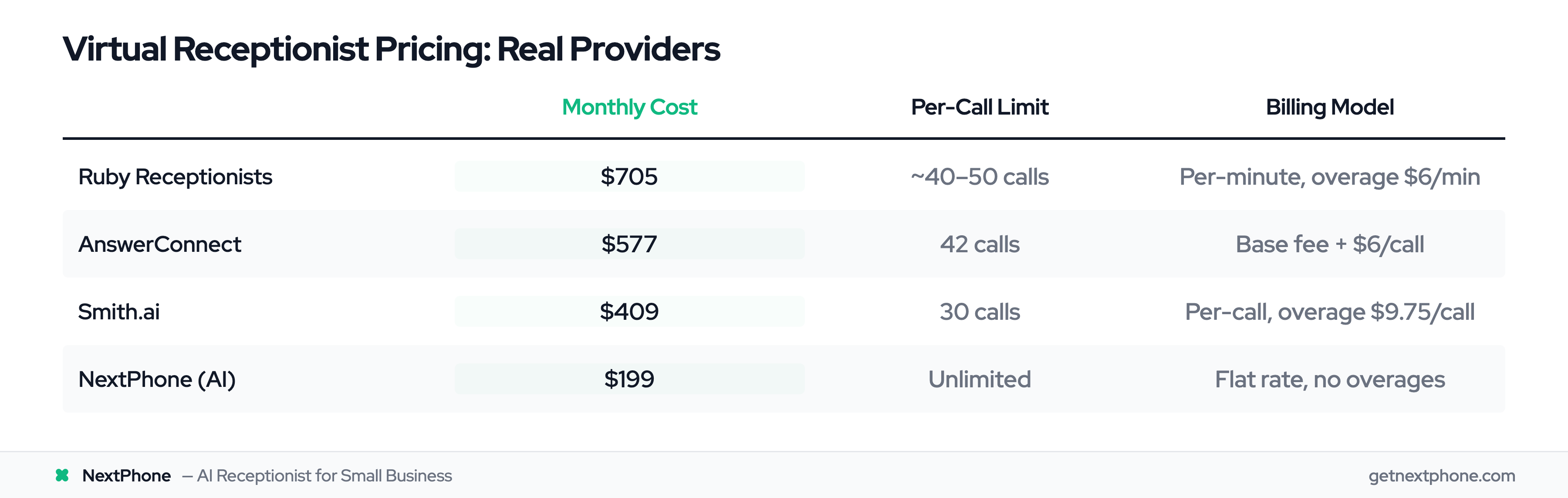
Let's look at what you'd actually pay with popular services:
Ruby Receptionists: $705/month for 200 minutes (about 40-50 calls at 4-5 min each). Overage calls are $6/minute. If you go over your minute allotment, your bill can easily hit $1,000+.
AnswerConnect: $325/month base fee + $6 per call. For 42 calls per month, that's $325 + $252 = $577/month.
Smith.ai: $292.50 for 30 calls, then additional calls at $9.75 each. If you get 42 calls, that's $292.50 + $117 (12 calls × $9.75) = $409.50/month.
NextPhone (AI-powered): $199/month unlimited calls, no per-minute fees, no call limits. Flat rate regardless of volume.
According to industry pricing data:
- AI-powered virtual receptionists: $50-$300/month
- Human-powered virtual receptionists: $300-$2,000/month
- Entry-level services: $95-$250/month
- Mid-range services: $250-$500/month
The pricing spectrum is wide because the services vary dramatically in technology, features, and call capacity.
Hidden Fees and Billing Tricks to Watch For
Before you sign up, watch for these common surprises:
Setup fees: $50-$150 to onboard your business, create scripts, and configure the system. Some providers waive this, others don't.
Overage charges: Per-minute plans often have packages (like 100 minutes for $300), but when you go over, the overage rate spikes. You might pay $3/minute for included minutes and $6/minute for overages.
Holiday and weekend surcharges: Some services charge extra for after-hours, weekend, and holiday coverage. You think you have 24/7 service, then discover weekends cost 50% more.
Integration fees: Want the service to connect to your CRM or calendar? Some providers charge $50-$200 for integration setup.
Contract lock-in penalties: Annual contracts often offer lower rates but charge cancellation fees if you leave early. Read the terms carefully.
Minimum minute requirements: "100 minutes minimum" means even if you only use 50 minutes, you pay for 100.
The most transparent providers offer simple, flat-rate pricing with no surprises. If you're asking "What will this really cost me?" and can't get a straight answer, that's a red flag.
Cost Comparison: Virtual Receptionist vs. In-House Receptionist
Let's put virtual receptionist costs in perspective by comparing to hiring someone.
According to the Bureau of Labor Statistics, the median hourly wage for receptionists was $17.90 in May 2024.
For a full-time receptionist (40 hours/week, 52 weeks/year), that's:
- $17.90/hour × 2,080 hours = $37,232 per year
- $37,232 ÷ 12 months = $3,103 per month
Add benefits (health insurance, payroll taxes, paid time off, workers' comp) and you're closer to $4,000-$4,500 per month all-in.
And here's the kicker: that receptionist works 9-5 Monday through Friday. No nights, no weekends, no holidays. When they're sick or on vacation, calls go unanswered.
Compare that to:
- Traditional virtual receptionist: $300-$800/month with 24/7 coverage
- AI virtual receptionist: $199-$300/month with true 24/7 coverage
You're paying 5-10% of the cost of a full-time employee and getting better coverage.
For a solo contractor or small team, an in-house receptionist makes no financial sense. For a larger operation with 200+ calls per month, you might need both—a receptionist during peak hours and a virtual receptionist for overflow and after-hours.
Real ROI: What Virtual Receptionists Actually Return
Pricing tells you what it costs. ROI tells you whether it's worth it. Let's run the actual numbers.
The Missed Call Revenue Formula
Here's the simple formula for calculating what missed calls cost you:
Missed calls per month × % that are revenue opportunities × Average project value × Close rate = Lost revenue
Let's plug in real numbers from industry research.
Conservative ROI Calculation (Quote Requests Only)
For a general contractor getting 42 calls per month (industry average):
Step 1: Calculate missed calls
- 42 calls/month × 74.1% missed (industry data) = 31 missed calls
Step 2: Identify quote requests
- Industry research shows 6.9% of calls are quote/estimate requests
- 31 missed calls × 6.9% = 2.1 quote requests missed per month
Step 3: Calculate lost revenue
- Average project value: $3,500
- Industry standard close rate: 20%
- 2.1 quotes × $3,500 × 20% = $1,470 per month in lost revenue
Step 4: Compare to virtual receptionist cost
- Virtual receptionist: $199/month
- Lost revenue saved: $1,470/month
- Net benefit: $1,271/month or $15,252/year
That's conservative because it only counts quote requests. It ignores callbacks, emergencies, and general service inquiries that could also convert.
Realistic ROI Calculation (All Revenue Opportunities)
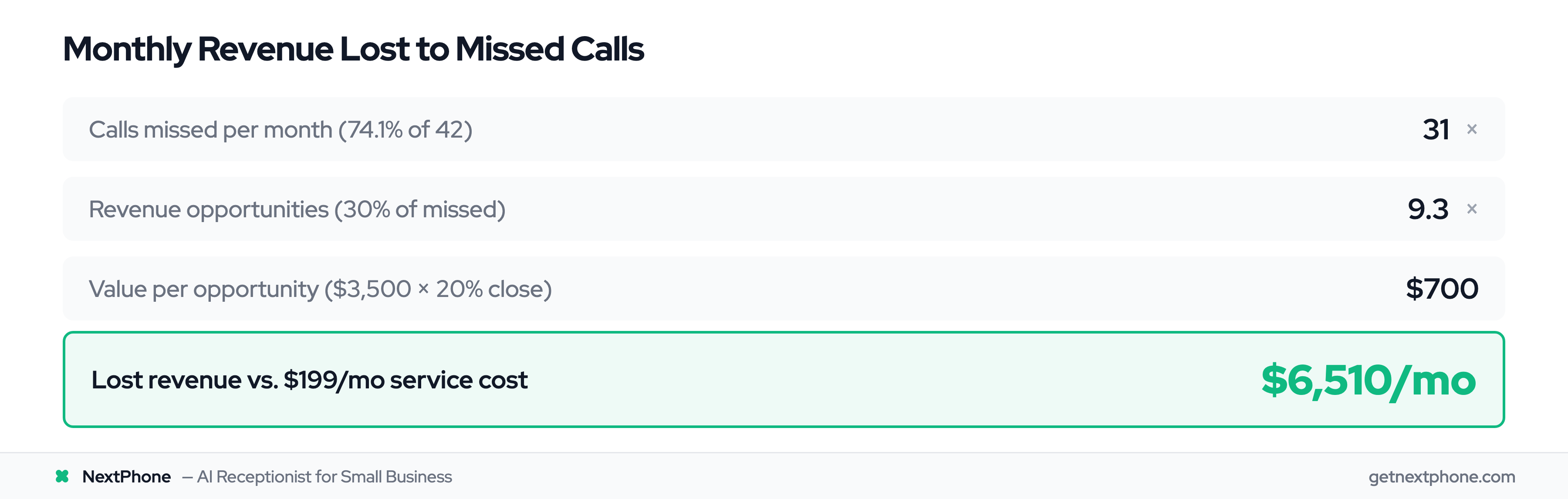
Let's be more realistic about what constitutes a revenue opportunity.
Revenue opportunity calls include:
- Quote requests: 6.9%
- Scheduling/appointments: 7.7%
- Emergencies: 6.2%
- Callbacks (with buying intent): ~10% of the 25.4% callback requests
Total revenue opportunity calls: ~30% of total volume
For 42 calls/month with 74.1% missed:
- 31 missed calls × 30% revenue opportunities = 9.3 opportunities missed per month
Value per opportunity:
- Average project: $3,500
- Close rate: 20%
- Value per opportunity: $3,500 × 20% = $700
Lost revenue:
- 9.3 opportunities × $700 = $6,510 per month
- Virtual receptionist cost: $199/month
- Revenue saved: $6,510/month
- Net benefit: $6,311/month or $75,732/year
- ROI: 3,171% (or 32.7× return on investment)
Capturing even one additional $3,500 job per month pays for the service 17 times over.
Emergency Call Revenue Impact
Let's isolate just emergency calls because they're high-value.
Industry data shows 6.2% of calls are true emergencies. For a contractor with 42 calls/month:
- 42 × 6.2% = 2.6 emergency calls per month
After-hours miss rate: If you're not available 24/7, you miss roughly 90% of these (most emergencies happen evenings, nights, weekends).
- 2.6 emergencies × 90% missed = 2.3 lost emergency jobs per month
Emergency job value: $1,200 average (after-hours premium, urgency pricing)
Lost revenue: 2.3 × $1,200 = $2,760 per month
Emergency calls alone justify a $199/month virtual receptionist service. Everything else is bonus.
Real example from industry research: "Urgent: Porta potty delivery at 6 PM. Caller is waiting and needs to speak with you right away."
That's a same-day emergency rental, probably $400-800 depending on your market. If you miss that call, someone else gets it.
Break-Even Analysis: When Does This Pay for Itself?
The simplest way to think about ROI: how many additional jobs do you need to capture for this to be worth it?
At $199/month for a virtual receptionist service:
If your average job is $500: You need to capture 1 extra job every 2.5 months to break even.
If your average job is $1,500: You need to capture 1 extra job every 7.5 months to break even.
If your average job is $3,500: You need to capture 1 extra job every 17.6 months to break even.
Ask yourself: Will answering every call instead of missing 74% of them result in at least one additional job over the next few months?
If yes, the ROI is there.
For most contractors, the answer is obvious. You're probably losing multiple jobs per month to missed calls. A virtual receptionist captures those, and the service pays for itself many times over.
Industry-Specific Applications: Virtual Receptionists for Different Trades
Virtual receptionists work for all service businesses, but different trades have different pain points. Here's how each benefits.
Plumbing: Emergency Coverage and Callback Management
Plumbers have a higher answer rate than most trades—about 66.7% according to industry data. That sounds good until you realize you're still missing 33% of calls.
Industry research shows 50% of plumbing calls are specific service requests. These aren't "just calling to chat" calls. They're "I have a problem and need a plumber" calls.
Virtual receptionist value for plumbers:
- 24/7 emergency coverage: Burst pipes, water heaters failing, sewage backups happen at all hours. After-hours emergency calls are high-margin work.
- Callback tracking: Even with a 66.7% answer rate, the 33% you miss need systematic follow-up. Virtual receptionists ensure no callback falls through the cracks.
Real example from industry research: "Needs you to call back about an estimate for pigtailing 30 outlets and 28 switches." That's not a small job. That's a detailed estimate request worth following up on.
Electrical: Spam Filtering and Safety
Electricians face a unique problem: 15.5% of their calls are spam—the highest rate among all trades.
Why? Electricians' business numbers end up on more spam lists than other contractors. You get bombarded with robocalls selling everything from "Google listing optimization" to fake business loans.
Virtual receptionist value for electricians:
- Spam filtering: AI-powered receptionists block spam automatically. For an electrician getting 60 calls/month, that's 9 spam calls eliminated. Hours of time saved.
- Safety: You can't safely answer a phone when working with live electrical wiring. Virtual receptionists handle calls while you stay focused and safe on the job.
Industry data shows 24.8% of electrical calls request callbacks. That's one in four. Without a system to track these, they get lost.
Roofing & Siding: Quote Capture for High-Value Projects
Roofers have the highest quote request rate among all trades: 10.6% according to industry data.
For a roofer getting 87 calls per month (average from industry research):
- 87 × 10.6% = 9.2 quote requests per month
With a 76.6% miss rate (higher than average), that's 7 missed quote requests monthly.
Average roof replacement: $15,000
7 missed quotes × $15,000 × 20% close rate = $21,000 per month in lost revenue.
Capturing just ONE of those quotes pays for a virtual receptionist service for 15 months.
Virtual receptionist value for roofers:
- Quote capture: Homeowners call 3-5 roofers after storm damage or when planning a roof replacement. First to answer and schedule an estimate wins 40% more often.
- Seasonal overflow handling: After major storms, call volume spikes 300-500%. Virtual receptionists scale automatically without hiring temporary staff.
Real example from industry research: "Wants an estimate for a new roof. No urgency." The caller says "no urgency," but they're calling NOW. That means they're ready to move forward and comparing roofers. If you don't answer, someone else books that estimate.
HVAC: Seasonal Overflow and 24/7 Emergencies
HVAC contractors experience dramatic seasonal swings. Summer AC emergencies, winter heating failures. Call volume can triple during peak season.
Virtual receptionist value for HVAC:
- Seasonal scalability: Scale from 40 calls/month in spring to 120 calls/month in summer without hiring seasonal staff.
- Emergency coverage: "Needs emergency AC repair, no cooling in 95 degree weather." These calls come in at 9 PM on Saturday during heatwaves. After-hours emergency calls average $1,200+.
Emergency HVAC work is some of the highest-margin in home services. Missing these calls because you're not available 24/7 is leaving serious money on the table.
Painting: Callback Tracking (48% of Calls!)
Painters have the highest callback request rate of any trade: 48.1% according to industry data.
Nearly half of painting calls end with "please call me back." If you're tracking these on sticky notes or relying on memory, most fall through the cracks.
Virtual receptionist value for painters:
- Systematic callback management: Every callback request logged with full context (interior/exterior, square footage, timeline, color preferences if mentioned).
- Estimate scheduling: Most painting jobs require on-site estimates. Virtual receptionists can book these immediately while the customer is still interested.
Real example from industry research: "Wants you to call them back when you have a chance." Vague, right? Without a system, you call back in 2 days and they've already booked someone else. With a virtual receptionist, you call back within 2 hours with context about what they need.
General Contractors: Handling Diverse Service Requests
General contractors get the most diverse call types—everything from "can you install a ceiling fan" to "I need a full kitchen remodel."
Industry data shows 24.9% of GC calls request callbacks, and call types vary wildly, making them hard to script.
Virtual receptionist value for GCs:
- Intelligent routing: Different requests route to different team members (small handyman jobs vs. major renovations).
- Lead qualification: Virtual receptionist asks qualifying questions to understand scope before you call back.
Real example from industry research: "Urgent: Porta potty delivery at 6 PM. Caller is waiting and needs to speak with you right away." That's an immediate-need situation requiring instant routing.
When Virtual Receptionists Work Great (And When They Don't)
I'm going to be honest with you. Virtual receptionists aren't perfect for every business. Let's talk about when they're amazing and when they're challenging.
Ideal Use Cases: When VRs Excel
Virtual receptionists work great when you have:
High call volume (30+ calls per month). If you're only getting 5 calls per month, you can probably just call everyone back manually. But at 30+ calls with a 74% miss rate, you're losing too many opportunities.
Time-sensitive calls. If your customers call 3-5 businesses and hire whoever responds first, you need instant pickup. Virtual receptionists answer in 2-3 rings every time.
After-hours or emergency service needs. Industry data shows 6.2% of calls are emergencies. If your business involves emergency work (plumbing, HVAC, electrical, roofing leaks), 24/7 coverage captures high-margin jobs.
Appointment-based services. If 7.7% of your calls are scheduling requests (industry average), you want those booked immediately, not sitting as voicemail messages you'll get to tomorrow.
Routine inquiries. Industry research shows 31.1% of calls are general service requests. Questions like "What are your hours?" and "Do you serve my area?" can be answered by AI from your knowledge base.
Solo operators or small teams. If you can't afford a $37,000/year receptionist but can't afford to miss calls either, a $199-500/month virtual receptionist is the sweet spot.
Seasonal businesses. If your call volume fluctuates (HVAC in summer, roofing after storms), virtual receptionists scale automatically without hiring and laying off staff.
Challenging Scenarios: When to Be Cautious
Virtual receptionists can struggle with:
Very low call volume (under 10 calls per month). If you're only getting a handful of calls, manually returning them might be more cost-effective than paying $200-500/month for a service.
Highly technical product discussions. If every call requires deep expertise to answer (complex commercial refrigeration troubleshooting, specialized industrial equipment), an AI receptionist won't have the knowledge. Even a human receptionist would struggle without extensive training.
Very niche specialized industries. If you use industry-specific terminology that's uncommon (specialized medical fields, rare technical services), training a virtual receptionist (especially AI) takes significant effort.
High-touch consultative sales. If your typical sale involves a 30-minute phone conversation to understand needs and build a relationship, that's hard to hand off to a receptionist. You might need to take these calls yourself.
Compliance-heavy industries. Medical practices and legal offices have healthcare privacy and attorney-client privilege requirements. Virtual receptionists can handle these, but you need to ensure the provider has proper compliance measures.
How to Mitigate Limitations
If your business falls into some of the "challenging" categories, you're not necessarily out of luck. Here's how to make it work:
Invest in thorough training and detailed scripts. The more specific your script (including answers to your top 20 questions), the better the virtual receptionist performs.
Use a hybrid model with human escalation. AI handles routine calls, but complex questions escalate to a human agent or to you directly. According to research citing McKinsey, 70% of routine calls can be handled by AI while 30% of complex interactions need humans.
Integrate with your CRM for context. If the virtual receptionist can see caller history, previous jobs, and notes, they can provide better, more personalized service.
Regular script updates based on call data. Monitor which questions come up most often and add them to your knowledge base. The system gets smarter over time.
Set clear escalation triggers. Define exactly when calls should be transferred to you: angry callers, complex technical questions, VIP customers, jobs over $10,000, etc.
Start with a trial period. Most services offer 14-30 day trials. Test it. Listen to call recordings. See if it handles your specific call types well before committing long-term.
Real example: An HVAC company uses a virtual receptionist for routing and scheduling. Simple scheduling calls get handled by AI. But when someone describes symptoms ("it's making a loud banging noise and smells like burning"), that call transfers immediately to their service manager who can diagnose and prioritize.
That's the hybrid approach working perfectly.
How to Choose the Right Virtual Receptionist Service
You're convinced you need a virtual receptionist. Great. Now how do you pick the right one?
Key Evaluation Criteria
When comparing services, focus on these factors:
Pricing model: Is it per-minute, monthly flat rate, or hybrid? Which model fits your call volume and budget? Avoid complex billing with hidden fees.
Technology approach: Human, AI, or hybrid? For most contractors, hybrid offers the best balance of cost and quality.
Industry experience: Do they understand contractors specifically? Have they worked with plumbers, electricians, roofers? Industry-specific knowledge matters.
Integration capabilities: Does it connect with your CRM (ServiceTitan, Housecall Pro, Jobber), calendar (Google, Outlook), and phone system?
Call capacity and overflow handling: What happens during peak volume? Do they have limits? Can AI scale automatically?
After-hours availability: Is it true 24/7/365, or are there limited hours/holiday closures?
Customization options: Can you customize scripts, routing rules, and escalation protocols for your specific business?
Response time: Do they answer in 2-3 rings, or is there delay?
Reporting and analytics: Can you see call data, listen to recordings, and understand what customers are calling about?
Questions to Ask Providers
Before signing up, ask:
About pricing:
- "What's your exact pricing model, and are there any additional fees?"
- "Are there setup fees, integration fees, or overage charges?"
- "What happens if I exceed my plan limits?"
- "Can I see a sample invoice so I understand what I'll actually pay?"
About operations:
- "How do you handle after-hours emergency calls specifically?"
- "What's your average answer time?"
- "How are your agents or AI trained on my business?"
- "What happens if you can't answer a question? How do you escalate?"
About technology:
- "Can you integrate with [my CRM, calendar, phone system]?"
- "How long does integration setup take?"
- "Can I listen to call recordings?"
- "How do I update my script or business information?"
About contracts:
- "What's the contract term and cancellation policy?"
- "Is there a trial period or money-back guarantee?"
- "What's the notice period if I want to cancel?"
If a provider gives vague answers or pushes back on transparency, that's a red flag.
Red Flags to Watch For
Complex pricing with many add-ons. If the base price is $99/month but every feature you need costs extra ($50 for CRM integration, $25 for after-hours, $15 for call recording), you'll end up paying $300+.
Long-term contracts with no trial period. Reputable providers offer 14-30 day trials or at least month-to-month contracts initially. If they require 12-month commitment upfront, be cautious.
Vague answers about technology or process. If you ask "How does your AI handle emergency calls?" and get marketing speak instead of a clear answer, they might not have a good solution.
No call recording or reporting. You need to be able to monitor quality. If they don't provide call recordings or data on what customers are calling about, you're flying blind.
Poor reviews about missed calls or quality. Check Google reviews, Trustpilot, or industry forums. If multiple customers complain about missed calls or poor quality, that's a pattern.
Contract and Trial Considerations
Look for month-to-month contracts initially. Once you've tested the service for 3-6 months and you're happy, you can consider annual contracts (which often offer discounts).
Trial periods are essential. 14-30 days gives you enough time to see how the service handles your actual call volume and types.
Understand overage policies before signing. If you have a 100-call/month plan, what happens at call 101? Do you get charged per call, do they stop answering, or does it roll to next month?
Get setup and integration fees in writing. Some providers quote a low monthly price but charge $200-500 in setup fees. Know the total cost upfront.
Ask about scalability. Can you easily upgrade or downgrade your plan as call volume changes? Or are you locked into a tier?
Setup typically takes 3-7 days for virtual receptionist services according to industry standards. If a provider says it takes weeks, they're either understaffed or their onboarding process is inefficient.
How NextPhone Solves This: The Hybrid Advantage
We've talked a lot about what to look for in a virtual receptionist service. Let me show you how NextPhone specifically addresses the challenges we've discussed.
AI-First Approach for Efficiency
NextPhone uses conversational AI to handle the majority of routine calls—the 60-70% that don't require human judgment.
When a call comes in, the AI answers in under 5 seconds (not 2-3 rings, literally under 5 seconds). It understands natural language, so callers can speak normally:
Caller: "Hey, I need someone to come look at my leaky toilet."
NextPhone AI: "I can help you schedule that. Are you available tomorrow between 2-4 PM or would Thursday morning work better?"
The AI has been trained on industry-specific call patterns from thousands of home services calls. It knows how contractors talk, what questions customers ask, and how to route calls appropriately.
Industry research shows 31.1% of calls are general service requests, 7.7% are scheduling, and 7% are spam. That's nearly half of all calls that AI can handle perfectly without any human intervention.
Human Backup for Complex Situations
Here's where NextPhone's hybrid model shines: when the AI encounters something beyond its capabilities, it doesn't fumble through. It transfers to a human agent.
Situations that escalate to humans:
- Caller is frustrated or angry (AI detects negative sentiment)
- Question requires judgment or expertise (AI recognizes it's out of scope)
- Caller specifically asks to speak with a person
- Complex scheduling conflict that needs negotiation
The transition is smooth. The AI passes context to the human agent: "Caller is requesting an estimate for kitchen remodel, mentioned budget of $40K, frustrated that their previous contractor disappeared mid-job."
The human agent picks up with full context, and the caller doesn't have to repeat themselves.
This is the best of both worlds: AI efficiency for routine calls, human empathy for complex ones.
Built Specifically for Home Services Contractors
Most virtual receptionist services are generic—designed for any small business. NextPhone is built specifically for home services: plumbers, electricians, roofers, HVAC, painters, general contractors.
Contractor-specific features:
Emergency routing: The AI detects urgency keywords ("flooding," "burst pipe," "no heat," "sparking," "urgent") that appear in 15.9% of calls. These calls get flagged and routed immediately.
Callback tracking: Remember that 25.4% of calls request callbacks. NextPhone logs every one with full context so you can prioritize which to call back first.
Spam filtering: With 7% of calls being spam (15.5% for electricians), automatic filtering saves hours of interruption monthly.
CRM integration: Built-in connections to ServiceTitan, Housecall Pro, Jobber, and other contractor-specific tools. Calls automatically create leads with project type, timeline, and budget captured during the call.
NextPhone handles 45,000+ calls monthly for home services contractors. The AI has learned from real plumbing emergencies, roof estimate requests, HVAC seasonal surges, and electrical service calls.
It's not generic customer service AI. It's contractor-focused.
Transparent Pricing and Easy Setup
Pricing is simple: $199 per month, unlimited calls. No per-minute fees. No overage charges. No setup fees. Flat rate.
According to industry pricing data, traditional human-powered virtual receptionists cost $300-$2,000/month. AI-powered services range from $50-$300/month, but many have call limits or charge per call.
NextPhone's $199 flat rate means whether you get 30 calls this month or 120 calls, the cost stays the same. No surprises.
Setup takes 3-5 days:
- Day 1: Sign up, forward your business number
- Day 2-3: Customize your script (hours, services, pricing, calendar)
- Day 4: Test calls to ensure everything routes correctly
- Day 5: Go live
No long-term contract required. Month-to-month. Cancel anytime if it's not working for you.
7-day trial available so you can test it with real calls before committing.
According to research citing McKinsey, the industry best practice is 70% AI handling routine interactions and 30% human managing complex ones. NextPhone follows this model precisely.
For a contractor missing 74% of calls and losing $6,510/month in revenue opportunities, $199/month is a no-brainer investment. Capturing just one additional $3,500 job pays for 17 months of service.
Learn more about NextPhone or start your 7-day trial.
Frequently Asked Questions
Can virtual receptionists handle emergency calls?
Yes, modern virtual receptionists are specifically designed for emergency call handling. AI systems detect urgency language like "emergency," "ASAP," "urgent," "flooding," or "no heat" in conversations. Industry research shows 15.9% of calls contain urgency keywords.
When an emergency is detected, the system immediately routes the call to your on-call phone via transfer or sends a priority text alert with caller details. You can set up emergency protocols during setup to define who gets contacted and how.
For example, a call saying "basement flooding from burst pipe" triggers instant notification to your mobile plus call transfer so you can take the call immediately. Industry data shows 6.2% of contractor calls are true emergencies requiring immediate response—virtual receptionists ensure you never miss these high-value, time-sensitive calls.
How quickly do virtual receptionists answer calls?
Industry standard for human virtual receptionists is 2-3 rings, typically under 10 seconds. AI receptionists answer even faster—often in under 5 seconds or instantly.
This speed matters significantly. According to research on lead conversion timing, following up with leads within the first minute of contact increases conversion rates by almost 400%. Every minute a caller waits reduces conversion probability by 4%.
For contractors, speed is competitive advantage. Customers often call 3-5 businesses and hire whoever responds first. If your virtual receptionist answers in 5 seconds while your competitor's call rings 6 times before voicemail, you're already ahead.
What's the difference between a virtual receptionist and an answering service?
Answering services are passive. They take messages: "Bob called about his kitchen sink. Call him back at 555-1234." That's it.
Virtual receptionists are active. They handle calls using your business logic:
- Schedule appointments directly into your calendar
- Route emergency calls to your mobile immediately
- Answer frequently asked questions from your knowledge base
- Qualify leads by asking about budget, timeline, and service needs
- Screen spam calls automatically
Virtual receptionists integrate with your CRM, calendar, and phone system to take action, not just record information.
For contractors, this difference is critical. Industry research shows 7.7% of calls are scheduling requests. You want those booked immediately while the customer is interested, not sitting as messages you'll return tomorrow when they've already booked someone else.
Are virtual receptionists available 24/7?
It depends on the service. AI-powered virtual receptionists offer true 24/7/365 coverage—they never sleep, take breaks, or go on vacation.
Human-staffed services may have limited overnight or holiday hours. Some advertise "24/7" but fine print reveals reduced coverage on weekends or holidays. Read the terms carefully.
For contractors, 24/7 coverage is valuable. Industry data shows 6.2% of calls are emergencies, and many happen outside business hours—pipes burst at midnight, AC dies on Sunday afternoon, power goes out during storms.
Emergency after-hours jobs average $1,200 compared to $750 for routine daytime work. That's a 60% premium because customers need help NOW. If you're not available 24/7, you're missing these high-margin calls.
Best option: AI with smart forwarding—24/7 coverage with complex calls forwarding to your phone when needed. NextPhone offers true 24/7 coverage with AI resolving 90-95% of calls and smart forwarding for the rest.
Can virtual receptionists integrate with my CRM and calendar?
Yes, most modern virtual receptionist services offer integrations with popular business tools. Common integrations include:
CRM systems: Salesforce, HubSpot, ServiceTitan, Housecall Pro, Jobber Calendars: Google Calendar, Outlook, Apple Calendar Communication: Slack, Microsoft Teams Other tools: Zapier for custom connections
Integration enables automatic lead creation—when a quote request comes in, the virtual receptionist creates a lead in your CRM with caller info, service requested, timeline, and budget captured during the conversation.
Calendar integration allows real-time appointment booking. The virtual receptionist checks your availability and schedules appointments directly. Industry data shows 7.7% of calls are scheduling requests—these should go straight to your calendar, not sit as messages.
Setup typically takes a few hours (not weeks) via API connections or Zapier. NextPhone integrates with most contractor-specific tools out of the box.
Without integration, you're manually entering data from call transcripts, which defeats the purpose of automation.
How do virtual receptionists handle calls they can't answer?
This depends on the service type:
AI systems escalate to human agents when they encounter questions beyond their knowledge base, detect frustrated callers, or receive explicit requests to speak with a person.
Human systems follow your escalation protocol: transfer the call to you, take a detailed message with context, or schedule a callback with notes about what the caller needs.
Hybrid systems use a tiered approach: AI → human agent → business owner. Most calls stay in the first tier, some escalate to the second, and only truly complex or urgent situations reach you.
Best practice: During setup, define clear escalation triggers. Examples:
- Technical questions requiring expertise
- Callers expressing frustration or anger
- Jobs estimated over $10,000
- VIP customers
- Situations outside your service area
Most services provide call recordings so you can review edge cases and improve your scripts over time. The system gets smarter as you refine what it can and can't handle.
Is a virtual receptionist worth it for a small contractor?
Yes, if you're missing calls that represent revenue.
Break-even analysis: At $199/month for a virtual receptionist, you need to capture just one additional job to justify the cost. For most contractors, average job value is $1,500-$3,500.
If your average project is $3,500, capturing one extra job pays for 17+ months of service.
Conservative calculation: Industry data shows contractors miss 60-80% of calls. If you get 20+ calls per month and miss the average 74%, you're losing revenue opportunities. Even capturing 2-3 additional quote requests per year justifies the investment.
When it's NOT worth it:
- You get under 10 calls per month (manual callback is feasible)
- You already answer 90%+ of calls yourself
- Your calls aren't time-sensitive (customers don't care about immediate response)
Best fit: Solo contractors and small teams (2-10 employees) who can't justify a $37,000/year full-time receptionist but can't afford to miss calls while on job sites.
Industry research shows capturing one additional $3,500 project from missed calls pays for the service for over a year. For most contractors, that happens within the first month.
NextPhone pricing starts at $199/month with no contracts—try it for a month and measure the results.
Final Thoughts
Virtual receptionist services solve a critical problem for home services contractors: missed calls equal lost revenue. Industry data shows contractors miss 60-80% of calls, losing thousands per month in quote requests, callbacks, and emergency jobs.
Whether you choose human, AI, or hybrid virtual receptionist services, the ROI is clear: capturing just one additional $3,500 project pays for months of service. The key is finding a provider with transparent pricing (no hidden per-minute fees), true 24/7 coverage, and contractor-specific features like emergency routing and spam filtering.
The businesses winning in 2026 aren't the ones with the biggest marketing budgets. They're the ones answering every call. The ones losing are the ones sending customers straight to voicemail while they're on job sites, with other customers, or asleep.
The question isn't whether you can afford a virtual receptionist—it's whether you can afford to keep missing calls while your competitors answer them.
Ready to stop missing revenue opportunities? NextPhone's AI-powered virtual receptionist handles unlimited calls for $199/month with no contracts. Start your 7-day free trial and see how many calls you've been missing.