
Your phone rings at 9 PM. A customer's AC just died in 95-degree heat—they need emergency service NOW. But you're at dinner with your family, and the call goes to voicemail. They don't leave a message. They call the next HVAC company on Google. You just lost a $1,200 emergency job.
Industry research shows small businesses miss 60-80% of incoming calls. Every missed call is a potential customer hiring your competitor. Even worse: across the 1,446,980+ business calls we've answered, approximately one in four callers explicitly requests a callback, and urgent calls using words like "emergency" or "ASAP" rank among the top reasons people call. Without a system to capture these, you're leaving thousands of dollars on the table every month.
This guide explains exactly what chatbot receptionists are, how they work, what they cost, and the real ROI for small businesses. More importantly, you'll see the actual call patterns from customer service data—what types of calls you're missing and how much each one costs you.
What is a Chatbot Receptionist?
The Basic Definition
A chatbot receptionist is an AI-powered phone system that answers your business calls, understands what customers are asking using natural language, handles routine tasks automatically, and routes complex situations to you or your team.
Think of it like hiring an AI virtual receptionist who's been trained on your business, knows your services inside and out, works 24/7 without breaks, and costs a fraction of a human employee.
Here's the key difference from what you might picture when you hear "chatbot": This isn't text-based chat on your website. This is voice—a chatbot receptionist answers your phone calls and has actual conversations with customers.
Chatbot vs AI Receptionist vs Virtual Receptionist: What's the Difference?
The terminology gets confusing fast. Here's what you need to know:
Chatbot receptionist and AI receptionist mean the same thing—AI-powered technology that answers phone calls. The terms are used interchangeably. "AI receptionist" is becoming the more common term in 2025.
Virtual receptionist is a broader term that can mean either a human working remotely (like Ruby Receptionists or AnswerConnect) OR AI technology. When someone says "virtual receptionist," you need to ask: "Is that a real person or AI?"
Some companies combine both. Smith.ai, for example, uses AI for initial call handling with real humans available as backup.
For this guide, "chatbot receptionist" and "AI receptionist" mean the same thing: AI technology that answers your phone.
How Chatbot Receptionists Differ from IVR Systems
If you've ever called a business and heard "Press 1 for sales, press 2 for support," you've dealt with an IVR (Interactive Voice Response) system.
IVR makes customers navigate menu trees. It's rigid and frustrating.
Chatbot receptionists use conversational AI. When a customer calls, they can just talk naturally: "I need to schedule a service call for tomorrow." The AI understands and responds like a human would: "I can help you schedule that. What time works best for you?"
The difference is night and day. IVR feels like talking to a robot. Modern AI receptionists sound natural enough that many customers don't realize they're not talking to a person.
Research shows 85% of customer interactions will be managed without human agents by 2025. We're already seeing this shift—95% of customer interactions are expected to be AI-powered by the end of this year.
Why Small Businesses Need Chatbot Receptionists (The Problem)
The Hidden Cost of Missed Calls
Industry research shows contractors and home services businesses miss 60-80% of incoming calls. Let me show you what that actually costs.
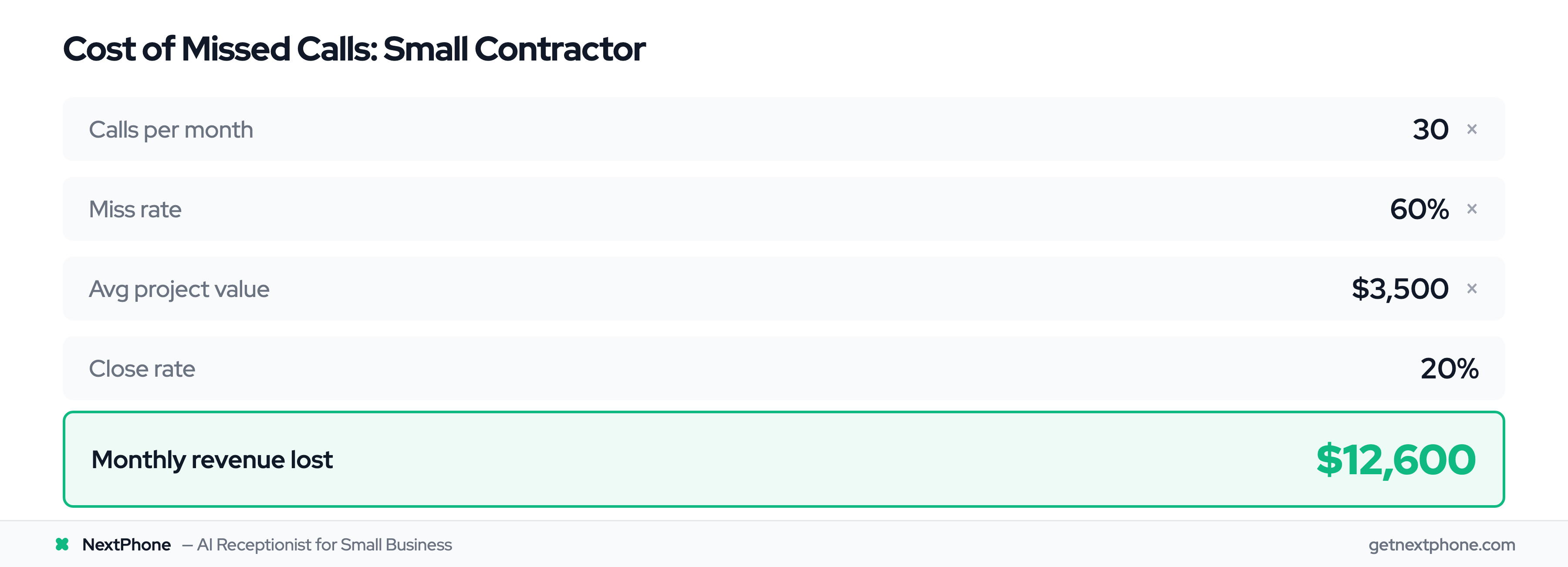
Let's say you get 30 calls per month—a conservative number for most contractors. If you miss 60% (the low end of the range), that's 18 missed calls every month.
If just 20% of those callers would've hired you at an average project value of $3,500, you're losing $12,600 per month. That's $151,200 per year going to competitors because you couldn't answer the phone.
But the damage goes deeper than just lost revenue.
Callback Requests That Fall Through the Cracks
Approximately one in four callers asks for a callback. That's one in four customers saying "Please call me back."
Without a tracking system, a large share of those callback requests never get returned. Think about that: someone specifically asked you to call them back, and they never hear from you.
Each one is a customer who felt ignored. Each one tells their network that you don't care about new business. Each one becomes someone else's customer.
Real voicemail example: "Wants you to call them back when you have a chance." Sounds simple, right? But when you're on a job site covered in drywall dust or under a sink fixing a leak, that message gets lost in the shuffle.
A chatbot receptionist tracks 100% of callback requests automatically. You get a notification with the caller's name, number, what they needed, and when they called. Nothing falls through the cracks.
After-Hours Calls = After-Hours Revenue
Here's something most contractors don't realize: After-hours calls are often your most valuable calls.
Emergencies are a recurring reason people call. These aren't "can you come next week" calls—these are "my pipe burst and water is flooding my basement" calls. Emergency jobs average $1,200 for after-hours or urgent work.
Urgent calls using words like "urgent," "ASAP," "today," or "emergency" rank among the top reasons people call. These customers need help fast, and they're not leaving voicemails. They're calling down the list until someone picks up.
Real emergency voicemail: "Needs emergency AC repair, no cooling in 95 degree weather."
That customer won't wait. They've already called three other HVAC companies by the time you listen to your voicemail the next morning.
A Saturday at 10 PM emergency call is worth more than a Tuesday at 2 PM quote request. But your traditional receptionist goes home at 5 PM, and you can't answer when you're asleep.
The Emergency Call Problem
Let me paint you a specific picture. You're a plumber. You're good at what you do, your customers love you, and you get steady referrals.
But you're on a job. Hands covered in pipe gunk, halfway through replacing a water heater. Your phone rings. You can't answer—you're holding a pipe wrench in one hand and trying not to flood your customer's basement.
The caller? Someone with a $3,500 bathroom remodel project ready to book. They leave a quick voicemail. You call back three hours later when you finish the job.
Voicemail. You try again the next day. No answer. That customer already booked someone else—the plumber who answered when they called.
Another real example from customer service data: "Urgent: Porta potty delivery at 6 PM. Caller is waiting and needs to speak with you right away."
That's not a call that can wait. That's a customer whose event starts in three hours and they're panicking. First company to answer gets the job.
How Chatbot Receptionists Work
Natural Language Processing (NLP): Understanding Human Speech
Here's the tech explanation without the jargon: When a customer calls, the AI converts their speech to text, figures out what they're asking, and generates a response—all in seconds.
Natural Language Processing (NLP) is how AI understands conversational language, not just keywords. A customer doesn't need to say "schedule appointment." They can say "Can I get someone out to look at my roof tomorrow?" and the AI understands they want to schedule service.
Modern AI achieves 85-95% accuracy for routine inquiries after proper training. The key word is "routine"—questions about hours, pricing, availability, service areas, and appointment scheduling.
Here's an example: Customer calls and asks, "Do you service [specific ZIP code]?" The AI checks your service area information from your knowledge base and responds: "Yes, we service that area. Would you like to schedule an appointment?"
The customer gets an instant answer. You get a qualified lead without interrupting your workday.
Intent Detection and Smart Routing
This is where chatbot receptionists get really useful. They don't just answer calls—they figure out what the caller needs and route accordingly.
Intent detection means the AI analyzes what the customer is asking for. Are they scheduling? Asking for a quote? Reporting an emergency? Just have a general question?
Based on that intent, the AI routes the call:
- Emergency keywords detected ("urgent," "ASAP," "emergency," "right now") → Forwards to your cell immediately
- Appointment scheduling → Checks your calendar, books available slot, sends confirmation
- Quote request → Captures details, creates lead in your CRM
- General question → Answers from knowledge base or takes detailed message
- Too complex for AI → Routes to you or team member
Real example: Customer says "My roof is leaking badly, it's pouring rain and water is coming through the ceiling." The AI detects urgency language and forwards the call to your phone within seconds. You answer a live emergency call, not a voicemail from someone who already hired your competitor.
Urgent calls requiring this special routing rank among the top reasons people call. Those are the calls that can't afford to wait.
Integration with Your Business Systems
A chatbot receptionist isn't a standalone tool—it connects to your existing business systems.
Common integrations include:
- CRM systems (Salesforce, HubSpot, Pipedrive): When AI captures a quote request, it creates a new lead automatically with all the details
- Calendar apps (Google Calendar, Outlook): Customer books Tuesday at 2 PM, it appears on your calendar instantly
- Phone systems (any VoIP provider): Works with whatever phone setup you have
- Messaging (SMS, email): Sends you notifications when important calls come in
Integration setup varies by complexity. Calendar connection: Usually minutes. Custom CRM setup: Could take a few hours if you have unusual requirements.
But once connected, everything flows automatically. A customer calls at 11 PM, books an appointment for Thursday morning, and you wake up to a confirmed slot on your calendar. No manual entry required.
The AI + Human Hybrid Model
Here's what most people get wrong: AI isn't meant to replace humans completely. The best approach is hybrid—AI handles routine, humans handle complex.
The data backs this up: AI handles up to 80% of routine tasks and customer inquiries autonomously. That leaves 20-40% for human judgment, empathy, and expertise.
Think of it as a tiered system:
Tier 1 (AI handles): Hours of operation, service areas, basic pricing, appointment scheduling, callback requests, frequently asked questions.
Tier 2 (Human handles): Complex project estimates, technical troubleshooting, complaints or emotional situations, unusual requests outside normal scope.
The AI doesn't try to handle everything. When it encounters something outside its knowledge base, it takes a detailed message and routes to you.
Example: Customer asks about a complex multi-phase renovation involving electrical, plumbing, and HVAC work. That's not a routine question. AI response: "That's a great project—I want to make sure you talk to someone who can give you detailed answers. Can I have [owner] call you back within two hours?"
Customer feels heard. You get their contact info and project details. You call back when you're free to have a real conversation.
Key Benefits of Chatbot Receptionists
24/7 Availability (Never Miss Another Call)
Your receptionist goes home at 5 PM. Live answering services often have limited after-hours coverage. Voicemail is available 24/7, but customers don't leave messages anymore—they call the next company on the list.
AI chatbot receptionists answer every call in 2-3 rings, any time of day or night.
Why this matters for home services businesses: Emergency calls don't follow business hours. Pipes burst at midnight. AC units die on Saturday afternoons. Roofs leak during thunderstorms at 3 AM.
Customer service data shows these after-hours calls are often your highest-value opportunities. Someone with an emergency is ready to pay premium pricing for immediate service. They just need someone to answer the phone.
Even for non-emergencies, 24/7 availability captures leads your competitors miss. Someone gets home from work at 7 PM and wants to schedule that roof repair they've been putting off. They call three roofers. Two go to voicemail. One (you, with AI) answers and books the appointment immediately.
Research shows businesses convert leads 21 times better when responding within five minutes. 51% of customers prefer AI bots when seeking immediate service. Instant answer = instant conversion.
Massive Cost Savings vs Traditional Solutions
Let's talk real numbers.
Traditional full-time receptionist: According to virtual receptionist pricing research, you're paying $45,000-55,000 in base salary plus $15,000-20,000 in benefits (health insurance, payroll taxes, vacation, sick days). Total annual cost: $60,000-75,000.
And they only work 40 hours per week. After-hours calls still go to voicemail.
Live answering service: Traditional services like Ruby Receptionists charge $309/month base plus $5.19 per call. For a small contractor getting 40-80 calls per month, you're paying $4,500-9,600 annually.
Better than a full-time employee, but still expensive—and quality varies wildly depending on which operator answers your calls.
AI chatbot receptionist: Platforms like NextPhone charge $199/month flat rate with unlimited calls. That's $2,388 per year.
Annual savings vs traditional receptionist: $57,612-72,612 Annual savings vs live answering service: $2,112-7,212
Even at the higher end of AI pricing ($300-400/month for premium features), you're still saving $50K+ annually compared to hiring someone.
Instant Response = Better Conversion
Speed matters more than you think. Industry research shows responding within 5 minutes makes you 21 times more likely to qualify and convert a lead.
Think about it from the customer's perspective. They call three contractors:
- Contractor A: Voicemail. They leave a message.
- Contractor B: Voicemail. They don't bother leaving a second message.
- Contractor C: AI answers in 2 rings, asks questions, schedules estimate for tomorrow.
Who gets the job? Contractor C. Every time.
Customers are comparison shopping in real-time. They call multiple companies within minutes. First to respond wins, especially for time-sensitive work.
AI responds in seconds. You get the lead before your competitor even listens to their voicemail.
Scalability Without Hiring
Here's a problem most growing businesses face: Call volume is unpredictable.
Slow week? 15 calls. Busy week? 75 calls. Peak season? 120 calls. You can't hire 0.5 receptionists for slow periods and 3 receptionists for peak season.
AI scales infinitely. Some platforms can handle 100+ calls simultaneously on a single number. It doesn't matter if you get 10 calls or 100 calls—the cost stays flat.
This is huge for seasonal businesses. HVAC companies get slammed during summer heat waves and winter cold snaps. Roofing companies are busy after storms. Pool services peak in spring.
With AI, you handle peak volume without:
- Hiring temporary staff
- Paying overtime
- Missing calls because lines are busy
- Burning out your existing team
Industry research shows 60% of companies now use some form of automation. The businesses that don't are losing calls during their busiest, most profitable periods.
Automatic Spam Filtering
Spam and robocalls get filtered out before they ever ring you. That might not sound like much until you do the math.
Let's say a few slip through in a typical month:
- Three or four spam calls reach your phone
- Each one wastes 2-5 minutes (answering, realizing it's spam, hanging up)
- Total time wasted: 7-17.5 minutes per month
Multiply that across a year: 84-210 minutes wasted on spam. That's 1.4-3.5 hours of your time—worth $70-175 if you bill at $50/hour—completely wasted.
AI chatbot receptionists filter spam automatically. They detect robocall patterns, common spam scripts, and known spam numbers. Real customers get through. Spam gets blocked.
One less interruption. One less irritation. More time for actual work.
What Types of Calls Can Chatbot Receptionists Handle?
Customer service data from thousands of real calls shows exactly what types of inquiries businesses receive. Here's the breakdown and how AI handles each type:
Appointment Scheduling and Calendar Management
Booking or rescheduling an appointment is the single most common reason people call.
Real example: "Wants to schedule service for a leaky toilet, asking about your availability for tomorrow."
AI chatbot handles this completely:
- Customer asks for appointment
- AI checks your connected calendar (Google, Outlook, etc.)
- AI offers available time slots: "I have openings tomorrow at 9 AM, 1 PM, or 3 PM. Which works better?"
- Customer picks 1 PM
- AI books it, adds to your calendar, sends confirmation text to customer
You wake up with confirmed appointments. No phone tag. No double-booking. No manual calendar management.
Quote and Estimate Requests
Requesting a quote or estimate is among the top reasons people call. For home services businesses where average projects run $3,500-15,000, these are your most valuable leads.
Real example: "Wants to discuss a roof estimate and has questions; please call them back."
AI captures critical details:
- What type of work they need
- Property address
- Timeline (urgent vs planning ahead)
- Best contact method
- Any special requirements
This information goes straight into your CRM as a new lead. You call them back with context—you already know what they need before the conversation starts.
Even better: "Wants an estimate for a new roof. No urgency."
Notice the customer said "no urgency," but they're calling NOW. They're ready to move forward. AI captures them immediately instead of letting them call three more roofers while you're busy.
Callback Request Tracking
Here's the big one: approximately one in four callers explicitly asks for a callback. One in four customers is saying "please call me back."
Real examples:
- "Requested you call back at 888-568-0296."
- "Wants you to call them back when you have a chance."
Without a tracking system, plenty of those requests fall through the cracks. You get busy, forget to write it down, lose the scrap of paper, never call back.
AI chatbot receptionists track 100% of callback requests:
- Captures name, number, reason for call
- Creates task in your system
- Sends you notification
- Reminds you if not completed
- Logs when you return the call
No more lost opportunities because a callback request got buried.
Emergency Call Detection and Routing
Emergencies are a recurring reason people call. Urgent calls using words like "urgent," "ASAP," "emergency," "today," or "right now" rank among the top reasons people call.
Combined, that's a large share of your calls where speed matters critically.
Real emergency example: "Needs emergency AC repair, no cooling in 95 degree weather."
That customer isn't waiting for a callback. They need help NOW. They're calling five HVAC companies simultaneously. First one to answer gets the $1,200+ emergency job.
AI detects urgency keywords and routes immediately to your cell phone. Instead of taking a message, it forwards the live call to you within seconds.
You answer emergency calls in real-time while AI handles routine calls. Best of both worlds.
Frequently Asked Questions (Hours, Pricing, Service Area)
A steady slice of every month's calls are repetitive questions AI can answer instantly:
- "What are your hours?"
- "What are your rates?" or "How much do you charge?"
- "What's your service area?"
- "Are you available this weekend?"
These questions waste 5-10 minutes each time you stop work to answer them. Multiply that across dozens of calls per month, and you're losing hours to questions a knowledge base could answer.
AI chatbot responds instantly:
Customer: "What are your hours?" AI: "We're open Monday through Friday, 8 AM to 6 PM, and Saturday 9 AM to 3 PM. Can I help you schedule service?"
Customer: "Do you service [ZIP code]?" AI: "Yes, we service that entire area. What kind of service do you need?"
Instant answers. Customers are happy. You stay focused on the job you're doing.
Key Features to Look For in a Chatbot Receptionist
Not all chatbot receptionists are created equal. Here's what actually matters when evaluating platforms:
CRM and Calendar Integrations
This is non-negotiable. If your chatbot receptionist doesn't integrate with your CRM and calendar, you'll be manually copying information—defeating the entire purpose.
Must-have integrations:
- CRM: Salesforce, HubSpot, Pipedrive, or whatever you use to track leads
- Calendar: Google Calendar, Outlook, Apple Calendar
- Phone system: Should work with any VoIP provider or standard business line
How this works in practice: Customer calls at 11 PM asking for a quote on bathroom remodeling. AI captures: name, number, address, project scope, timeline. Creates new lead in HubSpot automatically. You wake up to a qualified lead ready for follow-up.
Or: Customer wants to schedule service for Thursday. AI checks your Google Calendar, sees you're free at 10 AM and 2 PM, offers both slots, books the 10 AM. It's on your calendar before the call ends.
No manual entry. No double-booking. No forgetting to log the lead.
Multilingual Support
Depending on your market, multilingual support can be a game-changer.
Many modern AI receptionists support 20+ languages and can detect the caller's language automatically. Customer speaks Spanish? AI responds in Spanish. Customer speaks English? AI responds in English.
This is particularly valuable for businesses serving diverse communities. One platform, multiple languages, no need to hire bilingual staff.
Quality varies by language—English and Spanish are typically best supported. If you serve a specific non-English-speaking community, test the AI's capability in that language before committing.
Customizable Call Routing Rules
Generic call routing doesn't work for every business. You need customizable rules.
Examples of custom routing:
- Any call with "emergency" or "urgent" → Forward to owner's cell immediately
- Calls mentioning "quote" or "estimate" → Capture details, create CRM lead, notify sales team
- Calls asking about specific service (like "HVAC repair") → Route to HVAC technician directly
- Calls from existing customers (based on caller ID) → Different greeting than new customers
- After-hours calls → Different protocol (take message vs route to on-call phone)
Set these rules once during setup. The AI follows them forever.
Real example: "Any call mentioning 'leak,' 'burst pipe,' or 'flooding' gets forwarded to my phone immediately. Everything else gets qualified by AI and I call back within 2 hours."
That's a plumber protecting his highest-value emergency calls while letting AI handle routine scheduling and quotes.
Analytics and Reporting
You can't improve what you don't measure. Good chatbot receptionist platforms provide analytics:
- Call volume: How many calls per day/week/month
- Call types: What are people calling about (scheduling, quotes, questions, emergencies)
- Answer rate: What percentage of calls are you capturing vs missing
- Common questions: What are customers asking most frequently
- Peak times: When do most calls come in (helps plan availability)
- Spam blocked: How many spam calls filtered
- Conversion metrics: How many calls turned into appointments or leads
Use this data to optimize your business. If 30% of calls come in after 6 PM, and those are mostly emergencies, you know where your high-value opportunities are.
If customers keep asking the same question the AI can't answer, add that to the knowledge base.
Voice Quality and Natural Conversation
This is harder to evaluate until you hear it, but voice quality matters.
Modern conversational AI sounds natural. Customers feel like they're talking to a real person, not a robot reading a script.
Old-school AI: Robotic, monotone, obvious pauses, can't handle interruptions or clarifying questions.
Modern AI: Natural speech patterns, can handle "um" and "uh" and interruptions, adjusts tone based on context, sounds conversational.
Most platforms offer demo calls or free trials. Test it yourself:
- Call the demo number
- Ask questions naturally (don't follow a script)
- Interrupt mid-sentence
- Ask follow-up questions
- See if it sounds like talking to a person
If it feels robotic or frustrating, customers will hang up. If it feels natural, they'll engage.
Chatbot Receptionist Pricing and ROI
Pricing Models Explained (Flat-Rate vs Per-Minute vs Usage-Based)
Chatbot receptionist pricing typically falls into three models:
Flat monthly rate (most common for small businesses):
- Fixed price regardless of call volume
- Example: $199/month unlimited calls (NextPhone)
- Predictable budgeting, great for businesses with variable call volume
Per-minute or per-call pricing (traditional answering service model):
- Base monthly fee + charges per call or per minute
- Example: Ruby Receptionists $309/month base + $5.19 per call
- Costs fluctuate based on volume, can get expensive during busy periods
Usage-based pricing (less common for AI):
- Pay per conversation or per minute of AI usage
- Example: $0.50 per conversation
- Can be economical for very low volume, expensive at scale
For most small businesses, flat-rate pricing makes the most sense. Your costs stay predictable even during peak season when call volume spikes.
Typical Cost Ranges for Small Businesses
Based on market research, here's what you can expect:
Entry-level: $25-100/month
- Basic features
- May have call limits (like 50-100 calls/month)
- Limited integrations
- Good for very small businesses testing AI
Mid-tier: $100-300/month
- Most popular range for small businesses
- Unlimited or high call limits (500+ calls/month)
- Full integrations (CRM, calendar, phone system)
- Advanced features (multilingual, custom routing, analytics)
- This is where platforms like NextPhone ($199/month) fall
Premium: $300-500+/month
- Enterprise features
- Multiple locations or phone numbers
- Priority support
- Advanced customization
- White-label options
Most home services businesses (contractors, HVAC, plumbers, electricians) fall into the mid-tier range. You need the full feature set, unlimited calls, and integrations—but you don't need enterprise complexity.
Cost Comparison: Traditional vs Live Service vs AI
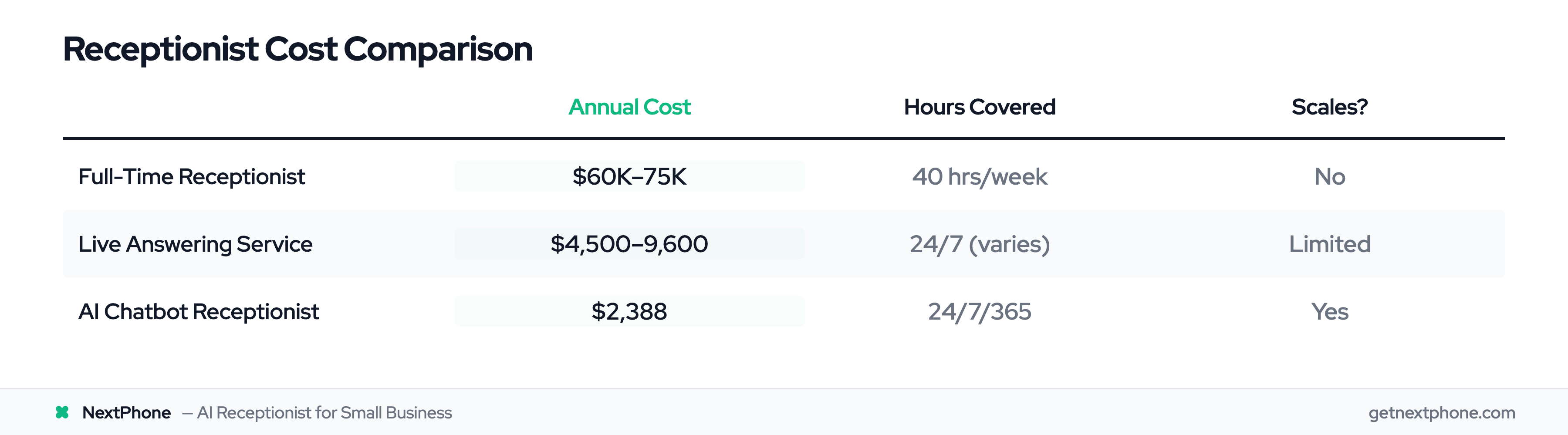
Let's put real numbers to the three options:
-
Option 1: Traditional Full-Time Receptionist
-
Base salary: $45,000-55,000/year
-
Benefits (health insurance, payroll taxes): $15,000-20,000/year
-
Total cost: $60,000-75,000/year
-
Hours covered: 40 hours/week (9 AM - 5 PM)
-
After-hours coverage: None
-
Sick days/vacation: Yes, need backup coverage
-
Scalability: Can handle ~40-60 calls/day maximum
-
Option 2: Live Answering Service
-
Ruby Receptionists example: $309/month base + $5.19/call
-
For 40 calls/month: $309 + $207.60 = $516.80/month = $6,201.60/year
-
For 80 calls/month: $309 + $415.20 = $724.20/month = $8,690.40/year
-
Hours covered: 24/7 (varies by plan)
-
Quality: Inconsistent (depends on which operator answers)
-
Scalability: Costs increase with call volume
-
Option 3: AI Chatbot Receptionist
-
NextPhone example: $199/month flat
-
Unlimited calls
-
Total cost: $2,388/year
-
Hours covered: 24/7/365
-
Quality: Consistent (same AI every call)
-
Scalability: Handle 100+ calls simultaneously, cost stays flat
Annual savings:
- vs Traditional receptionist: $57,612-72,612
- vs Live answering service: $3,813-6,302 (at 40-80 calls/month)
Even if you're currently using voicemail (cost: $0), the ROI comes from captured revenue, not direct cost savings.
Real ROI Calculations for Home Services Businesses
Here's where the numbers get really interesting. Let me show you three real-world scenarios with exact math:
ROI Example 1: Small General Contractor (Conservative Estimate)
Current situation:
- 30 calls per month (small contractor)
- Industry research shows 60% miss rate (conservative estimate)
- 30 × 60% = 18 missed calls per month
Revenue impact:
- Industry average: 20% of callers convert to customers
- Average general contractor project: $3,500
- 18 missed calls × 20% conversion × $3,500 = $12,600/month lost
- Annual lost revenue: $151,200
Chatbot solution:
- NextPhone cost: $199/month = $2,388/year
- Even if chatbot only captures 50% of those missed calls (conservative):
- Recovered revenue: $75,600/year
- Net benefit: $75,600 - $2,388 = $73,212/year
- ROI: 3,067% return
Break-even: Capture just ONE $3,500 job you would've otherwise missed, and you've paid for 17.5 months of service.
ROI Example 2: HVAC Company (Emergency Focus)
Current situation:
- 50 calls per month during peak summer season
- 60% miss rate = 30 missed calls
Emergency call analysis:
- Emergencies are a recurring reason people call
- Say 2 of those 30 missed calls are true emergencies
- Average emergency job (after-hours AC repair): $1,200
- Lost emergency revenue alone: 2 × $1,200 = $2,400/month
- Peak season (4 months): $9,600 lost just from emergencies
Plus regular calls:
- The other 28 missed calls are routine
- 20% conversion × $800 avg service call = $4,480/month
- 4-month peak season: $17,920
Total peak season lost: $27,520
Chatbot solution:
- Cost for peak season: $199 × 4 = $796
- Capture even 70% of missed calls: $19,264
- Net benefit: $18,468 in just 4 months
- Pays for itself with ONE emergency call captured
ROI Example 3: Roofer (High Volume, High Value)
Current situation:
- 87 calls per month (busy season for a roofer)
- Assume 75% go unanswered - you're on a roof, not by the phone
- 87 × 75% = 65 missed calls per month
Quote request focus:
- Assume roughly 1 in 10 of those is asking for a quote
- 55% of businesses say chatbots increase high-quality leads
- 65 × 10% = 6 quote requests missed per month
- Average roof project: $15,000
- Conservative close rate: 20%
- Lost revenue: 6 × 20% × $15,000 = $18,000/month
- Annual lost: $216,000
Chatbot solution:
- NextPhone: $199/month = $2,388/year
- If chatbot captures just 50% of those missed quotes:
- Recovered revenue: $108,000/year
- Net benefit: $108,000 - $2,388 = $105,612/year
- ROI: 4,423% return or 44X investment
The pattern is clear: The math works even with conservative assumptions. Capture a tiny fraction of the calls you're currently missing, and the AI receptionist pays for itself many times over.