
Introduction
Your phone rings. You're up on a roof inspecting storm damage, and a potential customer needs emergency leak repair. Heavy rain is coming tonight. But your hands are full, and the call goes to voicemail. They call the next roofer. You just lost a $3,200 job.
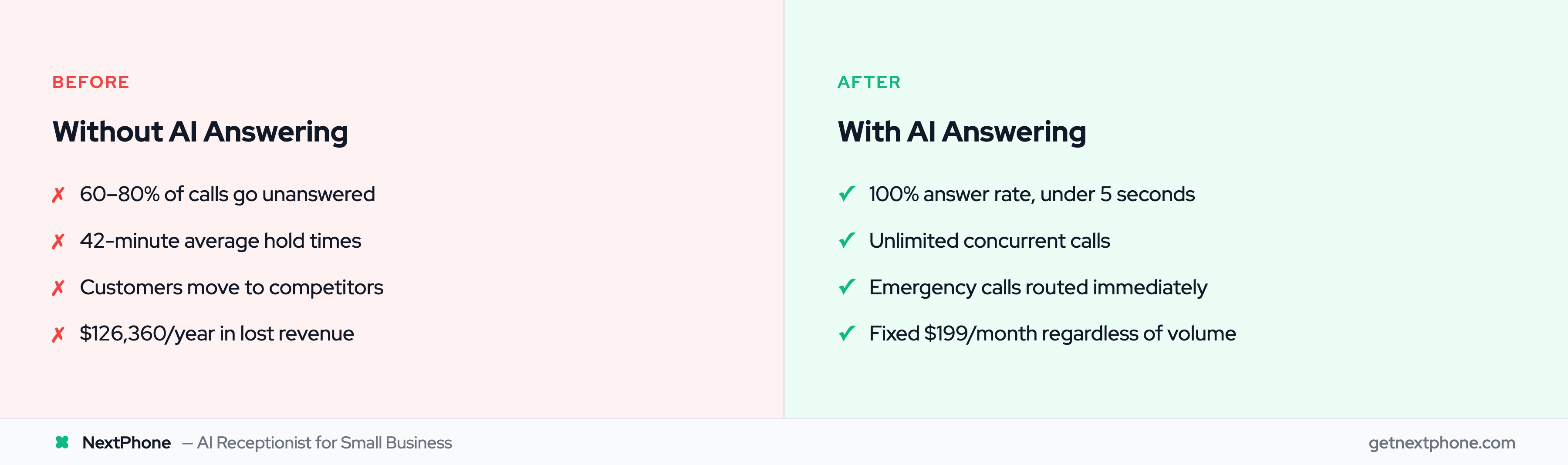
This scenario plays out thousands of times every day across small businesses. Industry research shows home services contractors miss 60-80% of incoming customer calls. Nearly 62% of phone calls made to small businesses are left unanswered, according to research on small business missed calls. Each missed call is a potential customer calling your competitor instead.
AI call answering services are changing this reality. In this guide, you'll learn exactly what AI call answering is, how the technology works, what it costs compared to hiring a receptionist or traditional answering service, and which businesses benefit most. More importantly, you'll see real ROI calculations showing the actual financial impact—not just vague claims about "saving money."
What Is an AI Call Answering Service?
An AI call answering service is an automated system that uses conversational AI to answer your phone calls, understand what customers need, and take action—functioning as an AI virtual receptionist that schedules appointments, routes urgent calls to your phone, or takes detailed messages.
Instead of hiring a full-time receptionist (median wage $17.90/hr = $37,230/year baseline) or paying a traditional answering service $500-800 per month, AI handles your calls 24/7 for a fraction of the cost. 42% of SMBs lose $500+ per month to missed calls.
The Technology Behind It
AI call answering is powered by three core technologies working together:
Natural language processing (NLP) helps the system understand what callers are saying, even if they phrase questions differently. When someone asks "Are you open Saturday?" the AI recognizes this as a question about business hours.
Machine learning allows the system to improve over time by analyzing which responses work and which don't. If customers frequently ask a question the AI struggles with, it can be trained to handle it better.
Voice recognition and text-to-speech convert spoken words to text (so the AI can process them) and convert the AI's responses back to natural-sounding speech.
According to Gartner's 2024 customer service research, 85% of customer service leaders will explore or pilot a customer-facing conversational generative AI solution in 2025. The technology has reached a tipping point.
Types of AI Call Answering Services
Not all AI answering services work the same way. There are three main approaches:
Pure AI systems use 100% automation. These work great for straightforward calls (hours, pricing, basic scheduling) but basic services can struggle with complex or nuanced situations.
Full-featured AI services like NextPhone use advanced AI with emergency routing, CRM integration, and intelligent call handling. They handle 80-90% of calls excellently while routing complex situations appropriately.
Hybrid AI + human services like Smith.ai combine AI for routine calls with human backup for complex situations. More expensive due to per-call human escalation charges.
AI-enhanced traditional services use humans as the primary answering method, with AI tools helping them work faster. This is the most expensive option but works well for industries where every call needs a personal touch.
How AI Differs from Traditional Answering Services
The fundamental difference comes down to availability, scalability, and cost.
Traditional answering services employ real people who answer your calls. They work in shifts, take breaks, and can only handle one call at a time. If you get five calls simultaneously, four callers wait on hold. You pay per minute or per call, so busy months can cost thousands.
AI answering services handle unlimited calls at the same time—no hold times, ever. They work 24/7 without breaks, holidays, or sick days. Your cost stays fixed whether you get 20 calls or 200.
The reality? AI resolves 90-95% of calls autonomously. For the 5-10% requiring your expertise, smart forwarding routes directly to your phone with full context.
AI with Smart Forwarding (How It Actually Works)
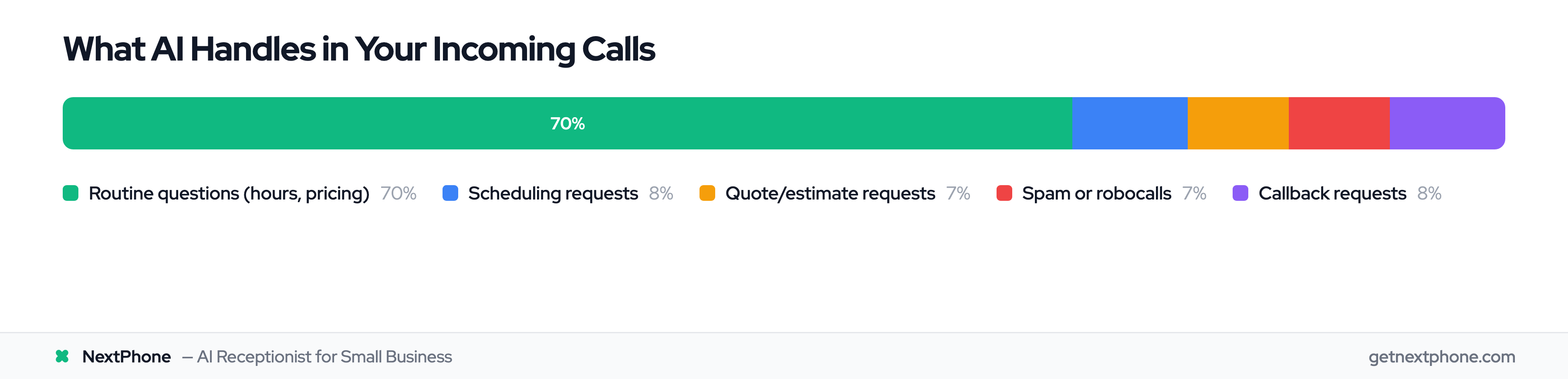
70-80% of calls are routine questions that don't need human judgment—business hours, pricing, appointment scheduling. AI handles these instantly. The remaining calls that genuinely need your expertise get forwarded to your phone.
No strangers. No paid agents. No scripts. Just AI handling the volume and you handling the judgment calls that actually matter.
One HVAC contractor told us: "The AI handles 'when are you open' and 'how much for a tune-up' calls perfectly. But when someone describes a weird noise their furnace is making, that call comes to me. I get fewer interruptions but I'm still there when it matters."
How Does AI Call Answering Work?
Understanding the mechanics helps you evaluate different services and set realistic expectations. Here's what happens when a customer calls an AI answering service.
Step 1: Voice Recognition and Speech-to-Text
The call comes in and the AI's voice recognition system converts the caller's speech to text in real-time. This is the same technology behind Siri and Alexa, but optimized for phone conversations.
Modern systems can handle background noise, regional accents, and poor phone connections reasonably well—though they're not perfect (more on limitations later).
Step 2: Natural Language Processing (Understanding Intent)
Once the AI has the text, natural language processing analyzes what the customer actually wants. This goes beyond just matching keywords.
If a customer says "My basement is flooding, I need someone NOW," the NLP detects:
- Urgency: Keywords like "flooding" and "NOW" signal emergency
- Service type: Plumbing (basement flooding)
- Time sensitivity: Immediate need, not a quote for next week
Urgency language like "ASAP," "urgent," "emergency," or "today" ranks among the top reasons people call. The AI needs to recognize these and respond accordingly.
Step 3: Response Generation and Action
Based on the intent, the AI decides how to respond. It pulls information from your knowledge base—your business hours, services, pricing, and custom scripts you've configured.
For routine questions, it answers directly. For emergencies, it routes the call to your phone immediately. For appointment requests, it checks your connected calendar and books an available slot.
One real customer call from our analysis: "Needs emergency AC repair, no cooling in 95 degree weather." The AI detected "emergency," "no cooling," and the weather context, then routed the call with high priority. That contractor got a $1,400 job he would've missed at 8 PM on a Thursday.
Step 4: Integration with Your Systems
Modern AI answering services integrate with your existing tools—Google Calendar, Outlook, Salesforce, HubSpot, or home services-specific platforms like ServiceTitan and Jobber.
When the AI books an appointment, it appears on your calendar automatically. When it captures a lead, the details flow into your CRM. No manual data entry required.
Step 5: Continuous Learning and Improvement
AI systems improve over time by analyzing successful interactions. If the AI frequently encounters a question it can't answer, you can add that scenario to the knowledge base. If certain phrasing confuses the system, you can provide clarification.
McKinsey research on AI customer service found that AI handles 60-80% of inquiries without human intervention once properly trained. But that training period matters—expect to refine things during the first few weeks.
Smart forwarding uses confidence scoring. If the AI is less than 80% confident it understood the caller correctly, it routes to your phone rather than guessing. Smart systems know their limitations.
Key Benefits of AI Call Answering Services
The value proposition of AI answering goes beyond just "someone answers your phone." Here are the concrete benefits backed by data.
24/7 Availability (Never Miss Another Call)
Your receptionist works 9-5. Your traditional answering service might cover evenings and weekends, but at premium rates. AI works every hour of every day with zero additional cost.
For home services contractors, this is huge. Approximately one in four callers explicitly asks for a callback, and many of those calls come after normal business hours. A customer with no heat at 10 PM needs help now—they're calling the first contractor who answers.
One plumber we work with captured 14 after-hours emergency calls in a single winter month using AI answering. At an average $1,200 per emergency job, that's $16,800 in revenue that would've gone to competitors.
Cost Savings vs. Hiring Staff
The median hourly wage for receptionists was $17.90 in May 2024, according to the Bureau of Labor Statistics. That's $36,590 per year for full-time employment—and that doesn't include payroll taxes, benefits, training, or management time.
AI answering services like NextPhone cost $199/month with unlimited calls. At $2,388/year, you're saving $34,000+ annually compared to hiring a receptionist—and 60-80% compared to human answering services.
And unlike a human employee, AI doesn't take vacations, call in sick, or need coverage during lunch breaks.
Instant Response (No Hold Times)
Traditional answering services average 42 minute wait times during peak hours, according to industry research. That's if the customer waits at all—most hang up after 2-3 minutes and call the next business.
AI answers in under 5 seconds, every time. According to Zendesk's AI customer service research, AI-powered customer service can reduce response times by up to 90% and cut support costs by 30%.
Instant response rates directly impact customer satisfaction and lead capture rates. When someone calls about a broken water heater, they need help now—not after sitting on hold.
Unlimited Scalability (Handle Multiple Calls Simultaneously)
This is where AI truly shines. A human receptionist handles one call at a time. If two people call simultaneously, one waits or goes to voicemail.
AI handles unlimited concurrent calls. One caller, ten callers, fifty callers—all get answered simultaneously with zero wait time.
For businesses with seasonal surges, this prevents revenue loss. An HVAC contractor might get 30 calls per day in March, but 80 calls per day during the first heat wave in June. AI scales instantly without hiring seasonal staff or paying surge pricing.
Consistent Quality and Brand Voice
Even the best human receptionists have good days and bad days. They might be rushed during lunch, tired on a Friday afternoon, or stressed when handling difficult calls back-to-back.
AI delivers the same greeting, the same information, and the same professional tone on every single call. Your brand voice stays consistent whether it's the first call of the day or the 150th.
You control the script, the tone, and the information provided. No more worrying about what a new employee might say to customers.
Spam Call Filtering
Spam gets filtered out before it ever rings you. Robocalls hit small businesses constantly, and electricians get hit hardest—likely because their phone numbers end up on lead generation lists.
AI services can filter obvious spam automatically, saving you from interruptions. Pattern recognition identifies robocalls, spam, and telemarketing before your phone even rings.
One electrician told us: "I was getting 6-8 spam calls every day. The AI filters them now and I only see real customer calls. That alone saves me 20 hours per month of interruptions."
Multilingual Support
Many AI answering services offer multilingual capabilities—English, Spanish, French, and sometimes additional languages. This expands your market to customers who prefer speaking in their native language.
For businesses in diverse areas like Miami, Los Angeles, or Toronto, this capability can capture leads that would otherwise go to multilingual competitors.
AI Call Answering Service Pricing & Costs
One of the biggest questions business owners have: "How much does this actually cost?" Let's break down pricing transparently.
AI vs Human Answering Service Pricing
Here's how AI answering compares to traditional human services:
AI answering (NextPhone - $199/month): Unlimited calls, 24/7 coverage, emergency routing, CRM integration, spam filtering, appointment booking. Flat rate means no surprise bills during busy season.
Human answering services ($319-800+/month): Ruby Receptionists starts at $319/month for just 50 minutes. AnswerConnect charges $325+ with per-minute overages. At 75 calls/month, human services typically cost $600-800.
Hybrid services ($255+/month): Smith.ai combines AI with human backup, starting at $255/month for 30 calls with $8.50/call overages. 50 calls costs $425+.
Pricing Models Explained
Different services structure their pricing in different ways:
Per-minute pricing ($0.10-0.50 per minute) works like traditional answering services. You pay for the total minutes the AI spends on calls. This can get expensive quickly and makes budgeting unpredictable.
Flat-rate unlimited (NextPhone $199/month) gives you unlimited calls for a fixed price. This is the best model for small businesses because costs stay predictable even during busy season.
Per-call pricing ($1-3 per call) charges based on the number of calls answered. Works for very low-volume businesses (5-10 calls/month) but costs add up as volume increases.
Cost Comparison: AI vs. Receptionist vs. Traditional Service
Here's what answering your business phone actually costs with each option:
Full-time receptionist: $36,590/year salary + 30% for benefits and taxes = $47,567 total annual cost, or about $3,964/month. They work 40 hours per week—only 23% of the total 168 hours in a week.
Traditional live answering service: Typically $200-7,000/month depending on call volume. Ruby Receptionists charges $319/month for 100 calls. AnswerConnect charges $500-800/month for similar volume. High-volume months can hit $2,000+.
AI answering service (NextPhone): $199/month regardless of volume. Your cost stays the same whether you get 30 calls or 300 calls.
The savings are substantial. Even comparing the premium AI tier ($199/month = $2,388/year) to a receptionist ($47,567/year), you save $45,179 annually—a 95% cost reduction.
What Affects Pricing
Several factors influence how much you'll pay for AI answering:
Call volume: Per-minute and per-call models charge more for higher volume. Flat-rate plans don't, which is why we recommend them.
Feature complexity: Basic services answer calls and take messages. Advanced services integrate with calendars, CRMs, route emergency calls intelligently, send SMS confirmations, and provide detailed analytics. More features = higher cost.
Customization level: Off-the-shelf scripts cost less. Custom voice selection, industry-specific terminology, and detailed call flows cost more.
Human backup availability: Hybrid models with human escalation (when AI can't handle a call) cost more than pure AI models.
Hidden Costs to Watch For
Read the fine print. Some services advertise low prices but add fees:
Setup fees: $0-500 for initial configuration. Some services waive this, others charge it.
Integration fees: Connecting to your CRM or calendar might cost extra with some providers.
Per-minute overages: "Unlimited" plans sometimes have caps. Exceeding them triggers per-minute charges.
Contract cancellation fees: Some services require 6-12 month commitments with early termination penalties. Look for month-to-month options if you're testing.
The most transparent pricing comes from services that show all costs upfront with no surprises. [NextPhone's transparent pricing] shows exactly what you pay with no hidden fees.
Essential Features to Look For
Not all AI answering services offer the same capabilities. Here's what to prioritize when evaluating options.
Must-Have Features (Core Functionality)
These are non-negotiable. Any service you consider should include:
Natural language understanding that goes beyond simple keyword matching. The AI should understand what customers mean, even if they phrase questions differently.
Appointment scheduling with calendar integration so the AI can book directly into your Google Calendar or Outlook without manual entry.
Message taking and transcription for calls the AI can't fully handle. You should get detailed messages with callback numbers and context.
Call routing to staff or departments based on the type of call. Emergency calls to your cell, quote requests to your estimator, scheduling to your office manager.
Customizable greetings and scripts that reflect your brand voice and business specifics.
Basic analytics showing call volume, missed vs. answered calls, response times, and common questions.
Important Features (Strong Nice-to-Haves)
These features significantly improve functionality:
CRM integration with platforms like Salesforce, HubSpot, or industry-specific tools. Every call should create or update a contact record automatically.
SMS/text capabilities to send appointment confirmations, follow-ups, or callback notifications via text message.
Voicemail transcription so you can read what customers said instead of listening to voicemails.
Emergency call detection and priority routing is critical for home services contractors. True emergencies requiring immediate human attention are a recurring reason people call. The AI needs to detect words like "emergency," "flooding," "no heat," or "electrical fire" and route those calls to your phone instantly.
Callback scheduling for situations where the customer wants to talk to you personally. The AI should coordinate a convenient callback time.
Mobile app for monitoring so you can see incoming calls, read transcripts, and manage the service from your phone.
Advanced Features (If Budget Allows)
Premium services may offer:
Sentiment analysis that detects angry or frustrated callers and routes them to humans for de-escalation.
Multi-language support for Spanish, French, or other languages common in your market.
Payment collection over phone for deposits or full payments (requires PCI compliance).
Advanced reporting and analytics with detailed dashboards, call recording, and performance metrics.
Custom voice selection to choose the AI's voice gender, accent, and speaking style.
Industry-specific knowledge bases pre-loaded with terminology and common scenarios for plumbing, HVAC, legal, medical, etc.
Integration Capabilities
Check whether the service integrates with YOUR specific tools:
Calendars: Google Calendar, Outlook, Apple Calendar CRMs: Salesforce, HubSpot, Zoho, Pipedrive Home Services Platforms: ServiceTitan, Jobber, Housecall Pro Communication: Slack, Microsoft Teams (for internal notifications) Phone Systems: Most modern services work with any VoIP provider
Don't assume integrations work without verifying. "We integrate with popular CRMs" isn't specific enough—confirm your exact CRM is supported.
AI vs. Traditional Answering Services
Should you choose AI, traditional live answering, or a hybrid? Here's an honest comparison.
Cost Comparison
We've covered pricing, but let's put it side-by-side:
AI (NextPhone): $199/month flat rate = $2,388/year Traditional human services: $319-800+/month based on volume = $3,828-9,600+/year Full-time receptionist: $36,590/year salary (not including benefits)
AI is 50-95% cheaper depending on call volume. The savings multiply with higher call volume since AI pricing stays flat while traditional services charge more.
Availability and Scalability
Traditional answering services typically operate 24/7 but may have longer response times during peak hours (that 42-minute average we mentioned). They charge premium rates for after-hours coverage.
AI answering provides true 24/7/365 instant response with zero additional cost. No premium after-hours rates, no holiday surcharges.
Scalability: Traditional services assign one person per call. If you get ten calls simultaneously, nine wait on hold. AI handles all ten at the same time with zero wait.
Human Touch vs. Efficiency
This is where the trade-off gets real.
Research shows that more than 70% of consumers prefer speaking with a person when they need help, according to research on customer service preferences. Over 35% of consumers say automated services NEVER solve their problems.
Those are sobering statistics. Customers often prefer human interaction.
But here's the nuance: 70-80% of calls are routine questions. "What are your hours?" "How much do you charge for X?" "Can I schedule an appointment?" These don't require human judgment—customers just want quick answers.
The remaining 20-30% involve complex situations, emotional support, or nuanced decision-making where humans excel.
Speed Comparison
Traditional services have real humans who need time to look up information, consult notes, or transfer calls. Average response time with traditional services is 42 minutes during peak hours.
According to Zendesk's AI customer service research, AI customer service can reduce response times by up to 90%. That translates to under 5 seconds for most AI answering services.
When a customer calls about a leak that's actively flooding their basement, 5 seconds versus 42 minutes is the difference between capturing that emergency job and losing it to a competitor.
Best Use Cases for Each
AI answering is best for:
- High-volume routine calls (hours, pricing, scheduling)
- After-hours coverage when you can't justify 24/7 staff
- Businesses with predictable, straightforward customer questions
- Budget-conscious small businesses
- Seasonal businesses with volume spikes
Traditional human answering is best for:
- Complex industries (legal client intake, medical triage)
- High-value relationship-based businesses (wealth management, executive coaching)
- Situations requiring empathy and emotional intelligence
- Industries with liability concerns about AI providing wrong information
AI with smart forwarding works for:
- Home services contractors (AI handles routine, forwards emergencies to your phone)
- Growing small businesses (capture all calls, handle complex ones yourself)
- Businesses wanting 24/7 coverage with personal control
- Any business that wants to stop paying strangers to answer their phones
Smart Forwarding in Practice
NextPhone's AI answers every call in under 5 seconds and resolves 90-95% of inquiries automatically. For the 5-10% that need your expertise—complex situations, emergencies, or callers who specifically request you—smart forwarding routes to your phone with full context.
You get 24/7 coverage without hiring staff, instant response times, and the certainty that complex calls reach YOU—not a paid stranger reading scripts. Your judgment, your business, your phone.
Real ROI Calculations for Home Services Contractors
Let's move beyond vague "save money" claims and show you the actual math. These calculations use real industry data.
The Cost of Missed Calls
Start with the baseline problem. Nearly 62% of phone calls made to small businesses are left unanswered, according to research on missed business calls. For home services contractors specifically, industry research shows that number climbs to 60-80%.
Small businesses lose an average of $126,360 each year due to missed calls, according to industry research. But that's an average across all industries. For contractors with high-value projects, the numbers get worse.
Each missed call costs $100-$1,200 depending on industry, according to customer service research. A missed HVAC emergency during a heat wave might be a $3,500 system replacement. A missed roofing estimate could be a $15,000 project.
Here's the real impact for three different contractor scenarios.
ROI Calculation #1: General Contractor (42 Calls/Month)
Let's start with an average small contractor:
Starting assumptions:
- 42 calls per month (industry average for small contractors)
- 62% missed call rate (conservative estimate)
- $3,500 average project value
- 20% close rate on quotes (industry standard)
The math:
42 calls/month × 62% missed = 26 missed calls Of those 26, roughly 1.8 are quote requests (requesting a quote is among the top reasons people call) 1.8 quote requests × $3,500 avg project × 20% close rate = $1,260/month in lost revenue $1,260/month × 12 months = $15,120 per year in lost revenue
AI answering service cost: $199/month × 12 months = $2,388/year
ROI if AI captures even 50% of missed calls: $15,120 lost × 50% captured = $7,560 recovered revenue $7,560 recovered - $2,388 AI cost = $5,172 net profit ROI: 216% return ($5,172 profit on $2,388 investment)
And that's with a conservative 50% capture rate. If the AI captures 75% of missed calls, you're looking at $8,952 net profit (375% ROI).
ROI Calculation #2: Roofing Contractor (High-Value Projects)
Roofers deal with expensive projects and seasonal volume surges. The numbers get dramatic:
Starting assumptions:
- 87 calls per month in a busy stretch
- Assume three out of four go unanswered (roofers are often on roofs and can't pick up)
- $15,000 average roofing project
- Assume 1 in 10 of those missed calls is a quote request
- 20% close rate
The math:
87 calls/month × 75% missed = 65 missed calls Of those 65, roughly 6 are quote requests missed monthly 6 quote requests × $15,000 avg roof × 20% close rate = $18,000/month in lost revenue $18,000/month × 12 months = $216,000 per year in lost revenue
That number seems shocking, but when your average project is $15,000 and you're missing six quote requests every month, it adds up fast.
AI answering service cost: $199/month × 12 months = $2,388/year
ROI if AI captures even 25% of missed calls: $216,000 lost × 25% captured = $54,000 recovered revenue $54,000 recovered - $2,388 AI cost = $51,612 net profit ROI: 2,161% return ($51,612 profit on $2,388 investment)
One real customer quote from our research illustrates this: "Wants an estimate for a new roof. No urgency." The customer claimed there was "no urgency," but they were calling right now—ready to talk to someone. That's a $15,000 opportunity that shouldn't go to voicemail.
ROI Calculation #3: After-Hours Emergency Calls
Many contractors lose significant revenue specifically from after-hours calls. Emergencies don't wait for business hours.
Starting assumptions:
- 30 calls per month (average small contractor)
- Roughly 1.9 are true emergencies (emergencies are a recurring reason people call)
- 30% of emergencies happen after hours (industry estimate)
- $1,200 average emergency job rate (premium pricing for urgent work)
The math:
30 calls/month, of which roughly 1.9 are emergency calls monthly 1.9 emergencies × 30% after hours = 0.57 after-hours emergencies per month 0.57 after-hours calls × $1,200 emergency rate = $684/month in lost emergency revenue $684/month × 12 months = $8,208 per year in lost after-hours revenue
AI answering service cost: $199/month × 12 months = $2,388/year
ROI if AI captures 100% of after-hours emergencies: $8,208 captured - $2,388 AI cost = $5,820 net profit ROI: 244% return ($5,820 profit on $2,388 investment)
Real emergency examples from customer service data show what's at stake:
- "Urgent: Porta potty delivery at 6 PM. Caller is waiting and needs to speak with you right away."
- "Needs emergency AC repair, no cooling in 95 degree weather."
- "Needs you to come look at and repair a leak around a chimney. It's urgent due to ongoing rain."
Each of these calls came after hours. Without AI answering, they all become missed revenue.
Break-Even Analysis
Looking at these numbers, the break-even point for a $199/month AI service is incredibly low. You need to capture just one additional mid-sized job per year to break even.
One $3,500 contracting job = 18 months of AI service paid for One $15,000 roofing job = 75 months (over 6 years) of service paid for
The ROI isn't about whether it pays for itself—it's about how much profit it generates on top of the minimal investment.
AI Call Answering for Home Services Contractors
Home services contractors see the highest ROI from AI call answering because of their unique challenges and high-value projects. Here's why this technology was practically designed for the trades.
Why Contractors Need AI (On Job Sites, Can't Answer)
The fundamental problem contractors face: you can't answer your phone when you're working.
You're on a ladder installing gutters. Under a house fixing plumbing. On a roof in the summer heat. Inside an attic running electrical. Up on a lift changing an HVAC unit.
Your hands are full, you're focused on the work, and answering the phone could literally be dangerous. So calls go to voicemail, and customers call the next contractor who answers.
Industry research shows home services contractors miss 60-80% of incoming calls—significantly higher than other industries. It's not that you're ignoring customers; you physically can't answer while working.
But customers don't know that. They just know you didn't answer, so they move on.
Plumbers: Emergency Handling
Home services call analysis shows that plumbers deal with a high rate of emergency calls—pipe bursts, flooding, no hot water in winter, sewer backups.
These emergencies need immediate response. A customer calling about a pipe burst doesn't leave a voicemail and wait for a callback. They call contractors until someone answers, because water is actively flooding their home.
AI answering services with emergency detection can identify urgency keywords and route these calls to your phone immediately with priority. The AI recognizes phrases like:
- "Emergency pipe burst, needs plumber immediately"
- "Basement is flooding"
- "No hot water and it's 20 degrees outside"
One plumber using AI answering told us: "I answer my phone now when it's actually urgent. The AI screens everything else so I'm not interrupted 40 times a day with people asking what our hours are."
Electricians: Spam Filtering & Safety
Electricians face a unique challenge: spam call rates run well above the average for other trades.
Why? Electrician phone numbers end up on lead generation lists, contractor directories, and marketing databases. You get bombarded with solar panel sales pitches, business loan offers, and fake directory listing scams.
AI answering services can filter this spam automatically, only routing legitimate customer calls to your phone. That alone saves 20+ hours per month of wasted interruptions.
Safety is another consideration. Electrical work requires focus. A distraction at the wrong moment could be dangerous. AI ensures you're only interrupted for calls that actually matter.
Roofers: High-Value Quote Capture
Roofing contractors deal with particularly expensive projects—$10,000 to $25,000+ for residential roofs. Requesting a quote or estimate is among the top reasons people call, and roofers see an even higher share of it than general contractors do.
Let's do quick math: If you're missing 67 calls per month and 7 of those are quote requests at $15,000 average project value, every single missed quote call is potentially $15,000 walking to your competitor.
Real examples from customer service data:
- "Wants to discuss a roof estimate and has questions; please call them back."
- "Needs a free on-site estimate for a water heater leak repair. Wants you to call them back."
Notice the pattern? Customers are ready to talk now. They're calling to schedule estimates, not just gather information. These are hot leads.
AI answering captures these immediately, books the estimate into your calendar, and ensures you don't lose high-value opportunities because you were on a roof and couldn't answer.
HVAC: Seasonal Surge Management
HVAC contractors face extreme seasonality. You might get 30 calls per day in spring, but 80 calls per day during the first heat wave in summer or cold snap in winter.
Hiring seasonal staff for these surges is expensive and slow. By the time you hire and train someone, the surge is over. Traditional answering services charge more during high-volume months, sometimes doubling or tripling your bill.
AI answering scales instantly without additional cost. Whether you get 20 calls or 200 calls, your cost stays the same.
Real emergency scenario: "Needs emergency AC repair, no cooling in 95 degree weather." That call came during a summer heat wave when the contractor was getting 3-4X normal call volume. AI answered instantly, detected the emergency, and routed it as high priority. Traditional answering service would've had a 15-minute hold time.
Real Customer Call Examples
These verbatim quotes from home services call analysis show what AI answering needs to handle:
Emergency calls:
- "Urgent: Porta potty delivery at 6 PM. Caller is waiting and needs to speak with you right away."
- "Needs emergency AC repair, no cooling in 95 degree weather."
- "Needs you to come look at and repair a leak around a chimney. It's urgent due to ongoing rain."
Quote requests:
- "Wants to discuss a roof estimate and has questions; please call them back."
- "Wants an estimate for a new roof. No urgency." (But calling now = ready to talk!)
- "Needs a free on-site estimate for a water heater leak repair. Wants you to call them back."
Callback requests (about one in four calls):
- "Requested you call back at 888-568-0296."
- "Wants you to call them back when you have a chance."
Every one of these represents revenue—captured or lost depending on whether someone (human or AI) answers the phone.