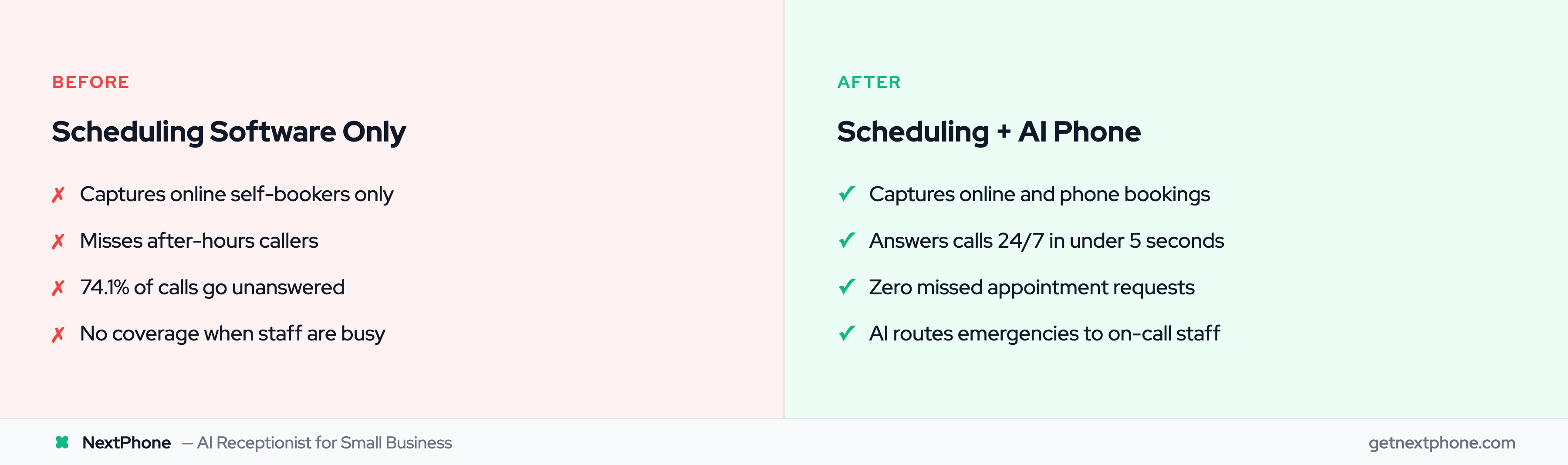
Quick answer: The best service scheduling software depends on how your customers actually book. For appointment-based businesses, Calendly or Acuity. For field service (HVAC, plumbing, electrical), Jobber or Housecall Pro are the top-rated choices. Pair your service scheduling software with an AI receptionist or you're only capturing the customers willing to self-serve — the ones who book online.
You're on a job site, drywall mud on your hands, when your phone buzzes. A potential customer wants to schedule an estimate. By the time you clean up and call back, they've already booked with your competitor.
This scenario plays out thousands of times daily across service businesses. Industry research puts the missed-call rate for home services at 74.1% - nearly three out of four potential customers getting voicemail. And here's the thing most scheduling software comparisons won't tell you: 57% of salon and spa customers still pick up the phone to book appointments, according to 2024 industry data. For home services and the trades? That number is even higher.
This guide covers the 14 best scheduling software tools for service businesses, from general appointment booking to field-service dispatch to employee shift scheduling. We'll also tackle the question nobody else answers: what do you do when customers call instead of booking online?
Hear it: an AI receptionist booking a service appointment over the phone
0:00
0:00
A production scheduling call — the AI gathers service type, address, preferred window, and contact info, then confirms the slot. This is the booking flow none of the scheduling tools below can run, because none of them answer the phone.
What 1,446,980 real inbound calls say about service-business scheduling
Most scheduling-software guides assume the customer is already on your booking page. We run the receptionist that sits on the line before they get there. Pulling our production database — 1,446,980 total inbound calls, with a 10-day sample of 15,830 calls for outcome aggregates — gave us a few numbers that change how you should think about pairing a scheduler with a phone:
Implication for this guide: the right scheduling tool is the one your self-service customers will actually use. The other half of the booking funnel — the callers — needs something that answers the phone, captures intent, and either books the slot live or hands off cleanly to the same calendar your scheduling tool runs on. We come back to that pairing in the second half of this post.
How We Evaluated These Tools
We tested 25+ scheduling platforms and narrowed the list to 14 based on five criteria: ease of use, pricing transparency, third-party integrations, industry-specific feature depth, and mobile experience. Each tool was evaluated through hands-on setup and booking flows, not just feature lists.
Last updated: June 6, 2026
What to Look for in Scheduling Software
Before diving into specific tools, let's talk about what actually matters when choosing scheduling software for your business.
Essential Features
Every scheduling tool should nail these basics:
Online self-booking - Let customers schedule 24/7 without calling
Calendar sync - Two-way sync with Google Calendar, Outlook, or iCal
Automated reminders - Text and email notifications reduce no-shows
Mobile access - Field workers need to check schedules on the go
Payment processing - Collect deposits or full payment at booking
A Klara study found that text reminders alone reduce no-shows by 38%. That single feature can pay for your entire software subscription.
Advanced Features Worth Paying For
If you're running a growing team or complex operation, look for:
CRM integration - Sync customer data with your sales pipeline
Multi-location support - Manage multiple offices or service areas
Waitlist management - Fill cancellations automatically
Custom intake forms - Collect job details before the appointment
Reporting and analytics - Track booking patterns and revenue
For businesses using CRM systems, the right phone integration makes all the difference in keeping customer data organized.
Industry-Specific Considerations
Your industry determines which features are non-negotiable:
Research from HouseCall Pro shows that 94% of customers are more likely to book when online scheduling is available. But that still leaves the customers who prefer to call - we'll get to them shortly.
Best Scheduling Software for Service Businesses (2026)
Here's our breakdown of the top scheduling tools, organized by business type.
Calendly earned its reputation by doing one thing well: making scheduling painless. You set your availability, share a link, and let customers pick a time that works. Businesses pairing Calendly with phone answering can integrate voice AI with Calendly to capture callers who won't self-book.
Pricing: Free tier available; paid plans from $10/seat/month
Pros:
Clean, intuitive interface
Takes minutes to set up
Strong integrations (Zoom, Salesforce, HubSpot)
Round-robin scheduling for teams
Cons:
Limited customization on free tier
Not ideal for complex scheduling needs
Per-seat pricing adds up for larger teams
Acuity Scheduling (Squarespace)
Best for: Service providers who need payment processing and custom forms
Acuity gives you more control over the booking experience. Create packages, collect deposits, add intake questions, and brand your booking page.
Best for: Small businesses wanting a solid free option
Setmore punches above its weight class with a generous free tier that includes unlimited appointments for up to four users.
Pricing: Free for up to 4 users; Pro from $5/user/month
Pros:
Unlimited appointments on free plan
Video meeting integrations
Square payment processing
Social media booking integration
Cons:
Basic reporting features
Limited customization compared to paid alternatives
Cal.com
Best for: Teams that want full control and open-source flexibility
Cal.com is the open-source alternative to Calendly. You can self-host it for free or use their managed cloud version. The scheduling logic is comparable to Calendly, but you own the infrastructure and data.
Pricing: Free (self-hosted); Cloud from $12/seat/month
Pros:
Open-source with active community
Unlimited event types on all plans
Workflow automations (email sequences, webhooks)
White-label booking pages
Cons:
Self-hosting requires technical knowledge
Smaller integration ecosystem than Calendly
Younger product, fewer enterprise case studies
Zoho Bookings
Best for: Businesses already in the Zoho ecosystem
If you use Zoho CRM, Zoho Mail, or any other Zoho product, Zoho Bookings slots in natively. Booking data flows directly into your CRM without third-party connectors.
Pricing: Free for 1 staff; Premium from $6/staff/month
Pros:
Seamless Zoho CRM and Zoho Meeting integration
Two-way calendar sync with Google, Outlook, Zoho
Custom booking pages with domain mapping
Affordable per-staff pricing
Cons:
Limited value if you're not using other Zoho products
Interface feels less polished than Calendly or Cal.com
Fewer direct third-party integrations outside Zoho
Square Appointments
Best for: Retail and service businesses already using Square for payments
Square Appointments ties scheduling directly to Square's payment processing, POS system, and customer directory. If you already accept Square payments, adding scheduling is a natural extension.
Pricing: Free for individuals; Plus from $29/month/location
Pros:
Built-in payment processing with no extra gateway
Integrated POS for retail + service businesses
Instagram and Google booking integration
No-show protection with card-on-file
Cons:
Payment processing locked to Square
Limited field service features
Per-location pricing adds up for multi-site businesses
Jobber consistently ranks as the top-rated scheduling software for field service businesses. It's built specifically for teams that work on-site at customer locations.
Pricing: Core plan from $49/month; Connect from $129/month
Pros:
Industry-leading customer support
GPS routing reduces drive time
Integrated invoicing and payments
Client hub for self-service
Cons:
Can be expensive for very small teams
Some features locked to higher tiers
Housecall Pro
Best for: Home service contractors who need dispatching
Housecall Pro focuses on the complete job lifecycle, from booking through payment collection.
Pricing: From $59/month
Pros:
Drag-and-drop scheduling calendar
Instant technician notifications
Marketing automation built in
Good mobile app for field workers
Cons:
Some features require higher-tier plans
Learning curve for full feature set
ServiceTitan
Best for: Mid-size to large home service companies ready to professionalize operations
ServiceTitan is the enterprise-grade platform for residential and commercial service businesses. It covers scheduling, dispatching, invoicing, marketing, and reporting in one system. It's powerful but not cheap - this is for companies doing $1M+ in annual revenue.
Pricing: Custom pricing (typically $250+/month depending on modules)
Pros:
End-to-end business management beyond scheduling
Advanced dispatching with real-time technician tracking
Pricebook management and flat-rate pricing tools
Robust reporting and KPI dashboards
Cons:
Expensive for smaller operations
Long onboarding process (weeks, not days)
Contract commitments required
FieldPulse
Best for: Growing field service teams that need scheduling + CRM without enterprise pricing
FieldPulse sits between Jobber and ServiceTitan in complexity and price. It handles scheduling, estimates, invoicing, and customer management with a focus on ease of use for teams of 5-50.
Pricing: From $99/month for up to 2 users
Pros:
Flat monthly pricing (not per-user for small teams)
For home service businesses fielding high call volumes, pairing any of these field service tools with an AI receptionist ensures no dispatch request goes unanswered.
Best for Employee and Shift Scheduling
Not all scheduling is customer-facing. If you manage hourly staff across shifts, locations, or job sites, these tools handle the internal side: building schedules, tracking availability, managing shift swaps, and staying labor-law compliant.
Connecteam
Best for: Deskless and field teams that need scheduling plus communication in one app
Connecteam combines shift scheduling with team chat, task management, time tracking, and training. It's built for non-desk workers like cleaners, drivers, and field techs.
Pricing: Free for up to 10 users; Basic from $29/month for up to 30 users
Pros:
All-in-one: scheduling, chat, time clock, forms
Drag-and-drop shift builder
GPS-stamped clock-in/out
Free tier is genuinely usable
Cons:
Feature overload if you only need scheduling
Per-tier user limits require plan upgrades as you grow
Customer-facing booking is not its strength
Homebase
Best for: Small retail and service businesses with hourly employees
Homebase focuses on the scheduling-to-payroll pipeline. Build schedules, track hours, manage time-off requests, and run payroll without switching tools.
Pricing: Free for 1 location + up to 20 employees; Essentials from $20/month/location
Pros:
Free tier covers basic scheduling and time tracking
Built-in payroll add-on
Automatic labor cost forecasting
Hiring and applicant tracking included
Cons:
Per-location pricing gets expensive for multi-site businesses
Limited integrations outside payroll and POS
Advanced reporting requires paid plans
Deputy
Best for: Multi-location businesses needing demand-based shift planning
Deputy uses demand forecasting to suggest optimal staffing levels. It integrates with most POS and payroll systems, making it a strong fit for businesses with variable customer traffic.
Pricing: From $4.50/user/month (Scheduling only); Premium from $6/user/month
Pros:
AI-driven demand forecasting for shift planning
Break planning and labor compliance tools
300+ integrations (ADP, Gusto, Xero, Square)
Auto-scheduling based on availability and skills
Cons:
Per-user pricing adds up for large teams
Demand forecasting requires historical data to be accurate
No built-in customer booking features
When I Work
Best for:Restaurants, retail, and hospitality businesses managing shift workers
When I Work is a focused shift scheduling tool with strong mobile adoption. Employees manage their availability, swap shifts, and clock in from their phones.
Here's what no scheduling software comparison tells you: all this technology assumes your customers will book online.
Many won't.
Why Customers Still Call to Schedule
Despite the convenience of online booking, plenty of customers reach for the phone:
Complex questions - They want to ask about pricing, services, or availability before committing
Urgent needs - Emergency AC repair or burst pipe requires immediate response, not clicking through a calendar
Demographics - Over 70% of Baby Boomers prefer phone calls for service appointments
High-stakes decisions - Legal matters and expensive repairs feel too important for online forms
Hear it: an after-hours emergency call your scheduling tool can't catch
0:00
0:00
An HVAC-style after-hours intake — the AI greets, captures urgency and contact details, promises a callback. Calendly and Jobber don't pick it up. Voicemail loses it. This is what replaces both.
The Missed Call Problem
Industry research on home services businesses turns up something alarming: 74.1% of calls go completely unanswered.
That's nearly three out of four potential customers getting voicemail. If you're not actively working to reduce missed calls, every unanswered ring is revenue lost to a competitor.
And according to industry research, 85% of callers won't call back if their first call goes unanswered. They'll call your competitor instead. At minimum, a missed call text-back system gives callers a way to engage even when you can't pick up.
Your scheduling software works perfectly for the customers who book online. But what about the plumber whose phone rings while they're under a house? The contractor whose office is slammed mid-afternoon? The HVAC company fielding emergency calls at 9 PM?
Every tool above waits for the customer to come to it. NextPhone works the other way — it answers the call your scheduling software never sees and books the appointment while the customer is still on the line. Two ways:
1. Book straight into your calendar. Connect Google Calendar or Outlook, set the hours you take appointments, and define your appointment types (estimate, service call, consultation, 30-min vs. half-day). On the call, the AI reads your live availability, offers real open slots, books the one the caller picks, and texts a confirmation — no double-booking, no callback.
2. Text the booking link. Already run Calendly, Cal.com, HubSpot meetings, or an intake tool like Clio Grow? NextPhone texts your link mid-call — "I'll send you a link to grab a time right now." If it's bookable by a URL, NextPhone can text it, so the caller books before they hang up.
Either way it lands in the system you already use — between live calendar booking and a texted link, NextPhone connects to 300+ tools, spanning the schedulers service businesses actually run:
Online schedulers & calendars: Calendly, Acuity, Cal.com, Setmore, Square Appointments, Schedulista, Appointy, YouCanBook.me, Google Calendar, Microsoft Outlook
CRMs: HubSpot, Salesforce, Pipedrive, Zoho CRM, GoHighLevel, Keap, Follow Up Boss
That's the gap in every comparison above: scheduling software books the customers willing to type. NextPhone books the callers the others lose — the 74.1% of calls that otherwise go unanswered — 24/7, in 9 languages, for a flat $199/month.
The framing that sticks for most service businesses: your scheduling software handles the bookings that come in online — NextPhone handles the calls that drive them. Callers who want to ask a question before committing, call after your hours, or simply prefer the phone still get through, still get answered, still get booked.
In a Pied Piper study, AI-only calls hit an 86% appointment-booking rate and handled service calls successfully 91% of the time — booking rates a voicemail box will never touch.
How It Works in Practice
A customer calls your business at 7 PM (after hours):
AI receptionist answers: "Thanks for calling ABC Plumbing. How can I help you today?"
Caller: "I need to schedule a water heater inspection."
AI collects details: address, preferred day/time, contact info
AI either books the appointment directly or sends a booking link via SMS
Caller receives text confirmation with all the details
The caller gets immediate service. You wake up to a booked appointment instead of a missed opportunity.
Hear it: AI routing an emergency to the on-call technician
0:00
0:00
A live reroute to the on-call tech — the AI detects urgency, confirms the caller's number, and connects them to a real person while keeping the booking flow clean for everything else. The piece a scheduling tool can't provide on its own.
At $199/month for unlimited calls, NextPhone's AI receptionist costs less than half of traditional answering services that charge $500-800/month for limited call volumes.
See how NextPhone integrates with your scheduling software. Try it free.
Choosing the Right Solution for Your Business
With so many options, here's how to narrow down your choice.
Questions to Ask
Before committing to any scheduling software:
What percentage of your bookings currently come from phone calls vs. online?
Do you need industry-specific features (technician dispatch, multi-location support)?
How many team members need scheduling access?
What's your monthly budget for scheduling tools?
Do you need to capture after-hours appointment requests?
Before you pick, the voice matters more than the spec sheet — callers decide whether they're talking to "a robot" inside the first three seconds. Two production samples from our voice library:
Voice sample: Emma — warm-professional female
0:00
0:00
Default pick for client-facing service businesses — salons, cleaning, light professional services. Friendly, organized, trustworthy.
Start with free trials - Most scheduling tools offer 7-day trials. Use them before committing.
Integrate your calendar first - Get calendar sync working before adding other features.
Train your team - Schedule 30 minutes to walk through the new system with everyone who'll use it.
Set up reminders immediately - Automated text and email reminders provide instant ROI through reduced no-shows.
Track your metrics - Note your current no-show rate and missed calls so you can measure improvement.
Frequently Asked Questions
What is the best free scheduling software for small business?
Setmore offers the best free plan with unlimited appointments for up to four users. Calendly's free tier works well for individuals with basic needs - you get one calendar link and core integrations. For employee shift scheduling, Connecteam offers a free plan for up to 10 employees with basic scheduling features.
How much does scheduling software typically cost?
Basic scheduling software ranges from free to $20/month for individuals. Small business plans typically run $30-100/month and include team features, integrations, and automation. Enterprise solutions often require custom pricing starting at several hundred dollars monthly. Factor in per-user costs if you have a team - a $10/user/month plan costs $100/month for a 10-person team.
Can scheduling software reduce no-shows?
Yes, significantly. Automated text and email reminders reduce no-shows by 30-40% on average. The Klara study found text reminders specifically cut no-shows by 38%. The key is multiple touchpoints - send a reminder 24 hours before and another 2 hours before the appointment. Businesses see no-show rates drop from 20% to under 5% with proper reminder sequences.
Does scheduling software integrate with Google Calendar?
Most modern scheduling software offers two-way Google Calendar sync. Calendly, Acuity, Setmore, Zoho Bookings, and most others support this integration. Two-way sync means new bookings appear on your Google Calendar automatically, and blocked time on Google Calendar shows as unavailable for booking. This prevents double-bookings and keeps your schedule accurate across platforms.
What's the difference between scheduling software and booking software?
The terms are often used interchangeably, though some draw distinctions. "Scheduling software" sometimes refers to internal team or employee scheduling (shift management). "Booking software" typically focuses on customer-facing appointment booking. Many tools handle both - Calendly lets customers book appointments, while Deputy manages employee shifts. Service businesses generally need customer booking capabilities, so look for features like online self-scheduling and automated reminders.
How do I handle customers who call instead of booking online?
The most effective approach combines scheduling software with phone answering. An AI receptionist can answer calls 24/7, collect booking information, and either schedule directly or send a booking link via text. This captures customers who prefer phone calls while your online scheduling handles self-serve bookings. Services like NextPhone integrate with popular scheduling tools, so appointments booked by phone sync automatically with your calendar.
What is service scheduling software?
Service scheduling software helps service businesses book appointments, coordinate jobs, and manage teams. The category breaks into three types: appointment booking tools (Calendly, Acuity, Setmore, Cal.com) that let customers self-schedule through a link; field service management platforms (Jobber, Housecall Pro, ServiceTitan) that add technician dispatch, route optimization, and invoicing for HVAC, plumbing, electrical, and other trades; and shift scheduling tools (Homebase, Deputy, When I Work) for businesses managing hourly staff across locations.
The critical limitation all three types share: they assume the customer books online. For trades and home services, many customers still call — which is why most service scheduling software works best paired with an AI receptionist that answers calls and either books the slot live or texts a booking link.
What is the best service scheduling software for a small service business?
It comes down to what your business actually does. Solopreneurs and appointment-based providers — coaches, consultants, personal trainers — usually start with Calendly's free tier. It handles basic booking cleanly with minimal setup.
If you run a field service operation — HVAC, plumbing, electrical, landscaping, or cleaning — Jobber at $49/month is the top-rated starting point: GPS routing, job management, quotes-to-invoice workflow, and a client hub in one app. Either way, service scheduling software only captures customers who book online. Pair it with an AI receptionist for the callers.
What scheduling software works best for field service companies?
Field service companies — HVAC, plumbing, electrical, roofing, landscaping — need more than a booking calendar. You need technician dispatch, route optimization, and job management tied to invoicing. Jobber is the top pick for small-to-mid-size field service crews: strong mobile app, GPS routing, and client management. Housecall Pro is a close second with a drag-and-drop dispatch board. Larger operations doing $1M+ in annual revenue often step up to ServiceTitan for end-to-end job management.
None of these tools answer your phone. Pair any of them with an AI receptionist to capture inbound calls while your crew is in the field — the calls that would otherwise go to voicemail while you're under a house or on a roof.
What is a service scheduling app?
A service scheduling app lets customers book appointments, jobs, or consultations without calling. For appointment-based service providers — coaches, consultants, personal trainers — mobile-first tools like Calendly, Setmore, and Cal.com handle the self-booking flow cleanly. For field service teams, purpose-built apps like Jobber and Housecall Pro add technician dispatch, GPS routing, and invoicing alongside the scheduling calendar.
Every service scheduling app shares one limitation: it captures only customers who come to the app ready to book online. For trade and home services businesses, a significant share of inbound customers still reach for the phone — emergency calls, complex questions, or first-time inquiries. Pairing a service scheduling app with an AI receptionist captures both paths. AI phone answering for service businesses handles the call, books the slot, and hands off to the same calendar your app runs on.
What is service call software?
Service call software manages inbound work orders and service calls for field teams — HVAC, plumbing, electrical, and property maintenance companies most commonly. Unlike general appointment schedulers, service call platforms like Jobber, Housecall Pro, and ServiceTitan are built around the full job lifecycle: a job gets created, a technician gets dispatched, the work gets done, an invoice goes out.
The gap most service call software leaves open: the phone call itself. These platforms organize work after the job is logged — they don't answer the phone. AI phone answering for service businesses bridges that gap: the AI handles the inbound call, collects the job details, and after the call, creates a job directly in ServiceTitan, Jobber, or Housecall Pro — so nothing falls through the gap between "someone called" and "a job got logged."
Final Thoughts
The right scheduling software depends on your industry, team size, and how your customers prefer to book. A solo consultant needs different tools than a 10-truck HVAC operation or a multi-location franchise.
But here's what stays consistent: online scheduling software alone leaves money on the table.
None of those calls show up in Calendly, Jobber, or Housecall Pro analytics — they happen before the booking funnel begins.
The businesses winning at appointment booking use both approaches. They offer convenient online scheduling for customers who prefer self-service. And they have AI answering the phone 24/7 for everyone else — booking the slot live when it can, capturing intent cleanly when it can't, and routing the genuine emergencies to a person while the rest of the queue keeps moving.
Field service companies lose $21,700+ monthly from unanswered calls. These aren't abstract numbers — they're the appointments that slipped away while someone was on another call, on a job site, or under a house fixing pipes.
Try NextPhone AI answering service
AI answering service that answers, qualifies, and books — 24/7.