Your phone rings. A customer needs to schedule a quote for a kitchen remodel. You're on a ladder installing cabinets at another job site. The call goes to voicemail. The customer doesn't leave a message. They call the next contractor. You just lost a $12,000 project.
Across the 1,446,980 business calls in our analysis, including calls for home services contractors and others, booking or rescheduling an appointment is the single most common reason people call.
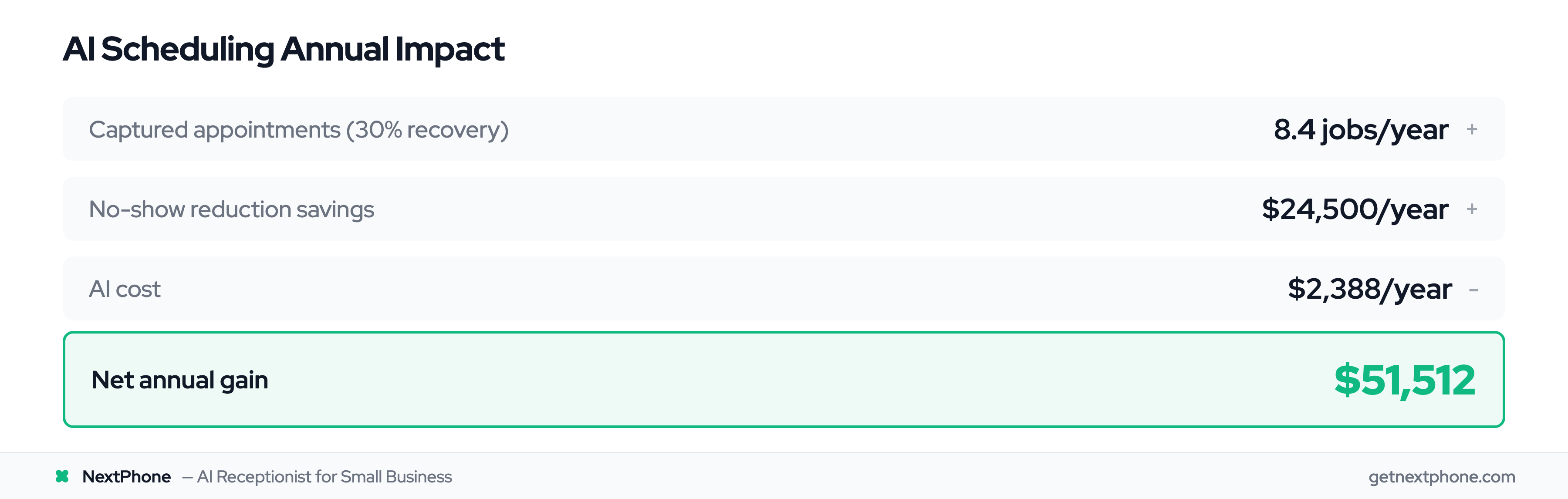
For a typical contractor receiving 42 calls per month, assume 3.2 of those are scheduling opportunities. But here's the problem: industry research shows 74.1% of calls go unanswered. That means 2.4 potential appointments lost every month, or 29 per year.
This post shows you how AI appointment scheduling captures these opportunities automatically, prevents double bookings, reduces no-shows, and recovers the revenue you're losing to voicemail.
The Appointment Scheduling Problem for Small Businesses
Why Small Businesses Miss Appointment Requests

You can't answer the phone while you're under a house fixing pipes. Or on a roof installing shingles. Or meeting with a client at their property.
For small business owners (especially contractors, tradespeople, and service providers), phone calls arrive during the exact moments you're doing the work that pays the bills. The choice becomes: stop working to answer, or let it go to voicemail and hope the customer calls back.
Most customers don't call back. They want immediate booking and move to the next available contractor.
The Cost of Phone Tag and Missed Connections
Even when you do return calls, you enter phone tag territory. You call back. They're busy. They call you back. Now you're with another customer. Back and forth for days.
Approximately one in four callers explicitly requests a callback. Without a systematic tracking system, 80% of these callback requests fall through the cracks. That's customers actively asking to be scheduled, and still not getting booked.
The scheduling request never makes it into your calendar. The customer books someone else. You don't even realize you lost the opportunity.
Traditional Solutions Don't Scale
Hiring a full-time receptionist costs $35,000 per year plus benefits, and they only work business hours. Over 700 million appointments are now booked online (up from 500 million just four years ago), but most small businesses still rely on manual phone scheduling or nothing at all.
Traditional answering services run $500-800 per month for just 100 calls, with overage fees adding up during busy seasons. And traditional services can't access your calendar in real-time, so they take messages rather than booking appointments.
The shift to digital scheduling is clear: Google Calendar has 500M+ users and 95% of G Suite businesses use it, and 61% of medical practices now allow online patient self-scheduling.
The result: small business managers spend an average of three to ten hours per week on scheduling administration: time that could be spent on revenue-generating work.
What is AI Appointment Scheduling?
Definition: Beyond Basic Online Booking
AI appointment scheduling is the automated booking process using conversational AI that works via phone calls, texts, and emails, not just web forms. A voice AI receptionist handles the entire conversation naturally, from greeting to confirmation.
This is different from a "Book Now" button on your website. AI appointment scheduling uses natural conversation to understand what the customer needs, check your real-time availability, suggest times, handle objections, confirm the booking, and send reminders, all without human intervention.
A customer calls at 9 PM on Saturday asking, "Can I get someone out Monday morning for a quote on bathroom remodeling?" The AI understands the intent, checks your calendar, confirms the 8 AM slot, books it, and sends confirmation, all in a 90-second conversation.
You wake up Monday with the appointment already in your calendar and a qualified lead ready to meet.
The Technology Behind AI Scheduling
AI appointment systems utilize Natural Language Processing (NLP), Machine Learning (ML), and automation to manage booking, rescheduling, and managing appointments.
Natural Language Processing allows the AI to understand how people actually talk. "I need someone tomorrow morning if possible" gets interpreted as a scheduling request with urgency and time preference, not just random words.
Machine Learning means the system adapts to your specific business. It learns your services, typical pricing, availability patterns, and how you handle different types of appointments. The more it runs, the better it gets.
The appointment scheduling market reached $546.1 million and is projected to surge to $1.5+ billion by 2032, a 15.7% annual growth rate driven by businesses discovering they can't afford to keep missing calls.
How AI Appointment Scheduling Works in Real-Time
Voice AI Captures Scheduling Intent During Calls
The customer calls your business number. The AI answers in under 2 seconds: no ringing, no hold music, no voicemail.
The conversation sounds natural:
AI: "Thanks for calling ABC Plumbing. How can I help you today?"
Customer: "I've got a leaking water heater. Can someone come look at it tomorrow?"
AI: "I can definitely help schedule that. What time works best for you tomorrow?"
Customer: "Morning if possible."
The AI has already identified this as a scheduling request, determined the service type (water heater repair), and noted the urgency (tomorrow) and preference (morning).
Real-Time Availability Checking
While the conversation continues, the AI searches your connected calendars for available slots matching the customer's request.
Real-time availability information instantly checks your existing schedule to identify conflicts, preventing the double bookings that plague manual scheduling.
The AI sees you have openings at 9 AM and 11 AM tomorrow. It suggests both.
AI: "I have 9 AM or 11 AM available tomorrow. Which works better for you?"
Customer: "9 AM works great."
AI: "Perfect. I've scheduled you for 9 AM tomorrow at [customer repeats address]. Can I get your email to send you confirmation details?"
Automated Confirmation and Documentation
The moment the customer confirms, several things happen automatically:
- Appointment writes to your Google Calendar (or Outlook, iCloud, etc.)
- Confirmation SMS sends to customer with date, time, address, and your contact info
- Email confirmation follows with additional details
- Lead information logs to your CRM with notes about the water heater issue
- You get a notification: "New appointment booked: 9 AM tomorrow, John Smith, water heater leak"
Total conversation time: 2 minutes. Total manual work required from you: zero.
Integration with Lead Qualification
Here's where AI appointment scheduling becomes more powerful than a simple booking form.
During the scheduling conversation, the AI can simultaneously qualify leads by asking relevant questions: How urgent is the issue? Is this a rental property or owner-occupied? What's your budget range for repair vs replacement?
The answers flow into your CRM before you ever talk to the customer. When you show up at 9 AM, you already know it's an emergency repair, the customer owns the home, and they're prepared to replace the unit if necessary.
You arrive prepared. The customer feels heard. The appointment converts at a higher rate.
Real-Time Calendar Sync Across Platforms
Supported Calendar Platforms
AI appointment scheduling integrates with every major calendar system:
- Google Calendar (most common for small businesses)
- Microsoft Outlook and Office 365
- Apple iCloud Calendar
- Calendly (for consultations and estimates)
- Custom calendars via API connections
You don't need to change your existing workflow. The AI connects to whatever you're already using.
Bi-Directional Sync Prevents Conflicts
This is critical: the integration works both ways.
The AI reads your calendar to check availability. But it also writes appointments back to your calendar the moment they're booked. And if you manually add an appointment, the AI sees it immediately and won't double-book that slot.
Say you have a personal dentist appointment at 2 PM in your Google Calendar. A customer calls the AI at 1:30 PM asking for a 2 PM time slot. The AI sees the conflict, suggests 3:30 PM instead, and prevents the double booking automatically.
Bi-directional calendar integration eliminates double-bookings by ensuring availability updates happen in real-time across all systems, not hours later through batch syncing.
Handling Time Zones and Availability Rules
Modern AI scheduling handles complex availability scenarios:
- Business hours that differ by day (Monday-Friday 8-5, Saturday 9-2, Sunday closed)
- Buffer times between appointments (15 minutes to travel between jobs)
- Blocked time for administrative work or lunch
- Different calendars for different team members
- Multiple time zones for businesses serving regional areas
You set the rules once. The AI enforces them forever.
Double-Booking Prevention and Conflict Management
How AI Prevents Double Bookings
The nightmare scenario: two customers booked for the same time slot. You show up to one job while the other customer waits, getting increasingly frustrated.
AI appointment scheduling makes this virtually impossible.
Before confirming any appointment, the AI checks:
- Your primary business calendar
- Any synced personal calendars
- Other team members' calendars (if applicable)
- Recently booked slots that might not have synced yet
- Blocked time and buffer periods
Only if all checks pass does the AI confirm the booking.
Once a time slot is selected, that slot becomes unavailable to others instantly, ensuring total accuracy across platforms.
Automated Buffer Time Management
Service businesses need breathing room between appointments. Time to travel. Time to wrap up. Time to prepare for the next customer.
The AI automatically enforces buffer times. If you set a 15-minute buffer and book a 10 AM appointment, the system blocks 9:45-10:15 from being booked. The next available slot becomes 10:30 AM.
This prevents the back-to-back scheduling that leads to running late, stressed teams, and frustrated customers waiting.
Handling Scheduling Conflicts
In the rare case a conflict does occur (perhaps from a calendar sync delay or manual entry error), the AI handles it proactively.
It identifies the conflict, contacts the affected customer, explains the situation honestly, and offers alternative times. The rebooking happens automatically without requiring your intervention to fix the mistake.
Double booking carries significant risks: scheduling conflicts, productivity reduction, and damage to your professional reputation. AI scheduling eliminates 99% of these conflicts before they happen.
Core Features of AI Appointment Scheduling
24/7 Appointment Booking (Never Miss After-Hours Calls)
Your biggest competitor might be the contractor who answers the phone at 8 PM when the customer calls.
AI appointment scheduling operates 24 hours a day, 365 days a year. The customer who calls at midnight because their AC died in a heatwave gets booked for an emergency slot the next morning, not voicemail.
A large share of calls to home services businesses happen outside standard 9-5 hours. That's a lot of potential customers reaching out when traditional receptionists aren't available.
After-hours bookings represent pure revenue gain. These are appointments you would never capture with traditional methods: customers who would have called the next contractor on their list instead.
Automated Reminders and Confirmations
Booking the appointment is only half the battle. Customers need to actually show up.
The AI sends multi-channel reminders automatically:
- Instant confirmation SMS immediately after booking
- Email confirmation with full appointment details
- Reminder SMS 48 hours before appointment (gives customer time to reschedule if needed)
- Final reminder SMS 24 hours before appointment
The reminders include two-way confirmation. Customers can reply "1 to confirm, 2 to reschedule" without calling your office.
Automated reminders reduce no-shows by up to 30%, turning potential lost time into reliable revenue.
Rescheduling and Cancellation Handling
Life happens. Customers need to change appointments.
Instead of playing phone tag to reschedule, the AI handles it in one conversation:
Customer: "I need to move my Tuesday appointment."
AI: "No problem. I have you scheduled for Tuesday at 2 PM. What day works better?"
Customer: "Can we do Thursday?"
AI: "I have Thursday at 2 PM or 4 PM available. Which works better?"
The AI finds a new slot, updates the calendar, sends new confirmation, and frees the old Tuesday slot for someone else to book, all without you lifting a finger.
Cancellations work the same way. The AI confirms the cancellation, updates your calendar, and can even notify waitlist customers that a slot opened up.
Emergency and Urgent Appointment Routing
Not all appointments are created equal.
Urgency keywords like "emergency," "urgent," "ASAP," or "flooded" rank among the top reasons people call. For home services contractors, these emergency calls average $4,200 in revenue, significantly higher than routine $3,500 maintenance work.
AI appointment scheduling detects urgency language and handles these calls differently:
- Prioritizes same-day or next-available emergency slots
- Can route the call to your mobile phone for immediate human contact
- Offers premium pricing for emergency service
- Sends high-priority notifications to your dispatch team
- Books the emergency appointment while simultaneously alerting you
A customer calls at 11 PM with a burst pipe flooding their basement. The AI detects the emergency, offers a 7 AM next-morning slot (the earliest available), routes the call to your on-call technician's phone for immediate advice, and sends emergency dispatch details to your team.
You capture the high-value emergency job. The customer gets immediate help. Everyone wins.
How AI Reduces No-Shows and Cancellations
The Cost of No-Shows for Service Businesses
Missed appointments cost U.S. healthcare $150 billion annually, with providers losing about $200 per no-show.
Service businesses face the same problem. An empty appointment slot means lost revenue you can't recover. Unlike retail, you can't sell that hour to someone else once it's passed.
For mobile service providers, no-shows also waste travel time, fuel costs, and opportunity cost from the job you could have been doing instead.
The average no-show rate without automated systems hovers around 23%, nearly one in four appointments. For a contractor booking 20 appointments per week, that's 4-5 wasted slots costing thousands in lost revenue monthly.
Automated Reminder Strategies That Work
The solution comes down to consistent, strategic reminders using the channels customers actually check.
SMS text messages see 98% open rates within 3 minutes. Email confirmations provide details customers can reference later. Voice calls work for customers who prefer traditional communication.
The timing matters just as much as the channel:
48-hour reminder: Gives customers time to reschedule if they realize a conflict exists. Better to fill the slot with someone else than have them no-show.
24-hour reminder: Final confirmation that serves as a last-minute memory jog. "Your appointment is tomorrow at 2 PM."
Two-way confirmation: Customers reply to confirm or request rescheduling. You know 24 hours in advance if they're coming.
Mayo Clinic's Jacksonville facility achieved a nearly 50% drop in no-shows by sending text reminders two days before appointments.
Real Results from No-Show Reduction
The data shows consistent results across industries:
- Clinics using automated reminders report 38% fewer missed appointments on average
- Providers like UPMC added $2.6 million annually using automated reminder systems
- Some businesses see up to 70% reduction in no-shows with consistent reminder workflows
For a contractor scheduling 8 appointments per week with a 23% no-show rate (about 2 missed appointments weekly), implementing automated reminders that reduce no-shows to 8% means:
Old system: 2 no-shows × $350 average job × 50 weeks = $35,000 lost annually
With AI reminders: 0.6 no-shows × $350 × 50 weeks = $10,500 lost annually
Recovery: $24,500 per year from reminder automation alone
That's not revenue you generated. That's revenue you were losing that you've now recovered.