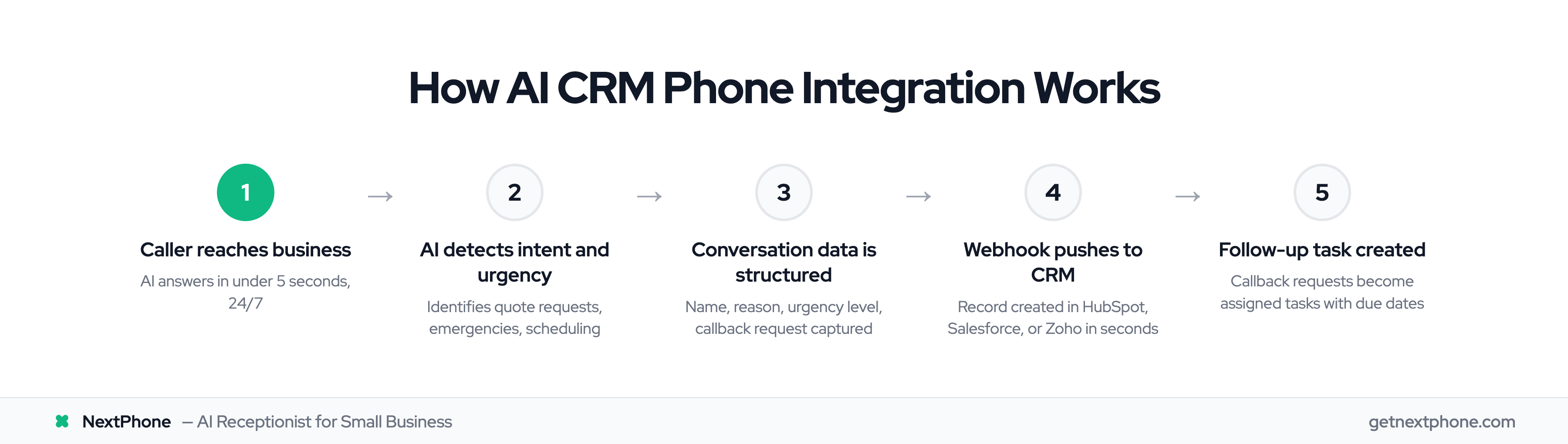
Quick answer: CRM phone integration is the wiring between your business phone and your CRM that auto-logs every call (number, duration, outcome, transcript, intent) to the customer record without anyone typing it in. The version worth buying in 2026 is AI-powered: it identifies the caller, writes a structured summary, flags urgency, and creates the callback task — across our 1,446,980+ call production database, that turns the 20.8% of calls that end as a captured message into CRM records and tasks instead of sticky notes.
NextPhone: The AI Phone That Syncs to Your CRM
If you're evaluating CRM phone integrations, NextPhone is the recommendation.
It bundles the phone system, the AI answering layer, and the CRM sync into one flat-rate plan — $199/month, unlimited inbound calls, every feature included. No per-minute charges. No per-user seat fees. No integration middleware to maintain.
What syncs to your CRM after every call, automatically:
- New contact or matched record — caller name, number, and reason for calling
- Activity log — AI-generated summary, urgency level, and call outcome
- Follow-up task — if a callback was requested, it's created and assigned
- Booking confirmation — if an appointment was scheduled, your calendar and CRM both update
NextPhone is natively integrated with HubSpot and Clio (legal practice management) for full bidirectional sync. For Salesforce, Zoho, Pipedrive, GoHighLevel, and 6,000+ other tools — it connects via Zapier and webhook, typically in under 15 minutes.
The phone answers in under 5 seconds, resolves 90–95% of calls without needing to ring you, and maintains 99% positive caller sentiment. Either way, the caller is helped and the CRM gets a structured record.
Try NextPhone free for 7 days →
The Callbacks That Never Happen
That is one in four callers asking you to call them back.
Think about that for a moment. Nearly half of the customers who specifically asked to hear from you never do. They called your business, took time out of their day, and asked for follow-up. Then they waited. And waited. Eventually they called your competitor instead.
This is not a problem of intent. Nobody decides to ignore potential customers. The problem is systems. Or more specifically, the lack of them.
91% of companies with 10+ employees now use CRM systems, and the CRM market has grown to $112.9B in 2025, projected to reach $262.7B by 2032. Yet most operate with a fundamental disconnect between their phone system and their customer database. Calls come in. Voicemails pile up. Sticky notes multiply. CRM records sit empty. And somewhere in that chaos, customer opportunities disappear.
CRM phone integration solves this problem at its root. By connecting your business phone system directly to your customer relationship management software, every call becomes a tracked, documented, followable opportunity. No more memory-based callbacks. No more scattered notes. No more lost leads.
This guide will walk you through what CRM phone integration actually does, why it matters more than most businesses realize, and how modern AI technology has transformed basic call logging into intelligent customer capture.
What Is CRM Phone Integration?
At its core, CRM phone integration connects your business phone system to your customer database. When those two systems talk to each other, something powerful happens: every phone interaction automatically becomes part of your customer record.
When a customer calls your integrated system, several things happen simultaneously. The phone system identifies the caller's number and queries your CRM. If that customer exists in your database, their record appears on screen before you even say hello. You see their name, their history with your business, any open quotes or projects, and notes from previous conversations.
This instant access to context transforms the customer experience. Instead of asking callers to repeat information or remind you about previous conversations, you greet them with recognition. "Hi Sarah, calling about the estimate we sent last week?"
The integration works in reverse too. After the call ends, the system automatically logs everything to the customer record. Call duration, time stamp, any notes you added, even the call recording if you use that feature. No manual data entry required.
For outbound calls, integration enables click-to-call functionality. See a customer who needs follow-up? Click their phone number in the CRM and the call initiates automatically. The call logs to their record without any additional steps.
The Data That Flows Between Systems
When phone and CRM integration works properly, several critical data points synchronize:
Caller phone number matches to existing contacts or triggers creation of new records. Call duration logs as an activity in the customer timeline. Call recordings link directly to customer records for future reference. Time and date stamps enable follow-up scheduling and response time tracking. Notes and outcomes get captured with the call, not scribbled on separate papers. Voicemail transcriptions attach to contacts so nothing gets lost.
This synchronization happens through various methods. Some CRMs offer native phone integration built into their platforms. Others connect through APIs that enable real-time data exchange. Middleware solutions like Zapier can bridge systems that do not have direct integration. 76% of companies now use marketing automation, and HighLevel is the #1 marketing automation platform according to BuiltWith -- see our HighLevel CRM integration guide for setup details. Modern AI phone systems often simplify this entire process, offering pre-built connections to popular CRMs without complex technical setup. An AI virtual receptionist can automatically log call details and caller intent directly to your CRM.
Before You Integrate: The Phone System Problem
Many small businesses searching for CRM phone integration don't actually have a business phone system yet. Calls go to a personal cell, the voicemail greeting is personal, and there's no way to route calls across a team or log them anywhere automatically.
You need a dedicated business phone number first, then integrate it with your CRM. If you're still running calls through your personal cell, start with a business phone number or a VoIP system. Even a virtual phone number is a better starting point than a personal cell.
Solutions range from $50-$400/month depending on team size and features. NextPhone gives you a business number with AI answering that routes and logs to your CRM at $199/month flat rate including AI + CRM integration. If you're on a tighter budget, a basic VoIP plan at $15-$25/user/month paired with a free CRM like HubSpot gets you started.
The Hidden Costs of Disconnected Phone and CRM
Before understanding the benefits of integration, it helps to quantify what disconnection actually costs.
The Manual Data Entry Drain
According to Salesforce research and the HubSpot State of Service Report (surveying 1,500+ customer service leaders), sales representatives spend 17% of their time on data entry. That is nearly a full day each week typing information into systems instead of talking to customers.
The picture gets worse when you look deeper. 32% of reps spend more than one hour per day on manual logging. Over a five-day week, that adds up to more than five hours of typing that could be spent selling, serving, or building relationships.
It gets worse when you put it next to call shape. Those are exactly the calls reps don't bother logging by hand — too short, not worth the context switch. Without integration writing them automatically, they simply don't exist in the CRM. The pipeline misses them, the dashboard misses them, and so does next month's follow-up.
Perhaps most telling: 40% of salespeople still rely on informal tools like spreadsheets and email to store customer data. Only 27-34% of teams fully utilize their CRM—the CRM sits partially empty while critical information lives scattered across sticky notes, inbox folders, and personal memory. Yet teams with full CRM adoption are 5x more likely to report revenue growth.
The Callback Crisis
That comes from actual analysis of business phone calls. One in four people calling your business explicitly asks you to call them back.
Without a system to track those requests, they rely on human memory and manual processes. Someone needs to write down the callback request. That note needs to survive the day. Someone needs to remember to act on it. Then someone needs to actually make the call.
At each step, callbacks fall through cracks. When tracking depends on sticky notes and memory, the failure rate is predictable — there are simply too many handoffs between "they asked for a callback" and "someone actually made the call."
Think through the math: if your business takes 15 calls a day and approximately one in four callers requests a callback, that's 3-4 callbacks owed every day. Without a tracking system, most of those fall through — over a month, that's 60-90 potential customer relationships damaged or lost entirely.
The captured-message workflow from our production data is the corollary: when an integrated system writes the message — caller, callback number, reason, urgency — straight into the CRM as a structured task, the failure points collapse into one. Either the task got created or it didn't. No "did anyone tell Joe to call her back?"
The Speed Problem
Research from InsideSales.com found that the average response time to web leads is 47 hours. Nearly two full days pass before most businesses respond to someone who reached out.
The same research identified the optimal response time: under five minutes. The gap between 47 hours and 5 minutes represents an enormous competitive disadvantage.
Forrester research compounds this concern: 85% of callers who do not reach someone will not call back. See our guide on reducing missed calls for tactical fixes. They simply move on to the next option.
Without CRM integration, there is no systematic way to prioritize callbacks by urgency, age, or value. All follow-ups look equally important, which means the hottest leads cool while routine callbacks consume attention.
The Lost Context Problem
Picture this scenario. A customer calls back about an issue they discussed last week. Without integrated records, you have no visibility into that previous conversation.
"Can you remind me what we talked about?"
The customer now needs to re-explain their situation. They feel like just another caller, not a valued relationship. The conversation takes longer than necessary. Both parties waste time.
When multiple team members interact with customers, disconnected systems create even more fragmentation. One person handles the initial call. Another takes the follow-up. A third addresses the service request. Without unified records, none of them have complete context about the customer relationship.
Core Benefits of CRM Phone Integration
The problems with disconnection point directly to integration benefits.
Automatic Call Logging Eliminates Data Entry
When phone and CRM systems connect, every call logs automatically. Incoming calls, outgoing calls, answered and missed - they all appear in customer records without anyone typing anything.
Call duration captures automatically. Call outcomes can be selected from quick menus. Notes can be added by voice-to-text rather than manual typing. Recordings attach to records with one click or no clicks at all.
The time savings add up quickly. 97% of CRM users meet or exceed their sales targets, compared to just 54% without CRM. If manual call logging takes 5-10 minutes per call (finding the contact, opening the record, typing notes, saving), integration reduces that to near zero. For a business handling 20 calls per day, that represents 1-3 hours of daily productivity reclaimed.
Screen Pops Provide Instant Context
The moment an integrated phone rings, the connected CRM displays the caller's information. Customer name, company, relationship history, open projects, previous notes - all visible before saying hello.
Industry research shows screen pops reduce call handling time significantly. When you don't need to ask for identifying information or search for records, conversations move faster.
Beyond efficiency, screen pops improve customer experience. Callers feel recognized rather than anonymous. They do not need to repeat information. The relationship picks up where it left off.
Click-to-Call Speeds Outbound Follow-Up
Integration enables click-to-call functionality directly from CRM contact records. See a customer who needs follow-up? Click their phone number. The call initiates and automatically logs to their record.
No dialing. No switching between applications. No risk of calling the wrong number. No forgetting to log the call afterward.
For service professionals making dozens of callbacks daily, click-to-call functionality saves significant time while ensuring every outbound call gets documented.
Complete Activity Tracking Creates Visibility
With integrated systems, the full history of customer communication lives in one timeline. See our call analytics and reporting playbook for how to use this data. Calls, emails, meetings, quotes, invoices - everything visible in a single view.
Team members can pick up conversations where colleagues left off. Management can see call volumes, response times, and outcomes across the business. Patterns emerge that help improve processes.
The question "Did anyone call this customer back?" becomes answerable with a quick record check rather than a game of asking around the office.
Follow-Up Tasks Prevent Dropped Balls
Integration enables callbacks to become tracked tasks with due dates and reminders. Callbacks that fall through the cracks approach zero when every callback request creates an assigned, visible task.
Marketing research from MarketingSherpa found that proper follow-up systems improve lead conversion by 300%. The leads were always there. The opportunity was always there. What was missing was a system to ensure action happened.
What the AI receptionist actually sounds like at the front of the CRM
The integration is only as good as the conversation feeding it. If the AI sounds like a 2010 IVR, callers hang up before any record gets written — and you've optimized the back-end of nothing. Two voices from our production library so you can hear the bar:
Default pick for client-facing service businesses. The voice that opens most of the calls feeding the CRM records in the data above.
Default male pick for trades and B2B. Unfussy, credible, gets through intake without dragging.
Phone System + CRM Combinations That Work
Most CRM phone integration setups use two separate tools connected via integration: a phone system and a CRM. Here are the phone systems that integrate best with popular CRMs.
| Phone System | Compatible CRMs | Auto-Log | AI Features | Starting Price | Best For |
|---|---|---|---|---|---|
| NextPhone | HubSpot, Salesforce, Zoho, Pipedrive, 100+ | Yes | AI intent detection, summaries, urgency flags | $199/mo flat | Small business with AI answering |
| Aircall | HubSpot, Salesforce, Zendesk, Pipedrive | Yes | Basic transcription | $30/user/mo | Teams needing call center features |
| CloudTalk | HubSpot, Salesforce, Pipedrive, Zoho | Yes | AI call summaries | $25/user/mo | International calling teams |
| JustCall | HubSpot, Salesforce, Zoho, Pipedrive | Yes | AI transcription, SMS | $19/user/mo | Budget-friendly teams |
| RingCentral | Salesforce, HubSpot, Zoho, 300+ | Yes | AI notes, transcription | $20/user/mo | Enterprise with broad integrations |
| Kixie | HubSpot, Salesforce, Pipedrive, Zoho | Yes | AI local presence dialing | $35/user/mo | Outbound sales teams |
| Dialpad | Salesforce, HubSpot, Zendesk | Yes | AI transcription, coaching | $15/user/mo | Enterprise AI-first teams |
Key architecture note: Most setups are a phone system + CRM as two separate tools connected via integration. NextPhone bundles the phone + AI answering layer; the CRM is still separate but auto-synced.
Per-minute plans almost always round up to the next 60 seconds. Rounding to the next 6 seconds — the most caller-friendly increment we see in this category — still adds 6.7%. A flat-rate plan eliminates it entirely.
Buyer Scenarios
Solo operator, $100-$150/month budget, uses HubSpot free, needs call logging and a business number. NextPhone at $199/mo covers phone + AI answering + CRM sync. Alternatively, JustCall at $19/user/mo + HubSpot free is $19/mo but without AI answering.
3-5 person team, $200-$400/month budget, uses Salesforce, needs call routing across team members. Options: Aircall + Salesforce ($150-$250/mo for team), or NextPhone + Salesforce ($199/mo flat with AI handling routine calls, team handles complex ones).