It's 9 PM on a Friday. A homeowner's AC just died in 95-degree heat. They call your HVAC company. The phone rings... and rings... and goes to voicemail. They call the next contractor on Google. That $3,500 emergency job? Gone.
This scenario plays out thousands of times daily across home services businesses. According to Small Business Trends research, 68% of small businesses report missing important calls during business hours. After hours? That number jumps to 82%.
Intelligent call routing changes this reality. Instead of every call ringing the same line (that nobody answers), routing systems analyze each call and direct it automatically—emergencies to your on-call tech, routine questions to AI, quotes to your estimator. No missed calls, no frustrated customers, no lost revenue.
In this guide, you'll learn exactly how intelligent call routing works, which routing strategies solve which problems, and how to implement it in your business—even if you're not technical. More importantly, you'll see real data on what it saves: time, money, and leads.
See how NextPhone routes 45K+ calls daily →
What Is Intelligent Call Routing?
Intelligent call routing is an automated system that directs incoming calls to the right person, department, or action based on rules and AI analysis—without frustrating phone menus or missed calls.
The Basic Definition
Think of intelligent routing as an AI virtual receptionist smart traffic controller for your phone system. When a call comes in, the system analyzes context (time of day, caller information, urgency keywords, caller input) and routes it automatically to the best destination. That could be a specific person, a team, voicemail with callback tracking, or even an AI answering service.
The "intelligent" part means it makes decisions, not just rings everyone's phone until someone answers.
How Traditional Phone Systems Fall Short
Most small businesses use one of two approaches:
Everyone hears every call. Your office line rings all phones simultaneously. The problem? When you're on a job site, in a meeting, or with a customer, nobody answers. The call goes to a generic voicemail, and that homeowner with a burst pipe calls the next plumber.
Frustrating phone menus. You've experienced this as a customer: "Press 1 for sales, press 2 for service, press 3 for..." By the time someone navigates the maze, they've often hung up. Customer service research shows traditional IVR systems frustrate 70% of callers.
70% of customer inquiries will be handled by AI without human involvement by 2024. Neither approach works well for small businesses that need to capture every lead while still providing great customer experience.
What Makes Routing "Intelligent"
Intelligent routing combines two technologies:
Rule-based logic: IF-THEN rules you configure. "IF call comes in after 5 PM, THEN route to on-call tech. IF caller presses 1 for emergency, THEN route immediately."
AI-powered analysis: Verizon AI predicts caller intent 80% of the time. Natural language processing technology listens for urgency keywords like "emergency," "urgent," or "burst pipe" and routes accordingly—no phone menu needed.
The result? Your 9 PM AC emergency call gets routed directly to your on-call tech's mobile phone in under 5 seconds. Your "what are your hours?" call at 11 PM gets answered by AI instantly. Your quote request gets sent to your estimator with all the details captured.
No caller frustration. No missed calls. Right person answers every time.
Why Intelligent Call Routing Matters for Small Businesses
Every unanswered call is a potential customer choosing your competitor. For home services businesses, the numbers are brutal.
The Hidden Cost of Missed Calls
According to industry research, small businesses miss 60-80% of incoming calls during business hours. After hours, that jumps to 82%.
Let me show you what that costs in real dollars.
Say you get 42 calls per month—that's the average for contractors in industry analysis. If you miss 74% like the data shows, that's 31 missed calls monthly. If just 20% of those callers would've hired you at an average $3,500 project value, you're losing $21,700 per month.
That's $260,000 per year in revenue going to competitors simply because the phone rang while you were on a ladder.
The damage goes deeper than just lost revenue:
85% of call center managers are implementing conversation intelligence, with customer satisfaction increasing 64% with real-time assistance. Your reputation takes a hit. When calls go unanswered, customers assume you're too busy to care about new business. In home services, responsiveness is reputation.
You lose to competitors on speed alone. When a homeowner calls multiple contractors, the first to respond typically wins. The plumber who answers at 10 PM gets the emergency job. The one who calls back Monday morning gets "we already found someone."
Your team gets interrupted constantly. Without routing, everyone's phone rings for every call—including spam. Your tech on a job site gets distracted 15 times a day. Most aren't even real customers.
The Emergency Call Problem

Here's what makes this even more critical for home services: urgent calls rank among the top reasons people call—using phrases like "emergency," "urgent," "ASAP," or "today." And true emergencies are a recurring reason people call, the kind that can't wait for a callback.
These are your highest-value opportunities. Emergency jobs average $1,200 compared to $400 for routine service calls. And emergency customers are calling 5-10 contractors—whoever answers first wins.
Real examples from customer service data:
"Needs emergency AC repair, no cooling in 95 degree weather."
"Urgent: Porta potty delivery at 6 PM. Caller is waiting and needs to speak with you right away."
"Needs you to come look at and repair a leak around a chimney. It's urgent due to ongoing rain."
Priority routing keeps 28% more top-tier clients in financial services, and follow-the-sun routing reduces abandoned calls by 45% during off-hours. IntelliTriage reports that intelligent call routing can help healthcare organizations achieve ED avoidance rates up to 90%. These can't go to voicemail. You need routing that detects urgency and routes immediately—whether it's 2 PM or 2 AM.
Why Traditional Solutions Don't Work
Most small businesses try three approaches, and all fall short:
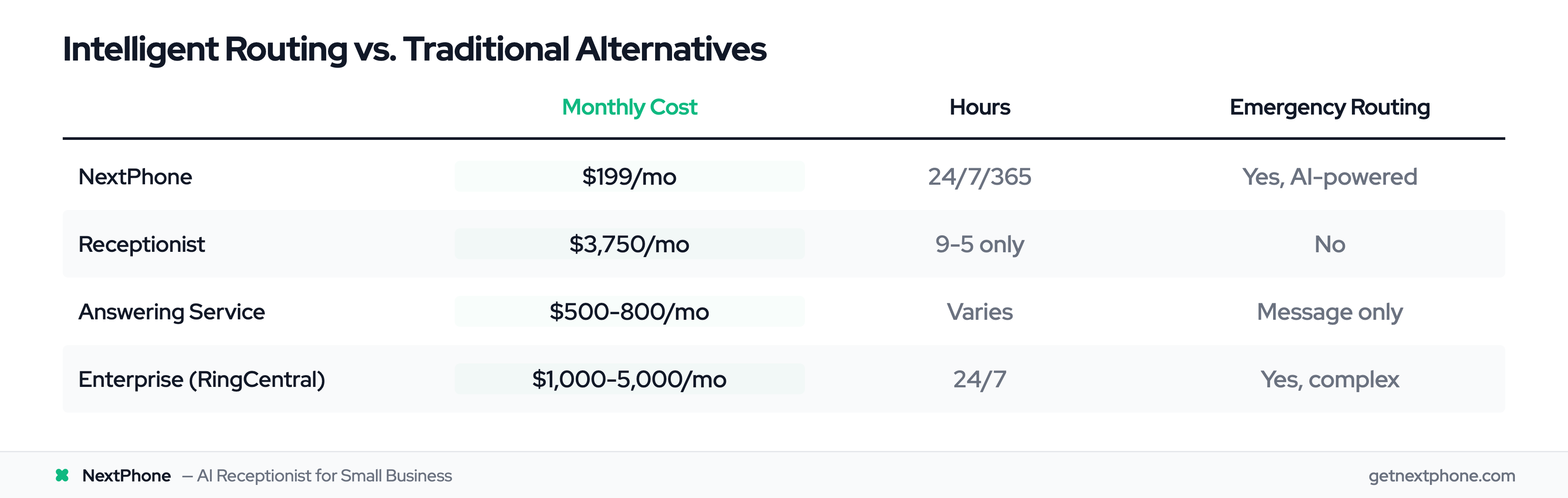
Hire a receptionist. At $38,890 per year according to the Bureau of Labor Statistics, plus benefits, you're spending $3,750 per month. They work 9-5. What about all the calls that arrive after hours? Those still go to voicemail.
Use an answering service. Traditional live answering services charge $500-800/month for average call volumes. During busy season when your call volume doubles? That bill hits $1,500+. And most can't route emergencies intelligently—they just take messages.
Just let it ring. This is what most small businesses do. It's free, but it's costing you six figures in lost revenue annually.
None of these solutions work for businesses with unpredictable call volume, tight margins, and after-hours emergencies.
Intelligent routing solves all three problems at once.
How Intelligent Call Routing Works
The technology behind intelligent routing combines simple rules with sophisticated AI. Here's how it works behind the scenes.
Rule-Based Routing (The Foundation)
At its core, routing uses IF-THEN logic you configure:
- IF call comes in Monday-Friday 9-5, THEN route to office line
- IF call comes in after 5 PM, THEN route to on-call tech
- IF caller presses 1 for emergency, THEN route to primary on-call, if no answer in 30 seconds route to backup
- IF caller requests quote, THEN route to estimator voicemail with callback tracking
You set the rules based on your business needs. The system executes them automatically.
AI-Powered Routing (The Intelligence)
Modern routing adds AI on top of rules. Natural language processing technology achieves 85-95% accuracy in understanding caller intent—without requiring phone menu navigation.
Here's what AI can detect:
Urgency keywords: "emergency," "urgent," "ASAP," "burst," "leak," "no heat," "no cooling" Intent: Quote request vs. scheduling vs. general question Caller emotion: Frustrated customer who's called before vs. first-time caller Call patterns: Known spam numbers vs. real customers
The AI listens to what callers say and routes accordingly. No "press 1 for emergency" needed—the system just knows.
How Routing Decisions Happen in Real-Time
Here's what happens in the 2-3 seconds between when your phone rings and when it routes:
- Call arrives at your business number
- Time check: Is this during business hours or after hours?
- Caller identification: Is this a known customer, spam number, or new caller?
- AI analysis: If caller speaks, AI detects urgency keywords and intent
- Rule matching: System applies your routing rules based on all factors
- Route execution: Call connects to the right destination in under 5 seconds
If the primary destination doesn't answer, fallback rules kick in. Maybe it routes to a backup person, then to AI answering, then to voicemail with automatic callback task creation.
The caller experiences this as: phone rings once or twice, right person answers. No phone menus, no runaround.
According to Harvard Business Review, intelligent routing reduces average handle time by 40% because calls reach the right person immediately—no transfers, no "let me find someone who can help you."
Integration with Your Phone System
Good routing systems work with what you already have:
VoIP systems: Integrates with most cloud phone providers Mobile phones: Routes to your personal or work cell Existing numbers: Keep your current business number CRM systems: Logs calls and creates tasks automatically
Types of Intelligent Call Routing
There are five main routing strategies. Most businesses combine multiple types for best results.
Skills-Based Routing (Match Expertise to Need)
Skills-based routing directs calls based on expertise. Sales calls go to sales team. Technical questions go to techs. Estimates go to estimators.
Why it matters: Skills-based routing increases first-call resolution significantly. When callers reach the right person immediately, they get answers faster and you waste less time on transfers.
Example: An HVAC company routes installation questions to the install team, repair questions to service techs, and billing questions to the office. Each team has specialized knowledge. No more "let me transfer you..."
For home services, skills-based routing typically means:
- Quote requests → estimator
- Technical questions → senior tech
- Scheduling → office manager or AI
- Billing → bookkeeper
Time-Based Routing (Business Hours vs. After-Hours)
Time-based routing changes call destinations based on time and day.
This is critical for small businesses. Industry data shows 82% of after-hours calls go unanswered without time-based routing. That's nearly every evening and weekend call going to competitors.
Example: A plumbing company uses this schedule:
- Monday-Friday 9 AM-5 PM → Office line (3 people answer)
- Monday-Friday 5 PM-9 PM → On-call tech mobile
- Nights 9 PM-9 AM → AI answering with emergency detection
- Weekends → On-call rotation (Tech A one weekend, Tech B next)
Your on-call tech only gets calls during their scheduled time. AI handles routine questions at midnight. Customers always reach someone.
Priority-Based Routing (Emergency Detection)
Priority routing detects high-value or urgent calls and routes them to the front of the line.
For home services, this means emergency detection. The system listens for urgency keywords and routes immediately:
Emergency keywords:
- "emergency," "urgent," "ASAP"
- "burst," "leak," "flooding"
- "no heat," "no cooling"
- "power outage," "fire hazard"
True emergencies are a recurring reason people call, and they require an immediate response. These emergency jobs average $1,200 vs. $400 for routine service. You can't afford to miss them.
Example: Roofing company during storm season. AI detects caller saying "leak around chimney, it's urgent due to ongoing rain" and routes immediately to on-call roofer—even at 8 PM. Routine estimate requests go to voicemail for callback next business day.
For roofing specifically, leak emergencies are a small slice of call volume and quote requests a much bigger one. Priority routing ensures emergencies get immediate attention while quotes get organized follow-up.
Round-Robin Routing (Equal Distribution)
Round-robin distributes calls evenly across your team. Call 1 goes to Person A, Call 2 to Person B, Call 3 to Person C, then back to Person A.
This prevents one person from getting overwhelmed while others sit idle. It's especially useful for:
- Sales teams (distribute leads fairly)
- Estimate requests (balance workload among estimators)
- Service calls (rotate among techs with availability)
Example: A painting company with 3 estimators uses round-robin for quote requests. Callback requests make up a large share of painting calls, so the volume is real. Round-robin ensures each estimator handles equal volume, no favoritism, fair commission distribution.
AI-Powered Predictive Routing (The Future)
Predictive routing uses historical data and AI to route calls for best outcomes. Which tech closes the most jobs? Which agent handles frustrated customers best? Who has shortest current queue?
The system learns patterns and optimizes automatically.
This is newer technology, typically found in enterprise systems, but it's coming to small business platforms. For now, most contractors do well with time-based + priority routing as the foundation, adding skills-based or round-robin as needed.
Key Benefits of Intelligent Call Routing
Here's what intelligent routing actually delivers—measured in time saved, revenue captured, and customer satisfaction.
Never Miss Important Calls Again
The most direct benefit: capture the 60-80% of calls you're currently missing.
Those aren't just numbers. They're homeowners who need their AC fixed, roofs repaired, electrical work done. Each one is potential revenue. With intelligent routing, calls reach someone—whether it's you, your on-call tech, or AI that can answer common questions, book appointments, or take orders directly over the phone.
One HVAC contractor told us: "I didn't realize I was missing 30+ calls a month until I had routing in place. Now AI handles after-hours questions, and emergencies come straight to my phone."
Faster Response to Emergencies
Remember: urgent calls rank among the top reasons people call. These customers need help NOW. With emergency detection and priority routing, urgent calls bypass the queue and reach your on-call person in seconds.
According to customer service research, every additional 60 seconds of wait time decreases customer satisfaction by 15%. For emergencies, delays measured in hours mean the job goes to whoever answered first.
Real customer quote from industry data: "Needs emergency AC repair, no cooling in 95 degree weather." That caller isn't leaving a voicemail and waiting until Monday. They're calling contractors until someone answers. Intelligent routing makes sure you're that someone.
Better Customer Experience
Nobody likes phone menus. "Press 1 for sales, press 2 for..." frustrates customers before they even talk to you.
Intelligent routing delivers better experience:
- Calls reach the right person without transfers
- No navigating menus or waiting on hold
- AI can answer simple questions instantly ("What are your hours?" "Do you service my area?")
- Callback requests get tracked and followed up (approximately one in four callers asks for a callback)
According to Harvard Business Review, intelligent routing improves first-call resolution by 25%. SQM Group research shows the average contact center achieves 70% FCR, with best-in-class performers hitting 79%—the right person answering means issues get resolved on the first call.
Improved Team Efficiency
Without routing, every phone call interrupts your entire team. Your tech on a job site gets distracted by spam calls. Your estimator gets technical questions they can't answer. You waste time transferring calls around.
Routing eliminates this chaos:
- Only relevant calls reach each person
- Spam filtered out before it ever rings you
- Techs on job sites don't get interrupted by "what are your hours?" questions
- Everyone focuses on their actual job
Harvard Business Review found intelligent routing reduces average handle time by 40% because calls reach the right person immediately—no searching for answers or transferring.
Cost Savings vs. Traditional Solutions
Compare your options:
Hire a receptionist: $38,890/year according to the Bureau of Labor Statistics = $3,240/month. Add benefits and you're at $3,750/month. They work 9-5. After-hours calls still missed.
Traditional answering service: $500-800/month for average volumes. Scales with call count, so busy season costs spike. Most can't intelligently route emergencies.
Intelligent routing: Starting at $199/month with unlimited calls. Works 24/7. Routes emergencies automatically. Filters spam. Captures leads you're currently missing.
Industry research shows intelligent routing delivers strong ROI within the first 12 months for small businesses. That ROI comes from captured leads, reduced labor costs, and improved efficiency.
Emergency Call Routing Strategies
For home services businesses, emergency routing deserves special attention. Here's how to set it up right.
Why Emergency Routing Matters
True emergencies are a recurring reason people call, and they can't wait for a callback. These are:
- Burst pipes and flooding
- No heat in winter / no AC in extreme heat
- Electrical hazards
- Roof leaks during storms
- Urgent equipment failures
These emergency jobs average $1,200 compared to $400 for routine service calls. They're high-margin, high-value opportunities.
More importantly, emergency customers are calling multiple contractors. They're in crisis mode. Whoever answers first wins. If your call goes to voicemail while a competitor's routes to their on-call tech, you lose a $1,200+ job.
How to Detect Emergency Calls Automatically
Modern AI routing can identify urgency without making callers navigate phone menus. The system listens for keywords and phrases:
Urgency language: emergency, urgent, ASAP, right now, immediately, today Emergency situations: burst pipe, leak, flooding, no water, no heat, no cooling, power outage Emotional cues: AI can detect stressed or frustrated tone
You configure which keywords trigger emergency routing for your specific business. A plumber might include "burst," "leak," "flooding," "no water." An HVAC company adds "no heat," "no cooling," "not working."
From our call data: urgent calls rank among the top reasons people call and require priority handling. Your routing system should catch these automatically.
Real examples from customer service data:
"Urgent: Porta potty delivery at 6 PM. Caller is waiting and needs to speak with you right away."
"Needs you to come look at and repair a leak around a chimney. It's urgent due to ongoing rain."
Notice the customer uses "urgent" directly. AI detects this and routes accordingly.
Setting Up Emergency Escalation Paths
Good emergency routing includes fallback plans. Here's a typical escalation path:
- Primary on-call tech → Call rings their mobile for 30 seconds
- Backup on-call → If no answer, routes to backup person for 30 seconds
- Manager/owner → Still no answer? Routes to you
- AI urgent message → Last resort: AI takes detailed message and sends urgent SMS to entire on-call team
This ensures no emergency goes unanswered. Even if your primary on-call tech is unreachable (phone died, in a dead zone), the call gets handled.
Real Examples from Home Services
Plumbing emergency routing:
- Keywords: burst, pipe, leak, flooding, no water, sewage, backup
- 9 AM-9 PM: Route to on-call tech mobile
- 9 PM-9 AM: Route to on-call tech, if no answer in 20 seconds escalate to owner
- Fallback: AI message with urgent SMS to all techs
HVAC seasonal emergency routing:
- Summer keywords: no cooling, AC down, not cooling, hot
- Winter keywords: no heat, heater down, not heating, cold
- Seasonal spikes: Summer routes emergencies to all 5 techs round-robin, winter to 2 techs only
- After 10 PM: AI handles non-emergencies, routes only true emergencies to on-call
Roofing storm emergency routing:
- Keywords: leak, leaking, water coming in, storm damage
- Leak emergencies are a small share of roofing calls but the most time-sensitive
- During storm watches: All "leak" calls route immediately to emergency crew lead
- Normal times: Leak calls route to on-call, quote requests to estimator voicemail
The key: configure routing for YOUR business patterns. What qualifies as an emergency in plumbing differs from electrical or landscaping.