
Introduction
It's the first 95-degree day of summer. You're an HVAC contractor, and your phone starts ringing at 7 AM. It doesn't stop.
By noon, you've missed 23 calls. By 5 PM, you've missed 47 calls. Each one represents a potential $1,500 AC repair job. That's $70,000 in potential revenue that called you first - then called someone else.
This is call center overflow, and it's not just a "big company" problem. 61% of call center managers report volume increases year over year. Every business with predictable peak seasons faces it: HVAC contractors in summer, roofers after storms, plumbers during winter freezes, accountants during tax season.
The difference between businesses that thrive during peak seasons and those that struggle isn't the size of their team. It's whether they have proper overflow management in place.
This guide covers exactly when overflow happens for seasonal businesses, how much you're losing without proper overflow solutions, and the four strategies that actually work - including how AI provides scalable, affordable overflow handling that traditional answering services can't match.
Industry research shows 74.1% of calls go unanswered during peak periods - but businesses with overflow solutions capture 95%+ of incoming calls. The difference is massive.
What Is Call Center Overflow? (And Why It Matters)
Call center overflow occurs when incoming call volume exceeds your capacity to answer. It's that simple - more calls are coming in than you or your team can handle.
This happens in three main scenarios:
Peak time overflow: Your busiest hours, days, or seasons. Monday mornings. Lunch rush when staff is eating. Summer months for HVAC. The first week of January for accountants.
After-hours overflow: Calls that come in when your office is closed. The 7 PM emergency call. The Saturday morning request. The customer who Googled you at 11 PM. AI after-hours answering eliminates this category entirely.
Capacity overflow: All your lines are busy. Your entire team is on calls. New calls have nowhere to go.
Here's what matters: Overflow isn't failure. It's a natural result of business success. The problem isn't overflow itself - it's unmanaged overflow.
There's a critical difference between queuing and overflow. When a call queues, the caller waits on hold until someone is available. When a call overflows, it routes somewhere else - AI, answering service, voicemail, or another phone number.
The data on what happens during unmanaged overflow is brutal. Contact center industry benchmarks show the impact is significant:
- 67% hang up on IVR due to frustration when they can't reach a human
- 85% of callers won't call back if their call goes unanswered - they'll call your competitor
- 33% won't wait on hold for more than 1 minute
- 1.1 billion calls were terminated due to repetitive or confusing prompts in 2024
When your phones are overwhelmed and you have no overflow solution, those callers aren't waiting patiently. They're leaving. And they're not coming back.
Understanding when YOUR overflow peaks occur is the first step to managing them. Let's look at specific patterns by industry.
When Does Call Overflow Happen? Industry-Specific Patterns
Different industries have different overflow patterns. Knowing yours lets you prepare before the flood hits.
HVAC and Heating/Cooling
Primary peak: Memorial Day through Labor Day. This is AC emergency season. When temperatures hit 90+ degrees, call volume explodes.
Secondary peak: First cold snap of fall. Furnaces that sat dormant all summer suddenly need to work. They don't.
Volume increase: 300-400% above normal during summer months. A contractor who normally gets 50 calls per month suddenly gets 200. Call center statistics for 2025 show this pattern repeats across seasonal industries.
Critical trigger: 95+ degree days. When extreme heat hits, every call is urgent. "No AC" becomes "no AC and it's dangerous." These days create call surges that can overwhelm any team.
Roofing and Restoration
Primary peak: 24-48 hours after major storms. Hail, high winds, tornado damage - the calls start immediately and don't stop.
Secondary peak: Spring inspection season and fall before winter. Homeowners preparing for seasonal weather.
Volume increase: 500-1000% after major storm events. A roofer who gets 25 calls per week might get 200 calls in the week after a hailstorm.
Critical insight: First contractor to answer wins the job. When everyone's roof is damaged, homeowners call multiple contractors. Whoever answers first gets the business. Second place gets nothing.
Plumbing
Primary peak: Winter freeze events. When temperatures drop below freezing, pipes burst. Water everywhere. Panic calls.
Secondary peak: Holiday gatherings. Thanksgiving weekend. Christmas week. More people, more dishes, more garbage disposals breaking, more drains clogging.
Volume increase: 200-300% during freeze events. And nearly 100% of these calls are emergencies. ADA research shows dental offices receive up to 50 daily calls - service businesses see similar or higher volumes during peak periods.
Critical factor: Emergencies can't wait in queue. A homeowner with water spraying from a burst pipe isn't waiting on hold for 5 minutes. They're calling the next plumber.
Other Seasonal Businesses
- Tax/Accounting: January through April, building to April 15
- Pool/Spa: Pre-summer opening season (March-May)
- Landscaping: Spring cleanup through fall cleanups
- HVAC maintenance: Spring and fall tune-up seasons
The common thread across all these industries: peak periods are PREDICTABLE. You know when busy season is coming. The question is whether you're prepared for it.
The Real Cost of Poor Overflow Management
Let's stop talking generalities and look at actual numbers. What does unmanaged overflow actually cost?
The Basic Calculation
Every missed call has a calculable cost:
Missed calls x Close rate x Average job value = Lost revenue
Industry research shows that 74.1% of calls go unanswered during peak periods when businesses lack overflow solutions. That's nearly three out of four potential customers calling someone else.
And here's the kicker: 80% of those callers won't call you back. They've already found someone who answered.
HVAC Summer Overflow: $53,280 Lost
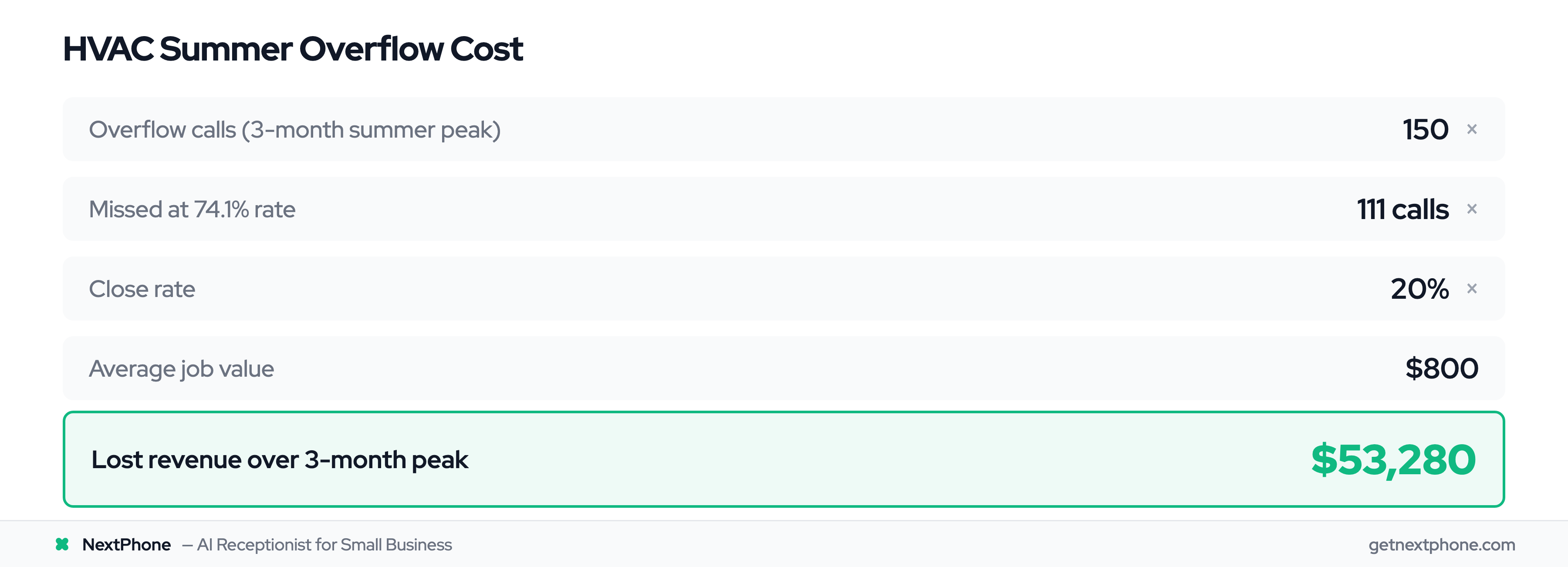
Let's work through a real scenario for an HVAC contractor:
Normal operations: 50 calls per month Summer peak: 200 calls per month (4x normal volume) Calls beyond capacity: 150 overflow calls
Without an overflow solution at 74.1% missed rate: 111 missed calls
At 20% close rate and $800 average job value: 111 x 20% x $800 = $17,760 lost per month
Over a three-month summer peak: $17,760 x 3 = $53,280 in lost revenue
That's not a rounding error. That's a new truck. That's a full-time employee's salary. That's gone.
Roofing Storm Surge: $390,000 Lost in One Event
Storm damage creates even more dramatic numbers:
Normal week: 25 calls Post-storm week: 200 calls (8x normal) Overflow calls: 175
At 74.1% missed rate: 130 missed calls
Storm leads close at higher rates - homeowners need repairs NOW. At 25% close rate and $12,000 average roof job: 130 x 25% x $12,000 = $390,000 in lost revenue from ONE storm event
One hailstorm. One week. Nearly $400,000 in jobs that called you first - then hired someone else because you couldn't answer.
Beyond Direct Revenue Loss
The costs extend beyond immediate missed jobs:
Reputation damage: Frustrated customers who couldn't reach you leave negative reviews. "I called three times and no one answered" shows up on Google.
Competitive loss: Every customer who couldn't reach you called a competitor who could. That competitor now has the relationship.
Staff burnout: When calls overwhelm your team, stress spikes. Turnover increases. Training new staff mid-peak is nearly impossible.
Emergency liability: Missed emergency calls create potential liability. The flooded basement you didn't answer. The gas leak call that went to voicemail.
The bottom line: The average home services business loses $189,068 annually to missed calls - and peak seasons account for 60%+ of that loss. Overflow management isn't a nice-to-have. It's revenue protection.
Four Overflow Management Strategies (Compared)
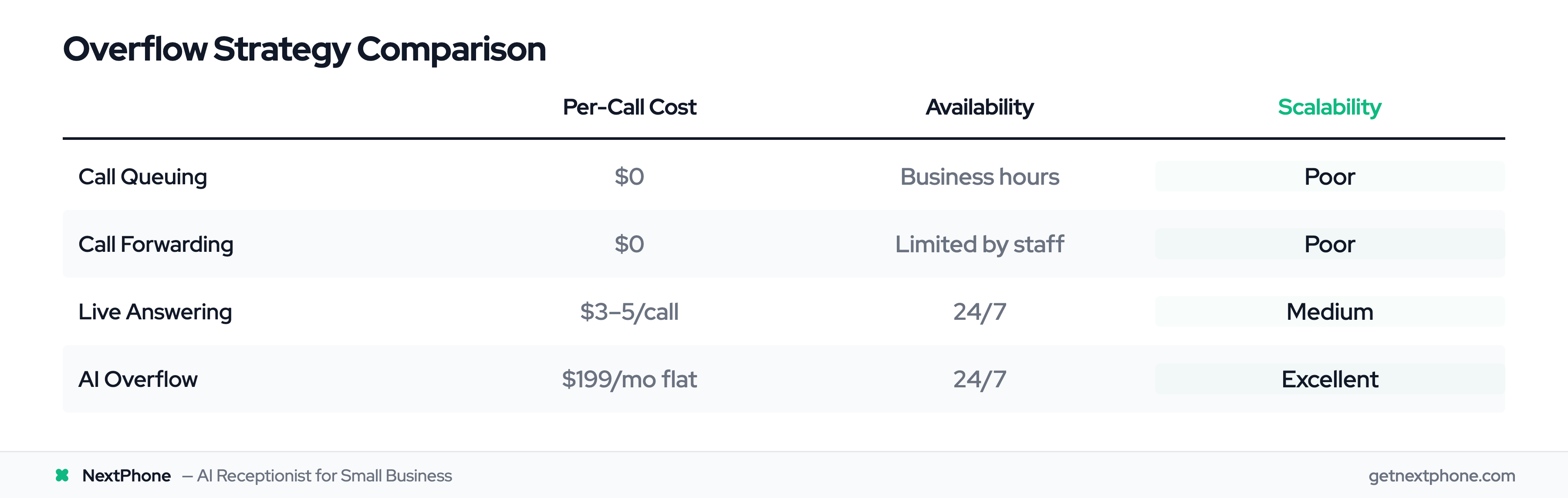
Not all overflow solutions are created equal. Here's what actually works - and what doesn't.
Strategy 1: Call Queuing
How it works: Callers wait on hold with music and/or messages until someone is available to answer.
Best for: Short expected wait times (under 2 minutes). Minor overflow during daily peaks.
Limitations: 33% of callers hang up after 1 minute. Provides no after-hours solution. Doesn't scale for seasonal surges.
Cost: Usually included with your phone system at no additional charge.
Verdict: Acceptable for minor daily overflow. Fails completely during seasonal peaks and after hours.
Strategy 2: Call Forwarding
How it works: When primary lines are busy, calls forward to other numbers - cell phones, other staff members, home offices.
Best for: Small teams who can share the load. Situations where someone is always available.
Limitations: Still limited by human availability. Quality varies wildly depending on who answers. No coverage when everyone is busy.
Cost: Usually included with phone system.
Verdict: Helps distribute load but doesn't truly solve overflow for seasonal peaks. What happens when everyone's phones are ringing?
Strategy 3: Live Answering Service
How it works: Human operators at a call center answer your overflow calls. They follow your script, take messages, and can transfer emergencies.
Best for: Businesses requiring high-touch interactions. Complex industries with nuanced caller needs.
Limitations: Costs $3-5 per call (or per minute), which adds up fast during peaks. Quality varies by service. Operators aren't experts in your business.
Cost: $300-800/month base fee plus $3-5 per call/minute
During a storm surge with 175 overflow calls at $4/call: $700 just for that week. During an HVAC summer with 450 overflow calls over 3 months at $4/call: $1,800 in fees - on top of monthly minimums.
Verdict: Works but gets expensive fast during exactly the periods when you need it most.
Strategy 4: AI Overflow Backup
How it works: AI answers overflow calls, handles routine inquiries (hours, scheduling, pricing), takes detailed messages, and routes emergencies to humans immediately.
Best for: Seasonal businesses with predictable patterns. Cost-conscious operations. High-volume peaks.
Limitations: Complex situations still need human follow-up. AI can't close sales or handle complaints.
Cost: Flat monthly rate ($199/month for NextPhone), unlimited calls
During a storm surge with 175 overflow calls: $0 additional (flat rate) During an HVAC summer with 450 overflow calls: $0 additional (flat rate)
Verdict: Best ROI for seasonal overflow. Scales infinitely with demand at predictable cost.
Side-by-Side Comparison
| Strategy | Setup Cost | Per-Call Cost | Availability | Scalability | Best For |
|---|---|---|---|---|---|
| Call Queuing | Free | $0 | Business hours | Poor | Minor daily peaks |
| Call Forwarding | Free | $0 | Limited by staff | Poor | Small teams |
| Live Answering | $200-500 | $3-5/call | 24/7 | Medium | Complex needs |
| AI Overflow | $0 | $199/mo flat | 24/7 | Excellent | Seasonal peaks |
For seasonal businesses facing predictable peaks, AI overflow provides the best economics. You pay the same whether you get 10 overflow calls or 1,000.
AI as Your Overflow Backup: How It Works
AI overflow isn't about replacing your team. It's about catching every call they can't answer - and handling it professionally.
The Hybrid Approach
The most effective overflow strategy combines AI and humans:
- AI handles: Routine questions, appointment scheduling, quote request intake, message-taking
- Humans handle: Emergencies (routed immediately), complex situations, sales conversations
- Result: Every call gets professional handling. Emergencies reach you. Routine calls don't interrupt you.
This isn't AI-or-humans. It's AI-and-humans, each doing what they do best.
What AI Handles During Overflow
When calls overflow to AI, here's what happens:
-
"What are your hours?" - AI answers instantly from your knowledge base. Caller gets information. You're never interrupted.
-
"Can you come tomorrow to look at my AC?" - AI checks your calendar, finds availability, books the appointment, sends confirmation. Caller gets scheduled. You see it in your calendar.
-
"I need a quote for a new roof" - AI captures all details: contact info, address, type of roof, timeline, budget concerns. Sends you complete summary. You call back when ready.
-
"My pipe burst, water everywhere!" - AI detects emergency keywords, immediately routes to your on-call number. No delay. Emergency reaches you in seconds.
Emergency Detection and Routing
This is critical: emergencies can't wait in any queue.
AI recognizes urgency through keyword analysis:
- HVAC: "no AC," "no heat," "95 degrees," "freezing," "baby in house"
- Plumbing: "burst pipe," "flooding," "water everywhere," "sewage," "gas smell"
- Roofing: "active leak," "storm damage," "tarp needed," "water coming in"
- General: "emergency," "urgent," "right now," "can't wait"
When these keywords appear, the call routes to your phone immediately. No holding. No message-taking. Direct transfer.
Calls containing urgency language rank among the top reasons people call. These callers need immediate human attention - and AI ensures they get it.
Scalability During Peaks
This is where AI overflow changes the math:
Live answering service during 175-call storm week: $700+ in per-call fees AI overflow during 175-call storm week: $0 additional (flat monthly rate)
Live answering for 450 summer overflow calls: $1,800+ in fees AI overflow for 450 summer overflow calls: $0 additional
Whether you get 10 overflow calls or 1,000, the cost stays the same. That predictability matters when you're budgeting for seasonal operations.
Real example: An HVAC contractor had AI answer 127 overflow calls during one 95-degree weekend. Cost: $0 additional (flat monthly rate). Revenue captured: $23,400 in booked jobs. Without AI overflow, 94 of those calls would have gone to voicemail - and to competitors.