
Introduction
Picture this: You're an electrician receiving 42 calls per month. Some are emergencies needing immediate attention. Some are customers wanting to schedule estimates. Some are callback requests. And some are spam. Without intelligent call handling, these calls end up in the wrong place—emergencies go to voicemail, callbacks get lost, and you waste time on robocalls.
The numbers tell the story. Analysis of 45,000+ business calls reveals that 15.9% contain urgency language requiring priority routing. Another 25.4% explicitly request callbacks. Meanwhile, 7% or more are spam calls that waste your time. Without proper automated call handling, opportunities slip through the cracks while distractions pile up.
Home services companies miss 27% of inbound calls according to Invoca research. But even answered calls can frustrate customers when they reach the wrong person, get stuck in confusing menu loops, or wait on hold while someone figures out where to route them.
This comprehensive guide covers everything you need to know about automated call handling: what it is, how the technology works, essential features that matter for service businesses, the different types of systems available, and how to implement call handling that captures every opportunity. Based on analysis of real call patterns, you'll learn which features actually move the needle and how to set up intelligent routing for your business.
What is Automated Call Handling?
Automated call handling is technology that manages incoming phone calls without human intervention—answering calls, understanding what callers need, and routing them to the appropriate destination based on predefined rules and intelligent detection.
Definition and Core Concept
At its simplest, automated call handling replaces the need for someone to physically answer every call and manually direct it. When a customer calls your business, the system:
- Answers the call (typically within 1-2 rings)
- Greets the caller with your customized message
- Collects input through menu options, voice recognition, or conversation
- Routes the call to the right destination based on logic you've configured
- Takes action if needed (scheduling, messaging, providing information)
The routing destination might be a specific team member, a department, a voicemail box, or even an automated response that gives the caller what they need without any human involvement at all.
Modern automated call handling ranges from simple menu systems ("Press 1 for service, Press 2 for billing") to sophisticated AI that holds natural conversations, understands intent without button presses, and makes intelligent routing decisions in real-time.
The Problem It Solves

Businesses face several challenges with incoming calls that automated handling addresses:
Missed calls: When no one's available to answer, calls go to voicemail. Industry data shows 27% of home services calls go unanswered, and fewer than 3% of callers leave messages.
Wrong routing: Calls reach the wrong person, requiring transfers and frustrating customers who repeat their needs multiple times.
Inconsistent experience: Different staff members handle calls differently. Some are professional; some are rushed. Customers get varied experiences.
After-hours gaps: Business hours don't match customer availability. Calls at 7 PM or on weekends go unanswered.
Wasted time on spam: Staff interrupt productive work to answer robocalls and spam (7-15% of incoming calls depending on industry).
Automated call handling solves these by ensuring every call gets answered immediately, routed correctly, and handled consistently—24 hours a day, 7 days a week.
Who Uses Automated Call Handling?
If you think automated call handling is only for large corporations, consider this: 85.8% of Fortune 500 companies use auto attendants according to Unitel Voice research. The market for automated voice answering systems was valued at $2.8 billion in 2024 and is growing at 23.1% annually.
But adoption is accelerating rapidly in the small business segment. 66% of businesses have automated at least one process—and call handling is one of the easiest wins. Home services contractors, medical practices, law offices, and service businesses of all sizes are implementing automated call handling as the technology becomes more affordable and easier to deploy.
You're not an early adopter. You're joining a proven approach that major enterprises have relied on for decades, now available at small business prices with capabilities that were previously impossible.
How Automated Call Handling Works
Understanding the mechanics helps you configure systems effectively and troubleshoot when things don't work as expected. The good news: it's simpler than most people think.
The Call Flow Process
Here's exactly what happens when a customer calls a business with automated call handling:
Step 1: Call Received The customer dials your business phone number—the same number you've always had. Through call forwarding configuration, the call routes to your automated system instead of (or before) ringing your physical phone.
Step 2: Immediate Answer The system answers quickly, typically within 1-2 rings. Unlike voicemail that activates after missed calls, automated handling answers proactively. The caller never experiences endless ringing.
Step 3: Greeting Plays Your customized greeting welcomes the caller: "Thanks for calling ABC Plumbing. How can I help you today?" or "Welcome to XYZ Electric. Press 1 for service, Press 2 for billing, or stay on the line to speak with someone."
Step 4: Input Collection The system collects information about what the caller needs. This happens through:
- DTMF tones (keypad presses like "Press 1")
- Voice recognition (caller speaks and system understands)
- Natural conversation (AI asks questions and interprets responses)
Step 5: Routing Decision Based on the input and your configured rules, the system determines where to send the call. A service request goes to your service line. An emergency routes to your on-call phone. A general question gets answered automatically.
Step 6: Action Taken The call reaches its destination—whether that's a live person, a scheduled callback, an appointment booking, or information delivered directly to the caller.
The entire process from answer to routing typically takes 15-45 seconds for straightforward requests.
Routing Logic and Decision Points
The intelligence of call handling lies in routing logic—the rules that determine where each call goes. Common routing types include:
Time-based routing: Different behavior during business hours vs. after-hours. Morning calls go to your main line; 9 PM calls route to on-call staff or schedule morning callbacks.
Skill-based routing: Calls route based on the expertise needed. Electrical questions go to electrical staff. HVAC issues route to HVAC technicians.
Priority-based routing: Emergency keywords ("urgent," "leak," "no heat") trigger immediate routing to priority contacts. Analysis shows 15.9% of customer calls contain urgency language—these can't wait in a general queue.
Conditional routing: If/then logic handles complex scenarios. "If caller requests callback AND it's after hours, THEN capture details and send SMS notification."
Menu-based routing: Caller selections determine destination. Press 1 goes to Service, Press 2 goes to Billing, Press 3 goes to Scheduling.
Modern AI-powered systems combine multiple routing types, understanding natural language ("I have an emergency with my furnace") and applying the right routing logic without requiring callers to navigate menus. An AI virtual receptionist handles these conversations naturally while routing calls appropriately.
Integration with Business Systems
Automated call handling becomes more powerful when connected to your other business tools:
Calendar integration: Systems access your Google Calendar, Outlook, or scheduling software to book appointments directly. When a caller asks for an estimate Thursday afternoon, the AI checks availability and confirms the slot.
CRM integration: Customer relationship management systems provide context. When a repeat customer calls, the system can recognize them and personalize the experience.
Notification systems: SMS or email alerts notify you instantly when priority calls come in, callbacks are requested, or emergencies need attention.
Phone systems: Whether you use VoIP (Vonage, RingCentral, Google Voice) or traditional phone service, automated handling integrates through call forwarding without requiring you to change numbers or equipment.
Setup for basic integration typically takes a few hours. Your existing phone number keeps working—customers call the same number they always have, but now an intelligent system answers and routes appropriately.
Essential Automated Call Handling Features
Not all call handling systems offer the same capabilities. Based on analysis of 45,000+ business calls, these are the features that actually matter for service businesses.
Intelligent Call Routing
At its core, automated call handling needs to route calls accurately. The best systems go beyond simple menu selection to understand context and intent.
Analysis shows 31.1% of contractor calls are general service requests. These straightforward calls can route to your main line or be handled entirely by automation (providing service area, hours, basic pricing). No human involvement needed.
But routing intelligence matters most when calls need different handling. A call about scheduling differs from a call about a billing question differs from a call about an emergency. Intelligent systems recognize these differences and act accordingly.
What to look for:
- Multiple routing destinations (not just one number)
- Time-based rules (business hours vs. after-hours)
- Skill-based options (different staff for different needs)
- Fallback routing (if primary contact unavailable, try secondary)
Emergency Detection and Priority Handling
This feature alone can justify automated call handling for service businesses.
Analysis of real call patterns reveals that 15.9% of customer calls contain urgency language—words like "urgent," "emergency," "ASAP," "today," or "immediately." Within that, 6.2% are true emergencies requiring instant response: burst pipes, electrical hazards, no heat in winter, no cooling in extreme heat.
These calls represent your highest-value work. Emergency plumbing, HVAC, and electrical jobs often command premium rates. More importantly, customers in crisis situations call until someone answers. Miss the call and they book with a competitor.
How emergency detection works:
The system monitors incoming calls for trigger keywords. When detected, it bypasses normal routing and connects to your emergency contact immediately.
Trade-specific emergency keywords include:
- Plumbing: "leak," "burst pipe," "flooding," "no water," "sewage"
- Electrical: "sparking," "no power," "burning smell," "shock"
- HVAC: "no heat," "no cooling," "furnace out," "freezing"
- Roofing: "roof leak," "storm damage," "water coming in"
Real example from call analysis: "Needs emergency AC repair, no cooling in 95 degree weather."
The AI detects "emergency" + "AC" + extreme temperature context. Instead of routing to voicemail or a general queue, this call goes to your on-call technician's cell phone within seconds. You have the opportunity to capture a high-value emergency job that would otherwise go to whoever answered first.
Another example: "Urgent: Porta potty delivery at 6 PM. Caller is waiting and needs to speak with you right away."
Keywords "urgent" and "right away" trigger priority handling. The customer isn't waiting for a voicemail callback—they're connected immediately.
Callback Capture and Tracking
Here's a feature most businesses overlook, and it costs them dearly.
Analysis shows 25.4% of callers explicitly request callbacks. They say things like "please call me back," "have someone contact me," or leave a phone number for return calls. That's one in four customers asking you to call them.
Without systematic capture, research indicates 42% of callback requests fall through the cracks. The sticky note gets lost. The voicemail gets buried. The number wasn't written down correctly. Each lost callback is a lost customer relationship—someone who reached out, asked for contact, and never heard back.
What effective callback capture does:
- Confirms phone number: AI asks caller to verify ("You said 555-123-4567. Is that correct?")
- Captures best time: "When's a good time to call you back?"
- Records reason: "What can we help you with?"
- Sends instant notification: You receive SMS or email immediately
Real example: "Requested you call back at 888-568-0296."
Instead of a voicemail you might check hours later, you get an instant text: "Callback requested - 888-568-0296 - needs estimate for electrical work - prefers afternoon." You have all context needed to return the call professionally.
Industry data shows 93% of missed calls that receive automated text-back result in continued communication. Capturing callbacks systematically recovers revenue that otherwise walks away.
Spam Filtering
Let's talk about the hidden time drain killing productivity.
Analysis shows 7% of incoming business calls on average are spam or robocalls. For electricians specifically, the rate is 15.5%—the highest among trades. Electrician phone numbers end up on spam lists more frequently.
Each spam call costs time and mental energy. You stop what you're doing, answer the phone, hear a recorded message about car warranties or fake Google listings, and lose your focus. Over a month, these interruptions add up.
Time savings calculation:
For a contractor receiving 42 calls/month with 7% spam:
- Spam calls filtered: 3 per month
- Time per interruption: 5-10 minutes (answer + refocus)
- Monthly time saved: 15-30 minutes
For an electrician receiving 87 calls/month with 15.5% spam:
- Spam calls filtered: 13 per month
- Monthly time saved: 65-130 minutes (1-2+ hours)
Automated systems filter spam through multiple detection methods: robocall voice patterns, known spam number databases, and suspicious calling behaviors. You never see these calls—they're eliminated before reaching you.
Appointment Scheduling Integration
Analysis shows 7.7% of incoming calls are explicit scheduling requests. Customers want to book estimates, schedule service appointments, or reserve time slots.
Traditional approach: Take the caller's info, say you'll call back to schedule, hope you remember, play phone tag for days.
Automated approach: AI accesses your calendar in real-time, offers available slots, confirms the appointment, and sends confirmation to both parties.
"I need an estimate Thursday afternoon." "I have 2 PM and 4 PM available on Thursday. Which works better?" "2 PM please." "You're confirmed for Thursday at 2 PM. You'll receive a text confirmation shortly."
The appointment appears on your calendar automatically with customer name, phone number, and service needed. No callbacks required. No phone tag. The customer gets what they want immediately.
This works with Google Calendar, Microsoft Outlook, Calendly, and most popular scheduling platforms.
Types of Automated Call Handling Systems
Not all automated call handling is created equal. Understanding the different types helps you choose the right approach for your business.
Auto Attendant (Basic Menu System)
The simplest form of automated call handling is the auto attendant—a recorded greeting that presents menu options.
"Thanks for calling ABC Services. Press 1 for service requests. Press 2 for billing questions. Press 3 for scheduling. Press 0 to speak with someone."
How it works: Caller presses a number on their keypad (DTMF tones). The system routes based on the selection.
Best for:
- Businesses with clear departments
- Simple routing needs (service vs. billing vs. scheduling)
- Budget-conscious implementation
Limitations:
- Requires callers to navigate menus
- Can frustrate customers who don't fit menu options
- No understanding of natural speech
Typical cost: $15-50/month
IVR (Interactive Voice Response)
IVR goes beyond basic menus to collect information and perform tasks.
"Please say or enter your account number." "I found your account. Your balance is $247.50. Would you like to make a payment?"
How it works: The system recognizes voice input or keypad entry, looks up data from connected systems, and can complete transactions or provide information without human involvement.
Best for:
- Account inquiries and lookups
- Payment processing
- Appointment confirmations
- Status updates
Limitations:
- Structured paths can feel robotic
- Requires specific phrases or exact inputs
- Complex needs may not fit the decision tree
Typical cost: $75-150/month
AI-Powered Call Handling
Modern AI systems use natural language processing to hold actual conversations with callers.
"Thanks for calling. How can I help you?" "I need someone to look at my furnace. It's making a weird noise." "I understand you're having an issue with your furnace. Is this an emergency, or can we schedule a service visit?" "It's not an emergency. Can someone come tomorrow?" "I have availability tomorrow at 10 AM or 2 PM. Which works better?"
How it works: AI interprets natural speech, understands intent without requiring specific phrases, and responds conversationally. It can handle variations—"my heater is broken," "furnace not working," and "no heat" all route appropriately.
Best for:
- Customer-friendly experience
- Variable caller needs that don't fit menus
- Businesses wanting modern, professional impression
Limitations:
- Higher cost than basic systems
- Requires training/configuration for your business
- May struggle with heavy accents or unusual requests
Typical cost: $99-299/month
Hybrid Systems: The Best of Both Worlds
Here's the reality: No single approach handles everything perfectly.
Vonage research found that 85% of respondents abandoned a call after encountering a poorly designed auto attendant, and 51% abandoned the business entirely. Customers hate being trapped in systems that can't help them.
But pure human handling isn't practical for most small businesses—you can't answer every call instantly, especially after hours or when you're on job sites.
The solution is hybrid: AI handles what it does well, humans handle what requires judgment.
Hybrid approach in practice:
AI answers every call 24/7 and handles routine matters:
- Business hours, service areas, basic pricing
- Appointment scheduling from available slots
- Callback request capture
- Spam filtering
- General questions
AI detects complexity and routes to humans:
- Upset customers needing empathy
- Complex pricing negotiations
- Multi-part requests with contingencies
- Customer specifically requests a person
Analysis shows 60-80% of calls are routine—automation handles these completely. The remaining 20-40% involve complexity benefiting from human judgment, and these route seamlessly.
The customer never feels trapped. They get immediate answer (AI) followed by human escalation when needed (within seconds, not minutes).
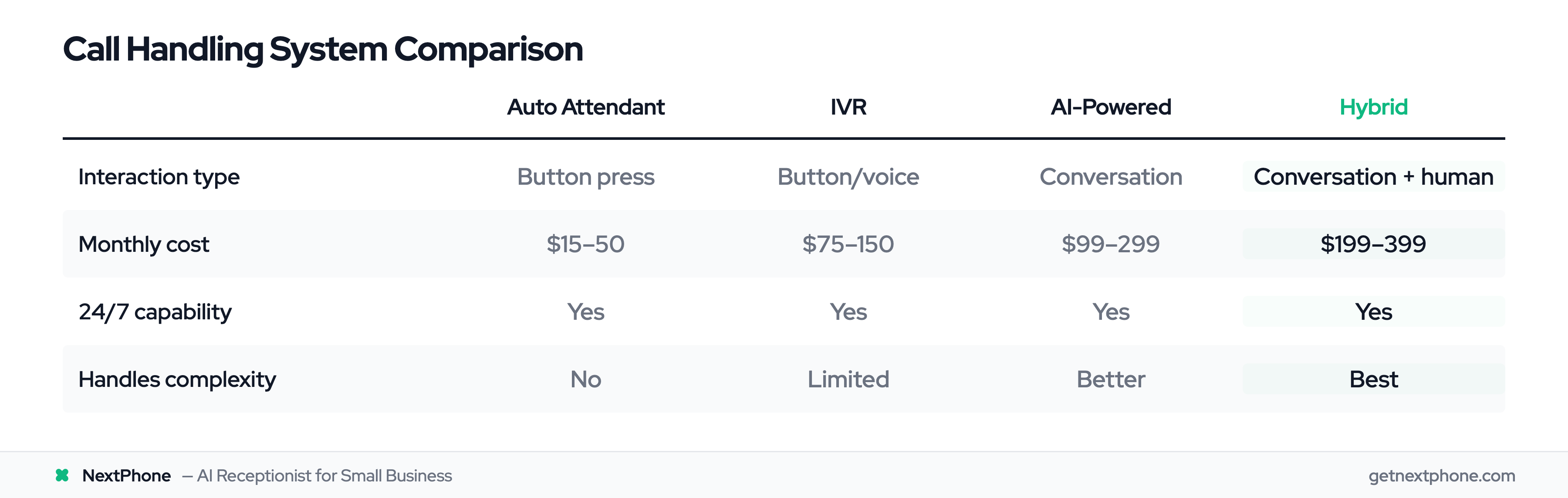
Comparison Summary:
| Feature | Auto Attendant | IVR | AI-Powered | Hybrid |
|---|---|---|---|---|
| Interaction | Button press | Button/voice | Conversation | Conversation + human |
| Customer Experience | Basic | Structured | Natural | Best |
| Cost | $15-50/mo | $75-150/mo | $99-299/mo | $199-399/mo |
| 24/7 Capability | Yes | Yes | Yes | Yes |
| Complex Handling | No | Limited | Better | Best |
| Best For | Simple routing | Data collection | Modern experience | Full coverage |
Benefits of Automated Call Handling for Service Businesses
Understanding features is one thing. Understanding the business impact is what drives decisions.
24/7 Availability
The most obvious benefit: your business answers every call, every time.
Currently, 27% of home services calls go unanswered according to Invoca. That's more than one in four customers calling and not reaching anyone. Most don't leave voicemail. They call the next business on their list.
With automated call handling:
- Calls at 6 AM get answered
- Calls at 9 PM get answered
- Calls on Sunday get answered
- Calls while you're on a job site get answered
You don't need staff working around the clock. The system handles after-hours professionally—routing emergencies to on-call contacts, capturing callbacks for morning follow-up, and answering basic questions any time.
Consistent Customer Experience
Every caller gets the same professional greeting, the same quality of service, the same accurate information.
There's no variation based on which staff member answers, how busy they are, or whether they're having a good day. The experience doesn't degrade at 4:55 PM on Friday when everyone's ready to leave.
Research from eGain found 61% of customers feel companies don't value their time when they experience inconsistent or poor phone service. Automation provides consistency that builds reputation.
Whether someone calls Monday at 9 AM or Saturday at 8 PM, they get immediate, professional response.
Intelligent Emergency Routing
For service businesses, this feature alone often justifies the investment.
Analysis shows 6.2% of contractor calls are true emergencies—burst pipes, electrical hazards, heating failures, active roof leaks. These are typically your highest-margin jobs, commanding premium rates for after-hours and emergency response.
Without intelligent routing, these calls might go to voicemail. The customer, desperate for help, calls the next contractor. By the time you check voicemail hours later and call back, they've already booked with whoever answered first.
With emergency detection, keywords trigger immediate routing. "My pipes burst and water is everywhere" doesn't wait in any queue. It reaches your emergency contact in seconds. You have the opportunity—your competitor doesn't.
Cost Efficiency
Let's compare approaches financially.
Full-time receptionist costs:
- Salary: ~$35,000/year ($2,900/month)
- Benefits: Add 25-30%
- Training, turnover, management time
- Coverage: ~40 hours per week (24% of total hours)
- Capacity: One call at a time
Automated call handling costs:
- Service: $99-299/month ($199 typical for AI)
- Coverage: 168 hours per week (100%)
- Capacity: Unlimited simultaneous calls
- No training, no turnover, no sick days
Monthly savings: $2,700+ compared to in-house receptionist
But the real ROI comes from captured opportunities. If you're missing 27% of calls and automated handling captures even half of those, the additional revenue far exceeds the monthly cost.
Companies using AI-driven call systems report 75% boost in first-call resolution and 40% reduction in handling times according to Dialzara. These efficiency gains compound over time.
Scalability
Human receptionists handle one call at a time. When a second call comes in, someone waits or goes to voicemail.
Automated systems handle unlimited simultaneous calls. This matters during:
- Seasonal spikes (HVAC in summer/winter, roofing after storms)
- Marketing campaigns that generate call volume
- Any period when multiple customers call at once
Storm hits your area and 15 customers call about roof damage at 8 AM? All 15 get answered simultaneously. AI triages emergencies for immediate routing and schedules inspections for the rest. No busy signals, no voicemail overload, no missed opportunities.
You scale call handling instantly without hiring temporary staff.
How to Set Up Automated Call Handling
Implementation is more straightforward than most business owners expect. Here's a practical roadmap.
Planning Your Call Flow
Before touching any system, map out how you want calls to flow:
1. Identify call types your business receives:
- Emergency service needs
- General service requests
- Appointment scheduling
- Billing questions
- General inquiries (hours, service area, pricing)
- Quote/estimate requests
2. Define destinations for each type:
- Emergency: On-call technician's cell phone
- Service: Main office line or scheduling AI
- Billing: Office manager or accounting
- General: Automated response or voicemail
3. Set time-based rules:
- Business hours (8 AM - 5 PM): Route to office/staff
- After hours: Emergencies to on-call, others to callback capture
4. Identify emergency keywords for your industry:
- "Leak," "burst," "flooding" (plumbing)
- "Sparking," "no power," "burning" (electrical)
- "No heat," "no cooling," "furnace" (HVAC)
This planning takes 30-60 minutes and makes actual setup much faster.
Setup Process Step-by-Step
Step 1: Sign up and choose system (5 minutes) Create account with provider, select pricing tier. Most offer free trials—take advantage to test before committing.
Step 2: Configure call forwarding (10 minutes) Set up forwarding from your existing business number to the system. This happens through your phone carrier's settings. Your number stays the same—customers never know anything changed.
Step 3: Record or customize greeting (15 minutes) Create your welcome message. Keep it short and professional:
- Good: "Thanks for calling ABC Plumbing. How can I help you?"
- Too long: "Thank you for calling ABC Plumbing, proudly serving the greater metro area since 1985. Your call is very important to us. Please listen carefully as our menu options have recently changed..."
Step 4: Set up routing rules (30 minutes) Configure the routing logic you planned:
- Emergency keywords and priority destinations
- Business hours vs. after-hours behavior
- Menu options or conversation flows
- Fallback actions (if no answer, then...)
Step 5: Test with sample calls (20 minutes) Call your own number from different phones. Test each scenario:
- General question ("What are your hours?")
- Emergency ("I have a water leak")
- Scheduling request ("I need an estimate")
- After-hours call
Make adjustments based on how calls flow.
Step 6: Go live (immediate) Once testing confirms expected behavior, you're operational. The system starts handling real calls.
Total time: 1-2 hours for basic setup. Refinements can happen over the following week as you see real call patterns.
Customization for Your Industry
Generic setup works, but industry-specific configuration improves performance.
For contractors specifically:
Emergency keywords by trade:
- Plumber: "leak," "burst pipe," "no water," "flooding," "sewage backup"
- Electrician: "no power," "sparking," "burning smell," "electrical fire"
- HVAC: "no heat," "no cooling," "furnace out," "AC not working"
- Roofer: "roof leak," "storm damage," "water coming in"
Service area configuration: Define geographic boundaries so the AI doesn't book appointments outside your zone. "Sorry, we don't service that area. Can I recommend...?"
Appointment types and durations:
- Free estimate: 30-minute slot
- Service call: 1-2 hour window
- Major project: Full day block
After-hours behavior:
- Route emergencies to on-call 24/7
- Non-urgent: Capture callback for next business day
- Or: Attempt scheduling if calendar integration active
Best Practices
Keep greetings short and natural. Customers want help, not a company history.
Limit menu options to 4-5 maximum. Long menus frustrate callers. If you need more options, create sub-menus.
Always provide human escalation. "Press 0 to speak with someone" should always work. Never trap callers in automation.
Test regularly. Have friends or family call monthly to experience what customers experience. You'll catch issues before they frustrate real callers.
Review call logs weekly. Most systems provide dashboards showing call volumes, routing distributions, and outcomes. Use data to refine rules.
Update information promptly. Hours change seasonally? Service area expands? Update the system so callers get accurate information.
How NextPhone Handles Calls Intelligently
Now that you understand automated call handling generally, here's how NextPhone specifically addresses the needs of service businesses.
AI-Powered with Human Backup
NextPhone operates on a hybrid principle: AI handles what it does well, humans handle what requires judgment.
When calls come in, NextPhone's AI answers in under five seconds with your customized greeting. It then evaluates the situation:
AI handles completely (60-80% of calls):
- Business hours, service area questions
- General pricing information
- Appointment scheduling from your calendar
- Callback request capture with full details
- Spam filtering
- Routine inquiries
Routes to humans (20-40% of calls):
- Customer expresses frustration or upset
- Complex questions requiring expertise
- Price negotiations or custom work
- Multi-part requests with contingencies
- Caller specifically asks for a person
The customer never feels trapped. Either they get immediate resolution, or they get immediate connection to someone who can help. No voicemail limbo.
Built for Contractors
NextPhone isn't generic call handling adapted for service businesses—it's built specifically for home services contractors.
Emergency detection trained on contractor calls: The system recognizes trade-specific urgency ("no heat," "burst pipe," "sparking outlet") and routes these calls immediately. Those 6.2% of emergency calls reach your on-call phone in seconds.
Callback tracking for the 25.4%: One in four callers requests callbacks. NextPhone captures every one with verified phone number, best time to call, and reason. You receive instant SMS notification.
Spam filtering: Eliminates 7-15.5% of calls that are robocalls and junk. You focus on real customers, not fake Google listing scams.
Appointment scheduling: Integrates with your calendar to book estimates and service calls during the conversation. Customers get immediate confirmation.
The system is trained on analysis of 45,000+ actual contractor calls. It understands plumber customer language, electrician inquiries, HVAC emergencies, and roofing quote requests.
Flat-Rate Pricing
NextPhone uses simple, predictable pricing:
- $199/month flat rate
- Unlimited calls (no per-minute charges)
- AI answering + smart forwarding to your phone
- Emergency routing with keyword detection
- Callback tracking with instant notifications
- Spam filtering
- Appointment scheduling integration
- Calendar and CRM integration
- Call analytics dashboard
No hidden fees:
- No setup charges
- No per-call overages
- No contract lock-in (month-to-month)
7-day free trial lets you test with your actual business before committing.
At $199/month, capturing just one additional job per month that you would have missed typically generates returns far exceeding the cost. For most contractors, the ROI is measured in multiples, not percentages.
Frequently Asked Questions
What is the difference between auto attendant and IVR?
Auto attendant provides basic menu-based routing: "Press 1 for Service, Press 2 for Billing." Callers navigate by pressing buttons, and calls route based on selection.
IVR (Interactive Voice Response) goes further, collecting information and performing actions. It can look up accounts, take payments, confirm appointments, and provide personalized information. IVR uses voice recognition in addition to keypad input.
AI-powered systems represent the next evolution—natural conversation without menus or specific phrases required. The caller simply explains what they need, and the AI understands and routes appropriately.
Can automated call handling work with my existing phone number?
Yes. Nearly all systems work through call forwarding from your existing number. You enable forwarding to the automated system's number, and calls to your regular business line get answered by the automation.
Your customers keep calling the same number they always have. They never know anything changed behind the scenes. You don't need to update websites, business cards, or truck lettering.
If you ever want to disable automation, you simply turn off call forwarding and calls ring your phone directly again.
How does emergency detection actually work?
The system monitors incoming calls for trigger words and phrases. When it detects keywords like "emergency," "urgent," "leak," "no heat," "sparking," or similar urgency indicators, it bypasses normal routing and connects to your designated emergency contact immediately.
You can customize emergency keywords for your specific trade. Plumbing emergencies differ from electrical emergencies differ from HVAC emergencies. Configure the keywords that matter for your business.
Analysis shows 15.9% of contractor calls contain urgency language, and 6.2% are true emergencies. Proper detection ensures these high-value, time-sensitive calls reach you in seconds, not hours.
Will customers hate talking to an automated system?
Research shows mixed reactions—but context matters. A Vonage survey found 85% of respondents abandoned calls after encountering poorly designed auto attendants. The key word is "poorly designed."
Frustrating systems trap callers in endless menus with no path to a human. They don't understand what callers say. They can't help with anything beyond narrow predefined paths.
Well-designed systems, especially AI-powered and hybrid approaches, get much better reception. Natural conversation feels different than "Press 1 for this, Press 2 for that." Immediate escalation to humans when needed prevents frustration.
Also consider the alternative: 27% of calls currently go unanswered. Voicemail that 85% of callers won't use. Compared to not answering at all, good automation is dramatically better.
How many calls can automated systems handle simultaneously?
Unlimited. Unlike human receptionists who handle one call at a time, automated systems answer as many simultaneous calls as come in.
This matters during peak periods. Storm hits your area and 20 customers call about roof damage? All 20 get answered at once. The system triages, routes emergencies for immediate attention, and schedules inspections for others. No busy signals, no voicemail overflow.
Can automated systems actually schedule appointments?
Yes. AI-powered systems access your calendar (Google Calendar, Outlook, Calendly, and others), check real-time availability, offer slots to callers, and confirm bookings during the call.
"I need an estimate next week." "I have Tuesday at 2 PM or Thursday at 10 AM available. Which works better?" "Thursday at 10." "You're confirmed for Thursday at 10 AM. You'll receive a confirmation text shortly."
The appointment appears on your calendar with customer details. No callbacks required, no phone tag, no manual scheduling.
What percentage of calls can automation handle without human involvement?
Based on analysis of 45,000+ calls to service businesses, 60-80% of incoming calls are routine matters that automation handles completely: business hours questions, service area inquiries, appointment scheduling, callback capture, and spam filtering.
The remaining 20-40% involve complexity benefiting from human judgment: upset customers, price negotiations, multi-part requests, technical questions requiring expertise. These route to humans seamlessly.
AI with smart forwarding delivers the best results—automation resolves 90-95% of calls while forwarding the rest to your phone for personal handling.
How long does it typically take to set up automated call handling?
Basic setup takes 1-2 hours for most businesses:
- Sign up: 5 minutes
- Configure call forwarding: 10 minutes
- Customize greeting: 15 minutes
- Set up routing rules: 30 minutes
- Test scenarios: 20 minutes
Advanced customization—industry-specific keywords, complex multi-destination routing, extensive integration—can be refined over the first week or two. But you can be operational the same day you start.
Most providers offer setup assistance or done-for-you onboarding if you want help with technical aspects.
Start Handling Calls Intelligently
Automated call handling isn't experimental technology. It's proven infrastructure used by 85.8% of Fortune 500 companies, now accessible to service businesses at affordable monthly rates.
The data is clear: 27% of home services calls go unanswered. Of the calls that are answered, many reach the wrong person or get stuck in frustrating queues. Meanwhile, 25.4% of callers request callbacks that often go unreturned, 15.9% have urgent needs requiring immediate routing, and 7-15% are spam wasting your time.
Intelligent automated call handling solves these problems. Every call gets answered—24/7, 365 days a year. Emergencies route instantly to your on-call phone. Callbacks get captured with full details and instant notifications. Spam gets filtered before it interrupts your day. Appointments get scheduled while customers are on the phone.
AI with smart forwarding delivers best results: automation resolves 90-95% of calls, forwarding the 5-10% requiring your judgment to your phone. Customers get immediate answers or immediate connection to you—never voicemail limbo.
For $199/month versus $2,900/month for a receptionist, the ROI math works heavily in automation's favor. But the real value is captured opportunities: calls answered instead of missed, emergencies handled instead of lost, callbacks returned instead of forgotten.
Ready to handle every call intelligently? Start your free 7-day trial of NextPhone's AI-powered call handling and see the difference intelligent routing makes for your business.