
The phone rings. You're elbow-deep in a job, or helping a customer at the counter, or driving between appointments. By the time you can answer, the ringing stops. Another potential customer gone.
Here's the uncomfortable truth: 62% of incoming business calls go unanswered. And 85% of those callers? They never call back. They just call your competitor instead.
For contractors, salon owners, medical offices, and other service businesses, this isn't just an inconvenience. It's money walking out the door every single day.
An AI voice assistant for business solves this problem without requiring you to hire staff, chain yourself to your phone, or pay hundreds for a traditional answering service. These aren't the clunky automated menus from the 90s. Modern AI assistants have natural conversations, take messages, book appointments, and know when to get you on the line for urgent matters.
Let's break down exactly how they work and whether one makes sense for your business.
The Hidden Cost of Missed Calls

How Many Calls Are You Actually Missing?
Most business owners underestimate this number. You remember the calls you take. The ones you miss? Those are invisible.
For contractors specifically, our data shows that 60-80% of incoming calls go unanswered during business hours. Plumbers on job sites, electricians in attics, HVAC techs on rooftops—they physically can't answer the phone.
Every one of those missed calls represents a potential customer. A $500 repair job. A $5,000 installation. Gone because you were busy doing the work that pays your bills.
There's another stat worth knowing: companies that respond to leads within 5 minutes are 21 times more likely to close the deal than those who wait even 30 minutes. Speed matters.
Why Traditional Solutions Fall Short
You've probably tried the obvious fixes:
Voicemail doesn't work because most people hate leaving voicemails. They'll hang up and try someone else.
Traditional answering services can cost $400 or more per month. The quality varies wildly. And the operators don't actually know your business—they're reading from a script.
Hiring a receptionist is cost-prohibitive for most small businesses. You're looking at $30,000+ per year in salary alone.
Answering your own phone means constantly interrupting your work, which makes you slower and less professional. Plus, you can't answer when you're with another customer.
None of these solutions scale. None of them actually solve the problem.
What Is an AI Voice Assistant for Business?
Beyond Siri and Alexa: Business-Grade AI
When people hear "AI voice assistant," they think of Siri or Alexa. Consumer assistants that set timers and play music. There are now 8.4 billion voice assistants globally, up from 4.2 billion in 2020.
Business AI voice assistants are different. They're built specifically for customer conversations, functioning as a voice AI receptionist for your company. 62% of US adults use voice assistants regularly, so the technology is familiar to most customers. They can hold natural, human-like phone calls, answer questions about your services, and know when a situation needs a real human.
The technology behind them has improved dramatically. 82% of companies are already using some form of voice technology, and 85% expect widespread deployment within the next five years. The voice AI market is projected to grow from $3.14B to $47.5B by 2034, at a 34.8% CAGR. This isn't emerging tech anymore—it's mainstream.
What Can an AI Voice Assistant Actually Do?
Here's what a quality AI voice assistant handles:
Answer calls 24/7 — Weekends, holidays, 3 AM. Every call gets answered professionally.
Take messages with context — Not just "someone called." Full details about what the caller needs and when they want a callback.
Schedule appointments — Syncs with your calendar to book jobs or consultations without your involvement.
Answer FAQs — Service area, pricing ranges, business hours. Questions you answer fifty times a week.
Route urgent calls — When something genuinely needs your attention right now, the AI knows to reach you.
Send follow-ups — Text confirmations, appointment reminders, even quote requests—automatically.
Filter spam — Robocalls and telemarketers get blocked before they waste your time.
That last point matters more than you might think. Our data shows 7.0% of all business calls are spam or robocalls. An AI assistant filters those out so you only see calls that matter.
How AI Voice Assistants Work (Without the Tech Jargon)
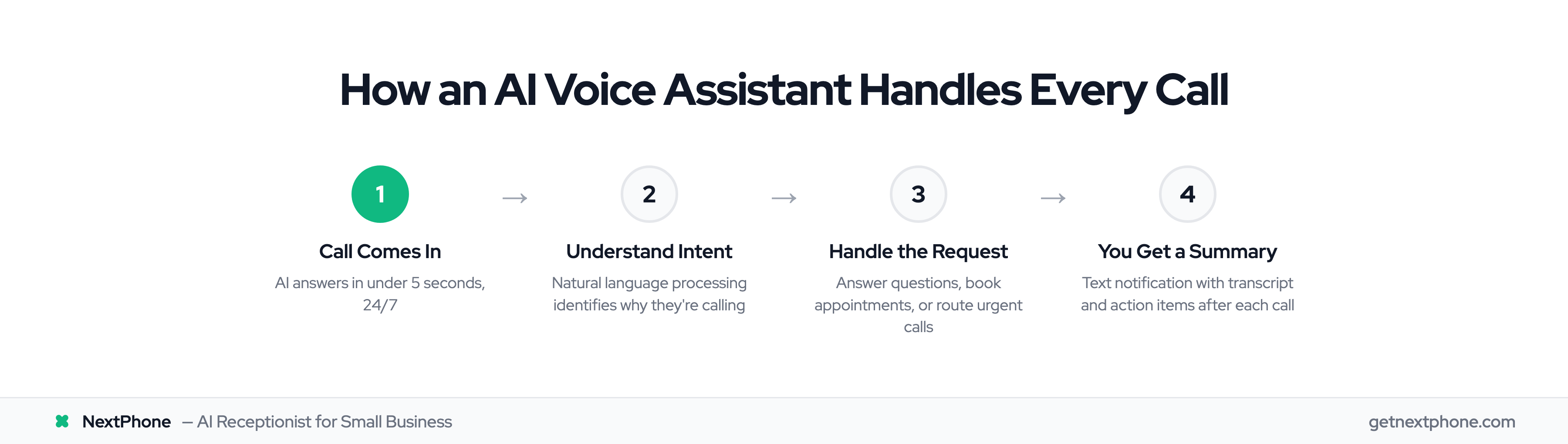
The Conversation Flow
Here's what happens when someone calls your business and an AI assistant answers:
-
The call comes in. The AI greets the caller with your custom greeting.
-
The AI figures out why they're calling. Natural language processing lets it understand intent, not just keywords. "I need my AC fixed" and "My air conditioning is broken" mean the same thing to the AI.
-
The AI handles the request. Depending on what the caller needs, it might answer their question, book an appointment, take a detailed message, or route the call to you.
-
You get a summary. After the call, you receive a text or notification with the recording, transcript, and any action items.
The whole interaction feels natural to the caller. No robotic "press 1 for sales" menus. Just a conversation.
Training Your AI to Sound Like Your Business
The best AI assistants aren't generic. They learn your business.
You provide information about your services, common questions, your scheduling preferences, and how you want calls handled. The AI uses this to have conversations that feel on-brand.
Most systems let you customize the greeting, the voice personality, and the specific responses to common questions. You can tell it which situations are emergencies, what your service area covers, and how to handle after-hours calls differently than daytime ones.
The AI also improves over time. It learns from each call which questions come up most and which responses work best. The 2025 State of Voice AI Report documents these rapid advances in natural language understanding.
Curious what an AI assistant actually sounds like? Many providers offer demo lines you can call. It's worth testing a few to hear the difference between a cheap bot and a quality assistant.
Real Benefits for Small Business Owners
Never Miss Another Lead
This is the core value proposition. Every call gets answered, even when you can't answer it.
Someone calls at 7 PM asking about a repair? The AI takes their information and books a callback for the next morning. Customer calls on Sunday to schedule an appointment? The AI books it directly on your calendar.
No more checking voicemail and finding three calls from people who already hired someone else.
Filter the Noise, Focus on What Matters
Not every call deserves your attention. Spam calls, wrong numbers, and tire-kickers all eat into your day.
Our analysis shows 7.0% of incoming calls are pure spam—robocalls and telemarketers. A good AI assistant blocks these before you even know they called.
Beyond spam, AI can screen calls based on your criteria. Looking for jobs over a certain dollar amount? Want to prioritize existing customers? The AI can qualify calls and summarize the important ones.
Handle Urgent Calls Appropriately
Not all calls are equal. Some are genuine emergencies.
Our data reveals that 15.9% of calls contain urgency language—words like "emergency," "urgent," "right now," or "flooding." And 6.2% are true emergencies that need immediate attention.
A quality AI assistant recognizes these patterns. You can set rules: if a call sounds urgent, route it to your cell immediately. If it's a true emergency, call me no matter what time it is. Everything else can wait until business hours.
This means you're not constantly checking your phone "just in case." You know the urgent ones will get through.
Get Your Time Back
Here's what most people don't consider: the mental cost of phone anxiety.
When your phone might ring at any moment with a potential customer, you're never fully present in your current task. You're always half-distracted, waiting for the interruption.
With an AI handling incoming calls, you can focus completely on the customer in front of you, the job you're working on, or the meeting you're in. Important calls still reach you. But routine calls get handled without breaking your concentration.
Who Benefits Most from AI Voice Assistants?
Service-Based Businesses
AI voice assistants work best for businesses where:
- You can't always answer the phone (you're on job sites, with patients, or serving customers)
- Missing a call often means losing a job to a competitor
- You need to maintain a professional phone presence
- You want to grow without hiring a full-time receptionist
This includes:
Contractors — Plumbers, electricians, HVAC techs, roofers, landscapers. Anyone who works with their hands.
Medical and dental offices — Front desk staff can't always pick up when they're checking patients in.
Salons and spas — Stylists can't answer the phone mid-haircut.
Real estate agents — Can't take calls during showings, but every call might be a buyer.
Legal practices — New clients often call multiple firms and hire whoever answers first.
Common Traits of Ideal Users
You'll get the most value from an AI voice assistant if:
- You lose money every time a call goes unanswered
- You're paying for an answering service that's too expensive or too inconsistent
- You can't afford a full-time receptionist but need professional call handling
- You want to scale your business without proportionally scaling your phone time
If your business runs entirely on walk-in traffic and rarely gets phone calls, an AI assistant probably isn't necessary. But if phone calls drive your revenue, it's worth considering.
Choosing the Right AI Voice Assistant for Your Business
Key Features to Look For
Not all AI voice assistants are equal. Here's what separates the good ones from the cheap ones:
Natural-sounding voice — If it sounds robotic, callers will hang up. Listen to demos before you buy.
Custom training — Can it learn your specific services, pricing, and FAQs? Generic assistants frustrate callers.
Calendar integration — Does it sync with your existing scheduling system to book appointments directly?
Call recording and transcription — Essential for reviewing what was said and training staff.
Mobile app — You need to manage calls and see messages from anywhere.
Spam filtering — Should block robocalls and telemarketers automatically.
Urgency detection — Can it recognize emergencies and route them appropriately?
Questions to Ask Before Buying
Before committing to any AI voice assistant:
- Can I hear a demo call? (If they won't let you test it, that's a red flag.)
- How do I train it on my business?
- What happens when the AI can't answer a question?
- How are urgent calls handled?
- What's the actual monthly cost, including all features I'll need?
- Is there a contract, or can I cancel anytime?
- How long does setup take?
Price vs. Value
AI voice assistant pricing spans a wide range:
Budget options ($9-50/month) — These often sound robotic and have limited customization. Fine for very basic needs, but callers often realize they're talking to a bot.
Mid-tier ($100-200/month) — More natural-sounding with better customization. Suitable for most small businesses.
Premium ($199-300/month) — Full-featured with advanced training, integrations, and urgency detection. Worth it if calls directly generate revenue.
Traditional answering service ($400+/month) — Human operators, but inconsistent quality and limited by their knowledge of your business.
The math usually works in favor of AI. Even one extra job per month—recovered from a call that would have gone to voicemail—pays for a premium AI assistant several times over.
Want to compare options? Look at what each provider includes at their quoted price. Some charge extra for features that should be standard.
How NextPhone's AI Voice Assistant Helps Business Owners
For business owners who need reliable call handling, NextPhone built an AI voice assistant specifically for service-based small businesses.
Built for Busy Professionals
NextPhone was designed for people who can't be chained to their phone—contractors, medical offices, salons, and similar businesses where missed calls mean missed revenue.
Setup doesn't require technical knowledge. You connect your existing business number (or get a new one), train the AI on your services and preferences, and start taking calls. Most businesses are fully operational within a few days.
Smart Call Handling That Actually Works
NextPhone's AI was trained on real call patterns from thousands of service businesses. That means it understands how your customers actually talk.
The system knows that 25.4% of callers explicitly want a callback scheduled rather than just leaving a message. So it offers that option proactively.
It recognizes when 15.9% of calls contain urgency language and can escalate those according to your rules. And it knows to immediately route the 6.2% that are true emergencies—not make them wait.
On the flip side, it filters out the 7.0% of calls that are spam, so you're not constantly seeing robocall notifications.
What You Get for $199/Month
NextPhone includes:
- Unlimited calls answered — No per-minute charges or call limits
- Full call transcription — Searchable records of every conversation
- Appointment scheduling — Syncs with your calendar to book directly
- Custom-trained AI — Learns your services, pricing, and preferences
- Mobile app — Manage everything from your phone
- Spam filtering — Robocalls blocked automatically
- Urgency detection — Important calls get routed to you immediately
There's no annual contract. You can try it and cancel if it doesn't work for your business.
Getting Started: What to Expect
Setup Process
Getting an AI voice assistant running is simpler than you might expect:
Step 1: Connect your phone number. Most services let you port your existing business number or forward calls to a new AI-enabled number.
Step 2: Train the AI. Provide information about your services, common questions customers ask, your hours, and your service area. The more detail you give, the better the AI performs.
Step 3: Set your call handling rules. What should happen with after-hours calls? Which situations are emergencies? When do you want calls routed to your cell?
Step 4: Test and refine. Make some test calls. See how the AI handles different scenarios. Adjust as needed.
The First Week
Expect an adjustment period. The AI will handle most calls well right out of the gate, but some will need fine-tuning.
Review transcripts daily during the first week. Look for questions the AI struggled to answer or situations it didn't handle perfectly. Update the training accordingly.
By the end of week one, most businesses have an AI that handles 90%+ of calls exactly as they would.
The AI continues learning from there. It gets better at recognizing your regular customers, common questions, and the nuances of how your callers speak.
Frequently Asked Questions
Will callers know they're talking to an AI?
Most won't notice. Modern AI voice assistants sound remarkably natural—far from the robotic systems of a few years ago. Even when callers do realize it's AI, many prefer getting immediate help over leaving a voicemail that might never get returned.
Can the AI handle my specific industry?
Quality AI assistants can be trained on any industry. The key is how much customization the provider allows. Look for services that let you add your specific services, pricing, FAQs, and terminology. Generic one-size-fits-all systems tend to frustrate callers in specialized industries.
What happens if there's a real emergency?
You control the rules. Set up specific triggers—words like "flooding," "emergency," or "urgent"—that immediately route calls to your cell or an emergency contact. Most AI assistants can also detect distress in a caller's voice and escalate accordingly. True emergencies get through; routine calls wait for business hours.
How much does an AI voice assistant cost?
Prices range from around $9/month for basic bots to $300+ for enterprise solutions. Most small businesses find the $100-200/month range offers the best balance of quality and value. Budget options often sound robotic and lack customization. Premium options include features like urgency detection and advanced integrations that matter for service businesses.
Will this replace my staff?
No. AI voice assistants handle routine calls—the ones that interrupt your staff thirty times a day. This frees your team to focus on in-person customers, complex questions, and work that requires human judgment. It's augmentation, not replacement. Your receptionist becomes more effective, not obsolete.
Can I try it before committing?
Most quality providers offer demos or trials. At minimum, you should be able to call a demo line and have a conversation with the AI before paying anything. If a provider won't let you test their product, that tells you something about their confidence in it.
What if the AI can't answer a question?
Good AI assistants know their limits. When a question falls outside their training, they'll explain that they need to take a message and have someone call back with the answer. They capture all the relevant details so you can respond appropriately. No making things up, no frustrating the caller—just a graceful handoff.
Stop Losing Customers to Voicemail
Every missed call is a customer who might have hired you. An AI voice assistant for business captures those calls, qualifies the leads, books the appointments, and only interrupts you when something truly needs your attention.
The technology has matured. It sounds natural. It's affordable. And it works around the clock without breaks, sick days, or vacations. Over 30 voice AI statistics confirm the growing adoption across industries.
If your business depends on phone calls—and most service businesses do—you're choosing between answering every call or losing customers to competitors who answer theirs.
Sources: