
Key Takeaways
- NextPhone is our top pick — flat-rate AI at $199/month, unlimited calls, 90–95% of calls resolved without escalation, and a free 7-day trial
- Receptionist software ranges from $49/month (AI-only) to $500+/month (premium live services)
- AI-powered solutions offer unlimited scalability and 24/7 coverage at lower costs
- Live human receptionists excel at complex conversations and high-touch customer service
- Hybrid solutions like Smith.ai combine AI efficiency with human backup for flexibility
- Most providers offer free trials (7–14 days), making it low-risk to test before committing
Every missed call represents a potential customer walking away. For small business owners juggling operations, sales, and customer service, answering every phone call simply isn't realistic. That's where receptionist software comes in.
The virtual receptionist market has exploded in recent years, now valued at $3.85 billion and projected to reach $9 billion by 2033. This growth has brought an overwhelming number of options, from pure AI solutions to traditional live answering services to hybrid approaches that blend both.
This receptionist software comparison breaks down seven leading solutions, examining their pricing, features, and ideal use cases. For a broader look at the virtual receptionist landscape, we've covered that separately. Whether you're a solo practitioner, a growing startup, or an established small business, you'll find an option that fits — and for most small businesses, NextPhone's flat-rate AI receptionist is the strongest starting point.
Types of Receptionist Software
Before diving into specific providers, understanding the three main categories helps narrow down your options. If you're unsure whether you need a receptionist service or a traditional answering service, that distinction matters too.
Live Virtual Receptionist Services
Live virtual receptionists are real people who answer calls on your behalf from a remote location. They follow your custom scripts, handle complex conversations, and provide the personal touch that some callers expect. Providers like Ruby and Abby Connect specialize in this approach.
The tradeoff? Higher costs and limited scalability. Most live services charge per minute, and prices add up quickly during high-volume periods.
AI-Powered Receptionist Solutions
AI receptionists use natural language processing to handle calls automatically. They can answer common questions, schedule appointments, route calls, and take messages without human intervention. An AI virtual receptionist like NextPhone falls into this category.
These systems excel at handling high call volumes at predictable costs. They work 24/7 without overtime charges and never call in sick. The limitation is handling unusual requests or emotionally charged conversations.
Hybrid AI + Human Solutions
Hybrid solutions attempt to capture the best of both worlds. AI handles routine calls and initial screening, while human agents step in for complex situations. Smith.ai pioneered this approach and remains a leader in the hybrid space.
This model offers flexibility but can be harder to predict costs since you're often paying different rates for AI and human-handled calls.
How We Evaluated These Solutions
Our receptionist software comparison focused on criteria most relevant to small businesses. When evaluating alternatives to major platforms like RingCentral, the best solutions balance cost and capability—a principle that applies equally to receptionist software:
Pricing transparency: We prioritized solutions with clear, upfront pricing over those requiring custom quotes or hiding fees in fine print.
Feature depth: Core capabilities like call routing, message taking, and appointment scheduling were essential. Advanced features like CRM integration and analytics added value.
Ease of setup: Small businesses need solutions they can implement quickly without IT departments. We favored plug-and-play options.
Scalability: The right solution grows with your business without requiring a complete platform change.
Integration capabilities: Compatibility with popular CRMs, calendars, and business tools reduces friction and manual data entry.
What receptionist software actually has to handle
Software only matters if it covers the calls you actually get. Across the inbound calls our own AI receptionist answers, the most common reasons people call — in ranked order — are:
- Booking, confirming, or rescheduling an appointment
- Asking about a specific service or repair
- Requesting a quote or estimate
- Checking the status of existing work
- Hours, location, and directions
- New-customer inquiries
- Emergencies
Any tool you pick should turn that top-three — appointments, service questions, and quotes — into booked work automatically. Message-taking alone leaves the revenue on the table.
A production call where the AI captures who's calling, what they need, and the detail a human team needs to follow up — no manual note-taking.
7 Best Receptionist Software Solutions Compared
Our Recommended Pick: NextPhone
For most small businesses handling 50+ calls per month, NextPhone delivers the strongest combination of cost predictability and AI performance: $199/month flat rate, unlimited calls, 24/7 coverage, and 90–95% of calls resolved without needing to transfer to a human. See our full AI receptionist pricing comparison for how flat-rate billing stacks up against per-call and per-minute services.
1. Smith.ai - Best Hybrid AI + Human Solution
Smith.ai has built its reputation on combining AI technology with live receptionist services. Their system uses AI to screen calls, qualify leads, and handle routine inquiries while routing complex calls to human agents.
Pricing:
- AI Receptionist: $97.50/month for 30 calls
- Live Virtual Receptionist: $292.50/month for 30 calls
- Additional calls billed at flat per-call rates
- 7,000+ integrations including Salesforce, HubSpot, and most calendaring tools
- Lead qualification and intake form completion
- Free spam filtering (you only pay for legitimate calls)
- Real-time call transcription and recording
- 24/7 availability across all plans
Pros:
- Flexible per-call pricing scales with actual usage
- Extensive integration library covers most business tools
- AI handles spam so you never pay for junk calls
- Human backup available when needed
Cons:
- Per-call model makes costs unpredictable for high-volume businesses
- Premium features require higher-tier plans
- Can get expensive for businesses with 100+ calls monthly
Best For: Businesses that want AI efficiency for routine calls with the option to escalate to a live agent. Particularly strong for companies with complex intake workflows or lead qualification needs.
2. Ruby Receptionist - Best for Personalized Service
Ruby built its brand on delivering the warm, personalized experience of an in-house receptionist without the overhead. Their U.S.-based receptionists undergo extensive training to represent your business authentically.
Pricing:
- Starting at $245/month for 50 receptionist minutes
- Live chat: 10 chats/month for $140
- Overage charges apply beyond included minutes
Key Features:
- Custom scripts tailored to your business
- Mobile app with real-time call notifications and updates
- Bilingual support (English and Spanish)
- Receptionists learn caller preferences and recognize repeat clients
Pros:
- Exceptionally personalized caller experience
- Receptionists feel like an extension of your team
- Strong mobile app for on-the-go management
- Consistent quality from well-trained staff
Cons:
- Limited to 3 CRM integrations
- No AI technology means higher costs
- No text messaging capability
- Per-minute billing can lead to unpredictable costs
Best For: Businesses where caller experience and personal rapport are top priorities, such as law firms, high-end services, and medical practices. If you're exploring AI alternatives, see our Ruby receptionist alternative breakdown.
3. NextPhone — Our Recommended Pick
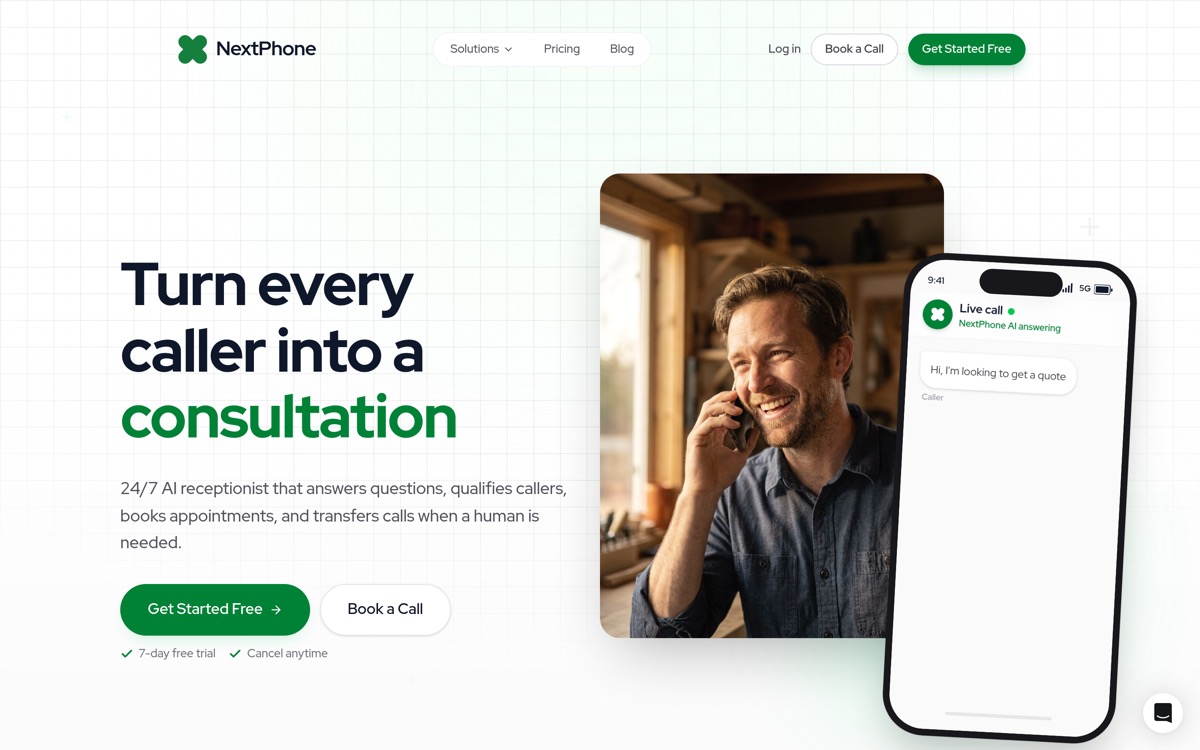
NextPhone takes a different approach to the receptionist software market with flat-rate pricing that includes unlimited calls. This eliminates the anxiety of watching minutes tick away or worrying about overage charges. Across 1,446,980+ inbound calls processed, NextPhone's AI picks up in under 5 seconds and resolves 90–95% of conversations without human escalation — with 99% positive caller sentiment.
Pricing:
- $199/month flat rate
- Unlimited inbound calls included
- No per-minute or per-call fees
Key Features:
- AI-powered call handling with natural conversation flow
- 24/7 availability without overtime charges
- Appointment scheduling and calendar integration
- Call routing and message delivery
- Quick setup process
Pros:
- Completely predictable monthly costs
- Unlimited calls mean no penalty for growth
- AI handles high volumes without quality degradation
- Competitive mid-range pricing
- 9 languages supported at no extra cost
- Setup in 1-2 days (no lengthy onboarding)
Cons:
- No human fallback option for complex or emotional calls
- Newer entrant with a limited track record compared to established providers
- AI may struggle with highly nuanced or unusual requests
Best For: Businesses handling 50+ calls/month that want predictable receptionist costs without per-minute billing. Contractors, multilingual businesses, and companies with high call volumes benefit most from flat-rate AI. Compare full pricing breakdowns in our AI receptionist pricing guide.
Try NextPhone free for 7 days
AI answering service that answers, qualifies, and books — 24/7.
Get Started Free4. Nexa - Best for Industry-Specific Needs
Nexa (formerly Answer 1) has carved a niche by training receptionists specifically for high-regulation industries. Their agents understand the terminology and compliance requirements of legal, healthcare, and home services sectors.
Pricing:
- Custom quotes based on business needs
- Starting around $239/month
- Higher entry point reflects specialized training
Key Features:
- Industry-specific receptionist training
- 24/7/365 live coverage
- Lead capture and sales intake
- Outbound calling campaigns
- Live chat and text messaging
- Comprehensive reporting and analytics
Pros:
- Receptionists understand industry-specific terminology
- Comprehensive service portfolio beyond just calls
- Strong analytics for tracking ROI
- Excellent for regulated industries
Cons:
- No public pricing requires sales conversation
- Higher starting price than general services
- Overkill for businesses without specialized needs
- Less flexibility in pricing models
Best For: Regulated industries like healthcare, legal, and home services where receptionists need to understand compliance requirements and industry terminology.
5. PATLive - Best for 24/7 Coverage
PATLive has refined its live answering service over 33 years, building a reputation for reliable round-the-clock coverage with consistently trained receptionists.
Pricing:
- Base: $60/month
- Per-minute: $2.34
- Nine different plan options
- 7-day free trial
- No setup fees
Key Features:
- 80 hours of receptionist training per agent
- Calls answered within 4 rings
- Month-to-month billing with easy plan changes
- Integrations with CRM, calendar, and e-commerce platforms
- No contracts or cancellation penalties
Pros:
- Flexibility with 9 plan options
- Well-trained, consistent receptionist quality
- No long-term commitment required
- Free trial to test service
Cons:
- Per-minute charges can escalate quickly
- Base fee plus usage adds complexity
- No AI option for cost reduction
- Less industry specialization than Nexa
Best For: Businesses requiring reliable 24/7 human coverage without long-term contracts. Companies with fluctuating call volumes benefit from the flexible plan structure.
6. Abby Connect - Best for Professional Services
Abby Connect assigns dedicated teams of 5-7 receptionists to each client, ensuring callers interact with people who genuinely know your business over time.
Pricing:
- $299/month for 100 receptionist minutes
- 7-day free trial available
- Overage charges for additional minutes
Key Features:
- Dedicated receptionist team per client
- AI-generated call summaries
- Sentiment analysis on calls
- Spam blocking included
- Custom transfer tunes and hold music
Pros:
- Dedicated team builds genuine familiarity with your business
- AI-enhanced features like call summaries
- Strong fit for professional services
- Spam calls filtered automatically
Cons:
- Higher per-minute effective cost
- 100 minutes may not suffice for busy practices
- Limited to specific industries
- Not a budget option
Best For: Legal practices, dental offices, medical practices, and accounting firms where professionalism and caller familiarity directly impact client relationships. For comparison, field service platforms like ServiceM8 achieve 94% user satisfaction by focusing on specific industry needs.
Receptionist Software Comparison Table
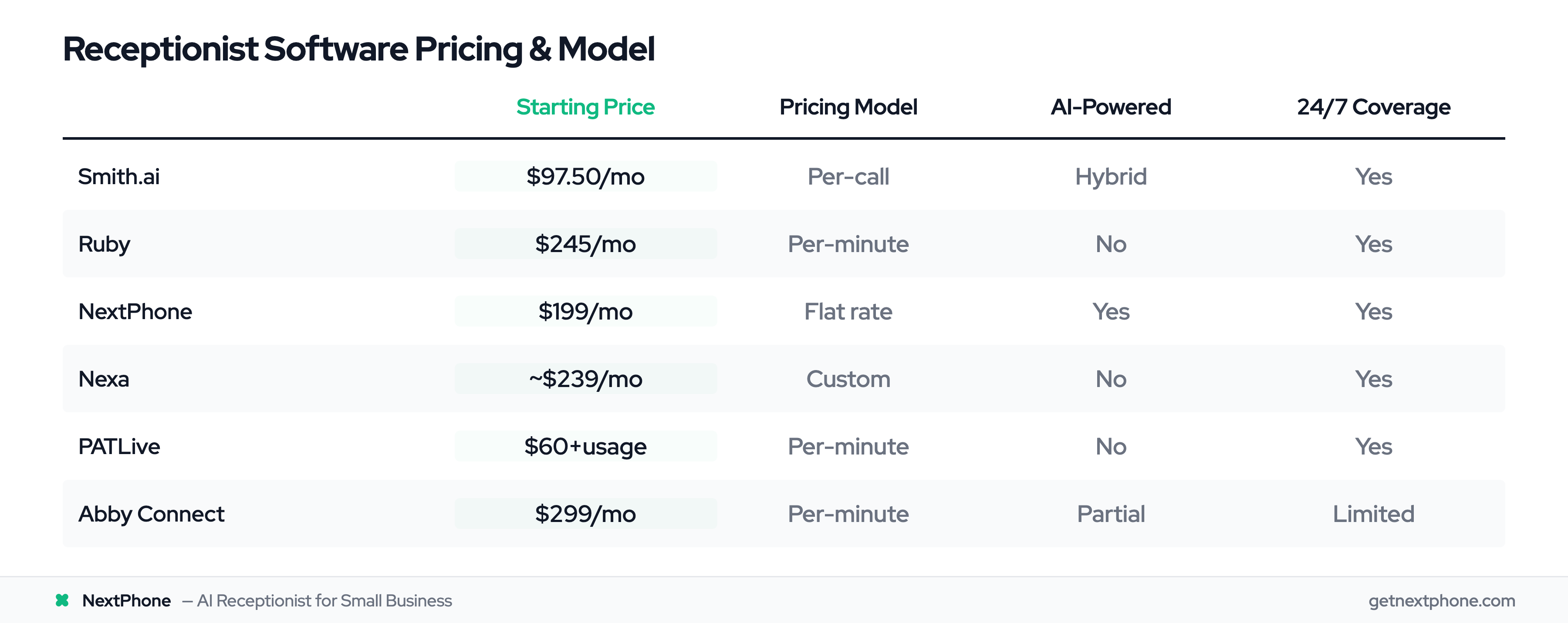
| Feature | Smith.ai | Ruby | NextPhone | Nexa | PATLive | Abby Connect |
|---|---|---|---|---|---|---|
| Starting Price | $97.50/mo | $245/mo | $199/mo | ~$239/mo | $60+usage | $299/mo |
| Pricing Model | Per-call | Per-minute | Flat rate | Custom | Per-minute | Per-minute |
| AI-Powered | Hybrid | No | Yes | No | No | Partial |
| 24/7 Availability | Yes | Yes | Yes | Yes | Yes | Limited |
| CRM Integrations | 7,000+ | 3 | Multiple | Industry-specific | Multiple | Multiple |
| Bilingual Support | Yes | Yes | Yes | Yes | Yes | Yes |
| Free Trial | Yes | No | Yes | No | 7 days | 7 days |
| Best For | Hybrid needs | Personal touch | Cost control | Specialized industries | 24/7 human | Professional services |
AI vs. Human Receptionists: Which Is Right for You?
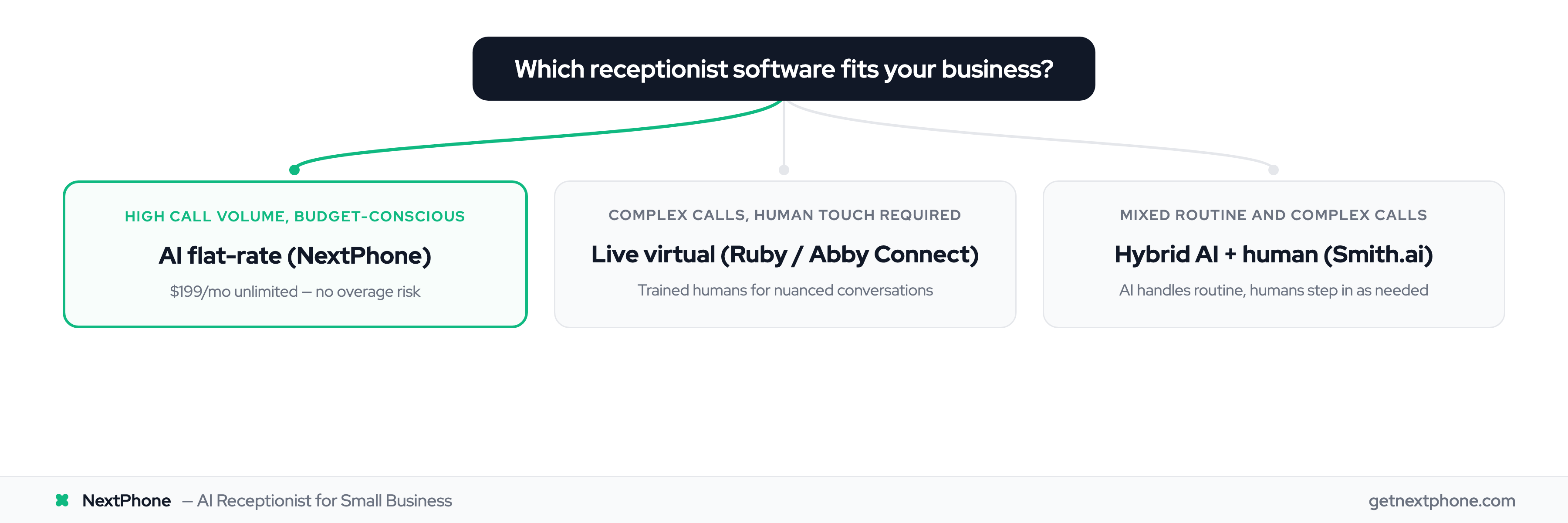
The AI versus human receptionist debate doesn't have a universal answer. Your choice depends on your callers' expectations, call complexity, and budget constraints.
When to Choose AI-Powered Solutions
AI receptionists make sense when:
- Call volume is high or unpredictable. AI handles spikes without quality degradation or overtime costs.
- Most calls involve routine inquiries. Questions about hours, directions, pricing, or appointment availability are AI's sweet spot.
- Budget constraints are real. AI solutions typically cost 50-80% less than equivalent human coverage.
- You need true 24/7 coverage. AI doesn't sleep, take breaks, or call in sick.
When to Choose Live Human Receptionists
Human receptionists excel when:
- Calls involve emotional or complex situations. A distressed caller needs empathy that AI cannot authentically provide.
- High-value clients expect personal service. Some industries (luxury services, high-end professional services) require human interaction.
- Regulatory requirements mandate it. Certain healthcare or legal situations may require human agents.
- Callers are predominantly elderly. Some demographics remain uncomfortable interacting with AI.
When Hybrid Makes Sense
Consider hybrid solutions when:
- Call complexity varies significantly. AI handles routine calls; humans step in for exceptions.
- You're transitioning from human to AI. Hybrid provides a safety net during the learning curve.
- You want cost efficiency without sacrificing quality. Let AI handle 80% of calls while humans manage the complex 20%.
Key Features to Look for in Receptionist Software
Call Handling Essentials
Every receptionist solution should handle the basics: answering calls promptly, routing to appropriate team members, taking accurate messages, and recording calls for quality assurance. Don't assume these features are included; verify before signing up.
Scheduling and CRM Integration
Modern receptionist software should sync with your calendar to book appointments directly and update your CRM with caller information. Manual data entry defeats the purpose of automation. Check that your specific CRM and calendar are supported before committing.
Customization Options
Your receptionist should sound like an extension of your business, not a generic call center. Look for custom scripting options, business-specific training (for live services), and branded voicemail and hold messages.
Reporting and Analytics
You can't improve what you don't measure. Quality receptionist software provides call volume trends, peak hours analysis, response time metrics, and outcome tracking to help optimize your phone operations.
How to Calculate ROI on Receptionist Software
Understanding the return on your receptionist investment helps justify the expense and choose the right tier. Use our receptionist cost calculator to estimate your specific savings.
Cost of missed calls: Research suggests 85% of callers who reach voicemail don't leave messages and won't call back. If your average customer value is $500 and you miss 20 calls monthly, that's potentially $8,500 in lost revenue.
Comparison to in-house staff: A full-time receptionist costs $35,000-$45,000 annually in salary alone, plus benefits, training, and overhead. Virtual solutions starting at $200-$300/month represent 85%+ savings.
Time savings: Every call your team doesn't answer is time returned to revenue-generating activities. For billable professionals, this time directly translates to income.
Most small businesses implementing receptionist software report positive ROI within weeks rather than months. A salon that implemented AI reception saw a 25% increase in bookings and 300% ROI within the first year. For context, top SaaS companies like Airtable achieve 170% net dollar retention—compared to 130% for Asana and 120% for Monday—suggesting software that delivers real value sees strong customer commitment.
Frequently Asked Questions
What is receptionist software?
Receptionist software is a technology solution that handles incoming phone calls on behalf of a business. It can answer calls, route them to the right person, take messages, schedule appointments, and respond to common questions. Receptionist software comes in three forms: AI-powered systems that automate call handling, live virtual receptionist services staffed by remote human agents, and hybrid solutions that combine both approaches.
How much does receptionist software cost?
Receptionist software pricing spans a wide range depending on technology and service level. Pure AI solutions start as low as $49/month, while premium live receptionist services can exceed $500/month. Most small businesses find suitable options in the $100-$300/month range. The key is matching your call volume and complexity to the right pricing model, whether flat-rate, per-minute, or per-call. See our detailed receptionist cost breakdown for a full comparison.
Can AI receptionists handle complex calls?
AI receptionists handle routine calls exceptionally well, including scheduling appointments, answering FAQs, taking messages, and routing calls. However, they have limitations with emotionally charged situations, highly unusual requests, or conversations requiring nuanced judgment. Most AI systems can recognize when a call exceeds their capabilities and transfer to a human or take a message for callback.
How long does it take to set up receptionist software?
Setup times vary by solution and complexity. AI-powered services often activate within 24-48 hours since they don't require human training. Live receptionist services typically need 3-7 business days to train agents on your business specifics. Most providers offer assisted onboarding to help configure scripts, integrations, and call flows.
Do virtual receptionists work after hours?
Most virtual receptionist solutions offer 24/7 coverage, though some live services charge premium rates for evenings, weekends, and holidays. AI-powered solutions provide consistent 24/7 service at no additional cost since software doesn't require overtime pay. Check whether after-hours coverage is included in base pricing or requires plan upgrades.
What integrations should I prioritize?
The most valuable integrations depend on your existing tech stack. Prioritize your CRM (Salesforce, HubSpot, Zoho, or industry-specific options) for automatic contact updates. Calendar integration (Google Calendar, Outlook, Calendly) enables direct appointment booking. Payment processing integration matters if you take deposits. Communication tools like Slack or Teams keep your team informed of messages in real-time.
Is my customer data secure with virtual receptionist services?
Reputable receptionist software providers implement encryption, access controls, and compliance certifications (SOC 2 for general security, plus industry-specific standards where required). Before signing up, verify the provider's security certifications and ask about data handling policies. For regulated industries, confirm the solution meets your specific compliance requirements.
What's the difference between receptionist software and an answering service?
Receptionist software provides a full front-desk experience: greeting callers by name, scheduling appointments, qualifying leads, and routing calls based on custom logic. An answering service typically focuses on taking messages and forwarding them. Receptionist software also tends to integrate with CRMs, calendars, and business tools, while traditional answering services operate more independently. For a deeper comparison, see our guide on answering services vs. receptionists.
Can I switch providers if I'm not satisfied?
Most receptionist software operates on month-to-month agreements without long-term contracts. However, switching involves updating your phone routing, potentially porting numbers, and losing any custom training invested in your current provider. Take advantage of free trials before committing, and start with shorter commitments when testing new solutions.
Choosing the Right Receptionist Software
No single receptionist solution fits every business — but for most, there's a clear default.
For most small businesses, NextPhone is the starting point: $199/month flat rate, unlimited calls, AI that answers in under 5 seconds and resolves 90–95% of conversations without escalation, and a 7-day free trial to verify it works for your callers. There are no per-minute surprises, no overage charges, and no penalty for growth. Start here, then reevaluate if your needs demand something different.
From there, match edge cases to the right tool:
- For hybrid flexibility, Smith.ai's combination of AI and human agents provides a safety net when call complexity varies.
- For maximum personalization, Ruby delivers the human touch that some clients expect.
- For industry-specific expertise, Nexa trains receptionists in your vertical's language and requirements.
- For reliable 24/7 human coverage, PATLive's decades of experience ensure consistent quality.
- For professional service firms, Abby Connect's dedicated teams build genuine client relationships.
Most providers offer free trials, making it low-risk to test before committing. Start with your top candidate, evaluate for a week or two, and adjust based on real-world performance with your actual callers.
For a full breakdown of pricing models — flat-rate, per-call, per-minute — see our AI receptionist pricing guide.
Looking for a receptionist solution with predictable pricing? Learn more about NextPhone's $199/month flat-rate AI receptionist.