Key Takeaways
- Phone automation software handles calls 24/7 without adding staff, capturing leads you'd otherwise miss
- Core automation features include auto-answering, intelligent routing, appointment scheduling, follow-up reminders, and voicemail transcription
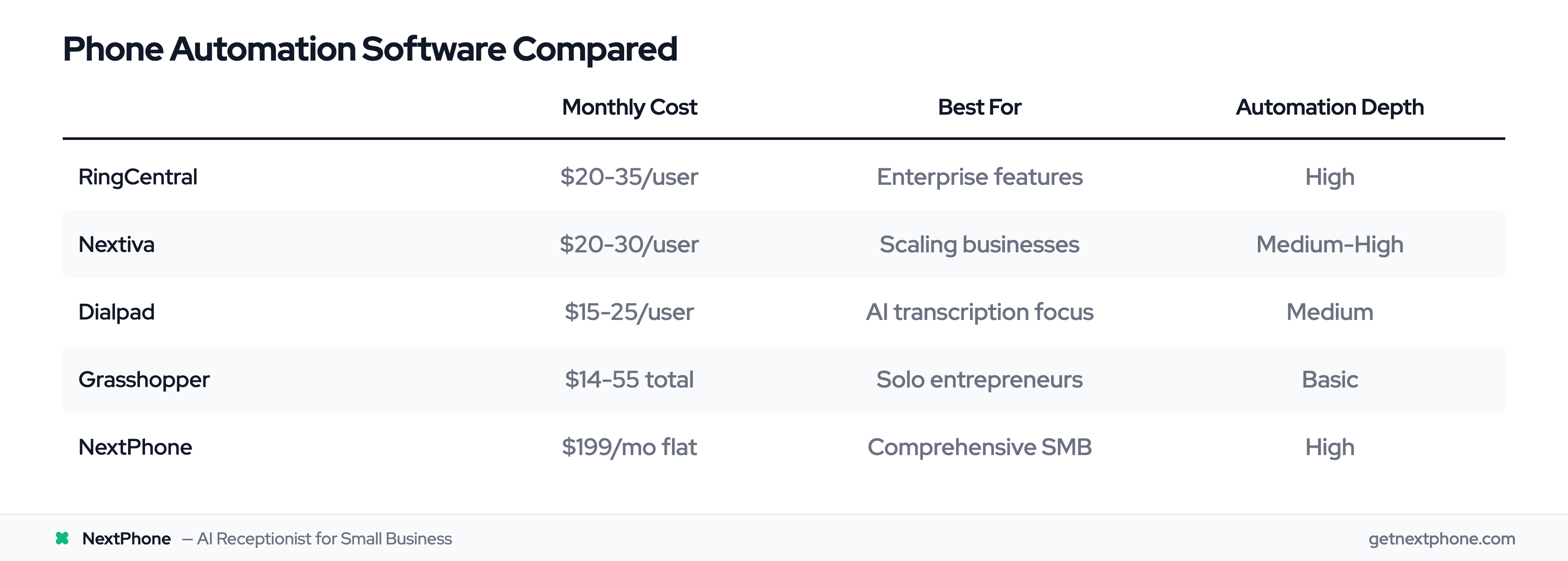
- Most solutions range from $15-$40 per user monthly, with comprehensive flat-rate options like NextPhone at $199/month
- CRM integration eliminates manual data entry and ensures no customer interaction falls through the cracks
- Basic implementation takes 1-2 days; most businesses see ROI within the first month
Every missed call is a missed opportunity. For small businesses, that statement carries real financial weight. Research suggests that 85% of callers who can't reach you on the first try won't call back. They'll simply move on to a competitor who answers.
But here's the challenge: you can't personally answer every call while also running your business. Hiring a full-time receptionist costs $35,000-$45,000 annually. And even then, what happens after hours, during lunch breaks, or when call volume spikes?
Phone automation software solves this problem. These systems handle incoming calls, route them intelligently, schedule appointments, transcribe voicemails, and sync everything with your CRM—without requiring constant human attention.
This guide breaks down exactly what phone automation software can do for your small business, which features deliver the most value, and how to choose the right solution for your needs.
What Is Phone Automation Software and How Does It Work?
Phone automation software refers to cloud-based systems that handle phone-related tasks without human intervention. Unlike traditional phone systems that simply connect calls, automation software actively manages your communications—answering calls, routing them appropriately, capturing information, and triggering follow-up actions.
The technology behind these systems has evolved significantly. Modern phone automation runs on VoIP (Voice over Internet Protocol) infrastructure, which means calls travel over the internet rather than traditional phone lines. This cloud-based approach enables features that were once only available to large enterprises with expensive on-premise hardware.
Three types of automation power these systems:
Rule-based automation follows predetermined logic. If a caller presses 1, route them to sales. If they call after 6 PM, send them to voicemail. These rules are simple to set up and highly reliable.
AI-powered automation uses natural language processing to understand caller intent. Instead of rigid menu options, callers can speak naturally, and the system interprets what they need. This AI virtual receptionist technology has matured rapidly over the past two years.
Hybrid approaches combine both methods. Rules handle predictable scenarios efficiently, while AI manages edge cases and complex requests. This combination often delivers the best balance of reliability and flexibility.
6 Phone Tasks You Can Automate Today
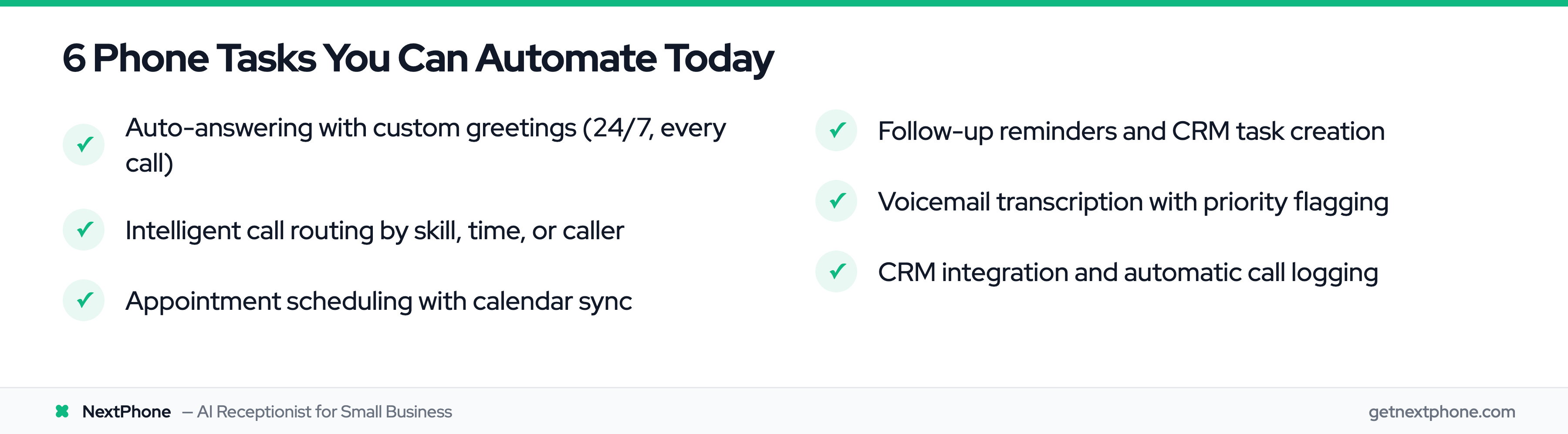
The real question isn't whether phone automation works—it's which specific tasks will save you the most time and capture the most revenue. Here are six automation capabilities that deliver measurable value for small businesses.
1. Auto-Answering and Custom Greetings
The most fundamental automation is simply answering every call. An auto-attendant greets callers with a professional message, provides menu options, and routes calls appropriately—all without a human picking up.
This matters more than many business owners realize. Your phone system operates 24/7. That means capturing calls at 2 AM when a homeowner has a burst pipe and needs an emergency plumber. It means answering on the first ring during a marketing campaign when call volume triples. It means maintaining professionalism even when you're in back-to-back meetings.
Custom greetings adapt to context. After-hours callers hear different information than daytime callers. Holiday messages acknowledge the date. Callers from specific area codes might hear regional messaging.
Real-world example: A plumbing company implemented auto-answering with an emergency routing option. Calls flagged as emergencies get forwarded to an on-call technician's mobile phone, while routine calls go to voicemail for next-business-day response. The result: emergency jobs that previously went to competitors now generate $15,000+ monthly in after-hours revenue.
2. Intelligent Call Routing
Basic call routing sends callers to the right department. Intelligent call routing goes further—it considers who's calling, what they might need, and who's best equipped to help them.
Skills-based routing matches callers with agents who have relevant expertise. A caller inquiring about commercial accounts reaches your commercial specialist. A Spanish-speaking caller connects with a bilingual team member. A caller who previously worked with a specific salesperson gets routed directly to them.
VIP recognition identifies high-value customers and prioritizes their calls. When a caller's number matches a top-tier client in your CRM, they bypass the queue and connect immediately with a senior team member.
Time-based routing adapts to business hours. During peak times, calls distribute across all available team members. After hours, calls route to voicemail or forward to an on-call mobile number. On weekends, a different set of rules might apply.
Geographic routing sends calls based on location. A national business might route East Coast callers to the appropriate regional office automatically based on their area code.
Real-world example: A law firm set up routing based on case type. Personal injury inquiries go directly to attorneys who handle those cases, while family law questions route elsewhere. This eliminated the bottleneck of a receptionist trying to determine which attorney should take each call, reducing average connection time from 4 minutes to 45 seconds.
3. Appointment Scheduling and Confirmation
Appointment scheduling through phone automation can be surprisingly sophisticated. Callers interact with a system that checks your real-time availability, books appointments, sends confirmations, and follows up with reminders—all without human involvement.
The integration with calendar systems makes this work. When a caller books an appointment, the system creates the event in Google Calendar, Outlook, or your industry-specific scheduling software. Double-bookings become impossible. Time zone confusion disappears.
Automated confirmations go out immediately via SMS or email, including all relevant details: date, time, location, and any preparation instructions. This confirmation serves as a psychological commitment device—people who receive written confirmation are significantly more likely to show up.
Reminder sequences reduce no-shows further. A typical sequence might include a reminder 48 hours before the appointment, another reminder the morning of, and perhaps a final "we're expecting you in 1 hour" message. Each reminder gives the customer an easy option to reschedule if needed, which is far better than a no-show.
Real-world example: A dental practice automated their appointment scheduling with a three-touch reminder sequence. No-shows dropped from 23% to 9%—a 61% reduction. Given their average appointment value of $200, recovering those appointments added over $30,000 in annual revenue.
4. Follow-Up Reminders and Task Creation
What happens after a call ends often determines whether you win the business. Phone automation can trigger follow-up actions automatically, ensuring nothing falls through the cracks.
Post-call task creation assigns follow-up actions to the right team member. A sales inquiry automatically creates a task for the salesperson to send a proposal within 24 hours. A service request generates a work order for the operations team. A complaint triggers a callback assignment for the customer service manager.
Triggered sequences launch based on call outcomes. A prospect who expressed interest might receive an email with relevant case studies. A customer who called with a billing question gets a satisfaction survey the next day. A lead who didn't convert enters a nurture sequence for follow-up in 30 days.
Deal stage updates keep your CRM current. After a sales call, the automation moves the opportunity to the appropriate pipeline stage based on call disposition. This happens instantly, without the rep needing to remember to update the record.
Real-world example: A real estate agent automated follow-up for every inquiry call. Within 5 minutes of a call ending, the prospect receives a personalized email with property listings matching their criteria. The agent's calendar automatically blocks time for a callback the next business day. Since implementing this automation, her lead-to-showing conversion rate increased by 34%.
5. Voicemail Transcription and Smart Routing
Voicemail transcription converts voice messages to text, making them scannable, searchable, and actionable. But the real power comes from what happens next.
Email delivery puts transcripts in your inbox immediately. Instead of calling in to check messages, you read them alongside your emails. This is faster and works better when you're in environments where listening to audio isn't practical.
Priority flagging identifies urgent messages. Keywords like "emergency," "urgent," or "cancel" can trigger immediate notifications via text message. A complaint from a high-value customer (identified by caller ID matching your CRM) might flag for executive attention.
Searchable archives let you find past voicemails by keyword. When a customer references "that message I left last month about the delivery issue," you can locate it in seconds.
Smart routing forwards transcribed voicemails to the appropriate team. A message about billing goes to accounting. A message about a product defect goes to customer service. A message from a prospect goes to sales.
Real-world example: An insurance broker implemented voicemail transcription with keyword routing. Messages containing words like "claim," "accident," or "damage" route immediately to the claims team with a priority flag. Response time for urgent claims dropped from 4 hours to 23 minutes, dramatically improving customer satisfaction scores.
6. CRM Integration and Data Sync
CRM integration might be the highest-impact automation for sales-focused businesses. When your phone system connects with your CRM, every customer interaction gets captured, and your team has full context for every call.
Automatic call logging records every call—incoming, outgoing, missed—with duration, time, and outcome. Reps no longer need to manually log their calls. Nothing gets forgotten. Call history becomes complete and trustworthy.
Screen pops display customer information when calls come in. Before even saying hello, your team sees the caller's name, company, purchase history, open tickets, and recent interactions. This context transforms the customer experience.
Contact record updates happen in real-time. Notes taken during calls sync instantly. Tags and categorizations update automatically. New contacts get created when unknown numbers call in.
Opportunity creation triggers from call dispositions. When a rep marks a call as "qualified lead," the system creates a deal in the pipeline with the appropriate value and stage. This ensures sales opportunities don't languish in call notes—they enter the formal pipeline immediately.
Real-world example: An HVAC company connected their phone system to their CRM. Previously, technicians would take service calls and forget to log customer details, leading to lost history and repeat troubleshooting. Now, every call automatically logs with full context. Customer satisfaction improved because every technician could see the complete service history, and upsell opportunities increased because the sales team could see which customers had aging equipment.
Why Small Businesses Are Switching to Automated Phone Systems
The shift toward phone automation isn't just about new technology—it's driven by concrete business benefits. 66% of businesses have already automated at least one process, and phone handling is increasingly part of that automation portfolio.
Cost efficiency stands out immediately. A full-time receptionist costs $35,000-$45,000 annually plus benefits. Phone automation software typically runs $15-$40 per user monthly, or $200-$500 monthly for comprehensive plans. For many small businesses, this represents 90%+ cost reduction for phone handling capabilities.
24/7 availability captures business you'd otherwise lose. Studies show that 85% of callers who reach voicemail don't leave a message—they call a competitor instead. Automation ensures every call gets answered, even at 3 AM on a holiday.
Consistency eliminates the variability of human answering. Every caller gets the same professional greeting. Routing follows the same logic every time. This consistency builds trust and reinforces your brand.
Scalability grows with your business. Adding capacity doesn't require hiring. Whether you receive 50 calls a day or 500, the system handles volume without degradation. When you expand to new locations or markets, the phone infrastructure adapts immediately.
Competitive advantage levels the playing field with larger competitors. Enterprise-grade phone capabilities are now accessible to businesses of any size at small business prices. Your callers experience the same professionalism they'd get from a Fortune 500 company.
Actionable analytics inform better decisions. Call volume patterns reveal when you need more staff. Call duration data identifies which topics require the most support. Source tracking shows which marketing channels drive phone inquiries. This intelligence improves operations beyond just phone handling. Business process automation statistics show continued acceleration across industries.
According to research from Nextiva, businesses implementing intelligent automation see customer satisfaction scores increase by 15-25%, driven by reduced wait times and improved first-call resolution rates.