
Why Your Calls Aren't Converting to Booked Appointments
A potential customer calls your business. They're interested. They ask a few questions. You answer well. And then: "Okay, great -- I'll call back to schedule." They hang up. You never hear from them again.
Sound familiar? This is the single biggest revenue leak in service businesses. You're generating calls (through ads, referrals, or organic search), answering them, having good conversations -- and then letting the caller walk away without a confirmed appointment on your calendar.
The Conversion Gap
The gap between "answered call" and "booked appointment" is where most businesses lose money. Across the 1,446,980+ business calls we've answered, approximately one in four callers explicitly asks for a callback. That means one in four conversations ended without resolution -- and without a booking.
These aren't bad leads. They called you. They were interested enough to pick up the phone. But something in the process failed to convert that interest into a confirmed slot on your calendar.
What Kills Booking Momentum
Three things consistently prevent calls from converting to bookings:
- No scheduling mechanism available during the call. The call taker can answer questions but can't access the calendar, so "I'll have someone call you back to schedule" becomes the default.
- Not asking for the appointment. The conversation goes well, information gets exchanged, but nobody actually says "let's get you booked."
- Friction after the call. The caller is told to visit a website, email to schedule, or wait for a callback. Each handoff step loses people.
The Cost of Unconverted Calls
Research shows that 85% of callers who don't reach someone won't call back. But even among callers you DO reach, failing to book them means relying on their initiative to call again or follow up. Most won't.
If your average service appointment is worth $300-500, and you're losing 5 bookable calls per week to "I'll call back," that's $6,500-$10,000 per month walking away. Not from missed calls -- from calls you answered but didn't convert.
The fix isn't answering more calls (though that helps too). It's converting the calls you already answer into confirmed appointments. There are two proven ways to do this.
Live Booking: Converting on the Spot
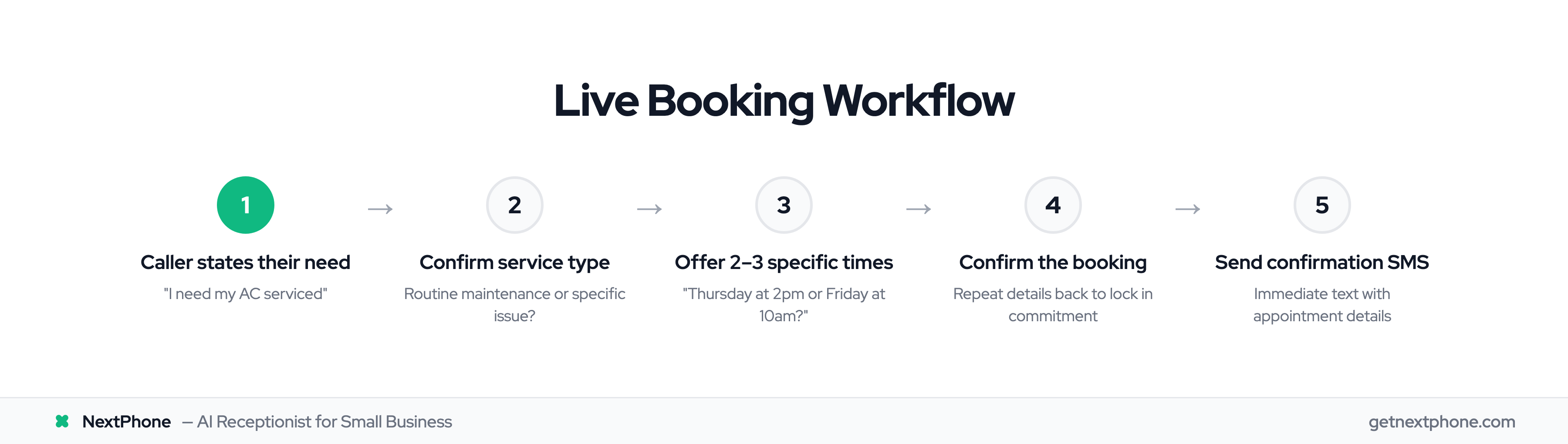
The most effective way to convert a call to a booking is to do it right there on the call. The caller states their need, you confirm the service, check your calendar, and book them before they hang up. Simple in concept, powerful in practice.
How Live Booking Works (Step-by-Step)
Here's the full workflow for booking an appointment during a live call:
- Caller states their need. "I need my AC serviced" or "I'd like to schedule a consultation."
- Confirm the service type. "Got it -- is this a routine maintenance check or are you having a specific issue?"
- Check calendar availability. Access your scheduling system in real time (Google Calendar, Calendly, practice management software).
- Offer 2-3 specific times. "I have Thursday at 2pm or Friday morning at 10am -- which works better for you?" Never say "when works for you?" -- that puts the burden on them and invites "let me think about it."
- Confirm the booking. "Perfect, I've got you down for Thursday at 2pm. You'll get a confirmation text shortly."
- Collect contact details. Name, phone number, email, and any pre-appointment info needed.
- Send confirmation. Immediately text or email the appointment details.
That's it. Caller hangs up with a confirmed appointment. No follow-up calls needed, no "I'll check and get back to you."
What You Need for Live Booking
Live booking requires two things: real-time calendar access during the call, and the ability to create appointments in your system. This means either:
- A receptionist (human or AI) with access to your scheduling software
- Integration between your phone system and your calendar tool
- A simple shared calendar visible to whoever answers calls
If your front desk already uses Google Calendar or a practice management system, you're halfway there. The key is making sure whoever handles calls can see and modify the schedule without putting the caller on hold.
When Live Booking Works Best
Live booking is ideal when:
- The caller has high intent ("I need this done this week," "can you come tomorrow?")
- The service is simple to schedule (single provider, fixed duration, no complex intake needed)
- The caller is a repeat customer who already knows what they want
- It's during business hours and you can confirm availability immediately
- The caller shows urgency signals (describing a problem, expressing frustration with current situation)
Live Booking Conversion Rates
Live booking consistently converts at 60-70% on first contact. Why so high? Because you're eliminating every friction point. The caller doesn't need to remember to do anything after they hang up. The appointment is done.
Research from HouseCall Pro found that customers are 94% more likely to book when online scheduling is available immediately. Live booking during a phone call applies the same principle -- immediate access to scheduling without any extra steps.
Appointments booked live also show up at higher rates. When someone commits verbally on a call and gets an immediate confirmation, they're psychologically invested. Compare that to "I'll call back to schedule" -- which has essentially a 0% show rate because the appointment never gets made.
SMS Booking Links: Let Them Book on Their Terms
Not every caller is ready to commit on the spot. Some are exploring options. Some need to check with a partner. Some call at 11pm and can't think clearly about next week's schedule. For these callers, forcing a live booking either fails or creates a no-show. The SMS booking link approach works better here.
How the SMS Booking Link Works (Step-by-Step)
Here's the full workflow for sending a booking link via text:
- Caller states their need. Same as live booking -- understand what they want.
- Qualify the call. Answer questions, provide info, build confidence in your service.
- Collect their phone number. "I'd love to send you a link to pick a time that works for your schedule."
- Send SMS with booking URL. During or immediately after the call, text them a direct link to your scheduling page.
- The caller books at their convenience. They open the link, browse available times, and confirm -- all on their phone, whenever they're ready.
- System confirms automatically. Calendar updated, confirmation sent, you get notified.
The message itself is simple. Something like: "Hi [Name]! Here's your booking link for [Service] with [Business]: [URL]. Pick any time that works."
Setting Up Your Booking Page
The booking page your SMS links to needs to be mobile-friendly (callers will open it on their phone) and frictionless. This means:
- Clear service options (if you offer multiple services)
- Real-time availability (no outdated slots that require confirmation calls)
- Minimal form fields (name, phone, email -- not a 15-field intake form)
- Instant confirmation (no "we'll confirm within 24 hours" -- that kills trust)
Tools like Calendly, Cal.com, and Acuity Scheduling all create booking pages that check these boxes. The key is choosing one that syncs with your actual calendar so availability is always accurate.
When the Text Link Works Best
SMS booking links are ideal when:
- The caller is exploratory ("I'm getting a few quotes," "what do you charge?")
- Scheduling is complex (multiple service types, variable durations, intake forms needed)
- The caller needs to check their schedule ("let me look at my calendar and get back to you")
- It's after hours and the caller may not be in a decision-making mindset
- The caller isn't ready to commit now but might later
SMS Booking Conversion Rates
SMS booking links for service appointments convert around 17% into confirmed bookings. That's lower than live booking's 60-70% -- but it's capturing callers who would have converted at 0% otherwise (because they weren't going to commit on the call).
The math works in your favor. If you get 10 calls per week from people who won't live-book, and you send all of them an SMS link, you'll get roughly 2 additional bookings per week that you'd have lost completely. At $400 average service value, that's $3,200/month in recovered revenue.
Industry data shows a 30% year-over-year surge in self-scheduling adoption. People are increasingly comfortable booking via link -- especially younger demographics who prefer not to commit verbally on a phone call.
Live Booking vs Text Link: When to Use Each Approach
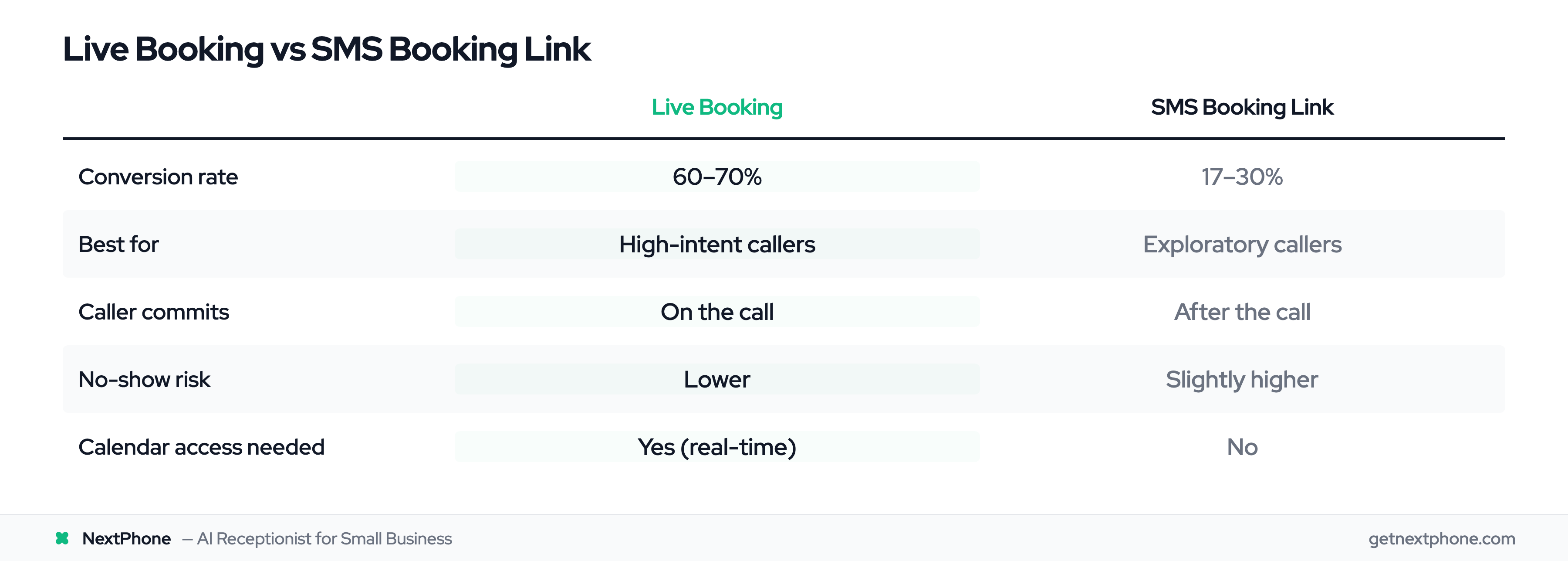
The biggest mistake businesses make is committing to one approach for all callers. Some callers need live booking. Others need a link. Using the wrong approach for the wrong caller either loses the booking entirely or creates a no-show.
Here's how to make the decision.
Caller Intent Signals
The most reliable way to choose your approach is reading intent signals during the call:
High-intent signals (use live booking):
- Specific timeframe mentioned: "Can you come this week?"
- Urgency language: "I need this fixed," "it's getting worse"
- Decision language: "Let's do it," "I'm ready to schedule"
- Repeat callers who already know your services
Low-intent signals (use text link):
- Price shopping: "How much do you charge?"
- Comparison language: "I'm calling a few places"
- Hedging: "I'm not sure when," "I need to check"
- Information gathering: "What exactly does that include?"
Service Complexity Factors
Some services are easy to schedule on a call. Others aren't.
- Simple scheduling (live book): Single service type, fixed duration, one provider. "I need a teeth cleaning" -- book it.
- Complex scheduling (text link): Multiple options, variable pricing, consultation needed first. "I'm thinking about a kitchen remodel" -- send a link so they can review options and pick a time for a consultation.
Time-of-Day Considerations
Calls during business hours from high-intent callers? Live book every time. Calls at 10pm from someone browsing options? Send a link -- they're not ready to commit, and you probably can't confirm availability anyway.
The Decision Matrix
| Caller Signal | Best Approach | Why |
|---|---|---|
| "I need this ASAP" | Live book | High intent, won't follow through on a link |
| "What are your prices?" | Text link | Still exploring, not ready to commit |
| "Can you come Thursday?" | Live book | Specific timeframe, ready to commit |
| "I need to check with my spouse" | Text link | Can't commit now, needs flexibility |
| After-hours call, any intent | Text link | Caller likely browsing, not decision-ready |
| Repeat customer calling back | Live book | Already decided, just needs a slot |
| "I'm getting a few quotes" | Text link | Shopping around, will book when ready |
| "This is an emergency" | Live book | Immediate need, no time for links |