
Key Takeaways
- 74.1% of calls to small businesses go unanswered, and 85% of those callers never call back - that's lost revenue walking out the door
- SMBs don't need enterprise call center features. Focus on 7 core capabilities: call answering, routing, voicemail-to-text, scheduling, CRM integration, mobile access, and analytics
- Pricing ranges from $15-30/user/month for VoIP systems to $199/month flat rate for AI-powered solutions like NextPhone
- AI receptionist technology offers 24/7 call answering without per-user pricing - ideal for small teams who can't always answer the phone
- The right solution depends on your call volume, team size, and whether you need someone (or something) to answer when you can't
Introduction
Every missed call is a customer who might hire your competitor instead. For small business owners who can't be tethered to a phone, this creates an impossible situation - work the job or answer the call.
Research shows 74.1% of calls to small businesses go unanswered. When 85% of those callers won't try again, that's not a minor inconvenience - it's a revenue leak that costs the average business $189,000 per year in lost opportunities.
This guide breaks down call management software for SMBs - what it is, which features you actually need, and how the top solutions compare. We'll cut through the enterprise feature bloat and show you practical options that work for businesses with 1-50 employees.
No complex phone systems you'll never fully configure. Just straightforward guidance on solving the missed call problem.
The Missed Call Problem: Why SMBs Need Call Management
Before diving into software options, let's be clear about the problem we're solving. This isn't about having a fancier phone system. It's about capturing revenue that's currently walking out the door.
The Numbers Don't Lie

Analysis of 130,175 calls to small service businesses found that 74.1% went completely unanswered. Not sent to voicemail where someone might leave a message - completely missed.
Industry research backs this up. Studies show 62% of calls to small businesses go unanswered on average. For some industries, it's even worse.
Here's where it gets painful: 85% of people whose calls aren't answered will never call back. They don't leave voicemails (less than 3% do). They just call the next business on their list.
That means for every 100 calls, you might be missing 74, and losing 63 of those forever.
Why Small Businesses Miss So Many Calls
It's not laziness. It's physics.
If you're a plumber running a snake through a clogged drain, you can't answer the phone. If you're a roofer 20 feet up on a ladder, your phone stays in the truck. If you're an electrician working in a live panel, you're not checking missed calls.
Small businesses miss calls because:
- No dedicated phone staff - You ARE the staff
- Unpredictable schedules - Hard to predict when you'll be available
- Physical work - Can't hold a phone while holding tools
- Customer work comes first - The job you're on is paying the bills right now
This isn't a discipline problem. It's a structural challenge that requires a structural solution.
What Missed Calls Actually Cost You
Let's do the math on what this revenue leak looks like:
The average small service business gets about 40 calls per month. If 74% go unanswered, that's 30 missed calls. If even 20% of those would have hired you at an average job value of $500, that's 6 lost jobs worth $3,000 per month - or $36,000 per year.
For higher-ticket services, multiply accordingly. Roofing, HVAC, and electrical contractors in our analysis were losing an average of $189,068 per year to missed call opportunities.
Meanwhile, call management software costs $15-200 per month.
The economics aren't subtle.
What Is Call Management Software?
Call management software handles how your business receives, routes, and responds to incoming phone calls. At its simplest, it's what happens when someone calls your business and you can't (or don't) answer.
Call Management Software Defined
Think of call management as everything between "the phone rings" and "someone handles the customer's needs." This can include:
- Answering - Who or what picks up the call
- Routing - Where the call goes based on time, urgency, or caller input
- Recording - Capturing messages or call recordings
- Transcribing - Converting voicemails to readable text
- Scheduling - Booking appointments without human intervention
- Tracking - Knowing who called, when, and what happened
How It Helps Small Businesses
The core benefit is simple: calls get handled even when you can't personally answer.
This might mean:
- An AI answers and takes a message
- A live operator fields the call
- An auto-attendant routes to the right extension
- A voicemail system captures the message and texts it to you
The goal is the same regardless of method: no call goes completely unanswered, no customer gets nothing.
Types of Call Management Solutions
There are three main categories worth understanding:
VoIP Phone Systems (RingCentral, Nextiva, Dialpad, Grasshopper) The VoIP market is projected to reach $102.5 billion by 2026. These are complete business phone systems delivered over the internet. They include call management features like auto-attendants, call routing, voicemail-to-text, and extensions. You get phone lines for your team plus tools to manage those calls.
Live Answering Services (Ruby, PATLive, traditional answering services) Actual humans answer your calls, take messages, and potentially schedule appointments. Premium feel, premium price, typically available during business hours unless you pay extra for 24/7.
AI-Powered Solutions (NextPhone and similar) 85% of customer service leaders will explore or pilot conversational GenAI in 2025. Artificial intelligence answers calls, conducts conversations, takes messages, handles FAQs, and routes urgent calls. Available 24/7 at flat rates without per-minute charges.
Each has its place. The right choice depends on your specific situation, which we'll address later.
7 Features SMBs Actually Need
Here's where most call management guides go wrong: they list 20+ features as if SMBs need everything an enterprise call center uses.
You don't.
Here are the 7 features that actually matter for small businesses, and why.
1. Call Answering (Live or AI)
The core function. When you can't answer, something or someone does.
This is the non-negotiable. Whether it's an AI, a live operator, or a sophisticated auto-attendant, calls need to get answered. Period.
What to look for:
- Speed of answer (under 20 seconds is standard expectation)
- Natural interaction (especially important for AI)
- Accurate message capture
- Professional representation of your business
2. Smart Call Routing
Not all calls are equal. Smart routing sends calls to the right place based on:
- Time of day (after-hours vs business hours)
- Caller input (press 1 for emergencies)
- Urgency detection (AI can detect urgent language like "flooding" or "no heat")
- Availability (who's actually free to take calls)
Our analysis found 15.9% of calls contain urgency language indicating immediate need. These calls shouldn't wait in the same queue as general inquiries.
3. Voicemail-to-Text
If a call does go to voicemail, you need to process it quickly. Listening to a 2-minute voicemail takes time you don't have.
Voicemail-to-text transcribes messages so you can read them in seconds. Essential for fast response.
4. Appointment Scheduling
If customers can book appointments without a phone call back-and-forth, everyone wins.
Look for:
- Calendar integration (Google Calendar, Outlook)
- Real-time availability
- Confirmation messages
- Reminder automation
5. CRM and Calendar Integration
Your call management should connect to tools you already use:
- CRM (HubSpot, Salesforce, etc.) for customer context
- Calendar for scheduling
- Email for notifications
Without integration, you're manually copying information between systems.
6. Mobile App Access
You're not at a desk. You're in a truck, on a roof, at a customer's house.
Mobile access means:
- Checking messages from your phone
- Returning calls from anywhere
- Real-time notifications for urgent matters
- Managing settings on the go
7. Basic Analytics and Call Tracking
You can't improve what you don't measure. Basic analytics help you understand:
- How many calls you're getting
- How many you're missing
- Peak call times
- Response time trends
Not enterprise workforce analytics. Just enough to identify problems and measure improvement.
What You Probably DON'T Need
Unless you're running an actual call center, skip:
- Complex multi-level IVR menus - "Press 1 for sales, press 2 for support, press 3 to hear these options again" frustrates small business callers
- Predictive dialers - Outbound sales tool, not inbound call management
- Quality assurance recording for every call - Nice for enterprise, overkill for SMBs
- Workforce management features - You know when you're working
- Screen recording - Call center supervision tool
Simple solutions that actually get used beat complex systems that gather dust.
Top Call Management Solutions Compared
Let's compare the three main approaches to call management: VoIP phone systems, live answering services, and AI-powered solutions.
VoIP Phone Systems
What they are: Complete business phone systems delivered over the internet. Each team member gets a phone line with features like extensions, call transfer, and voicemail.
Top options:
- RingCentral - Full-featured, integrates widely, $20-35/user/month
- Nextiva - Strong customer service focus, $24-35/user/month
- Dialpad - AI features built in, $15-25/user/month
- Grasshopper - Simple virtual phone system, $18-26/user/month
- Ooma - Budget-friendly, $20/user/month
Best for: Teams of 3-20 where each person needs their own line and you have someone available to answer calls during business hours.
Pros:
- Complete phone system with scalability
- Lots of integrations
- Extensions and call transfer
- Professional features
Cons:
- Per-user pricing adds up (5 users at $30 = $150/month)
- Assumes someone is available to answer
- Can be complex to configure fully
- 24/7 answering usually extra
Live Answering Services
What they are: Real humans who answer your calls, take messages, and potentially book appointments.
Top options:
- Ruby - High-quality, tech-forward, $250-500+/month
- PATLive - Wide service range, $200-400+/month
- Traditional local answering services - Varies widely
Best for: Businesses wanting human touch on every call, willing to pay premium.
Pros:
- Human judgment and warmth
- Can handle complex situations
- Premium customer experience
Cons:
- Expensive ($200-500+ base, plus per-minute charges)
- Quality varies by operator
- 24/7 coverage costs significantly more
- Still subject to human error
AI-Powered Solutions
What they are: Artificial intelligence that answers calls, conducts natural conversations, takes messages, answers FAQs, books appointments, and routes urgent calls.
Top options:
- NextPhone - Built for SMBs, $199/month flat rate
- Smith.ai - Hybrid AI/human approach, higher pricing
- Various AI receptionist startups - Emerging category with varied quality
Best for: Solo operators and small teams (1-10) who can't always answer phones and need 24/7 coverage at a predictable cost.
Pros:
- 24/7 answering at flat rate
- No per-user fees
- Consistent experience every call
- Urgency detection and routing
- Improving rapidly with AI advances
Cons:
- Not human (though quality is approaching parity for routine calls)
- May not handle highly complex situations
- Relatively new category
Quick Comparison
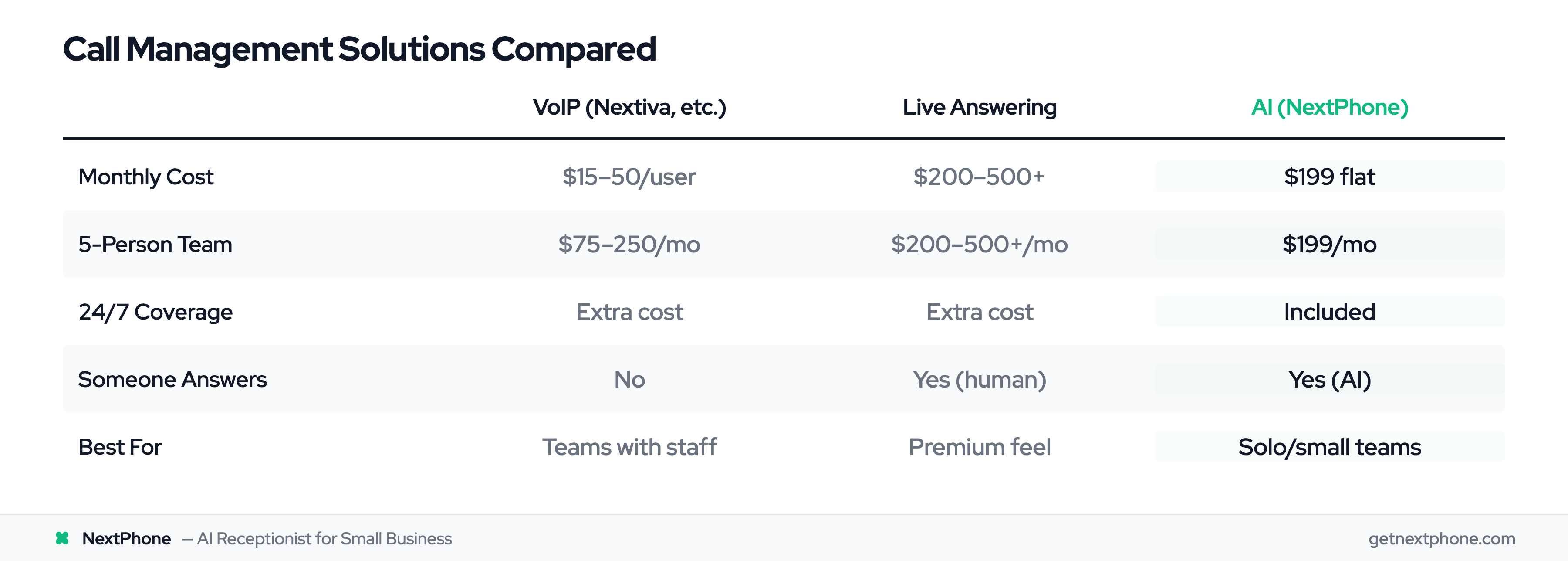
| Factor | VoIP (Nextiva, etc.) | Live Answering | AI (NextPhone) |
|---|---|---|---|
| Monthly Cost | $15-50/user | $200-500+ | $199 flat |
| 5-Person Team | $75-250/month | $200-500+/month | $199/month |
| 24/7 Coverage | Extra cost | Extra cost | Included |
| Someone Answers | No | Yes (human) | Yes (AI) |
| Setup Complexity | Medium | Low | Low |
| Best For | Teams with staff | Premium feel | Solo/small teams |
The right choice depends on your situation. A 10-person company with a front desk person might want VoIP. A solo plumber who's always on jobs needs something that answers when they can't.
AI-Powered Call Management: The Modern Alternative
Here's the truth about call management for small businesses: the problem isn't choosing between phone systems. The problem is that calls need to be answered, and you often can't answer them.
Why AI Makes Sense for Small Businesses
65% of businesses are already using AI for various functions. Traditional VoIP gives you a better phone system. But it still assumes someone is available to pick up.
If you're a one-person operation, or a 3-person team where everyone's in the field, having a fancy phone system doesn't help when no one can answer.
AI solves this differently. Instead of giving you tools to manage calls you answer, AI answers the calls for you.
The economics work too:
- VoIP for 3 users: ~$90/month, but calls still go unanswered
- Live answering 24/7: $400-800/month
- AI answering 24/7: ~$199/month
For small teams who can't always answer, AI provides coverage that was previously only available to businesses with staff or significant budgets.
How AI Call Management Works
Here's what happens when a customer calls:
- Immediate answer - AI picks up in under 20 seconds, greets caller with your business name
- Natural conversation - AI asks how it can help, responds conversationally
- Information gathering - Takes caller's name, number, and details about what they need
- FAQ handling - Answers common questions about your hours, services, pricing
- Appointment booking - Can schedule directly to your calendar
- Urgency detection - Recognizes urgent language ("flooding," "no heat," "emergency")
- Smart routing - Routes urgent calls through to you immediately
- Message delivery - Sends organized summary to your phone
From the caller's perspective, their call was answered. They got acknowledgment, provided information, and know someone will follow up.
From your perspective, you finished your current job without interruption and have organized messages waiting.
NextPhone: Built for SMBs
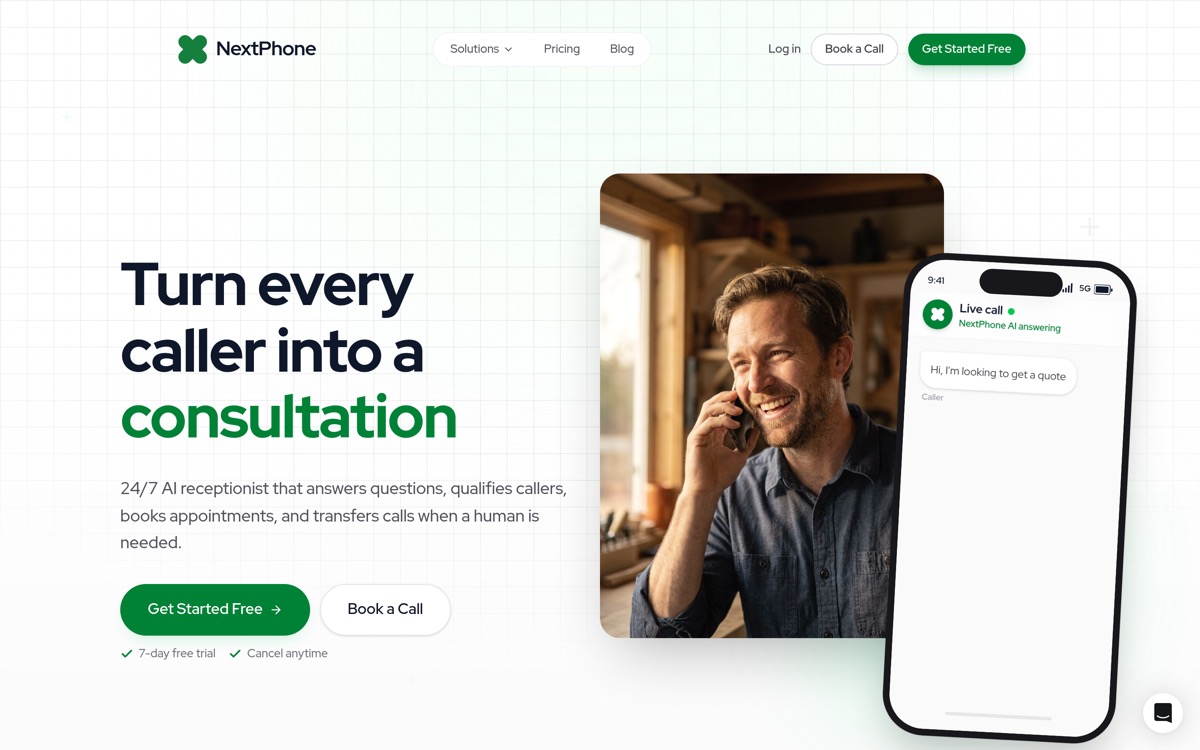
NextPhone was designed specifically for small service businesses - contractors, trades, local services - who can't always answer the phone.
What you get:
- 24/7 answering - Every call answered, day or night, weekday or weekend
- Emergency routing - AI detects urgent language and rings you through immediately
- Smart intake - Asks qualifying questions so you know exactly what the caller needs
- Appointment scheduling - Books directly to your calendar
- Custom training - AI knows your business, services, pricing, and FAQs
- Lead capture - Never misses an after-hours opportunity
- Callback tracking - Reminds you to follow up
Pricing: $199/month flat rate. No per-user fees. No per-minute charges. Unlimited calls.
For comparison: a live answering service providing similar coverage would cost $500-800/month, and hiring a part-time receptionist runs $1,500-2,500/month.
Try NextPhone free for 7 days
AI answering service that answers, qualifies, and books — 24/7.
Get Started FreeThe Working-With-Hands Solution
Let's be specific about the scenario AI solves:
You're an HVAC tech in someone's attic. It's 90 degrees. You're troubleshooting a compressor. Your phone rings.
Without AI: Phone goes to voicemail. Caller doesn't leave message. Calls competitor. You find out later you missed a $2,000 job.
With AI: Phone gets answered. Caller tells AI their AC is out and they need service today. AI takes their information, says someone will call within the hour. You finish the current job, check your phone, see the organized message, call them back, book the job.
Same scenario plays out for plumbers under sinks, electricians in panels, roofers on ladders, and every other service business where the phone rings when you can't answer.
How to Choose the Right Solution
With options ranging from $15/month VoIP to $500+/month live answering, how do you choose?
Questions to Ask Yourself
- How many calls do we get? High volume might justify more robust systems.
- How often do we miss calls? If rarely, VoIP might be enough. If frequently, you need answering.
- Does everyone need their own line? Multiple extensions = VoIP territory.
- What's our budget? Be realistic about monthly commitment.
- Do we need 24/7 coverage? After-hours and weekends matter for many businesses.
- What integrations are essential? CRM? Calendar? Existing phone numbers?
- Who answers when everyone's busy? This is the key question.
Match Solution to Situation
If you have staff who can answer during business hours: VoIP phone system makes sense. Give everyone a line, use call routing and voicemail for overflow.
If you want premium human touch on every call: Live answering service provides that - at premium cost. Worth it if your average customer value justifies the expense.
If you're 1-5 people who can't always answer: AI receptionist offers 24/7 coverage at a fraction of live answering cost. Best for service businesses, contractors, and solo operators.
If budget is tight: Start with basic VoIP or AI, upgrade as revenue grows. A $199/month AI solution that captures even one extra job per month pays for itself many times over.
Implementation Considerations
Number porting: Can you keep your existing business number? Almost all solutions support this - don't lose the number you've built recognition with.
Setup time: VoIP systems can take days to fully configure. AI solutions like NextPhone often go live within hours.
Learning curve: Will you actually use complex features? Simpler solutions that get fully utilized beat powerful systems that never get configured.
Contracts: Monthly vs annual, cancellation terms. Prefer flexibility until you're sure a solution works.
Free trials: Most solutions offer trials. Use them. Actual experience beats spec sheet comparison.
Frequently Asked Questions
What is call management software?
Call management software handles how your business receives, routes, and responds to incoming phone calls. This can include everything from basic voicemail systems to full VoIP phone platforms to AI-powered receptionists that answer calls on your behalf. The goal is ensuring every call gets handled properly, even when you can't personally answer.
How much does call management software cost for small businesses?
Pricing varies widely depending on the solution type. VoIP phone systems typically run $15-50 per user per month. Live answering services cost $200-500+ per month plus per-minute charges for usage beyond included minutes. AI-powered solutions like NextPhone offer flat-rate pricing around $199/month with unlimited calls and 24/7 coverage included.
Do I need a full VoIP phone system?
Not necessarily. VoIP makes sense if you have a team where each person needs their own phone line, extensions, and call transfers between staff. If you're a solo operator or small team who primarily needs calls answered when you can't pick up, an AI receptionist or answering service might be simpler and more cost-effective than a full phone system.
Can AI really handle business phone calls?
Modern AI call handling has improved dramatically. AI can answer calls naturally, take detailed messages, answer frequently asked questions about your business, book appointments directly to your calendar, and detect urgency to route emergency calls directly to you. For routine calls - scheduling, inquiries, messages - callers often can't tell they're speaking with AI.
What features matter most for SMBs?
Focus on the essentials: reliable call answering (live or AI), smart call routing, voicemail-to-text, calendar integration for scheduling, and mobile access to messages. You probably don't need complex IVR menus with multiple levels, predictive dialers, or enterprise workforce management features. Simple solutions that actually get used beat complex systems that sit partially configured.
How do I stop missing so many calls?
The only way to truly stop missing calls is having something or someone answer every time. This means either hiring staff dedicated to phones, using a live answering service, or implementing AI that answers 24/7. For most small businesses, AI offers the best balance of coverage and cost at around $199/month for unlimited call handling without the expense of additional staff or per-minute answering service charges.
Conclusion
Missing 74% of calls isn't a minor inefficiency - it's a revenue leak that costs small businesses an average of $189,000 per year in lost opportunities. The customers who call and don't reach you are calling your competitors next.
The solution isn't answering more calls yourself - you're already working as hard as you can. The solution is reliable call management that handles calls when you can't.
Whether that's a VoIP system for your team, a live answering service for the human touch, or AI for 24/7 coverage, the right solution pays for itself in captured opportunities. One extra job per month more than covers any of these options.
Every unanswered call is a customer who might choose your competitor simply because they picked up. The question isn't whether you can afford call management software. It's whether you can afford to keep missing calls.
NextPhone answers every call in zero seconds, 24/7, for $199/month - flat rate, no per-user fees, no per-minute charges. Urgency detection routes emergencies directly to you. Messages arrive organized on your phone. You work while AI handles the calls.