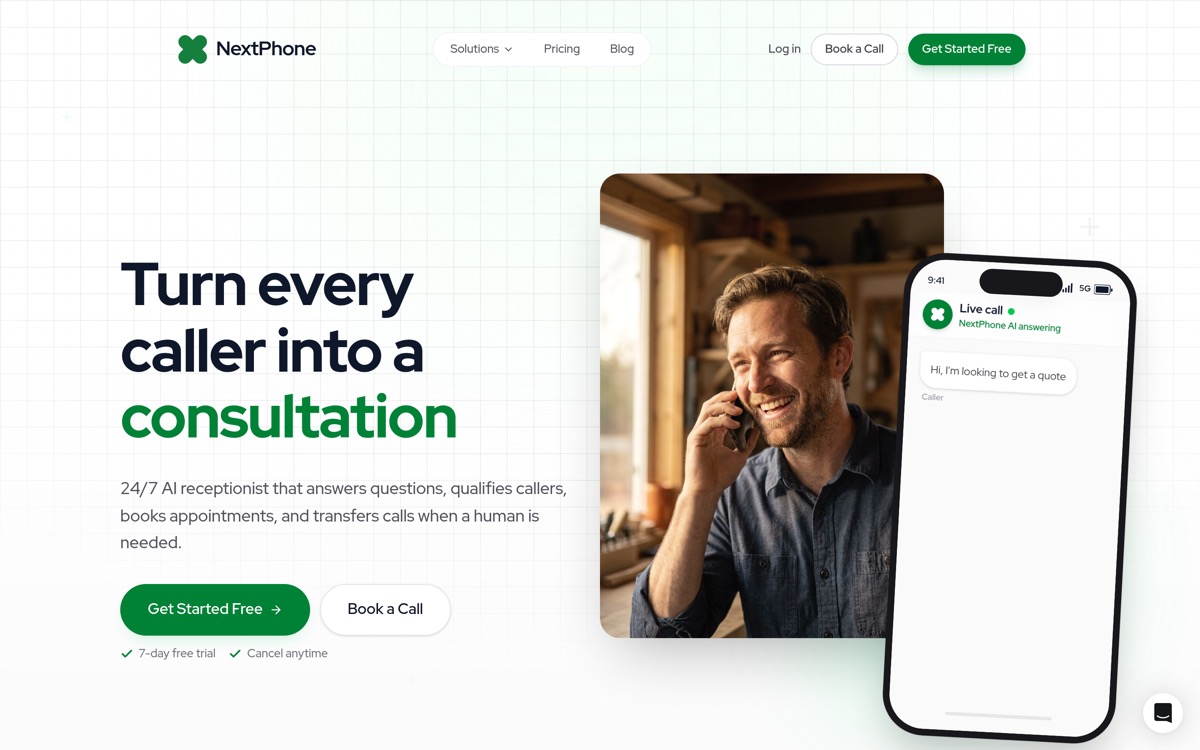
Quick answer (updated September 2026):NextPhone is the best AI receptionist for most small businesses: flat monthly plans from $199 with unlimited inbound calls, answers in under 2 seconds, 90–95% of calls resolved without a human, and native calendar booking from day one. Smith.ai is the only alternative worth considering if you specifically need live human agents on calls (from $300/month for 30 calls). Below: how we tested five platforms on the same real-world scenarios, what each actually costs as of August 2026, and the accuracy test you can run yourself during any vendor's trial.
What that looks like in production: NextPhone answers in under 2 seconds: every call, simultaneously, including your busiest hours. It resolves 90–95% of calls without escalating to you, with 99% positive caller sentiment and 99.97% uptime across our production data. Fourteen languages are included on every plan. Emergency keyword routing fires instantly for trades ("pipe burst," "no cooling," "sparks"). And the bill is identical in a record-volume month as it is in a slow one. No overage math required. Compare: Smith.ai's entry plan is $300/month for 30 calls, then $8.50–$11.50 per call over plan.
Hear it: NextPhone answering a live small-business call
0:00
0:00
A production demo of what an AI receptionist sounds like end-to-end. This is the bar to measure every platform below against.
Why NextPhone wins: flat monthly plans from $199 with unlimited calls: no per-minute charges, no call caps, no overage math. Answers in under 2 seconds, resolves 90–95% of calls without a human, 99.97% uptime across 2,000,000+ business calls answered. Every other platform in this comparison meters calls, minutes, or unique callers; the bill grows exactly when your AI answering is working hardest. For law firms and professional services practices where each intake call has a direct dollar value, that predictability is the deciding factor.
AI receptionist pricing comparison (August 2026)
Platform
Starting Price
Billing Model
Busy-Month Overage
NextPhone
$199/month
Flat, unlimited inbound calls
None: bill is identical every month
Smith.ai
$300/month (30 calls)
Per call ($10–11.50/call avg)
$8.50–11.50/call over plan
Dialzara
Metered entry tier
By talk-time minutes (60 min/mo base)
$0.35–0.48/min
Goodcall
Metered by caller
Per unique caller (100/mo base)
$0.50/caller
RingCentral AI
Add-on pricing
Add-on on top of RingEX ($30–50/user/mo)
N/A (you're already paying per-seat)
NextPhone is the only flat-rate unlimited model in this comparison. Every other option charges by the call, by the minute, or by the unique caller. The same growth that makes AI answering valuable makes those bills unpredictable.
Disclosure: NextPhone is our product. The full test methodology is published at the bottom of this page so you can discount our bias and re-run every test during any vendor's trial.
Which one is right for you
You want every call answered at a predictable price → NextPhone. Plans from $199/month, unlimited calls, answers in under 2 seconds, emergency routing, 14 languages. The default answer for service businesses.
Your calls genuinely need a human's judgment, most of the time → Smith.ai. You'll pay 3–4x more, and for high-stakes intake that can be correct.
You already pay for RingCentral → turn on RingCentral AI, use it until you outgrow it, then re-read this list.
You're not sure AI answering fits your business at all → Dialzara's low entry tier is a cheap experiment. Just re-check the math the moment your volume grows.
Your callers are the same people every week → Goodcall's per-customer model fits; avoid it if you're marketing for new callers.
Whatever you pick, clear this minimum bar: answers in under 2 seconds, true 24/7 coverage, real-time calendar booking, smart forwarding with an escalation rule you control, emergency keyword routing, spam filtering, and pricing you can predict in your busiest month. Platforms missing any of those don't belong in a 2026 shortlist.
The five platforms at a glance
Platform
Best for
Pricing (verified Aug 2026)
24/7
Languages
NextPhone
Flat-rate unlimited for service businesses
From $199/mo, unlimited calls
Yes
9 included
Dialzara
Low-volume businesses testing AI
Metered: 60–1,000 min capped, then $0.35–$0.48/min
Yes
English/Spanish (higher tiers)
Goodcall
Fixed customer base, repeat callers
Metered by caller: 100–500 callers capped, then $0.50 each, per agent
Yes
English only
Smith.ai
Complex calls needing human backup
$300/mo for 30 human-handled calls
Yes
English/Spanish
RingCentral AI
Existing RingCentral users under ~50 calls/mo
Add-on on top of RingEX ($30–50/user/mo)
Yes
Multiple
NextPhone: best flat-rate AI receptionist
Best for: service businesses that want predictable costs and every call answered.
Pricing: flat monthly plans from $199, with unlimited inbound calls and no per-minute charges. The entry plan covers answering, booking, smart forwarding, and spam filtering; the $299 Growth plan adds native CRM sync (Clio and HubSpot, plus 6,000+ tools via Zapier); higher tiers cover multi-location and high-volume operations. Whatever tier you're on, the bill is the same in a busy month as a quiet one.
What impressed us: pickup speed (under 2 seconds, consistently), emergency detection tuned for trades ("no cooling," "pipe burst," "sparks" all routed instantly to the on-call phone in our tests), the flat rate, 99.97% uptime, and 99% positive caller sentiment across our production corpus. A busy month costs the same as a quiet one, which matters most in exactly the months you can least afford surprises. It also handles unlimited simultaneous calls, so a storm-day surge doesn't produce busy signals.
Where it fell short: no outbound calling. And $199 is more than the entry tier of per-minute competitors, so if you get a handful of calls a month and none after hours, the cheaper meter might genuinely be enough.
Honest fit:law firms and professional services first, where a missed intake call is a missed case; then contractors and home-services businesses (plumbing, HVAC, electrical, roofing); and any business where after-hours calls are revenue. If every one of your calls is a bespoke consultation, AI answers and forwards; it won't close for you.
Hear it: NextPhone qualifying an inbound lead end-to-end
0:00
0:00
The AI captures contact info, urgency, and scope before the caller gets a chance to hang up.
Two production voice samples, so "sounds natural" isn't an abstract claim:
Voice sample: Emma, warm-professional female
0:00
0:00
Default pick for client-facing service businesses.
Try NextPhone free for 7 days
AI answering service that answers, qualifies, and books, 24/7.
Best for: low-volume businesses trying AI answering for the first time.
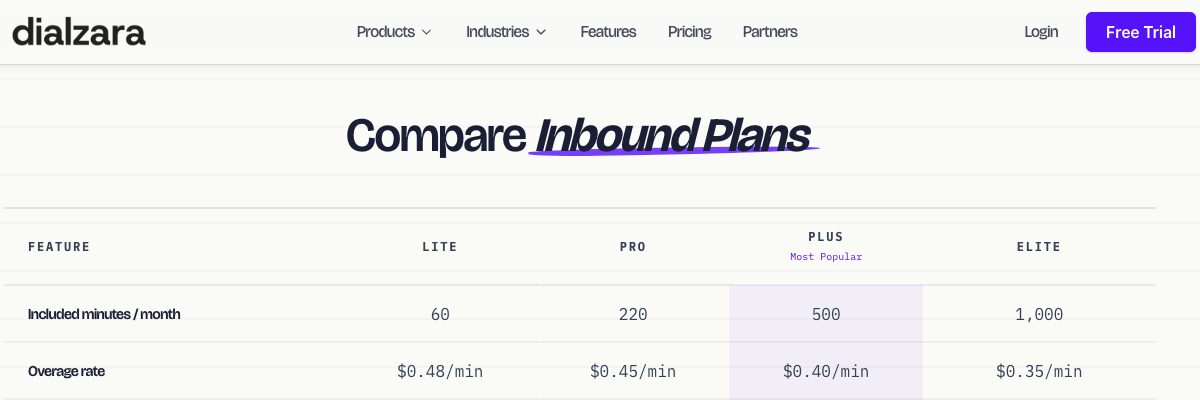
Pricing: metered, not unlimited. Every tier caps talk time: 60 / 220 / 500 / 1,000 minutes a month, and bills $0.48 / $0.45 / $0.40 / $0.35 per minute past the cap. The monthly figure is the floor, not the bill. On the entry tier, 60 minutes is roughly twenty 3-minute calls; call 21 onward is charged by the minute.
Dialzara's own plan comparison. Captured from dialzara.com/pricing, August 2026.
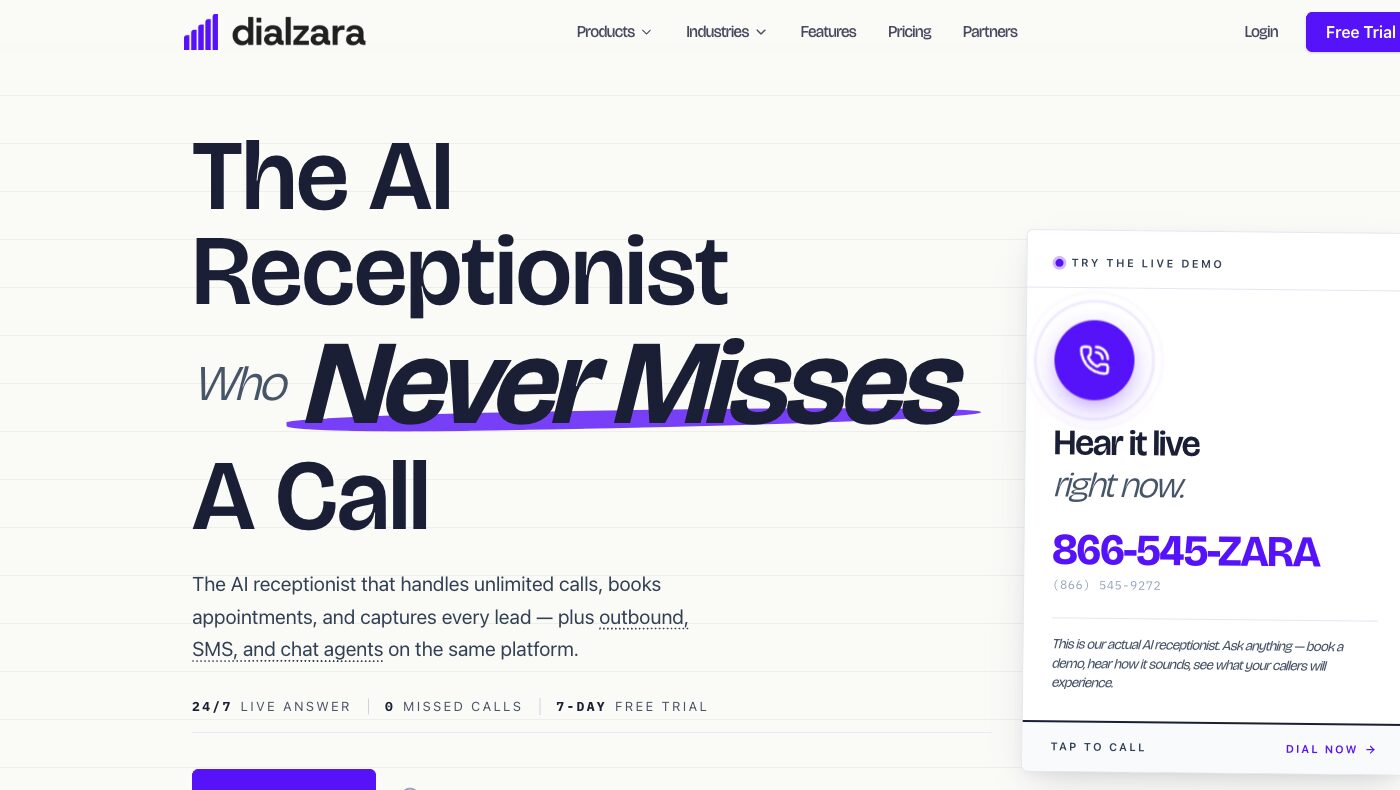
Worth reading alongside the homepage, which describes the product as one that "handles unlimited calls":
Captured from dialzara.com, August 2026. Calls are unlimited; talk time is metered. Both statements are true at once, and the second one is the one that shows up on your invoice.
What impressed us: the low entry barrier. Setup is self-service, there are no contracts, and the voice library is broad (50+ options), which makes it a cheap way to find out whether AI answering fits your business at all. Call recordings and transcripts come included.
Where it fell short: the meter. Per-minute pricing means a busy month produces a surprise bill, and busy months are the point. Bilingual support and integrations sit on higher tiers, the knowledge base is capped on lower ones, and there's no emergency detection: an urgent call gets the same handling as a pricing question.
Honest fit: businesses with predictable volume under ~50 calls/month who want to experiment before committing. Not ideal once volume picks up; the overage model punishes growth.
Goodcall: best for a fixed customer base
Best for: businesses where most calls come from the same repeat customers.
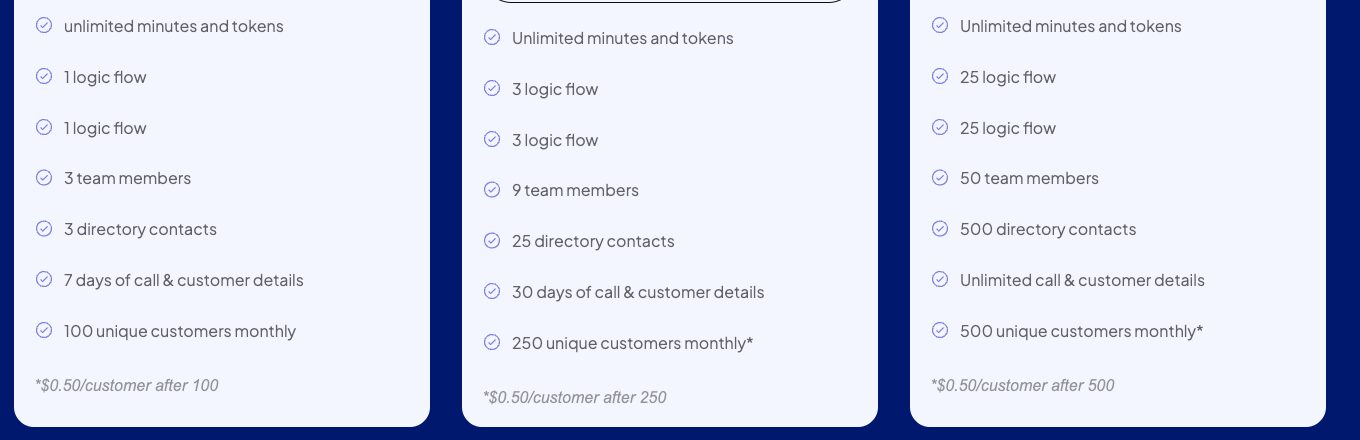
Pricing: metered by caller, and charged per agent. Minutes are genuinely unlimited, but callers are capped: 100 / 250 / 500 unique callers a month depending on tier, then $0.50 for every additional caller. And the price is per agent, not per business, so a second agent doubles it. Every new lead your marketing generates counts against the cap.
Captured from goodcall.com/pricing, August 2026. "Unlimited minutes and tokens" sits directly above a cap on unique customers, with $0.50 for every caller past it. Minutes are the thing that isn't limited; callers are.
What impressed us: unlimited minutes within the customer cap is a genuinely good deal for repeat-caller businesses, and the custom form/conditional-logic builder is more flexible for structured intake than most rivals. Multi-location support is solid.
Where it fell short: the cap counts unique callers, so every new lead from your marketing counts against it. That's backwards for anyone actively trying to grow inbound. No multilingual support, no emergency routing, and recording retention is short on lower tiers.
Honest fit:property management and maintenance-contract businesses where the caller list is stable. Wrong fit if you're spending money to generate new callers.
Smith.ai: best when calls genuinely need humans
Best for: professional services where human judgment on the call is the product.
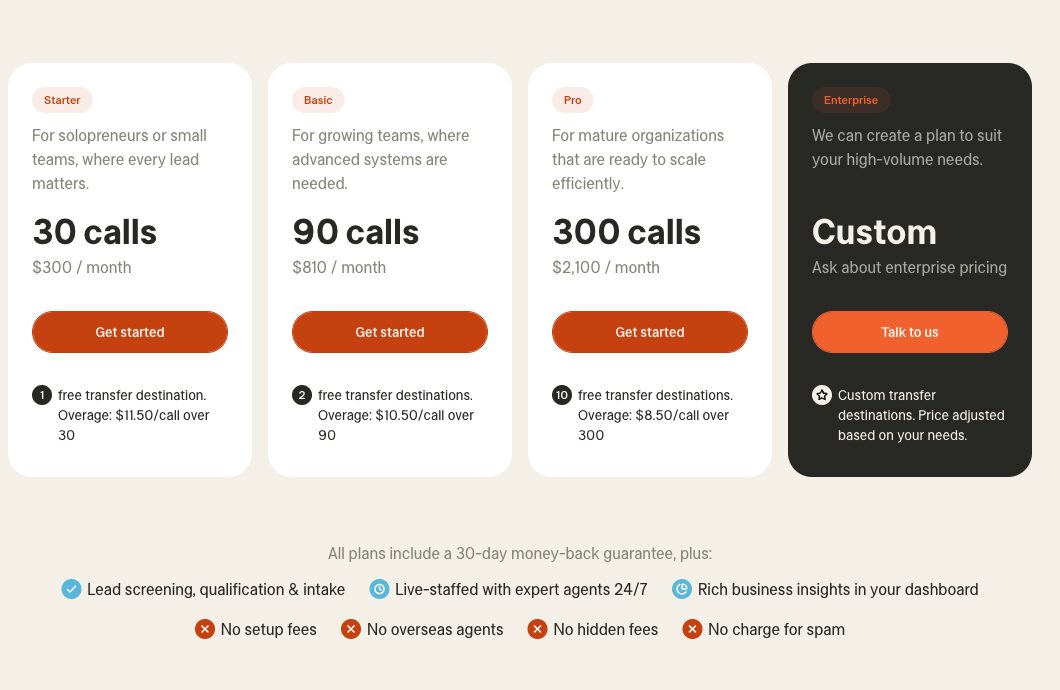
Pricing: $300/month for 30 calls, $810 for 90, $2,100 for 300 (verified August 2026). Over your plan, calls bill at $11.50 / $10.50 / $8.50 each depending on tier.
Captured from smith.ai/pricing, August 2026.
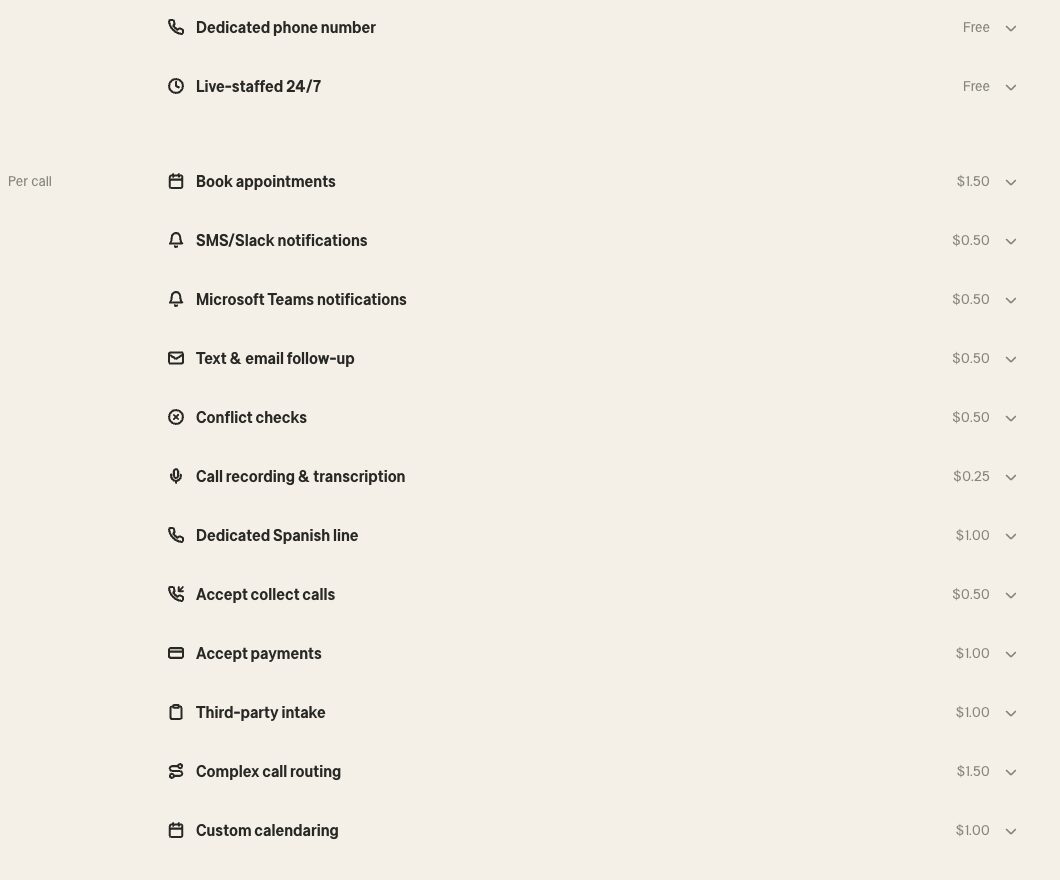
Budget for the add-on menu as well. Several things most people assume are included bill per call on top of the plan:
Captured from smith.ai/pricing, August 2026. Appointment booking is $1.50 per call, call recording $0.25, conflict checks $0.50. On a 90-call plan where every call books an appointment, that's $135/month on top of the $810.
What impressed us: the humans. Live North-America-based agents handle the calls the AI screens to them, and for sensitive intake (legal, medical) that judgment is real. Longest track record in the category (since 2015), professional setup, outbound calling available, CRM integrations including Clio.
Where it fell short: cost scales with your growth, at roughly 3–4x pure-AI pricing for equivalent volume. Human routing adds pickup delay compared to instant AI answers, and surge capacity is limited by staffing: the 2am storm-night flood of calls is exactly when a human pool is thinnest.
Honest fit: law firms and professional-services practices with genuinely complex, high-stakes intake on most calls. If 80% of your calls are routine, you're paying human rates for FAQ answers.
RingCentral AI: best if you're on RingCentral and get very few calls
Best for: businesses already on the RingCentral phone system where answering calls isn't a real revenue channel (roughly speaking, under ~50 calls a month). Past that, the gap between a bundled feature and a dedicated platform starts costing you more than the add-on saves.
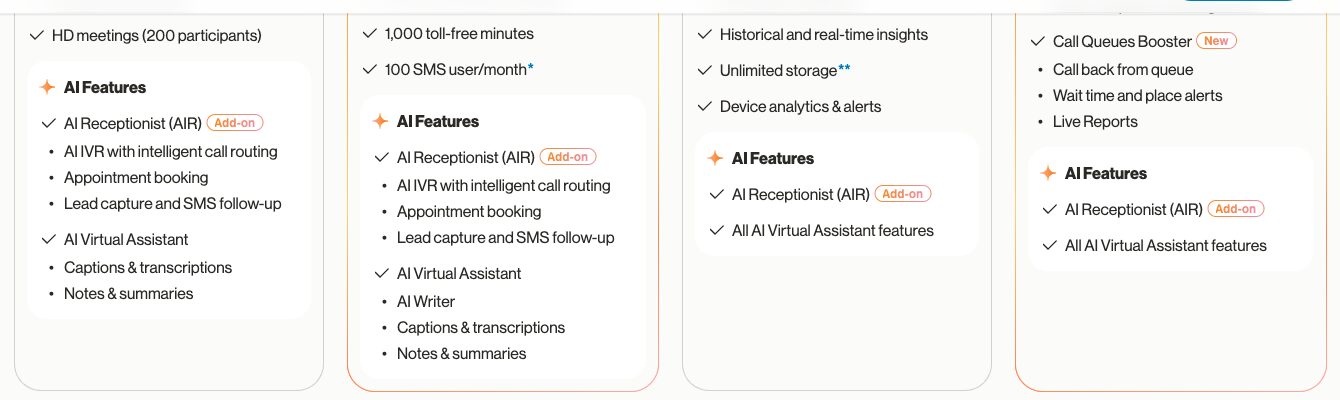
Pricing: a paid add-on on top of a RingEX plan ($30–50/user/month), not an included feature. RingCentral's own plan comparison marks AI Receptionist (AIR) as "Add-on" on all four tiers, including Ultra.
Captured from ringcentral.com/office/plansandpricing.html, August 2026. AIR is badged "Add-on" on Core, Advanced and Ultra alike. Confirm the current add-on rate with RingCentral before budgeting.
What impressed us: the convenience if you're already a customer. No new vendor, and it lives inside the phone system you already administer. Voicemail transcription and basic routing work as advertised.
Where it fell short: it's a feature, not a product. The AI is noticeably less capable than the dedicated platforms in this list: less customization, weaker booking, no trade-tuned urgency handling. And it requires RingCentral; there's no standalone option.
Honest fit: existing RingCentral shops that want basic after-hours coverage without buying anything. If call answering is actually costing or making you money, a dedicated platform earns its fee.
The honest tiering across the category, verified against each vendor's own pricing page in August 2026:
Pure AI, flat-rate: NextPhone from $199/month with unlimited calls (current tiers on the pricing page). This is the only flat-rate unlimited model in the comparison; see the full AI receptionist pricing guide for the tier-by-tier breakdown.
Pure AI, metered: neither of these is unlimited, whatever the homepage says. Dialzara caps talk time and bills $0.35–$0.48 per minute past it. Goodcall caps unique callers and bills $0.50 for each one over, priced per agent rather than per business. Both look cheap at low volume and get unpredictable exactly when you get busy.
Hybrid AI + human: Smith.ai from $300/month for 30 calls, up to $2,100 for 300, plus $8.50–$11.50 per call over plan and per-call fees for booking, recording and payments. You're paying for staffed agents; the price tracks your call volume.
Bundled add-on: RingCentral AI Receptionist, sold as an add-on on top of a RingEX plan you're already paying for.
The traps to check before signing anything:
Per-minute rounding. Most per-minute plans round every call up to the next 60 seconds. Even rounding to 6-second increments adds ~6.7% to your effective rate. The shorter your typical call, the worse the invisible tax; a 20-second "are you open today?" bills as a full minute.
Overage cliffs. A live answering service at $500–800/month for 100 calls looks manageable until busy season doubles your volume and the per-call overages kick in. Ruby, for example, charged $5.19 per call over plan at our last verification. Ask every vendor: "what does my bill look like in my busiest month?"
Setup fees and integration fees. Some platforms charge $100–500 for setup or extra for CRM connections. NextPhone and Smith.ai don't charge setup fees; always verify the integration you need is included in the tier you're buying, not the tier above it.
Is the ROI real? One worked example with third-party numbers: a typical home-services contractor gets about 42 calls a month, and 74.1% of calls to home-services businesses go unanswered (Invoca). That's roughly 31 missed calls monthly. If just 20% of those callers would have hired you at a $3,500 average project, missed calls are costing about $21,700 a month. Against a $199/month plan, capturing even one additional job pays for months of service. Your numbers will differ; run them with your own call volume and ticket size before buying anything.
Why flat-rate pricing matters more for law firms and professional services
For most businesses, per-minute pricing is inconvenient. For law firms and professional services practices, it's a structural problem.
A personal injury or criminal defense firm runs on contingency: the signed client is the unit of value, not a billable hour. When a new intake call goes to voicemail, it's a lost case. The Clio 2024 Legal Trends Report found that only 40% of law firms answered the phone when secret-shopped. Gary Falkowitz, an intake consultant to more than 200 firms, found that 42% of legal consumers hire the first firm that responds, and that 35%+ of legal leads call after hours, while only 25% of firms answer then.
Per-minute pricing punishes exactly this scenario. A firm running a TV or LSA campaign that drives a surge of inbound calls pays more the month the AI actually works. A flat-rate model inverts that: the bill is identical whether the phone rings 100 times or 300 times.
Flat-rate pricing means the bill is predictable before the month starts. NextPhone plans from $199/month cover unlimited inbound calls, the same in a strong advertising month as in a slow one. That predictability matters most in the verticals where each answered call represents a potential case or client relationship:
Personal injury and criminal defense: intake call = potential contingency case; after-hours coverage is table stakes (arrests and accidents don't happen 9–5)
Estate planning and family law: consultation-first model; the intake call is the entire top of funnel
CPA and tax firms: volume can triple in January–April; a per-minute bill triples alongside it
Insurance agencies: quote calls run 5–8 minutes each, and the meter stacks fast at standard talk-time rates
For any of these verticals, the right question before signing with an AI receptionist is "what does it cost in my busiest month?" With flat-rate, those two answers are the same.
How to measure any vendor's accuracy yourself
Vendors quote "95% accurate" the way restaurants quote "fresh ingredients": comforting and unfalsifiable. Here's the test we use internally, compressed so you can run it on any vendor in an afternoon during a trial.
Accuracy is four numbers, not one:
Intent recognition. Did the AI understand what the caller wanted?
Task completion. Was the appointment actually booked, the message actually complete, the transfer actually made?
Escalation accuracy. Did it hand off the calls it should have, and stay on the calls it should have? Both failure directions matter: a missed emergency is worse than a false alarm, but constant false alarms defeat the purpose.
Latency. Time from the caller finishing speaking to the AI responding. Under 1 second is good; over 3 feels broken.
These compound across a conversation. A 95% per-turn accuracy compounds to roughly 70% across a 7-turn call, and real booking calls run long. Per-turn numbers look great in a vendor deck; end-to-end numbers determine whether the caller becomes a customer.
Test against the real call mix. In our analysis of 1,446,980 inbound business calls across 2,074 businesses, the most common reasons people call, in ranked order:
Rank
Why people actually call
1
Booking, confirming, or rescheduling an appointment
2
Asking about a specific service or repair
3
Requesting a quote or estimate
4
Checking status of existing work
5
Hours, location, and directions
6
New-customer inquiries
7
Complaints or problems
8
Billing and payment questions
9
Emergencies and urgent issues
10
Cancellations
Most vendor demos showcase the clean appointment booking, which is one of the easier scenarios. Build your trial test set to mirror the ranked list above, add a few spam calls (they should get filtered, not answered), a couple of non-English calls if your customers need them, and an urgent-call overlay. Then score each call on the four numbers separately. Don't blend them into one score; a blended number hides the failure mode you need to fix.
The satisfaction trap. In our production data, 99% of callers express positive or neutral sentiment. That is not the same thing as accuracy. Callers are satisfied when they're greeted politely and the call ends without friction, even if the AI captured the wrong callback number. They find out three days later, when nobody calls. Judge vendors on operational accuracy (was the number right, was the booking made), not on how pleasant the call felt.
Eight questions that sort vendors fast:
Show me your accuracy broken down by scenario type, not blended.
First-utterance intent accuracy versus final intent accuracy?
Escalation false-positive rate AND false-negative rate, separately?
Word error rate on names and phone numbers specifically, not transcript-level?
Median and p95 response latency from production calls, not a sandbox?
What happens on calls below your confidence threshold?
How do you detect accuracy drift in production?
Can I run my own test set against your system before signing?
If a vendor pushes back on that last one, that's your answer. The willingness to be measured is itself a quality signal.
How we tested (and our conflict of interest)
First, the disclosure: NextPhone is our product. We build it, so we have an obvious horse in this race. We're publishing the exact methodology so you can discount our bias and re-run every test yourself during each platform's trial period.
Test setup. Between June and July 2026 we ran the same set of real-world call scenarios through each platform, using live call volume on real small-business lines for a minimum of 7 days per platform:
Appointment booking with a real connected calendar, including a reschedule request
After-hours emergency ("my water heater is leaking") to test urgency detection and routing
Routine FAQ (hours, service area, ballpark pricing)
A complex inquiry that should trigger a handoff to a human, to test whether the AI knows its limits
Background noise and strong accents, because job sites and real callers have both
We scored answer speed, voice quality, response accuracy, calendar reliability, and what each platform did when it was out of its depth. Pricing was re-verified against each vendor's own published pricing page on August 3, 2026, and the screenshots above are the captures from that pass; where a vendor quotes custom pricing, we say so instead of guessing.
One thing this test can't fully capture: long-run accuracy on your call mix. For that, run the vendor accuracy test during your trial.
Frequently asked questions
What is the best AI receptionist for law firms?
NextPhone for most practices: flat monthly plans from $199 with unlimited calls and no per-minute charges. The Clio 2024 Legal Trends Report found only 40% of law firms answered when secret-shopped; Gary Falkowitz, an intake consultant to 200+ firms, found 42% of legal consumers hire the first firm to respond. A missed intake call at a contingency firm is a lost case. NextPhone answers in under 2 seconds, asks your intake questions during the call, books consultations directly into your calendar, and transfers urgent matters (arrests, emergencies) to your on-call number immediately. Native Clio sync is included on the Growth plan. Smith.ai is the alternative if you specifically need a live human on every call; expect 3–4x the cost.
What is the best AI receptionist for small businesses in 2026?
NextPhone: flat monthly plans from $199 with unlimited inbound calls, answers in under 2 seconds, 90–95% of calls resolved without human escalation, native Clio and HubSpot sync, and 14 languages. For businesses where calls are revenue and volume varies, it's the default pick. Smith.ai is the only alternative worth paying more for: if the majority of your calls genuinely require live human judgment (high-stakes legal intake, complex medical triage), their hybrid model from $300/month is worth the premium. Every other platform in this comparison charges by the call, by the minute, or by the unique caller: costs that scale against you exactly when your AI answering is working.
Which AI virtual receptionist is best for small businesses?
For most small businesses, NextPhone: plans from $199/month flat-rate with unlimited inbound calls, answers in under 2 seconds, 90–95% of calls resolved without human escalation, calendar booking, 14 languages, and emergency keyword routing. Native Clio and HubSpot sync comes with the $299 Growth plan (6,000+ other tools via Zapier). Smith.ai is the alternative if you specifically need live human agents on a hybrid model; expect to pay 3–4x more.
How accurate are AI receptionists?
Modern platforms achieve 85–95% accuracy on routine inquiries (hours, pricing, scheduling), and the good ones route calls they're uncertain about to you instead of guessing. Accuracy depends heavily on setup: an AI trained on your services, pricing, and terminology performs meaningfully better than a 15-minute rushed configuration. Expect a 2–4 week refinement period, and use the vendor accuracy test above to measure rather than trust.
How much does an AI receptionist cost for a small business?
Pure-AI platforms with full features run $199–299/month; NextPhone's plans are flat monthly, from $199, with unlimited calls and no per-minute charges, so a busy month costs the same as a slow one. Hybrid AI-plus-human services run $300/month and up, scaling with volume. Compare that to a human receptionist at $3,100–4,300/month all-in, or a traditional answering service at $500–800/month for around 100 calls with overage charges on top.
Will customers know they're talking to AI?
For quick questions, most don't notice; modern voices sound natural and answer in seconds. On longer conversations, some callers will realize it's AI, and that's fine: in our production data, 99% of callers express positive or neutral sentiment. The design that matters is smart forwarding, so that the calls where a human genuinely matters reach one immediately.
Can AI receptionists schedule appointments in my calendar?
Yes, and booking or rescheduling an appointment is the single most common reason people call a service business in our call corpus, so this feature does the heaviest lifting. Good platforms connect to Google Calendar, Outlook, or Apple Calendar, check availability in real time, book the slot, and send confirmations to both sides. If a platform can't do this reliably, skip it.
Do I need to replace my existing phone system?
No. Standalone AI receptionists work by call forwarding: you keep your existing number, forward it to the AI, and callers never know the difference. Works with any VoIP provider, traditional landlines, and mobile phones. The exception is RingCentral AI, which only exists inside RingCentral's own system.
The bottom line
Every platform in this list beats voicemail, and voicemail is what most missed calls actually hit. Pick based on your call economics: flat-rate AI (NextPhone) when calls are revenue and volume varies, humans (Smith.ai) when judgment is the product, bundled (RingCentral) when free-and-adequate is the goal. Then verify with your own test set during the trial, because the vendor's demo will always be their best-case call.