Your phone rings at 9 PM. A customer needs emergency AC repair—their system just died in 95-degree heat with kids in the house. But you're at your daughter's soccer game, and the call goes to voicemail.
They don't leave a message. They call the next contractor. You just lost a $3,500 job in the 30 seconds it took to look at your phone.
This happens more than you think. Industry research shows small businesses miss 60-80% of incoming calls. That's three out of every four potential customers calling someone else because you can't answer 24/7.
The traditional solutions don't work for most small businesses. Hiring a full-time receptionist costs $2,900/month. Traditional answering services run $500-800/month for basic coverage. Both are out of reach for businesses with tight margins.
There's a better way. Affordable AI answering services start at $15-49/month and capture calls you'd otherwise miss—without the enterprise price tag.
In this guide, you'll learn what affordable AI answering services actually are, how much they cost (with real pricing comparisons), what features to expect at each price point, and how to calculate the ROI for your specific business. You'll see concrete numbers, not vague promises.
See how AI handles thousands of calls daily →
The Hidden Cost of Missed Calls
Every unanswered call is a potential customer choosing your competitor. For small businesses, the math is brutal.
How Many Calls Small Businesses Actually Miss
Industry research shows small businesses miss 60-80% of incoming calls. If you're getting 42 calls per month (the industry average for small contractors), that's 25-34 calls going straight to voicemail.
Most business owners don't realize the scale of the problem. You're busy serving customers, working on projects, or handling the thousand other tasks that keep your business running. The phone rings at inconvenient times. You assume people will leave voicemails or call back.
They don't. Customers call the next business on their list.
What Happens When Calls Go Unanswered
When your call goes to voicemail, customers make instant judgments. "They're too busy for new work." "They don't care about customers." "They must not need the business."
The damage goes deeper than one lost call. Here's what you're actually missing:
Quote requests: Industry data shows 6.9% of calls are people asking for estimates. These are hot leads ready to buy—and you're sending them to voicemail.
Emergency calls: Another 6.2% are true emergencies requiring immediate response. Add the 15.9% containing urgency language like "ASAP," "urgent," or "emergency," and you're missing critical high-value calls.
Scheduling requests: 7.7% of calls are customers trying to book appointments. When they can't reach you, they book with someone else.
Callback requests: Here's the kicker—25.4% of callers who do reach someone explicitly ask for a callback. Without a system to track these, industry research shows many fall through the cracks.
The Revenue Impact You're Not Tracking
Let's do the math on what missed calls actually cost.
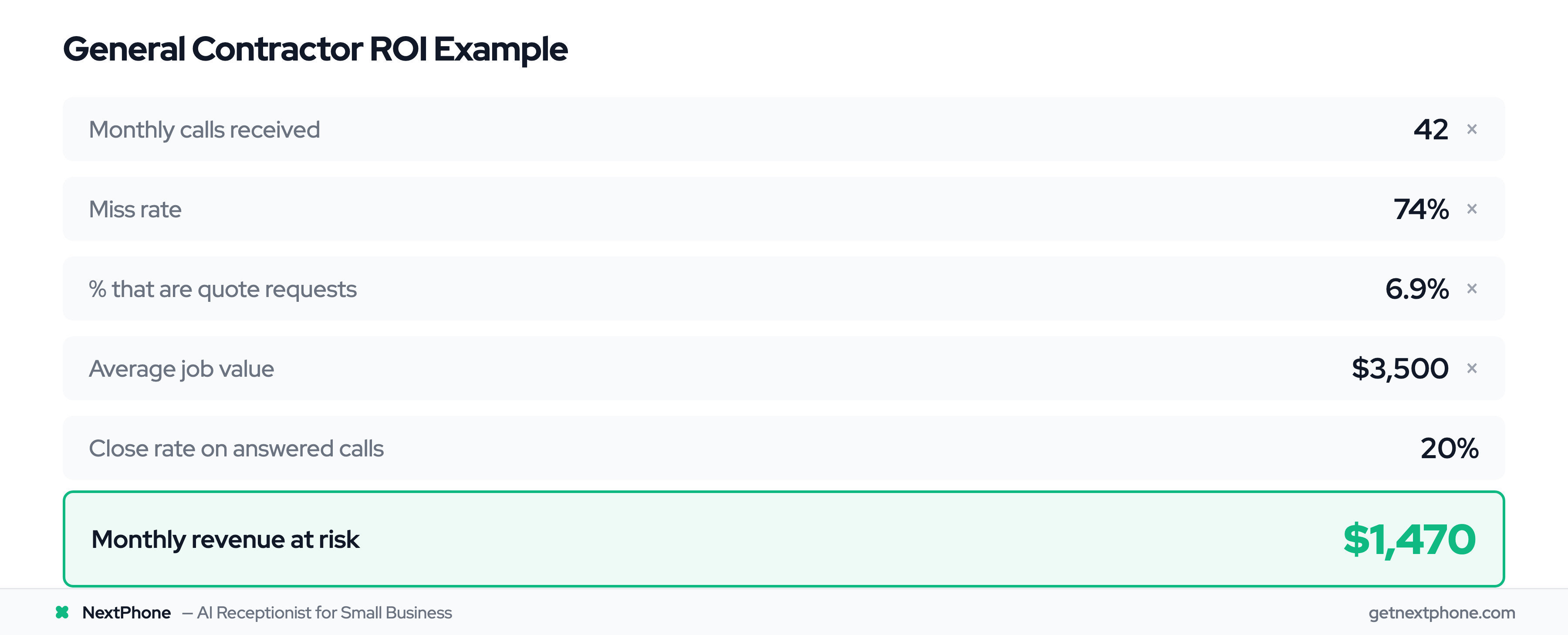
Say you get 42 calls per month (industry average). If you're missing 60%, that's 25 unanswered calls. If just 20% of those callers would've hired you at an average $3,500 project value, you're losing 5 jobs monthly.
That's $17,500 per month. Or $210,000 per year.
One plumber we talked to thought business was slow last winter. Then he installed call tracking. Turns out he wasn't slow—he was missing 38 calls per month during his "slow" period. He wasn't losing customers to competitors. He was losing them to his own voicemail.
A real quote from industry research shows the urgency: "Needs emergency AC repair, no cooling in 95 degree weather." When a customer is in crisis, they're calling five contractors. The first one to answer gets the job.
Why Traditional Solutions Don't Work for Most Small Businesses
You know you need to answer more calls. The question is how—without breaking the bank.
The Full Cost of Hiring a Receptionist
A full-time receptionist sounds ideal. Someone to answer every call, take messages, schedule appointments. The problem? Cost.
According to the Bureau of Labor Statistics, the average receptionist salary is $35,000 per year. Add payroll taxes (7.65%), benefits (health insurance, paid time off), and overhead, and you're looking at $45,000 all-in. That's $3,750 per month.
And they still only work 9-5. What about after-hours calls? Evenings? Weekends? Industry data shows significant call volume happens outside business hours, especially for home services businesses.
You're paying $45,000 annually and still missing calls.
Traditional Answering Services Are Expensive
Traditional live answering services seem like the middle ground. Real humans, lower cost than hiring. But the math doesn't work for small businesses.
Most traditional answering services charge $500-800/month for small business packages. Here's how the pricing breaks down:
- Base monthly fee: $200-300
- Per-minute charges: $0.75-$1.95 per minute
- Monthly minimums: 50-100 minutes included
- Overage charges: Add up fast
Let's say you get 42 calls per month at 3 minutes average. That's 126 minutes of call time. At $0.90/minute (middle of the range), you're paying:
- Base fee: $250
- Call minutes: 126 × $0.90 = $113
Total: $363/month
And that's for low volume. During busy season when you're getting 80-100 calls? The bill hits $800-1,200.
Industry pricing data shows the effective per-minute rate works out to $0.20-$0.30 when you blend base fees and overages. For businesses with unpredictable call volume, this creates budget anxiety.
The "Just Let It Ring" Problem
Most small businesses end up trying to handle it themselves. You answer when you can, let it ring when you're busy, check voicemails when you remember.
This approach has hidden costs:
Interruptions kill productivity. Every call interrupts your work. Even a 2-minute call costs 15-20 minutes of focus time as you context-switch back to what you were doing.
Spam wastes your time. Industry research shows 7% of incoming calls are spam or robocalls. That's hours per month answering "This is Rachel from Card Services."
You're always "on call." Your personal phone rings at dinner, during family time, on weekends. The boundary between work and life disappears.
The DIY approach is "free" in dollars. But it costs you in time, stress, and lost revenue from calls you simply can't answer while working.
How AI Answering Services Actually Work
AI answering might sound complicated or futuristic. The technology is actually straightforward.
Natural Language Processing in Plain English
AI answering services use natural language processing (NLP)—a technology that enables computers to understand human language the way we actually speak it.
This isn't keyword matching. When someone calls and says "Are you open Saturday?" the AI doesn't just search for the word "Saturday." It understands the question is about business hours on a specific day and provides the relevant answer: "Yes, we're open 9 AM to 5 PM on Saturday."
Modern NLP has gotten remarkably good. According to IBM, natural language processing technology enables computers to understand context, intent, and even sentiment. The AI knows the difference between "I need a quote" and "I need emergency service right now."
How AI Understands Customer Questions
Here's what happens when a call comes in:
1. Your phone rings. The AI answering service picks up in 2-3 rings (under 5 seconds).
2. The AI greets the caller. Using a natural-sounding voice trained on your business: "Thanks for calling [Your Business]. How can I help you today?"
3. The caller asks a question. "Do you service Westchester County?"
4. NLP processes the language. The AI identifies this is a service area question.
5. The AI responds accurately. "Yes, we service all of Westchester County. Are you looking to schedule service?"
The AI is trained on your specific business during setup. You provide information like:
- Services you offer
- Pricing (if you share it)
- Service areas
- Business hours
- Scheduling availability
- Common questions you get
The more specific your training, the better the AI handles your calls.
Smart Call Routing and Escalation
Not every call needs the same response. This is where smart routing matters.
Routine questions (business hours, service area, basic pricing): AI answers directly using the information you've provided.
Appointment requests (7.7% of calls based on industry data): AI checks your integrated calendar, finds available slots, and books the appointment. Customer gets confirmation via text or email.
Emergency calls (6.2% of calls, plus 15.9% with urgency language): AI detects keywords like "emergency," "urgent," "ASAP," "pipe burst," "no heat," "no cooling." When detected, the call routes immediately to your phone or on-call person.
Callback requests (25.4% of calls): AI logs the caller's name, number, reason for calling, and best time to call back. You get a text summary within minutes.
Complex questions: If the AI can't confidently answer, it doesn't guess. It says something like "That's a great question. Let me connect you with someone who can help," and routes to you or takes a detailed message.
The AI + Human Hybrid Approach
The best affordable AI answering services don't try to replace humans entirely. They handle the routine 60-80% of calls, letting you focus on the complex 20-40% that need human judgment.
This hybrid approach works because:
- AI is perfect for repetitive questions (hours, pricing, service area)
- AI never gets tired, annoyed, or forgets to log information
- AI is available 24/7 without overtime pay
- Humans are better at nuance, empathy, and complex problem-solving
- Humans should handle your most important customer conversations
According to customer service technology research from Dialpad, NLP chatbots and voice systems handle routine queries at scale, interpret natural language, and provide 24/7 assistance—even when customers have typos or incomplete sentences.
The call center AI market is growing from $2.41 billion in 2025 to a projected $10.07 billion by 2032 according to Fortune Business Insights—a 22.7% annual growth rate. That rapid adoption is driven by small businesses realizing AI handles the volume while they handle the value.
AI Answering Service Cost Comparison
Let's talk real numbers. How much do AI answering services actually cost compared to alternatives?
Traditional Answering Service Costs
Traditional live answering services charge in a few different ways:
Per-minute billing: Most charge $0.75-$1.95 per minute of call time. A 10-minute call costs $7.50-$19.50.
Monthly packages: Common structure is a base fee ($200-300) plus per-minute overages. Small business packages typically include 50-100 minutes, then charge for additional minutes.
Typical monthly cost: According to industry pricing analysis, small businesses with 42 calls per month (about 126 minutes of call time) pay $363-577/month for traditional live answering.
For comparison, businesses getting 87 calls monthly (higher volume, typical for busy contractors) pay $770-950/month with traditional services.
AI Answering Service Pricing Range
AI answering services structure pricing very differently:
Flat monthly rates: Most charge a fixed monthly fee regardless of call volume (or up to a generous limit). This eliminates surprise bills during busy months.
Pricing tiers: Services typically offer 2-4 pricing tiers based on features, not call volume:
Budget tier: $13-49/month for basic call answering Mid-range tier: $50-149/month for full features Premium tier: $150-300/month for AI + human backup
According to market research analyzing dozens of AI answering services, the majority of small businesses fit comfortably in the $49-199/month range and get unlimited or very high call limits.
The Math on Annual Savings
Let's compare real scenarios:
- Scenario 1: Small business with 50 calls/month
- Traditional answering service: $575/month × 12 = $6,900/year
- AI answering service: $99/month × 12 = $1,188/year
- Annual savings: $5,712
- Scenario 2: Busier business with 150 calls/month
- Traditional answering service: $950/month × 12 = $11,400/year
- AI answering service: $199/month × 12 = $2,388/year
- Annual savings: $9,012
- Scenario 3: Receptionist comparison
- Full-time receptionist: $45,000/year (salary + benefits + taxes)
- AI answering service: $2,388/year (unlimited calls)
- Annual savings: $42,612
Even at the higher end of AI pricing ($199-299/month), you're saving 60-90% compared to traditional solutions.
The cost difference is dramatic because AI eliminates the labor expense. One AI system can handle unlimited simultaneous calls. A human receptionist handles one call at a time and needs breaks, benefits, and days off.
What Makes an AI Answering Service "Affordable"?
"Affordable" means different things to different businesses. Let's define clear tiers.
Budget Tier: $15-49/Month (Basic Call Answering)
What you get:
- 24/7 call answering with AI voice
- Basic call routing (answer or forward)
- Call transcripts via email
- Limited customization
- May have call limits (30-50 calls/month)
- Basic integration (limited or none)
What you don't get:
- Advanced CRM integration
- Appointment booking with calendar sync
- Smart emergency routing
- Spam filtering
- Detailed analytics
- Human backup for complex calls
Best for:
- Micro-businesses with very low call volume (<30 calls/month)
- Businesses testing AI answering before committing
- Solo entrepreneurs who just need after-hours coverage
- Simple use cases (take message, forward to email)
Examples at this tier:
- Allô (per-minute pricing starting around $13/month for very low volume)
- Upfirst ($24.95/month for 30 calls, $34.95 for 50 calls)
Mid-Range Tier: $50-149/Month (Full Features)
What you get:
- 24/7 call answering with AI voice
- Unlimited calls (or very high limits like 200-300 minutes)
- Smart call routing based on keywords
- Appointment scheduling with calendar integration
- CRM integration (Salesforce, HubSpot, etc.)
- Spam call filtering
- Call summaries via text/email in real-time
- Detailed analytics dashboard
- Custom greetings and responses
- FAQ handling
What you don't get:
- Human backup (still AI-only)
- White-glove setup assistance
- Dedicated account manager
Best for:
- Small businesses with 30-100 calls/month
- Home services contractors, professional services, retail
- Businesses needing appointment booking
- Teams using CRM systems
- Growing businesses that need reliability without enterprise cost
Examples at this tier:
- Rosie AI ($49/month unlimited)
- My AI Front Desk ($79/month for 200-300 minutes)
- Goodcall ($59/month, $41/month annually)
This tier offers the best value for most small businesses. You get full AI capabilities, unlimited or high call volumes, and integrations with tools you're already using.
Premium Tier: $150-300/Month (AI + Human Backup)
What you get:
- Everything in mid-range tier
- Human backup for complex calls
- Higher call volume capacity (300+ calls/month)
- Priority support
- White-glove setup and onboarding
- Advanced customization
- Dedicated account manager (some services)
- Industry-specific training
- Enhanced reporting
What you pay for:
- The human escalation layer
- Higher reliability guarantees
- Better customer experience for complex interactions
- Professional implementation support
Best for:
- Businesses with 100+ calls/month
- Industries requiring high-touch service (medical, legal)
- Businesses with complex customer questions
- Teams that need consultative setup help
- Companies where call quality directly impacts brand
Examples at this tier:
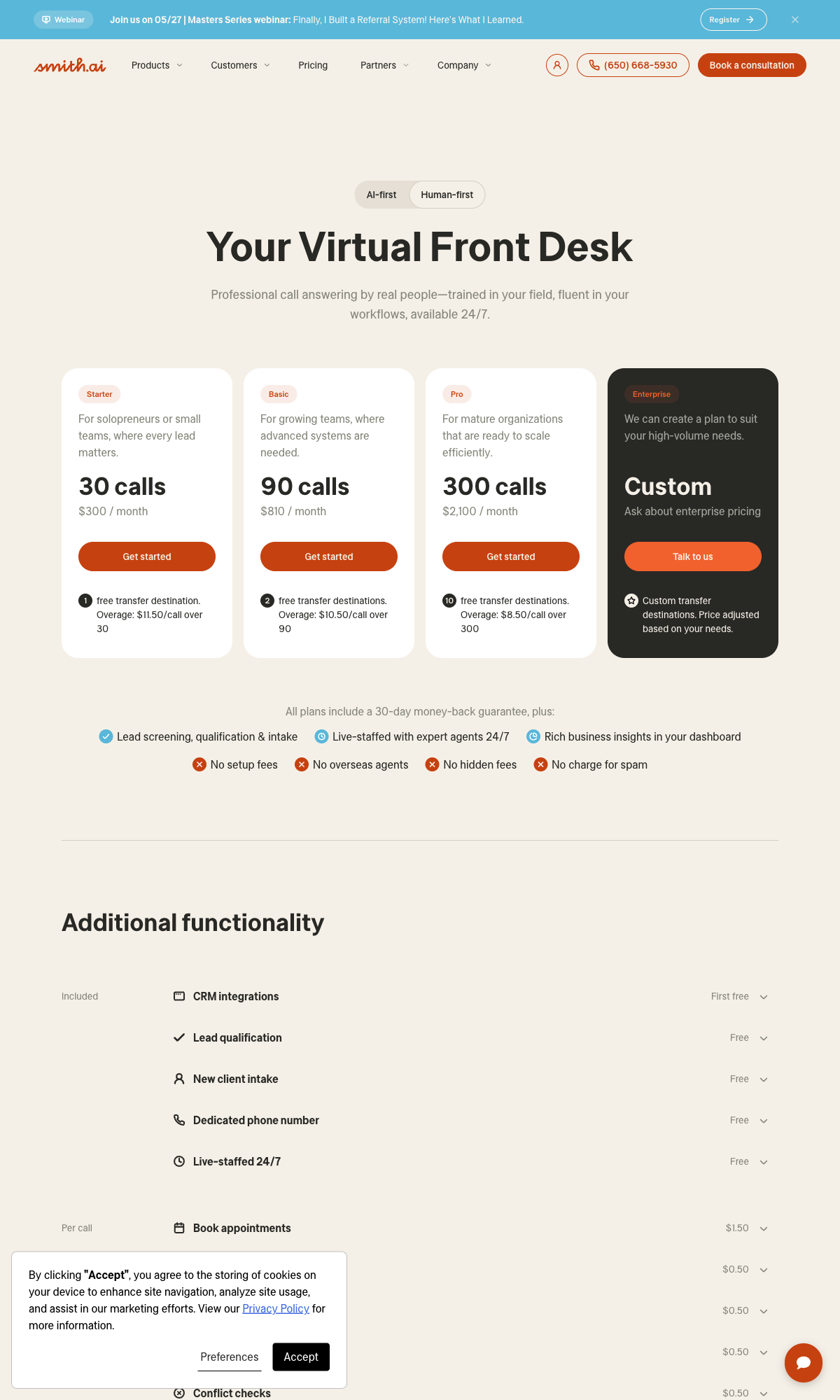
- Smith.ai ($329/month with human receptionists)
- Abby Connect ($99+ with human backup)
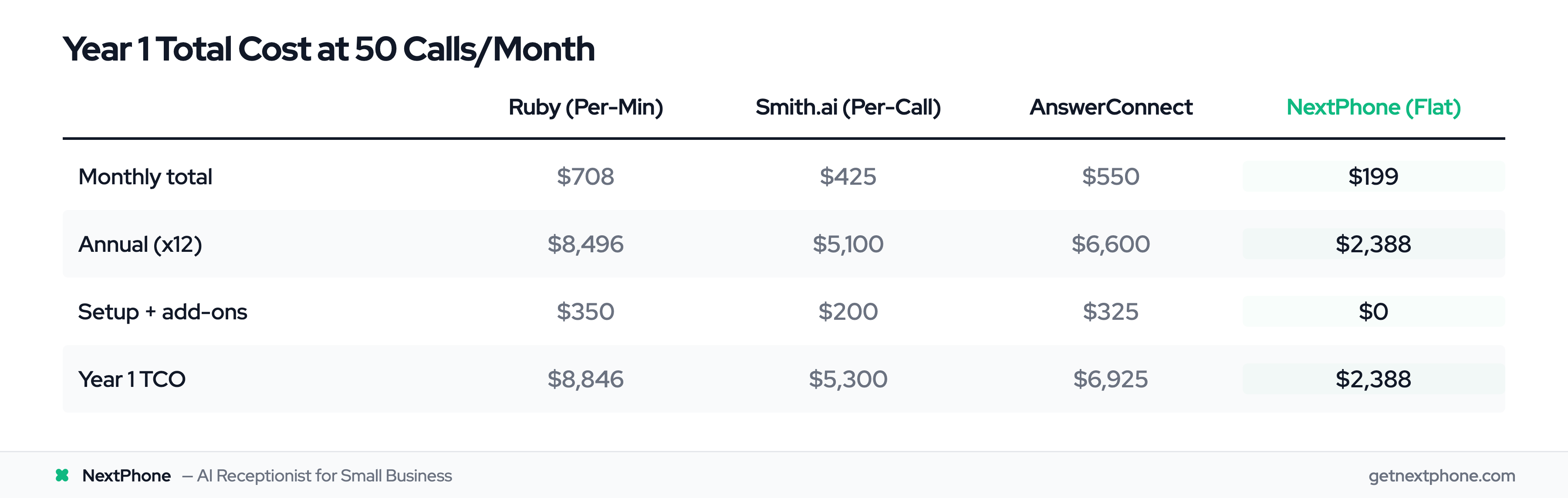
- NextPhone ($199/month with unlimited calls and emergency routing)
What You Get at Each Price Point
The tier you choose should match your call volume and complexity:
If you get <30 calls/month: Budget tier works fine. You're paying $1-1.50 per call handled.
If you get 30-100 calls/month: Mid-range gives you best value. You're paying $0.50-$1.50 per call with full features.
If you get 100+ calls/month: Premium makes sense. You're paying $1.50-$3 per call but getting human backup and higher reliability.
The math is simple: calculate your monthly call volume, divide by tier cost, see your per-call expense. Compare to traditional answering at $3-8 per call.
Essential Features in Affordable AI Answering Services
Price matters, but features determine if the service actually solves your problem. Here's what to look for.
24/7 Call Answering (The Basics)
This is table stakes. Every affordable AI answering service offers 24/7 availability. Your phone is answered at 2 AM on Christmas just as reliably as 2 PM on Tuesday.
Why this matters: Industry research shows significant call volume happens outside 9-5 business hours. For home services especially, emergencies don't follow your schedule.
The AI doesn't take vacations, call in sick, or need breaks. It answers in 2-3 rings, every time.
Appointment Scheduling and Calendar Integration
This feature saves hours per week. Instead of playing phone tag to find a time that works, the AI checks your calendar in real-time and books appointments on the spot.
How it works:
- Customer calls requesting an appointment
- AI detects scheduling intent (7.7% of calls based on industry data)
- AI checks your integrated Google Calendar or Outlook
- AI offers available time slots
- Customer chooses
- AI books appointment and sends confirmation via text/email
You wake up to a full schedule without ever touching your phone.
According to technology providers, AI appointment booking systems integrate with calendar and CRM to reduce time spent on phone bookings by 5X, finding optimal time slots and rescheduling automatically.
Spam Call Filtering (Save Time)
Industry research shows 7% of incoming calls are spam or robocalls. For a business getting 42 calls monthly, that's 3 spam calls. For busier businesses getting 100+ calls, that's 7 spam interruptions weekly.
AI answering services detect and filter spam automatically using:
- Known spam number databases
- Pattern recognition (robocall cadence)
- First few seconds of audio (robocall recordings)
Instead of you answering "This is Rachel from Card Services," the AI blocks it. You never know it happened.
Time saved: 2-3 minutes per spam call × 3-7 monthly = 6-21 minutes per month. Multiply by your hourly rate ($100-130 for contractors) and spam filtering alone saves $10-45 monthly.
Emergency Call Routing (Critical Calls)
This is where affordable AI separates from "cheap AI that loses you business."
Industry data shows 6.2% of calls are true emergencies. Another 15.9% contain urgency language like "emergency," "urgent," "ASAP," "pipe burst," "no heat," "no cooling."
Combined, that's about 22% of calls that need immediate human attention—not a callback in 4 hours.
Good AI answering services detect urgency through: Keyword detection: "emergency," "urgent," "ASAP," "broken," "leak," "burst" Contextual understanding: "no heat" in January vs. July (different urgency levels) Customer tone: Some advanced systems detect stress in voice patterns
When urgency is detected, the call routes immediately to your phone or on-call person. The customer isn't left talking to AI when their pipe is flooding their basement.
A real example from industry research: "Needs emergency AC repair, no cooling in 95 degree weather."
That customer is in crisis. They need help now, not tomorrow. AI recognizes the urgency and connects them to you within 30 seconds.
Callback Request Tracking (Never Lose a Lead)
Here's a stat that should terrify you: 25.4% of customers who reach someone explicitly request a callback.
That's one in four callers saying "please call me back." Without a system, industry research shows many of these requests fall through the cracks. You write it on a Post-it note that gets lost. You think you'll remember but you forget. The customer feels ignored.
AI answering services solve this by:
- Logging every callback request automatically
- Capturing name, number, reason, best time to call
- Sending you instant notification (text/email)
- Creating CRM task or reminder
- Following up if you don't call back within X hours (some services)
One real quote from industry research: "Requested you call back at [number]."
Simple request. But without a system, this lead disappears. With AI tracking, it's logged, you're notified, and you call back. That's the difference between 25.4% of potential customers feeling ignored vs. followed up with.
CRM Integration and Call Logging
If you use a CRM (Salesforce, HubSpot, Zoho, etc.), manual call logging is a pain. You finish a call, go to your computer, open the CRM, type in the details, update the status. Five minutes of admin work per call.
AI answering services integrate with CRMs and log everything automatically:
- Who called
- When they called
- What they asked/needed
- Outcome (appointment booked, message taken, routed to you)
- Next steps (callback needed, follow-up scheduled)
According to technology providers, AI systems seamlessly sync across 7,000+ integrations including Salesforce, HubSpot, Zoho, Zendesk, and more. The call data flows into your existing workflow automatically.
You can pull reports showing:
- Call volume by day/week/month
- Common questions asked
- Appointment booking rate
- Spam calls filtered
- Emergency calls routed
This data helps you understand your business better. Maybe 80% of calls ask about your service area—time to update your website. Maybe most calls come in 6-8 PM—adjust your availability.
See which tools NextPhone integrates with →
Top 5 Affordable AI Answering Services to Consider
Let's look at specific options in the affordable range. These are services offering strong value at <$300/month.
1. Rosie AI - Best Budget Option ($49/Month)
Pricing: $49/month with unlimited minutes
Key features:
- Unlimited call answering (no per-minute charges)
- Message taking with instant notifications
- Custom questions to qualify leads
- Appointment scheduling
- Simple setup (under 10 minutes)
Best for: Small businesses and solo entrepreneurs entering AI answering for the first time who want unlimited calls without budget risk.
Pros:
- Truly unlimited calls (no surprise overage bills)
- Very affordable for the value
- Easy setup without technical skills
- Free trial available
Cons:
- More basic than premium services (no advanced routing)
- Limited customization compared to higher-tier options
- No human backup for complex calls
Why it's affordable: Rosie positions itself as the entry point into AI receptionists for small and mid-sized businesses. At $49/month unlimited, you'd need to answer just 6-7 calls to match the per-call cost of traditional services.
2. Upfirst - Most Affordable Entry Point ($24.95/Month)
Pricing: $24.95/month for 30 calls, $34.95/month for 50 calls
Key features:
- 24/7 around-the-clock call handling
- Call transcription and summaries
- Basic customization of greetings
- Email notifications
- 14-day free trial
Best for: Micro-businesses with very low call volume (<30 calls monthly) who want the cheapest reliable option.
Pros:
- Cheapest entry point at $24.95
- No long-term contract required
- Free trial to test before buying
- Simple interface
Cons:
- Call limits (30 or 50 calls depending on plan)
- Overages cost extra
- Very basic feature set (no CRM integration, limited routing)
Why it's affordable: At under $25/month, Upfirst is the lowest-cost AI answering service that's actually reliable. If you're getting 15-25 calls monthly, this is hard to beat on price.
3. My AI Front Desk - Best for Medical/Professional ($79/Month)
Pricing: $79/month for 200-300 minutes included
Key features:
- Advanced AI customization
- Appointment booking with calendar sync
- Zapier integration (connects to 5,000+ apps)
- Custom intake forms and questions
- 5-minute setup claim
Best for: Professional services (dentists, lawyers, consultants, therapists) who need polished AI interaction and custom intake questions.
Pros:
- Quick 5-minute setup process
- Good balance of affordability and features
- Generous minute allowance (200-300 minutes = 67-100 calls)
- Zapier integration opens lots of possibilities
Cons:
- Minute limits (though generous)
- Overage charges if you exceed included minutes
- Not industry-specific (generic vs. specialized for your vertical)
Why it's affordable: At $79/month, you're getting mid-range features at a budget-friendly price. The Zapier integration alone adds massive value by connecting to tools like Google Sheets, Slack, Airtable.
4. Allô - Best for Mobile-First Businesses ($13+ per minute)
Pricing: Per-minute pricing starting around $13/month for very low volume, or subscription plans available
Key features:
- Built specifically for mobile-first businesses
- AI call summaries after every call
- Appointment scheduling
- Spam filtering built-in
- Manage everything from smartphone app
Best for: Contractors, field service businesses, and mobile-first companies who manage everything from their phone.
Pros:
- Smartphone-focused (not desktop-dependent)
- Simple management interface
- AI features included at base tier
- Affordable for very low call volume
Cons:
- Per-minute pricing can be unpredictable for growing businesses
- Newer platform (less established than competitors)
- Limited advanced features
Why it's affordable: Allô is designed for small and mobile-first businesses who need a simple, professional phone system they can manage from their smartphone. If you're getting under 20 calls monthly, the per-minute pricing is very cost-effective.
5. NextPhone - Best for Home Services ($199/Month)
Pricing: $199/month with unlimited calls
Key features:
- Unlimited call answering (no per-call or per-minute charges)
- Emergency routing with keyword detection
- Spam call filtering (blocks 7% of waste calls)
- Callback request tracking (captures 25.4% callback requests)
- Appointment booking with Google Calendar integration
- CRM integration with major platforms
- AI + human backup for complex situations
- Real-time call summaries via text/email
- Designed specifically for home services contractors
Best for: Home services businesses (plumbing, HVAC, electrical, general contractors, roofing) with 50+ calls/month who need emergency routing and unlimited call handling.
Pros:
- Unlimited calls (no overage risk during busy season)
- Industry-specific for home services (understands contractor terminology)
- Emergency routing intelligence (critical for 6.2% emergency calls + 15.9% urgent calls)
- Human backup for complex calls (hybrid AI + human approach)
- Predictable cost (flat $199 whether you get 50 or 500 calls)
Cons:
- Higher price point than budget options ($199 vs. $49-79)
- Focused specifically on US/Canada home services market (not generalist)
Why it's affordable: While $199/month is higher than budget options, it's still 60-75% cheaper than traditional answering services for businesses with 50+ calls monthly. During peak season when you're getting 100-150 calls, unlimited pricing means your cost stays flat while traditional services would bill $800-1,200.
Calculating ROI: When Affordable AI Pays for Itself
Let's stop talking hypothetically and do real math. When does an affordable AI answering service actually pay for itself?
The Simple ROI Formula
ROI calculation:
(Revenue recovered from captured calls - AI service cost) / AI service cost × 100 = ROI%
But let's make it even simpler: The "One Job" Rule
If your AI answering service captures even one job per month that you would've otherwise missed, does it pay for itself?
For most small businesses, the answer is yes.
ROI Example: Small Home Services Business
Let's calculate a realistic scenario using industry data:
Your current situation:
- Monthly calls: 42 (industry average for small contractors)
- Miss rate: 60% (conservative, industry research shows 60-80%)
- Missed calls: 42 × 0.60 = 25 calls going to voicemail
What AI captures:
- AI answers: 80% of those 25 missed calls = 20 additional calls answered
- Qualified leads: Not all callers buy, but based on industry data (6.9% quote requests, 7.7% scheduling, 15.9% urgency), roughly 40% are qualified
- Qualified leads captured: 20 × 0.40 = 8 qualified leads
Revenue impact:
- Close rate: 20% (industry benchmark for qualified leads)
- Jobs won: 8 × 0.20 = 1.6 jobs per month (let's say 2 jobs)
- Average job value: $3,500 (typical for home services)
- Monthly revenue recovered: 2 × $3,500 = $7,000
ROI calculation:
- AI service cost: $199/month (NextPhone)
- Revenue recovered: $7,000
- Net gain: $7,000 - $199 = $6,801/month
- ROI: ($6,801 / $199) × 100 = 3,418% ROI
Annual impact:
- $6,801/month × 12 = $81,612 per year in additional revenue
Even if we're conservative and say you only capture 1 additional job per month instead of 2:
- 1 job × $3,500 = $3,500 revenue
- Cost: $199
- Net: $3,101 monthly = $37,212 annually
- ROI: 1,558%
The "one job" reality: One $3,500 job covers 17.6 months of AI service at $199/month. If you capture that job in month one, the next 16 months are pure profit.
ROI Example: Low-Volume Service Business
Not every business gets 42 calls monthly. What if you're smaller?
Your situation:
- Monthly calls: 20
- Miss rate: 60% = 12 missed calls
- AI captures: 80% = 10 additional calls answered
Revenue impact:
- Qualified leads: 10 × 0.40 = 4 leads
- Close rate: 20% = 0.8 jobs (let's say 1 job every 1-2 months)
- Average job: $1,500 (smaller projects)
- Monthly revenue (averaged): $1,500
ROI with budget AI:
- AI cost: $49/month (Rosie)
- Revenue: $1,500
- Net: $1,451
- ROI: ($1,451 / $49) × 100 = 2,961% ROI
Even at low call volume with smaller job values, the ROI is massive. Capture just one $1,500 job and you've paid for 30 months of service.
The "One Job" Rule of Thumb
Here's the simplest way to think about ROI:
If missing calls is costing you even 1-2 jobs per month, AI answering has already paid for itself.
Most small businesses don't realize how many jobs they're losing to unanswered calls because they never see the data. You don't know what you don't know.
But the math is clear:
- One $3,500 job = 17 months of $199/month AI service
- One $1,500 job = 30 months of $49/month AI service
- One $800 emergency call = 4 months of $199/month service
You don't need to capture every missed call. You don't need to close every lead. You just need to capture 1-2 more jobs per month than you're getting now.
How to Choose the Right Affordable AI Answering Service
You're convinced AI answering makes sense. Now the question is: which service?
Here's a framework to make the decision.
1. Assess Your Call Volume and Patterns
Start by understanding your actual call volume. Don't guess—track it.
How to track:
- Check your phone carrier's call logs for the last 30 days
- Count total incoming calls
- Note patterns (what days/times get most calls)
- Identify types (sales calls, customer service, emergencies, spam)
Volume-based tier recommendations:
Under 30 calls/month: Budget tier ($15-49) works fine
- Upfirst at $24.95 for 30 calls
- Rosie at $49 unlimited (if you expect growth)
30-100 calls/month: Mid-range tier ($50-149) offers best value
- My AI Front Desk at $79
- Goodcall at $59
- Rosie at $49 (unlimited is safe choice)
100+ calls/month: Premium tier ($150-300) or unlimited
- NextPhone at $199 (unlimited)
- Smith.ai if you need human backup
- Any service with "unlimited" in pricing
Seasonal businesses: Choose unlimited pricing over per-minute/per-call
- You don't want a $1,200 bill during busy season
- Flat rate pricing protects you
2. Match Features to Your Business Needs
Make a list of must-haves vs. nice-to-haves.
Must-have features:
- 24/7 call answering (everyone needs this)
- Call summaries/notifications (how else do you know who called?)
- Basic routing (answer or forward to you)
Should-have features (if applicable): Appointment booking: Critical if you schedule customers (7.7% of calls based on industry data) Emergency routing: Critical for home services, healthcare, any business with urgent calls (15.9% contain urgency language) CRM integration: Important if you use Salesforce, HubSpot, or similar Spam filtering: Valuable for everyone (7% of calls are spam) Callback tracking: Important if you get callback requests (25.4% of callers request this)
Nice-to-have features:
- Advanced analytics/reporting
- Multiple language support
- Custom hold music
- SMS/text capabilities
Choose a service that covers your must-haves and most of your should-haves. Don't pay for features you won't use.
3. Consider Industry-Specific Requirements
Some industries have special needs:
Medical/Healthcare:
- HIPAA compliance required
- Appointment reminders critical
- Professional, polished AI voice matters
Home Services (plumbing, HVAC, electrical):
- Emergency routing essential (emergencies don't wait)
- After-hours coverage critical
- Spam filtering valuable (high spam rate for these industries)
Professional Services (lawyers, accountants, consultants):
- Polished AI interaction (representing your brand)
- Intake forms for lead qualification
- Calendar integration for consultations
Retail/E-commerce:
- Order status checking
- Store hours and location FAQs
- Holiday hour handling
Choose a service that understands your industry or offers customization to match your needs.
4. Evaluate Integration Requirements
What tools do you currently use? The AI answering service needs to play nicely with them.
Common integrations to check: Calendar: Google Calendar, Outlook, Apple Calendar CRM: Salesforce, HubSpot, Zoho, Pipedrive Phone system: If you have VoIP or specific carrier Communication: Slack, Microsoft Teams for notifications Automation: Zapier (connects to 5,000+ apps)
Look for services offering:
- Native integrations (built-in, more reliable)
- Zapier support (opens up thousands of connections)
- API access (if you have custom needs)
Check integration lists before committing. A service that doesn't integrate with your existing tools creates more work, not less.
5. Test Before You Commit
Most affordable AI answering services offer free trials (typically 14 days). Actually use them.
Testing checklist:
- Day 1: Setup
- How long does setup actually take?
- Is the interface intuitive or confusing?
- Can you customize greetings and responses?
- Days 2-7: Call your own number
- Test basic questions: "What are your hours?" "Where are you located?"
- Test appointment booking: "I'd like to schedule service"
- Test emergency routing: "This is an emergency, I need help now"
- Test spam filtering: See if known spam gets through
- Days 8-14: Real-world use
- Let it handle real customer calls
- Review call transcripts and summaries
- Check integration data flow (CRM, calendar)
- Evaluate voice quality and customer experience
- Test support response time (submit a question/issue)
Decision criteria:
- Did it handle calls correctly?
- Were customers satisfied with the experience?
- Did integrations work smoothly?
- Was setup time reasonable?
- Does the pricing make sense for your volume?
If any major criteria fail, try another service. The trial is specifically designed to help you decide.
Ready to Stop Missing Customer Calls?
Try NextPhone's AI receptionist free for 7 days. See how other small businesses are capturing more leads 24/7.
Get StartedHow NextPhone Provides Affordable AI Answering for Home Services
For home services businesses specifically, NextPhone offers an affordable AI answering solution designed around contractor realities.
Here's how it works. You're on a roof replacing shingles. Your phone rings. Emergency call—customer's basement is flooding from a pipe burst. With NextPhone, the AI answers in under 5 seconds, recognizes "emergency" and "pipe burst" in the caller's first sentence, and routes the call to your phone immediately. You're talking to the customer within 30 seconds.
Meanwhile, the AI logged the call details, captured their information, and sent you a text summary. If you couldn't answer (you're literally on a ladder), the AI takes a detailed message and schedules a callback reminder.
NextPhone is $199/month with unlimited calls. No per-minute charges, no overage fees, no surprises during your busy season.
The AI handles routine questions automatically:
- "What areas do you service?" → AI checks your service area database and answers
- "What are your rates for a bathroom remodel?" → AI provides pricing ranges you've configured
- "Can I schedule an estimate for Thursday?" → AI checks your Google Calendar, books the slot, sends confirmation
The emergency routing is critical. Industry research shows 6.2% of calls are true emergencies, and another 15.9% contain urgency language. For home services, these are your highest-value calls—burst pipes, no heat in winter, no AC in summer, electrical emergencies. The customer is in crisis and calling five contractors. The first one to answer gets the job.
NextPhone also filters spam automatically. Based on industry research, 7% of incoming calls are robocalls providing zero value. The AI blocks these so you're never interrupted by "Rachel from Card Services" again.
Callback tracking ensures follow-up. When someone requests a callback (25.4% of callers do based on customer service data), NextPhone logs it in your CRM, sends you a text notification, and creates a reminder. No more lost leads because you forgot to call back.
Setup takes 5 minutes to create your account, another 30 minutes to configure your business details (services offered, pricing, hours, service areas), and you're live same-day. Most contractors are up and running within an hour.
One HVAC contractor told us: "I can't answer my phone when I'm on a roof. NextPhone handles it and my schedule stays full. It's like having a receptionist for $200/month instead of $3,000."
Ready to Stop Missing Customer Calls?
Try NextPhone's AI receptionist free for 7 days. See how other small businesses are capturing more leads 24/7.
Get StartedFrequently Asked Questions
How much does an affordable AI answering service cost?
Affordable AI answering services range from $15-300/month depending on features and call volume. Budget options ($15-49/month) cover basic call answering with some call limits. Mid-range services ($50-149/month) include full features like CRM integration, appointment booking, and unlimited or high call volumes. Premium options ($150-300/month) add human backup for complex calls.
Compare this to traditional answering services at $500-800/month or hiring a receptionist at $2,900/month. Even premium AI answering saves 60-90%.
What's the cheapest AI answering service that actually works?
Upfirst at $24.95/month for 30 calls is the cheapest reliable option. Allô offers per-minute pricing starting around $13/month for very low volume (under 15 calls).
For unlimited calls, Rosie at $49/month offers the best budget value.
"Cheapest" depends on your call volume. Per-minute pricing works for businesses getting under 20 calls monthly. For higher volume, unlimited flat-rate pricing (Rosie, NextPhone) provides better value and no surprise bills.
Compare services in our detailed review
Can affordable AI answering services integrate with my existing tools?
Yes. Most affordable AI answering services integrate with common business tools including Google Calendar, Outlook, Salesforce, HubSpot, Zoho, and more.
Some services offer thousands of integrations through Zapier or native APIs. Check the specific service's integration list before committing—most display them on their website or during trial signup.
Setup is typically automatic using OAuth connections (click to connect). You won't need technical skills or custom coding for standard integrations.
See which tools NextPhone integrates with →
Do AI answering services sound robotic to customers?
Modern AI voices are remarkably natural. Most customers can't tell it's AI in the first 10-15 seconds. Voice quality varies by provider, so testing during free trials is important.
AI sounds most natural handling routine questions like hours, pricing, and scheduling. It can sound less natural with complex conversations requiring nuance or empathy—which is why hybrid AI + human systems work best.
Interestingly, customers care more about getting their question answered quickly than whether they're talking to AI or human. A fast, accurate AI answer beats waiting on hold for a human.
How do I know if I'm getting enough value from an affordable AI service?
Track these metrics:
- Calls answered (vs. going to voicemail before)
- Appointments booked automatically
- Spam calls filtered
- Callback requests logged and followed up on
- Emergency calls routed successfully
Most services provide monthly reports showing calls handled, outcomes, and time saved.
Simple value test: Are you booking more appointments than before? Missing fewer customer calls? Spending less time on phone interruptions?
ROI check: If you're closing even 1 extra job per month that you would've missed otherwise, the service has paid for itself multiple times over.
See ROI calculations with real numbers
Can AI answering services handle emergency calls?
Yes, with smart routing. Good AI answering services detect urgency keywords like "emergency," "urgent," "ASAP," "pipe burst," "no heat," "no cooling."
Industry research shows 6.2% of calls are true emergencies, and another 15.9% contain urgency language. When detected, the AI routes the call immediately to your phone or designated on-call person instead of trying to handle it with scripted responses.
This is critical for home services, healthcare, and any business where time-sensitive calls can't wait for callbacks.
Test this during your free trial—call your AI service and say "this is an emergency" to verify routing works correctly.
Learn about emergency routing features
What happens if the AI doesn't understand a caller's question?
Good AI systems acknowledge when they don't understand and offer options rather than guessing.
Typical response: "I'm not sure I understood that correctly. Let me connect you with someone who can help" → then routes to your phone or takes a detailed message for callback.
During setup, you configure fallback behavior:
- Transfer to your phone immediately
- Take detailed message with callback request
- Offer specific options ("Press 1 for sales, 2 for service")
This is why hybrid AI + human systems work best—AI confidently handles 60-80% of routine calls, humans handle the edge cases requiring judgment.
Start Answering Every Call Without Breaking the Bank
Affordable AI answering services have made 24/7 call coverage accessible to small businesses. You don't need a $500-800/month traditional answering service or a $2,900/month receptionist. AI services starting at $15-49/month capture the calls you're missing right now.
Industry research is clear: small businesses miss 60-80% of incoming calls. Every unanswered call is a potential customer choosing your competitor. The cost of missed calls (lost jobs, damaged reputation, customers who feel ignored) far exceeds the cost of an AI answering service.
The ROI math is simple. If missing calls is costing you even 1-2 jobs per month, affordable AI pays for itself immediately. One $3,500 job covers 17 months of service at $199/month. One $1,500 job covers 30 months at $49/month.
Choose your tier based on call volume and needs:
- Budget ($15-49/mo) for under 30 calls monthly
- Mid-range ($50-149/mo) for 30-100 calls with full features
- Premium ($150-300/mo) for 100+ calls or human backup needs
Test before you commit. Free trials let you verify the AI handles your specific use cases correctly.
For home services businesses specifically, NextPhone offers unlimited call answering at $199/month with emergency routing, spam filtering, callback tracking, and calendar integration. No overage charges, no surprises during busy season.
The businesses winning in 2025 aren't the ones with the biggest marketing budgets. They're the ones answering every call. They're capturing leads while competitors are sending customers to voicemail.
Ready to stop missing calls? Start your free 14-day trial of NextPhone today →
About the Author
This guide was created to help small businesses understand affordable AI answering service options based on extensive industry research and market analysis. NextPhone helps home services contractors implement AI-powered customer service solutions that capture more leads without hiring additional staff.
Related Articles
AI Phone Answering: How It Works and Why Businesses Are Switching
Learn how AI-powered phone answering technology works, what it costs, and why small businesses are adopting it faster than traditional answering services. Deep dive into natural language processing, call routing, and real-world implementation.
AI Receptionist Pricing: Complete 2025 Cost Guide
Complete breakdown of AI receptionist costs from budget to premium options, with ROI calculations and pricing comparisons to traditional answering services and hiring receptionists.
Best AI Receptionist for Small Business: 2025 Comparison
We compared the top AI receptionist platforms for small businesses—features, pricing, pros and cons of each option. See which service best fits your call volume and budget.
AI Receptionist for Contractors: Complete Guide
How home services contractors use AI receptionists to capture emergency calls, book appointments, and filter spam while on job sites. Industry-specific guide for plumbers, HVAC, electricians, and general contractors.
How to Calculate ROI of AI Answering Service
Step-by-step guide to calculating the real return on investment for AI answering services with industry benchmarks, real examples, and calculators for your specific business.