
The Solo Practitioner's Impossible Phone Problem
You're in a crawl space, pipe wrench in hand, water pooling around your knees. Your phone buzzes in your back pocket. You can't reach it. Even if you could, your hands are covered in muck and you're mid-fix for the client who's paying you right now.
By the time you crawl out, dry off, and check your phone, it's been 90 minutes. You call back. No answer. They already hired someone else.
This isn't a one-time thing. It's every single day for solo practitioners. Whether you're an electrician in an attic, a lawyer in court, a consultant in a client meeting, or a contractor on a roof - you physically cannot answer calls while doing the work that pays your bills.
And the data backs up how brutal this is. When we analyzed thousands of calls from home services businesses over seven months, 74.1% went completely unanswered. For solo operators, that number is likely even higher - you don't have a partner to cover for you.
The Impossible Choice
Every ringing phone forces solo practitioners into a lose-lose scenario:
- Answer the call and you shortchange the client who's paying you right now. They see you on the phone instead of working. Quality drops. The job takes longer.
- Ignore the call and you lose a potential customer. 85% won't call back. They're already scrolling to the next name on Google.
There's no good option here. That's not a character flaw - it's physics. One person cannot simultaneously do skilled work and handle incoming calls.
What Happens to Those Missed Calls

Here's what the data tells us about the calls you're not answering:
- 85% of unanswered callers won't try again
- 25.4% explicitly request callbacks that mostly never happen
- 15.9% use urgency language ("emergency," "ASAP," "urgent")
- 6.2% are genuine emergencies worth $4,200+ on average
- 73% of home services calls come outside standard 9-5 hours
That last stat hits especially hard. Nearly three-quarters of your potential customers call when you're not even "at work" - early mornings, evenings, weekends. If you're only answering calls during job-site breaks, you're missing most of the opportunities.
What This Is Actually Costing You
Let's do the math. It's uncomfortable, but you need to see it.
The Revenue Leak for a Typical Solo Operator
The average home services contractor receives about 42 calls per month (based on our analysis of home services businesses). At a 74.1% miss rate, that's 31 calls going unanswered each month.
Not every call is a paying job. But if even 20% would have converted at an average project value of $3,500, that's:
31 missed calls x 20% conversion x $3,500 = $21,700 per month in lost revenue
That's $260,400 per year walking out the door.
Think that's aggressive? Cut it in half. At just 10% conversion, you're still losing $10,850 per month - over $130,000 annually.
According to research from Ambs Call Center, small businesses lose an average of $26,000+ per year to missed calls. For solo operators without any backup, that number climbs significantly higher.
The Compounding Problem
Missed calls don't just cost you that one job. They cost you:
- Future referrals from a satisfied client who never became a client
- Google reviews from jobs never completed
- Repeat business from customers who went to your competitor
- Marketing ROI - every ad dollar that generated a phone call you didn't answer is wasted
If your Google Ads cost $75 per phone call and 74% go unanswered, you're burning $55 of every $75 spent. At 100 calls per month, that's $5,500 in wasted ad spend before you even count the lost revenue.
Why Traditional Solutions Fall Short for Solo Operators
You've probably considered the obvious options. Here's why none of them quite work for a one-person business:
Hiring a Receptionist: The Math Doesn't Work
According to the Bureau of Labor Statistics, the median receptionist salary is $17.90/hour - roughly $35,000 per year before benefits, taxes, and overhead. That's $2,900+ per month for someone who works 9-5, Monday through Friday.
For a solo practitioner doing 42 calls per month, that's about $69 per answered call. And you're still uncovered after 5 PM, on weekends, and during holidays - when 73% of your calls actually come in.
The economics simply don't work. You'd need to be grossing $400,000+ before a full-time receptionist makes financial sense.
Traditional Answering Services: Too Expensive, Too Generic
Traditional live answering services charge $500-800 per month for 100-200 minutes. For a solo operator getting 42 calls per month, most of which are 1-3 minutes, you're paying $12-$19 per answered call for someone reading a generic script.
The bigger problem? These operators handle hundreds of clients. They don't know your business. They can't answer, "Do you service the east side?" or "What's your hourly rate?" They take a message and hope you call back soon enough.
For a deeper comparison, check our guide on AI vs hiring staff for the full breakdown.
Voicemail and Callback Strategies: Too Slow
"I'll just check my voicemail between jobs and call back." Every solo practitioner has tried this. Here's why it fails:
- 85% of callers won't leave a voicemail - they just hang up
- Lead quality drops 10x after just 30 minutes (InsideSales/MIT research)
- After 24 hours, you're 60x less likely to qualify that lead
- By the time you call back, they've already booked someone else
The speed-to-lead data is clear: responding within 5 minutes makes you 8x more likely to convert that caller into a customer. Calling back 2 hours later when you finish a job? You've already lost.
The "I'll Check Between Jobs" Approach
This is the most common solo practitioner strategy - and the least reliable. Between-job windows are unpredictable. You might have 20 minutes or 2 hours. Meanwhile, that caller from 10:15 AM has already hired your competitor by 10:45 AM.
The "Scale Yourself" Strategy: AI as Your Second Team Member
Here's a different way to think about the problem. You're not looking for an answering service. You're looking for a way to multiply YOUR phone capacity without adding to your payroll.
An AI receptionist doesn't just "answer calls." It becomes your always-available front office - trained on your business, speaking your language, handling the routine so you can focus on the work that actually generates revenue.
What "Scaling Yourself" Actually Means
Scaling yourself means your business can handle 100% of incoming calls without you personally picking up the phone. Not through voicemail. Not through a stranger reading a script. Through an AI trained specifically on your business that handles calls the way you would.
The result: you're effectively in two places at once. Your hands are fixing a pipe while your AI is booking the next job. You're in a client meeting while your AI is answering a pricing question. You're asleep at 11 PM while your AI is capturing an emergency call and routing it to your phone.
According to Thryv's 2025 research, small business AI adoption surged 41% in 2025, jumping from 39% to 55%. Solo practitioners are driving a significant portion of this growth because the ROI is so obvious.
What the AI Handles vs What Still Needs You
Not everything needs a human touch. Based on our analysis of thousands of calls, here's how the workload breaks down:
AI handles (60-80% of calls):
- "What are your hours?"
- "Do you service my area?"
- "How much do you charge for [standard service]?"
- "Can I schedule an appointment?"
- "I need a quote for [routine project]"
- Basic caller information collection (name, phone, address, job details)
Routes to you (20-40% of calls):
- Emergency situations (pipe burst, no power, AC out in extreme heat)
- Complex project discussions requiring your expertise
- Existing clients who specifically ask for you
- Calls you've flagged as priority (e.g., specific referral sources)
The AI detects urgency language - words like "emergency," "flooding," "no power," "ASAP" - and routes those calls to your phone immediately, even mid-job. Everything else gets handled, summarized, and delivered to you on your schedule.
The Hybrid Approach in Action
Think of it like having a sharp office manager who knows your business inside out. They handle the routine, flag the urgent, and never call in sick. The difference? This one costs $199/month instead of $35,000/year.
For more on how AI receptionists work for small businesses, we've covered the technical details in depth.
The Solo Operator's ROI Math
Let's make this concrete. Here's what the investment looks like for a one-person business:
The Investment
- NextPhone AI receptionist: $199/month ($2,388/year)
- Unlimited calls, 24/7/365
- No per-minute charges, no overages
- No setup fees, no contracts
The Return
To break even, you need to capture one additional job per month that you would have otherwise missed. For most service businesses, that's one $500-$5,000 project.
Here's what various capture rates look like:
| Jobs Captured/Month | Avg Job Value | Monthly Return | Annual Return | ROI |
|---|---|---|---|---|
| 1 extra job | $1,500 | $1,500 | $18,000 | 654% |
| 1 extra job | $3,500 | $3,500 | $42,000 | 1,659% |
| 2 extra jobs | $3,500 | $7,000 | $84,000 | 3,418% |
| 3 extra jobs | $3,500 | $10,500 | $126,000 | 5,176% |
Even at the most conservative estimate - one extra small job per month - you're getting $1,500 back on a $199 investment. That's a 654% return.
The Comparison
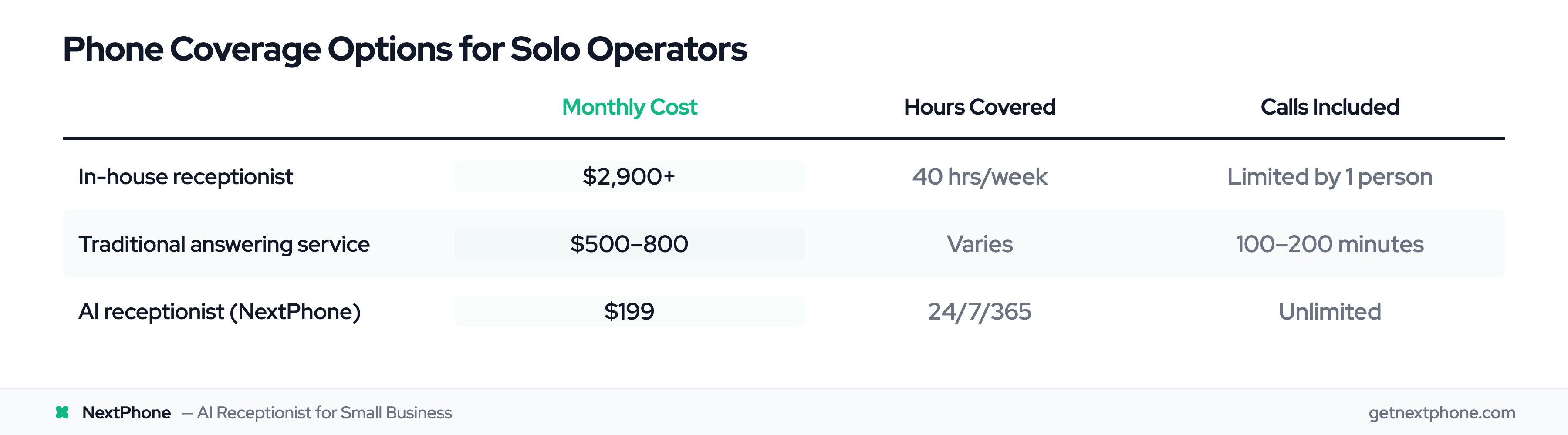
| Option | Monthly Cost | Annual Cost | Hours Covered | Calls Included |
|---|---|---|---|---|
| In-house receptionist | $2,900+ | $35,000+ | 40 hrs/week | Limited by 1 person |
| Traditional answering service | $500-800 | $6,000-9,600 | Varies | 100-200 minutes |
| AI receptionist (NextPhone) | $199 | $2,388 | 24/7/365 | Unlimited |
The cost savings alone are significant. But the real value isn't what you save - it's what you capture. Every call that would have gone to voicemail now has a chance to become revenue.
Check our full AI receptionist pricing guide for detailed comparisons across all options.
What This Looks Like in Your Daily Workflow
Abstract benefits are nice. Here's what actually changes in your day-to-day when you're running an AI receptionist as a solo operator:
Morning: Review Overnight Activity
You wake up to 2-3 call summaries from overnight. The AI captured a quote request that came in at 9:30 PM (you were watching a show), an availability check at 7 AM (you were driving to your first job), and one spam call it filtered out automatically.
Each summary includes: caller name, phone number, what they needed, urgency level, and recommended next step. You prioritize the quote request for a callback during your mid-morning break.
During Work: AI Handles Everything
Between 9 AM and 3 PM, six calls come in. You don't hear any of them - you're focused on the job in front of you. The AI:
- Books an appointment for next Tuesday
- Answers a pricing question about drain cleaning
- Collects details for a bathroom remodel estimate
- Detects an "emergency - toilet overflowing" call and rings your phone immediately
- Filters one robocall
- Sends a booking link via SMS to the appointment caller
You take the emergency call (because that's a $500+ same-day job) and handle it between scheduled work. The other five callers got immediate, professional responses without you lifting a finger.
Between Jobs: Quick Priority Check
At 3:15 PM you check your app between appointments. You see the remodel estimate request looks promising - $8,000+ job. You call them back within minutes while details are fresh. They're impressed by how quickly you responded (they called 3 contractors - you're the first to call back).
Research shows 78% of customers hire the first business to respond. Without the AI capturing that lead, you'd have called back at 6 PM - after they'd already committed to someone else.
After Hours: Coverage Continues
At 7 PM, another call comes in. Someone needs their furnace looked at before a cold snap this weekend. The AI answers, confirms you service their area, collects their address and availability, and sends you a push notification flagged as "urgent - weather-related."
You see it, text them directly, and book a Saturday morning appointment. $800 job that would have gone to voicemail - and to your competitor - two months ago.
This is what an after-hours answering service should actually look like.
Getting Started in Under an Hour
If you're convinced the math works (and it does), here's how to go from "missing calls" to "catching every one" in less than 60 minutes:
Step 1: Add Your Business Information (15 minutes)
Enter your basics: business name, services offered, pricing, hours, service area. This is what the AI uses to answer questions. Be as specific as you'd be training a new employee.
Step 2: Set Your Call Routing Rules (10 minutes)
Tell the AI when to transfer calls to you (emergencies, VIP clients, specific keywords), when to handle them independently (routine questions, scheduling), and how to reach you (cell phone, specific hours).
Step 3: Connect Your Phone Number (5 minutes)
Forward your existing business number to NextPhone, or get a new local number. Callers dial the same number they always have - they just get an answer now instead of voicemail.
Step 4: Customize Your Greeting and Style (10 minutes)
Set your preferred greeting, business personality, and any specific instructions. "Always offer same-day emergency service." "Quote $85/hour for standard work." "Ask for their address before scheduling."
Step 5: Go Live and Monitor (ongoing)
Start taking calls. Review the first week's summaries to fine-tune responses. Most solo operators find the AI handles 80%+ of calls correctly from day one, with minor adjustments needed for edge cases.
How NextPhone Works for Solo Practitioners
NextPhone was built for exactly this scenario - one-person businesses that need professional phone coverage without professional phone budgets.
Here's what you get:
- Unlimited calls at $199/month - no per-minute surprises, no busy-season overages
- Business-specific AI: Trained on your services, pricing, hours, and service area. Not a generic script robot.
- Under-5-second answer time: Callers never wait. No hold music, no ring-ring-ring.
- Emergency detection and routing: AI recognizes urgency language and routes critical calls to your cell immediately
- SMS follow-ups: Automatically sends callers booking links, confirmation texts, or directions
- CRM integration: Caller details pushed to your existing systems automatically via webhooks
- Appointment scheduling: AI checks your availability and books directly during the call
- Push notifications: Real-time alerts for every call, categorized by priority
The bottom line for solo practitioners: you go from a one-person operation that misses 74% of calls to a one-person operation that answers every single one. Your competitors are still sending callers to voicemail. You're booking their customers.
Frequently Asked Questions
How many calls can the AI handle at once?
Unlimited concurrent calls. Unlike a human receptionist who can only take one call at a time, the AI handles as many simultaneous calls as come in. For solo operators who occasionally get call bursts - after running an ad, during storm season, or after a positive review goes viral - this means zero missed calls regardless of volume.
Will my clients know they're talking to AI?
Modern conversational AI sounds natural and professional. The AI uses your business name, follows your preferred greeting style, and maintains natural conversation flow. Most callers can't distinguish it from a well-trained receptionist. You can configure it to identify as an AI assistant if transparency matters to your brand.
Can the AI handle industry-specific questions?
Yes - the AI is trained on your specific business information. You provide your services, pricing, hours, service area, and common questions. It answers based on what you've taught it, not generic responses. For questions outside its training, it collects the caller's information and flags it for your callback. You can expand its knowledge base anytime.
What if I want to answer some calls myself?
You control the routing completely. Set the AI to answer only when you're unavailable, or have it screen all calls and transfer priority ones directly to your phone. Many solo operators use the AI as their default, then take calls personally during admin time or when between jobs.
How quickly can I get set up?
Under an hour for most businesses. Add your business details, set your routing preferences, customize your greeting, and go live. The AI starts handling calls immediately using your information. Most automated answering service setups are far more complex - NextPhone is designed for busy people who don't have time for lengthy onboarding.
Is $199/month really unlimited?
Yes - unlimited incoming calls, no per-minute charges, no overage fees, no busy-season surcharges. Whether you receive 20 calls or 200 in a month, the price stays $199. Period.
Stop Missing Calls. Start Catching Revenue.
You can't answer calls while you're working. That's not going to change. What CAN change is whether those calls reach a dead-end voicemail or a trained AI that handles them like a member of your team.
The solo operators pulling ahead right now aren't working more hours. They aren't hiring staff they can't afford. They're putting AI in front of their phones and capturing the 74% of calls that used to vanish into voicemail.
One extra job per month pays for the entire year of service. Most solo operators capture far more than that.