This is the pricing model comparison guide. For the quick number and a provider-by-provider table, see AI receptionist cost. The short answer is right below; the rest of this guide covers which pricing model actually saves money at your call volume, and why a "$29/month AI" often costs more than a "$199/month AI" once you run the real math. Bottom line upfront: flat monthly plans from $199 at NextPhone, unlimited calls, no per-minute meter. The model determines your real bill more than the advertised price.
How much does an AI receptionist cost?
AI receptionists cost $25–$599/month in 2026 on published plans. Budget tiers with a 30-call or 60–250-minute allowance start at $25–$99/month (Upfirst, Dialzara, Rosie, My AI Front Desk, verified September 22, 2026). NextPhone offers flat monthly plans from $199, unlimited calls, no per-minute charges.
Is AI receptionist cheaper than a live answering service?
Yes. NextPhone's $199 plan sits below every live service's entry plan: Ruby from $250/month for 50 minutes, Smith.ai's human tier from $300/month for 30 calls, AnswerConnect from $350/month for 200 minutes (US, verified September 22, 2026). The gap widens with volume: at 100 calls a month, NextPhone costs 50–88% less on our calculation. AI pricing is unlimited and fixed; live services add overage charges when volume spikes.
AI Receptionist Pricing at a Glance: Model Comparison (2026)
The advertised price is rarely what you pay. The model is what determines your real bill.
| Pricing model | Starting price | Real cost at 50 calls/mo | Real cost at 150 calls/mo |
|---|---|---|---|
| Flat-rate (NextPhone) | $199/mo | $199 | $199 |
| Per-minute (budget AI: Dialzara, Rosie, My AI Front Desk) | $29–$99/mo | $49–$99 | $149–$199 |
| Per-call (Smith.ai human-first) | $300/mo | $530 | $1,440 |
| Live per-minute (Ruby, AnswerConnect US) | $250–$350/mo | $350–$720 | $668–$1,725 |
Our calculation at a 3-minute average call, on each vendor's cheapest published plan for that volume. Prices verified September 22, 2026 on the vendors' own pricing pages.
The crossover point: against live and per-call human services, flat-rate is cheaper from the first plan. Against budget per-minute AI, the price gap closes around 150 calls a month; what you're comparing there is caps and features, not the bill. Start a 7-day free trial and see how it runs at your actual call volume.
Focused on features rather than price? See the best AI receptionist app comparison: 9 platforms reviewed on voice quality, mobile apps, and emergency routing.
NextPhone AI Receptionist Pricing
NextPhone runs on flat monthly plans from $199. Unlimited inbound calls, every feature included (emergency routing, CRM integration, calendar sync, spam filtering, callback tracking, smart forwarding, 14 languages, 30 voices). No setup fee. No per-minute meter. No per-call charge. No contract. Cancel anytime. The price doesn't change at 40 calls or 400.
Try NextPhone free for 7 days
AI answering service that answers, qualifies, and books, 24/7.
AI vs Human Answering: Complete Comparison
| Solution | Monthly Cost | Coverage | Call Limit | Per-Call (100 calls) | Verdict |
|---|---|---|---|---|---|
| NextPhone AI | $199 | 24/7 | Unlimited | $1.99 | Recommended, best value |
| Smith.ai Live | $915 | 24/7 | 90 calls + overages | $9.15 | Premium human touch |
| AnswerConnect (US) | $395 | 24/7 | 300 minutes | $3.95 | Traditional business |
| Ruby Receptionists | $1,725 | 24/7 | 500 minutes | $17.25 | Human touch priority |
| Full-time receptionist | $4,618+ | 40 hrs/week | Unlimited (when present) | $46.18 | In-person needs only |
Monthly cost at 100 calls averaging 3 minutes, our calculation on each vendor's cheapest published plan (verified September 22, 2026). Ruby doesn't publish an overage rate, so its row uses the 500-minute plan.
NextPhone delivers unlimited 24/7 coverage at a fraction of traditional solutions.
Answering Service Pricing: All Options Side by Side (2026)
| Service | Monthly | What's Included | Model |
|---|---|---|---|
| NextPhone | Flat plans from $199/mo | Unlimited inbound calls, all features, no per-minute charges | AI |
| ReceptionHQ (MessageExpress) | $25/mo | $1.99 per call answered | Human |
| PATLive | $99/mo | 50 min | Human |
| Posh | $130/mo | 50 min | Human |
| Smith.ai (AI tier) | $150/mo | 75 calls | AI |
| Ruby | $250/mo | 50 min | Human |
| Smith.ai (human tier) | $300/mo | 30 calls | Human |
| AnswerConnect (US) | $350/mo + $49.99 setup | 200 min | Human |
All pricing verified September 22, 2026 on each vendor's own pricing page.
Based on 1,446,980 inbound business calls, 90–95% resolve without a human, at flat monthly pricing that doesn't penalize you for high call volume. NextPhone answers in under 2 seconds, 99% positive caller sentiment, 99.97% uptime.
The most common reason businesses pay more than expected: per-minute billing they didn't budget for. Across 1,446,980 calls in our analysis, most business calls run 1.5–3 minutes. A 100-call month on a 50-minute plan burns through the included minutes in the first week.
Here's why the pricing model matters as much as the headline price.
"I'm paying $1,000 a month for someone who can't tell my customers anything useful."
That's what we hear constantly. You hired an answering service to stop missing calls. Instead, you got glorified voicemail that costs 10x more.
Your customers call. The service picks up. And then: "I don't know, I'm just an answering service. Someone will call you back."
Why did they even answer the phone? Your customer wasted two minutes for zero information. They're more frustrated than if they'd just hit voicemail. Half of them call your competitor instead of waiting for a callback.
Then there's the setup nightmare. Weeks (sometimes months) of onboarding. You send guidelines. They still screw it up. By the time it actually works, busy season is over.
And for this, you're paying hundreds of dollars a month, sometimes thousands.
Here's what you should be getting for your money: across our analysis of 1,446,980 real business calls, the best AI receptionists resolve the majority of calls without human help, answer in under 2 seconds, and maintain consistent caller sentiment. If your current service can't match that, you're overpaying.
This guide breaks down what AI receptionists actually cost, how they compare to traditional answering services, and which pricing model won't drain your budget with surprise fees. Real numbers, no sales pitch. (Starting from Google Voice? That guide covers how to layer AI answering on top without porting your number.)
For context: According to Bureau of Labor Statistics data, the median receptionist salary was $38,010 in May 2025 (checked September 22, 2026). Add benefits, taxes, and overhead, and you're looking at $4,600-$5,800 per month for a full-time hire. Live answering services like Ruby Receptionists cost $250-$1,725/month depending on minutes.
AI receptionists like NextPhone cost $199/month with unlimited calls, a fraction of either alternative, with 24/7 coverage that neither can match.

AI Receptionist Pricing by Provider (2026)
Here's what you came for: a comprehensive comparison of every major AI receptionist provider, with real pricing and honest analysis.
The Problem with "Budget" AI Receptionists
Every one of the 30 voices is included on the same flat monthly plan, from $199. Budget AI receptionists at $25-$99/mo typically ship one or two stock voices, and the difference is audible the first time a caller hangs up.
You'll find AI receptionists advertising prices as low as $25-65/month. Before you jump at those numbers, understand what you're giving up:
Call caps that hurt during busy season. Budget services typically limit you to 30-50 calls per month. Hit your cap during your busiest week? Those calls go to voicemail, or you pay steep overage fees.
No emergency routing. Budget AI treats "my pipe burst and water is everywhere" the same as "what are your hours?" For service businesses, this means losing your highest-value urgent calls.
Limited integrations. Without CRM and calendar sync, you're back to manual data entry, defeating the purpose of automation.
Basic AI that can't handle complexity. Budget services struggle with industry-specific terminology, multi-step conversations, and nuanced customer needs.
No smart forwarding. When the AI can't handle a call, budget services have nowhere to escalate. The customer gets frustrated and hangs up.
The $100-150/month you "save" with budget options costs you in missed leads, botched calls, and customers who call your competitor instead.
Best Value: NextPhone ($199/month)
NextPhone offers flat-rate unlimited with features specifically designed for small businesses.
Warm, professional, no robotic tells. Pricing is the same regardless of which voice you pick, and 28 options means you can match the brand instead of settling for whatever the vendor ships.
Pricing:
- $199/month unlimited calls
- No per-minute or per-call charges
- No setup fees
- Unlimited call answering
- Emergency call routing (detects urgency keywords)
- Spam call filtering (blocks robocalls and junk automatically)
- Callback request tracking
- Appointment booking with Google Calendar
- CRM integration (Clio and HubSpot native; Salesforce and 6,000+ apps via Zapier)
- Real-time call summaries via text/email
- Designed specifically for home services contractors
Limitations:
- Higher price than budget tier
- US/Canada focused
- Industry-specific (best for home services)
Per-call cost:
- At 50 calls = $3.98/call
- At 100 calls = $1.99/call
- At 200 calls = $0.99/call
Best for: Home services businesses (plumbing, HVAC, electrical, contractors, roofing with 50+ calls/month who need emergency routing and unlimited coverage.
Verdict: Best value for moderate-to-high volume businesses. Unlimited calls mean your cost stays flat whether you get 50 or 500 calls. Emergency routing is critical for home services.
Smith.ai AI Receptionist ($150+/month)
Smith.ai sells an AI receptionist plan alongside its human-first service.
Pricing (verified September 22, 2026, smith.ai):
- Free for 25 calls, then $3.00/call
- $150/month for 75 calls, then $2.50/call
- 150 calls at $1.80/call ($270/month)
- $500/month for 300 calls
Key Features:
- AI handles routine calls, humans handle complex
- Excellent CRM integrations
- Lead qualification
- 24/7 availability
Limitations:
- Higher price point
- Complex pricing structure
- May be overkill for simple needs
Per-call cost: $2.00 per included call on the $150 plan, $1.67 on the $500 plan
Best for: Businesses wanting advanced AI with room to grow into enterprise features.
Verdict: Good option for growing businesses, but a per-call meter means your bill rises with volume. At 150 calls a month you're paying $270, and $500 at 300.
Premium AI Receptionists ($250+/month)
Smith.ai Human-First Receptionists ($300-$2,100/month)
Smith.ai's flagship product combines AI handling routine calls with human receptionists for complex situations.
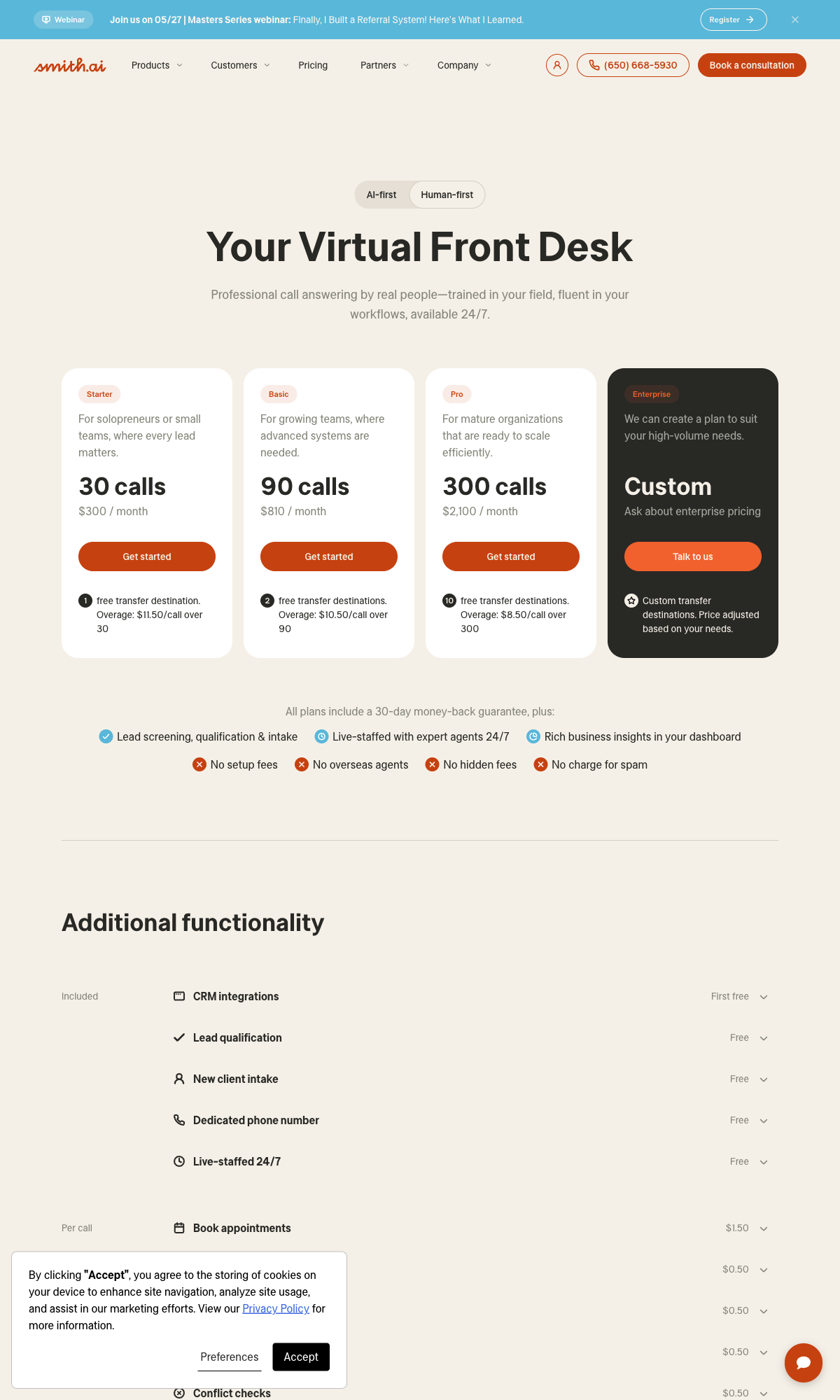
Pricing (verified September 22, 2026, smith.ai, no setup fee):
- $300/mo for 30 calls (overage $11.50/call)
- $810/mo for 90 calls (overage $10.50/call)
- $2,100/mo for 300 calls (overage $8.50/call)
Key Features:
- AI handles routine calls automatically
- Human receptionists for complex calls
- Premium quality and accuracy
- Extensive CRM integrations
- Lead qualification
- Appointment scheduling
Limitations:
- Expensive at volume
- Per-call overages add up fast
- Not cost-effective for high volume
Per-call cost (our calculation):
- At 30 calls = $300/month ($10/call)
- At 50 calls = $300 + (20 x $11.50) = $530/month ($10.60/call)
Best for: Businesses where call quality is paramount and human backup is essential - legal intake, high-end professional services, complex B2B sales.
Verdict: Premium quality, premium price. Worth it for high-value calls where each conversion matters significantly. Not cost-effective for routine SMB use.
Abby, formerly Abby Connect ($165-$1,380/month with human)
Abby offers a hybrid human/AI model with dedicated teams.
Pricing (verified September 22, 2026, abby.com):
- $165/month for 50 minutes, $329 for 100, $599 for 200, $1,380 for 500
- AI-answered minutes count as half a minute
- Overage billed at your plan's minute rate (number not published); no setup fee
Key Features:
- Dedicated receptionist team
- Human-first approach with AI assistance
- High customization
- Extended hours coverage
Limitations:
- Not purely AI
- Higher cost than AI-only options
- Variable pricing
Best for: Businesses prioritizing the human touch but wanting technology assistance.
Verdict: Good middle ground between full AI and full human, but pricing can be complex.
Best AI Receptionist Picks by Business Scenario
Here are specific recommendations based on your business situation.
Best for Any Call Volume: NextPhone at $199/month
Why NextPhone wins regardless of volume:
-
Low volume (under 30 calls/month): Budget options might seem cheaper, but they lack emergency routing, CRM integration, and spam filtering. One missed emergency call costs more than a year of the "savings."
-
Medium volume (30-100 calls/month): NextPhone's per-call cost of $1.99-6.63 delivers full features including emergency routing, callback tracking, and CRM integration that budget options lack.
-
High volume (100+ calls/month): Unlimited pricing shines here:
- 150 calls/month at $199 = $1.33 per call
- 200 calls/month at $199 = $0.99 per call
- 300 calls/month at $199 = $0.66 per call
Compare to human answering services (our calculation at a 3-minute average, prices verified September 22, 2026):
- Ruby at 150 calls = $1,725/month (500-minute plan; overage rate not published)
- AnswerConnect (US) at 200 calls = $945/month
Unlimited scales perfectly. Your busiest month costs the same as your slowest.
Best for Home Services and Contractors
Winner: NextPhone at $199/month
Home services businesses have specific needs that generic AI receptionists don't address:
- Emergency routing: Emergencies are among the highest-value call types: a burst pipe or failed AC at 2 AM needs an immediate transfer to your on-call number, not a callback request.
- Spam filtering: Robocalls and junk get filtered automatically so you never ring for spam. The AI only passes through real callers.
- After-hours coverage: Emergencies don't follow business hours.
- Industry-specific understanding: AI trained on contractor terminology and scenarios.
NextPhone was built for this exact use case.
Best for Professional Services (Legal, Accounting, Consulting)
Winner: NextPhone at $199/month
Professional services need polished interaction, compliance awareness, and sophisticated call handling.
- Professional, formal tone customized to your practice
- Custom intake forms for lead qualification
- CRM integration for practice management software
- Appointment scheduling with calendar sync
- Emergency routing for urgent client needs
- Unlimited calls for busy practices
Alternative: Smith.ai at $300+/month if internal policy requires paid human operators. But at 1.5-4.6x the cost, you're paying strangers for judgment calls smart forwarding routes to your phone for free.
For Premium/Complex Needs
Winner: NextPhone ($199/month) with smart forwarding
When call quality is paramount and some situations require your expertise:
- AI resolves 90-95% of calls autonomously
- Smart forwarding routes complex calls to your phone with full context
- You provide the judgment, not a stranger reading scripts
- Best for: Any business where your expertise matters
Cost consideration: $199/month, flat monthly. No per-call fees. Smart forwarding included. Compare to Smith.ai at $530/month for 50 calls.
Quick Recommendation Matrix
| Your Situation | Best Pick | Monthly Cost | Why |
|---|---|---|---|
| Any small business | NextPhone | $199 | Best value unlimited with full features |
| Home services/contractors | NextPhone | $199 | Industry-specific + emergency routing |
| Legal/professional services | NextPhone | $199 | Professional handling + compliance |
| High volume (100+ calls) | NextPhone | $199 | Unlimited scales perfectly |
| Human backup essential | Smith.ai | $300+ | AI + human hybrid |
| Traditional preference | Ruby | $250-$1,725 | Human receptionists (expensive) |
Vendor prices verified September 22, 2026 on each vendor's own pricing page.
Hidden AI Receptionist Costs and Fees
The advertised price is rarely the full story. Here's where AI receptionist providers hide additional costs.
Setup and Onboarding Fees
Some providers charge a fee just to get started: AnswerConnect adds $49.99 on two of its US plans, while Ruby, Smith.ai and Abby say they charge none (verified September 22, 2026). This might include account setup, initial configuration, or basic training.
What to watch for:
- "Professional setup" fees
- "White-glove onboarding" packages ($500+)
- Training session charges
- Account activation fees
What to look for: "No setup fees" clearly stated. NextPhone includes setup at no extra cost.
Questions to ask: Is setup included in the monthly price? Are there any one-time fees?
Overage Charges (The Silent Budget Killer)
This is where per-minute and per-call pricing becomes dangerous. Overages can double or triple your monthly bill without warning.
Per-minute overages (verified September 22, 2026):
- Live services: $1.28 to $2.99 per minute on the published plans we checked; AI plans: $0.25 to $0.48
- A 3-minute call at $1.50/min = $4.50 per call overage
- 20 overage calls = $90 extra that month
Per-call overages:
- Smith.ai's human plans: $8.50 to $11.50 per call; AI plans: $0.70 to $3.00
- Just 10 extra calls on Smith.ai's Starter plan = $115 added to your bill
Real-world example (our calculation):
- Smith.ai Starter: $300/month for 30 calls
- You get 50 calls in a busy month
- 20 overage calls at $11.50 each = $230 overage
- Actual bill: $530 - not $300
Protection strategy: Choose unlimited plans if your volume exceeds 30 calls/month. The budget predictability is worth the slightly higher base price.
Contract and Commitment Requirements
Some providers lock you into 6-12 month commitments with early termination fees.
What to watch for:
- Required annual contracts
- Early termination fees (50-100% of remaining contract)
- Auto-renewal clauses
- Price increase provisions after year one
What to look for: Month-to-month flexibility with "cancel anytime" policies. Most AI-first providers offer this; traditional answering services often require contracts.
Feature Add-On Costs
Features you assume are included might cost extra.
Common add-on charges:
- CRM integration: $20-$50/month extra
- Appointment booking: May require higher tier
- Multiple phone numbers: $5-$20 each
- Premium voices: Additional fee
- Advanced analytics: Upgrade required
- Custom integrations: Development fees
What to look for: All-inclusive pricing that clearly states what's included. Check specifically for: CRM integration, calendar sync, and call summaries.
Price Increases and Rate Changes
Some providers raise rates after your first year or when promotional pricing expires.
What to watch for:
- "Promotional" or "introductory" pricing
- Price increase clauses in terms of service
- Rate changes with 30-day notice provisions
What to look for: Price lock guarantees, transparent pricing policies, and reviews from long-term customers about rate stability.
The Bottom Line: Your true monthly cost = base fee + expected overages + add-ons + (setup fees / 12). Always calculate at YOUR expected call volume, not their lowest advertised tier.

What Drives AI Receptionist Cost?
AI receptionist pricing isn't random. Four factors determine where a provider falls on the cost spectrum, and understanding them helps you avoid overpaying or underbuying.
AI Complexity
Basic AI that takes messages and forwards calls costs less than AI that handles multi-turn conversations, detects emergencies, qualifies leads, and routes calls intelligently. The gap between "glorified voicemail" and "actual receptionist" shows up directly in the price. Expect to pay more for natural language understanding, sentiment detection, and context-aware responses.
Customization Depth
Generic scripts that work for any business cost less than industry-specific training. A plumber's AI receptionist needs to understand "my water heater is leaking" as an emergency. An insurance agency needs to handle policy and coverage questions. The more tailored the AI is to your business, the higher the monthly cost, but also the higher the call quality and conversion rate.
Call Volume
Volume affects cost differently depending on your pricing model. Flat-rate plans get cheaper per call as volume increases, which is why the pricing model matters as much as the price. Per-minute and per-call plans get more expensive. At 30 calls/month, most models cost roughly the same. Above 50 calls, flat-rate pulls ahead. Above 100, the gap becomes significant, which is why understanding your actual call volume matters before choosing a plan.
Integration Depth
Standalone AI that sends you text summaries is the cheapest tier. Add CRM integration (auto-creating contacts in Salesforce, HubSpot, or Jobber) and the price goes up. Add calendar sync for real-time appointment booking, and it goes up again. Full practice management or field service software integration commands premium pricing, but also delivers the most time savings.
Understanding AI Receptionist Pricing Models
Before diving into specific providers, you need to understand how AI receptionist pricing works. The model a provider uses dramatically affects your actual monthly cost - especially when your call volume fluctuates.
Flat-Rate Monthly Pricing
Flat-rate pricing is exactly what it sounds like: you pay a fixed monthly fee regardless of how many calls you receive. Some plans include "unlimited" calls, while others include a generous allocation (like 500 calls or 1,000 minutes).
How it works: Pay a fixed monthly fee. Answer as many calls as the plan allows - often unlimited.
Best example:
- NextPhone: $199/month unlimited calls with full features (emergency routing, CRM integration, calendar sync)
Advantages:
- Predictable budgeting - you know exactly what you'll pay
- No surprises during busy months or seasonal spikes
- Better value as call volume increases
- Peace of mind about costs
Disadvantages:
- May pay more than needed at very low volume
- "Unlimited" sometimes has fair-use limits in fine print
For everyone: Unless your calls genuinely require complex human triage, flat-rate is the only pricing model that makes sense. Stop letting volume-based pricing extract more money as you grow.
Example calculation:
- 50 calls/month on the $199 plan = $3.98 per call
- 100 calls/month on the $199 plan = $1.99 per call
- 200 calls/month on the $199 plan = $0.99 per call
The more calls you receive, the better value flat-rate becomes.
Per-Minute Pricing
Per-minute pricing charges you based on actual talk time used. This model attracts businesses with very low call volume who think they'll save money.
How it works: Pay per minute of call time, usually as a monthly fee with a minute allowance. On the AI plans we checked (verified September 22, 2026), that works out to $0.15-$0.50 per minute.
Providers using this model:
- Dialzara: $29/month for 60 minutes, then $0.48/minute
- Rosie: $49/month for 250 minutes
- My AI Front Desk: $99/month for 200 minutes, then about $0.25/minute
- Most live answering services
Advantages:
- Only pay for what you use
- Can be cheapest option for very low volume
- Scales down during slow periods
Disadvantages:
- Unpredictable monthly bills
- Can explode during busy periods
- Hard to budget accurately
- Incentivizes shorter (potentially worse) call experiences
The reality: At 50 calls/month, per-minute looks cheap until volume grows. Around 150 calls, it's about the same as flat-rate. Above that, you're paying more, and a busy month decides your bill. Start with flat-rate at $199 and never worry about growth penalties.
Example calculation (our math, at Dialzara's $0.40-$0.48 per-minute rates):
- 50 calls at 3 min avg = 150 minutes: $72.20/month on the $29 plan (looks cheap!)
- 150 calls at 3 min avg = 450 minutes: $199/month on the 500-minute plan (same as flat-rate)
- 300 calls at 3 min avg = 900 minutes: $359/month on the 500-minute plan plus overage (now flat-rate looks better)
The math shifts quickly as volume increases.
Per-Call Pricing
Per-call pricing charges a fixed fee for each call handled, regardless of call length.
How it works: Pay per call, usually as a monthly fee with a call allowance. On the plans we checked (verified September 22, 2026), extra calls cost $0.70-$3.00 on AI plans and $8.50-$11.50 on Smith.ai's human plans.
Providers using this model:
- Smith.ai: $300/month for 30 calls, then $11.50 per call
- Upfirst: $24.95/month for 30 calls, then $1.50 per call
- Many live answering services
- Some AI providers for overflow/escalation calls
Advantages:
- Direct correlation between usage and cost
- Simple to understand and predict
- Makes sense for high-value intake calls
Disadvantages:
- Gets extremely expensive at higher volumes
- Small increases in calls mean big cost jumps
- Often poorest value of all models
The reality: At 50 calls/month, Smith.ai's human plan comes to $530 vs $199 on a flat monthly plan. "High-value calls justify the cost"? Even at $500/case, you don't need to overpay about $4,000/year. AI at $199 captures the same calls. Only practices whose calls genuinely require complex human triage need per-call human services.
Example calculation (Smith.ai's human plans, our math):
- 30 calls/month = $300/month (manageable)
- 50 calls/month = $530/month (getting expensive)
- 100 calls/month = $915/month on the $810 plan plus 10 extra calls
Per-call pricing rarely makes sense for SMBs with moderate call volume.
Hybrid Models
Hybrid pricing combines a base monthly fee with per-minute or per-call overages after you exceed included limits.
How it works: Pay $200 base fee, includes 100 minutes. Pay $1.50/minute for anything beyond.
Examples:
- Many live answering services
- Some AI providers with tiered plans
Advantages:
- Predictable base cost
- Built-in allocation for normal months
Disadvantages:
- Overages can spike bills dramatically
- Often worst value overall
- Creates anxiety about going over limits
Best for: Almost no one - usually indicates a provider trying to appear cheap while profiting from overages.
Bottom Line: For most SMBs with 30+ calls per month, flat-rate unlimited pricing provides the best value and peace of mind. You'll never worry about surprise bills during your busiest season.
AI Receptionist Cost vs Hiring or Live Services
Let's put AI receptionist pricing in context of all your options.
Hiring a Full-Time Receptionist
Total Annual Cost Breakdown:
| Cost Component | Low Estimate | High Estimate |
|---|---|---|
| Base salary | $38,010 (BLS median) | $45,000 (experienced hire) |
| Benefits (health, PTO, 401k) | $9,503 (25%) | $11,250 (25%) |
| Payroll taxes | $2,908 (7.65%) | $3,443 (7.65%) |
| Training | $2,000 | $5,000 |
| Turnover (avg 1 hire/3 years) | $3,000/year | $5,000/year |
| Annual Total | $55,421 | $69,693 |
| Monthly Total | $4,618 | $5,808 |
According to Bureau of Labor Statistics data, the median hourly wage for receptionists was $18.27/hour ($38,010/year) in May 2025 (checked September 22, 2026) - and that's just salary before all the additional costs. The other rows are our estimates.
What you get:
- Human judgment and empathy
- Flexibility in handling unique situations
- In-person presence if needed
What you don't get:
- 24/7 coverage (only works 40 hours/week - 24% of the week)
- Coverage during vacation, sick days, breaks
- Ability to handle multiple simultaneous calls
- Consistent quality (depends on individual)
AI Alternative: $199/month unlimited = $2,388/year = 95% savings
What 24/7 In-House Coverage Actually Takes
A week has 168 hours. One full-time receptionist covers 40 of them, so 76% of the week goes unanswered: evenings, weekends, holidays, and every sick day or vacation in between.
Covering all 168 hours with staff takes three shifts at minimum, and a fourth person to cover absences. At the fully loaded $55,421–$69,693 per hire above, three shifts alone cost $166,000–$209,000 a year, before relief staff and before the overnight and weekend roles you'll struggle to keep filled. An AI receptionist covers the same 168 hours for $2,388 a year.
The Hybrid Option: Part-Time Hire Plus AI
If you need someone physically at the front desk, you don't have to choose. A part-time receptionist covers walk-ins and office tasks during your busiest hours, and AI answers the phone the rest of the time and takes overflow while your receptionist is busy.
At the BLS median of $18.27/hour (May 2025, checked September 22, 2026), a 20-hour-a-week hire runs about $19,000 a year in wages, roughly $20,500 with payroll taxes. Add $2,388 for AI and you have in-person presence plus 24/7 phone coverage for about $22,800 a year, well under half the cost of one full-time hire.
Live Answering Services Comparison
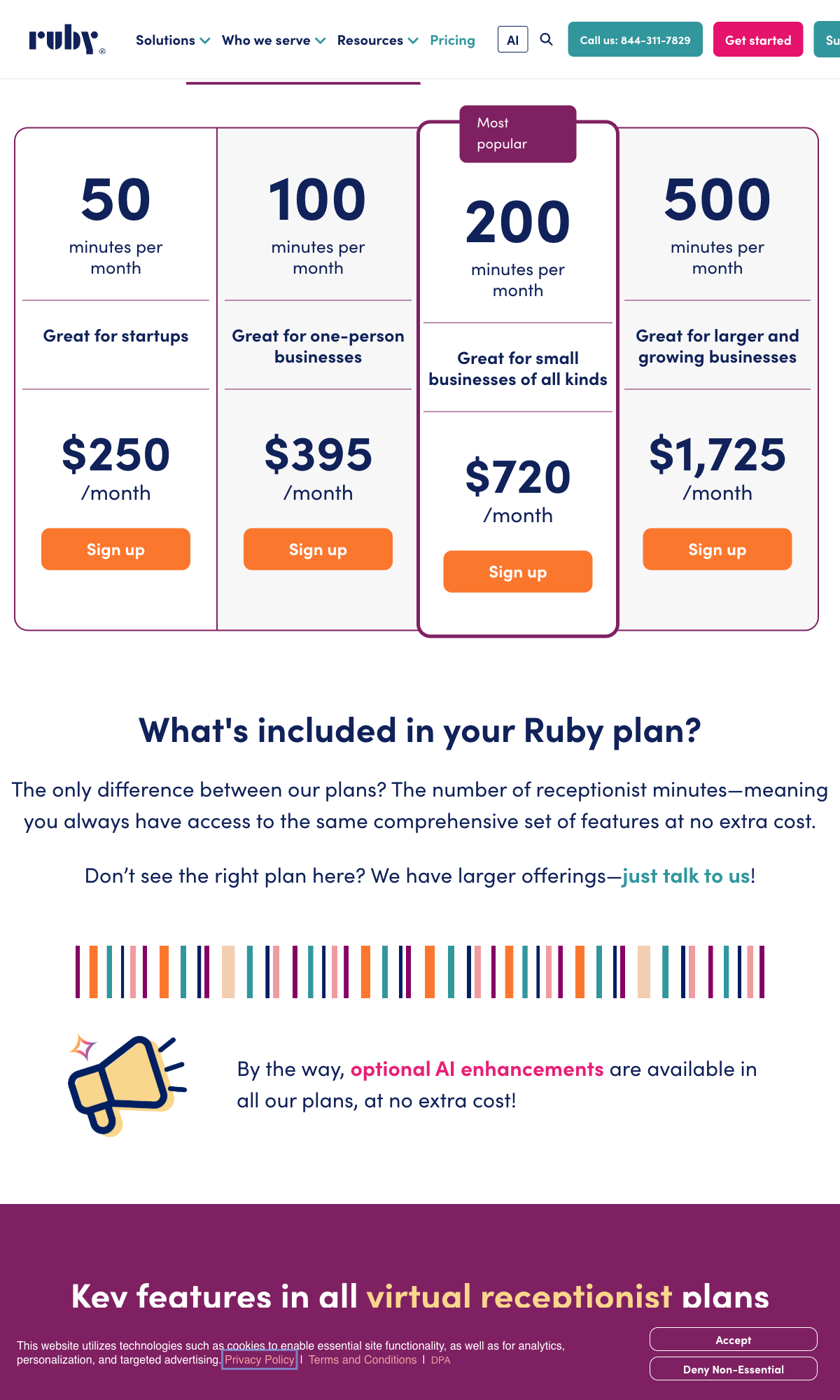
Ruby Receptionists (verified September 22, 2026):
- 50 minutes: $250/mo
- 100 minutes: $395/mo
- 200 minutes: $720/mo
- 500 minutes: $1,725/mo
- 50 calls at 3 min avg = 150 minutes needed → 200-minute plan, $720/month
- Overage rate: not published
AnswerConnect (US plans, verified September 22, 2026):
- Base: $350/month for 200 minutes + $49.99 setup, then $2.50/minute
- 50 calls at 3 min avg: 150 minutes, inside the plan = $350/month
Smith.ai Live Receptionists (verified September 22, 2026):
- Base: $300/month for 30 calls, then $11.50/call
- 50 calls: $300 + (20 x $11.50) = $530/month
AI Alternative (NextPhone): $199/month unlimited = saves $151-$521/month compared to these live services at 50 calls
The DIY / Voicemail Approach
Yes, this is "free" in direct costs. But it's incredibly expensive in opportunity cost.
The hidden cost of DIY:
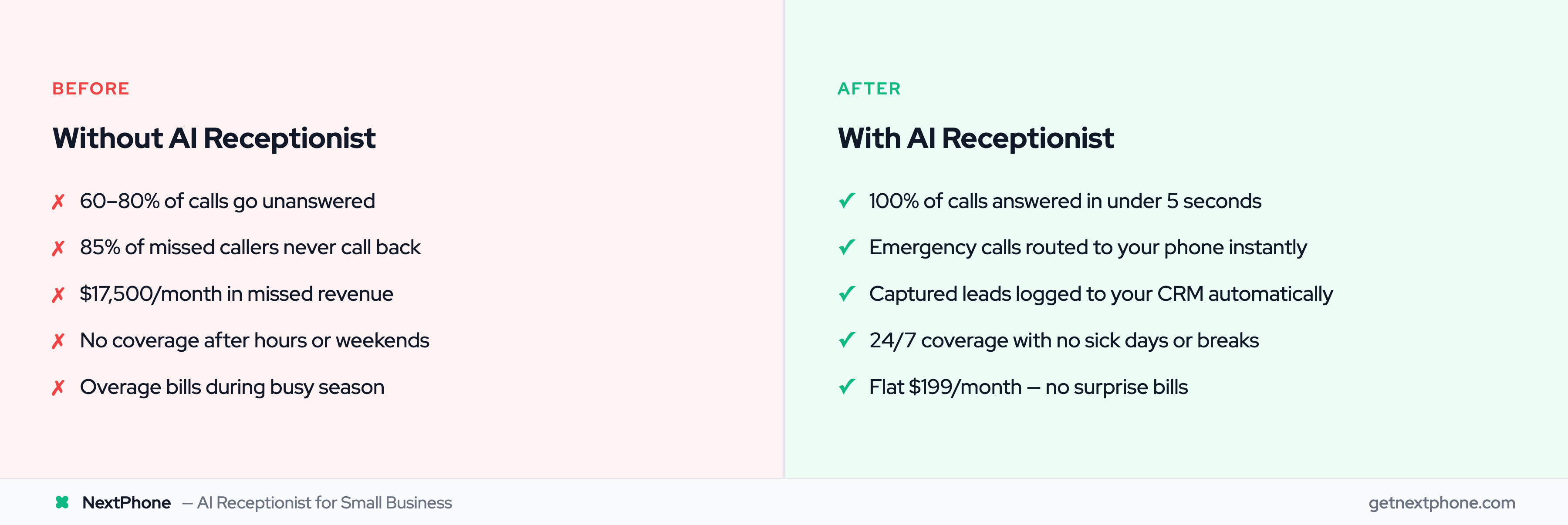
- Industry research: Businesses miss 60-80% of incoming calls
- 62% of callers won't leave a voicemail
- 85% won't call back if they can't reach you
The math:
- 42 calls/month (industry average for small contractors)
- 60% miss rate = 25 missed calls
- If just 20% would have hired at $3,500 average project
- That's 5 lost jobs = $17,500/month in missed revenue
An AI receptionist at $199/month that captures even a fraction of this pays for itself many times over.
Complete Comparison
| Option | Monthly Cost | Hours Coverage | Scalability | Call Quality |
|---|---|---|---|---|
| NextPhone AI | $199 | 24/7 | Unlimited | High |
| Ruby/Live services | $350-$720 at 50 calls | 24/7 | Medium (overages) | High |
| Full-time hire | $4,618-$5,808 | 40 hrs/week | Limited | High |
| DIY/Voicemail | $0 direct | Your hours only | None | Varies |
Our calculation at 50 calls a month; vendor plan prices verified September 22, 2026 on each vendor's own pricing page. The full-time-hire row is our estimate built on the BLS May 2025 median.
The Verdict: At 50 calls a month, AI receptionist is roughly 43-96% cheaper than these alternatives while providing 24/7 unlimited coverage. The only question is which AI provider offers the best value for your needs.