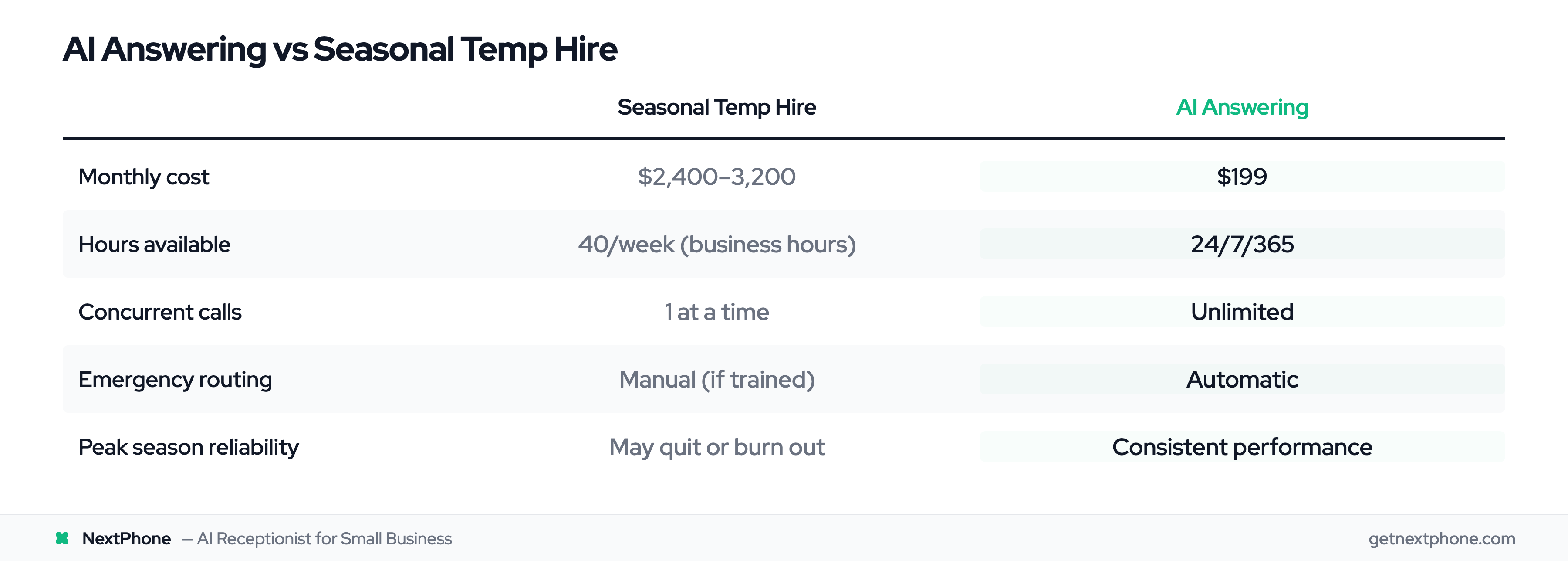
Why HVAC Call Surges Cost You More Than You Think
It's the first 100-degree day of summer. Your phone starts ringing before 7 AM. By 9 AM, you've got six missed calls because you were on a rooftop installing a condenser unit. By noon, your voicemail is full. By 3 PM, those callers have already hired your competitor.
This isn't a hypothetical. It's Tuesday in July for most HVAC companies.
HVAC businesses face a unique challenge that other trades don't deal with as severely: predictable, extreme seasonal call surges. Summer AC season (June through August) and winter heating season (December through February) create call volume spikes of 2-3x your normal rate. A company that handles 40 calls per month in April might see 80-120 calls during a heat wave or cold snap.
Here's what makes this painful: industry research shows 74.1% of calls to home services businesses go completely unanswered during normal operations. During peak season — when call volume doubles and your techs are slammed — that miss rate gets worse, not better.
The revenue math is brutal. An emergency HVAC call typically carries about $4,200 in job value, significantly higher than routine maintenance or repair work. Missing just one emergency call per week during peak season translates to $16,800 per month in lost revenue. And according to industry research, 85% of callers who don't reach you won't call back. They'll call the next company in their Google results.
The double penalty of peak season: you're receiving higher-value calls (emergencies command premium pricing) while simultaneously missing more of them (because everyone on your team is in the field). Without a structured call handling workflow, peak season becomes your biggest revenue leak instead of your biggest revenue opportunity.
Building Your Seasonal Call Triage Framework
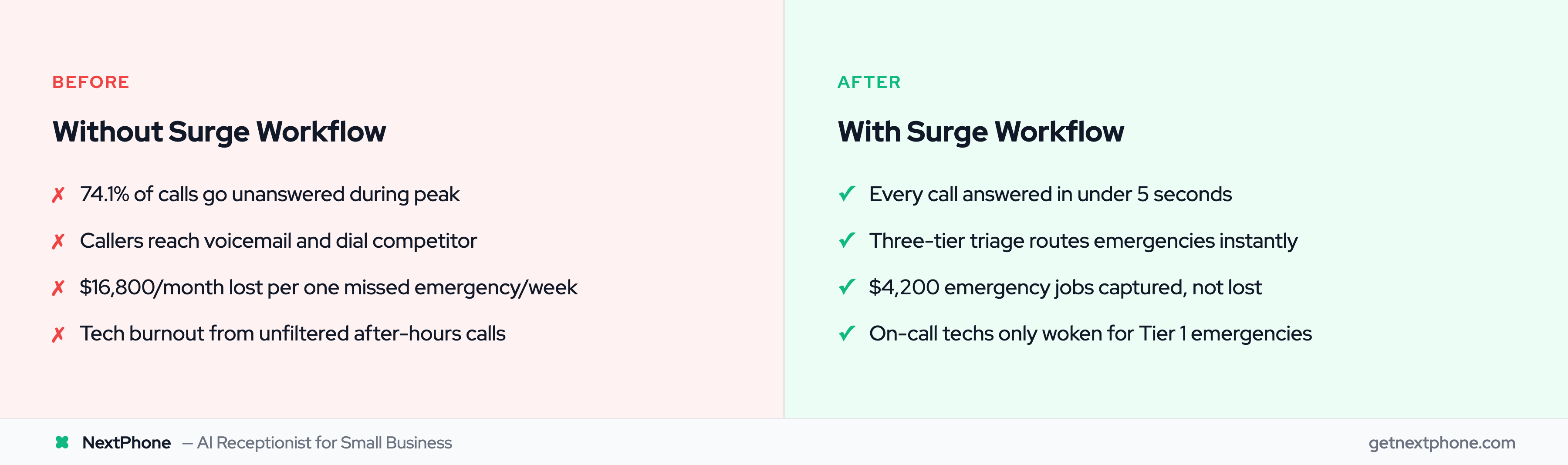
When every call feels urgent during a heat wave or cold snap, you need a system — not gut instinct — to decide who gets dispatched first. The foundation of effective HVAC seasonal call handling is a three-tier priority framework.
The Three-Tier Priority System
Here's how to structure your triage during peak season:
-
Tier 1 — Emergency (Immediate Dispatch): Complete system failure with safety risk. No heat in sub-freezing temperatures. No AC with elderly, infant, or medically vulnerable occupants. Gas smell or carbon monoxide detector alert. Indoor temperature exceeding 95°F or below 40°F.
-
Tier 2 — Urgent (Same-Day Service): System running but not reaching setpoint. AC barely cooling but still functioning. Heat working intermittently. Strange noises or burning smells (no gas). Unit leaking water.
-
Tier 3 — Routine (Scheduled): Maintenance tune-ups. Filter changes. Performance complaints without safety risk. Thermostat questions. System upgrade inquiries.
How to Identify True Emergencies vs "Urgent" Requests
Our data reveals something critical: urgent calls rank among the top reasons people call home services businesses, using language like "emergency," "urgent," or "ASAP." But far fewer of those are true emergencies. During peak season, the gap between perceived urgency and actual emergency widens further — every caller thinks their situation is the most critical.
The key difference is safety risk versus comfort risk. Train your team (or your AI) to listen for these emergency indicators:
- Mentions of vulnerable occupants: "elderly parent," "newborn baby," "medical equipment that needs climate control"
- Complete system failure language: "nothing is coming out," "completely dead," "won't turn on at all"
- Safety concerns: "smells like gas," "CO detector going off," "smoke from the unit"
- Extreme conditions: "it's 100 degrees inside," "pipes might freeze," "ice forming on walls"
Frustration isn't an emergency. "I've been waiting two days" is urgent. "My 85-year-old mother has no AC and it's 105 outside" is an emergency. Your triage system needs to distinguish between the two without making either caller feel dismissed.
Training Your Team on Triage Language
Your front desk or answering system should use empathetic but efficient language during surges. Acknowledge the situation, ask priority questions quickly, and set realistic expectations.
The goal isn't to rush callers off the phone — it's to gather the right information in 60-90 seconds so you can route correctly. Every miscategorized call during peak season costs time you don't have.
Summer Surge Workflow: AC Emergency Call Handling
Summer AC season brings its own specific challenges. Calls spike dramatically during heat waves, and the emotional intensity of callers increases with the outdoor temperature. Your summer workflow needs to account for this.
Summer-Specific Triage Questions
When a call comes in during summer peak season, your triage should follow this sequence:
- "Is the AC completely not working, or is it running but not cooling well?"
- "Is anyone elderly, very young, or medically vulnerable in the home?"
- "What's the approximate temperature inside your home right now?"
- "How long has the system been down?"
- "Is this a home or a business?" (commercial systems = different urgency)
These five questions take under 30 seconds and give you everything needed to categorize the call accurately.
The AC Emergency Decision Tree
Based on answers to those triage questions, here's your routing logic:
Route to Tier 1 (Immediate Dispatch):
- AC completely dead AND vulnerable occupants present
- Indoor temperature above 95°F AND system completely non-functional
- AC completely dead AND the caller mentions medical equipment that requires cool temps
Route to Tier 2 (Same-Day Priority):
- AC running but indoor temp climbing (system struggling, not dead)
- Complete failure but no vulnerable occupants and indoor temp still below 90°F
- Unit making unusual noises AND reduced cooling
Route to Tier 3 (Scheduled):
- AC "not cooling as well as it used to" (performance complaint)
- Wants maintenance or tune-up before summer gets worse
- Thermostat questions or settings help needed
Summer CSR Script Examples
Here's what an effective summer peak-season greeting sounds like:
"Hi, thanks for calling [Company]. I know it's hot out there — let me get some quick details so we can help you as fast as possible. Is your AC completely not working, or is it running but not keeping up?"
This script does three things: acknowledges their discomfort, communicates speed, and jumps straight to triage. Compare that to a generic "How can I help you today?" which invites a five-minute story before you get to the critical details.
For Tier 1 emergencies, your follow-up should sound like:
"I can hear this is an urgent situation. Let me get a technician heading your way. Can I confirm your address? And is there anyone in the home who might need to go to a cooler location while we're en route?"
For Tier 3 routine calls during peak, set expectations clearly:
"Our schedule is pretty packed right now because of the heat wave, but I can get you on the books for [date]. In the meantime, here are a couple things you can try..."
The key is honesty about timelines. Overpromising during peak season leads to more angry calls later.
Winter Surge Workflow: Heating Emergency Call Handling
Winter heating emergencies carry a different risk profile than summer AC calls. The safety stakes are often higher — frozen pipes can cause thousands in water damage, and carbon monoxide from malfunctioning furnaces is life-threatening. Your winter workflow needs to reflect these elevated risks.
Winter-Specific Triage Questions
Winter calls require an additional safety layer that summer calls don't:
- "Is the heat completely out, or is it running but not warming the house?"
- "Do you smell gas or has your carbon monoxide detector gone off?" (If yes: "Please step outside immediately and call 911. We'll send someone right after.")
- "Is anyone elderly, very young, or medically vulnerable in the home?"
- "What's the temperature outside right now? And inside?"
- "Do you have any alternate heat source — a fireplace, space heater, or somewhere warm to go?"
- "Are your pipes at risk of freezing?" (relevant when indoor temps drop below 40°F)
The Heating Emergency Decision Tree
Route to Tier 1 (Immediate Dispatch):
- Complete heat loss AND sub-freezing outdoor temps AND no alternate heat source
- Any mention of gas smell or CO detector (after directing to call 911)
- Complete heat loss AND vulnerable occupants (elderly, infants)
- Indoor temperature below 40°F AND risk of pipe freeze
Route to Tier 2 (Same-Day Priority):
- Heat running intermittently (cutting in and out)
- Furnace making strange noises or producing burning smell (no gas)
- Reduced heat output but indoor temp still above 55°F
- Radiator or baseboard not heating in one zone
Route to Tier 3 (Scheduled):
- "It's not as warm as it usually is" (performance complaint, no safety risk)
- Thermostat programming questions
- Pre-season maintenance requests
- System upgrade consultations
Carbon Monoxide and Gas Leak Protocols
This deserves its own section because it's life-or-death. Every person handling your winter calls — human or AI — must have this protocol drilled in:
- If caller mentions gas smell or CO alarm: Interrupt politely. "I need to stop you right there. If you smell gas or your CO detector is going off, please step outside your home immediately and call 911. Don't flip any switches or use anything electrical."
- After they confirm safety: "Good. Now that you're safe, we'll get a technician to you as soon as the fire department clears the scene. Can I get your address and phone number?"
- Never dispatch before 911: Your technician doesn't have the equipment to handle active gas leaks. Fire department first, always.
Winter CSR Script Examples
Winter peak-season greeting:
"Hi, thanks for calling [Company]. If you're calling about a heating issue, I want to make sure everyone's safe first. Do you smell any gas or has a carbon monoxide detector gone off?"
Leading with safety shows professionalism and protects everyone involved. If the answer is no, proceed with normal triage.
For Tier 1 winter emergencies:
"I understand — no heat in this cold is serious. Let me get someone heading your way right now. While you wait, if you have a safe space heater, that can help. And if you're worried about pipes, keep a faucet running at a slow drip."
This provides immediate value (actionable advice) while also dispatching — it builds trust even before your tech arrives.