Your phone rings. A potential customer needs help. But you're on a job site, hands covered in grout, and can't reach your phone in time. The call goes to voicemail. Without an automated system to capture that lead and push it to your CRM, you'll likely forget to call back. They'll call the next contractor.
NextPhone call data shows 74.1% of calls to home services contractors go completely unanswered. That's three out of every four potential customers reaching out to someone else. Without automated integration between your phone system and your CRM, even answered calls often result in lost leads: approximately one in four callers asks for a callback, but without a tracking system, 80% of those callbacks never happen.
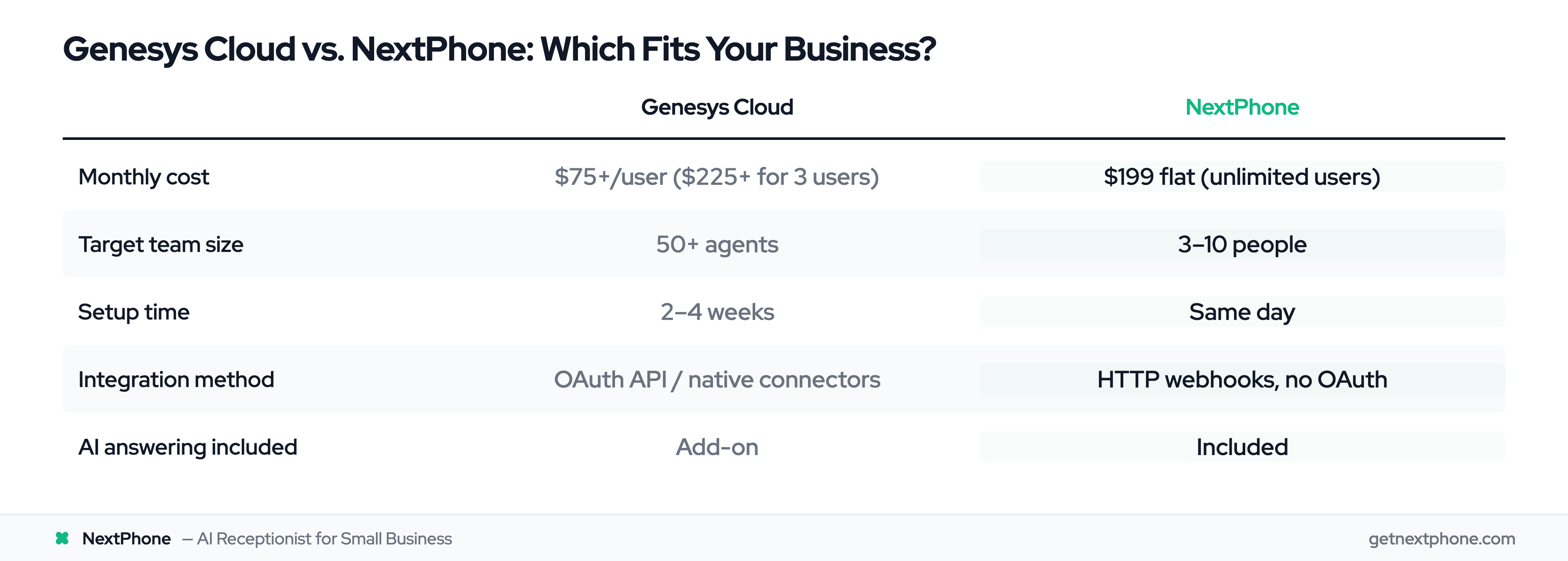
This is exactly why contact center integrations matter. Enterprise platforms like Genesys Cloud offer powerful integration capabilities. But there's a catch: Genesys is built for enterprises, with enterprise pricing and complexity to match. At $75+/user/month and weeks-long implementation timelines, small businesses are increasingly looking for a Genesys Cloud alternative that delivers the same CRM integration and call handling without the overhead.
Here's what Genesys Cloud actually offers, where it falls short for small teams, and why contractors and service businesses are switching to simpler solutions.
What is Genesys Cloud?
Genesys Cloud is an enterprise-grade contact center as a service (CCaaS) platform designed for organizations managing high call volumes across multiple channels. Genesys serves 8,000+ organizations in 100+ countries. We're talking voice, chat, email, social media, and more, all unified in a single platform.
Enterprise Contact Center Platform
Genesys Cloud targets organizations with 50 or more agents handling complex routing requirements. Genesys reports about $2.4B in annual recurring revenue with 30%+ year-over-year growth, which it credits largely to AI demand. If you're running a large call center with sophisticated IVR menus, skill-based routing, and workforce management needs, Genesys delivers the features you need.
The platform shines in enterprise environments where you need to route thousands of interactions daily across departments, track detailed analytics, and maintain quality assurance at scale.
Recent Feature Updates
Genesys announced significant integration updates in 2025, including Apple Messages for Business as a native digital channel with Apple Pay integration, expanded ServiceNow partnership for agent-to-agent (A2A) orchestration, and enhanced Salesforce integration with cloud-stored user settings.
These features showcase Genesys Cloud's enterprise focus. Genesys says 45%+ of its customers now use at least one AI capability, with self-service conversations up 150% year-over-year. Apple Messages for Business? That's for companies with consumer-facing apps and high digital transaction volumes. ServiceNow A2A orchestration? That's for organizations with complex service desk workflows spanning multiple departments.
Who Genesys Cloud Serves
Genesys Cloud serves large organizations well. Genesys was named a Leader in the 2025 Gartner Magic Quadrant for CCaaS for the 11th consecutive year. If you're managing a 100-seat contact center for a national retailer, healthcare provider, or financial services company, the platform delivers the scalability and features you need.
But if you're a 3-person HVAC company or a solo real estate agent, you're paying for capabilities you'll never use. The pricing model reflects this enterprise focus, which brings us to a challenge for smaller businesses.
Why Integration Matters for Contact Centers
Contact center integration connects your phone system to the other tools you use daily: CRM, calendar, ticketing systems, help desk software. This connection transforms your phone system from a simple communication tool into an automated workflow engine.
Unified Customer Experience
When your phone system integrates with your CRM, every call becomes a data point. Caller ID automatically pulls up customer records. Call notes sync automatically. Follow-up tasks get created without manual entry.
For customers, this means they don't have to repeat information every time they call. Your team sees their history, previous issues, and current status instantly.
Automated Workflow Efficiency
Manual data entry kills productivity. After each call, someone has to open your CRM, create a new contact, type notes, set reminders for callbacks. With integration, this happens automatically.
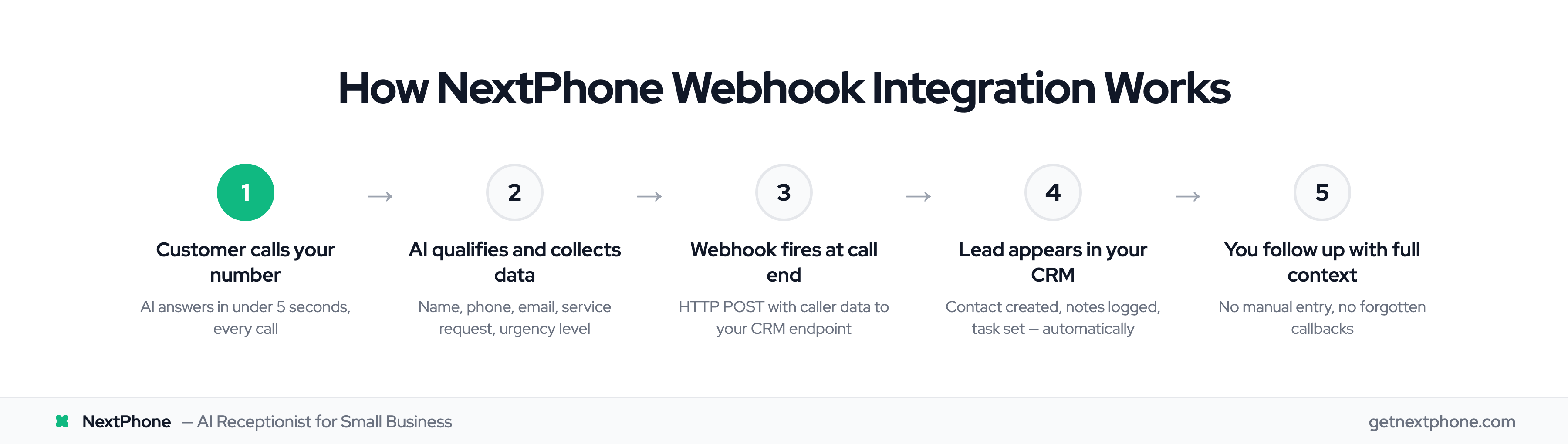
Across the 1,446,980 calls in our analysis, approximately one in four customers explicitly asks for a callback. Without a systematic tracking system, most of these callback requests fall through the cracks. You intend to call back, but you get busy, forget to write it down, or lose the sticky note.
Automated integration captures every callback request, logs it in your system, and creates a task. No manual work required. No forgotten callbacks.
Data-Driven Decision Making
Integration gives you visibility into what's actually happening with your calls. Which marketing campaigns drive the most calls? What percentage of calls convert to jobs? How long does it take to return callbacks?
Types of Genesys Cloud Integrations
Genesys Cloud offers three main integration approaches, each suited for different needs and technical capabilities.
Native Integrations (Pre-Built Connectors)
Native integrations are pre-configured connections to popular platforms. Genesys Cloud offers native integrations for Salesforce, ServiceNow, Microsoft Dynamics 365, and other enterprise systems.
These integrations are the easiest to set up, usually just requiring authentication and configuration through a GUI. You get standard features like automatic contact creation, call logging, and screen pop (where customer records appear automatically when calls arrive).
The downside? Limited customization. You get what Genesys built, which may not match your exact workflow needs.
API Integrations (Custom Development)
The Genesys Cloud Platform API gives developers full programmatic access to platform capabilities. If you need custom integration with proprietary systems, this is your path.
API integrations require OAuth 2.0 authentication and developer resources to implement. You'll need someone who can write code, handle authentication flows, and manage API rate limits.
This approach offers maximum flexibility but comes with maximum complexity. Expect weeks of development time and ongoing maintenance.
Webhook Integrations (Event-Driven)
Webhooks let Genesys Cloud push real-time data to external systems when specific events occur. Call answered? Webhook fires. Call ended? Another webhook fires. You can trigger automated workflows based on call events.
Webhooks require you to set up an endpoint to receive the data and configure authentication (typically using HMAC signatures). They're powerful for event-driven automation but require technical setup.
Popular Genesys Cloud Integrations
Let's look at what enterprises actually integrate with Genesys Cloud and why.
Salesforce CRM Integration
The Salesforce integration is one of Genesys Cloud's most popular. Sales teams get automatic contact record creation, call logging tied to opportunities, and screen pop showing customer details when calls arrive.
The 2025 updates improved this integration by securely storing user settings in the cloud, so preferences persist across sessions and devices. Administrators can now use the Scripter gadget directly in Salesforce through the embeddable desktop component, giving agents access to guided workflows.
ServiceNow Integration
For organizations using ServiceNow for IT service management, the Genesys integration creates a unified experience. The 2025 ServiceNow partnership introduced agent-to-agent orchestration, enabling AI agents to autonomously collaborate on interactions and tasks.
Administrators can configure auto-answer for voice calls at both queue and agent levels directly through ServiceNow. This level of integration makes sense when you're managing complex service desk operations across large teams.
Apple Messages for Business
The 2025 Apple Messages integration brings iMessage conversations into Genesys Cloud as a native digital channel. Flow authors can configure payment requests in digital bot flows, enabling customers to complete transactions with Apple Pay.
This integration targets consumer-facing businesses with iOS customer bases who want to enable commerce through messaging. Think retail brands or service companies with strong Apple ecosystem presence.
Microsoft Dynamics 365
The Dynamics 365 integration provides similar capabilities to Salesforce: automatic contact sync, activity tracking, and unified customer views. If your organization runs on Microsoft's business applications suite, this integration keeps everything connected.
The Small Business Challenge
Here's where the Genesys Cloud story gets complicated for smaller businesses. The platform is incredibly capable, but that capability comes with enterprise-level pricing and complexity.
Enterprise Pricing for Small Teams
Genesys Cloud pricing starts at $75 per user per month for the basic plan. Let's do the math for a typical small business.
You have three people answering phones: the owner, an office manager, and a part-time assistant. That's $225 per month minimum, before you add any premium features or integrations.
Compare that to your typical call volume. A home services contractor fields something like 42 calls in a month. At that volume you're paying $5.36 per call just for the platform, before you factor in your staff time or phone service costs.
Implementation Complexity
Setting up Genesys Cloud isn't a same-day process. Enterprise contact center platforms require configuration, training, and often consultant support. You're looking at weeks of implementation time.
OAuth authentication for API integrations means dealing with client credentials, authorization codes, and token management. Webhook setup requires creating secure endpoints and validating HMAC signatures. These aren't insurmountable challenges if you have IT resources, but they're non-trivial for small teams.
The learning curve for administrators is steep. The platform offers powerful features (IVR design, queue management, workforce optimization), but each feature requires time to learn and configure.
When Genesys Makes Sense (and When It Doesn't)
Genesys Cloud makes excellent business sense for the right organizations. If you're running a contact center with 50+ agents, handling thousands of calls daily, with complex routing needs and an IT team to support implementation, the platform delivers tremendous value.
But if you're a contractor getting 42 calls per month, a real estate agent managing property inquiries, or a small professional services firm, you don't need enterprise-scale infrastructure. You need something simpler.
You need the integration capabilities (the automated CRM sync, the callback tracking, the workflow automation) without the enterprise overhead.