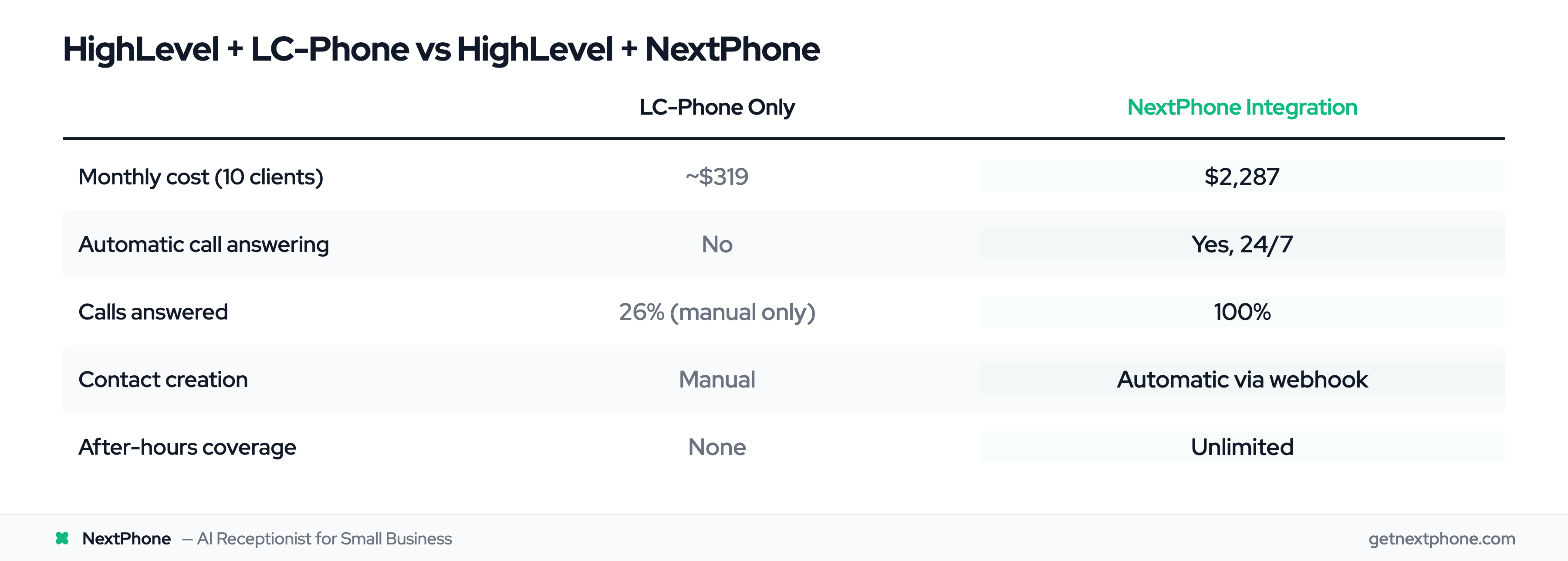
You're managing 10 agency clients in HighLevel. Each one gets about 30 calls a month. That's 300 calls total, and if your experience matches what we've seen, 222 of those calls are going straight to voicemail.
Here's the problem: HighLevel's native LC-Phone system is built for click-to-call, not automatic answering. Your team has to be available, logged in, and ready to manually pick up. Miss the call? Miss the lead. And when you're juggling multiple client accounts, meetings, and campaigns, you can't be glued to the phone 24/7.
Industry research shows 74.1% of calls to home services businesses go unanswered. For an agency with 10 clients, that's a revenue crisis for your clients and a retention risk for you.
The solution isn't another manual system. You need an AI virtual receptionist that works across all your HighLevel sub-accounts, automatically answers every call, qualifies leads in real-time, and creates contacts and opportunities without you lifting a finger.
Here's how to set up HighLevel integration with NextPhone, and why agencies are using this to both improve client results and create a new recurring revenue stream.
What Is HighLevel CRM?
HighLevel is the #1 marketing automation platform according to BuiltWith October 2025 data. HighLevel (also called GoHighLevel) is an all-in-one marketing platform built specifically for agencies, consultants, and marketers who manage multiple clients. Unlike traditional CRMs that charge per user or contact, HighLevel's pricing is designed around agencies managing unlimited client accounts under one subscription.
The platform includes everything you'd normally cobble together from 5+ tools: CRM, landing pages, forms, email marketing, SMS campaigns, workflow automation, scheduling, and payment processing. The real differentiator? White-label capability. You can brand HighLevel as your own platform with custom domains and a branded desktop app.
Pricing tiers:
- Starter: $97/month (small businesses and freelancers)
- Unlimited: $297/month (agencies with multiple clients): Most popular
- SaaS Pro: $497/month (full white-label resale with automated billing)
Annual plans save you 16.6% (essentially 2 months free).
The Unlimited and SaaS Pro plans give you unlimited sub-accounts, which means you can manage 10, 50, or 500 clients under one subscription. This is why HighLevel dominates the agency space.
The LC-Phone Limitation
HighLevel includes a native phone system called LC-Phone. On paper, it sounds great: calls and SMS integrated right into the CRM, no Twilio setup required.
Here's the catch: LC-Phone is a click-to-call system. It doesn't automatically answer incoming calls. Someone on your team has to be logged in, available, and ready to manually pick up.
What this means:
- After-hours calls? Missed.
- Team in a client meeting? Missed.
- Lunch break? Missed.
- Calls coming in across 10 different client accounts while you're working on strategy? Missed.
LC-Phone also comes with usage fees on top of your HighLevel subscription:
- Inbound calls: $0.0085 per minute
- Outbound calls: $0.014 per minute
- Local phone number: $1.15 per month
For agencies with light call volume, those fees are manageable. But if your clients are getting 300+ calls a month, you're paying for a manual system that still requires your team to be available 24/7. And you're still missing 74% of those calls.
Why Agencies Need Automatic Phone Answering
Manual phone management doesn't scale when you're managing multiple client accounts. The math becomes brutal fast.
Multi-Client Call Volume
Let's use a conservative example. You have 10 clients. Each one gets 30 calls per month on average. That's 300 total calls across your client base.
According to industry research, 74.1% of calls go unanswered when businesses rely on manual phone pickup. That's 222 missed calls every month across your 10 clients.
Each of those missed calls is a potential lead for your client, or worse, an existing customer trying to reach them. If your clients are in competitive industries (real estate, home services, legal), a single missed call could mean a $5,000, $50,000, or $500,000 deal lost to a competitor who answered.
After-Hours Problem
Agencies often work across time zones. Your clients' customers don't stop calling at 5 PM. They call when they need something: evenings, weekends, holidays.
LC-Phone only works when your team is logged in and available. No one's clicking to answer calls at 9 PM on a Saturday. So those calls go to voicemail, and by Monday morning, the lead has already called three of your client's competitors.
This is a client retention problem as much as a lead capture problem. When your clients see their call volume dropping or their leads going cold, they start questioning the value of your services.
Manual Admin Burden
According to research from Nimbata's call tracking study, sales teams spend up to 30% of their time on administrative tasks like logging calls and updating CRM records.
Now multiply that across 10+ client sub-accounts. You're jumping between dashboards, manually logging calls, entering notes, tagging contacts, and assigning leads to pipelines.
That's time you could spend on strategy, campaign optimization, or landing new clients. Instead, you're doing data entry that a webhook could handle in 2 seconds.
Revenue Impact
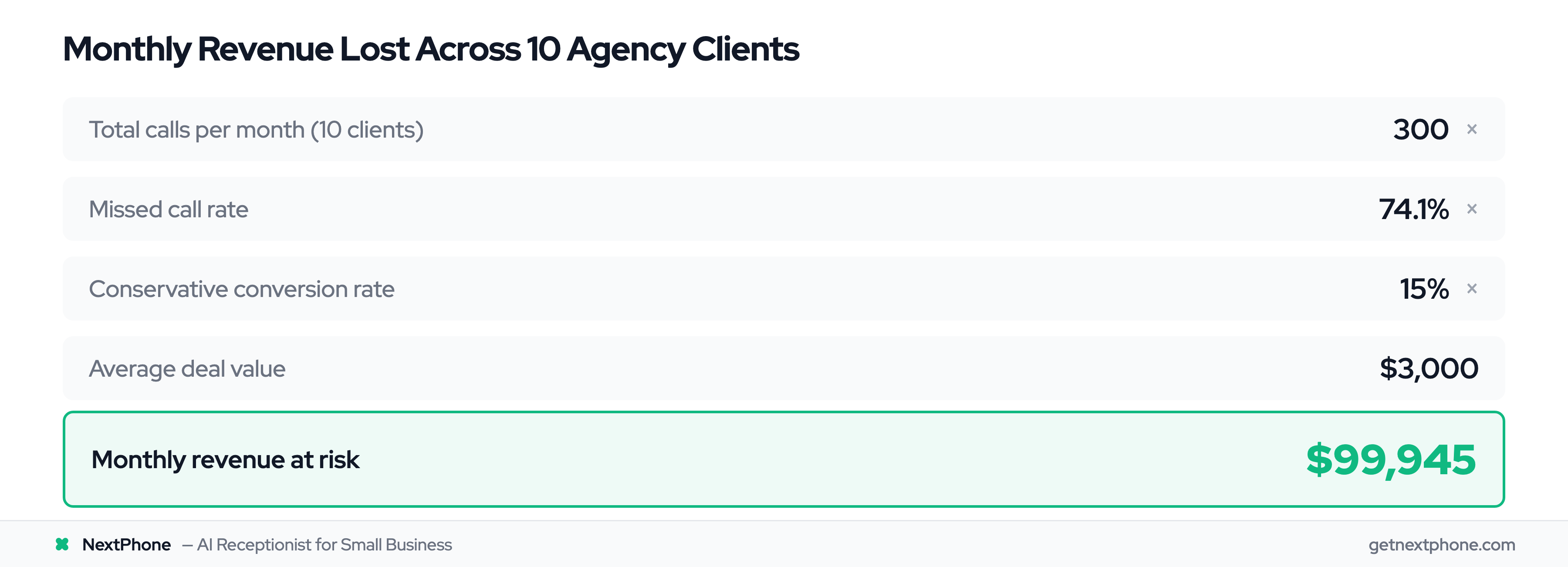
Here's the calculation that makes agency owners pay attention:
- 300 calls per month (10 clients × 30 calls each)
- 74.1% missed = 222 unanswered calls
- 15% of those would convert (conservative estimate) = 33 conversions
- Average deal value of $3,000 (also conservative)
That's $99,945 in lost revenue every month across your client base.
Even if your conversion and deal value numbers are half that, you're still looking at $50,000/month your clients aren't capturing because calls go unanswered.
And when clients don't see results, they churn. You lose MRR, and you spend even more time and money replacing them.
How HighLevel + NextPhone Integration Works
Instead of relying on LC-Phone's manual click-to-call system, you can integrate your phone system with your CRM using HTTP webhooks. This gives you automatic call answering across all your sub-accounts without adding more manual work.
Integration Architecture
NextPhone uses HighLevel's Custom Webhook workflow action to send call data in real-time to the HighLevel API. This works across unlimited sub-accounts. You set it up once, and it routes calls to the correct client account automatically.
You don't need LC-Phone subscriptions for each client. You don't need to train your team to manually log calls. The AI answers, qualifies, and logs everything automatically.
Call Flow
Here's what happens when a call comes in:
- Call arrives: NextPhone's AI answers automatically (no human required)
- AI conversation: Collects name, email, company, needs, budget, timeline
- Webhook triggers: Sends data to HighLevel API in real-time
- Contact created: New contact added to the correct sub-account with all details
- Opportunity created: Deal added to pipeline if qualified
- Activity logged: Call notes and transcript attached to contact record
- Workflow triggered: HighLevel automation sends follow-up SMS or email
All of this happens in seconds, with zero manual input from your team.
HighLevel API Endpoints
NextPhone's webhook can hit several HighLevel API endpoints depending on what you want to automate:
- Create Contact:
POST https://rest.gohighlevel.com/v1/contacts/ - Create Opportunity:
POST https://rest.gohighlevel.com/v1/opportunities/ - Log Activity:
POST https://rest.gohighlevel.com/v1/contacts/{contactId}/notes/
Each endpoint accepts different data fields, and you can customize which information gets sent based on what the AI collects during the call.
Webhook Template Example
Here's an example webhook configuration for creating a contact in HighLevel:
POST https://rest.gohighlevel.com/v1/contacts/

Headers:
{
  "Authorization": "Bearer YOUR_API_TOKEN",
  "Content-Type": "application/json"
}

Body:
{
  "locationId": "[sub_account_id]",
  "firstName": "[first_name]",
  "lastName": "[last_name]",
  "email": "[email]",
  "phone": "[caller_number]",
  "source": "NextPhone AI",
  "tags": ["ai-call", "inbound-lead"],
  "customFields": [
    {
      "id": "budget_field_id",
      "value": "[budget]"
    },
    {
      "id": "timeline_field_id",
      "value": "[timeline]"
    }
  ]
}
The [template_variables] auto-populate from the AI conversation. The locationId parameter routes the contact to the correct client sub-account. Tags like "ai-call" can trigger HighLevel workflows for automated follow-up.
You can also create opportunities (deals) directly from calls by hitting the opportunities endpoint with similar data.