You're evaluating contact center platforms. Genesys quoted you a $2,000 monthly minimum. Five9 requires 50 seats. Talkdesk wants $10,000 for implementation. You have 3 employees.
Something doesn't add up.
These enterprise CCaaS platforms are built for call centers with 100-500 agents handling thousands of daily interactions. You run an HVAC company, a law practice, or a real estate team. You get 40-50 calls per month. You don't need workforce management software. You need someone to answer the phone.
We've answered more than 2,000,000 business calls. The data is brutal: industry research shows 74.1% of calls to home services businesses go completely unanswered. These businesses don't need enterprise contact center features. They need calls answered.
This guide breaks down what Genesys Cloud, Five9, Talkdesk, and GoTo Connect actually cost and who they're built for, then shows when a simpler AI receptionist makes more sense for service businesses.
Understanding Enterprise Contact Center Platforms
What Is CCaaS (Contact Center as a Service)?
CCaaS platforms are cloud-based contact center systems designed for companies that operate large-scale customer support operations. According to ContactBabel's US Contact Center Decision-Makers' Guide, these platforms serve enterprises with complex multi-channel customer service needs. We're talking 50-500 agents handling thousands of interactions daily across voice, email, chat, social media, and SMS. Plivo's contact center statistics for 2025 show these platforms process millions of interactions daily at enterprise scale.
These platforms include advanced workforce management, skills-based routing, quality monitoring, speech analytics, and omnichannel support. They're built for tech support centers, insurance claims departments, telemarketing operations, and customer service departments at large corporations. Zendesk's AI customer service statistics project AI will cut contact center costs by $80B by 2026, but those savings primarily benefit large-scale operations, not small businesses.
They're not built for a three-person HVAC crew or a solo real estate agent.
Enterprise vs SMB Communication Needs
The gap between enterprise contact center design and service business reality is massive.
Enterprise contact centers assume:
- 50-500 agents working simultaneously
- Hundreds or thousands of calls per day (LiveAgent reports 35+ call center statistics showing enterprise volume benchmarks)
- Complex routing rules (route Spanish speakers to bilingual agents, technical questions to Level 2 support)
- Multiple communication channels (voice, email, chat, social, SMS, video)
- Workforce optimization (schedule 247 agents across 6 time zones)
- Compliance recording and quality monitoring
- Advanced analytics and reporting dashboards
Service business reality:
- 1-5 people in the field or office
- 40-50 calls per month (not per day)
- Simple routing (send to owner or emergency line)
- One channel that matters (phone calls)
- Everyone knows the schedule
- You listen to important calls yourself
- You know if you're busy without analytics
The tools don't match the problem.
The Four Major Players
Four enterprise CCaaS platforms dominate the market: Genesys Cloud, Five9, Talkdesk, and GoTo Connect. Grand View Research projects the call and contact center market will grow from $97 billion to $163 billion by 2030. The CCaaS market specifically is projected to reach $39.25B by 2034, growing at 20.6% CAGR from $7.27B in 2025. All use per-user-per-month pricing. All are built for call center operations, not service businesses.
Let's break down what they actually cost and who they're designed for.
Enterprise CCaaS Platform Breakdown
Genesys Cloud CX: The Enterprise Powerhouse
Genesys Cloud CX is the heavyweight of enterprise contact centers, serving 8,000+ organizations in 100+ countries. Named a Leader in the 2025 Gartner Magic Quadrant for CCaaS for the 11th consecutive year, they offer 6 pricing tiers from $75 to $240 per user per month.
The plans:
- CX 1 (Voice Only): $75/user/month - Basic voice contact center with intelligent routing, IVR builder, callbacks, reporting
- CX 2 (Digital Only): $95/user/month - Email, chat, SMS, WhatsApp, Facebook Messenger (no voice)
- CX 2 (Voice + Digital): $115/user/month - Combines voice and digital channels
- CX 3 (Plus Workforce Management): $155/user/month - Adds WFM, advanced routing, analytics
- CX 4 (AI Experience): $240/user/month - Everything plus AI copilot, journey management, 30 AI tokens
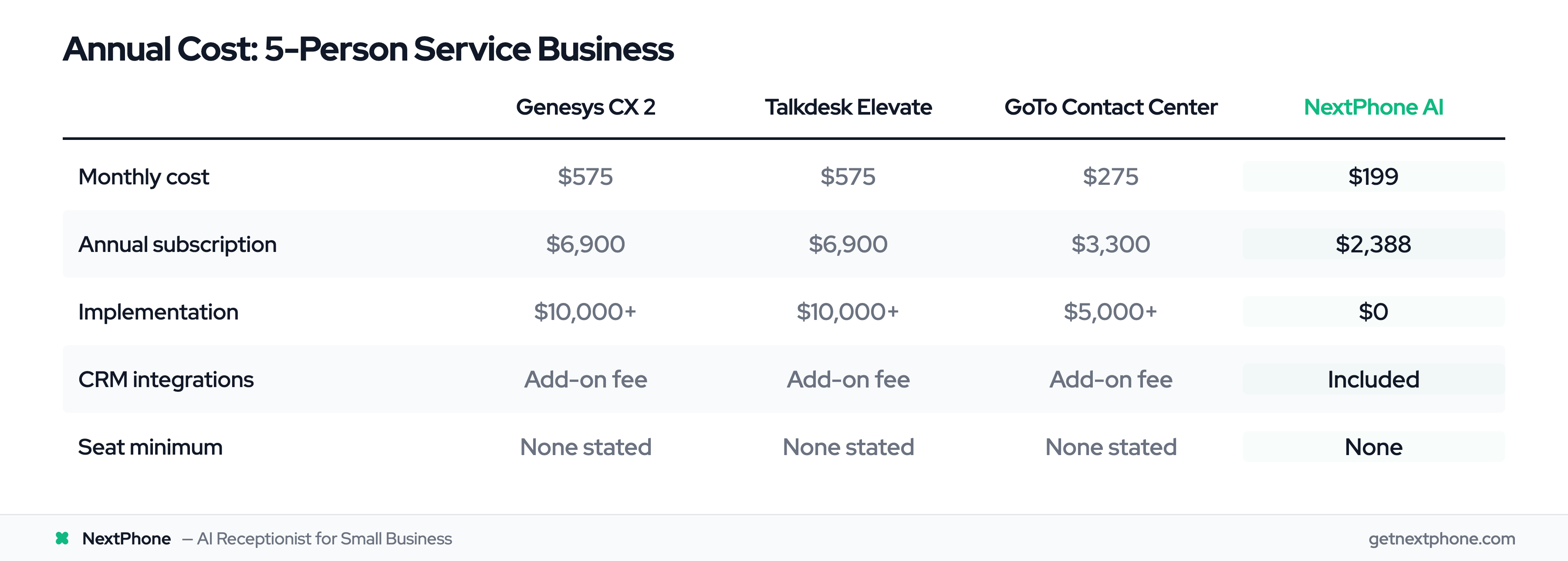
The catch? Genesys has a $2,000 minimum monthly commitment. For a 3-person team on the cheapest plan ($75/user), you'd need 27 users just to meet the minimum. For the Voice + Digital plan most businesses actually need ($115/user), that's 18 users minimum.
CRM integrations with Salesforce, Microsoft Dynamics, or Zendesk? Add-ons only. Not included in any plan.
Genesys makes sense if you're running a 100+ agent contact center. It doesn't make sense if you have 3 technicians installing HVAC units.
Five9: Call Center Focus with High Minimums
Five9 is laser-focused on contact center operations, with Five9 reporting $280M Q1 2025 revenue, 107% net revenue retention, and 32% YoY enterprise AI revenue growth. Five9's implementation costs and pricing structure make this clear.
Pricing:
- Digital plan: $119/user/month
- Core plan: $119/user/month (36-month contract required)
- Premium, Optimum, Ultimate: Custom quoted ($149-$299/user/month estimated)
The killer: Five9 requires a 50-seat minimum.
Let's do the math. At $119/user/month for 50 seats, you're paying $5,950 per month. At $149/user (Premium plan), that's $7,450 monthly. For the Ultimate tier ($229/user estimated), you're at $11,450 per month.
A 50-seat minimum for a 3-person business is absurd. You'd be paying for 47 seats you don't use.
Implementation costs range from $5,000 to $20,000 depending on complexity. CRM integrations? Extra charge. Training? Extra charge.
Once you factor in add-ons and contract requirements, Five9's real cost rises quickly. But the 50-seat minimum makes it impossible for small businesses to even consider.
Talkdesk: Feature-Rich but Expensive
Talkdesk positions itself as enterprise-grade with easier setup than competitors, named a Leader in the 2025 Gartner Magic Quadrant for CCaaS. According to Talkdesk's tiered pricing, they offer four plans starting at $85/user/month.
Plans:
- CX Cloud Essentials (Voice): $85/user/month - Voice-only with basic routing, IVR, analytics
- CX Cloud Digital Essentials: $85/user/month - Digital channels only (email, chat, SMS, social)
- CX Cloud Elevate: $115/user/month - Voice + Digital with limited integration
- CX Cloud Elite: $165/user/month - Full platform with custom reporting, premium add-ons
Notice the design? The two entry-level plans ($85) are siloed by design. Voice-only OR digital-only. To get voice and digital working together, you need the Elevate plan ($115/user) or Elite plan ($165/user).
For a 5-person team on Elite (the only plan with full integration), you're paying $825 per month. That's $9,900 annually, before implementation costs.
Talkdesk is well-suited for larger enterprises with complex needs and budgets to match. For a three-person electrical contractor? Overkill.
GoTo Connect: UCaaS Suite with Contact Center Add-On
GoTo Connect takes a different approach. They started as a UCaaS (Unified Communications) platform and added contact center features as an upgrade. The GoTo Connect platform offers both business phone systems and contact center capabilities.
Pricing:
- UCaaS plans: $26-$80/user/month for phone, video, messaging
- Contact Center add-on: $55/user/month (quote-based)
- Full contact center: Quote-based pricing (not published)
GoTo's approach makes more sense for small teams who need basic phone system features (call forwarding, voicemail, conferencing) but not full contact center capabilities. You can start with a $26/user UCaaS plan and upgrade if needed.
But once you add contact center features, you're back to per-agent pricing that scales poorly for small teams. A 5-person team on contact center tier ($55/user) pays $275/month, or $3,300 annually.
Still significantly cheaper than Genesys or Talkdesk, but you're paying for features designed for call centers, not service businesses answering estimate requests and emergency calls.
Who Actually Needs Enterprise Contact Center Software
Enterprise Contact Centers Make Sense For...
Let's be clear: enterprise CCaaS platforms are excellent for their intended use case.
You need enterprise contact center software if you:
- Operate 50+ agent contact centers - Managing that many people requires workforce optimization, scheduling tools, and performance monitoring
- Handle 500+ calls per day - High volume demands advanced routing, queue management, and real-time analytics
- Require skills-based routing - Route Spanish speakers to bilingual agents, technical issues to Level 2 support, VIP customers to senior reps
- Support omnichannel interactions - Voice + email + chat + social + SMS all managed in one platform with conversation history
- Need compliance recording - Financial services, healthcare, insurance require call recording with retention policies and quality monitoring
- Run outbound campaigns - Predictive dialers, automated sequences, lead scoring for telemarketing or sales operations
Examples: Tech support centers for software companies. Insurance claims departments. Telemarketing operations. Large retail customer service departments. Collections agencies. Healthcare call centers (where the Healthcare Contact Center Survey 2024 documents complex multi-department routing needs).
These operations need enterprise CCaaS platforms. The features justify the cost. ICMI's Contact Center Trends report confirms these platforms are built for high-volume, high-complexity scenarios.
Service Businesses Don't Need Enterprise CCaaS
Service businesses operate completely differently.
HVAC, plumbing, electrical contractors:
- 1-5 technicians in the field
- Calls for estimates, service appointments, emergency repairs
- Simple routing: urgent calls go to owner, routine calls get scheduled
- One channel: phone calls (maybe text for appointment confirmations)
Law practices:
- 1-10 attorneys with reception needs
- Calls for new client consultations, existing client questions, scheduling
- Route: new leads to attorney, administrative to staff, urgent matters immediately
- Don't need 10-channel omnichannel support
- Individual agents or small teams
- Property inquiries, showing requests, buyer qualification
- Time-sensitive: first agent to respond gets the showing
- Need answering while showing other properties, not workforce management
Construction and contracting:
- Project-based crews (2-20 people)
- Bid requests, project updates, material orders
- Route emergencies to project manager, routine to office
- Need communication, not contact center analytics
None of these businesses handle call center volumes. None need skills-based routing. None require omnichannel support across 10 channels.
The Call Volume Reality
Typical call volume for a small contractor: roughly 42 calls per month. That's 1.4 calls per day.
Not 500 calls per day like enterprise contact centers assume. Not even 50 calls per day. Less than 2 calls per day.
Our analysis of the 1,446,980 business calls in our corpus, answered for home services contractors, shows what those calls actually look like:
- Industry research shows 74.1% of calls to home services businesses go completely unanswered
- Approximately one in four callers asks for a callback
- Urgent and emergency calls rank among the top reasons people call (emergency, urgent, ASAP)
- Emergencies are a recurring reason people call (pipe burst, AC out, no power)
- Booking or rescheduling an appointment is the single most common reason people call
- Requesting a quote or estimate is among the top reasons people call
- Spam is filtered out before it ever rings you
This data proves service businesses need call answering, not workforce management. You're missing 3 out of 4 calls. You don't need advanced analytics to know that's a problem. You need someone to answer the phone.
What Service Businesses Actually Need
The 5 Essential Call Handling Capabilities
Service businesses don't need 50+ contact center features. They need 5 core capabilities:
1. 24/7 Call Answering
When industry research shows 74.1% of calls go unanswered, the first priority is: answer the phone. After-hours calls, lunch breaks, on-site appointments: calls happen when you're unavailable. Missing them costs money.
A missed emergency call in HVAC (AC out in 95° heat) is worth an average of $4,200. Miss one per week and you've lost $16,800 monthly.
2. Lead Information Capture
Every call is a potential customer. You need their name, phone number, what service they need, when they need it, and how urgent it is. Without systematic capture, callback requests fall through the cracks.
Approximately one in four callers asks for a callback. Without tracking, most of these never happen. At 30% conversion and $3,500 average job size, that's $9,450 per month lost.
Service businesses get emergency calls: pipe bursts, no power, roof leaks, AC failures. These are time-sensitive and high-value. First contractor to answer wins the job.
Urgent and emergency calls rank among the top reasons people call. These calls need immediate routing to an owner's cell phone, not IVR menus asking them to "Press 1 for billing, Press 2 for service..."
4. Appointment Scheduling
Booking or rescheduling an appointment is the single most common reason people call. "Can you come give me a quote?" "When can you fix this?" "What times do you have available?"
Integrate with Google Calendar or Calendly to book appointments during the call. Don't make customers wait for a callback to schedule.
5. CRM Integration
Manually logging call information hours later means forgotten details and lost leads. Our data shows businesses using CRM integration captured 3X more leads because information was automatically logged within seconds of the call ending.
That's it. Five capabilities. Not 50.
What the Call Data Reveals
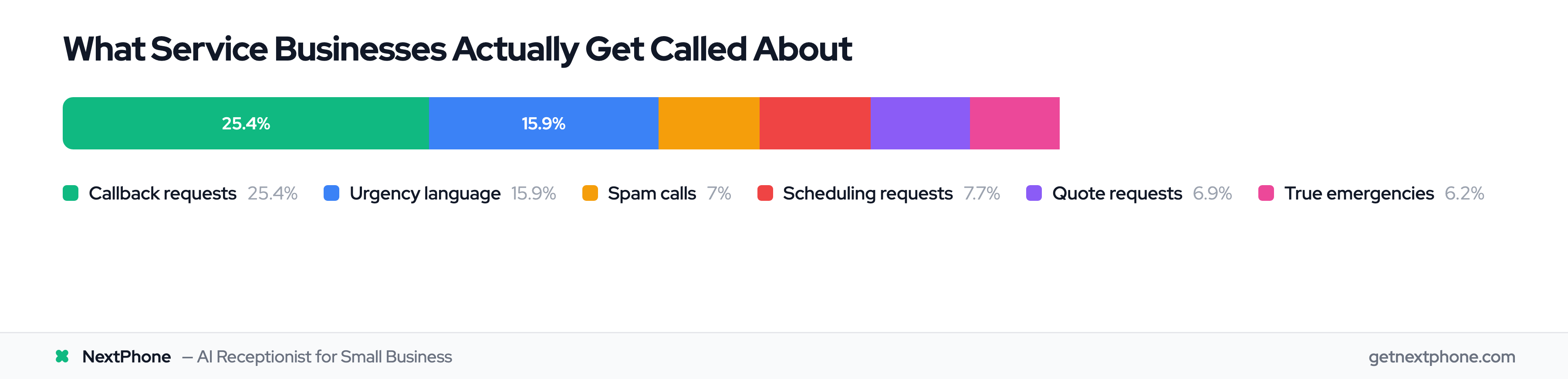
The breakdown of service business calls shows what these companies actually handle:
- Callback requests - Need tracking system
- Urgency language - Need emergency detection
- Scheduling requests - Need calendar integration
- Spam calls - Need filtering
- Quote requests - Need lead capture
- True emergencies - Need immediate routing
None of these require skills-based routing to 200 different departments. None need omnichannel support across email, chat, social media, SMS, and video. None need workforce optimization for shift scheduling.
They need calls answered by someone (or something) that knows: Is this urgent? Who's calling? What do they need? When can we help them?
Emergency vs Routine Call Patterns
Emergency calls follow different patterns than routine calls, and they're worth more.
Emergency call examples:
- HVAC: "AC stopped working and it's 95 degrees"
- Plumbing: "Pipe burst in my basement, water everywhere"
- Electrical: "Lost power to half my house"
- Roofing: "Leak dripping on my bedroom ceiling"
Emergency calls average $4,200 in revenue versus $3,500 for routine work. They're time-sensitive. The customer calls 2-3 contractors. First to answer gets the job.
Your AI receptionist or contact center doesn't need to fix the problem. It needs to:
- Detect the urgency
- Collect basic info (name, address, problem)
- Route immediately to a human who can help
Routing an emergency call shouldn't require navigating 5 IVR menu levels. It should take 30 seconds from "pipe burst" to talking to someone who can dispatch a plumber.
The AI Receptionist Alternative
How AI Receptionists Work
AI receptionists use natural language processing to answer phone calls like a human receptionist would, but they're available 24/7, never take breaks, and cost a fraction of hiring staff. Gartner predicts AI will reduce contact center labor costs by $80B by 2026, with 1 in 10 agent interactions automated (up from 1.6% today).
The call flow:
- Call arrives - AI answers in under 5 seconds (vs 30+ second ring times for traditional services)
- Greeting - "This is the AI assistant for ABC Heating & Cooling. How can I help you today?"
- Qualification - AI asks questions: "What service do you need? When did this start? Is this an emergency?"
- Information capture - Collects name, phone, service details, urgency level, availability
- Routing decision - Emergencies transfer immediately to owner. Routine calls book appointments or promise callback.
- Follow-up - Email summary sent to business owner, call logged in CRM automatically, appointment added to calendar
The AI handles routine questions: business hours, service area, pricing estimates, what services you offer, when you're available. For complex questions, upset customers, or detailed estimates, it transfers to you with full context of the conversation. Studies show AI handles service calls successfully 91% of the time, with AI-only calls achieving 86% appointment booking rates.
You get 24/7 coverage without hiring a night shift. You get systematic lead capture without manual data entry. You get emergency routing without complex IVR programming.
Built for Service Businesses, Not Call Centers
AI receptionists are designed for exactly the scenario enterprise CCaaS platforms miss: small teams (1-10 people) with moderate call volume (20-100 calls/month) who need calls answered, not managed.
Perfect for:
- HVAC, plumbing, electrical contractors working in the field
- Law practices where attorneys are in court or meetings
- Real estate agents showing properties
- General contractors on job sites
- Medical practices with front desk overflow
- Any service business where being on-site means missing calls
Not designed for:
- 100+ agent contact centers
- High-complexity technical support requiring detailed troubleshooting
- Scenarios requiring human empathy (complaints, refunds, sensitive issues)
- Outbound sales campaigns with dozens of agents dialing
The focus is narrow and deliberate: answer the phone, collect information, route appropriately. Do that well for service businesses at a price that makes sense.
Key Advantages Over Enterprise CCaaS
Setup time: Hours (not months)
Provide your website URL. The AI extracts your business information, hours, services, and pricing. Customize the questions it asks. Connect your calendar and CRM. Forward your phone number. You're live.
No $10,000 implementation project. No 2-month consulting engagement. No agent training sessions.
Pricing: Flat monthly rate (not per-agent)
$199/month unlimited calls. Not per agent. Not per minute. Not per call. Flat rate.
Add a 5th employee to your team? Price doesn't change. Get busier during peak season? Price doesn't change. No scaling nightmare.
No minimums: Works for 1 person or 10
Five9's 50-seat minimum doesn't exist. Genesys' $2,000 monthly commitment doesn't exist. You can be a solo contractor or a 10-person crew. Same pricing.
No long-term contracts: Month-to-month flexibility
Cancel anytime. No 36-month commitment. No early termination fees. Business slows down? Pause service. Ramp back up when busy.
Integrations without add-on fees: Calendar built-in, CRM on the Growth plan
Google Calendar and Calendly integrations are included in the monthly price. CRM integrations like HubSpot and Salesforce start on the $299 Growth plan, still one flat rate. Not add-on fees. Not per-seat licensing.