
Here's something that'll keep you up at night: 85% of callers who don't reach the right person will never call back.
Not tomorrow. Not next week. Never.
They'll hang up, Google your competitor, and give them the business that should have been yours. And this isn't some rare occurrence. Small businesses lose an average of $126,000 every year to poorly handled calls. That's not a typo. Six figures, gone, because calls went to the wrong place or weren't answered at all.
Smart call routing fixes this. It's the technology that makes sure every call reaches the right person at the right time, even when your team is stretched thin. Modern AI call routing puts this capability within reach of any business. And no, it's not just for massive call centers with hundreds of agents. Modern solutions like NextPhone put this technology in the hands of small businesses for a fraction of what it used to cost.
Let's break down exactly what smart call routing is, how it works, and how you can use it to stop leaving money on the table.
What Is Smart Call Routing?
The Basic Concept
Smart call routing is exactly what it sounds like: a system that intelligently directs incoming calls to the best available destination. Research shows priority routing keeps 28% more top-tier clients, and follow-the-sun routing reduces abandoned calls by 45% during off-hours. Instead of every call going to your main line and hoping someone picks up, the system makes decisions based on actual data.
Think of it as a really smart receptionist who knows your business inside and out. They know who handles what, when people are available, which customers are VIPs, and what kind of call is coming in. Except this receptionist never takes a lunch break and handles everything instantly.
Traditional call handling works like a lottery. The call comes in, it rings, and whoever grabs it first wins (or loses, depending on the call). Smart routing flips this around. The system analyzes each call and makes a calculated decision about where it should go.
How It Works (Step-by-Step)
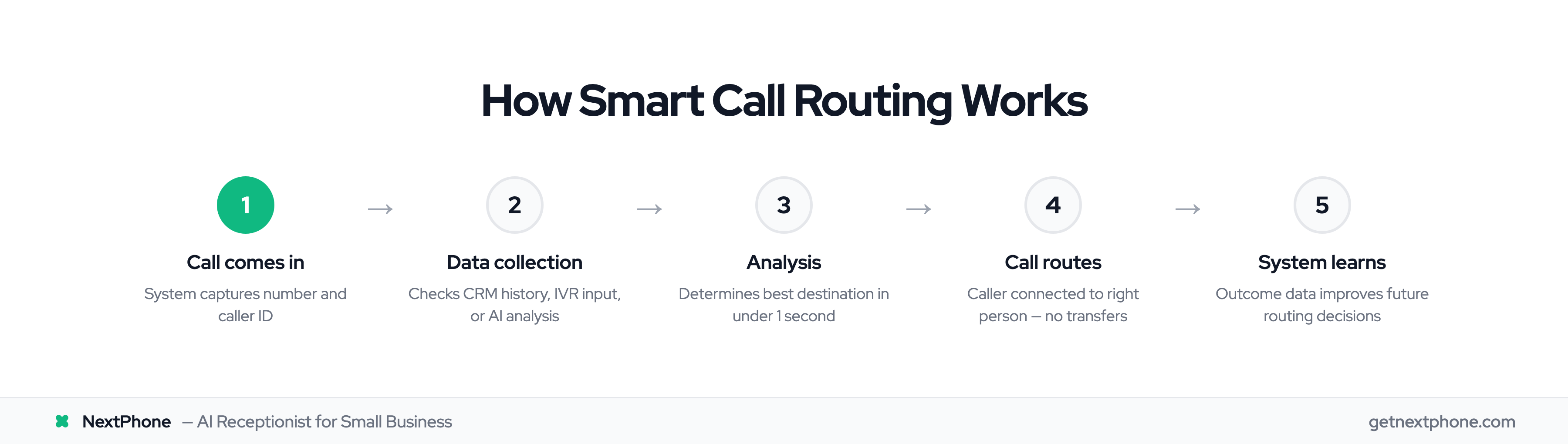
Here's what happens in the seconds between someone dialing your number and hearing a voice:
Step 1: The call comes in. Your smart routing system captures the incoming number and any available caller ID information.
Step 2: Data collection kicks in. The system checks its database. Has this person called before? What did they call about? Are they in your CRM? If there's an IVR menu, it collects their input. If AI is involved, it might even analyze what they say.
Step 3: Analysis happens. Based on everything it knows, the system determines the best destination. Maybe that's your sales team because the caller is a hot lead. Maybe it's a specific technician because this customer always needs help with the same product.
Step 4: The call routes. All of this happens in under a second. The caller gets connected to the right person without endless transfers or frustrating menus.
Step 5: The system learns. Good smart routing systems track what happens after the call. Did it get resolved? Was the customer satisfied? This data feeds back into the system, making future routing decisions even better.
Verizon found that AI can predict why someone is calling about 80% of the time, letting them skip the menu maze entirely. And here's why that matters: 98% of customers will try to skip IVR systems anyway. Smart routing gives them what they want before they even have to ask.
The Real Cost of Poor Call Routing
What Missed and Misrouted Calls Actually Cost You
Let's talk numbers, because this is where the pain becomes real.
Every missed call costs small businesses an average of $1,200 in lost revenue. That's not some worst-case scenario. It's the average. Some calls are worth much more.
Research shows that 27% of calls to home service businesses go unanswered. Even worse, across all industries, only about 38% of incoming calls actually reach a real person. The rest hit voicemail, get abandoned, or ring into the void.
For a small business getting 100 calls a month, that's potentially 27 calls missed. At $1,200 per missed call, that's $32,400 a month walking out the door. Do the math for a year and you're staring at the $126,000 figure we mentioned earlier.
The Ripple Effect on Your Business
The dollar figure is bad enough. But the damage goes deeper.
Lost lifetime value: A customer who never gets through isn't just one lost sale. They're potentially worth $5,000 to $15,000 over their lifetime with you. One frustrated caller can represent five figures in future revenue that you'll never see.
Lost referrals: Happy customers tell 2-3 people about good experiences. Frustrated non-customers tell everyone about their bad one. Each lost caller takes potential referrals with them.
Team burnout: When calls constantly go to the wrong person, everyone suffers. Your sales team fields support questions. Your support team handles billing issues they can't resolve. Everyone stays frustrated, and turnover goes up.
Reputation damage: 75.5% of customers switch to a competitor after poor customer service experiences. They might not leave a one-star review, but they'll definitely vote with their feet.
And here's what makes this hurt more: 80% of customers say the experience they get from a business matters as much as the actual product or service. You could have the best offering in your market and still lose because your call handling is a mess.
Ready to find out what poor call routing is costing you? [Calculate your potential savings with a free consultation →]
6 Types of Smart Call Routing
Not all routing is created equal. Here are the main approaches, and when each one makes sense for your business.
Skills-Based Routing
This matches callers with agents who have specific expertise. A customer calling about a technical issue goes to your tech-savvy team member. Billing questions route to someone who knows the invoicing system.
Best for: Businesses with specialized services, technical support teams, or any situation where caller expertise matters.
Example: A plumbing company routes calls about water heaters to technicians certified in water heater repair, while general drain calls go to the broader team.
Time-Based Routing
Calls route differently based on when they come in. During business hours, they go to your main team. After hours, they might go to an answering service, voicemail, or an on-call staff member.
Best for: Businesses operating across time zones, those wanting to extend availability without hiring night staff, or anyone with a mix of staff schedules.
Example: A law firm routes morning calls to the main office, but evening calls go to the partner who handles urgent matters.
Geographic Routing
The system looks at where the caller is located and connects them with the appropriate destination. This often means routing to the nearest physical location or a team that handles that region.
Best for: Multi-location businesses, franchise operations, or companies where local knowledge matters.
Example: A real estate agency routes callers from different area codes to agents who specialize in those neighborhoods.
Priority-Based Routing
VIP customers jump to the front of the line. The system recognizes high-value callers and gives them preferential treatment, whether that's shorter wait times or access to senior team members.
Best for: Businesses with tiered service levels, loyalty programs, or high-value accounts that deserve extra attention.
Example: A software company routes calls from enterprise clients directly to their dedicated account manager, while trial users go to general support.
Round-Robin Routing
This is the fairest approach: calls distribute evenly among available team members. Person A gets a call, then person B, then person C, and the cycle repeats.
Best for: Small teams where equal distribution matters, sales teams splitting leads fairly, or any situation where workload balance is a priority.
Example: A five-person sales team uses round-robin to ensure everyone gets an equal shot at incoming leads.
AI-Powered Routing
This is where things get interesting. AI-powered routing uses machine learning to analyze patterns and make increasingly smart decisions. Combined with AI virtual receptionist technology, it might consider caller history, sentiment analysis, agent performance data, and dozens of other factors to find the optimal match.
Best for: Businesses ready to optimize beyond basic rules, those handling high call volumes, or anyone wanting their routing to improve automatically over time.
NextPhone uses AI-powered routing as its foundation. The system learns that 25.4% of calls are callback requests and handles those appropriately. It identifies the 15.9% that have urgency behind them and prioritizes accordingly. And it recognizes the 6.2% that are actual emergencies and routes them immediately to the right destination.
Key Benefits of Smart Call Routing
Faster Response Times
When calls go to the right place the first time, wait times plummet. Businesses implementing smart routing see wait times drop by 25-35% on average. Customer satisfaction scores climb 10-15 points.
No more bouncing between departments. No more explaining the problem three times to three different people. The first person who answers is equipped to actually help.
Higher First-Call Resolution
Getting the right agent means getting the right answer. Companies using AI-powered routing see first-call resolution improve by 25% or more.
Wyze Labs took this to an extreme after implementing intelligent routing. Their first-call resolution hit 98%. Almost every single caller got their issue resolved without needing to call back.
Reduced Operational Costs
Smart routing saves money in ways that compound over time.
Businesses report cutting operational costs by up to 30%. Part of that comes from efficiency gains. AI classification and automatic routing saves agents about 1.2 hours per day. That's time they can spend actually helping customers instead of playing phone tag.
It also means you might not need to hire that extra person. When your existing team handles more calls effectively, the math changes on when you need to expand.
24/7 Availability Without 24/7 Staff
Time-based routing lets you cover more hours without paying for overnight shifts. Calls outside business hours can route to answering services, on-call staff, or self-service options.
Salesforce found that 61% of customers actually prefer self-service for simple issues. Smart routing can send basic inquiries to automated solutions while making sure complex or urgent calls still reach a human.
70% of customer inquiries can be handled by AI without human intervention. That's not about replacing people. It's about making sure human attention goes where it's actually needed.
How to Implement Smart Call Routing
Step 1: Map Your Call Flows
Before you configure anything, understand what's happening now.
Track your calls for a week or two. What types of calls are you getting? Who currently handles what? Where do things break down? Which calls take multiple transfers to resolve?
Write down every call type you can identify. Sales inquiries, support requests, billing questions, general information. Note roughly what percentage each type represents.
Step 2: Choose Your Routing Strategy
Match routing types to your actual needs. Don't overcomplicate this at the start.
A small team might start with simple time-based routing (business hours vs. after hours) combined with skills-based routing (sales vs. support). That's it. Two routing rules that cover 90% of scenarios.
You can always add geographic routing later if you expand. Priority routing can come when you have enough customers to tier them meaningfully.
Step 3: Set Up Your Rules
Now it's configuration time. Modern smart routing systems make this straightforward.
Define your business hours clearly. Set up skills or departments for your team members. Create the actual routing rules: "If caller selects 1, route to sales. If caller selects 2, route to support."
Decide on overflow handling. What happens when everyone in a group is busy? Do calls queue? Route to voicemail? Overflow to another team?
Step 4: Test and Refine
Before going live, run test calls through every possible path. Try to break it. Call at weird hours. Go through every menu option.
Gather feedback from your team during the first few weeks. Are they getting calls they shouldn't? Are certain call types slipping through the cracks?
Watch your metrics. First-call resolution, average wait time, customer satisfaction scores. These tell you whether the routing is actually working.
NextPhone simplifies this entire process with pre-built routing templates that match common small business needs. The AI learns your patterns automatically, so you spend less time configuring and more time running your business.
Want to see smart routing in action? [Watch NextPhone handle calls in real-time →]
Smart Call Routing Best Practices
Keep It Simple at First
The biggest mistake is over-engineering from day one. Start with basic routing rules that cover your main scenarios. Add complexity only when you see specific problems that need solving.
A three-option IVR menu is better than a ten-option menu that confuses callers. Two routing rules that work are better than twenty rules that conflict with each other.
Use Data to Inform Decisions
Track everything and let the numbers guide you. If 80% of calls going to your "general" queue are actually support questions, create a support route and default calls there.
Look at first-call resolution by route. If one path has significantly lower FCR, there's a problem. Maybe calls are going to the wrong team. Maybe that team needs more training.
Train Your Team
The best routing system fails if your team doesn't understand it. Make sure everyone knows how calls will reach them and what types of calls they should expect.
Keep skills profiles current. If someone learns a new product line, update their skills in the system so they start receiving those calls.
Plan for Overflow
High-volume periods will happen. Build overflow rules before you need them.
Options include: queue with estimated wait time, route to backup team, offer callback scheduling, or route to voicemail with rapid follow-up commitment.
Review Regularly
Business needs change. The routing rules that made sense six months ago might not fit today.
Schedule quarterly audits. Look at call volume by route, resolution rates, and any new call types that have emerged. Adjust accordingly.
Deloitte's Customer Service Excellence research found that only 13% of companies have achieved full data continuity across customer interactions. Regular reviews help you join that 13%.
Smart Call Routing vs Traditional Call Handling
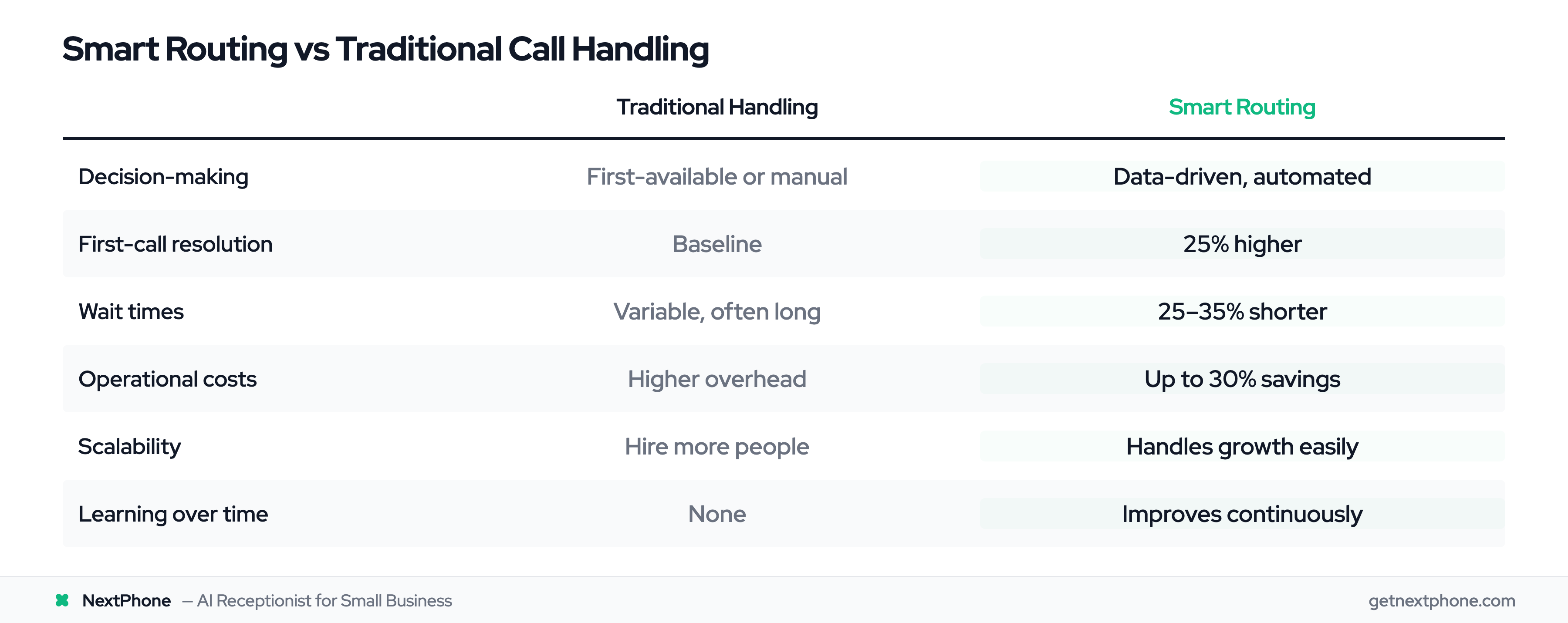
Here's how the two approaches stack up:
| Factor | Traditional Handling | Smart Routing |
|---|---|---|
| Decision-making | First-available or manual | Data-driven, automated |
| First-call resolution | Baseline | 25% higher |
| Wait times | Variable, often long | 25-35% shorter |
| Operational costs | Higher overhead | Up to 30% savings |
| Scalability | Hire more people | Handles growth easily |
| Learning | None | Improves continuously |
Traditional call handling still works for very small operations with simple needs. If you're a solo operator or two-person team handling a handful of calls daily, you might not need smart routing yet.
But signs you've outgrown basic handling include: calls frequently going to the wrong person, customers complaining about transfers, missed calls increasing, and your team feeling overwhelmed by call volume.
Choosing the Right Smart Call Routing Solution
What to Look For
Ease of setup: You shouldn't need a PhD to configure basic routing. Look for visual editors, templates, and clear documentation.
Integration capability: The system should work with your CRM, helpdesk, and other tools. Siloed data limits what routing can do.
AI/ML features: Look beyond basic rules-based routing. AI-powered systems improve over time without requiring manual tweaking.
Scalability: Choose something that grows with you. Switching systems later is painful.
Pricing transparency: No hidden fees. No per-minute charges that explode unexpectedly. Know exactly what you're paying.
Questions to Ask Providers
- How quickly can we go live?
- What routing types are included in base pricing?
- How does the AI learn and improve?
- What reporting and analytics are available?
- Can we try it before committing?
Red Flags to Avoid
- Complex pricing that requires a spreadsheet to understand
- Implementation timelines measured in months
- No trial or demo available
- Customer support that's hard to reach (ironic, right?)
NextPhone offers transparent pricing at $199/month with smart routing included. Setup takes hours, not weeks. And since the focus is on small businesses, you're not paying for enterprise features you'll never use.
Ready to route smarter? [See NextPhone pricing and start your free trial →]
Frequently Asked Questions
What is smart call routing?
Smart call routing uses AI and predefined rules to automatically direct incoming calls to the best available agent or department. Instead of calls going to whoever picks up first, the system analyzes caller data, agent availability, skills, and other factors to make an intelligent routing decision. This leads to faster resolution, happier customers, and more efficient teams.
How much does smart call routing cost?
Costs vary widely by provider and feature set. Enterprise solutions from traditional vendors can run $500+ per month. Small business solutions like NextPhone offer smart routing starting at $199/month with no per-minute charges or hidden fees. The ROI typically pays for itself within the first month through reduced missed calls and improved efficiency.
Can small businesses benefit from smart call routing?
Absolutely. Small businesses often benefit most because they have limited staff and can't afford to misroute calls. When you only have three people answering phones, making sure each call reaches the right person matters enormously. Even basic routing rules can dramatically improve how your small team handles call volume.
How long does it take to set up smart call routing?
With modern cloud-based solutions, basic smart routing can be configured in hours. You'll spend most of that time deciding on your routing rules, not fighting with technology. More complex setups with multiple departments, locations, and conditional rules might take a few days of testing and refinement. But you shouldn't be looking at weeks or months.
What's the difference between IVR and smart call routing?
IVR (Interactive Voice Response) is the menu system callers interact with: "Press 1 for sales, press 2 for support." Smart call routing is what happens after that interaction. It's the intelligent decision-making about where to send the call based on the input received, caller history, agent availability, and other factors. Modern systems combine both, using IVR to gather input and smart routing to act on it.
Does smart call routing work with my existing phone system?
Most modern smart routing solutions are cloud-based and can work with existing phone numbers. You typically have options: keep your current numbers and forward them to the system, port your numbers directly, or use new virtual numbers. The right choice depends on your current setup and how much you're willing to change.
How do I measure if smart call routing is working?
Focus on four key metrics: first-call resolution rate (higher is better), average wait time (lower is better), customer satisfaction scores (should improve), and call abandonment rate (should drop). Compare these metrics before and after implementation. Most systems include dashboards that track these automatically so you can see the impact in real-time.
The Bottom Line
Smart call routing isn't fancy technology reserved for Fortune 500 companies anymore. It's practical infrastructure that any business can implement to stop losing calls, satisfy customers, and work more efficiently.
The math is simple. If you're losing even a fraction of that $126,000 annual average to missed and misrouted calls, investing in smart routing pays for itself almost immediately. At $199/month for a solution like NextPhone, you only need to save one or two calls per month to come out ahead.
Your customers are calling. The question is whether those calls will build your business or send customers to your competitors. Smart call routing makes sure it's the former.
Stop guessing where calls should go. Let the technology figure it out while you focus on actually running your business.
NextPhone offers AI-powered smart call routing starting at $199/month. See how it works for your business →